-
Rigging Tight High Shoes in Daz3d
Hi i am very new to all this and i would love if anyone could teach me how to rig overknee shoes in daz3d just for the purpose of renders. I am getting quite frustrated. My Shoes fit the body shape but when i use transfer utility tool its fully out of position. Please help. The shoes have been created in Blender
Novica & Forum Members Tips & Product Reviews Pt 8FW Hillary HD (Gen3F) Dax Hair (Gen3 M / F) UHT Hair Shaders for Iray
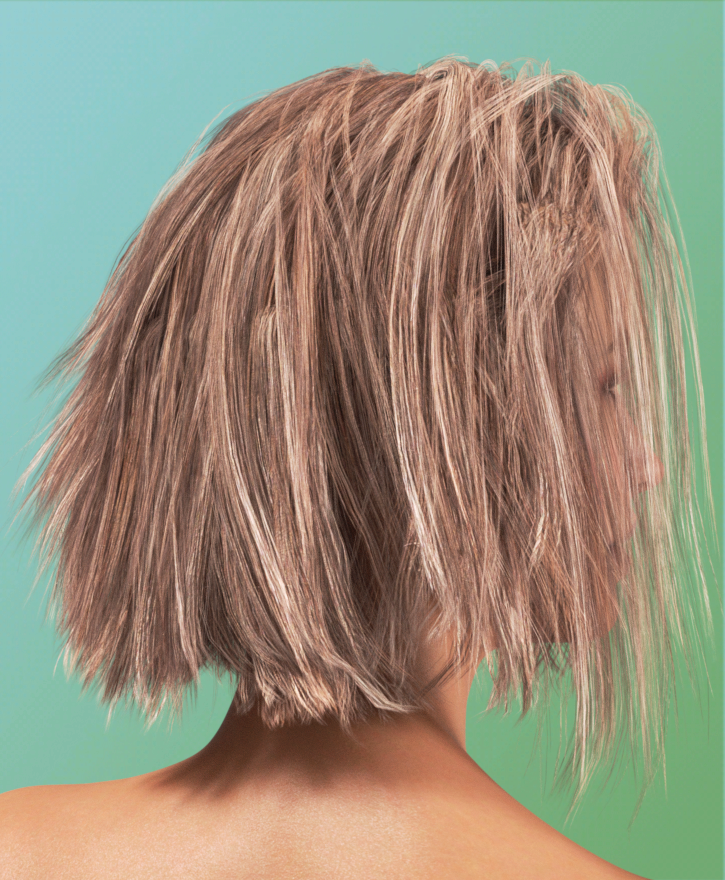
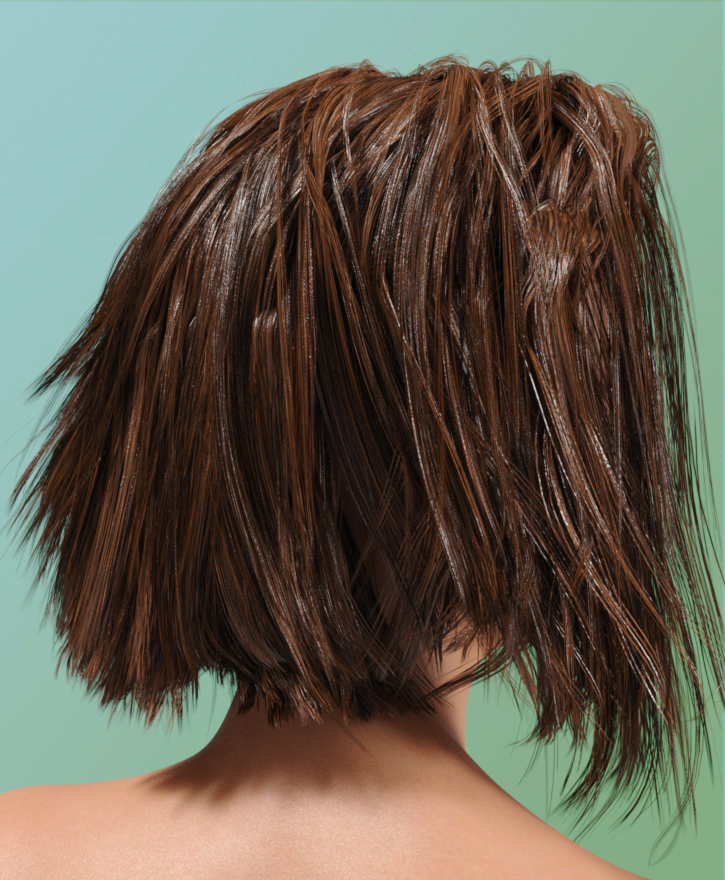
Dax Hair is a cute, short hairstyle for both men and women. I spent a couple hours experimenting with hair last night after reading the hair and skin Iray thread. First, if you don't have UHT (for short) you can choose the transparency and shine options, so you get a range. I showed you the high shine, which for water scenes, helps give you that glossy, wet look. I am assuming the medium shine and regular shine will also change some of the settings that I tweaked on my own.
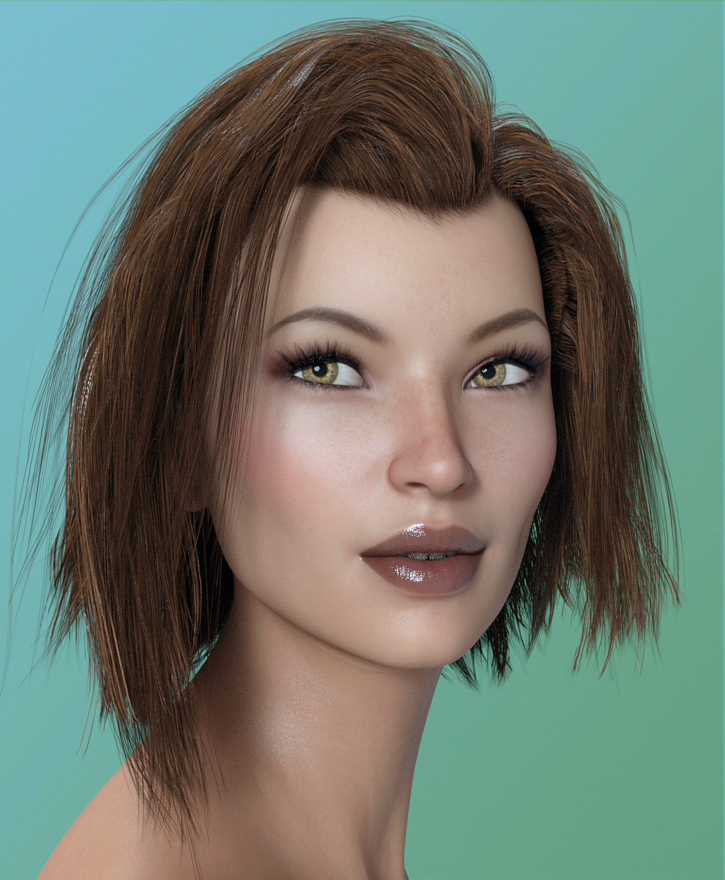
TIP: for Dax Hair, turn off the limits (click on the cog in the Parameters morph slider, then turn off the limits) for the right and left ear so you can go NEGATIVE and increase the fluffiness on the sides. Otherwise, it's very flat.
What I did: I applied the UHT, then tweaked it using suggestions from the hair thread. Some of those included:
*increasing the Cutout Opacity to 1.25 to 1.50
*the translucency color may be default white, change it to a lighter color of the hair, same for the weight and put that at .5 (or use black to get more shadows)
*turn up the bump, if it doesn't have SubD, add it and use 2. TIP: Edit>Object>Geometry>Convert To Subd
*in a graphics program, increase the contrast on the base bump map.
*use Scatter and Transmit
*up the horizontal tiling to 2
*the higher the Top Coat Weight, the more is reflected back. Higher is shinier.
*try a wax shader for SSS to get backlight scattering, reduces the painted look. (I haven't tried this. Anyone?)
*use two of the hair, load one almost as a ghost, to increase thickness of thin hair products.
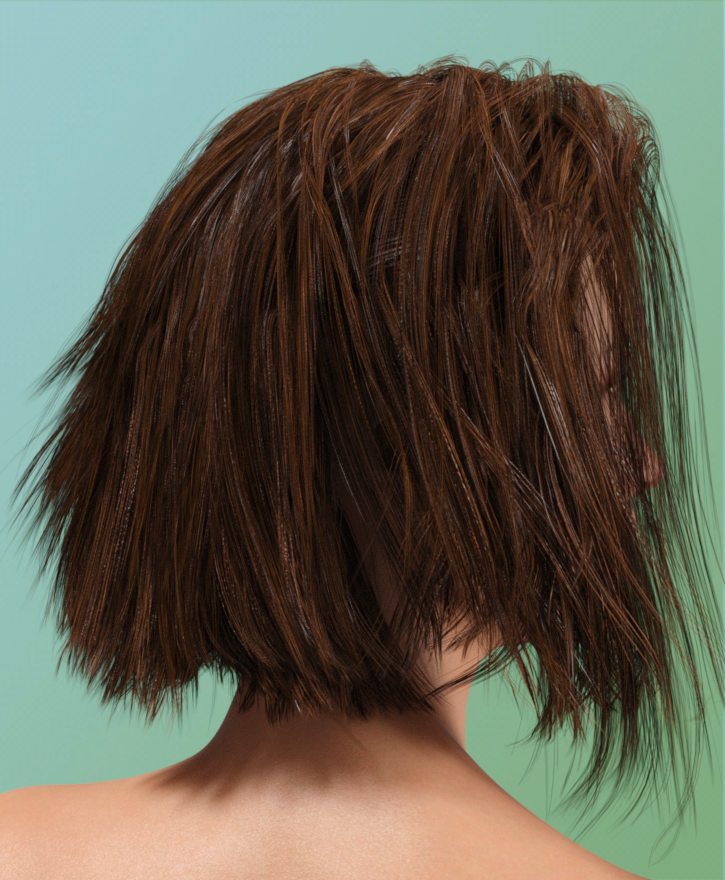
*turn up SSS and translucency and give it a neutral color (white, gray)So here's the original (they didn't have a color close to the one I wanted to play with), Slosh's high shine (wet look) and mine. Keep in mind I started with Slosh's and tweaked from there. I would increase the highlights more (turn up reflectivity and tweak a few more dials) but I think it has a nice amount of oil in the hair, as compared to the materials that come with the hair. That one IMO seems ultra dry.
Original
UHT High Shine
My Experiment
Do note on our right side, the side of her hair right by her face. If you unclick the parameter limits, you'd have to do a bit of postwork (depending on your camera angle) for that line which is created. I didn't want to do any postwork as I might change the look of what I was trying to show you.)
 Novica & Forum Members Tips & Product Reviews Pt 8
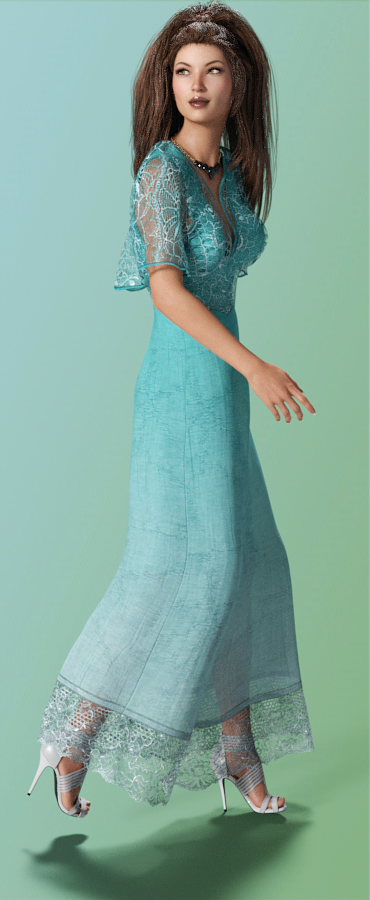
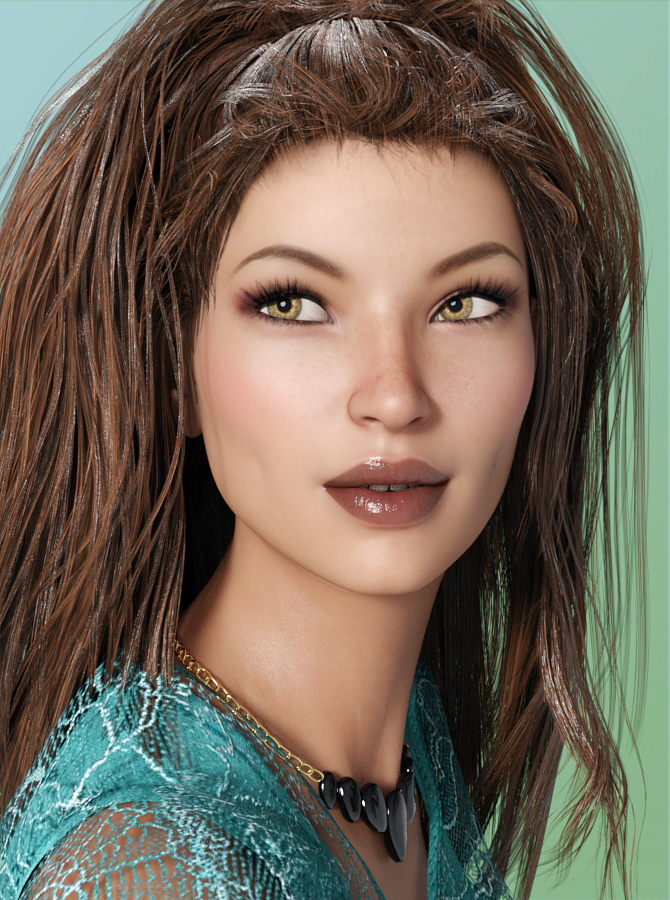
FW Hillary HD (Gen3F) Twilight Hair (Gen3F) Summer Maxi Dress (Gen3F) Sophia Heels (Gen3F) 9 to 5 Dress Outfit (necklace)
One thing to note- the Summer Maxi Dress has a dress under that lacy outer one, you can make it a different color and get some very nice options. One thing I did not find is how to lengthen the dress, maybe I just overlooked it (but I tried for several minutes.) I wanted to show you the Sophia Heels and the full length of the dress, so just ignore that the dress should come down longer. The 9 to 5 Dress Outfit has a really cute necklace and you can change up the stones. Good for business and elegant outings.
Hillary is a ruddy character, she'll look very red if your lighting isn't cooler. This was with neutral so the ruddy shows. I did lower the saturation a tad in postwork, otherwise she'd be much redder. Love her hint of dimples! We discussed this years ago, vendors, we want dimple options!!!!
TIP: for the Twilight Hair, to shrink that massive mound on her head, it's the Tail Into Waterfall morph option. This was at 77%, you'll need to crank it up.
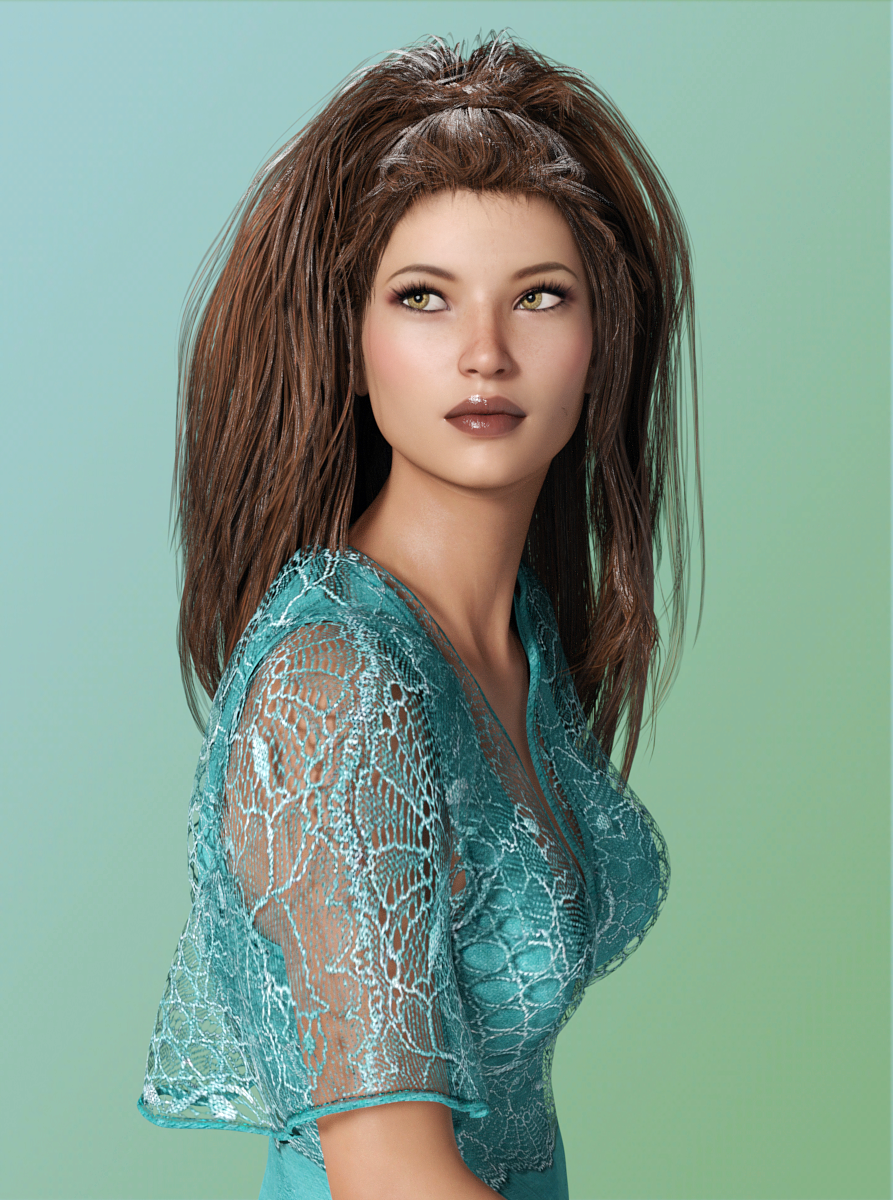
I have FW Hillary HD in my wishlist. I wasn't quite sure if I wanted to get her or not but her morphs intrigue me. It's amazing how different she looks with a different hairstyle and color. Her whole face just looks softer and more approachable than in her original promos. I like the soft lights and colors you used. :)
Novica & Forum Members Tips & Product Reviews Pt 8FW Hillary HD (Gen3F) Twilight Hair (Gen3F) Summer Maxi Dress (Gen3F) Sophia Heels (Gen3F) 9 to 5 Dress Outfit (necklace)
One thing to note- the Summer Maxi Dress has a dress under that lacy outer one, you can make it a different color and get some very nice options. One thing I did not find is how to lengthen the dress, maybe I just overlooked it (but I tried for several minutes.) I wanted to show you the Sophia Heels and the full length of the dress, so just ignore that the dress should come down longer. The 9 to 5 Dress Outfit has a really cute necklace and you can change up the stones. Good for business and elegant outings.
Hillary is a ruddy character, she'll look very red if your lighting isn't cooler. This was with neutral so the ruddy shows. I did lower the saturation a tad in postwork, otherwise she'd be much redder. Love her hint of dimples! We discussed this years ago, vendors, we want dimple options!!!!
TIP: for the Twilight Hair, to shrink that massive mound on her head, it's the Tail Into Waterfall morph option. This was at 77%, you'll need to crank it up.
 Non-photorealistic Renders (NPR)
More playing with FilterForge. Nice thing about more simply 'apply filter' stuff is that I can use Iray, which, for me, is way faster.
This uses Fern Lake tree, TerraDome3 'archipelago' morph + water, and Iray Skies. Plus an old sea turtle model.
Trouble with Autofit capeI'm trying to get RPublishing's Chaos seed working on a Genesis 2 female.
Most of the outfit works fine, but I'm having some trouble with the cape. The images below shold show what I mean. after using autofit, the parts that are supposed to hang, stick outwards instead.
Can anyone privide suggestions on a fix?
I've tried following Sickleyields tutorials and used the Transfer utility instead, but with no success. I've also tried using 'Sickle Rigging and Morphing System', but similarly, with no sucess.
Problem with Aspen for Gia and gia morph not savingHas anyone else had a problem with the Aspen morph being stripped out when they save a file, exit daz, and come back in? If so is there a solution? I'm about to scrap about a month worth of work because of this. I'd created a 'race' which used the Aspen morph as well as several others in hopes of using this for several years. It's just for book covers for myself but I spent a massive amount of time figuring out how to move the morphs over to the male. I have not even looked to see if the male one is working yet but I do know I can save the original figure that I created under a new name, close daz, and reopen it and the Aspen morphs are gone.
Ive never had this problem with Aspen (or any other morph) before. How are you saving? I tested both the Aspen character and shape. No issues. The only thing I can really think of is that maybe your morphs are installed wrong? Whatever you do, dont delete your work yet.
Need head only for aspen for giaUnfortunately it goes over my head as well. I've tried to get into Blender but I'm getting lost. I guess if I REALLY want a separate head morph I'll give it another shot but now it's just a big headache.
GenX2 - Need HelpYes, now it works fine but I don't have Scott6 so I don't know if your problem and mine are related..
If you have the P morph setting ( https://www.daz3d.com/forums/discussion/comment/2276606/#Comment_2276606 ) you should contact Dimension3D, he solved it for me.
Thank you very much MN-150374.
I did not see your post but that is usually the way I do it. I own GenX since Genesis and never had any problem and I have been able to transfer Leo7 or George to G3F with no problem.
Anyway I retried it with Gianni7 full morph and if the body part works the head still does nothing.
In GenX manual I didn't find anything special about transferring Pose controller morphs.
I sent a PM to Dimension3D.
Thank you again.
Where you able to get it figured out? I'm having some issues transfering some G2M to G3M as well. So I'm wondering if we're having the same issue. I'm trying to transfer Scott 6 to G3M but can't seem to figure out what the issue is that's not transfering the morphs. I'm going to have to go back and carefully read all the back and forth and see if there's a solution there.
GenX2 - Need HelpThank you very much MN-150374.
I did not see your post but that is usually the way I do it. I own GenX since Genesis and never had any problem and I have been able to transfer Leo7 or George to G3F with no problem.
Anyway I retried it with Gianni7 full morph and if the body part works the head still does nothing.
In GenX manual I didn't find anything special about transferring Pose controller morphs.
I sent a PM to Dimension3D.
Thank you again.
Where you able to get it figured out? I'm having some issues transfering some G2M to G3M as well. So I'm wondering if we're having the same issue. I'm trying to transfer Scott 6 to G3M but can't seem to figure out what the issue is that's not transfering the morphs. I'm going to have to go back and carefully read all the back and forth and see if there's a solution there.
Someone has developed a Character Preset to allow Carrara users to use Genesis 3 ?Nice work SileneK, that right side Neanderthal certainly does it for me.
OT been really enjoing listening to this series of lectures as I drive to work and back https://diyscholar.wordpress.com/2010/01/15/a-great-anthropology-class-returns/
Thanks, all! The morph dials for my Neanderthal does involve purchasing some morphs/expressions. But having them has made doing it so dead easy in G3.
The hard part is that the morphs and shapes and expressions for G2 and even between the sexes in G2 are different. G1 is even more different. So it's a faff for a while to see how to get the equivalent morphs. I bought UltraGenesis 2/3 very cheap and ULTRAGENESIS: Faces of G to speed up morphig and expressions/ageing etc. and am not sure if I am using it correctly on the female I am working on but maybe it will help. Will post if it does.
The second product was reviewed on this thread: https://www.daz3d.com/forums/discussion/comment/2255851/#Comment_2255851
Knittingmommy said: A lot of character and morph products work really well on the base even if they are listed for a specific character. They won't look exactly like the promo if you don't use the required product but you can get some really nice results that way.
I don't have Karen or Eva either, and am going to give it a go as I need ageing for my characters. Fingers crossed!
Andy, that looks interesting. And I was particularly interested in her Homer lecture!
 SileneFacegen now on sale...get it!
Can you recognize a face created by FaceGen with no skin texture applied? It's probably very hard to do. I think this is because it doesn't create HD morphs. With the lower quality morph, as soon as you swap out the skin texture, the face is no longer recognizable, because a lot of the detail is baked into the texture, and not the geometry. Just my observation. I think users should request HD morphs from FaceGen to get the ball rolling.
All right, I give upNo, I don't. And I just noticed that the Gen 4 morph option is not available to me for Genesis. Obviously, something went south. Guess I'll uninstall Studio and re-install it in the morning. Thank you!
FaceGen - Where's my morph?Yes, that's where I checked Bookie, but the morph is not there. I also just typed to search for it, it isn't there for some reason. I wonder if it has something to do with my file location(s)?
FaceGen - Where's my morph?Open the shaping tab of g3f, navigate to head and you will find the newly created morph (enter the morph's name in the filter field to find it quicker)
FaceGen - Where's my morph?Hi everyone. I bought Facegen since it was on sale again. I've had my eye on it a while but now I am having some issues. I keep my daz content on an external drive, and I followed the instructions to navigate to the folder where G3F is located and FG installed my morph here:
F:\!Daz Installed Content\DAZ 3D\Studio\My Daz Connect Library\data\cloud\1_21630\data\daz 3d\genesis 3\female\morphs\FaceGen
When I load up G3F in DS, I cannot find my face morph. I've been trying to search for a resolution but not having any luck. If anyone can help me out, that would be awesome! Thank you! :)
Knittingmommy's LaboratoryNot much going one render-wise here. Still plugging away with Camp NaNoWriMo. I hit a hiccup with the writing and had to take a step back and work on my characters a bit. I'll have to try and make up the word count tomorrow. I've been working on what this hero looks like and I think I've figured it out. I'm still working on his morph though. I should have a render for him soon, well within a day or two soon, maybe.
I don't think I mentioned one of the things that had me pulling my hair over the past few weeks, but my husband was in a car accident. Some people ran a red light and slammed into his passenger door. He's fine. It was a slow speed crash just around the corner from the house so he was almost home. In fact, he walked home after his car got towed off. It was enough for airbags to deploy and the insurance company totaled the car. We had to go car shopping and ended up getting a great deal on a used Chrysler Town & Country minivan. It was a prior fleet vehicle and only had about 30,000 miles on it and less than 3 years old. The boys are over the moon because it has a video system so they can play DVDs on long trips.
The people in the other car started trying to claim injuries a couple of days after the accident even though it was their fault. So, the insurance companies had to try to figure out from the police report and witnesses exactly who was at fault so they could make an official determination. Anyway, the insurance company FINALLY came back today and said they had determined that it was definitely the other car's fault and that they will be going after the other insurance company to get our deductible back. It might take awhile as they do all of their back and forth, but at least now the other people can claim injuries all they want. They'll have to go after their own insurance to get any money. I'm breathing a sigh of relief that the worst of that ordeal is finally over. It was very frustrating having to deal with that.
I know I've been quiet but I'll be back. I'll be working on a couple of Gimp things over the weekend and should have those posted by sometime Monday. I want to try and get all of my partially done tutorials actually finished! I'm so easily distracted from one project to another more exciting one at times.
Oh no, glad your hubbys ok KM
 I was hit on my motorcycle years ago and i know the pain of dealing with insurance people. I was young and stupid ... even more stupid at the time, so i ended up going 50/50. Don't worry, were not going anywhere :)
That happened to me. A man drove through a red light and I could not stop, nor could I do an emergency lane change as one lane was occupied and the other had oncoming traffic. I hit the back right quarter of his car and spun him around. The air bag did not deploy, and the car was actually repaired... by my insurance company, as he was not insured. This is why it's good to have decent Uninsured coverage. It took care of my car and my medical.
It took a while longer to repair me, however. That was the second accident I had been in where there was major damage to my car. Add 4 fender benders, and this is why my neck is a mess.
Oh man, i'm sorry to hear that
I was hit when someone changed lanes on a roundabout. As i said, i was on my bike, so i couldn't really do much. My head went through her passanger side window, so at least we had a fleeting introduction. I broke a few bones but it was mostly my pride that bared the brunt. I was in my late teens (around ten years ago) so pretty much everything has cleared up now. It somewhat sullied my passion for two wheels though!Ouch! When you mentioned it in the first post, I didn't realize it was that bad! A few broken bones isn't exactly nothing! I'm glad everything has healed up. Yeah, I can't imagine getting on a bike after that. I love that line about a 'fleeting introduction'!!! That's very cute! :)
Knittingmommy's LaboratoryNot much going one render-wise here. Still plugging away with Camp NaNoWriMo. I hit a hiccup with the writing and had to take a step back and work on my characters a bit. I'll have to try and make up the word count tomorrow. I've been working on what this hero looks like and I think I've figured it out. I'm still working on his morph though. I should have a render for him soon, well within a day or two soon, maybe.
I don't think I mentioned one of the things that had me pulling my hair over the past few weeks, but my husband was in a car accident. Some people ran a red light and slammed into his passenger door. He's fine. It was a slow speed crash just around the corner from the house so he was almost home. In fact, he walked home after his car got towed off. It was enough for airbags to deploy and the insurance company totaled the car. We had to go car shopping and ended up getting a great deal on a used Chrysler Town & Country minivan. It was a prior fleet vehicle and only had about 30,000 miles on it and less than 3 years old. The boys are over the moon because it has a video system so they can play DVDs on long trips.
The people in the other car started trying to claim injuries a couple of days after the accident even though it was their fault. So, the insurance companies had to try to figure out from the police report and witnesses exactly who was at fault so they could make an official determination. Anyway, the insurance company FINALLY came back today and said they had determined that it was definitely the other car's fault and that they will be going after the other insurance company to get our deductible back. It might take awhile as they do all of their back and forth, but at least now the other people can claim injuries all they want. They'll have to go after their own insurance to get any money. I'm breathing a sigh of relief that the worst of that ordeal is finally over. It was very frustrating having to deal with that.
I know I've been quiet but I'll be back. I'll be working on a couple of Gimp things over the weekend and should have those posted by sometime Monday. I want to try and get all of my partially done tutorials actually finished! I'm so easily distracted from one project to another more exciting one at times.
Oh no, glad your hubbys ok KM
I was hit on my motorcycle years ago and i know the pain of dealing with insurance people. I was young and stupid ... even more stupid at the time, so i ended up going 50/50. Don't worry, were not going anywhere :)That happened to me. A man drove through a red light and I could not stop, nor could I do an emergency lane change as one lane was occupied and the other had oncoming traffic. I hit the back right quarter of his car and spun him around. The air bag did not deploy, and the car was actually repaired... by my insurance company, as he was not insured. This is why it's good to have decent Uninsured coverage. It took care of my car and my medical.
It took a while longer to repair me, however. That was the second accident I had been in where there was major damage to my car. Add 4 fender benders, and this is why my neck is a mess.
Geesh, I'm sorry to hear that! Glad you're better now. Yeah, drivers going through red lights around here is a big problem. I thought drivers in NY were bad, but they are even worse down here! Luckily, we always carry full coverage because you just never know about these things. I'd rather pay the extra for full coverage and not need it than just liability and wish I had had full coverage.
Problem with Aspen for Gia and gia morph not savingHas anyone else had a problem with the Aspen morph being stripped out when they save a file, exit daz, and come back in? If so is there a solution? I'm about to scrap about a month worth of work because of this. I'd created a 'race' which used the Aspen morph as well as several others in hopes of using this for several years. It's just for book covers for myself but I spent a massive amount of time figuring out how to move the morphs over to the male. I have not even looked to see if the male one is working yet but I do know I can save the original figure that I created under a new name, close daz, and reopen it and the Aspen morphs are gone.
Knittingmommy's LaboratoryNot much going one render-wise here. Still plugging away with Camp NaNoWriMo. I hit a hiccup with the writing and had to take a step back and work on my characters a bit. I'll have to try and make up the word count tomorrow. I've been working on what this hero looks like and I think I've figured it out. I'm still working on his morph though. I should have a render for him soon, well within a day or two soon, maybe.
I don't think I mentioned one of the things that had me pulling my hair over the past few weeks, but my husband was in a car accident. Some people ran a red light and slammed into his passenger door. He's fine. It was a slow speed crash just around the corner from the house so he was almost home. In fact, he walked home after his car got towed off. It was enough for airbags to deploy and the insurance company totaled the car. We had to go car shopping and ended up getting a great deal on a used Chrysler Town & Country minivan. It was a prior fleet vehicle and only had about 30,000 miles on it and less than 3 years old. The boys are over the moon because it has a video system so they can play DVDs on long trips.
The people in the other car started trying to claim injuries a couple of days after the accident even though it was their fault. So, the insurance companies had to try to figure out from the police report and witnesses exactly who was at fault so they could make an official determination. Anyway, the insurance company FINALLY came back today and said they had determined that it was definitely the other car's fault and that they will be going after the other insurance company to get our deductible back. It might take awhile as they do all of their back and forth, but at least now the other people can claim injuries all they want. They'll have to go after their own insurance to get any money. I'm breathing a sigh of relief that the worst of that ordeal is finally over. It was very frustrating having to deal with that.
I know I've been quiet but I'll be back. I'll be working on a couple of Gimp things over the weekend and should have those posted by sometime Monday. I want to try and get all of my partially done tutorials actually finished! I'm so easily distracted from one project to another more exciting one at times.
Oh no, glad your hubbys ok KM
I was hit on my motorcycle years ago and i know the pain of dealing with insurance people. I was young and stupid ... even more stupid at the time, so i ended up going 50/50. Don't worry, were not going anywhere :)That happened to me. A man drove through a red light and I could not stop, nor could I do an emergency lane change as one lane was occupied and the other had oncoming traffic. I hit the back right quarter of his car and spun him around. The air bag did not deploy, and the car was actually repaired... by my insurance company, as he was not insured. This is why it's good to have decent Uninsured coverage. It took care of my car and my medical.
It took a while longer to repair me, however. That was the second accident I had been in where there was major damage to my car. Add 4 fender benders, and this is why my neck is a mess.
Oh man, i'm sorry to hear that
I was hit when someone changed lanes on a roundabout. As i said, i was on my bike, so i couldn't really do much. My head went through her passanger side window, so at least we had a fleeting introduction. I broke a few bones but it was mostly my pride that bared the brunt. I was in my late teens (around ten years ago) so pretty much everything has cleared up now. It somewhat sullied my passion for two wheels though!Daz 3D is part of

Connect
DAZ Productions, Inc.
7533 S Center View Ct #4664
West Jordan, UT 84084Licensing Agreement | Terms of Service | Privacy Policy | EULA
© 2026 Daz Productions Inc. All Rights Reserved.