-
I have a question regarding the Daz Rendering at 96 Pixel/Inch
zaselim_08eb9236 said:
Padone said:
You can't change it in windows, unless there's some trick with the registry but I wouldn't recommend that. You can change it in the image properties in GIMP, so I assume it is doable in PS too. In general an application that makes images for video or the web, not to be printed, will set the dpi at the default 96. Any good graphics program that deals with printing can change the dpi as desired.
Yeah I know that is why asked him when he implied that he changed his lol. So i imported the image in gimp and then expoted it back as a png and then i imported in the PS and it had 72ppi instead of 96. Then I imported the original image over the gimp expoted imabe and then upscale it to full canvas to match the image below and stangely upscaling didn't effect the quality of the image. I then imported the original image in PS in separate window and it had 96ppi then I made a comparison among them (gimp exported, original and upscaled) and they were identical at least to my eyes. I also checked by zooming in to 200% and they were identical. So I think I don't need to render at 5120x2880 in daz to get 3480x210x72ppi and I will just render at my desired resolution from now on instead of increasing the resoltion by difference between 72 and 96ppi, and I will just import it and export it from gimp to make it auto 72ppi instead of upscaling it in PS.
Thanks for all of your info guys.
You are still not getting it. DPI is just a number that's written in the file's metadata. It does not affect the image content at all.
Open your image in GIMP. Go to Image->Print Size. In the window that opens, set your DPI to whatever you want - 300, 900, 1234, whatever - and export that image.
Now open it - the exported image - in a different program and look at what DPI number it shows you.I have a question regarding the Daz Rendering at 96 Pixel/InchPadone said:
You can't change it in windows, unless there's some trick with the registry but I wouldn't recommend that. You can change it in the image properties in GIMP, so I assume it is doable in PS too. In general an application that makes images for video or the web, not to be printed, will set the dpi at the default 96. Any good graphics program that deals with printing can change the dpi as desired.
Yeah I know that is why asked him when he implied that he changed his lol. So i imported the image in gimp and then expoted it back as a png and then i imported in the PS and it had 72ppi instead of 96. Then I imported the original image over the gimp expoted imabe and then upscale it to full canvas to match the image below and stangely upscaling didn't effect the quality of the image. I then imported the original image in PS in separate window and it had 96ppi then I made a comparison among them (gimp exported, original and upscaled) and they were identical at least to my eyes. I also checked by zooming in to 200% and they were identical. So I think I don't need to render at 5120x2880 in daz to get 3480x210x72ppi and I will just render at my desired resolution from now on instead of increasing the resoltion by difference between 72 and 96ppi, and I will just import it and export it from gimp to make it auto 72ppi instead of upscaling it in PS.
Thanks for all of your info guys.
Daz Studio 5 development updatePerttiA said:
TheMysteryIsThePoint said:
Other than how difficul it is to figure out how these things work. If it were easier, we would have more nice things from said outside vendors, who are mostly just people with families and jobs and limited time to endlessly reverse engineer even the simplest things.
Most of the files are text files, there is nothing difficult in figuring out how to make for example metadata for a product.
As well, Doctor Jellybean's Content Package Assist (still PC-only, sadly) can help people make DIM-compatable packages for anyone seriously making DAZ content for sale outside the DAZ store:
https://www.daz3d.com/content-package-assist
-- Walt Sterdan
Daz Studio 5 development updateTheMysteryIsThePoint said:
Other than how difficul it is to figure out how these things work. If it were easier, we would have more nice things from said outside vendors, who are mostly just people with families and jobs and limited time to endlessly reverse engineer even the simplest things.
Most of the files are text files, there is nothing difficult in figuring out how to make for example metadata for a product.
Daz Studio 5 development updateTheMysteryIsThePoint said:
Richard Haseltine said:
bnstone_stone said:
Three things they need to work on.
1. Afore mentioned load times for figures. Way too long.
2. Better Content Management. This includes third party purchases from the Daz store or downloads, and the ability to organize/search between any dB on the computer,
3. Improved render capability.
Okay a forth, scene control needs to be improved. It's a bear trying to move, rotate and zoom around in Daz.
Aside from load time (which has received soema ttention in the current public build, if you haven't tried that) those are very vague - though on 2, nothing stops outside vendors or freebie makes from including metadata.
Other than how difficul it is to figure out how these things work. If it were easier, we would have more nice things from said outside vendors, who are mostly just people with families and jobs and limited time to endlessly reverse engineer even the simplest things.
I continue to be of the opinion that the best thing DAZ could do to improve DAZ Studio is just documenting what is already there, instead of adding new features. The enterprising nerds would take over, and most of them would do it for no other reason than it's fun and everyone benefits from a better DAZ Studio.
Over ten years ago, I evaluated Poser as my 3D art tool. The only thing I liked about it was the 830 page manual. I then evaluated DAZ Studio. The only thing I didn't like about it was the manual, which at that time was precisely zero pages long.
Cheers,
Alex.
Carraera-DAZ obj export-importWhen exporting an object modeled in Carrara to be used in Studio, I use File : Export: OBJ : Daz Studio Full Scene
Then when importing that object to Studio, I use File : Import : OBJ : Carrrara Preset
There are other settings that would workm I am sure, but have to match export and import.
Carraera-DAZ obj export-importwhat area the besrt settings fore a Carraera-DAZ obj export-import?
my thinfgy is way too high and w ay too big in daz
Daz Studio 5 development updateRichard Haseltine said:
bnstone_stone said:
Three things they need to work on.
1. Afore mentioned load times for figures. Way too long.
2. Better Content Management. This includes third party purchases from the Daz store or downloads, and the ability to organize/search between any dB on the computer,
3. Improved render capability.
Okay a forth, scene control needs to be improved. It's a bear trying to move, rotate and zoom around in Daz.
Aside from load time (which has received soema ttention in the current public build, if you haven't tried that) those are very vague - though on 2, nothing stops outside vendors or freebie makes from including metadata.
Other than how difficul it is to figure out how these things work. If it were easier, we would have more nice things from said outside vendors, who are mostly just people with families and jobs and limited time to endlessly reverse engineer even the simplest things.
I continue to be of the opinion that the best thing DAZ could do to improve DAZ Studio is just documenting what is already there, instead of adding new features. The enterprising nerds would take over, and most of them would do it for no other reason than it's fun and everyone benefits from a better DAZ Studio.
Head Shape/Morph for top of head?There're few head shape products including good and enough head top morphs... you may check: EJ Face Morphs and Details...
Besides modifiers, if you know some sculpting software like Zbrush, blender, etc., you can make perfect shapes there and import the morphs back to the figure, easy and quick~
Daz Studio 5 development updatebnstone_stone said:
Three things they need to work on.
1. Afore mentioned load times for figures. Way too long.
2. Better Content Management. This includes third party purchases from the Daz store or downloads, and the ability to organize/search between any dB on the computer,
3. Improved render capability.
Okay a forth, scene control needs to be improved. It's a bear trying to move, rotate and zoom around in Daz.
Aside from load time (which has received soema ttention in the current public build, if you haven't tried that) those are very vague - though on 2, nothing stops outside vendors or freebie makes from including metadata.
Anyone Know This Product?Pink Gazelle said:
Cybersox said:
Given that the tag is personalized, I'm pretty sure that it's been at least partially kitbashed. One of the things about collars, though, is that since they don't have to be conformed, just parented to the neck, the base used could be a clothing item for almost any figure or a stand-alon prop, configured for almost any software that can be ported into DAZ, and there's no guarauntee that it's still available on the net if, indeed, it ever was.
It would be so much easier if it were possible to just contact the artist and ask, but alas i cannot. I dont really need the heart by the way. Just the bell and collar.In that case, here you go. just get it in OBJ format, import it, reapply any textures that came with it and then position it in place
https://www.turbosquid.com/3d-models/3d-dog-collar-model-1222852
How to open or use mtl. fileslilweep said:
Ascania said:
johnbuckeridge said:
Hi everyone. A lot of the freebie models I come across on the web are in obj. + mtl. formats. I know how to use obj files, but the mtl. files that come with them - which are pretty essential - I don't seem able to make use of. A search on Google tells me lies! That Photoshop will open them, but it doesn't. What I'd like to do is convert them to either jpg or png files so I can use them. Any ideas? Or can you point me towards a tutorial? Many thanks. :)
They are applied automatically when opening the .obj
only if they are in the same path as the .obj and only if you have 'read material library' checked on the import obj dialog box.
Okay, so I've just checked that - 'read material library' seems to be checked by default on my set-up, but how would you if the mtl. files are/ are not in the same path?
Installing Michael 4/Victoria 4 et al in D|S 4.21.0.5 in Windows 111. If you bought M4/V4 Base product or bundles, the better way is to install them via DIM. You could find the IM packages under Ready to Download tab;
2. As for non-Daz.com products, suggest use Content Wizard to install them. The script will analyze and generate metadata for you, in most cases the metadata are correct.Installing Michael 4/Victoria 4 et al in D|S 4.21.0.5 in Windows 11You can't install G4 figures and morphs with Connect, the way their morphs work is not compatible with the fact that Connect installs each product in its separate folder.
Clothes and most other types of add-ons for them can be installed with Connect, but base figures, morph packs and characters using custom morphs can't. You have to use DIM, DazCentral or manual install for those, and install them all in the same poser content directory so that all the morph data are in the same folder. And yes, the batch file still exist, and you will still need to run it after installing morph packs and custom morphs (IIRC it's not really needed anymore for packs which include "power loader" files, but running it anyway doesn't hurt).
As for content from other sites, if you want them to show up in Smart Content you'll usually need to categorize them yourself after install, as most of them don't include metadata to appear in Smart Content.
This product might be worth the investment if you have lots of content from other sites, it helps with install and adding metadata: Content Wizard | Daz 3D
How to open or use mtl. filesAscania said:
johnbuckeridge said:
Hi everyone. A lot of the freebie models I come across on the web are in obj. + mtl. formats. I know how to use obj files, but the mtl. files that come with them - which are pretty essential - I don't seem able to make use of. A search on Google tells me lies! That Photoshop will open them, but it doesn't. What I'd like to do is convert them to either jpg or png files so I can use them. Any ideas? Or can you point me towards a tutorial? Many thanks. :)
They are applied automatically when opening the .obj
only if they are in the same path as the .obj and only if you have 'read material library' checked on the import obj dialog box.
Gen 9 Essentials Expansion pack issueI installed G9 Body Shapes, Expressions, and Head Shapes from a bundle. The Expressions and Head Shapes can't seem to be enabled. Install Manager shows them installed but only the icons below show up in the content library and they don't do anything. Tried uninstalling and reinstalling. Do I do something with updating metadata?
Diffeomorphic DAZ Importer version 1.6.0 releasedPadone said:
I see you export HD. Actually there's a bug with easy import of HD figures, now reported. Everything works fine with the standard import. Personally for animation I'd not use HD anyway because it is very demanding on the hardware but that is your choice. Below there's the easy import settings I'd use for original animation in blender with rigify.
Let me know if this works for you.
https://bitbucket.org/Diffeomorphic/import_daz/issues/1522/
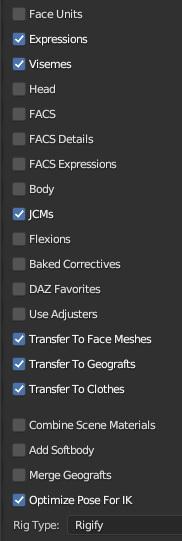
You was right on the money champ! Good looking out my man! I really appreciate the help thanks alot. Again really appreciate it.
Diffeomorphic DAZ Importer version 1.6.0 releasedPadone said:
I see you export HD. Actually there's a bug with easy import of HD figures, now reported. Everything works fine with the standard import. Personally for animation I'd not use HD anyway because it is very demanding on the hardware but that is your choice. Below there's the easy import settings I'd use for original animation in blender with rigify.
Let me know if this works for you.
https://bitbucket.org/Diffeomorphic/import_daz/issues/1522/
Ohhhhh. Ok that makes sense so it's a bug. Ok i will check it out without HD. Will let you know
What exactly does the Create Category utility function do, pleaseibr_remote aka infinity10 said:
crosswind said:
You meant 'Categorize' ?
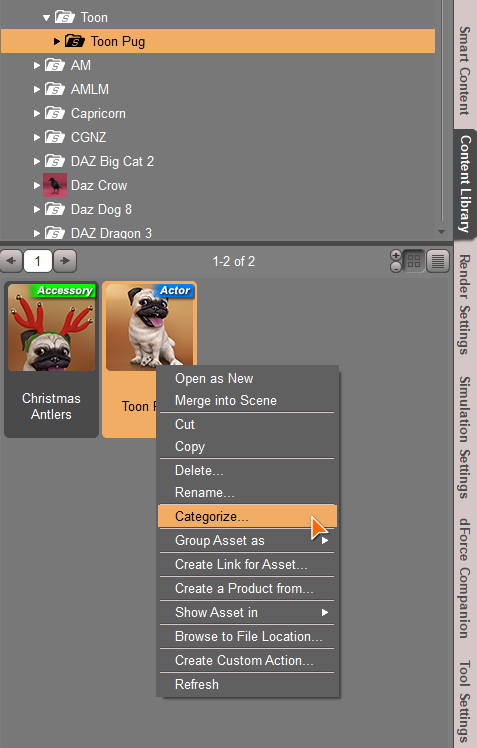
If you assign a category to the item in this way, there'll be a record entry written to cms database, meaning this item has the category you assigned. Then if you go to Smart Content - Files Tab, select the Category you just assigned from the left hierarchy, that item will be under the selected category (right list) ~ So this function is just for categorization and quick searching...
Thanks for your reply. I needed to be sure I was doing the right thing for non-Daz3D content that does not have metadata. When I select Default, the script automatically scans the folder hierarchy, so I was wondering if the correct category would be automatically applied.
No matter the item is from daz.com or a 3rd-party, or has metadata or not, you just assign a category which's stored in cms database to the item.. That's fine.
What exactly does the Create Category utility function do, pleasecrosswind said:
You meant 'Categorize' ?
If you assign a category to the item in this way, there'll be a record entry written to cms database, meaning this item has the category you assigned. Then if you go to Smart Content - Files Tab, select the Category you just assigned from the left hierarchy, that item will be under the selected category (right list) ~ So this function is just for categorization and quick searching...
Thanks for your reply. I needed to be sure I was doing the right thing for non-Daz3D content that does not have metadata. When I select Default, the script automatically scans the folder hierarchy, so I was wondering if the correct category would be automatically applied.
Daz 3D is part of

Connect
DAZ Productions, Inc.
7533 S Center View Ct #4664
West Jordan, UT 84084Licensing Agreement | Terms of Service | Privacy Policy | EULA
© 2026 Daz Productions Inc. All Rights Reserved.