-
Ready ! Strappy shoes for Genesis 3
Amyaimei pointed me to this Making high heels shoes for DAZ Genesis 3 Female
which i think used the deleted toes version - the way i did the rigging was according to this video ny Allen at Daz3D

i did have problems smoothing the weights on the platform part of the shoes and there's even a semi-related-to-this defect on the sole of the platform
maybe i'll re-rig them and post an update someday
Oh, pretty!!! Yanno, I never thought of using them on shoes! LOL :P
Laurie
I don't remember half of the freebies I grab, but your shaders popped into to mind straight away. -should have put a little pearl anklet on g3 too ;-)
Thanks again.
Nice with AllentArts pearl shaders..
Nice surprise Looks great !
a heel-length morph will be available once i understand how to make them survive the save process
also platform height
I noticed on the few G3 shoes I bought, the separate toe bones are deleted, probably because the are a total pain with the shoe rigging. I've been trying and yes, it is a lot easier without them toesies
Gwennili HD for Victoria 7This is my first render with Gwenili.
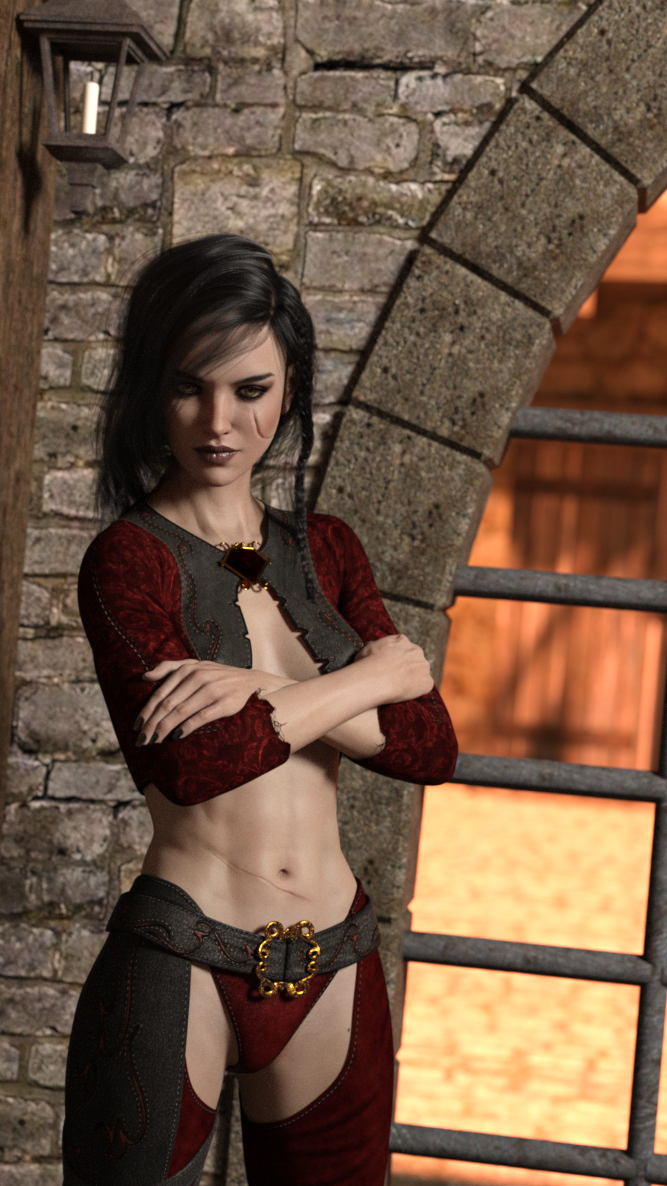
She comes with different scar materials and two scar morph-dials (face and body). The face morph is clearly visible. The body morph is very subtle. In fact I have some difficulties to see its effect. I've made a G3F-render with the body and face scars dialed in.
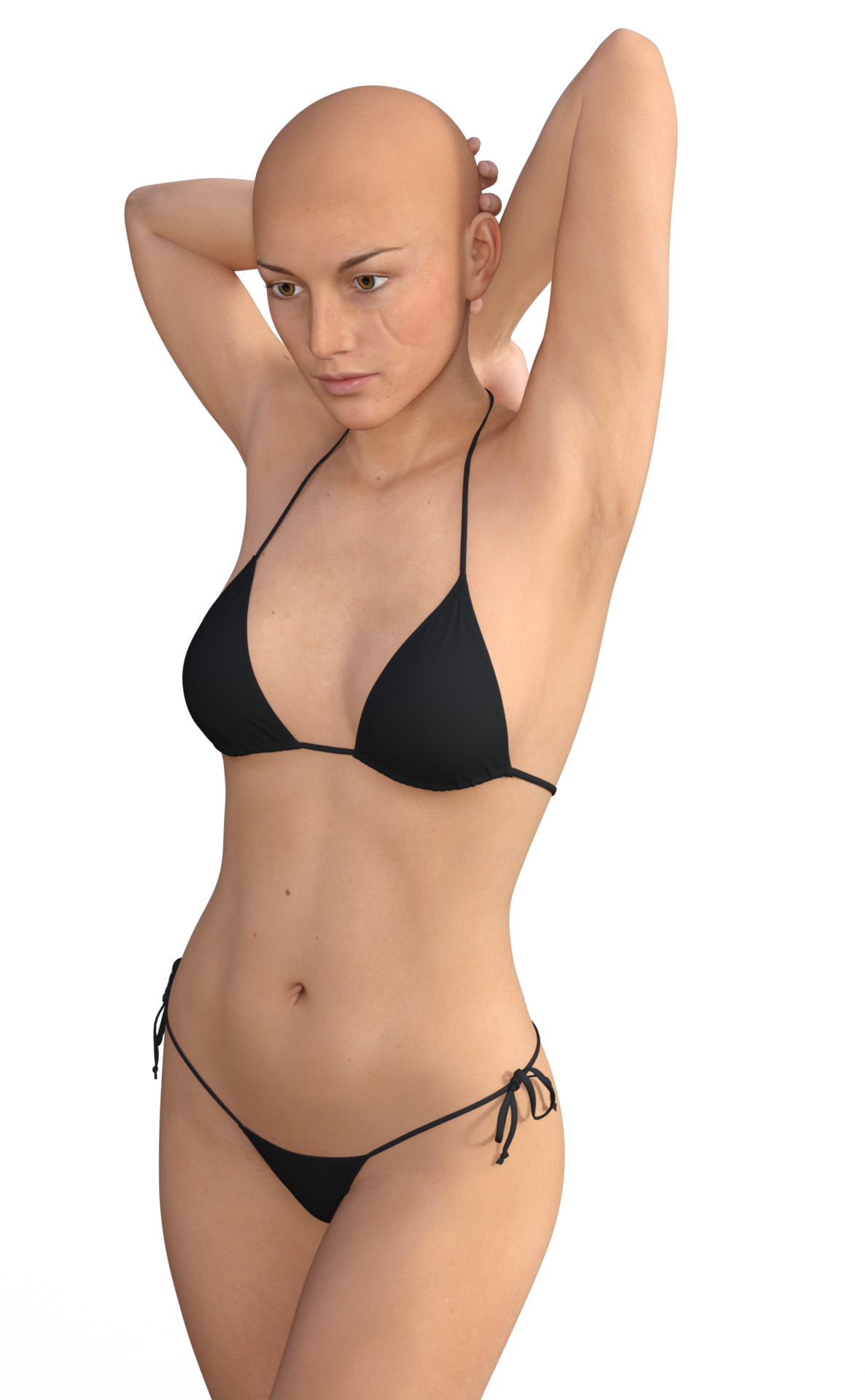
And an additional one with scars dialed in and Gwennili skin applied.

Yes, I think she would be good in different renders. https://www.daz3d.com/gwennili-hd-for-victoria-7 Nice strong women caricature.
Killer Legs Morphs for Genesis 3 Female(s)Cool! I'm making a note of what you used. Two items going on my wishlist.Another tip, if you don't know about it, is to right click on the gear icon and change Parameter Settings. Turn off the click on Use Limits and click Accept. After that you will have more play when increasing a morph, (although sometimes the limits have been placed because the extra play goes beyond realistic appearances).
Killer Legs Morphs for Genesis 3 Female(s)Just a comment that the soleus muscle partially fills in the region between the main calf (gastrocnemius) and the ankle. If you have the muscle morph pack you can play with that and see it it helps.
If you mean this, then, no, I don't have it, but I'll check it out and see.
Problem at rendering with Victoria 7Also, in many cases the morph of the character set itself to zero.
Problem at rendering with Victoria 7I forgot to say that I'm having that problem with Cathy too. The shape of Cathy and Victoria pops up everytime I open a file or load a new female character into the scene. In order to eliminate that morph I have to open the file, turn down to zero all the morphs of Cathy (or Victoria), save it and do this two more times. Please help me in this one Richard I'm don't know what to do. I have reinstalled the characters and the Daz Studio many times

What is listed in the controller tab at the bottom of the dialogue is: "ERC [DeltaAdd] > Olympia 7: Cathy". I have attached some images
Many thanks
Is it still possible to transfer 3D models from D.S to Clip Studio Paint?I am trying to figure out how to export 3D models from DazStudio to make them usable in Clip Studio Paint, there are several models I want to buy in order to use them for drawing figures, however, I am running into a problem of the methods I have been able to find not working. :( Idk what I am doing wrong, anyone able to help me with this issue?
Generating Dynamic Clothing in DAZNo, Im afraid there aren'y tools in DS for creating dynamic clothing - the suite used to make Optitex clothing is very expensive professional kit. It is possible to export to other applications to drape a mesh, then load that as a morph or static mesh.
Ready ! Strappy shoes for Genesis 3Oh, pretty!!! Yanno, I never thought of using them on shoes! LOL :P
Laurie
I don't remember half of the freebies I grab, but your shaders popped into to mind straight away. -should have put a little pearl anklet on g3 too ;-)
Thanks again.
Nice with AllentArts pearl shaders..
Nice surprise Looks great !
a heel-length morph will be available once i understand how to make them survive the save process
also platform height
I noticed on the few G3 shoes I bought, the separate toe bones are deleted, probably because the are a total pain with the shoe rigging. I've been trying and yes, it is a lot easier without them toesies
Facegen now on sale...get it!Yep based on a closeup of Kristin. Check out some of her photos on line, it's hard to find any 2 that look exactly alike. Her range of expressions and facial structure (multiracial - her father is Dutch, her mother is a mixture of Chinese, Scottish and African) is unique to say the least. If I revisit the morph in the future, I'll lower the eye and brow area because the nose appears too long to me now.
 Knittingmommy's Laboratory
Not much going one render-wise here. Still plugging away with Camp NaNoWriMo. I hit a hiccup with the writing and had to take a step back and work on my characters a bit. I'll have to try and make up the word count tomorrow. I've been working on what this hero looks like and I think I've figured it out. I'm still working on his morph though. I should have a render for him soon, well within a day or two soon, maybe.
I don't think I mentioned one of the things that had me pulling my hair over the past few weeks, but my husband was in a car accident. Some people ran a red light and slammed into his passenger door. He's fine. It was a slow speed crash just around the corner from the house so he was almost home. In fact, he walked home after his car got towed off. It was enough for airbags to deploy and the insurance company totaled the car. We had to go car shopping and ended up getting a great deal on a used Chrysler Town & Country minivan. It was a prior fleet vehicle and only had about 30,000 miles on it and less than 3 years old. The boys are over the moon because it has a video system so they can play DVDs on long trips.
The people in the other car started trying to claim injuries a couple of days after the accident even though it was their fault. So, the insurance companies had to try to figure out from the police report and witnesses exactly who was at fault so they could make an official determination. Anyway, the insurance company FINALLY came back today and said they had determined that it was definitely the other car's fault and that they will be going after the other insurance company to get our deductible back. It might take awhile as they do all of their back and forth, but at least now the other people can claim injuries all they want. They'll have to go after their own insurance to get any money. I'm breathing a sigh of relief that the worst of that ordeal is finally over. It was very frustrating having to deal with that.
I know I've been quiet but I'll be back. I'll be working on a couple of Gimp things over the weekend and should have those posted by sometime Monday. I want to try and get all of my partially done tutorials actually finished! I'm so easily distracted from one project to another more exciting one at times.
Oh no, glad your hubbys ok KM
 I was hit on my motorcycle years ago and i know the pain of dealing with insurance people. I was young and stupid ... even more stupid at the time, so i ended up going 50/50. Don't worry, were not going anywhere :)
That happened to me. A man drove through a red light and I could not stop, nor could I do an emergency lane change as one lane was occupied and the other had oncoming traffic. I hit the back right quarter of his car and spun him around. The air bag did not deploy, and the car was actually repaired... by my insurance company, as he was not insured. This is why it's good to have decent Uninsured coverage. It took care of my car and my medical.
It took a while longer to repair me, however. That was the second accident I had been in where there was major damage to my car. Add 4 fender benders, and this is why my neck is a mess.
Oh man, i'm sorry to hear that
I was hit when someone changed lanes on a roundabout. As i said, i was on my bike, so i couldn't really do much. My head went through her passanger side window, so at least we had a fleeting introduction. I broke a few bones but it was mostly my pride that bared the brunt. I was in my late teens (around ten years ago) so pretty much everything has cleared up now. It somewhat sullied my passion for two wheels though!Ouch! When you mentioned it in the first post, I didn't realize it was that bad! A few broken bones isn't exactly nothing! I'm glad everything has healed up. Yeah, I can't imagine getting on a bike after that. I love that line about a 'fleeting introduction'!!! That's very cute! :)
Ouch is right. Glad you you have a sense of humor about it ("fleeting introduction"). I understand about your passion for two wheels... after an accident, it does make one shell-shot for a while. I still approach that intersection with caution. I am especially cautious about driving too fast in the rain. Nothing is scarier than hydroplaning - hitting the brakes and nothing happens. My husband drove over the crest of a hill and on the other side was a guy waiting for someone who had stopped to make a left turn. A river of water was sheeting over the road. We hit the first guy who slammed into the second guy. My husband had one hand in a cast so he held onto the steering wheel tightly to protect it, and literally bent the wheel. There were no broken bones or serious injuries, but that's when I first got a nasty case of whiplash.
DAZ 4.9.3.166 Degradation of iRayThere're two different SubDs:
- Render
- Displacement
What you're talking about?
Did you transfer the surface to iRay? The iRay Uber shader don't have SubD Displacement level > 0.
If Displacement: What SubD value? Did you check for 0, 1, 2, ..., or way bigger 2 ?And about what of the surface structures do you talk? The amethyst or the other skin-marmor structures? Second are only bump/normal. Here you only see an optical, but no real 3dimensional up/down.
The amethyst structures are big compared with the devisions of the mesh. So they work without SubD. And Displacement SubD shows an effect, but only up to 2; above that there's no further effect. For 4.9.2.70 bigger values each showed a more detailed outcome.
I talk about structures only having a fraction of the mesh resolution.Problem with transfer utitlityThe Transfer Utility ignores local transforms, so your adjustments are not being taken into account. If the model fitted Genesis in your modelling application then that suggests the import settings are wrong - you need to use the preset for importing the OBJ that you used for exporting Genesis to model around.
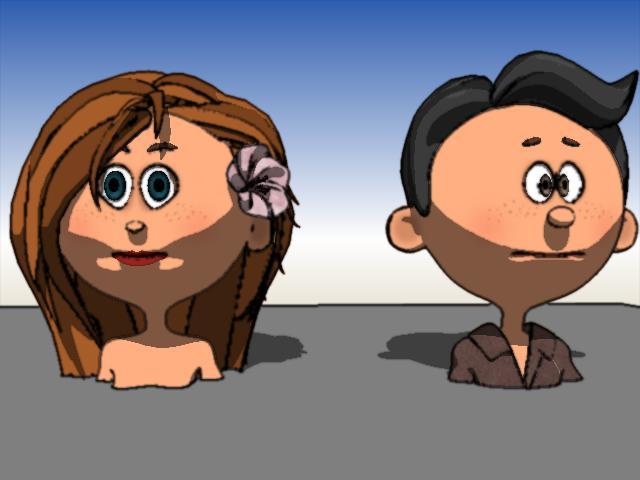
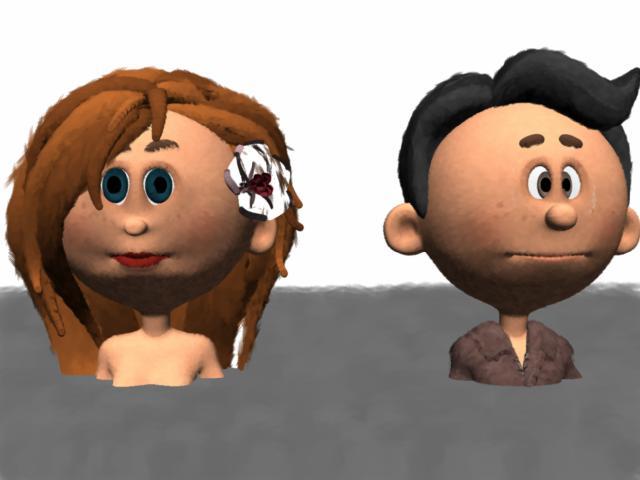
Carrara Challenge #32 They Only Come Out At Night - WIP Thread - Meet Our PA Sponsor, GKDantas!I need a 1940s glamorous singer. I loaded 3DUniverse toon generations base figure. Instead of creating, saving, and loading formal morph targets by bodypart, I simply edited the mesh in the vertex modeler. I then saved the result to my object browser. The man on the right is the base toon generation figure with some of 3DUniverse's base male clothes. The figure on the left is my morphed figure with morphed hair and a flower.
EDIT: 1st image is default toon. 2nd image is default NPR.
.
.
 Problem with transfer utitlity
I'm trying to use the transfer utility to create a conforming clothing for Genesis. When I import the OBJ to Daz, it doesn't come in centered, so I have to reposition the object so that it fits genesis correctly. After that, I use the transfer utility and everything works the way it should, except the object reverts back to it's original position. It's still conformed to the Genesis figure, it just doesn't fit into place. Anyone know what's going on?
saving takes an awful long timeThe length of time for saving a file depends on what's in the file. I've found non-Genesis assets that store their morph data in the file, such as V4 or M4, to take a lot longer to save. These files can be significantly larger, 50+ megabytes in some cases.
During saving D|S creates a temp file of your latest version, and as soon as that is complete, it's swapped with the previous file, and the thumbnail is created. This process takes less than a second.
Need hep to convert Genesis 2 Creature Creator addons to Genesis 3Hello! I need some help in the problem of conversion custom-boned items from Genesis 1-2 to Genesis 3, like Creature Creator Addons for Genesis 2 Males ( https://www.daz3d.com/creature-creator-add-ons-for-genesis-2-male-s) and Females. There were nicely made animalistic legs (bovine, feline etc) and I wanted to convert them from Genesis 2 Male to G3M, but encountered a sudden issue with custom bones. I've read three tutorials by Sickleyield about saving custom bones on conversion (this one and others), but with those addons they didn't help much. Formerly I managed to convert many hairs with custom bones, following tutorials, but legs seemingly have more complicated rigging and I don't know how to combine upper Thigh bones of Genesis 3 with lower legs and feet bones from original addons.
Here is the original rig of one of such addons (Bovine Legs) for Genesis 2 Male -

At first, I shaped my first item (Bovine Legs) after the clone of G3M in Genesis 2 Male and got the OBJ of the legs, which fits Genesis 3 Male. Then I loaded the original Bovine Legs and transferred rigging from these original legs to this new geometry, so I got the new figure, let it be Male Legs Bovine Conformed 01. But this figure is unusable for Genesis 3 Male because of the wrong rigging, because Genesis 2 has one Thigh bone and Genesis 3 has two thigh bones. I thought that I may conbine 2 rigs and decided to use Autofit to fit the new legs to G3M. Autofit destroys all custom rigging as usually and replaces it with Genesis 3 Male's bones. Here are the results of the autofit.


As it clearly seen, after applying the most of poses legs are distorted.
At the second attempt to fix it, I deleted all the odd unneccessary bones in these new autofitted Bovine Legs like individual toes of the feet and metatarsals, renamed all bones according to the original rig (e.g. Left Foot to Left Foot CC, Left Shin to Left Shin CC) and so I've got the rigged structure, close to the initial rig. But the position of these bones remained wrong. I hoped to fix it with Transfer Rigging from the original Bovine Legs to this new item, but in vain. It doesn't help.

As the third variant, I used Transfer Utility again and transferred rigging only from the original Bovine Legs to the new item from the attempt # 2 with Merge Hierarchies checked on, and when I got two parallel rigging sets in one the same figure, I kept just Thigh Bend and Thigh Twist bones from the autofitted G3M's version of the legs and deleted all autofitted bones from the shin and lower. Then I reparented original Shin CC and its child bones to these Thigh Twist bones and after all I got some hybrid rig, which upper part corresponds to G3M and lower to the original addon. Here is this final item.

But there is the same problem - now this item remains unusable for G3M, and requires autofitting or Transfer Utility again to conform it. And these actions destroy the custom rig. I tried to use a fast way with Transfer Utility with checked Merge Hierarchies and unchecked Remove Unused Bones, but DAZ Studio crashes every time. If I parent these legs to G3M without conforming, they don't follow morphing and posing, naturally. So it needs to be conformed by any way. How to combine two different rigs in these and other similar items? I remember I had no problems with custom hair like braids, whose root bone is Head and custom bones were parented to head, and the most part of problems with high-heeled converted shoes I managed to fix with Transfer Rigging. Why these methods do not work in this case and what to do to get the best of such conversions?
P.S. Would be nice to have this package recreated for Genesis 3 by professionals, I hope one day we'll see it in the shop. But there is many other earlier monster addons for Genesis and V4-M4, so I think my problem is rather wide-spread and should have solutions.
Josh Crockett Suggestion Page for Monster Characters!What I'd like to see is a huge, muscular guy built along the proportions of The Hulk in Joss Whedon's Avenger movies. Someone who goes way beyond the Freak character. I suspect that a completly new mesh would be required, I doubt the existing Genesis figures would take such an extreme morph without something breaking.
Cheers,
Alex.
Ice Dragon Art WIP'sSo, the move over to an external drive on my laptop did not go particularly well in regards to my categories. I lost about 2/3 of the links from the original files to my custom categories. I have been slowly going through everything and re linking. I already know the issue is because of 4.8 as my transfer went fine with my pc which runs 4.9. Not a big deal, I'm re linking slowly. So I was working on this tonight because my PC is busy rendering something and since I have a bit of a headache I'm working on my links. I just worked my way through my Genesis 2 Female characters and discovered that I have 78 of them. Not counting things like Faces of Asia and Africa, etc. How on earth did that happen?!? That's totally ridiculous....
Killer Legs Morphs for Genesis 3 Female(s)Just a comment that the soleus muscle partially fills in the region between the main calf (gastrocnemius) and the ankle. If you have the muscle morph pack you can play with that and see it it helps.
Daz 3D is part of

Connect
DAZ Productions, Inc.
7533 S Center View Ct #4664
West Jordan, UT 84084Licensing Agreement | Terms of Service | Privacy Policy | EULA
© 2026 Daz Productions Inc. All Rights Reserved.