-
question about It's Magic outfit...
So Rod is correct in that the morphs I have made are tailored to a specific outfit. If the edges do not line up then things may not look right. However, at Rod's insistence I am working on a more general package that might work on a wider array of items. Although this morph was made for the skirt this gives an idea of what can be done by making RealFit morphs for more than just bikinis.
Cheers!
Figure Metrics has me beyond frustrated!Are the measurements fighting each other? Is the morph linked to one measurement also affecting others?
All things LabyrinthThank you Ice Dragon Art, I had a plane in the background with a Goblin King picture on during character creation to see how close I could get with G3M and dial spinning. I was quite pleased with the result, pleased enough to not look at making a custom morph anyways.
Showing the Skin Under the No SuitI'm trying to make certain sections of the No Suit Morph disappear to show the nose and chin underneath --a la Captain America. As far as I know, the No Suit doesn't come with anything to make those portions of the costume invisible or removed. I've tried to do this by going into Surfaces and changing the Skin map under the matching Diffuse Color, Bump Strength and Specular Strength maps to show the character's skin underneath.
Unfortunately, the problem is that my character now looks like a zombie when I render him. Looks fine in the Viewport, but when I render him, the skin is gray and pale.
I did it wrong, so how do I make the skin show correctly?
Simtero shape projector and Daz/Carrara morphsI got the product at a steep discount during some sale and returned it. It mostly performed as described in the store page, but I just found it easier to use blender.
Initially I thought shape reprojector would be easier and faster than exporting to another application for collision deformations and then importing the results as a morph. It wasn't for me. It might be for someone who doesn't use blender or another 3D modeling app.
I expected shape reprojector to be slow, since it is a script, but in my case, it took as much or more time than export, collide in another app and import.
The real killer issue for me can be found in the documentation at the botom of page 3:
IMPORTANT: The process will work on objects in any orientation, but for best results, it is strongly recommended that all position and rotations be set to zero on the Receiver figure. Transformed objects, especially figures moved and rotated at the hip, may produce invalid morph results.
In my experience, moving or rotating the hip and/or scaling the character, made it unlikely to get the results one would expect. It might work for your head as I expect you could do that in the zero/rest pose, but blender and other applications can do that easily as well. I had no luck trying to create a morph for laying on a flat surface with a scaled figure standing in a T-Pose. I got results, but they took forever and never were good enough.
Read through the PDF and see what you think. I believe the product and its documentation describes itself accurately and that it can do what it claims. In my case, I had other options that produced as good or better results in a similar or much shorter time.
greyed out smart contentSliders arent there to pose the face. Under shaping there are a couple sliders to post the face in a general charactr sort of way (victoria 7, vs the Summer caharacter used in the example. The sliders do appear to be there to move the and pose the other body parts. For the record. I haven't bought any advanced morph packages, since basic stuff doesn't seem to work.
question about It's Magic outfit...Actually the "It's magic outfit" from Zoro_d and the "RealFit"-Stuff from the3dwizard are working differently from my understanding.
The Realfit-Bikins do come with custom morphs for G3F providing that reality-like effect that the outfit applies pressure to the skin. Once the product is installed those morphs are available on all G3F-based characters so you can dial them in whenever you want. Apparently they fit the RealFit-bikins they come with best.
With the It's Magic-Outfit, the effect is tied to the pantyhose as a morph ("smooth hip"). The skin tint is also part of the pantyhose. There is a show/don't show script included so you can also use the Magic-Outfit without the pantyhose. But then also the pressure-effect is gone. From what I understand that unfortunately limits the skin-pressure-effect in this case to the Outfit it comes with. Even more so actually, as the effect is only shown with the pantyhose.
Please see the test render for comparison:
Left
Magic-Outfit applied with the smooth hip morph on the outfit active. Opacity of the pantyhose set to 0 (which actually removes the legs and panty alltogether). Made visible again through the provided script. -> No pressure effect.
Middle
Magic-Outfit applied in default form with pantyhouse. Smooth hip morph from the outfit is active by default. -> Pressure effect.
Right
Same as left but in that case, I've dialed in the morphs from the RealFit-bikini which work here as well, although adjustments to deal with occasionally poke through might be necessary. --> Pressure effect, but limited to the areas covered by the used morph.
Hope that helps!
P.S. I've removed limits and "overdialed" the morphs in all three versions to better indicate the differences.
Is export FBX with morphs broken with GF3 / V7 ?Most definitely, I just applied a basic ambient moves loop to GF3 and exported, I didn't apply any morphs, I just exported with "morphs" checked, I remove all Morph Export rules and it still happens.
16 extra unwanted morphs are created.
Import straight back into Daz and you see this:
GF2 has no issues.
 Novica & Forum Members Tips & Product Reviews Pt 8
Nice. I forgot who was talking about rigging in this thread. I may have questions for you. I'm thinking of making a polo shirt in Hexagon, but I want the color to be able to morph along the seam to wear it Cuff Up or Cuff down, like an 80s preppy. I feel like what you're messing around with might be the best way to do that.
Wear Them AllIn my brain, a clone is already a morph, just a special one that's 'hidden' unless using autofit.
And good call on front fixer. If I had known about that, would've avoided the blender route. Much easier solution!
Wear Them All...so is there any good way to solve the mesh stretching of a skirt without resorting to a modelling or sculpting programme?
I know! Can this "mermaid clone" be made available to us who can't do stuff in blender? I saw the tutorial and I just can't get my 53 year old brain around figuring out another program.
Hmm, not sure if I can post a 'clone' file without breaking some license/eula/tos. I used V4 and G3F to create it in blender and I don't own the copyright to either of those figures. If someone from daz posts and gives the OK, I don't mind sharing it.
would there be some way to save it as a morph?? I've got the same issue as ALLIEKATBLUE can't get my brain wrapped around modeling at all .........
Simtero shape projector and Daz/Carrara morphsSimtero is in a flash sale. Does anyone have the shape projector? Could I take my custom model head for Brash Lonergan and use the shape projector to create a matching head morph for Genesis or Genesis 2? There are other figure attributes that don't match. For example, the ratio of Brash's leg-length to torso-length is longer than default genesis or genesis 2. Still, It would be interesting to have a head version of Brash for a Daz figure. Or, do I misunderstand the product?
https://www.daz3d.com/simtenero-shape-reprojector
Skin Builder 3 Merchant Resource for Genesis 3 Female (Commercial)I was already sold, but seeing the toon promo just hastened the process. By the way, will the script recognize options added to the folder? I mean, if I edit the veins, for instance, and add the modified files to their folders, will it show up as an additional option? I would be nice to be able to add minor variations, but I guess there's always plain old GIMP.
Yes it will show as an additional option as long as the new option you created follows the order of icon name and assigned texture names. The tutorial explains how to add in more options if you wish to do so. The script is fully automated in that regard. It was designed this way so If I ever needed to include more options, there is no script work required.
This is awesome. You are awesome.
Speaking of the Vascularity morphs, do the veins align with the morphs? Cause I'm picturing a psion with the mother of all migraines.
Not really. The details of these are slightly different. The Vascularity morph layout is designed to be more universal since they work on any UV. There might be some areas where they match, but in some areas they won't. They independant products really. What I found is that some details look great as a morph but not as a texture detail, and vice versa.
Tutorial requestAwesome! So I take it all of our purchased shapes for Genesis 3 will work with those Carrara preset characters?
Hello Dart, I have had no problems with any of the figure morphs, which includes GenX2 converted morphs so far.
Some of the clothing does not convert well and will crash Carrara when loaded.
So then you just load those clothes into DS and convert to Blended Weights? Is that right?
I've never used GenX, so have no clue what any of that means.
Both Wendy & Misty have done a video tutorial at the Carrara forum at the other site, both well worth watching.
GenX2 is DAZ3D specific for converting morphs between figures. I use it a lot especially for my critter morph renders. https://www.daz3d.com/genesis-generation-x2
Tutorial request@Dartanbeck - You have been a tremendous help to me also.
Thanks! I appreciate your kind words, my friend! Always glad to help!
If anyone has or knows of a thorough tutorial for exporting an object or figure from Studio to Carrara, making a morph, and re-importing to Studio, I would love to read it. I have had success doing this, but help would be good. Like to know what settings to use at the various steps, and why.
Absolutely!
The beautiful thing about Carrara is that we don't need that extra step of exporting from Daz Studio into Carrara, unless we're working on a figure that Carrara doesn't support, like Genesis 3. More on Genesis 3 morphs below. But for Genesis 1 and 2 and earlier figures, like V4, M4, etc., we can open them directly into Carrara, model the new morph upon the base figure (or upon a morphed figure, which requires a subtractive step in DS later in the process) in its default pose, and export from Carrara using the Daz Studio OBJ preset.
Then import the new OBJ we've just exported as a Morph onto the Base figure in Daz Studio using Morph Loader Pro, which also contains the abilities to subtract the morphs that may have been applied in order to create the morph. For example, if we wanted to make a specific morph for the Genesis 1 Gorilla, we'd need to dial up the Gorilla morph so we can make our morph. Well, if we don't subtract the Gorilla morph's data from the new morph obj, we'll be multiplying the Gorilla morph onto Genesis. So Morph Loader Pro allows us to remove the Gorilla morph during the morph creation process from the OBJ we've exported. Cool, huh!
For Genesis 3, it's just as easy to use Carrara as the morph modeler, except that we do need to export the figure from Daz Studio just like we'd need to do with any figure for any other modeler.
For all of these things, there are many questions and techniques that pop up along the way. To get started into doing this stuff, it's really Really easy. Just follow these simple instructions and delve into more lessons as needed. Don't forget to check out how to hook up JCMs as well... it can help make things work automatically behind the scenes! ;)
Here is where to begin - DAZ Studio 4 3D Content Creation Tools - by Daz3d
These tutorials are for an earlier version of Daz Studio and for Genesis 1, but the same tools apply now, and have even gotten better along the way.
 One of Daz3d's incredible employees, whom is an amazing guru on all of this, has also started his own channel on his own time to help us even further - and helps to show us how endless our Carrara <> Daz Studio relationship can become, even though he doesn't mention Carrara at all - he's a Modo user. But I feel that Carrara is perfect for all of this work. It's easy to keep topology intact, we don't need to do nearly as much tinkering with export/import since the figures (except for Genesis 3) open directly within Carrara
I give you, Mr. Josh Darling!
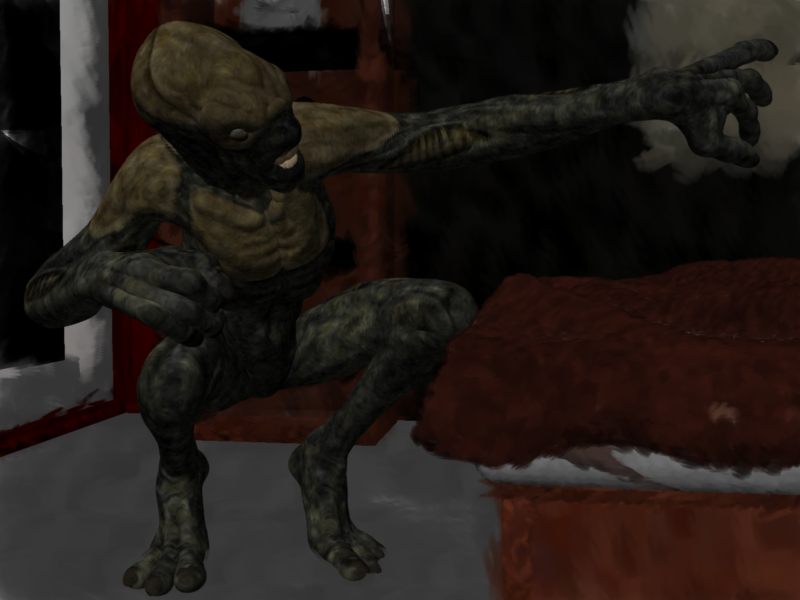
There is now an off-site solution for Genesis 3. The following render is Gigalien for G3M by RawArt with The Exile Alien by Josh Crockett morph added, carrara NPR render.
 Novica & Forum Members Tips & Product Reviews Pt 8
Here's a list of some of the utilities to work across different generations. It will be in the Reference post of this thread (the second post.)
It doesn't matter if you are going from a higher generation to a lower one, or a lower to the higher- this list will put the product in the LOWEST generation involved. This is because some of these products can involve multiple generations as options.
Generation 3
GenX AddOn Gen3 Bundle Transfer morphs for Victoria 3, Michael 3, Stephanie 3 Petite, David 3, The Freak 3, Aiko 3, and Hiro 3 to Genesis and Genesis 2.GenX2 AddOn Gen3 Kids Transfer base shape of Laura, Luke, Maddie, and Matt, using GenX2, to Genesis and Genesis 2. (see Genesis Generation X2 for requirements for using Genesis 2.)
Legacy UVs for Genesis 3 Special Edition: Victoria 3 Use Victoria 3 textures on Genesis 3 Females.
Generation 4
Genesis Generation X2 For Generation 4, Genesis, Genesis 2 to transfer morphs between the generations.
GenX2 also translates poses or expressions with morph values and morph injections or shaping presets to be used with the transferred morphs. (Must have GenX2 AddOn For Genesis 2 to use Genesis 2, and to transfer morphs between the two Genesis 2 figures (Male/Female.)Wear Them All- Autofitting Clones And Clothing Smoothers For Genesis 3 Females
Autofit Victoria 4, Michael 4, Genesis and Genesis 2 Female clothing to Genesis 3 Female (also contains cleaveage smoothers/fixers)Wear Them All- Autofitting Clones And Clothing Smoothers For Genesis 3 Males
Autofit Victoria 4, Michael 4, Genesis and Genesis 2 Female clothing to Genesis 3 Male(also contains bulge fixers/chest smoothers/fixers)Michael 4 For Genesis 2 Males Use Michael 4 textures, morphs, and clothing on Genesis 2 Males. Note: the UVs can also be applied to Genesis 2 Female.
Legacy UVs For Genesis 3: Michael 4 Use Michael 4 textures on Genesis 3 Males.
Victoria 4 for Genesis 2 Females Use Victoria 4 textures, morphs and clothing on Genesis 2 Females. See the next product if you want to avoid manually doing the process.
V4 Skins Auto Converter For Genesis 2 Female(s) Reads V4 texture files .ds .dsa .PZ2 and converts them for you so you don't have to do them one by one. It's a "speed it up helper" for the Victoria 4 For Genesis 2 Females.
Generation 4 Legacy Shapes for Genesis 2 Male(s) Use the shapes of Genesis Basic Male, Michael 4, Hiro 4, and The Freak 4 on your Genesis 2 Males.
Generation 4 Legacy Shapes for Genesis 2 Female(s) Use the shapes of Genesis Basic Female, Victoria 4, Stephanie 4, Aiko 4, and The Girl 4 on Genesis 2 Females.
Kids 4 UVs for Genesis 2 Male(s) and Female(s): Check your Product Library, it was a limited time freebie at Christmas and not available in the store. Many thanks to Draagonstorm. Includes the Kids 4 textures and custom boy and girl morphs
Genesis
Genesis 2 Male and Female Base UVs for Genesis Use any textures made with the Genesis 2 Male or Female Base on Genesis.
Victoria 6 and Michael 6 UVs for Genesis Use any textures based on the Victoria or Michael 6 on Genesis.
Generation 5 UV Bundle for Genesis 2 Male(s) Contains the UV sets for David 5, Hiro 5, and Freak 5. (Michael 5 already comes with Genesis 2.) If any of your Generation 5's require the Michael 4 UVs, you must own Michael 4 for Genesis 2 Males. (see description under Generation 4)
Generation 5 Legacy Shapes for Genesis 2 Male Shapes include Genesis (1) Basic Male, Michael 5, Michael 5 Hero, David 5, Hiro 5, Freak 5, Freak 5 SuperFreak, and Young Teen Justin. Additional head shapes are included for Michael 5 (two additional heads), David 5 (three additional heads), Freak 5 (six additional heads), and Young Teen Justin (one additional head
Generation 5 UV Bundle for Genesis 2 Female(s) Contains the UV sets for Aiko 5 and Stephanie 5. (Victoria 5 already comes with Genesis 2.) If any of your Generation 5's require the Victoria 4 UVs, you must own Victoria 4 for Genesis 2 Females.
Generation 5 Legacy Shapes for Genesis 2 Female(s) Shapes for Genesis (1) Basic Female, Victoria 5, Victoria 5 SuperModel, Stephanie 5, Stephanie 5 Curvy and Model Bodies, Aiko 5, and Young Teen Julie. Additional head shapes are included for Stephanie 5 (two additional heads) and Young Teen Julie (three additional heads). Put the shapes on Genesis 2 Females.
Genesis 2 Female Clone For Genesis Use Genesis 2 Female clothing on Genesis.
Legacy UVs for Genesis 3: Genesis Pack Use Michael 5, David 5, Stephanie 5, and Aiko 5 textures on Genesis 3.
Legacy UVs for Genesis 3: Victoria 5 Use your Victoria 5 textures on Genesis 3 Female.
Genesis 2
GenX2 AddOn for Genesis 2 So GenX2 can be used with Genesis 2. Now, it's possible to transfer morphs from Genesis and supported Poser figures to Genesis 2 Male and Female. In addition, morphs may be transferred from Genesis 2 to Genesis or between the Male and Female version of Genesis 2
Genesis 2 to Genesis 3 Pose Converter: Convert your Genesis 2 poses to Genesis 3. (Male and Female)
Pose Builder for Genesis 3 Mix and match Genesis 2 and Genesis 3 poses.
Genesis 3 Female For Genesis 2 Female(s) Autofit Genesis 3 Female clothing to Genesis 2 Females.
Genesis 3 Male For Genesis 2 Male(s) Autofit Genesis 3 Male Clothing to Genesis 2 Males.
Genesis 3 UVs For Genesis 2 Female(s) Use Genesis 3 textures on Genesis 2 Females
Genesis 3 UVs For Genesis 2 Male(s) Use Genesis 3 textures on Genesis 2 Males
Legacy UVs for Genesis 3: Victoria 6 Use Victoria 6 textures on Genesis 3 Females.Legacy UVs for Genesis 3: Genesis 2 Male and Michael 6 Use the Genesis 2 Base Male and Michael 6 textures on Genesis 3 Male.
Genesis 2 Legacies For Genesis 3 Male: Heroes Shapes for Michael 6, Gianni 6, Darius 6, Lee 6, and Scott 6, as well as an optimized version of the Genesis 2 Base Male, to put on Genesis 3 Male.
Genesis 2 Legacies for Genesis 3 Female: Stylish Shapes for Giselle 6, Keiko 6, Lilith 6, and Ninive 6, as well as an optimized version of the Genesis 2 Base Female, to put on Genesis 3 Female.Genesis 2 Legacies for Genesis 3 Female: Beauties Shapes for Olympia 6, Monique 6, Mei Lin 6, and Gia 6, as well as an optimized version of the Genesis 2 Base Female.
Genesis 2 Legacies for Genesis 3 Female: Classics Shapes for Victoria 6, Aiko 6, Stephanie 6, and The Girl 6, as well as an optimized version of the Genesis 2 Base Female.
Genesis 3
Genesis 3 UV Swap: Male and Female Base Put the female textures on the male, and the male on the female.
GenX2 AddOn For Genesis 3 Now, it's possible to transfer morphs from Genesis, Genesis 2, and supported Poser figures to Genesis 3 Male and Female. Read the description for more information.
I love all the Genesis 2 Legacies for G3. I got those before I purchased any G2s when I first started with DS last March and it's so cool to use Keiko on G3! And they really add to the gene pool! To be honest, I don't really see a need for G2s, although by now I've collected a bunch in supersales but I rarely use them. I suppose I should because now I own so many and I do like Aiko 6, Lilith 6 and the Girl 6 better than the 7 versions and the legacy versions for G3 aren't EXACTLY the same but close. I'm actually surprised Daz allowed those products...
Tutorial request@Dartanbeck - You have been a tremendous help to me also.
Thanks! I appreciate your kind words, my friend! Always glad to help!
If anyone has or knows of a thorough tutorial for exporting an object or figure from Studio to Carrara, making a morph, and re-importing to Studio, I would love to read it. I have had success doing this, but help would be good. Like to know what settings to use at the various steps, and why.
Absolutely!
The beautiful thing about Carrara is that we don't need that extra step of exporting from Daz Studio into Carrara, unless we're working on a figure that Carrara doesn't support, like Genesis 3. More on Genesis 3 morphs below. But for Genesis 1 and 2 and earlier figures, like V4, M4, etc., we can open them directly into Carrara, model the new morph upon the base figure (or upon a morphed figure, which requires a subtractive step in DS later in the process) in its default pose, and export from Carrara using the Daz Studio OBJ preset.
Then import the new OBJ we've just exported as a Morph onto the Base figure in Daz Studio using Morph Loader Pro, which also contains the abilities to subtract the morphs that may have been applied in order to create the morph. For example, if we wanted to make a specific morph for the Genesis 1 Gorilla, we'd need to dial up the Gorilla morph so we can make our morph. Well, if we don't subtract the Gorilla morph's data from the new morph obj, we'll be multiplying the Gorilla morph onto Genesis. So Morph Loader Pro allows us to remove the Gorilla morph during the morph creation process from the OBJ we've exported. Cool, huh!
For Genesis 3, it's just as easy to use Carrara as the morph modeler, except that we do need to export the figure from Daz Studio just like we'd need to do with any figure for any other modeler.
For all of these things, there are many questions and techniques that pop up along the way. To get started into doing this stuff, it's really Really easy. Just follow these simple instructions and delve into more lessons as needed. Don't forget to check out how to hook up JCMs as well... it can help make things work automatically behind the scenes! ;)
Here is where to begin - DAZ Studio 4 3D Content Creation Tools - by Daz3d
These tutorials are for an earlier version of Daz Studio and for Genesis 1, but the same tools apply now, and have even gotten better along the way.
One of Daz3d's incredible employees, whom is an amazing guru on all of this, has also started his own channel on his own time to help us even further - and helps to show us how endless our Carrara <> Daz Studio relationship can become, even though he doesn't mention Carrara at all - he's a Modo user. But I feel that Carrara is perfect for all of this work. It's easy to keep topology intact, we don't need to do nearly as much tinkering with export/import since the figures (except for Genesis 3) open directly within CarraraI give you, Mr. Josh Darling!
greyed out smart contentJust for the heck of it. I decided to try the fix you suggested for RKane 1. And that seemed to fix most of the problem for me as well. Theres still 4 products greyed out. But the rest are back.
Two additional questions. One easy and one hard.
1. I noticed that some of the products now have a bright blue border around them. What does that signify?
2. Now the tough one. Since the introduction of Genesis 2 and 3, These products have been mostly unuseable too me. The basic morpfs to shape the body and head were not connecting (actually we talked about this before). But now when I load the basic Genesis 2 or 3 character. Those body morphs seem to be conforming to the purchased character properly. Where I'm still having problems is in expressions. I can't get the characters to smile, frown or even open there mouths. The tools arent there or I can't find them for some reason. Any ideas?
Just a thought: Do I need the advanced Morph packages for that? Seems like basic functionality to me. But maybe I'm mistaken.
Thanks
Dale
Tutorial request@Dartanbeck - You have been a tremendous help to me also. I am always on-again-off-again with Carrara. I need to get back into it. I have migrated from Poser to Studio over the past couple of years. I might use Poser 10% of the time, totally prefer Studio, especially because of Iray.
If anyone has or knows of a thorough tutorial for exporting an object or figure from Studio to Carrara, making a morph, and re-importing to Studio, I would love to read it. I have had success doing this, but help would be good. Like to know what settings to use at the various steps, and why.
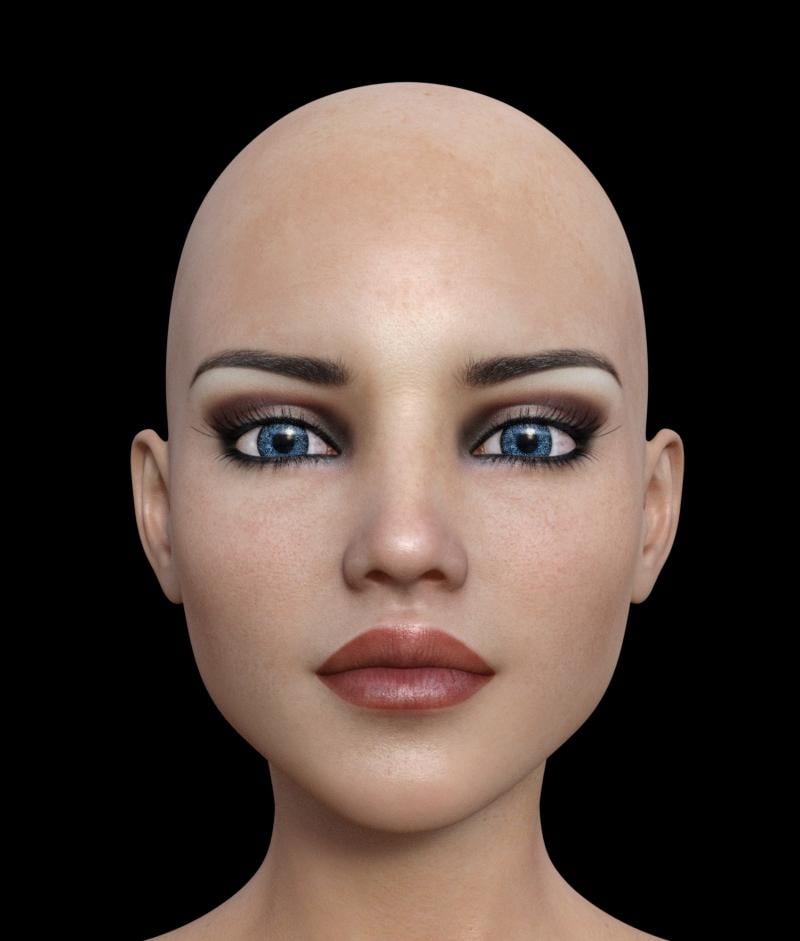
Who's the unbelievably hot model?I think it's the Izabella 7 texture but not sure about the morph. This one is a mix of Sunny 7 (20%) and Izabella 7 (30%) heads but it doesn't look quite right.
Daz 3D is part of

Connect
DAZ Productions, Inc.
7533 S Center View Ct #4664
West Jordan, UT 84084Licensing Agreement | Terms of Service | Privacy Policy | EULA
© 2026 Daz Productions Inc. All Rights Reserved.