-
The Sky is Falling Complaint Thread
@KyotoKid
I'm not familiar with the character, but I remember back in the day trying all sorts of stuff to get motion blur, and I especially remember it was all very CPU intensive. I think your bike render came out pretty damn smooth, and I'm trying to remember now, I think it must have been the very last version of the full edition of Ray Dream Studio (now Carrara Pro) that was the last time I ever tried to render motion blur as part of the render itself. If I recall it was known as a "post-effect" in the render settings anyway, along with some other stuff, glow being another, again if I recall.
@LeatherGryphon
So how's the Burger King avoidance going these days, and do you think it could be responsible for your pound of steak cravings?
*** Devilish Grin ***
Off Topic Thread #2spikey cucumbers! this thread will get locked :)
Here's a render of a three d object I printed out today, I asked in daz studio forum how to backe a displacement map onto an obj exported - like you can in carrara
unfortunately it doesnt seem you can
but Wendy put me onto a blender tut thanks Wendy !
even managed to get it back into carrara for a render
the wiggly bits on the edges arent aa loss but displacement - the three d print turned out okay
the anhk in the bull is a boolean done in 3d builder
 How to export an Obj with displaced mesh intact from Daz Studio?
WendyLuvsCatz said:
I also found a thread with a shadermixer set up but the asker Szark couldn't get it to work so probably not helpful
thanks Wendy the Blender worked fine, even managed to get Carrara to reload it.!!! Obviously the parameters need tweaking in blender but that's for another day
main displacement on humans
How to export an Obj with displaced mesh intact from Daz Studio?Squishy said:
Headwax said:
What I would like to do is export the obj from studio with the displacement embedded into the mesh.
the short answer is, D|S cannot do this. some other apps can do it, e.g. blender or zbrush or maya or rhino, but this is not treated as an import/export feature. I don't know anything about cararra but that kind of import/export dialogue has never referred to what you want to do with converting a displacement map to hard geometry that I have ever seen, skinning refers to weight mapping and rigging.
thank you Squishy for that. Much obliged! It only works in Carrara if you have 'show displacement in 3d view" ticked. Perhaps Carrara is referring to the displacement as a morph, which is silly as you have a choice of subdivision which would change the geometry of the mesh and nullify the morph. Thanks again. Cheers :)
How to export an Obj with displaced mesh intact from Daz Studio?WendyLuvsCatz said:
I believe you can do it using 3Delight shaders but it's been a while since I tried and forgotten how
I do know you need the mesh subdivided
that said, if Carrara cannot cope with the displaced mesh done there, it will not load the exported obj either
or take 10 hours to do it and then won't save as I have experienced with those Strandbased hairs
thanks Wendy for that input! The ultimate goal is to 3d print it :) Make mesh in Carrara, then Studio displace it, then 3d print it. Of course the beauty of some displacement in Carrra is that it is 3d not just surface - eg the wod parameters in the shader room
How to export an Obj with displaced mesh intact from Daz Studio?I believe you can do it using 3Delight shaders but it's been a while since I tried and forgotten how
I do know you need the mesh subdivided
that said, if Carrara cannot cope with the displaced mesh done there, it will not load the exported obj either
or take 10 hours to do it and then won't save as I have experienced with those Strandbased hairs
How to export an Obj with displaced mesh intact from Daz Studio?thanks Squishy, much obliged for your answer.
I should have said, I am seeing all the channels I need, including displacement.
What I would like to do is export the obj from studio with the displacement embedded into the mesh.
I don't need the displacement texture exported, but the object already changed by the displacement texture.
I am using studio to do it because Carrara crashes on the large meshes I am using.
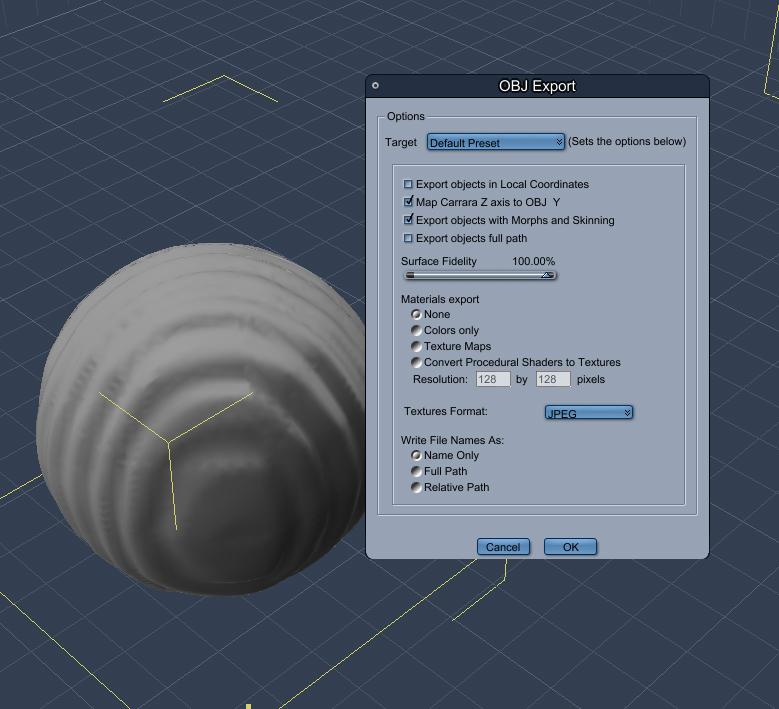
in Carrara you take the object with the displacement map applied and export with 'morphs and skinning' - please see below window
I hoped studio has a similar feature
 Strand-Based Hair Edit Please
I personally would love a way to turn polylines into editable strandbased hair albeit without simulation abilities
since apparently nobody will buy DAZ hairs if they allowed that in spite of the fact we all happily buy every other product even though Blender exists
if that were possible, I could use Zbrush, Carrara, Poser hairs or polygon hairs converted to lines in the editor, I already CAN import them and turn them into curves so it's not replacing anything
just giving a starting point from software I find easier to work in as I suggested before,
LAMH is even easier to use than that editor
Free Toon Characters coming July 1st, early download available nowStezza said:


Brilliant! Thanks for showing that Webboids can be a little Wacky!
Carrara Users for the Win!
You guys rock!
Sadly, now I'm craving chocolate for breakfast again...
Free Toon Characters coming July 1st, early download available nowBunyip02 said:
Having fun !
Female this time !
Great stuff, what a fun bit of stuff to wake up to! Thanks for testing the Webboids out in Carrara, much appreciated.
Now that I have a couple of older iMacs running as remotes in the basement, I should be able to install Carrara Pro again and give this a try myself once I've cleared my desk of a couple of other projects.
How to export an Obj with displaced mesh intact from Daz Studio?Gordig said:
Are you baking the displacement into the mesh in Carrara? In all the programs I've used, texture displacement is just that, unless you add whatever appropriate modifier applies the displacement to the mesh itself.
Thanks Gordig, yes in a way it is baked in Carrara. You make the displacement visable in the assembly room and export an obj with morphs and skinning applied/ Cant see an option for that in studio :(
How to export an Obj with displaced mesh intact from Daz Studio?Are you baking the displacement into the mesh in Carrara? In all the programs I've used, texture displacement is just that, unless you add whatever appropriate modifier applies the displacement to the mesh itself.
How to export an Obj with displaced mesh intact from Daz Studio?Hi, I wondered How to export an Obj with displaced mesh still evident from Daz Studio?
Ie in studio I add displacement texture - looks fine., But when I export the obj I just get the original mesh of the obj with no displacement applied/
In Carrara you can do it, so I guess there is a method in Studio?
thanks in advance for advice :)
Off Topic Thread #2good to see people blending carrara with other apps
Off Topic Thread #2Steve K said:
3deedlin said:
Both are good. Vue and plant factory also work well in Blender. Haven't tried the plants in C. Really amazing what an allrounder C was for it's time. I got the 8.5P on a recent sale just in case. Carrara wiggles it's way into your heart.♥ Wanted the 64bit version. It totally choked on a LAMH OBJ model though.It's weird cause after 100% import, which took foreeever. It reached it, but just stared blankly back. Lol. Then the other attempt ended w/ the rest of the OBJ coming in as some kinda blob. Probably, coulda converted it. I did get it to work okay in Blender though.
Yes, Carrara has become second nature to me, I don't have to think how to do something, just what I want to do, especially for animation. And I've pretty much learned what will import and what to avoid (DAZ Studio files are iffy). One of my alltime favorite VUE model vendors switched to Blender a while back, but I just can't get my head around it and do not (yet?) have the incentive. Happily I have a good collection of his earlier VUE models. I used one in this animation done mostly in Carrara (one of the VUE scenes attached, the yacht is imported from a Poser format model which Carrara also handles nicely):

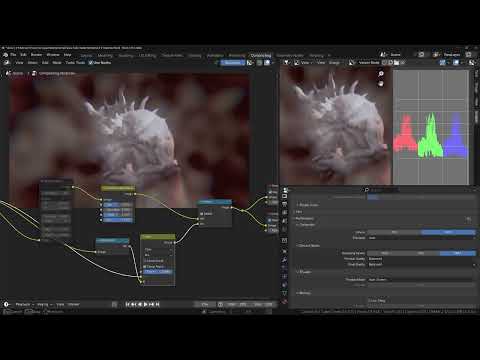
Very Nice! The last V of Blender (4.4) had some nice improvements, however, 4.5 is gonna be big. Just around the corner.
This is the 4.5 Alpha Compositor. Impressive!
 Off Topic Thread #2
Stezza said:

 interesting
HaaHa! Yeah the title was a little click baity, but interesting. Curious they didn't say Carrara, but Ray Dream.
Buy Something That Doesn't Work in Carrara? Post your Questions and Workarounds here. (please)Another tip for Premier members and/or folks who have Mesh Grabber:
In Daz Studio we can use Mesh Grabber or Studio Premier's Geometry Scultor (Mesh Grabber on Steroids) to reshape directly while the figure is wearing the item (or not) and then save the results as a morph directly from Mesh Grabber or Geometry Sculptor. Then save that as a new garment to retain those new morphs.
I did this all the time in Carrara, however, without Mesh Grabber. I just couldn't reuse the results in anything other than Carrara - which was fine for me. I'd just save the new garment as a CAR file in my browser.
We can make morphs in Carrara - but I often just left it as the new shape.
Buy Something That Doesn't Work in Carrara? Post your Questions and Workarounds here. (please)Thanks Dart - was wondering if the obj morph from Carrara might be the sloution. Will be interested in what Wendy thinks !!!
Buy Something That Doesn't Work in Carrara? Post your Questions and Workarounds here. (please)Another option if you have VWD Cloth and Hair with the Carrara plugin:
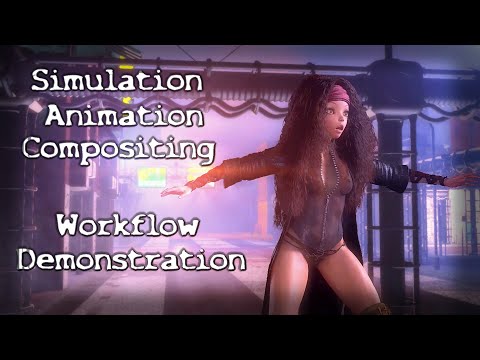
At around 3:35 in this video I start talking about using VWD for the J-Suit. When I do, I mention that "I've already converted this one to a Prop". No need to do that. We can just leave it a conforming item.
The reason I'm referencing this dragged-out, babbly video is so that you can see the collision distance and friction settings I'm using, and then see how I Glue the item to the figure.
Notice that the j-suit is much smaller that the figure - poke-through everywhere. For this, I used morphs to do that on purpose to make the suit skin-tight.
At around 7:30 I show how I'm adding the parts of the garment that should retain their shape and not flow with simulation by adding their material zones to the Rigid group.
Keep in mind that, in Carrara (as well as DS) we can always assign New Material Zones if we need them for purposes like this
 Buy Something That Doesn't Work in Carrara? Post your Questions and Workarounds here. (please)
Possibly.
It might be working in Daz Studio, but not in Carrara, if within Daz Studio the clothing is using the Smoothing Modifier
(with item selected in Scene pane > General > Mesh Smoothing)
If there is Not as Mesh Smoothing listing under General, then that's not the problem - but it likely is.
I really Wish that Carrara had that same modifier - maybe it does and I don't know about it? In DS, it works So Well for So Many Things. And many things - especially tight-fitting clothing (and clothin in general, for that matter) rely upon it.
The only possible solution for this for Carrara that I can think of is to reshape the mesh to fit the Semi-Realistic morph, export that as an OBJ. The import that into the original item in DS using Morph Loader Pro as a new morph. We'd likely have to dial it ourselves in Carrara manually, but it should would - albeit not neccesarily with all poses.
Daz 3D is part of

Connect
DAZ Productions, Inc.
7533 S Center View Ct #4664
West Jordan, UT 84084Licensing Agreement | Terms of Service | Privacy Policy | EULA
© 2026 Daz Productions Inc. All Rights Reserved.