-
Transferring D-former morphs?
For a Genesis figure that should happen automatically when the morph is applied to the figure - if it doesn't, click the gear icon on the morph's slider, Parameter Settings, and make sure AutoFollow is checked. For earlier figures using the parametric rigging system (Victoria 4 etc.) right-click the figure and select Transfer Active Morphs; if that doesn't work, again check AutoFollow is on
Transferring D-former morphs?Hi all, once I spawned a D-former morph for a figure, is it possible to transfer it to clothes to make them fit over the morph? thanks.
Transfer Utility issue - absent morph slider?G2F Shoulders Scale is not really a "morph". It is just a controller that scales the left and right collar bones. It adjusts the Scale parameter in the transforms. Perhaps that is why it behaves differently than the other morphs you are using.
 Transfer Utility issue - absent morph slider?
Hey,
I've read about resolving various issues with the transfer utility when it comes to clothing created for morphs (i.e. not the base Genesis 2F model), but there seems to be something strange going on with a particular item of clothing i've made. The transfer utility applies all the morphsto the clothing, and I can zero them no problem, but this is the problem; it's as if the transfer utility has "baked" a morph into the clothing and not provided a dial to zero it, meaning I can't get the the default shape back.
Attached pic shows the issue i'm having -
1. Imported clothing .obj;
2. Transfer Utility used on clothing;
3. Dialled morphs on clothing to zero; <--- This is the issue. As you can see, everything's dialled back to the default shape, but the shoulder section remains incorrectly morphed
4. Dialling back the problem morph on the figure solves the problem, as the clothing returns to default... but now the figure has the wrong shoulders.(Hidden figure to compare clothing shape to 1.)As you can (hopefully!) see, the issue seems to be that the "Shoulders Scale" morph has been applied to the top, but since there's no slider for it I can't zero it with the rest of the morphs. Fortunately it's a pretty basic top so I could always remodel it to fit the base G2F figure, but I find it's a lot more accurate to model clothes based on the final morph...
Any ideas how to remove the morph for the clothing?
(Or some way to transfer with "use nearby vertices", though i've tried that several times and it doesn't seem to work as i'd expect in DAZ as opposed to Blender; it still applies the morphs and skews the clothing)Legality of Selling ArtThis is the important part of the EULA, as far as you are concerned
Terms of Use. Two Dimensional Works. Subject to the terms and conditions of this Agreement, User may (i) access, use, copy and modify the Content in the creation and presentation of two-dimensional animations and renderings, (ii) incorporate two dimensional images (including two dimensional images that simulate motion of three dimensional objects) derived by User from the Content in User’s other works, and (iii) publish, market, distribute, transfer, sell or sublicense User’s two-dimensional animations, renderings and other works; provided that User may not in any case publish, market, distribute, transfer, sell or sublicense any renderings, animations, software applications, data or any other product from which any Content, or any part thereof, or any substantially similar version of the Content can be separately exported, extracted or de-compiled into any re-distributable form or format.
Subject to the proviso that there is no way any part of the original content can be extracted.
Isamu - very good looking, but middle age? Seriously?Okay, who called this kid "middle aged". No wrinkles around the eyes or on the brow? No battle scars? For a middle aged fantasy warrior, he must have some sort of enchantment spell on him. Nice model but too youngish looking. Add a few wrinkles and some grey in at the temples, maybe a few battle scars and you will get a proper middle aged warrior. Any wrinkle morph packs out there?Luxrender: Reality or LuxusTo the best of my recollection reality was the first plugin available for luxrender and it is available for DS and Poser. Luxus is not open source, it is sold here at Daz and is available for DS and Carrara. Luxrender is open source and supports OpenCL as Richard said so any advanced graphics display should support OpenCL to some degree.
As for rendering, materials need to be tweaked since lux is PBR and DS or Iray "shaders" won't translate but otherwise both plugins call the same render engine so the only difference will be surface settings. One of the coolest features of lux over Iray is the film response settings so you can simulate kodachrome or ectakrome etc. film stock.
As to batch rendering, luxrender does support batch renders with specific stop conditions but that needs to be set up manually. Also it is very easy to set up network render nodes so more than one computer can contribute to renders without paying outrageous licenses. So you can have lux running in the background on your wife's computer and set it as a network node on your main computer without needing to have DS or anything other than lux installed on your wife's computer since lux will transfer everything needed for it to contribute.
Hexagon export to daz bridgeI am a day old with hexagon although been using day for awhile. I have a model in hexagon, saved it, selected the entire object and hit the export to daz, and then nada, zip, absolute silence. Nothing happens. I have windows. I want the object to transfer with rigging and surfaces as it appears in hex. I know I am missing a step and the manual is of no help, videos show the button being used, so I am sure it is me.
I appreciate your input. What step am I missing?
Thanks
Skinchangers - More fabulous from Sixus1had a go it's all one morph basicly did find in shaping tab some head morphs had to unlock but didn't get as good a shape on Ivan's head kinda interesting but not wolfish with the main one it's humanistic but heavily muscle toned and lehs still same
Rigging HairAh I often forget,, you can try, just use hair without "fit to", as if it is static prop hair, then parented to the head node. after that it can not auto follow any morph.
you may need manually scale or use the morphs which already offered for the hair (or your hand made morphs), to adjust and fit the hair shape.
I use this more myself. Auto morphs sometimes gum up the clothes or hair you are moving. The very best way is to create a morph fit in the modeler of your choice for whatever you want to use. You can reuse all sorts of things this way.
Rigging HairAh I often forget,, you can try, just use hair without "fit to", as if it is static prop hair, then parented to the head node. after that it can not auto follow any morph.
you may need manually scale or use the morphs which already offered for the hair (or your hand made morphs), to adjust and fit the hair shape.
Rigging HairIt is because, ds have ability to auto generate morph to your hair (when it fit to, and tweaked morph of actor usually set as "Auto Follow")
dirty quick but reliable way is apply smooth modifier about hair. (select hair, from top menu>edit>geometry>apply smooth modifier), then tweak parameter in parameter tab.
if default setting not work well for your purpose, you can set collsion item as "none" and test smooth type as "generic". I recommend compare with each setting and choose option.
( if set collision none, your hair just turn smooth, but not collision with Actor mesh. sometimes " generic" work well when your hair corrupted by "base shape matching" for the mesh problem, and "collsion none " work better, when you pose your hand around hair, or you can not pose hand near hair)
Or you can remove those generated morph value, with "show hidden parameter" and currently used in parameter tab. set those value as zero. then remove effected morphs,
if you hope to remove generated morph effect parmanently , you can change setting of each generated morph , in parameter tab setting, and save it as new morph with same name. it can overwrite generate morph, then it not auto follow any more.
but usually you may find too many morphs which already generated when you morph, and posing, then remove or set value as zero, about each generated morph,
check with which morph actually you need not, cause time lot^^; (though it is recommend way to perfectly remove auto generate morph effect,,) but some genearted morph actually useful to keep your hair shape without poke through,,
hi i am trying to make supergirl this pic is what she looks likeI don't think I could package this if I wanted to, due to the sheer number of morph packages involved (you'd have to have all of them), but maybe someone can simplify this a bit (use fewer, Daz product related morphs) and release their own. It's probably good to have some subtle differences anyways, so that you aren't using an exact likeness (potential copyright issues? Does Melissa own her own face and likenesses thereof? I don't really know how this part of copyright law works).
It looks like Taoz is planning to do exactly that. Looking at his pic, something seems slightly off, but I can't put my finger on it. Maybe the face is too wide? Or maybe the skull above the eyes is too short. It looks really good regardless. Mine isn't dead on either, but then that's the fun of trying to dial in faces. Also, Taoz may be working with a different reference pic, which can result in a number of differences, and different people will focus on different details even when looking at the same pic (no two people see things exactly the same way).
I've had some thoughts about this actually. I don't know how big an issue copyright is when it comes to copying private people, there's quite a few celebrities that have been "converted" to 3D models and just sold under different names without any references to the reference person, in which case it's probably hard to prove that you have copied that particular person. You probably can't create any reasonably normal looking 3D character anyway without it having a very close resemblance to one or more persons somewhere on this planet.
I've realized though that personally I don't feel good about intentionally copying any living person, no matter who or what they are, as a 3D model, and sell or distribute that model, without their explicit wishes or consent. So for that reason I've dropped the project. I wouldn't mind creating a model of Supergirl, even with a close resemblance to Melissa, as Supergirl is a fictive character which is a different story or context, but I fear there might be some copyright issues here so I have no plans for that either.Daz to Blender bridge.Some kind of script for Daz that prepares a model(s) for transfer over to Blender, would be fantastic.
Hi
Do you mean for rendering in blender or modeling operations to send the geometry back to DS, like the Zbrush bridge??
Both, actually. I'd love to see the same kind of bridge that Zbrush has, but for Blender. And I'd love to be able to carry over my Daz characters to landscapes and environments I create in Blender. For instance, I just completed a kitchen model, and I'd really like place a Daz character in it to give it human context.
Eye Caramba for V4 and M4In this preview, I love how the refraction of the cornea is filling up with the colors of the iris (instead of just seeing through the part which would otherwise appear to be clear).
I'm really looking forward to see how well I can achieve my ever-so-sought-after (by me, at least) "Iris Gleam", which causes the opposite side of the iris to 'glow' from the side of the face which is lit - so if the bright highlight of the face is on the ring, the left side of the iris is what glows.
It can be common to get eyes to stand out by using an iris texture in the glow channel, which can be fine for stills. We'd just blacken out the texture on the appropriate side to create the appropriate gleam.
I started really getting into this watching the Clone Wars, as the seasons progressed and the team got better at their techniques, it becomes obvious that Iris Gleam was also part of the direction - and it really adds to animations of eyes, especially for emotions.
To do this, I've been trying highly concave irides - that I've been able to better achieve using Arki's awesome EYEDeas figures. But I have a feeling that a flat set of irides might just work beautifully.
My challenge was to keep away from the glow channel, and have the scene lighting create the glow and interact with the cornea/iris relation, so I began by using the highlight channel in combination with adjusting the highlight size onto the Iris using the shininess channel interactively. It's been hard to show in my still examples, but really works great so far. I love the V4 and M4 versions as they just conform to the figures. Genesis (1 and 2) has been more of a challenge, using parented eyes - but I still like the EYEDeas better that the original mesh.
But I bought Arki's after my first, very fast, down and dirty test of creating a simple morph on the irides, and it worked!
So I am really looking forward to trying this. Also, the version of EYEDeas 3+ I'm using on M4 and V4 use the same texture maps as those used by M4 and V4, so the shaders from this kit will be a fun experiment on those! Still, the version used on Genesis (just to try something different - try Arki's amazing art) are mapped specially by Arki and use her custom maps - I could still try these shaders and switch out the texture maps - perhaps try to make some custom Normal maps? We'll see ;)
Either way... I'm really excited about this!
Daz to Blender bridge.Some kind of script for Daz that prepares a model(s) for transfer over to Blender, would be fantastic.
Hi
Do you mean for rendering in blender or modeling operations to send the geometry back to DS, like the Zbrush bridge??
Exporting a Scene with Parented Objects?Ran into a little snag here. I've got a scene set up with a Genesis 1 figure and some imported 3D objects parented to it as custom props. These are items I made in Blender, not officially-supported, fit-to-figure DAZ props. I've parented them appropriately so that when I move the figure the objects move with it - i.e., the items on the forearm move with it when I bend the arm. I considered using the transfer utility but that doesn't work for my needs as it causes the objects to deform when the figure moves instead of just rotating or moving but keeping their shape. The issue I'm having is in trying to export the scene. When I export it to DAE or FBX, no matter which options I choose, I can't seem to get the objects to stay parented to the figure in the exported file. Instead they separate from it, return to their original sizes and positions (I scaled and placed them on the figure within DAZ), and do not react when the figure is moved. Is there any way to get the exported file to retain the parenting, size, and positioning of these objects?
Thank's Linday for Satine!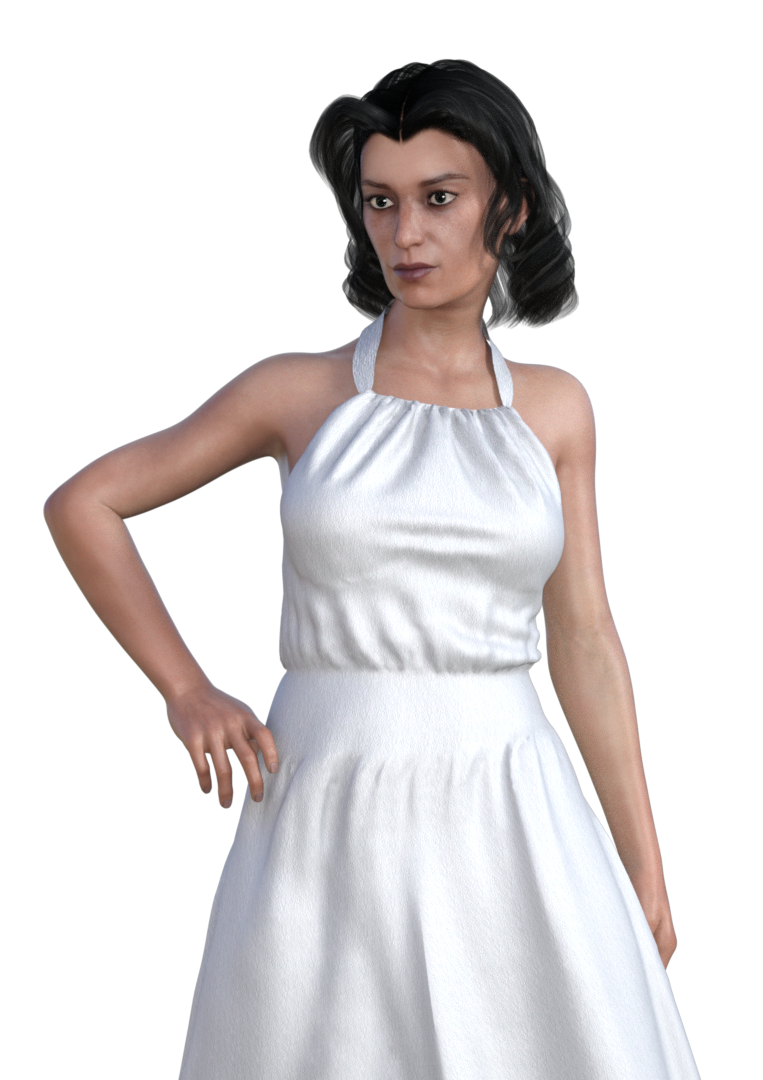
Ended up buying her...here is a test render. non-NGS2 version, default makeup, default lighting. Monika dress with the transmap turned off and Tandy Hair with UHT2 shaders.
This character comes with two versions of her physique, the more extreme one you see in the swimsuit promos, and a less extreme one that cooperates better with clothes (which I am using here). Eyeshadow makeup and lipstick are separate presets, just the way I like them, rather than dumping a full face of makeup with each preset and making you take it or leave it (or tediously hand-tweak it in surface). Freckles, as with many people IRL are not terribly obvious unless you go in for a closeup.
If I had to guess, Linday was using some very golden, outdoorsy lighting for the promos, like Skies of Iradiance.
I like her. Very convincing skin, very strong personality in the morph. She kind of looks like a cross between Elsa Lancaster and some French actress I can't place.
aniblock walk cycles for Genesis3?Hi My advice is this:
Spend $7.50 and get this bundle from Bonetech3D, it has many walk in place aniblocks
for the G2 male
https://www.daz3d.com/locomotion-pro-animation-bundle-vol-2Get the FREE script discussed in this thread:
https://www.daz3d.com/forums/discussion/109961/pose-and-animation-conversion-for-multiple-generations-of-daz-figures/p1Use that script to auto transfer your newly purchased G2 male walks to the G3 male
Save as aniblock for G3 male
I can confirm that it works great!!!!Its actually vol 3 that has the walk in place aniblocks not vol 2. Unfortunately its not on sale at the moment. (vol 2 is all different types of sprinting/ running), Within Vol 3 its subdivided into Locomotion Variety Pack vol 1, 2, 3 (the walk in place cycles are in Locomotion Variety pack vol 2 found here), but this is not the same as the separate Vol 2 which you linked to. I have all the volumes, and the labeling is very confusing. And thanks for the link to the script, I wish I had seen that sooner.
Do the animation conversion V4.2 to Genesis and Genesis 2 Female work on males?Oh, I FWIW I used initials "For What Its Worth" to describe the technique I use to transfer and adjust animation between BIPED figures. Its more tedious than running a script and only rigged bone joints are captured by BVH. It will not transfer morphs.
Daz 3D is part of

Connect
DAZ Productions, Inc.
7533 S Center View Ct #4664
West Jordan, UT 84084Licensing Agreement | Terms of Service | Privacy Policy | EULA
© 2026 Daz Productions Inc. All Rights Reserved.