-
Some Morph is distorting my G3 female's body - but I cannot identify it (Solved)
Congraturation. then I hope to know, which d|s 4 version are you using ?
About old daz studio 4, when current value is not default (memorized) value, those parameters are shown as "currently used" . then if morph set default as 1.0, it will be loaded with the value, but not shown as currently used.
But daz changed the way, with up-date.
about recent d|s versions, (after ds 4.7) when current parameter value is not zero, the parameter will be shown as "currently used" in parameter tab (at least with "show hidden properties" , even though default value has been modified.
It is discribed like that,
"Back to Base"
Selecting the “Currently Used” filter in parameter based panes now displays properties with a value that differs from the base figure value, instead of the properties that are different than their memorized values. For example, loading the Olympia 6 Character Preset will now show the Olympia 6 shape(s) as “Currently Used” because the morph property has a value that is different than the Genesis 2 Female base.
That means if Nurwen Body.dsf are auto- applied, current value is not zero, and genesis3female.dsf do not discribe , morph values as default. there is case, genesis3female.duf (character preset) save those moprh value, (if overwrite without intention) but other g3f character preset, never load the Nurwen body.dsf with the values.
then the parameter need to be shown as "currenlty used" . if it not work about current ds version (4.7 later), there seems clear problem which DAZ need to know. (I have never seen exceptional case, then hope to know, actually there is case, "currently used" not work as daz dscribed )
I do not have the prodcut, then serch it , and I checked read me, vendor said, it made by 4.9.1.3.0 in read me,, then I think, if you overwrite genesis3female.duf without intention. if so,, you may better, re-install genesis3female essential kit, then genesis3female.duf return default. (not include the morph values).
Some Morph is distorting my G3 female's body - but I cannot identify it (Solved)I had not enough time during the last week, but now I could identify the morph which was causing the changed geometry.
I found no other way than to remove all folders in My Library 3\data\daz 3D\genesis 3\female\morphs\ folder which had been changed since my last working backup. Fortunately I realised that there is a better "narrow down" strategy than to copy them back one by one and test each time: I took one half of the folders, tested; then the half of the remaining folders, tested, and so on. And in the moment the distortion was back I removed the half of the restored folders/morphs again. So after four iterations/tests I found the "evil" morph - it was the "Nurwen" character from a well known content source.
The only little problem was that the body modification morph (Nurwen Body.dsf) of this character is loaded automatically for every G3 female with a value 1 (or 100). Of course that's a mistake from the vendor. But that active "default" morph is not shown under "Currently used" - that's a bug in Daz Studio.
Thanks to all people who posted comments to solve the problem!
Help finding a product.I was wondering if anyone knows what shirt/vest this character is wearing in this picture. The one circled in red. I had hoped it was a shirt in this product with a morph applied but no such luck. (No big deal. I wanted this outfit anyway) I recognize the hat from the Iconic outfit but don't know where the shirt/vest came from. I like the rolled up sleeves. Any help would be much appreciated.
Molly HD for Genesis 3 Females (Commercial)Hi Guys. Here is a sneak peak of Molly. I created her to showcase Growing Up but never really had the time to release her, but now I have. That incomplete folder on my desktop was working on my nerves lol.
Some of Molly's features-
- Contains her own added jcm's for corrections.
- She is a custom sculpt with separate head and body morphs with slight asymmetry in the face.
- Contains separate head and body HD morph details.
- She can be customized by adjusting the used Growing Up and Molly Morphs.
- Two skin variations, freckled and non-fleckled, both with browless or added brow texture options for Iray and 3Delight.
- Molly comes with a Morphable Fibermesh Brows set which contain morphs to create a wide variety of shapes that can also be used on any character for Genesis 3 Female and Genesis 3 Male.
Is V5 a genesis character?Yes, Victoria 5 is a morph from the Base Female Geneeis figure
Daz Studio's Render Engine Not relevant???I make my renders mostly in Daz Studio iray, Poser Superfly and Firefly, Unity and Bryce. Wish to learn how to make the good renders in Blender,
but I have not figured out, how to transfer materials from Daz Studio assets, that looks good in Blender, yet.
Is V5 a genesis character?I loaded V5 into Carrara and noticed the name "Genesis" under "Victoria 5" in the instances tab. I need to know which add on items I should purchase. Genesis 1? Genesis 2 etc? V5? I am confused. I think I understand that Genesis is a character that can morph into almost anything. Is V5 a morphed Genesis character?
How to transfer a morphHello. I have a G2M figure with a morph I've made on Zbrush and now I want to transfer that morph to other G2M figure. Is there any way to do that in Daz Studio? Only transfer that morph from a G2M figure to other G2M figure. I dont want to save as a morph asset because i just want to use that morph on those two figures.
Free Belly Button Morphs for Genesis 3 Male(s) & Female(s)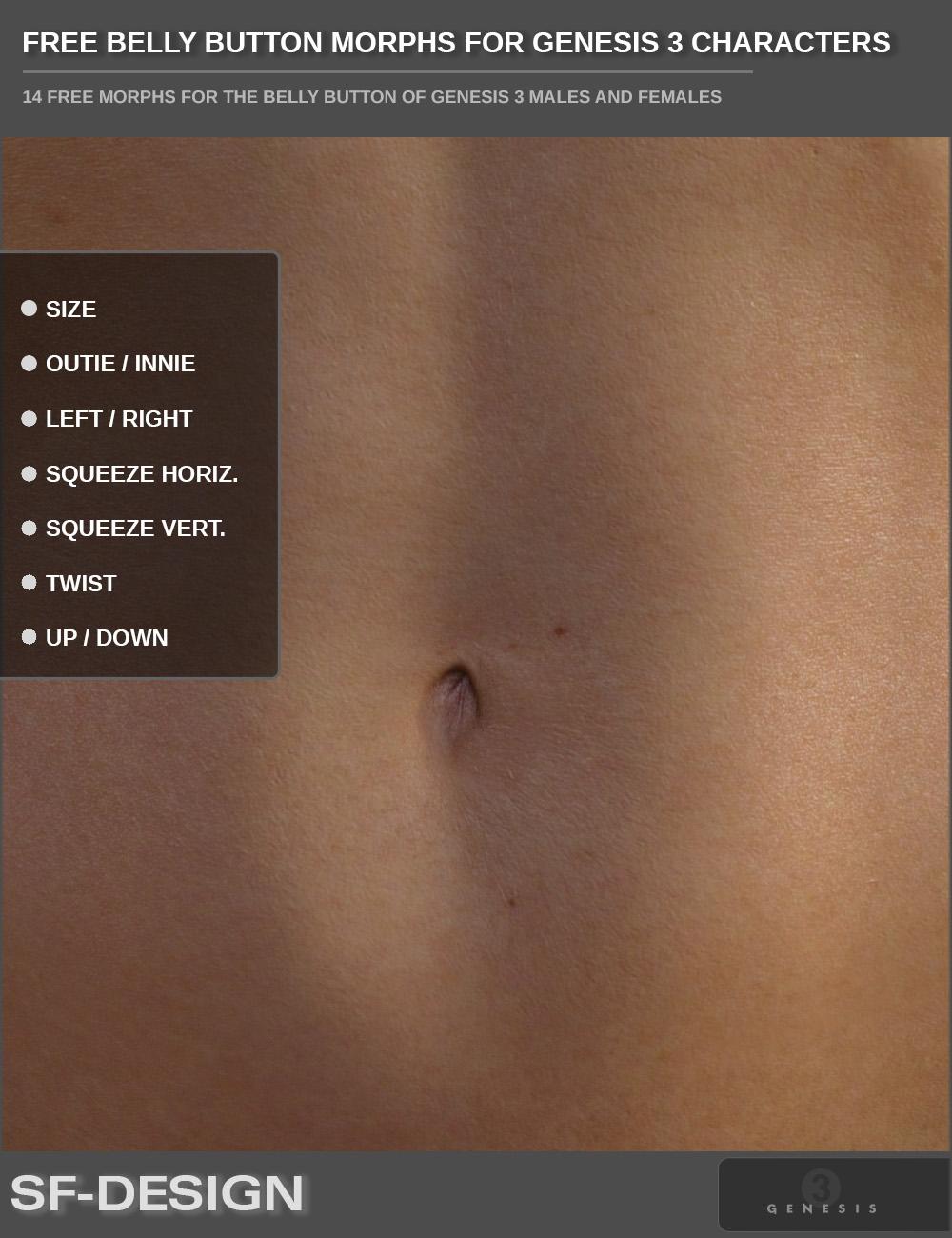
7 morphs for Genesis 3 Male(s) and 7 morphs for Genesis 3 Female(s) to adjust the belly button:
- Size
- Up/Down
- Left/Right
- Twist
- Squeeze Horizontal
- Squeeze Vertical
- Outie/Innie
You will find the morph dials in the Waist / Real World Section.
Hope you find it useful.
DOWNLOAD
This FREE PRODUCT is not a MERCHANT RESOURCE and may not be used to create free or commercial products.
Redistribution of the content at whole or in parts is not permitted. Neither all nor single morphs maybe included/copied or extracted to create other products (free or commercial).
FREE does not mean free of copyright. The free morphs may be used to create private and commercial 3D Art (images).
Visit my DAZ Store for more productsDynamic clothes Gen 4 to GenesisWith Optitex Clothes... You should be able to get an M4/V4 optitex outfit to work on genesis characters by generally setting up your genesis character size to be as close to the intended optitex outfit's target character (e.g. M4) in a t-pose as possible, then animating the size/shape and pose/position of the character to its target/final state *in the outfit* over as few frames as you can get away with. I usually expect to use 30-60 frames to get a character's shape *and* pose to my target pose/position in most scenarios, with some more frames (15-20?) for settling. To get an M4 optitex outfit to Micheal5 in a pose, try:
- fresh scene, load your genesis, T-pose
- open DS timeline (animation), be sure you're in the timeline's 'Advanced View' w/ right-click on the 'Timeline' *tab' and enable that, else you can't see the keyframe icons!
- frame 0, shape genesis to M4 (if you have the M4 shape!, if not, resize your genesis to get close to M4's size), then set the keyframe (little key with plus on DS timeline)
- frame 15, re-shape genesis to your M5 (or whatever shape you want), set that keyframe
- frame 30, pose M5 to your preferred pose, set keyframe
- frame 45, do nothing, set keyframe (settling, just because)
- to test things so far, scrub the animation 0 to 60, and Genesis should start as M4-ish shape, morph to M5 Shape, then migrate to your desired pose/location, and stand there for a bit
- go back to frame 0
- load optitex M4 outfit into scene (merge)
- still at frame 0, *move* outfit to best fit the genesis M4 shaped t-posed character. DO NOT SCALE optitex clothes. Doesn't work. Set Keyframe 0 again
- open Dynamic Clothing Tab
- select cloth item, set 'affected' setting to 'all selected cloth'
- set mode to 'animated' (vs single frame) drape
- open 'collide with...' tab and only select things that might collide with the cloth. (I unselect the cloth itself...)
- open prameters tab, set 'self intersection', and 'face body intersection' (at least to start - play with these later)
- on DS timeline, set scrubber to frame 0
- In Dynamic Cloth tab, press 'clear'
- press 'drape'
- wait/watch while simlation runs, press cancel to stop the simulation anytime if you like it. It doesn't erase, or undo anything. It just stops it there, and all actions until that point are fine.
- scrub back and forth in the animation tab (play it) to see the draping in action. Pretty neat.
(at this point you can change settings, poses, gravity, materials, etc., and 'drape' some more, and it will continue from there... handy!)
- If you don't like it, set the scrubber back to 0, and press clear (yes), and 'drape' again, and it will start from scratch. Before each drape, or after you cancel, You can change M4/M5 morphs, poses, locations, etc. and/or adjust optitex outfit materials, and 'drape' again. You can add frames to the timeline, and continue to drape more, and change poses/shapes, etc. if you like. Everything is a work-in-progress at this point.
- save the scene/scene-subset every-so-often as you progress through the adventure (I use numbered versions to be able to go back if I mess things up)
- repeat to taste, and when you like it, you can either render it right there at the frame(s) where you like it, or, save the scene and come back/load/merge it later with othr stuff for rendering, or, 'freeze' the resulting animation as a scene by right-clicking on the dynamic clothing tab and pressing the 'freeze' option.
NOTE: the outfit becomes non-dynamic after 'freezing', and you'll have to load a new original outfit again and redo/redrape things if you wish to change things after freezing. Once frozen, tho', the clothing item can be exported as an animated 'thing' and loaded into other software (FBX/alembic/PZ2. @th3Digit has some experience migrating animations around that might be helpful if you have questions).
Also note that when reloading a saved dynamic draping scene (non-frozen), you need to reset the 'collide-with' settings again, but other settings seem to stick pretty well.
I hope this helps with the big-ideas (you have to nudge dynamic clothes around and stretch into them), and I hope the example is clear enough to get you going. It's kind of cool to play with once you get how it all works.
Lastly, scaling dynamic clothes doesn't work in DS. try the 'shink X % or shrinkY % settings (in the Dyn Cloth 'panel' tab) to see if that will help, and if a character is too big to start with, scale him/her down at the start, and animate the figure's scaling back up to 'stretch into' the outfit for best results. Any action that intersects or pushes though opitex clothes too radically, usually results in some very odd outfit distortions - and can be pretty funny.
Edit to add: I use sequential mode for most multi-cloth drapes, and to fix simple poke-through, you can select the coth item, enable the 'smoothing-modifier' (search for it, too long for this post/topic), and use the new parameters to fix collision and smooth the cloth a bit. I mention a bit more below
Edit to add: Anywhere a pose or figure's body-parts sandwich optitex clothes (intersecting it), you will see problems! Under-arms, crotch, knee joints,hands through thighs, etc., all like to do this. Some ways around this are to disable collision for one of the two body-parts (hands/fingers), adjust the pose, or maybe cleverly use the 'poke-away' tool to shrink the body part out of the way for those sections of the drape... esp during animations. I'm sure there are other ways to do this, but you'll know it when you see it...
cheers,
--ms
Centaur 7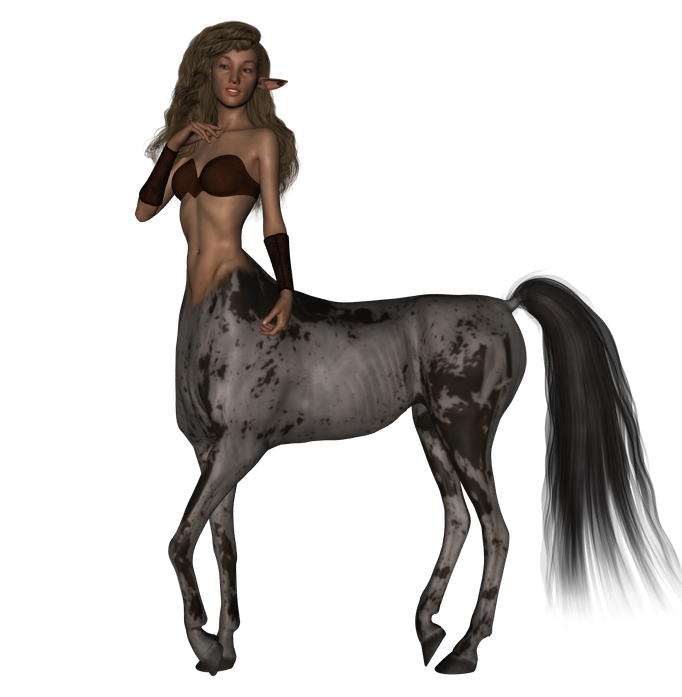
okay so got rid of the toon and played with the avaiable morphs ,maybe if we ask nice some talented person could make a delicate /unicorn morph for the centaur
Centaur 7RawArts Rheena!!
FSMCDesigns you gotta check out RawARTs character for the Centuar!! it fixes the join ........me I'm just HAPPY!!
True, but then I would have to get the base and Rawarts product. Basing this on past experience, can you dial out Rawarts morphs, or is it all or nothing?
@FSMCDesigns - When I saw her today, I thought of you. I still think you have the best looking "centauride" around! Her curves are beautiful and graceful.
LOL, thanks. yeah, I really want to invest in her, but not sure if I can morph her close to what I like. I am just not into the stocky, barbarian look on a female centaur.
Carrara Sale Email Message Alert threadWow, I'm hanging out at the wrong baseball games! $5.98 for a beer? I have to pay $9.00 for a Bud Lite at Nats Park. $8.00 for a Natty Bo in Camden Yards. Not even sure either beverage qualifies as beer. Fortunately, these days there are more options, although those tend to be more expensive.
I should say that I will use any figure depending on the circumstances. Some of the older figures that I have used within the last 5 or 6 months include the Kids 4, Vicki 3, Simon from Poser 7, Pumpkin Jack, Gobbles, and the RDNA unidwarf. Speaking of the unidwarf, did the RDNA goblinz and unidwarf not transfer over to Daz with the merger? However, if I am just starting a project with a generic human figure that I will be doctoring up, I generally start with genesis 2 these days.
Apparently, my experience with Genesis 2 has been different from Dartanbecks. If I am rendering in Carrara, then I have the least difficulty if I do as much as possible directly in Carrara. I do use the transfer utility in Studio if I am making custom conforming clothing. For me, the kinds of problems that Dart reports only occur with the very earliest content for the original genesis that used external dsf files. The irony was that that was the Genesis content included with Carrara 8.5. I remember complaining about it in the thread I maintained while experimenting with Genesis. Might save people having to reinvent the wheel. Please remember that this is an older thread so some of the issues reported may have been updated elsewhere.
Centaur 7RawArts Rheena!!
FSMCDesigns you gotta check out RawARTs character for the Centuar!! it fixes the join ........me I'm just HAPPY!!
True, but then I would have to get the base and Rawarts product. Basing this on past experience, can you dial out Rawarts morphs, or is it all or nothing?
you can simply use the materials and not use Raw's morph at all and there is a morph dial so you can add in as much or little as you want ......
Starship/Sci-Fi officer uniforms, Genesis 3When it comes to Sci-Fi uniforms, you do tend to have a few kinks to work out. I think there needs to be a happy medium between Star Trek and Babylon 5/BSG. I think there should be the high collars and strong shoulders of the militaristic style, but brighter color options of a more exploratory feel.
Now, the DAZ Library DOES have some pretty good Sci-Fi uniforms... but they are outdated and even with tools to auto-fit to Genesis 3, they still leave a lot to be desired. I think the last halfway decent sci-fi uniform was for Genesis 2 male. It was all right, but it kind of reminded me of low budget British Sci-Fi shows from the 70’s- early 90’s. There was a lot of great idea with Genesis 4. The Space Defenders series was a fantastic jumping off point… but I will come back to that.
I think what people want in Sci-Fi uniforms… What I want in a sci-fi uniform is detail. This isn’t something you can really do with just one outfit fitted over a G3M or G3F. Based on body type, there should be meshes designed for both body types and along all the morphs that come with them. I really like the Interstellar Officer uniform, and am impressed with how it fits on both male and female figures. The downside I’m finding, is that when I apply it to a G3F, since it’s reacting more like a morph than an outfit, it tends to deform if you turn the head or other body parts.
What I really liked about the Space Defenders series was that there were SO many options. The New Adventure Continues series was similar in that, while it didn’t offer much in the way of outfit options, it DID offer a lot in the way of customizable insignias and textures.
Space Defenders, had it been designed for Genesis 3, would have been FANTASTIC, and should probably be used as a baseline reference as far as clothing options. To that end the hypothetical Genesis 3 series should contain the following for both G3M and G3F.
Admiral/High Commander.
Captain
Officer
Security
Medical Doctor
Nurse
Enlisted
Casual
I think all options above Enlisted should have some kind of high collar and squared off shoulders for a more formal look which covers the entire series. I also think there should be a skirt option for G3F, for officers who would prefer a skirt over pants (but can still wear them if they choose). It might even be an interesting novelty (certainly never seen before) to include a utility kilt option for G3M officers. The Utility kilt is kind of a new thing, but it’s never been seen before and it would certainly get people’s attention.
The highest-ranking officer should probably be the most formal… usually represented with an overcoat of some kind. An added option could also be a long skirt with a high slit up the side for a G3F option… formal but elegant.
Captain should be similar to the officer, but with an added little something here, or there to make it stand out… kind of like Captain Picard’s jacket over his grey uniform shirt… not necessarily a jacket LIKE that, but something that sets them apart.
Officers… standard really. Formal high collar… broad shoulders… possibly a hat for added effect (which might require a unique morph for hair… I’m already having issues with the hat helper)
Security officers should stand out and maybe have the least amount of diversity. They should probably look more like soldiers, than officers, but with at least a little bit of formality for coordination sake. They should probably coordinate the most with the enlisted uniform while still being a little bit more formal… sort of a bridge between enlisted and officer.
The Doctor should be sleek… There should be some kind of white element. I always liked Dr. Crushers lab coat (but not its color) as it makes the medical personnel stand out. I think there should be a more formal medical officer for the doctors, while the nurse should coordinate, but maybe be a bit less formal… and there should be options for all genders.
The enlisted should look more like field uniforms. The interstellar patrol series, for both G3M and G3F is AWESOME and is a great reference point, but these should, of course, coordinate with the rest of the series. Possibly having a similar collar to the officers (for ranking purposes) but more subdued shoulders, and more options for weapons.
The Casual uniforms would be a novel idea as well… something an officer could wear out on the town, without being too noticeable. They should coordinate with officer uniforms, but could be as simple as Tee shirts or oxford shirts, coordinating jackets you can mix with casual clothing from other G3 sets. Something that says “I’m off duty, but I am here to help in an emergency”
I think the foot ware should be diverse too. A pair of knee high boots and/or stiletto heels along with combat boots, formal shoes and maybe even casual shoes.
Rank and insignia, along with possible name plates, should probably be simple shapes that can be easily customized via Photoshop bridge. There are way too many options as far as rank location goes so I suppose that is something that would depend on the overall look of the uniform.
Another think I thought was kind of cool with the space defender series was a “sexy” option which bared the mid-drift for female officers. It really diversified the series and gave way to a whole new slew of storyline options for characters who may be wearing it. Of course, a sexy option for G3M wouldn’t go amiss either.
It would also be great if there were options for things like sleeve and pant length… possibly removing the sleeves from some, or allowing the officers to wear shorts… you know, when you might be on a tropic/desert environment. And there should DEFINITELY, without a doubt, be different color options to differentiate divisions. With Star Trek you have, Red= Command, Gold= Operations/Security (switched in TOS) and Blue for Science. This is kind of a given for Sci-Fi, although the new Discovery uniforms deviate from this, differentiating divisions with uniform trim… different for sure… kind of cool.
Below are some links to references, as well as past uniform series that DAZ has done for much older Generations. It may be a good place to get some ideas. The Fantasy uniforms on pinterest may actually be along the lines of what many people are looking for.
https://www.daz3d.com/war-hammer
https://www.daz3d.com/space-defenders-earth-force-command-v4-bundle
https://www.daz3d.com/space-defenders-security-officer-for-m4
https://www.daz3d.com/space-defenders-admiral-for-m4
https://www.daz3d.com/space-defenders-commander-for-m4
https://www.daz3d.com/space-defenders-lieutenant-for-v4
https://www.daz3d.com/space-defenders-nurse-for-v4
https://www.daz3d.com/the-new-adventure
https://www.daz3d.com/the-new-adventure-continues
Problem with Genesis3Male exportDo you really need them ? can't you use the bones in Maya and just rotate them ? the morphs are linear and does not do a "correct" eye rotation even if it's ok most of the time.
Are you limited to 0-100% morph values in Maya, there is no tweaking so you could set a negative value ? most 3D software have some clamping parameters you can set for morphs and I would guess they are set to 0-100 by default, but I am just guessing here, enver used Maya.
It is possible to set negative values for morphs in Maya, but the result is unexpected (in this case, the eyes get out of the orbits). The idea of using ready-made morphs for Genesis 3 allows me to save a lot of time on the face rigging, simply by combining several blendshapes.
Problem with Genesis3Male exportDo you really need them ? can't you use the bones in Maya and just rotate them ? the morphs are linear and does not do a "correct" eye rotation even if it's ok most of the time.
Are you limited to 0-100% morph values in Maya, there is no tweaking so you could set a negative value ? most 3D software have some clamping parameters you can set for morphs and I would guess they are set to 0-100 by default, but I am just guessing here, enver used Maya.
Problem with Genesis3Male exportThose are not morphs, they are controllers that drive the actual rotations on the eye bones. I'm not sure why one would work and the other fail, however/
I understand that, but in the fbx format it still becomes a morph/blendshape. As far as I understand, this is due to the fact that the values of this pose remain 0-100%, i.е. negative values are "cut off".
Is it possible to create a morph from a specific pose (in this case, turning the eyes) and export it as a separate morph along with the model in the fbx file?
virtual penny 4 yor carrara thoughts ?thinkin of trying Open Broadcasting Software
i luv the bandicam, but tired of recording their bannerstill need a hdmi capture for my witcher3 play.
yes xbox has an internal recorder up to 5 minutes.
there's no easy way to transfer the file to my pc.
reading something about the mbr switch, seems xbox1 runs a le of windows8 (ghastly)
used to use the fdisk mbr switch to fix boot sector viruses back in win95 days,
back in my days of 'operating' AS400.was about to order the roxio kit, but then read some seriously neg reviews on amazon.
dont want to spend my xeon saving on a 'serious' kit.http://www.xbox.com/en-US/entertainment/xbox-one/live-apps/upload-studio
you should be able to download that and get the one drive link, you can even share just the link
thanks.
- doesn't seem to transfer files to usb drive to pc.
would like to back up my witcher3 game to usb too. what if xbox crashes or something. oh gawd, losing my save would catasstrophic
seems the xbox 360 could do it, for some reason microsoft removed the 'feature' in xbox1
Rheena Centaur for G3F [commercial]Looks great! Especially since there are no real barbarian-looking female models out there, just several fitness-like types. Unfortunately I'm not into Centaurs and the like - would you consider creating a "normal" female character based on this one?
Nothing based off of this one...but most of my gals can be barbarianized pretty easily......specially with my Massive Morph sets https://www.daz3d.com/massive-morphs-for-genesis-3-female-s
Daz 3D is part of

Connect
DAZ Productions, Inc.
7533 S Center View Ct #4664
West Jordan, UT 84084Licensing Agreement | Terms of Service | Privacy Policy | EULA
© 2026 Daz Productions Inc. All Rights Reserved.