-
Creating clothing and accessories
I have found a leather texture in a clothing product I already own. That texture is currently on a skirt. Is it possible to export that same leather texutre to use elsewhere...? on something larger like a sofa...? If, by somehow expanding / enlarging this texture I can actually re-apply it, can you list me the work flow steps required using the least expensive available software? Keep in mind the sofa-couch I want to re-texture is already a working model, just with a cloth texture. So I'm looking for the workflow and software requirements to remove, expand, and refit a texture to some other model. Both models involved in the intended transfer are made for the DS environment. and thxs in advance for your time....
A quick way to save smoothing/collision results as a morph.Sorry, I don't know how to do it, other than the export obj/import as morph method, which you've already considered but rejected as too cumbersome. You could submit a help request and as Customer Service for suggestions.
Looking for Canine head morphs for g2 and g3 figureshttps://www.daz3d.com/hfs-fantasy-shapes-for-genesis-3-bundle
There's a dog morph in there Lyrra :).
Laurie
Get frustrated every time I attempt to use Daz StudioI learned some basic Unity a bit ago.. I found it and Daz share a lot of simiilar interface designs. I found it very easy to transfer my Daz knowledge to Unity, so perhaps the reverse is true.
Transfer Utility on Morphed CharacterThanks. I tried Current, but the same problem...the clothing exploded.
The problem with selecting the morph I used is that it's a bunch of morphs I dialed manually, not just one.
I even tried zeroing the clothing shape after fitting it to the character, but that didn't work. Neither did "Clear Generated Morphs".
Any other ideas? Thanks much.
Transfer Utility on Morphed CharacterIn Transfer Utility set the Source Shape to the morph you used (or Current, but people have reproted an issue with that). Then in the options check reverse Source Shape from Target.
Transfer Utility on Morphed CharacterWell now I've got my final clothing, all rigged via the Transfer Utility, sitting on my morphed character, and it looks fine. It's just not fitted to the character. HOWEVER, as soon as I fit the clothing to the character, the clothing inherits the character morphs and explodes. I guess it adds the character morphs to the existing morphed shape.
So I guess the question is...is there some way to Fit clothing to a character without having it inherit the character's morphs? That would fix my immediate problem
Thanks.
Transfer Utility on Morphed CharacterOkay, I successfully exported a MORPHED G3 character out of DAZ Studio as OBJ, brought it into Blender, made a clothing object and did a nice cloth sim on it, then exported as an OBJ. Keep in mind I built the clothing over a morphed character, not the base character.
Now I brought it into Studio and it fit perfectly on the morphed character. I then did the Transfer Utility to automatically rig the clothing (selected to fit to character as a post operation), but the result was a mess. It looked like the clothing had double morphs applied or something.
So I then tried to first zero the character shape, apply Transfer Utility, and then restore the character shape, but again the clothing was grossly distorted.
I'm guessing that the Transfer Utility doesn't like that I'm applying clothing that's already morphed. But the problem is that I need to do a cloth sim over the final morphed character, otherwise it doesn't look right.
Anyone have an idea what I'm doing wrong? Maybe I need to make two cloth-sim'ed clothing objects...one over the base character, then one over the morphed character, and then do a Transfer Utility with the base clothing and load the morphed clothing as a morph target? Or is there an easier way?
Thanks.
Celebrity Look-a-Likes for 3D figures Part 2Older Jennifer Connolley tweaks:
First get Andromeda byMRL
OLD JENNIFER CONNOLLEY-
Some of the settings are a little goofy because this was a work in progress from a year ago.
Like why even have a “heavy” body setting if I’m just taking it away again with a high “Thin” setting?
I don’t know.
This makes a FANTASTIC Wonder Woman, by the way.
Morph ++
Full head and Face
Old .364
Face long 1.324
Face full -.376
Nose depth -.600
Nose height 1.416
Nose width -.372
Lower face
Cheeks sink .376
Morphs /Expressions Base
Eyes squint .535
Eyes open-close -.016
Mouth smile simple .124
Makeup
Andromeda 5
Eyes
Andromeda 03
BODY
Fitness .116
Thin .656
Young .228
Voluptuous .492
Heavy .236
ANYBODY WHO TRIES THIS, LET ME KNOW IF IT WORKED!
Celebrity Look-a-Likes for 3D figures Part 2Hi everybody! Here are my Jenniffer Connolley tweaks I sent to a nice fellow who sent me a message, but I forgot to share them with the group.
Did I forget? I backtracked and couldn't find it.
First get MRL Andromeda
All I did was make the face more fleshy, turn the nose up, and provide an expression which helps with shaping. The mouth doesn't need to be open.
After observing young Jennifer, her mouth is often slightly open and she has a blank look which translates to sweet and innocent.
The expression tends to make the mouth a little smaller, and the nose might be a little wider in the tip and nostril area. I hope I got that in.
Tweaks for young Jennifer:
Make sure you have DAZ Morphs ++ and MRL Andromeda morph applied. I'm not sure how urgent that one is, but do it anyway.
I used DAZ Long Story hair, but you might have better idea.
Nose flesh full .580
Face full .580
Nose tip up/down .848
Expression:
Brow up-down .212
Brow outer up-down .560
Brow inner up-down -.482
Eyes squint .440
Mouth open .552
Lips part .660
Lip top up-down .448
I hope this works. I've never done this before.
Old Jennifer is also a must-have, and I'll get to it right away.
MRL Andromeda provides some expressions, but haven't used
ALMOST FORGOT!
Part 2, body tweaks-
Not usually useful if the body is clothed.
Young .228
Voluptuous .492
Heavy .236
DAZ Natural Gravity Morphs for V4 could come in handy.
Preview - First Look at Avalon Hair for Genesis 3 Male (& Female)Okay, back again. The problem I was having was in the rigging; it didn't manifest until I tried to "fit to" Victoria 7. The 7cm displacement was essentially due to a slight head height difference between G3M and G3F present in the rigging. When I tried to transfer the rigging from my original model to the G3F version, it shifted the hair from the modeled position to the G3M head position. Which meant that I had to re-rig from scratch. I'll also have to make adjustments to the morphs created for the G3M version, when I transfer them, next.
Until then, here's the rigged female version:
Need idiot proof toon shader/render tut, esp for four listed...The Noir-line shaders were envisioned as suitable to apply across one's whole scene, or in front of a relatively plain backdrop. Unfortunately, they're rather resource-heavy and thus it becomes prohibitive to use them for complex or detailed renders. There's also a bug in the Specular Color and Refractive Color so that they do not transfer properly from "standard" shaders (DAZ Default Material, UberSurface, Iray Uber, et c...) which I hope to fix this year. If you'd like color-and-style presets more specific than those in the original package, I have several that just haven't made it into the store, and one set I had taken down after a wheezingly bad year. And, of course, there's the updated versions that I haven't released to QA yet...
Josh Crockett Suggestion Page for Monster Characters!A little something just for fun today. Super quickie neomorph.
Where can I purchase this morph? ;)
Tranferring head or face morphs only?A shaping preset would work, if you go through the options menu and first unceck all, then check only the groups with head shaping morphs - as long as you aren't wanting to split the effect of a single existing morph.
Tranferring head or face morphs only?Is there a way to transfer JUST head or face morphs?
I created a face on a character with the https://www.daz3d.com/genesis-3-female-head-morphs and am hoping there's an easy way to move the result to different character with body slider morphs I've already made.
Thanks in advance :)
A quick way to save smoothing/collision results as a morph.One of the biggest slow downs in workflow is smoothing modifier when trying to pose figures. The way around this is to disable smoothing > pose then enable and wait for the smoothnig process to finish which can also take a while. If you have to pose multiple figures it slows things down more. If you have multiple smooth elements with collision like Clothes and sitting impressions on a couch you get recursive loops of smoothing that never end.
The solution would be to export the smoothed figure and then bring it back in through the morph loader but that takes too much time because you have to make the whole scnene invisble except for that one figure and export it as obj. Then you have to repeat this with multiple figures. If you try doing animation problem is worse.
What I want is a script or feature that just turns the results of smoothing into a morph, where you click on the script or button and a morph is created, smoothing is then set back to 0, baking the results into that morph.
Novica & Forum Members Tips & Product Reviews Pt 8Here's the Iray Glassworx again, I posted this in the Commons but will put it here too. The floor materials are irregular looking when you use the glass shader, which I really like (it's not render noise.) The product also did the back wall, default load. You can tile to get it to have smaller squares.
We talked about the Digital Touch characters looking a lot alike, so to be fair, I wanted to take a very close look and then pick ONE to try. For me, it was a toss up between DT-Cindy For Genesis 3 Female(s) (shown below) or Eve based on the thicker, slightly more natural eyebrows. Cindy has poofier lips, but they can be slimmed easily with the morph sliders. Yolanda has nice lips and more natural eyebrows (where they start, more individual lines) and I would simply turn the nose tip and nostrils down (I don't like noses where the nostrils are really prominent.)
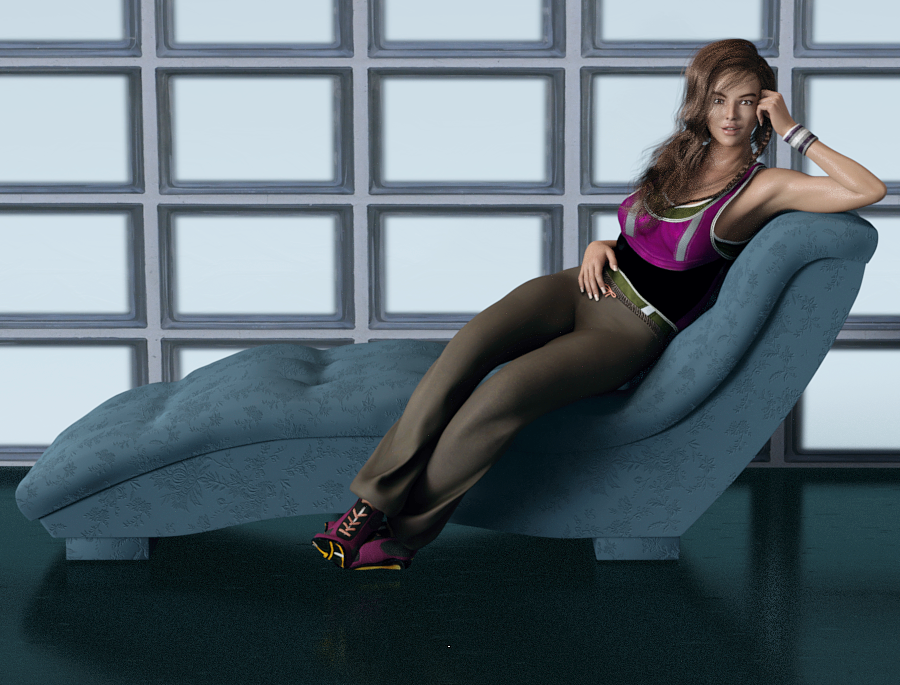
Shopped for four years, and I will admit it's my first Digital Touch female, I think it backfired on the vendor to have all the women in dark hair to look alike. They look TOO much alike IMO. This is Cindy and I shrank the bottom lip 14%, and I like her! Her materials aren't ultra ruddy, they are easily lit. It's Sapphire Hair and the chaise is included in the Bella Donna Poses, Chaise, and Shaders The pose is from that product also. It's really nice, one click and she's on the chaise and in position. (Both the pose and the chaise load World Center.)
I'll do a closeup of Cindy, then I'm headed to the barn (It's 6:15 and a lovely day, nice and cool at this time of day.)
 Reverse Source from Target broken in DAZ 4.9?
Yes those step have been used, (And I know it work
 ) though I usually save as clone about current mix morphed shape when I use reverse defomation option, (because Clone have no concern about scale proplem etc, and find it easy ,when you aplly "soruce as clone" option. it may not different from your way, make one " temp FBM" for TU.
I usually model clothing first for zero shape figure, then keep the clothing obj in my 3d aprication, later make it fit to my actor shape, sometimes you may hope to overwrite auto-generated morph individually.
Then it has been recommeded for long time, even though we model clothing for morphed shape, at first transfer weight and rig to clothing with zero base figure. not morphed figure. Though there is auto-reverse option, most of case we need to re-modify and tweak a little for zero base shape. (because auto-reverse process not work perfect, it aproximately reverse and remove generated morph from Clothing to zero shape)
I really like merge many morphs for body or head , then usually I hope to re-shape clothing for each actor shape . then may not plan start with morphed shape, without I concentrate one actor shape, and hope to make best fit item for the Actor. (but I tweak body morphs frequently,,,,)
 Released: Easy Teeth - Control Dials + Morphs and Materials for Genesis 3 Female(s) +MR [commercial]
https://www.daz3d.com/easy-teeth-for-genesis-3-female-s-and-merchant-resource
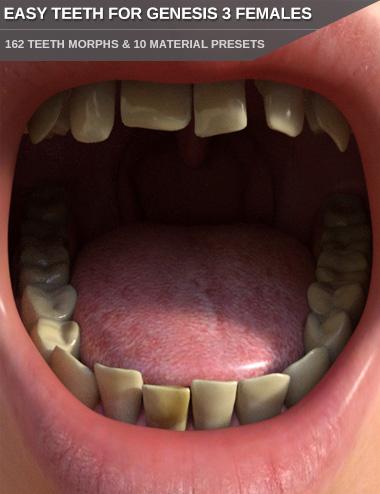
The teeth of humans never look exactly the same.
Give your Genesis 3 Female based characters some more individuality with adjusting the shape and look of their teeth.
This morph pack contains 162 morphs to adjust the shape and position of the teeth. You can adjust each tooth individually. Make them wider/smaller, longer/shorter, adjust the depth or make the tooth or several/all teeth completely gone to get a gap or loosen the teeth step-less. Great for elderly men, younger kids with tooth gaps or any other situation where a missing or loose tooth or teeth is needed. You can also move and rotate the upper incisors, lateral incisors and canines.
Included are also morphs for all teeth, like one to get childish milk teeth. Children's teeth do not look like adult ones, so this is very handy for younger characters. Morphs to make the teeth irregular are included beside morphs to make the lower and upper canines sharp (nice for vampires or other fantasy creatures) as well.
Rounded up is this product by the included 10 material presets for Iray. Unclean and yellowed teeth, different teeth tones like slightly stained or bleached white teeth, bloody teeth and one preset with gold teeth. There are also 6 shape presets included that utilize the morphs. You can of course save all your teeth adjustments as your own shape presets as well to be able to quickly apply your favorite settings later.
Overall a very versatile product to make your characters more unique.This product is also a Merchant Resource you can use to create morphs for your character products. Please refer to the ReadMe how this resource may be used.
Reverse Source from Target broken in DAZ 4.9?Kitakoredaz was right, and thanks to him I was able to find a workaround for this issue. I'll post a more detailed solution later; but here's the gist of it:
1. Load Genesis 3 Base and dial-in your custom character (in my case, this involved about 20 different dials from various morphs and vendors).
2. Save the current Shape Preset for later and model your clothing on this custom shape.
3. Set the resolution of your Genesis 3 figure to Base, Subdivision to 0 and export it as an OBJ file at 100% scale. We're going to create a morph from this OBJ.
4. Reset the shape of Genesis 3 to 0, it should look like the base figure again.
5. Use Morph Loader Pro and the OBJ created in step 3 above to create a morph for Genesis 3. Remember the name of this morph for later.
6. Dial the morph created in step 5.
7. Reset the figure to High resolution and subdivision level to 1 (or whatever it was when you modeled your clothes).
8. Load your clothes. They should fit your morphed figure.
9. Use the Transfer Utility to rig the clothing: In "Item Shape" select "Morph" and then select the morph you created on step 5 above. Also enable "Reverse Source Shape from Target".
10. Select the projection template (if applicable).
11. Run the transfer utility. Your clothes should now be rigged without distortion on the morphed figure and they should be usable now. If this is all you wanted, then you're done!
Side note: sometimes this step will create minor distortions in certain areas. At this point you might want to use the Morph Loader Pro again on the rigged clothing and load the original, un-rigged OBJ of the clothing to create a morph. Yes, what I'm saying is this: create a morph that transforms the rigged clothing back to its original modeled shape. This should eliminate all minor distortions that may have been created by the transfer utility.
12. Optional: delete the morph created in step 5 or simply reset the shape of Genesis 3 again so that it looks like the base figure (the rigged clothing should also follow this change so that it fits Genesis 3 Base), then load the Shape Preset you created in step 2 above. The rigging should now work on your Custom Shape. This has the additional advantage that you may continue to refine and tweak the Custom Shape to your liking and the rigged clothing should continue to work (to within reasonable limits).
These steps worked for me. However, I don't think the end user should jump through hoops just to get the same funcionality we had with a couple of clicks 2+ years ago. I think a bug should be filed to fix this.
Daz 3D is part of

Connect
DAZ Productions, Inc.
7533 S Center View Ct #4664
West Jordan, UT 84084Licensing Agreement | Terms of Service | Privacy Policy | EULA
© 2026 Daz Productions Inc. All Rights Reserved.