-
Give a Man a Pole..Teach that Man to Fish..Sell that Man... Your "Custom" Fish.
" I see repeatedly where people seem to expect DAZ3D or the PAs to create exactly the thing they envisioned for renders they want to do, rather than buy the morph packs and do it themselves. I also see folks totally overlooking stuff like SickleYield's People of Earth or Zev0's various packs to add features that are otherwise lacking in what does get released.
+1 Agree completely
it seems the marketing of purpose built Characaters
has completely undermined the original purposeof the genesis technology that used to inspire artists to make their own variety.A person recently stated they wanted a less attractive fatter, older male instead of the endless parade of pretty boys.
Someone posted a link to George HD.
The response:(paraphrasing) "I have seen George but I need the PA's to make something in between the default G3 male and George so I dont have to do any fiddling with morph sliders"
????????!!!!!

This!!!!!!!!!! I shake my head also at how sooo many want everything plug and play and have no desire whatsoever to be "creative". It's all about saving time, time and time it seems. I understand that most addon characters add something unique to the gene pool that you might not be able to get yourself from the generic morph packs, but try and be unique in the art you are doing. Bascally by using premade characters as is you are just doing new promos for the vendors since they did all the work.
My fav scenario is when a female is released and then comes the chanting for her male counterpart, HUH?! G3M + morphs = male counterpart.
Users mention how unique Dale and George are, yes, both are great, I love them, but I never use them as is, there is always something else added to the gene pool to make them....my creation for my artwork.
I don't own most of the DAZ addon characters since I don't see that much variety that can add to other figures, but I do have a couple and they are never used 100% as is.
I think all this comes down to one thing, we are spoiled, spoiled rotten!!! In the early V4 days, there was no autofit (super conforming in DS which was hit or miss), so if you wanted an outfit to fit a custom character you had to add the morphs to the outfit and save it, either with DS features or crossdresser/morphing clothes. Before genesis and GenX, your choices on morphs was very limted and tied to the figure. Same with textures, although secondary figures such as Stephanie and Aiko worked ok on V4. You actually had to work at getting custom anything for your scenes back then.
These days with a few choice addons and plugins, everything is backward compatible with a click or two and the choices are endless for custom anything, be it figures, sets or environments
While I have no desire to go back to the stone age of 3D, I am always on the lookout for artists that do the work and try to be more unique in their artwork and let them know it is appreciated
Give a Man a Pole..Teach that Man to Fish..Sell that Man... Your "Custom" Fish.Subtitle:
The failed Promise the Genesis Figure Platform.Remember Anubis?
I remember the heady days of Genesis 1 as I watched enviously from the sidelines.This was before I migrated from my Old Mac running DS 2.3 to a New PC capable of running the latest Daz studio and genesis.
Once I made the switch from aging Poser figure tech, I fully embraced the Genesis technology as its innovative "One Figure to rule them all" morphing capability liberated me from the limitations of having to always find and then Buy separate figures if I wanted both racial and Demographic and even Species variety for my preferred genere of Sci-Fi storytelling
If I needed the ubiquitous 20 something Northern European Girl/guy ..Sure easy
But if I Needed the middleaged Arab man or woman or Fat frumpy Dorky 21st century westerner or Exotic Alien From the other side of the galaxy,
Then genesis was my solution as wellI am so thankful for Artists Like Dariofish(HFS) for his amazing alien morphs Inspired by the Popular video game
"Mass Effect".But a disturbing pattern has emerged over the course genesis's evolution to version 3.
More and more we are seeing purpose built "Character Bundles" with clothing that Does NOT morph well outside of those specific Character bundle shapes.
This ,in my personal view, have slowy created the mentality that Genesis is just relatively inert "base figure" with not much utility unless you buy the Amazing bundles. Much like the original Mike & Victoria 1I understand the marketplace economic utility of getting people to contsantly buy the new bundled "Characters",
This is a business after all.However it seems we are seeing less & less separate General use Morphs and Skin map products that take true advantage of the Strength and the versatility of the genesis technology.
The technolgy that Liberted us as Artists
It seems ,To me at least we have been slowy coaxed back on to "The plantation" mentality of
"I wish"someone"....not me but "someone" would make a more (Insert character type here) For Gx
I would $$buy$$ that in an instant".
its a tough spiral to break out of.
Exporting morph targetsStill working on my Morph. Can't load the Morph target into Poser. Get the message "Target geometry has wrong number of vertices." I checked vertices count of both target and "victim" in Carrara. They are the same. However the sizes are different. Would the same error message occur if vertices are correct but sizes are different?
R.I.P. Ralf Sesseler AKA Dimension 3DSo sad to hear about his passing. His GenX is a big part of the reason I transitioned to Studio. Being able to transfer my beloved V4 serial characters to Genesis 2 at the time was tremendously important to me. And it still is.
Give a Man a Pole..Teach that Man to Fish..Sell that Man... Your "Custom" Fish.I'm pretty sure there are already more than enough general use morph packs. There's only so much you can do before you're just creating redundant morphs that everyone already has multiple copies of from the other packs they own. Though I'm still waiting for some good teeth morphs for Genesis 3. EDIT: Nevermind. I just checked the store and some teeth morphs just came out. lool.
Wasn't there a weight slider or something to create something less fat than George but more fat than default? Seems people are just a little too lazy to even look. That said, I can kinda see the need for a skin texture to go along with a fatter character and George's texture is a little too...flabby.
Give a Man a Pole..Teach that Man to Fish..Sell that Man... Your "Custom" Fish." I see repeatedly where people seem to expect DAZ3D or the PAs to create exactly the thing they envisioned for renders they want to do, rather than buy the morph packs and do it themselves. I also see folks totally overlooking stuff like SickleYield's People of Earth or Zev0's various packs to add features that are otherwise lacking in what does get released.
+1 Agree completely
it seems the marketing of purpose built Characaters
has completely undermined the original purposeof the genesis technology that used to inspire artists to make their own variety.A person recently stated they wanted a less attractive fatter, older male instead of the endless parade of pretty boys.
Someone posted a link to George HD.
The response:(paraphrasing) "I have seen George but I need the PA's to make something in between the default G3 male and George so I dont have to do any fiddling with morph sliders"
????????!!!!!
Yep, that was one of the threads I had in mind when I posted.
 Scaling teeth and eyes along with head
I have a Head propagating Scale parameter, in Actor/Head/Real World. I can't recall if that's from the base figure or, more likely, the head morph pack
translating multiple objects at onceyou can scale parts via the Parameters Pane but most will have a fixed value and you need to unlock the limits using the small Cog wheel, right of the relative body part in the Parameters Pane. From memory some parts don't have scaling options and it does depend on what morph packages you have added whether you can scale them at all.
is there a Generation 4 legacy shapes for G3M?You can easily transfer M4 and H4 over to G3M using Generation X 2. You will need both the Genesis 2 and Genesis 3 plugins. Here is a picture of Hiro 4 on G3M using the original Hiro 4 maps.
is there a Generation 4 legacy shapes for G3M?I don't think there is yet. Give it a little bit of time and I'm sure there will be. SloshWerks just recently did a package with Gen 5 shapes so it's possible he might also do the Gen 4 shapes. No idea what he has in mind. However, if you have GenX2, you should be able to do your own morph for G3M. You would just need the Genesis 3 add-on. I believe the all of the Gen 4 shapes are built into the base script which should include Hero 4.
Knittingmommy's LaboratoryI wanted to play with the RealFit String Bikini that I got awhile back. I love the morphs that come with it. I converted the Indoor Pool Room to Iray and, while it went really nicely, the lights were messed up. 3Delight lights just don't always convert well to Iray. It isn't always a simple matter of turning on Photometrics. I'll have to go in and manually fix all of the lights. I have some Iray lights that will work well in there. Until then, though, I used Iray Ghost Lights to brighten things up. I love those things, so quick and easy to use. I tried something new and used the iRadiance - HDRI Variety Pack One for the background outside the windows. They worked really well and I didn't have any geometry outside the window to slow things down. If you do this, remember to turn the draw ground to off.
This is Holly. She isn't a character for one of my stories yet. That might change in the future. I just wanted to play around with Skin Builder 3 again and I like doing my own characters when I do that. Holly is dial-spun with a mix of a few characters that I have. I like how she turned out. The skin was made with Skin Builder 3. I think I'll have to try making a skin specifically for a G3M in mind and use the transfer utility to put on a G3M and see how that goes.
Holly

Gallery LinkI'm working on a render with Creech in it. I was so excited to see him in the store yesterday! Finally, I can embrace my love of old black and white B movies. ;) Render coming soon.
Real G3 peopleI think the trick is to offer a set of regular looking characters. Check out AliveSheCried's sets at Rendo.
This is what I am talking about... why aren't these products here?
I actually do have all of the morph packages and body shapers for G3, but to tell you the truth, it's not quite enough. Bethany is a good start to a mainline figure that's not 100% fit... where's the male equivilant?
That would be George.
https://www.daz3d.com/george-hd-for-genesis-3-male-sI've got George... he's okay, but I'm talking something in between that you don't have to mix and match...
May I humbly suggest the Santa Claus model for G3M which is currently on sale. :)
Facegen now on sale...get it!ok... second test with facegen (demo) - i erased the watermark from the render later in gimp postwork.
since i really wasn't happy with the morph - head too big, too broad - i used those morphs packs on the head:http://heavenskies.deviantart.com/art/SPECIAL-FREEBIE-BUNDLE-for-G2F-M-564571477
http://heavenskies.deviantart.com/art/HS-Cranium-Head-Shapes-For-G2M-FREEBIE-560522468and it actually got better. still, it's not HIM. and since i have zero observation skills, i can't pinpoint what's wrong... but something definitely is. the nose, for a start. and i changed the eyes for some g2m generic ones, maybe it was a mistake too.
so, can someone actually tell WHO this is (supposed to be) - i mean i know, but can he be recognized - and what i'm missing?Give a Man a Pole..Teach that Man to Fish..Sell that Man... Your "Custom" Fish." I see repeatedly where people seem to expect DAZ3D or the PAs to create exactly the thing they envisioned for renders they want to do, rather than buy the morph packs and do it themselves. I also see folks totally overlooking stuff like SickleYield's People of Earth or Zev0's various packs to add features that are otherwise lacking in what does get released.
+1 Agree completely
it seems the marketing of purpose built Characaters
has completely undermined the original purposeof the genesis technology that used to inspire artists to make their own variety.A person recently stated they wanted a less attractive fatter, older male instead of the endless parade of pretty boys.
Someone posted a link to George HD.
The response:(paraphrasing) "I have seen George but I need the PA's to make something in between the default G3 male and George so I dont have to do any fiddling with morph sliders"
????????!!!!!
Give a Man a Pole..Teach that Man to Fish..Sell that Man... Your "Custom" Fish.While I understand what you're saying, I see repeatedly where people seem to expect DAZ3D or the PAs to create exactly the thing they envisioned for renders they want to do, rather than buy the morph packs and do it themselves. I also see folks totally overlooking stuff like SickleYield's People of Earth or Zev0's various packs to add features that are otherwise lacking in what does get released.
mcjTeleBlender:Daz Studio scenes/animations w/Blender's Cycles EngineHI
I finally got around to trying this script on my PC (I used to use a Mac which tended to be very slow).
I have probably forgotten all I used to know about it but I believe the s
Hi there
The magenta/purple color usually means that Blender could not find one of the texture images
the image filenames and paths are tranfered to Blender from Daz through the .mtl and .py files that are found in the same folder as the .obj file
( so one could look in those files using notepad and look for weird filenames or paths )
usually the fact that you check-marked the "collect maps" option in mcjTeleBlender helps reduce that sort of problem
sometimes the issue is that the .mtl file specifies something like mytexture.tif and the "collected map" is in fact "mytexture.jpg"
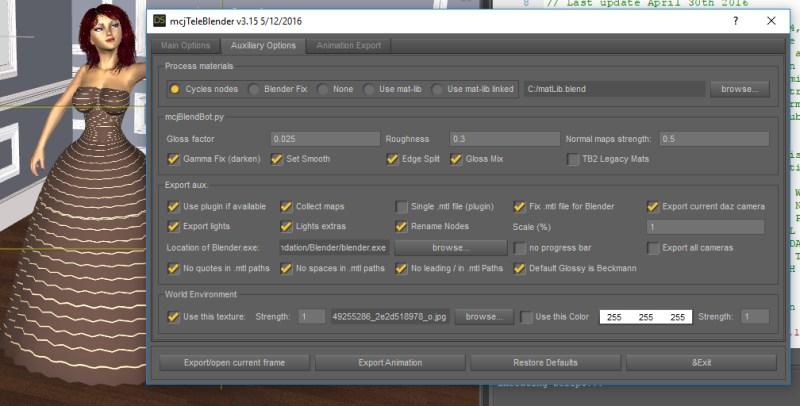
the other options affecting the success of this are the "Fix .mtl .... " and the "no quotes in mtl paths"
which are okay in your screen captures
note that the fact that we can see the bearded texture means, that those 2 options are not at fault
-----
now about the iRay materials and other "real" shaders like that
i did valiant efforts to adapt the code so it can extract the same surface properties that i get from the DsDefault material/shader surfaces
but it can fail, notably when subsurface scattering is involved
For mcjTeleBlender those neat iRay shaders are a nuisance. Also, when TeleBlender doesnt really export .obj/.mtl files, it asks Daz Studio to export them. And event there the nifty iray shaders cause problems.
so, ideally you could select all the surfaces in the figure and apply the "shader" named DsDefault, which on my Daz Studio is located in Daz Studio Content/My Daz 3D Library/ Shader Presets / Ds Defaults
then readjust the materials until you get something that looks good when transfered to Blender
the save the set of materials as a Material Preset file (in Daz studio)
=====================
well just to make me lie, i tried a render right now and i had to turn "collect maps" off to get it to render
i'll see what's happening and tell you
oops false alert, the problem was that i used an old version of mcjTeleBlender
the important option was "No leading / in paths" i'll post my settings and the render in a minute or 3
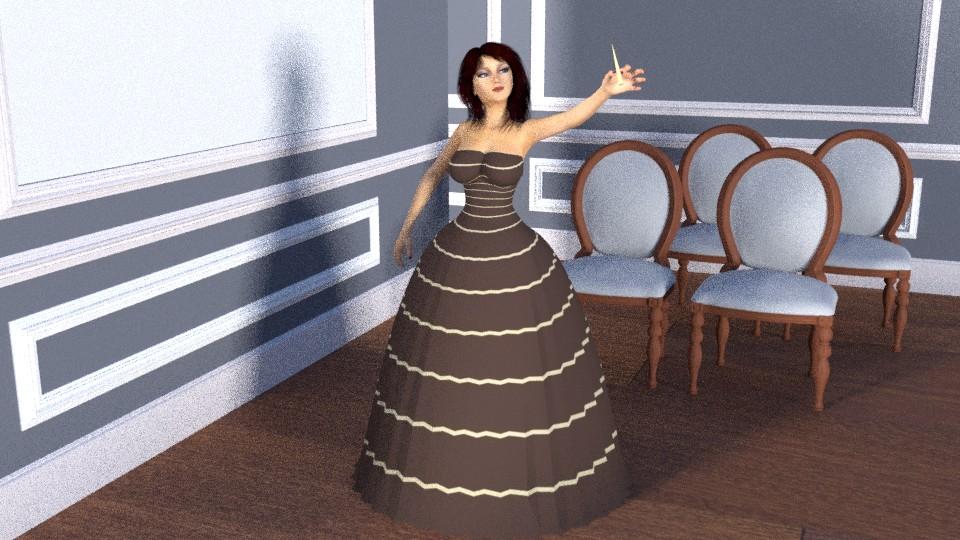
the red iRay velvet color on the chair failed the transfer process
only 100 samples per pixel, forgive the render :)
 Exporting morph targets
Thank you 3DAGE. It is a prop (eyeglasses) that have no moving parts so I don't think it needs bones. The poser manual has a good section on external morphs. Couldn't find a complete Carrara 8 manual. The Carrara 7 manual that comes with Carrara 8.5 has a good section on exporting morphs but the morph tab is different. I think I now have enough info to figure it out thanks to this forum and good Poser documentation.
Facegen ProThat 'swollen face' you talk of happens when there is not a high resolution image you scanned for the picture. I know as I tried pictures of my grandfather and my grandma from 1920 and the details in the photoscan weren't sufficient so I wound up with a low polygon Facegen morph that wasn't a good fit to the DAZ models. So I will make nw scans although if the picture source doesn't have the details to begin with, and a lot of very old pictures don't have those details, no matter how high a resolution you scan the picture in you won't get a good FaceGen morph out of it.
You also can get that problem by not placing the dots in good places or placing them innacurately.
You sure it's the resolution??
I've had varying rez's and it happens on them all.
I'm placing the points where they say and it doesn't seem to help. particularly with the nose..
No, not 100% sure but I noticed it happened on the old black & white photos. Your suggestions & Grinch's have me thing I will try those photo again. Thanks.
Give a Man a Pole..Teach that Man to Fish..Sell that Man... Your "Custom" Fish.I don't know. I feel that that DAZ is doing pretty good. For example whoever made the Polynesian characters was excellant and I recognized facial characteristics in those models as my nephew's phenotype right away.
Now I do agree it is frustrating that there isn't a morph pack to go with the head and morph pack of the Genesis 3 (or Genesis #) that lets one dial in ethnicities but really I think it's a bit of a stretch to expect DAZ to attempt that. Having lived in Europe as an outsider I can tell you indeed there are Irish, Alpine, Italian, Dutch phenotypes (not to 100% of the population) and they are not too much like the Genesis 3 models which seem more Balkan to me. I guess FaceGen is best used for that sort of thing but one needs to have a sense of what all these geographic human phenotypes look like which no one does of course comprehensively.FaceGen by it'self is not enough though. Artistically one has to have the ability to notice the differences in those phenotypes. They aren't glaring. There is to be a few books of collections of portraints of people throughout the world. They were very old and in black & white and very fascinating to look at. I haven't seen one since I was like 12 years old though.
I think the biggest obstacle is clothing. That's why I bought all the 'Cross-Figure' and 'Wear Them All' products. Since you model sy-fy type clothing I don't think it's that big a concern for you though.
I feel DAZ models need a 'morphable' skin texture resource sort of like Skin Builder on high-speed but I doubt we will see such a product, at least for a while. And hair...don't even ask.
Give a Man a Pole..Teach that Man to Fish..Sell that Man... Your "Custom" Fish.Subtitle:
The failed Promise the Genesis Figure Platform.Remember Anubis?
I remember the heady days of Genesis 1 as I watched enviously from the sidelines.This was before I migrated from my Old Mac running DS 2.3 to a New PC capable of running the latest Daz studio and genesis.
Once I made the switch from aging Poser figure tech, I fully embraced the Genesis technology as its innovative "One Figure to rule them all" morphing capability liberated me from the limitations of having to always find and then Buy separate figures if I wanted both racial and Demographic and even Species variety for my preferred genre of Sci-Fi storytelling
If I needed the ubiquitous 20 something Northern European Girl/guy ..Sure easy
But if I Needed the middleaged Arab man or woman or Fat frumpy Dorky 21st century westerner or Exotic Alien From the other side of the galaxy,
Then genesis was my solution as wellI am so thankful for Artists Like Dariofish(HFS) for his amazing alien morphs Inspired by the Popular video game
"Mass Effect".But a disturbing pattern has emerged over the course genesis's evolution to version 3.
More and more we are seeing purpose built "Character Bundles" with clothing that Does NOT morph well outside of those specific Character bundle shapes.
This ,in my personal view, have slowy created the mentality that Genesis is just relatively inert "base figure" with not much utility unless you buy the Amazing bundles. Much like the original Mike & Victoria 1I understand the marketplace economic utility of getting people to contsantly buy the new bundled "Characters",
This is a business after all.However it seems we are seeing less & less separate General use Morphs and Skin map products that take true advantage of the Strength and the versatility of the genesis technology.
The technolgy that Liberated us as Artists
It seems ,To me at least we have been slowy coaxed back on to "The plantation" mentality of
"I wish"someone"....not me but "someone" would make a more (Insert character type here) For Gx
I would $$buy$$ that in an instant".Daz 3D is part of

Connect
DAZ Productions, Inc.
7533 S Center View Ct #4664
West Jordan, UT 84084Licensing Agreement | Terms of Service | Privacy Policy | EULA
© 2026 Daz Productions Inc. All Rights Reserved.