-
What is the character texture and hair used in the male model of i13's Dreams of the Past?
Not a character, maybe a morph instead?
https://www.daz3d.com/male-model-morphs-hd-for-michael-6With these textures too:
https://www.daz3d.com/male-model-textures-for-michael-6Ears out? Question about both ears and the hair that drapes around themBut, one way to do it is just export out the Genesis 3 base character. Load it up in your favorite 3D modeller. Select the vertices of each ear, and rotate them.
Import the modified model back into Daz and use the Morph Loader to create a morph for it. Each ear should be done separately.
One thing that has surprized me over the time I have been here is how few users actually seem to have a modeling app installed. I would think that is a must have for any 3D work, just like having an image editor
Ears out? Question about both ears and the hair that drapes around themFound these for Genesis 2. Don't know of any "ear angle" morphs for Genesis 3.
http://www.daz3d.com/genesis-2-female-head-morphs
Ears Angle
Ears Angle Left
Ears Angle RightBut, one way to do it is just export out the Genesis 3 base character. Load it up in your favorite 3D modeller. Select the vertices of each ear, and rotate them.
Import the modified model back into Daz and use the Morph Loader to create a morph for it. Each ear should be done separately.
Ears out? Question about both ears and the hair that drapes around themFirstly, the obvious: is there an actual morph, in some character or package here, to bend the ears out away from the head? I can rotate them, move them up and down, back and forth, but surely not everyone's ears are the same angle against their heads. I have "200 Plus - Head & Face Morphs for Genesis 3 Female(s)" in my cart - it has "Ear Angle A" and "Ear Angle B" but the picture doesn't really give an idea of which axis this angle is based on - I'm looking for the y-axis, obviously.
Secondly, I think girls with their ears poking through their hair are cute. Without a way to angle them out, this is kind of a moot point, and very few hairstyles seem to account for this possibility, even ones that have strands before and behind the ears - even then, many of them that come close are following the figure underneath, so even moving the ear only means the hair that covers it will move with the ear so it still covers it.
Any suggestions? And will D|S ever have anything like Poser's Morph Brush? That would be great for this, not to mention for the usual ugly 'breast bone' that sticks out of the cleavage of most female shirts, tops and dresses when the character's breasts are not C-cups or larger.
Thanks!
"Brace yourself, my dear wallet! There's always another Sale - and Glitches!"Wow, great deals today when using the Darkseal Special to take advantage of the Genesis 2 Mega Sale - 5 free G2 outifts, 91% off total order.
On a side note, I wonder if DAZ will transfer licenses for those of us that have bought Darkseal items from a previous vendor. I already own 5 of their products listed here now, and it would be nice to have the ownership transfer so I can get possible future updates to the products.
Genesis 2 vs Victoria vs StephanineFor generations 4 Victoria 4 (4.2) was the base female model. Stephanie 4 is a morph of Victoria 4. Clothes were initially made for a single character. Later they developed unimesh fits that would allow the same clothes to fit multiple characters.
For generation 5, Genesis 1 was the base female (and male) character. Victoria 5 is a morph of the Genesis 1 base. Stephanie 5 is a different morph of the Genesis 1 base. Clothes made for Genesis 1 will automatically adjusts to fit Genesis 1 characters. You can also auto fit clothes designed for Victoria 4 to work on Genesis 1.
The base female charcter for generation 6 and 7 are genesis 2 and 3 female. Victoria 6 and 7 are morphs of these base characters. Each generation will auto fit clothes from the previou by default. There are add on products that let you auto fit clothes back to Victoria 4.
I think there is an add on product that will auto fix genesis 3 clothes on genesis 2, but in general clothes are not backwardly compatible. Genesis 1, 2 or 3 clothes do not work on Victoria 4.
Realistic Pressure QueryMaybe this could do the job but I don't have it to know for sure.
You could just say brasts. or soft tissue (it isn't really skin that you are asking about) if you want to be coy. In any event, if you mean touch from a finger then there isn't really enough mesh resolution to work with - switch to a preview mode that shows the wires (ctrl(Win)/cmd(Mac) 8 for example will give lines over the texture) - only the solid lines are "real", and only the points at which they cross can be affected by direct mesh manipulation (DForm, or manipulating an exported OBJ and importing as a morph). Displacement is an option, that can work on the SubD mesh in Iray or can be arbitrarily fine in 3Delight, but that would be very awkward to do.
thank you both. :)
Legacy UVs for Genesis 3 [Commercial]wargis, it is true that there are some omissions from the Legacy UVs series (kids and monsters!), but I had to draw the line somewhere. Each one of these UV conversions takes about 2-3 weeks, and I have to try to gauge whether the demand will justify the time spent. And as it is possible to convert textures within the generations using the Map Transfer facility , there is a way to get these textures onto Genesis 3, even though it may mean a bit of work.
Thank you, Cayman Studios. I hope when you are less busy, you' ll devote some time to the Legacy UVs project again. Meanwhile, for me this Map Transfer tool works far from ideal and sometimes can even crash with multiple textures, so it's a little frustrating. I found that a Blender way of rebaking textures from Genesis Base to other UVs is even more reliable than Map Transfer, although it's longer and I wouldn't like to use both methods for big texture sets with 10-12 head maps with various makeup and more then three body maps. Actually, map transferring is acceptable for a single character which has about 9 main texture maps in whole, but latest Genesis characters had much more texture options, apart from a great lot of partial texture packages for G1, like eyes (Terror Eyes and other similar products), which could be used with Genesis 3 too with corresponding Legacy UVs. So I hope you will keep your work with Legacy series, it's a really unreplaceable tool. Good luck!
Error making clothes?Custom morphs, instead of the auto generated morphs, for the shirt (so you can pull it out of the crease under the breasts or brdge the cleavage) for those cases where a morph looks bad (or you may in some cases be able to make a universal morph that can handle a range of shapes - a lot of items now include a breast bridge morph for example, which can help with the fabric getting stuck in the cleavage for any shape). For posing either adjust the weight-maps or create morphs to fix the issues and use ERC Freeze to link them to the transform. There are several helpful videos in the Daz Youtube channel
https://www.youtube.com/channel/UCtqhpxQyGa7fm0LPoDz4s4A
https://www.youtube.com/user/WWWDAZ3DCOM/videos?sort=dd&shelf_id=4&view=0Harness questionThere's this one too:
https://www.daz3d.com/medieval-wagonBTW, didn't the Gypsy Wagon used to be sold here? Now it's at HW.
The gypsy wagon sold here is still here. It's in the PC+ collection. Along with at least one morph and a number of texture add-ons.
The one at Hivewire is a different waggon from a different artist.
The harness in the Tilbury promo looks like the same harness as Tumbleweed's, but then I suspect it was made specifically for the promo and not rigged.
Even if it has the same design basis, the harness of the tilbury promo is not the one of the tumbleweed (which has bones) and is a completely new modeling, well rigged (by transfer of the horse2 weight) but incompletely morphed. The main problems of the harness for the horse2 is the neck-head couple which required so much progressive morphs to keep it in the right place. For instance that position was the one that decided me to give away... now, I put it back in my work list.
Well even if it doesn't work well for extreme poses it would still be great to have for a simple "horse pulling a carriage" pose.
Headshop Oneclick, the eyesI finally picked up oneclick and I was messing around with it learning the software. I decided to start with the character Daenerys Targaryen (Emillia Clarke) because I found a good frontal picture of the character with a neutral expression pretty fast.
Anyways, her eyes are a bit larger than normal and I had to adjust the dots for the lower eyelid and the corners. But the created morph streatches the eyeballs themselves so when I use standard Bree textures, the cornea and Pupils look oblong. How do I either fix this or keep this from happening?
Skin Builder 3 Merchant Resource for Genesis 3 Female (Commercial)Hey Peoples, another great product. It will take time to get everything figured out but so far I just love the results.
Is there a reason why the tanlines don't get transfered to the anotomical maps? That is my ONLY issue, lol
There were UV seam transfer issues with the tanline blur and could not be transferred properly to the Genital UV. Unfortunately that is the downside with the Daz Anatomy using its own UV map. Same with the pubic hair options.
How to change the fold for the contents of the Cararra?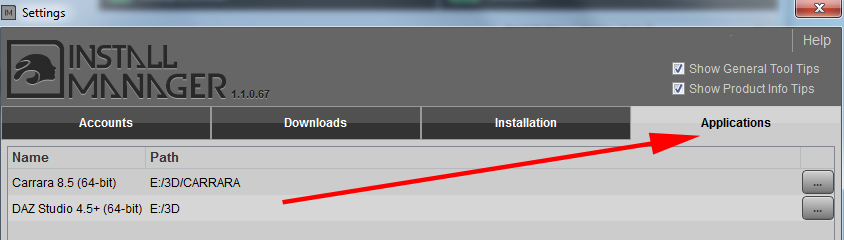 ETA another image and make a correction!
I finally got my head around this when I faced the same problem... I have even put my DS and Carrara programmes on my E drive. See screenshot to right. For Content see screenshot below right. At the bottom of that lower right image you see the drop down menu can toggle between the DAZ + Poser Content or Carrara. If you buy mixed application items, be sure you download the Carrara ones to the CARRARA directory and then change to the DAZ + Poser directory for the remaining ones. I have to mind this. I have other Runtime directories for things that come from outside of the realm of DIM, ShareCG, etc, but it is not necessary.
HOWEVER, as my DIM was installed on the C: drive and I didn't want to mess with that, the downloaded files (those zips) which personally I do not want to have deleted once downloaded, accumulate on the C: drive as in below left screenshot. Those zips take up a LOT of mbs... so I manually transfer them by copy and paste to an archive on the E drive as well. I know when I am in trouble there after a shopping spree as my C: drive directory bar changes to red. I see I have accumulated some files that need moving and had forgotten, so will do that today. I put them in a separate directory on E as they are an archive as far as I am concerned. I actually am probably going to probably relocate them to an external hard drive. I worry about the future and DAZ Connect and/or another crash and do not want to go through all that re-downloading again.
Thank you again, Fixmypcmike...it was you that helped me last year!

 Silene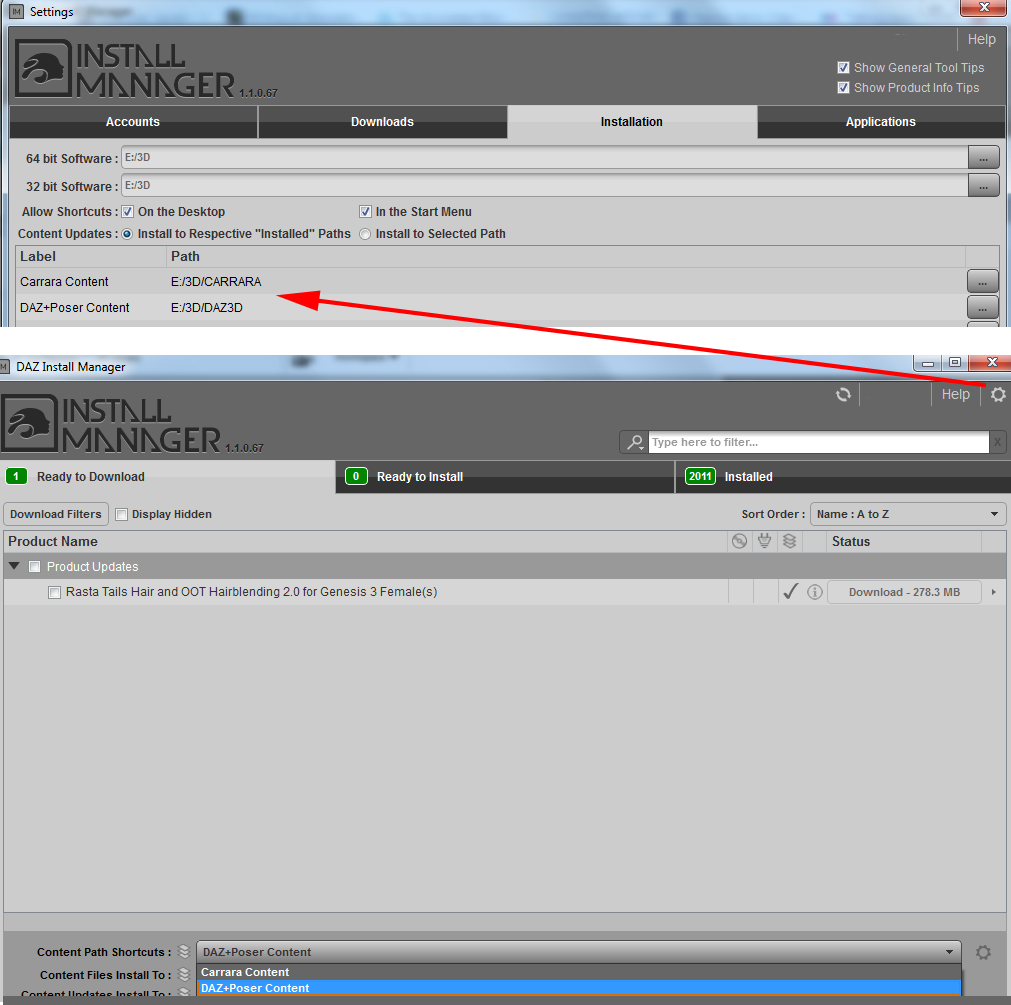
 Realistic Pressure Query
You could just say brasts. or soft tissue (it isn't really skin that you are asking about) if you want to be coy. In any event, if you mean touch from a finger then there isn't really enough mesh resolution to work with - switch to a preview mode that shows the wires (ctrl(Win)/cmd(Mac) 8 for example will give lines over the texture) - only the solid lines are "real", and only the points at which they cross can be affected by direct mesh manipulation (DForm, or manipulating an exported OBJ and importing as a morph). Displacement is an option, that can work on the SubD mesh in Iray or can be arbitrarily fine in 3Delight, but that would be very awkward to do.
Legacy UVs for Genesis 3 [Commercial]Hello, Cayman Studios! Thanks for your Legacy UVs, but I feel they do really need one more addon - UVs for Genesis Base, Male and Female, because there are many products, uv-mapped and textured for Genesis like HFS Races for Genesis and other similar monsters and aliens. Their morphs are convertible for Genesis 3, but with Legacy UVs for M5 and V5 I need to convert all their body maps to V5 or M5 accordingly, and this is double work. Of course, sometimes Genesis products have mapping of V4, but basic UV mapping occurs much more often. And I have a question about Kids 4? It has it's own UV map, not V4 or M4, and also should be converted to M5 or V5. I think it would be great to have separate Legacy UV addons for G3M and G3F, for Kids 4 and for Genesis Base and I suspect it is quite possible. I hope one day we'll see them in your shop, so far it's only my suggestion for future products.
wargis, it is true that there are some omissions from the Legacy UVs series (kids and monsters!), but I had to draw the line somewhere. Each one of these UV conversions takes about 2-3 weeks, and I have to try to gauge whether the demand will justify the time spent. And as it is possible to convert textures within the generations using the Map Transfer facility , there is a way to get these textures onto Genesis 3, even though it may mean a bit of work.
Harness questionThere's this one too:
https://www.daz3d.com/medieval-wagonBTW, didn't the Gypsy Wagon used to be sold here? Now it's at HW.
The gypsy wagon sold here is still here. It's in the PC+ collection. Along with at least one morph and a number of texture add-ons.
The one at Hivewire is a different waggon from a different artist.
The harness in the Tilbury promo looks like the same harness as Tumbleweed's, but then I suspect it was made specifically for the promo and not rigged.
invalid dual post, sorry
Harness questionThere's this one too:
https://www.daz3d.com/medieval-wagonBTW, didn't the Gypsy Wagon used to be sold here? Now it's at HW.
The gypsy wagon sold here is still here. It's in the PC+ collection. Along with at least one morph and a number of texture add-ons.
The one at Hivewire is a different waggon from a different artist.
The harness in the Tilbury promo looks like the same harness as Tumbleweed's, but then I suspect it was made specifically for the promo and not rigged.
Even if it has the same design basis, the harness of the tilbury promo is not the one of the tumbleweed (which has bones) and is a completely new modeling, well rigged (by transfer of the horse2 weight) but incompletely morphed. The main problems of the harness for the horse2 is the neck-head couple which required so much progressive morphs to keep it in the right place. For instance that position was the one that decided me to give away... now, I put it back in my work list.
Harness questionthe gypsy wagon sold here is still here. It's in the PC+ collection. Along with at least one morph and a number of texture add-ons. The one at Hivewire is a different waggon from a different artist.
Are you referring to this wagon?
https://www.daz3d.com/world-travels
I couldn't find it because I was looking for Gypsy Wagon, not World Travels.
Thx!
Free back grounds updated 8-27Hi Ivy - Thank you for an exellent back-ground collection, fabulous indeeed. i'm quite inexperienced with DAZ, how do I locate the downloaded images and transfer them to my DAZ content folder.
Thank you.
Robert.
My backgrounds are very easy to use with daz studio. Made for Iray or 3delight rendering. , these backgrounds were rendered in Iray.
to use them within daz studio, simple follow these steps.
Step 1) Download and unzip my back grounds to your favorite image folder.
Step 2) Open daz studio
Step 3) On top of the daz studio program you will see File, Edit Create etc. go way over to Windows and click it and then scroll down to & click panes(tab) when you click that option you will see a list of tool-tabs listed here. which you can use to help you when working in daz studio. . on this panes(tab) list choose and click the environments tab and the environment box will pop up. On the box, on the top line tab click the drop down menu that is default listed as (None) and change it to back ground. when you do that, this will give you the options where you can browse to the folder you had unzipped my background to, and choose one to use as a back ground in the studio program then click okay or accept. Now the back ground you choose will show in daz studio as your working back ground image
Step4) To add a light source to these back grounds in Iray, please use the daz studio iray render settings and click Sun and Sky only setting & for 3dl I recommend using Uber environment sphere preset but the back grounds will work with anything you choose for light, once you have the back ground in place, you can start loading and place your model or character anywhere in the scene to fit the back ground you choose for your renders.
I am sorry I can not provide you with any pictures to show you the steps with images . Because daz web site does not allow me to upload images.
Anyway I hope this information helps
Harness questionThere's this one too:
https://www.daz3d.com/medieval-wagonBTW, didn't the Gypsy Wagon used to be sold here? Now it's at HW.
The gypsy wagon sold here is still here. It's in the PC+ collection. Along with at least one morph and a number of texture add-ons.
The one at Hivewire is a different waggon from a different artist.
The harness in the Tilbury promo looks like the same harness as Tumbleweed's, but then I suspect it was made specifically for the promo and not rigged.
Daz 3D is part of

Connect
DAZ Productions, Inc.
7533 S Center View Ct #4664
West Jordan, UT 84084Licensing Agreement | Terms of Service | Privacy Policy | EULA
© 2026 Daz Productions Inc. All Rights Reserved.