-
Show Us Your Iray Renders. Part VI
Been wanting to do an image like this for awhile and with a new tree purchase and the new UVs for the Horse2, I figured it was time. Lots of behind the scenes work went on before rendering. Couldn't find any boot cut jeans anywhere, so used the V4 Assassin Angel pants since they had the boot cut morph, but had to retexture them to jeans and delete parts of the geometry. I had to redo the horse textures, I had to model the hat, the winchester and the boots. Retexture the saddle, and retexture the cows which I got from a game I play
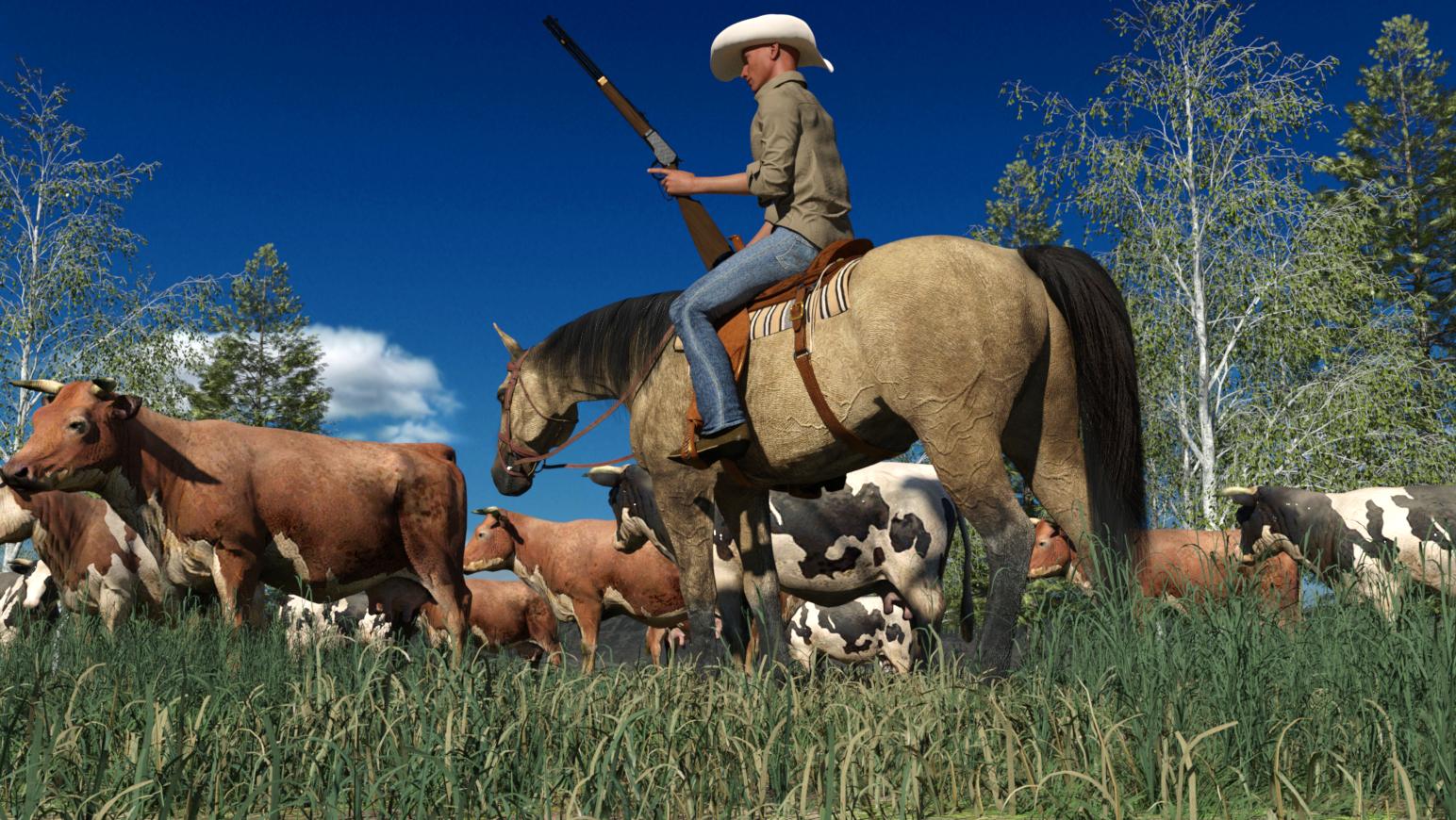
Really like this render
The Serena The Succubus G3F Ready to Wear (and nearly ready to wear) ThreadSoooo, I've been dealing with an interesting dilemma...
There are several 'demon wing' products available on the Daz site. They all look very nice, but my personal fave is these:
https://www.daz3d.com/dark-fantasy-add-ons-for-genesis-3-female-s

There's a G2F version of this product as well (link below), which look very similar (it appears pretty much identical but I don't have the product), but to be clear I'm working with the product above in my renders. The G3F version has a transparent 'Succubus Shell' that gets added, so I'm guessing that is where the difference lies.
https://www.daz3d.com/succubus-add-ons
Anyways, what sets the demon wings in these products apart from other 'demon wing' products is the fact that the wing membrane attaches to the full length of the back, which can make it problematic when you are looking for clothing for them.
Sure, you can mess around with transparency maps and custom morphs/D-Formers to try to move stuff around, but it'd be nice to have a list of 'ready to wear products (and perhaps some nearly ready to wear ones).
Soooo, introducing Serena The Succubus!

Serena is a 'Vanilla G3F gal, with Jeanne skin, eyes, and makeup options. I'm not looking to win any rendering contests here, I just want to illustrate which dresses/tops/outfits and other clothes work best with these wings. As to why she has 'normal' skin, she's a Succubus/Human hybrid. Her horns are some basic horns I found somewhere (I wanted small ones) but those really aren't relevant to to this discussion. She is also sporting Aldora Hair.
The background is a simple photoshop gradient, but I haven't done any other post work in my renders (again, not trying to win any render contests here). Most of these are partial Iray renders (say 50% or so) 'cuz my laptop is slow and I am impatient...
I'm using the Surfer Guy/Day At The Beach lights in my renders at default, and Serena is currently facing in the 'default' G3F direction.
The only pose changes I've made to the 'baseline' G3F model involve the arms and head, with the shoulders and everything below them at the 'default pose. The tail has been moved up slightly to clear the beltline (I did this by unparenting it and attaching it to the hip directly, then using y translate, z translate, and x rotate to locate the tail root up a little higher). I wrapped the right wing around her right arm/shoulder just for fun, but the left wing is at the 'default' pose.
Now, on to the wardrobe choices you see here. Serena is sporting the Sunny Swimsuit HD for G2F by Elele and is also wearing the Proxy Pants for G3F from the Proxy Outfit Collection. by Aeon Soul. The Proxy top and Proxy Jacket won't work out of the box (they blend/appear underneath the wings) - the jacket has some possibilities with morphs maybe - but these pants should be representative of most pants out there - any pants that aren't 'hi cut' should work. The swimsuit shows pretty welll what you'll be looking for as far as 'Safe' choices that will clear the wings with no issues. The G2F clothes have been autofitted, and in this instance I didn't have any issues.
Similarly, similar to pants most panties should work without issues, as long as they aren't 'hi cut' in the back, so I'm not going to focus on them in this thread. I'm primarily focusing on on the various tops/dresses, and how they interface with these particular wings.
Next is an example of what I mean by 'nearly ready to wear'.

Continuing on with the Swimwear theme, here's a modified version of the Cross Monkini for G2F by Nikisatez, which will NOT work out of the box. I'm showing it here so that you can see some possibilities as far as moving the strings at the back above the wing roots using custom created morphs or whatever. Unfortunately, the strings got a little squiggly as I attempted to move them above the wings using the D-Former tool, so they look a little messy above the wing roots. I'm trying to clean this up in Hexagon, but it's taking some effort (my laptop and Hexagon have a love hate relationship). This will give you some idea of some 'nearly there' options if you don't mind doing a little work with morphs or some other 3d program.
The 'wide strap section' which is extending diagonally from the breast cup was a happy morph accident as I was trying to position the morph field. I like the look, so I kept it. If Nikisatez wants to 'borrow' that idea for an updated version for Succubuses using these wings in a product expansion, that'd be awesome! Or maybe I could release some sort of product that does this (based on her product) but for now I'm mainly trying to show the possibilities here.

Real quick, I want to show off the Virgin Killer sweater that I found for free on another website (Rendo?). It was a free download (you will need to have registered on their site to get it) and it works real well in this instance. Serena is also wearing the (modified) Cross Monokini mentioned above in this render because the sweater shows off a little too much butt crack, and I'm trying to keep this SFW. This is only a partial Iray render (3% or something), but shows off how the sweater drapes below the wings well enough.
Finally, here's another example of real close but needs a little bit of work with DFormers...

Here you see the Cherry Blossom Dress for G2F by Sarza and Xena. I haven't done any modifications here, so you can see how 'close' this is to being usable with the Default wings. The shoulder areas should be able to be pushed out using a Dformer fairly easily, to fully clear the wing roots (I tried fitting the dress to the wings, that didn't help, but I may have done that wrong). The Waist area can be deformed below the wing membrane base (I did this with another outfit) but it requires a bit more deforming. I suppose a transparency knockout could work with the waist area base as well, but that'd take a bit of work to set up properly using the base textures and some photoshop magic. This should help give you an idea of what to look for as far as open back dresses and such.
The Louisiana Dress for V4, etc by Bobbie25 is in a similar boat to the Cherry Blossom dress in that you need to 'nudge' the back of the waistline down a bit to clear the wings. The top part of the Louisiana Dress clears with no issues whatsoever (it just wraps around the neck). I'll show this off in a later post once I do a proper render with Serena.
That's it for now. I'll try to get a better handle on attaching pics, so may edit this post to better utilize the pics if I can upsize them properly, but I'll add more 'Serena the Succubus ready to wear' wardrobe options as I put them together in later posts. I have a rather large handful of clothing options to work through thanks to a few recent sales, especially that G2F sale...
I did grab a couple of G2F bodysuits (these include options to 'hide' parts of the bodysuit). I'll show off what I come up with bodysuit wise in a future render, If I can work out how to 'uncover' the right back regions without exposing the breasts in the process.
If anyone else has any product suggestions or wants to show off their 'Serena the Succubus - Ready To Wear' product, and wants to share renders of how they look, feel free to add to this thread. Serena is pretty easy to put together in Daz, here's a recap Serena's 'stats': in case you want to use her,
- G3F base, no additional morphs applied. No pose changes below the shoulders, or to the torso please, so we can see how the wardrobe looks in the default pose (i.e. arms and neck/head only).
- Jeanne Skin, Eyes, Makeup
- Aldora Hair (this hair is V4, etc, but worked OK for me nonetheless). Or use any hair you like if you don't have Aldora hair, the hair isn't that important.
- Succubus/Demon Wings from the Dark Fantasy Addons or from the Succubus addons package if you don't have the first one.
- The Tail from the same package, moved up slightly (unparent, then drag it to the hip subdivision (not pelvis) so you can move it up between the wing membrane bases to provide more clearance.
- I used some basic horns I found somewhere, use what you like (they aren't really imortant here)
So, which other items of clothing (dresses/tops/outfit) are 'Serena The Succubus Approved?' Stay tuned!
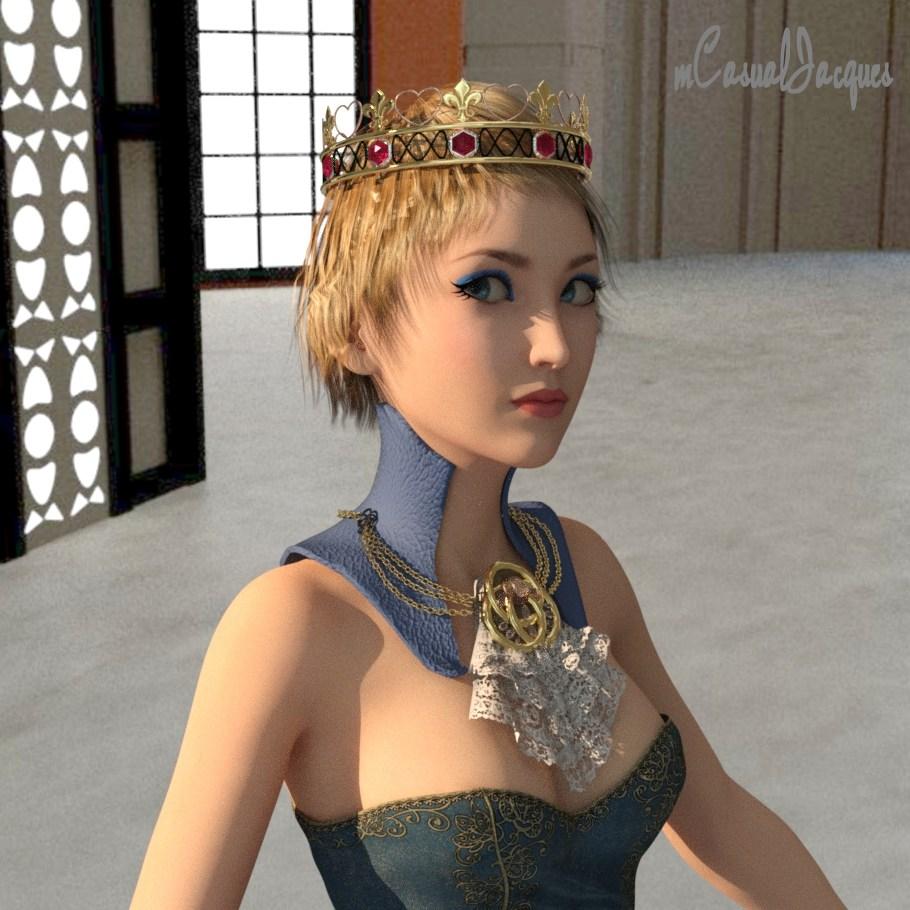
mcjCrownFinal - crown prop - hearts, fleur de lys and hexagon stonesUPDATE TOULOUSE HAIR MORPH
Just now i added a morph for the Toulouse Hair
if you unzip the zip file correctly ( in my case this was C:\Users\Public\Documents\My DAZ 3D Library )
then each time you load a Toulouse hair prop, there will be an "mcjCrown" morph channel in the Toulouse Hair parameters tab
you turn this morph up to 100%
you resize the crown ZScale 122%
and youll be able to lower the crown without having the hair poking through it
same page as the crown
https://sites.google.com/site/mcasualsdazscripts8/mcjcrownfinal
 morphs not loading/other?
sorry, didn know. according to the tab. the only thing currently used is "render subD level (minimum)" and set to 1.
reseting it doesnt do anything.
edit: how odd, it didnt show on currently used but when i manually checked my morphs, i found one that was set as 1 on default. reseting it to 0 placed the model back to default. how do i make that morph to stay at 0? models still load with that morph at 1.
Show Us Your Iray Renders. Part VIBeen wanting to do an image like this for awhile and with a new tree purchase and the new UVs for the Horse2, I figured it was time. Lots of behind the scenes work went on before rendering. Couldn't find any boot cut jeans anywhere, so used the V4 Assassin Angel pants since they had the boot cut morph, but had to retexture them to jeans and delete parts of the geometry. I had to redo the horse textures, I had to model the hat, the winchester and the boots. Retexture the saddle, and retexture the cows which I got from a game I play
So you ripped off the cows?
 Very lifelike - except for the cowboy it could be a photo from our local neighbourhood.Centaur 7
okay I have a question how the heck do you save a material for the centuar body ??I've been making some toony skins for the horse half but can't figure out how to save them so that they will apply to both the body and the geoshell ........with out having to hand load the textures ....It's possible cause the skins that come with the centuar load on the geoshell as well as the body .......I know I'm missing something but can't figure it out .......kinda like I'd really like a morph to lenghten the legs .....can't figure that out either ......ugh!!help please
Have G3M selected and save as a Heirarchical Material instead of a material. Check the pieces you want to include in the file.
Thank you very much ChanglingChick!!
Centaur 7okay I have a question how the heck do you save a material for the centuar body ??I've been making some toony skins for the horse half but can't figure out how to save them so that they will apply to both the body and the geoshell ........with out having to hand load the textures ....It's possible cause the skins that come with the centuar load on the geoshell as well as the body .......I know I'm missing something but can't figure it out .......kinda like I'd really like a morph to lenghten the legs .....can't figure that out either ......ugh!!help please
Have G3M selected and save as a Heirarchical Material instead of a material. Check the pieces you want to include in the file.
Excessively long saved figure and scene loading, saving and clearing time ...SOLVED!!!It's a problem with all programs, they would much rather load/save a couple of large files rather than thousands of little files, as they can deal with the large files in a fraction of the time it takes to deal with all of the small files.
With the Genesis series of figures it's the Morphs folder that's the killer, the more morph packs and characters you have the worse it gets.
This makes sense to me, I will trying to uninstall morphs and see what that does to load time.
Rigging & Weight Mapping~ Beginners Thru AdvancedSo I'm stuck on something and I cant figure it out. I'm making a helmet which supposed to be 100% solid. I've imported my mesh and ran transfer utility for it and it works fine on genesis 3. I filled the head weight map to 100% and it's all good if I pose it on the figure. I'm now trying to make it so that if I change shape from basic figure to lets say victoria 7 it stays solid but when I do that some parts stay fine but some other like the visor and chin deform. I can't figure out what step am I missing.
Transfer utility may assign part of your helmet geometry to the lower jaw group (or whatever it is named for G3, I'm not sure) so if you want the helmet rigid you should assign all those polygons back to the head group.
Show Us Your Iray Renders. Part VIBeen wanting to do an image like this for awhile and with a new tree purchase and the new UVs for the Horse2, I figured it was time. Lots of behind the scenes work went on before rendering. Couldn't find any boot cut jeans anywhere, so used the V4 Assassin Angel pants since they had the boot cut morph, but had to retexture them to jeans and delete parts of the geometry. I had to redo the horse textures, I had to model the hat, the winchester and the boots. Retexture the saddle, and retexture the cows which I got from a game I play
morphs not loading/other?Please don't post images of skin-coloured naked figures, even if they lack anatomical details. You can show a morph issue, in most cases, by taking a screenshot in Smooth Shaded preview mode.
This looks as if a morph has been saved with a non-zero default value, by you or by an add-on maker. Load the figure and in the Parameters pane Editor tab look to see what is listed in the Curently Used group.
Investigations on Genesis 3 joints in Daz Studio Chapter 1-8 (including PDF documentation)Characters in Daz Studio are based on a hierarchy of joints. These joints can have one or no parent (in case of the root joint) and zero to multiple children. These joint chains or hierarchies are bound to a mesh with a weight map and thus drive the body mesh by rotation, translation or scaling of the joint. Thus, joints are a major tool to pose a character and deform the body mesh in the correct way. Additionally, it may be supported by joint controlled body mesh morphs, which enhance the deformation based on the quaternion weighting in Genesis 3.
To transfer a Genesis 3 character from Daz Studio to another program and to be able to pose this character there in a similar way like in Daz Studio, you need to be able to transfer the joint skeleton, the weighting and the joint controlled morphs, which should work in the same way, as in Daz Studio.
While investigating these things, I had to understand how Genesis 3 works in Daz Studio and compiled this in a document, which I would like share with this nice community. Hopefully this is valuable for some of you. If you have questions, let me know.
Excessively long saved figure and scene loading, saving and clearing time ...SOLVED!!!It's a problem with all programs, they would much rather load/save a couple of large files rather than thousands of little files, as they can deal with the large files in a fraction of the time it takes to deal with all of the small files.
With the Genesis series of figures it's the Morphs folder that's the killer, the more morph packs and characters you have the worse it gets.
Post Your Renders like it's the year 2020!!! My Pleasure, John! He has them available for Genesis 2 and 3 as well ;)
For V4, I really like Facial Expressions for V4, but also find that the expressions that come with Girl 4 can really help me get just the right look - just little tweaks on the dials can make all the difference, especially during animations.
That has been one of the things holding me back from going Genesis 1 or 2 as well. The pack I just got from SimonWM truly covers it for Genesis for me. The rest of the morph packs I have (I collected a LOT for Genesis 1 as they were first coming out, since Carrara 8.5 beta was really a fun trip!) help to dial those in really well.
Centaur 7okay I have a question how the heck do you save a material for the centuar body ??I've been making some toony skins for the horse half but can't figure out how to save them so that they will apply to both the body and the geoshell ........with out having to hand load the textures ....It's possible cause the skins that come with the centuar load on the geoshell as well as the body .......I know I'm missing something but can't figure it out .......kinda like I'd really like a morph to lenghten the legs .....can't figure that out either ......ugh!!help please
Skin Builder 3 Merchant Resource for Genesis 3 Female (Commercial)Anyone know if HFS Fantasy Shapes for Genesis 3 Female(s) works with SB3? It's on the Flash Mob Sale right now, and it would be cool to make skins for these shapes. Or does SB3 come with any fantasy-style shapes?
That's a morph only product, so yes, SB3 should work just fine.
Thanks!
Genesis Clothing Poke-Through in PoserDarn it! I knew I shouldn't have tried re-installing the importer, 'cause it just made things worse. An old problem has now returned. The "Transfer active morphs" option is now completely ineffectual. It does nothing, even for an unposed character. I don't even know how this issue went away the first time. I think somehow, in the midst of transfering my stuff to a new computer or updating this or that, it just miraculously worked again one day...until just now! I really don't get it.
Genesis Clothing Poke-Through in PoserI can't be sure when this problem started, but it's been bugging me for a while now, so I finally decided to get some advice. The Genesis G-Suit and Supersuit fit fine on an unposed Genesis, even when the figure has several morphs applied. But as soon as a pose is applied, I get some substantial poke-through, especially on the limbs. Re-applying "Transfer active morphs" helps only partially if at all. I think this problem also affects a few other clothing items, though JeanZ (which I think I've had for longer than the G-Suit or SuperSuit) at least seems unaffected. The example pictured here is a completely unmorphed Genesis. Any help will be greatly appreciated! I'm using DSON Importer version 1.2.0.12 and Poser 11 Pro with the latest updates. Re-installing the importer did not solve the problem.
Wow, I've been slimed...Nevermind! Figured it out. Basically in step 4 (your second step 4, lol), I posed as instructed. But I forgot to zero the hip stuff before morph loader on the prop. Once I did that, ran morph loader, the reverse deformations work...and indeed clean up some of the stretching in that particular pose.
Excellent tips!
Exporting only a part of a model as an objIf it's an HD morph then there's nothing to be done, I'm afraid - we don't have the tools to manage or load those.
Daz 3D is part of

Connect
DAZ Productions, Inc.
7533 S Center View Ct #4664
West Jordan, UT 84084Licensing Agreement | Terms of Service | Privacy Policy | EULA
© 2026 Daz Productions Inc. All Rights Reserved.