-
DELETE
I started getting that before Central came out. I think it started around the release of the latest build of Daz Studio - at least that's about when i first noticed it. I only use DIM for things that won't install through Contect Browser within Studio.
DELETEEver since they introduced Central I've had odd problems popping up with DIm can't help but wonder if the Central thing is interfering with DIM somehow.
If you installed Central it may have changed some paths in DIM
3D Art Freebie Challenge-June 2020 - "A Day At..." - Main Thread OnlyI am glad to hear you are back to work but sad too. No time now for rendering. Thank you for your kind response as well. So if I were to finish the line "I do declare" I would say "I do delcare Hylas. Your are my hero." only Scarlet says it to Mr. Beauregard. Are you a fan of Gone with the Wind?
The embarassing truth is, I've never seen Gone with the Wind.
But I do remember Gone with the Window, the Drag Race episode where the contestants made dresses out of curtains...
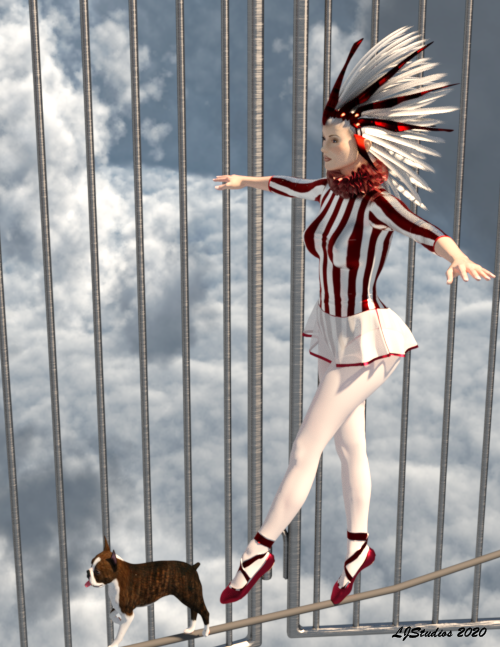
Ah yes were they green velvet by chance? Not embarassing. I am sure there are many movies, animations and shorts that I have not seen that are just as iconic. Watching Gone with the Wind is just another opportunity to watch one of the movies from the Golden Era. The director did some amazing things with 1939 cinema technologies not to mention using color in a big way. The scene of Atlanta after Sherman came through is impactful. The use of color must have been amazing for those that watched it in 1939. I kind of think they might have felt like me after watching Avatar in 3D. You just didn't want it to end. You might find it difficult to get through, though. It is three hours long. It is told from a white person from the South point of view. The love story might not be to your taste. Scarlet is a spoiled brat. But for all its shortcomings it is a work that would be worthwhile to study. Just like Metropolis (1927) and Maria, the central characterin the movie. I can only take about 10 minutes of it at a time but it is still worth doing so. ArtDeco is pretty cool stuff. And who can resist such a Russian angst kind of thing. I love movies. Watched them my whole life. I noticed that The Blob is now available on Netflix. That is my first real memory. Playing on the bars in the drive-in playground and seeing "it" eat a person. Love at first sight and it scared the s**t out of me. Still don't like horror very much but to get that kind of emotion was a wonder and isn't that what it is all about? Hope you are having a wonderful, stress free weekend. a one last image from my Day At the Circus. V2 in Redviper's Gymnastics Wear for A4, Ziggy's Tight Rope and the Boston Terrior by Kerwyn. The headdress is by Specs. If you want links tell me and I will list them.
 Beta for DazCentral, your new Content Manager
I'm trying to do a new clean install of selected components on a Windows machine to test. I have a hard enough time keeping DIM from barfing all over the C: drive, but I decided to try DAZCentral and there is no option. The drop down says controlled by DIM, so I download and install it through the browser (I did not see a way to do that through DAZCentral). Could not successfully install Studio until I removed DAZCentral. Now content is hit or miss. I may try to install it through Studio itself.
DIM was bad enough, but Central is buggy and doesn't seem to need to exist. I just may have to uninstall everything and use RegEdit to get all the other parts gone and start again with only DIM.
Merged threads
DAZ Central is badThere is a dedicated thread for Daz Central here https://www.daz3d.com/forums/discussion/407131/beta-for-dazcentral-your-new-content-manager#latest . Givenm your workflow you may well be better off sticking with DIM, or even using Connect (install within DS - that wll then prompt you to install any missing products needed by the scene or preset you are loading).
DELETEEver since they introduced Central I've had odd problems popping up with DIm can't help but wonder if the Central thing is interfering with DIM somehow.
Installing Content with DAZCentral (Consider it closed)Hi R-O Studios,
I had assumed that the Base Path Location was for content and DAZ Studio Install location was for the application or program. I have tried it that way and can't get the program to install to my c:\programs folder although I seem to get my content to install to the location I specified. It appears as loaded however old content that is already loaded to my content location doesn't register as already installed?
The program actually loads to users\me\applications\etc.
So beats me.
Also I can't get DIM to work either. It will not install DAZ at all. Although again it accepts my home network drive for content.
I was going to submit a ticket but I assume they are already working on this issue. Because lots of people seem to be having problems since the DAZ central app started to be used for installing new content?
DAZ Central is badOne of the things I need to do frequently is uninstall and then reinstall content via the DIM so that I can manage space on my hard drive.
I decided to download Daz Central today, and not only is it a sluggish, advertising nightmare for a platform I've already spent thousands of dollars on, but it auto-installs content without warning.
Some hair props alone take up about 2GB of space, when I'm not using them for a scene, I uninstall them.
And I absolutely loathe the idea of Daz Store advertising to me when I run it's applications. I uninstalled Daz Central immediately, and if I'm ever forced into it, I won't be giving anymore business to Daz3D, that's for sure.
Horrible idea.
Beta for DazCentral, your new Content ManagerI'm trying to do a new clean install of selected components on a Windows machine to test. I have a hard enough time keeping DIM from barfing all over the C: drive, but I decided to try DAZCentral and there is no option. The drop down says controlled by DIM, so I download and install it through the browser (I did not see a way to do that through DAZCentral). Could not successfully install Studio until I removed DAZCentral. Now content is hit or miss. I may try to install it through Studio itself.
DIM was bad enough, but Central is buggy and doesn't seem to need to exist. I just may have to uninstall everything and use RegEdit to get all the other parts gone and start again with only DIM.
Daz Install Manager (DIM) 1.4.0.94, Now Available! (*UPDATED*)Is DAZ Central using the same type of Manifest files for installed content as DIM? If, are they shared if you use both (if that's possible)?
In theory yes. I have both and installed and they share what is and isn't installed. At least during beta, now centrals wants me to update to use and i'm not inclined to test my luck again. While i had no issues (i don't use default paths, btw), lots of people shared horror stories with this. I prefer DIM in every aspect except visuals. But visuals can be deceiving. Also search is good in central, but i need that level of good inside DAZ, no in an outside app.
OK, thanks. Yes, though I haven't tried DAZ Central I probably never will, DIM works great for me, and I write my own tools for whatever else I feel I need.
Daz Install Manager (DIM) 1.4.0.94, Now Available! (*UPDATED*)Is DAZ Central using the same type of Manifest files for installed content as DIM? If, are they shared if you use both (if that's possible)?
In theory yes. I have both and installed and they share what is and isn't installed. At least during beta, now centrals wants me to update to use and i'm not inclined to test my luck again. While i had no issues (i don't use default paths, btw), lots of people shared horror stories with this. I prefer DIM in every aspect except visuals. But visuals can be deceiving. Also search is good in central, but i need that level of good inside DAZ, no in an outside app.
Beta for DazCentral, your new Content ManagerI really love DAZ Central, especially after struggling for many years with too many separate files after creating renders in DAZ Studio. I am willing to pay for a commercial plugin to DAZ Central that would enable me to have the ability for my renders to show up sorted showing round thumbnails, file name, figure, date, and file size exactly as how "My Assets" and "Plugins" presently function. Such a plugin (to me) would be worth paying up to $35 to have.
That sounds like what a folder where you keep them can do.
Beta for DazCentral, your new Content ManagerHey.
Please read this with an inner voice of mild concern. Do not use inner sarcasm voice, or any derogatory tone, because this isn't a rant. It's simply feedback, my impression, and a suggestion that would actually make this a favorable thing.
 Onwards...
I was less than impressed with Daz Central. The email that pointed me to it sounded promising. I downloaded and installed it. Okay. No, not so okay.
One of the features is to have the tutorial videos available on the Dashboard in an easy to see location. So I picked the first one, and was highly disappointed. Here's the video it eventually landed me at on YouTube:
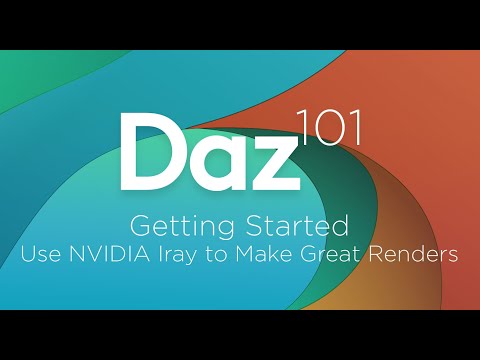
For those who don't wish to click it, it's a 2016 tutorial showing an extremely outdated UI that looks nothing like today's UI. In the comments that are years old, people were asking for an up to date tutorial please, and of course, now it's 2020 and at the time of this post, hasn't been updated in the least. That killed all interest I've had in wanting to watch any other tutorials.
Next disappointment was showing me my current product purchases, and I can open them in Daz Studio 4.12 with one click. Tried it, it works. However, I could do the same thing in two clicks. I can click to open Daz, then click the 'new' tagged product within Daz itself, on the products pane that is already open when Daz loads. So they saved me one click, and perhaps a few inches on the mouse wheel to scroll through products to find the 'new' tag, if I was tag hunting. I know what I bought by name, actually, and I find it easily regardless. Still just two clicks. Is the cost of an entire program development really worth only one click?
Now for a suggestion... why not actually put in a feature that isn't available in Daz Studio itself? Like the ability to go to your saved files and delete a saved file and everything related to it in one click? As of right now, you can't delete it. You see, Daz is the only program I know where a save file isn't easy to get rid of. I can load up a 20 year old program, click delete saved file/saved game/saved document/saved whatever, and it's gone, confirmation dialog or not. I can load up a relatively new program and do the same thing. Saved file/saved game/saved document/saved database/saved image/saved whatever, and it's gone. No lingering thumbnails with error reporting hanging out anywhere.
Except for Daz Studio.
I looked it up once, a while back. I have to delete the DUF, go into library whatever, find the related files, delete them, find another spot... yadda yadda yakity smackety and you know the rest, to delete just one old scene that I no longer use. Because of this, I am highly reluctant to save any scene, because once it's there, I guess it's there forever, as I really don't have the time to become a coder to hunt down all the bits and pieces that Daz Studio will report as a prolem that's left over through a thumbnail connection that will never vanish otherwise.
I just want to right click the saved file in the saved files area, and choose a delete option that doesn't exist as of today, and that be that and it's gone, thumbnail, DUF and any other bits of code connected to it gone as well. Or have that doable on Daz Central. If so, I'll reinstall the nearly useless thing and be happy for that feature all by itself.
Thank you for your valuable time.
Please note: The email that was sent to me did not include a single word that this program was in beta. I put the post above in the Product Suggestions forum, thinking it was a finished item development wise. You may or may not understand how I got slightly jaded over the function issues I noted above. If they had properly noted the status of the program, I may have been a touch less 'put off' from it.
I basically object to the wording of that video and some of the wording in it.
The GPU isn't going to do a better job, only do it faster; the render will be equally good, bad or indifferent.
DazStudio and DazCentral and PostSQL and who knows what elseNot sure if this is the right ploace ot post this question (please let me know if not or move the thread).
I had to do a clean install of Daz becuse everything was going insane (lagging, couldn't find the products, randomly changed the render settings of my saved profile, etc...) so I decided to use the new DazCentral that, for some reason, kept saying I didn't hjave daz studio installed nor any of my products. Now here's what's important to know:
1. I have my daz 3d library on a different path/folder
2. I didin't want daz installed in the regular path (programs x86) but in programs only instead.Sounds as if you were installing the 32 bit version on 64 bit Windows - use the 64 bit version instead, or at least as well.
3. I didn't want to loose my daz library assets and workplace so I copied both folders to the dektop before deleting everything.
4. Yes, I had to DELETE everything MANUALLY because there was NO uninstall ANYWHERE! I had hidden folders active and got rid of everything.Uninstall would be in Install Manager for content isntalled through DIM, as long as nothing happened to its records (the Manifests folder).
Now... After installing daz central I tried installing daz (after changing the path in the little gear icon) and got the weirdest message saying someting about settings, download folders and dialogs (apologies for not rememring but it was yersterday and I didn't take a screenshot). I checked the path again and it had changed back to default so I reinstalled DC and decided to let it install whatever it wanted WHEREever it wanted - I figured I could just move the folders after.
So DC created a folder on my desktop called Applications/64bt that was basically the installation of daz studio and (also inside Applications) called Data/Daz3D/Install manager/Downloads. I moved both folders to my own programs path but for some unknown reason (and I really don't know how this keeps happening) the Data folder keeps going to C:/ - it's just there Applications/Data/Daz3D/Install manager/Downloads
I don't even know where to place it to be honest so should I leave it there? I'm a bit of a organization freak so Ilike my things in their rightful place -.-'Do you mean Application Data? That will have onyl settings files, no application or content will go there by default. Moving folders is of course going to break any uninstallers.
Anyway, I installed all my purchased content and then moved it all to my daz library folder (the one in another path) and replaced everything. I didn't delete the folder and replaced it with the new one because I have some third party content that was installed manually and didn't really have to do it all again.
After everything is installed and moved correctly I open Daz and get this message! (attachment) so I looked online as usual and found no answer to my predicament - since I do have PostSQL installed (attachment).
What security software are you running? If yous tart Daz Studio do you see a number of entries for postgresql in the background Preocesses list in Task Manager (you will need to turn on Show Details to see this)?
After that I saw that the daz help centerk, documentation, thingy said to go to DIM and reinstall PostSQL so I opened daz central to see if that was possible and what do I find?! According to it nothing is installed! absolutely nothing! I changed the paths, thinking it was trying to find the programs in unexisting folders and still nothing! I logged out and in again and nothing! Back to square one! (attachment)
So far Daz seems to be working and I'm even able to load in my characters without having to merge them (which is a step forward) but I have yet to try anything dforce related or actual posing and creating.
Does this PostSQL message and Daz Central being blind influence the studio's work?! If anyone knows how to just get things working and not having to google a problem evey 5 minutes I would really, really appreciate it!PostgreSQL drives the Content Management System - no connection will break features (Smart Content, Products, Categories, the Presets tabs in property panes, as well as less obviousd things like AutoFit).
Thank you =) and sorry for the rambling (quarentine is getting to me -.-)
Given some of the above I suspect you have more profound issues than just Daz Central, though it is true that it seems to reset paths and get confused about what is isntalled for some users even without moving stuff around to break it. There is a thread here for Daz Central discussions https://www.daz3d.com/forums/discussion/382131/daz-install-manager-dim-1-4-0-35-now-available-updated#latest
Daz Install Manager (DIM) 1.4.0.94, Now Available! (*UPDATED*)Is DAZ Central using the same type of Manifest files for installed content as DIM? If, are they shared if you use both (if that's possible)?
Since DazCentral is using the DIM engine I would assume so, but I haven't checked whether an item installed with DazCentral shows as installed in DIM.
OK, so you have both installed on the same system?
No, I don't have DazCentral installed anymore.
Beta for DazCentral, your new Content ManagerI noticed on my orders, there is this concerning line: * Requires latest version of DazCentral
Is it only a matter of time before we see products that can't be downloaded any other way? Can someone from Daz please clarify what their intention is with this being included?
That means the Daz Central links, I expect - it used to say the same for Install Manager when that was the default, even though manual and Connect were options.
Ah ok, phew. Thanks, puts my overreacting worrying mind at ease.
 Beta for DazCentral, your new Content Manager
I noticed on my orders, there is this concerning line: * Requires latest version of DazCentral
Is it only a matter of time before we see products that can't be downloaded any other way? Can someone from Daz please clarify what their intention is with this being included?
That means the Daz Central links, I expect - it used to say the same for Install Manager when that was the default, even though manual and Connect were options.
Daz Install Manager (DIM) 1.4.0.94, Now Available! (*UPDATED*)Is DAZ Central using the same type of Manifest files for installed content as DIM? If, are they shared if you use both (if that's possible)?
Since DazCentral is using the DIM engine I would assume so, but I haven't checked whether an item installed with DazCentral shows as installed in DIM.
OK, so you have both installed on the same system?
DazStudio and DazCentral and PostSQL and who knows what elseNot sure if this is the right ploace ot post this question (please let me know if not or move the thread).
I had to do a clean install of Daz becuse everything was going insane (lagging, couldn't find the products, randomly changed the render settings of my saved profile, etc...) so I decided to use the new DazCentral that, for some reason, kept saying I didn't hjave daz studio installed nor any of my products. Now here's what's important to know:
1. I have my daz 3d library on a different path/folder
2. I didin't want daz installed in the regular path (programs x86) but in programs only instead.
3. I didn't want to loose my daz library assets and workplace so I copied both folders to the dektop before deleting everything.
4. Yes, I had to DELETE everything MANUALLY because there was NO uninstall ANYWHERE! I had hidden folders active and got rid of everything.Now... After installing daz central I tried installing daz (after changing the path in the little gear icon) and got the weirdest message saying someting about settings, download folders and dialogs (apologies for not rememring but it was yersterday and I didn't take a screenshot). I checked the path again and it had changed back to default so I reinstalled DC and decided to let it install whatever it wanted WHEREever it wanted - I figured I could just move the folders after.
So DC created a folder on my desktop called Applications/64bt that was basically the installation of daz studio and (also inside Applications) called Data/Daz3D/Install manager/Downloads. I moved both folders to my own programs path but for some unknown reason (and I really don't know how this keeps happening) the Data folder keeps going to C:/ - it's just there Applications/Data/Daz3D/Install manager/Downloads
I don't even know where to place it to be honest so should I leave it there? I'm a bit of a organization freak so Ilike my things in their rightful place -.-'Anyway, I installed all my purchased content and then moved it all to my daz library folder (the one in another path) and replaced everything. I didn't delete the folder and replaced it with the new one because I have some third party content that was installed manually and didn't really have to do it all again.
After everything is installed and moved correctly I open Daz and get this message! (attachment) so I looked online as usual and found no answer to my predicament - since I do have PostSQL installed (attachment).
After that I saw that the daz help centerk, documentation, thingy said to go to DIM and reinstall PostSQL so I opened daz central to see if that was possible and what do I find?! According to it nothing is installed! absolutely nothing! I changed the paths, thinking it was trying to find the programs in unexisting folders and still nothing! I logged out and in again and nothing! Back to square one! (attachment)So far Daz seems to be working and I'm even able to load in my characters without having to merge them (which is a step forward) but I have yet to try anything dforce related or actual posing and creating.
Does this PostSQL message and Daz Central being blind influence the studio's work?! If anyone knows how to just get things working and not having to google a problem evey 5 minutes I would really, really appreciate it!Thank you =) and sorry for the rambling (quarentine is getting to me -.-)
Daz Install Manager (DIM) 1.4.0.94, Now Available! (*UPDATED*)Is DAZ Central using the same type of Manifest files for installed content as DIM? If, are they shared if you use both (if that's possible)?
Since DazCentral is using the DIM engine I would assume so, but I haven't checked whether an item installed with DazCentral shows as installed in DIM.
Daz 3D is part of

Connect
DAZ Productions, Inc.
7533 S Center View Ct #4664
West Jordan, UT 84084Licensing Agreement | Terms of Service | Privacy Policy | EULA
© 2026 Daz Productions Inc. All Rights Reserved.