-
Released: Easy Teeth for Genesis 8 Female(s) and MR - Teeth Morphs and Mats [commercial]
Is there really any actual reason this pack (which I just bought for G3) isn't compatible with V8? I'm happy to support DAZ and content makers, but it's hard not to feel like we're being gouged.
EDIT: I don't mean by you, SF-Design. I mean by our friends at DAZ.
Because the base mesh of G4F is not exactly the same as G3F. I don't know how much different they are, but I suppose if you wanted to try to make them work the way folks do with other body morphs that might work.
yap , that is the reason I think too. I did not compare meshes 1:1 but when you put them both over the other you can clearly see that they are different. The vertex count is also different. G3F has something over 17000 and G8F something about 16500.
862 Polys, if you leave out the eyelash mesh; 398 if you include them, since they will load into zBrush (or whatever modeling program you use) if parented to the new model.
I tried the G3F morphs (not only mine but others) with G8F and they do not work the same or have strange results.
With poses you can use a pose converter to adjust the bending etc. But morphs change the mesh, I do not think that there is a way to script a "morph converter", at least I would know how to. If I did I would for sure do :)
There might be away to "convert" or whatever all morphs from G3F to G8F but I just wanted to have a clean solution without strange things happening, so I decided to create all the morphs again for G8F using the G8F mesh. It is the same with the Daz Head and Body Morphs. The new ones are especially made for G8F. And the G3F ones are made for G3F.
It would be cool however if all morphs from Generation XXX would work with all other Generations too. Actually it is true and no secret that vendors benefit from new generations too by selling add ons and morphs etc. But I am also a usual customer as well and DO have to buy all the morphs I need too, like Body and Head Morphs and morphs from other vendors.
And I think, that the meshes do change from generation to generation "old" morphs just cannot work like with the generation they were originally made for.
What I think is good that the materials from G3F work with G8F without any converters or needed add ons.Agreed, to everything here. Even if they would work, it's often better to make morphs specifically for a mesh base so that there aren't issues with how they fit; not everyone has the skill to make the minute adjustments needed to properly align everything for perfection.
Thanks.
I think what many confused was the "Backward Compatibility" thing for G8F and they prolly thought that everything is compatible backwards.Day 4 of Generation 8 and...The one big limitation with Normals and displacement is that it can only reflect details that move in or out along the surface.
Imagine a surface with small thorns that rise and curve back; you can't do that without a morph, and probably need HD to get it right.
one of my content folders of third-party content won't displayThank you both - I found it under Shpaing Tab: G3M->Hip->Real World->Pants Masculinizer
I was looking for it as a morph to pants rather than hip
Morphs from G3 to G8Thank you so much for this! I'm loving G8 more and more! This is straight Gia 7 morph on G8.
 How can I open Property Editor in DazStudio 4.9?
Hello everyone,
I'm trying to create my own figure morph.
I found the following article.
But I cannot find the Property Editor.
Could you please tell me where the Property Editor is?
Best Regards,
Yoji
Day 4 of Generation 8 and...The morphs from G7 transfer so easily (even extreme ones) that I plan to get thru them all eventually ;)
This is Josh Crockett's Hag morph for Genesis 7 Female. Love ;).
Laurie
That's amazing! How did you transfer the HD details? I've tried transfering highly detailed morphs but it seams to lose the detailing.
I didn't...there's no HD morph there. I can't transfer those. That's just the base with the normal maps n stuff. I just loaded Vicky 8's skin first and then replaced the maps on all the surfaces with the hag's maps. :)
Laurie
So all that detail is bump maps and normal maps? NICE! Just shows you don't NEED HD for highly detailed characters. :)
Day 4 of Generation 8 and...Day 3 and I finally got it working. So far, it's alright. Loving the new face interface. Backwards compatibility is not worse than what I thought it would be and is even better in some cases. I discovered a new use for SY hat hair.. I can 'stage' G3 hair on it and trick G8 into conforming it without any morph loss. I only had 3 hours to play with it so far so my test drive was limited to clothes and hair and the face system. If you have Ikaros outfit in your wishlist you may want to reconsider; those elbow guards are getting crushed. :(Released: Easy Teeth for Genesis 8 Female(s) and MR - Teeth Morphs and Mats [commercial]Is there really any actual reason this pack (which I just bought for G3) isn't compatible with V8? I'm happy to support DAZ and content makers, but it's hard not to feel like we're being gouged.
EDIT: I don't mean by you, SF-Design. I mean by our friends at DAZ.
Because the base mesh of G4F is not exactly the same as G3F. I don't know how much different they are, but I suppose if you wanted to try to make them work the way folks do with other body morphs that might work.
yap , that is the reason I think too. I did not compare meshes 1:1 but when you put them both over the other you can clearly see that they are different. The vertex count is also different. G3F has something over 17000 and G8F something about 16500.
862 Polys, if you leave out the eyelash mesh; 398 if you include them, since they will load into zBrush (or whatever modeling program you use) if parented to the new model.
I tried the G3F morphs (not only mine but others) with G8F and they do not work the same or have strange results.
With poses you can use a pose converter to adjust the bending etc. But morphs change the mesh, I do not think that there is a way to script a "morph converter", at least I would know how to. If I did I would for sure do :)
There might be away to "convert" or whatever all morphs from G3F to G8F but I just wanted to have a clean solution without strange things happening, so I decided to create all the morphs again for G8F using the G8F mesh. It is the same with the Daz Head and Body Morphs. The new ones are especially made for G8F. And the G3F ones are made for G3F.
It would be cool however if all morphs from Generation XXX would work with all other Generations too. Actually it is true and no secret that vendors benefit from new generations too by selling add ons and morphs etc. But I am also a usual customer as well and DO have to buy all the morphs I need too, like Body and Head Morphs and morphs from other vendors.
And I think, that the meshes do change from generation to generation "old" morphs just cannot work like with the generation they were originally made for.
What I think is good that the materials from G3F work with G8F without any converters or needed add ons.Agreed, to everything here. Even if they would work, it's often better to make morphs specifically for a mesh base so that there aren't issues with how they fit; not everyone has the skill to make the minute adjustments needed to properly align everything for perfection.
Morphs from G3 to G8I tried the Sickleyield method and it worked great. But my question is, why not just use the G3 version? So far I see no advantages to G8... Why do we need G8 if we already have all the morphs we want in G3??? The mouth may be a bit more realistic for some expressions but not such a big change. V8/G8 could just be another less attractive G3 character. I'm not seeing the huge advantages...
The facial rigging and better posing are huge advantages to me. I got into 3D art primarily to do book covers and promo art for my writing. Along the way, I found a new hobby I love that enhances my writing process and am starting to do covers for other writers. Lifelike expressions and great posing are crucial to that, as are well draped clothes, which is why I'm also working hard to learn everything I can about dynamic clothing.
With the latest updates to Studio and the new G8, I'm finally getting the results I've been striving towards for the past year and a half. I am totally on board with the new stuff, but not afraid to use the old stuff when needed (I love the old stuff!) I'm also learning Poser and many other things as I try to find the right tools for the right job.
So yeah, personally I'm happy to embrace the new technology. It's opening doors I didn't even know were there.
I have sooo many expression and bending and merchant resource morphs for G3 already... The free G8 doesn't have as many dots, is that from a morph package? I also found that if I play with just the free G8 facial morphs, expressions and visemes, I can do quite a lot with facial expressions. I'm waiting to hear a response from my ticket to see if they'll give me a discount since I have the Victoria pro bundle stuff but bought individually, not as a bundle. I still haven't used my coupon so may go for the morphs, but doubt I'll be investing a bunch more money into it. As of now, I don't see a huge difference, but it might be because I already have so many morphs for G3...
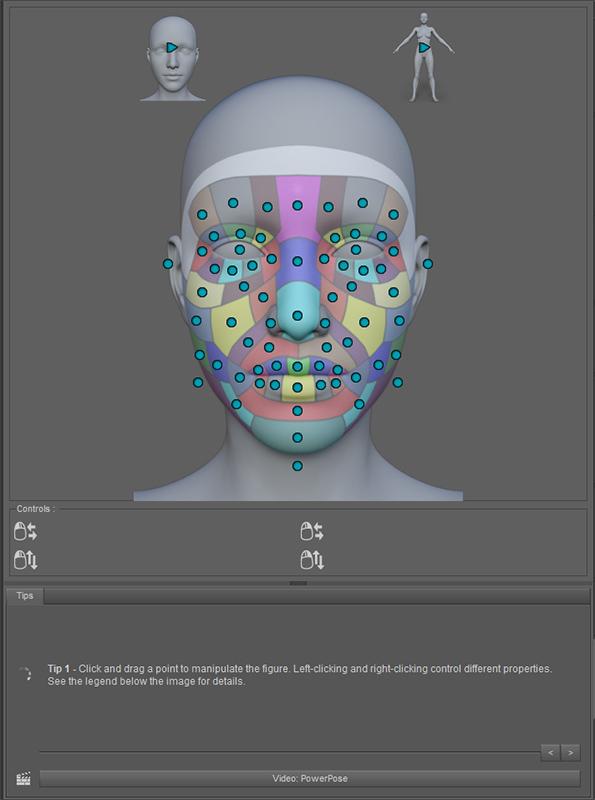
My free G8 has plenty of dots - have you installed the PowerPose Templates download? Try this: https://www.daz3d.com/forums/discussion/comment/2539036/#Comment_2539036
G3F Character morph to G8F... SIMPLE TOOL!!!!!!!I have no idea why the tried and true techniques don't work for you, but they are likely the best available for a while, until someone steps up to replace Dimension3D, who died recently.
well 1) it seems as though every time DAZ Studio is updated, the instructions change because the interface changes. It's little things at first... a certain tool may have moved to a different area in the menu or something was just completely taken out and 2) and this is a big one, there are some problems with some of the different models... Mei Lin for example, while you can import the morph, there are serious (and scary) deformations when using the power pose feature.
Morphs from G3 to G8I tried the Sickleyield method and it worked great. But my question is, why not just use the G3 version? So far I see no advantages to G8... Why do we need G8 if we already have all the morphs we want in G3??? The mouth may be a bit more realistic for some expressions but not such a big change. V8/G8 could just be another less attractive G3 character. I'm not seeing the huge advantages...
The facial rigging and better posing are huge advantages to me. I got into 3D art primarily to do book covers and promo art for my writing. Along the way, I found a new hobby I love that enhances my writing process and am starting to do covers for other writers. Lifelike expressions and great posing are crucial to that, as are well draped clothes, which is why I'm also working hard to learn everything I can about dynamic clothing.
With the latest updates to Studio and the new G8, I'm finally getting the results I've been striving towards for the past year and a half. I am totally on board with the new stuff, but not afraid to use the old stuff when needed (I love the old stuff!) I'm also learning Poser and many other things as I try to find the right tools for the right job.
So yeah, personally I'm happy to embrace the new technology. It's opening doors I didn't even know were there.
I have sooo many expression and bending and merchant resource morphs for G3 already... The free G8 doesn't have as many dots, is that from a morph package? I also found that if I play with just the free G8 facial morphs, expressions and visemes, I can do quite a lot with facial expressions. I'm waiting to hear a response from my ticket to see if they'll give me a discount since I have the Victoria pro bundle stuff but bought individually, not as a bundle. I still haven't used my coupon so may go for the morphs, but doubt I'll be investing a bunch more money into it. As of now, I don't see a huge difference, but it might be because I already have so many morphs for G3...
RenderGuyNY's Freebies (latest freebie updated 5-24-20)Tiana for G8F
Tiana for G8F started out as a project for G3F, but when G8F came out this week I updated the project to give everyone something free for G8F. Tiana comes with 8 makeup options, 11 eye colors, and a whole lot more. Please make sure you read the documentation file if you run into problems. I used a method created by Redzfor transfering morphs from a G3F to G8F. I'm not 100% how this will work out for others. For this reason, I also included the original .obj morph file. I provided a link to Redz tutorial if you run into problems as well, or you can read all about this on the discussion forum: https://www.daz3d.com/forums/discussion/176271/morphs-from-g3-to-g8. As always, happy rendering.
https://www.sharecg.com/v/88548/browse/21/DAZ-Studio/Tiana-for-G8F-%5Bsome-nudity%5D


PS. You can see full body shots on the Share CG website.
Suggested specs for workstation and other dumb questions1. Yes the GPU does the heavy lifting, but it still relies on the CPU for other tasks. (For Iray, the CPU handles the intial package and transfer of data to the GPU) In your preview window, the big CPU tasks include morph targets, posing, and dynamic cloth simulation. I would consider getting something in the current generation for your CPU, that way you will be on a DDR4 memmory platform. (unless you are buying it second hand at a super cheap price)
2. The GTX 1080 should get the scene DONE to 100% convergence in under an hour.
Modeling Objects in Carrara - Q&A - Come One and AllAs I thought... I was trying, in head, to overmodel. Shader domains are very like my 1st try at a Toonlike eyball... which I had too many domains... should have used morphs for pupil size as well as flat and concave. Was thinking about it this morning a bit to make simpler/less polys.
As you describe I will only need 2 spheres... with your shader domains and morphs descriptions.
- 1 for Inner Eye surface, Pupil, Iris and and Schlera.
- 1 for Outer Eye surface for wetness and the Cornea Bulge.
A few things that I just thought of is adding an additional morph to the pupil for a Cat's Eye look... and for a Toon Eye add another morph for stretch effect as seen in cartoons, for example... when a pretty gal walks by.
Transfer Utility G3F to G8FFirst of all thank you so much for this great way to transfer morphs.
I followed the tutorial to the letter but with every pose the hands/ finger look awful and distorted.
Only now I saw you uploaded a new revised tutorial file, will that help with the finger issue?
Kind regards
Petra
"Brace yourself, my dear wallet! There's always another Sale - and Glitches!"I sent in a ticket because I didn't get any extra discount on anything. I have V5 full pro bundle and 99% of V6 and V7 pro bundles with items purchased individually so no advantage to getting those free with purchase, I'm only missing a couple of items that I never wanted. I really just wanted the G8 morphs/expressions and PA eyelash thing because the eyelashes are almost invisible. But I'm still not sold on the advantages of G8. So far I haven't seen a single render that was any better than a good G3 render. I transferred a character over and it took about 20 minutes and I could have just rendered the original character.
I just don't get it! What am I missing? What is so great about G8??? Maybe it's because I have every merchant resource morph there is for G3 and a zillion characters for the gene pool. Maybe I invested too much into G3 but I guess I'll wait and see if PAs do something spectacular with it that I don't already have for G3. I just hope they continue to make hair compatible with G3. To be honest, I feel like I just walked into some religious cult where everyone is praising some guru and there is nothing in the "religion" I haven't heard before. Maybe I'll become enlightened to the advantages of G8 eventually, but right now, I just don't see it.
Morphs from G3 to G8G3 to G8 clothing...that's fantastic Singular Blues ;)
..and.I..found the problem.....it's creating the G8-G3 Morph initial transfer..I saved and used it to carry over and create other morphs but for some reason it won't save them to the morph loader..but starting from scratch worked and now have Arabella and Crediwen morphs and they work like a charm so thanks everyone :)Morphs from G3 to G8I tried the Sickleyield method and it worked great. But my question is, why not just use the G3 version? So far I see no advantages to G8... Why do we need G8 if we already have all the morphs we want in G3??? The mouth may be a bit more realistic for some expressions but not such a big change. V8/G8 could just be another less attractive G3 character. I'm not seeing the huge advantages...
The majority of my renders are probably head and shoulders shots where the expression on the face of the character does as much to tell the story as everything else in the image put together. The new features (shown below) of the PowerPose tool in Daz offer control of even the smallest detail of G8's expression, something that's just not possible with G3. I'm over the moon with my G8 morph of G3Zarina (and others) because her face can 'say' so much more now, and so much more easily than the G3 version ever could. No more time spent on postwork or even abandoning images altogether just because G3's smile has made her lower eyelids take on a peculiar upward curve and given her a mouth like a letterbox - a few quick tweaks in PowerPose will get rid of any oddities like that, although the G8 base expressions are so much better to start with and it's often not necessary to tweak them at all. Creating my own original expressions isn't that difficult now either.
What with being able to use the character's original texture (if it didn't use a custom UV) or those made with Skin Builder 3, G8 is rapidly becoming my 'go to' figure for female renders and I'm seriously thinking of buying the V8 Pro bundle on the strength of it, even though I've barely scratched the surface of what can be done with G8 alone.
 Day 4 of Generation 8 and...
Genesis 7!! I definitely missed that release.

The morphs from G7 transfer so easily (even extreme ones) that I plan to get thru them all eventually ;)
This is Josh Crockett's Hag morph for Genesis 7 Female. Love ;).
Laurie
Hehe...Genesis 3...sorry. It's gonna take awhile until my synapses catch up with the number change ;).
Laurie
Don't worry, it's not just you :) I posted mentioning G7 the other day (well, it's the one before G8, right? :) ), but spotted it and edited before anyone noticed!
That's why I will continue to refer to the new generation as G4; so I don't get confused.
Day 4 of Generation 8 and...Genesis 7!! I definitely missed that release.
The morphs from G7 transfer so easily (even extreme ones) that I plan to get thru them all eventually ;)
This is Josh Crockett's Hag morph for Genesis 7 Female. Love ;).
Laurie
Hehe...Genesis 3...sorry. It's gonna take awhile until my synapses catch up with the number change ;).
Laurie
Don't worry, it's not just you :) I posted mentioning G7 the other day (well, it's the one before G8, right? :) ), but spotted it and edited before anyone noticed!
Daz 3D is part of

Connect
DAZ Productions, Inc.
7533 S Center View Ct #4664
West Jordan, UT 84084Licensing Agreement | Terms of Service | Privacy Policy | EULA
© 2026 Daz Productions Inc. All Rights Reserved.