-
Soooo... M8
Maybe someone will make a G8 female male morph in the meantime.. I actually found Nalin kind of useful, although not sure if it would sell well.
Soooo... M8Well, when he does arrive, I hope his anatomical elements are better. That was a definite step in the wrong direction. Whoever made that did a horrible job. G2M was much more usable and poseable.
Since most of my products have anatomical elements in them, I think actually the opposite is true. G3M gens have more bones in them than G2M thus more posable, it also had HD details built in (though you had to set render subdivision to 3 or 4) that G2M lacked.
Yes, I have to admit that I like the rigging on G3M's elements but that foreskin was the worst ever. As someone who used that a lot with G2M, G3M's foreskin was a big let down. Simple on or off does not leave a lot of room for creativity.
I have no opinion on it as it was a rarely used feature, hence its simplification. And G2M is a headache to make foreskin morphs for to go with the gens morphs compared to G3M. G2M required 6 morphs for each section of gens compared to just one in G3M, as G2M used animation for its MCM/JCM. There's a product on renderotica that makes a intermediate foreskin morph, but truly I won't miss G2Ms effort and hope it doesn't make a return. It was a rarely used feature that required more polygons; those polygons that was removed from that area back into the gens areas and made morphing it much better.
Ah, I never have managed to get into doing morphs of my own yet. However, I loved being able to pose that part of the anatomy and did so in a lot of my nudes. It isn't such a static object in real life and I loved being able to make adjustments and pose it. Can't do that with G3M.
Soooo... M8Well, when he does arrive, I hope his anatomical elements are better. That was a definite step in the wrong direction. Whoever made that did a horrible job. G2M was much more usable and poseable.
Since most of my products have anatomical elements in them, I think actually the opposite is true. G3M gens have more bones in them than G2M thus more posable, it also had HD details built in (though you had to set render subdivision to 3 or 4) that G2M lacked.
Yes, I have to admit that I like the rigging on G3M's elements but that foreskin was the worst ever. As someone who used that a lot with G2M, G3M's foreskin was a big let down. Simple on or off does not leave a lot of room for creativity.
I have no opinion on it as it was a rarely used feature, hence its simplification. And G2M is a headache to make foreskin morphs for to go with the gens morphs compared to G3M. G2M required 6 morphs for each section of gens compared to just one in G3M, as G2M used animation for its MCM/JCM. There's a product on renderotica that makes a intermediate foreskin morph, but truly I won't miss G2Ms effort and hope it doesn't make a return. It was a rarely used feature that required more polygons; those polygons that was removed from that area back into the gens areas and made morphing it much better.
I really love Genesis 8!The more I use this figure and morph her the more I fall in love. I especially love how DAZ removed the useless nail bed geometry, and welded the fingernail and toenail geometry to the figure. They kept a bit of geometry under the nail tip which is absolutely what they should have done. Goodbye to those endless hours of shaping nail beds so the geometry doesn't protude through nail geometry and cause hot pixels in Octane. Now shaping fingernails and toenails are a breeze. She bends even better than Gen 3, and her facial expression detail is fantastic!! I would put a DAZ Gen 8/V8 up against any of the so called $600.00 and above professional figures found on other sites! DAZ has a huge winner here. I can't wait to see the HD morphs...I think we are well on the way to hyper realism.
Thanks again DAZ!!
Morphs from G3 to G8OK, here's a probably complete silly question but anyhow. In order to transfer a morph, one is asked to dial it in on G3F and then export it. What about morphs which can be dialed in and out meaning morphs that come with 0 but allow being set to either -100 or +100? Is it sufficient just to export them dialed in +100 or should one also export the other behavior?
Yes, it is sufficient.
You don't have to do anything tricky. When you import the morph it will default to -100 to 100 regardless of what the original setting were.Morphs from G3 to G8OK, here's a probably complete silly question but anyhow. In order to transfer a morph, one is asked to dial it in on G3F and then export it. What about morphs which can be dialed in and out meaning morphs that come with 0 but allow being set to either -100 or +100? Is it sufficient just to export them dialed in +100 or should one also export the other behavior?
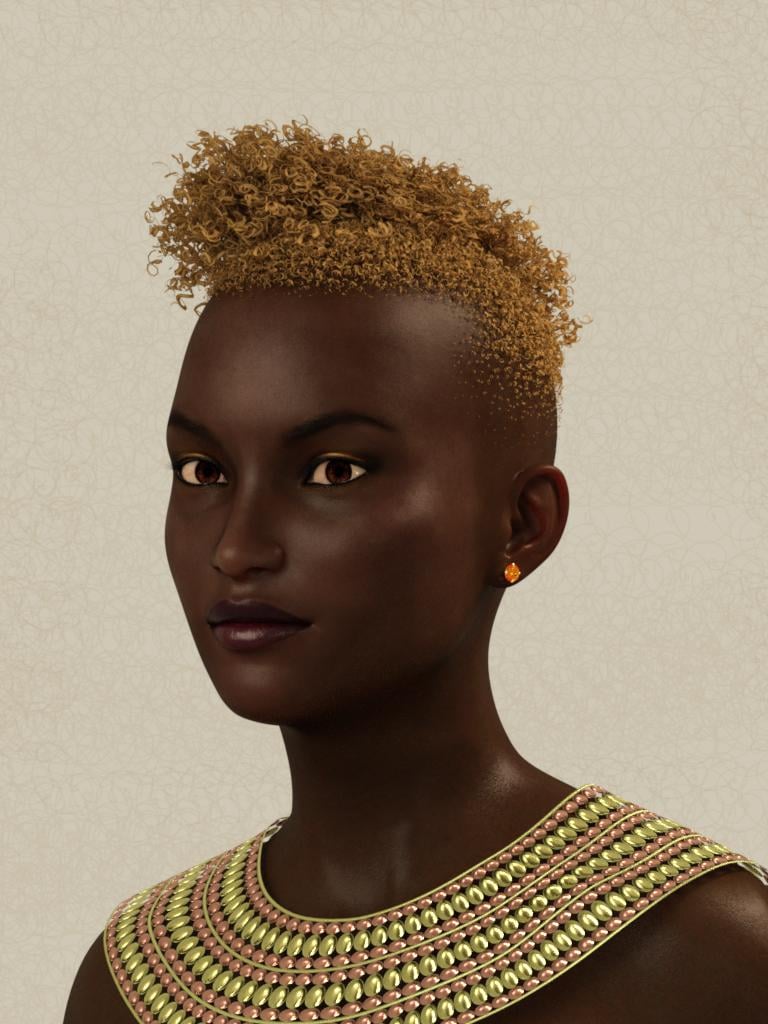
Morphs from G3 to G8I'd like to give a big "Thank You" to everyone who has come up with transfer methods and assistance. Here's G8F with 50% Samira and 50% Bethany 7 (Samira skin).
 DS 4.9.4?
...OK haven't read through the entire thread, so how does one go about downloading 4.9.4.117 and all the G8 essentials without the DIM. My workstation is no longer online so I need to manually DL to a notebook and transfer the files to the workstation so I can install with the DIM in offline mode. That means I need to find where I can download the .zip from. Doesn't work form the main page as when I click Download for the Windows 64 bit version, it takes me to my Product Library.
...and could we please find some way fo get the spell check to flag typos in words that are shorter than 4 letters? Or find a better one (or just go back to using the browser's default spell check)?
that is actually a very good question so you click on the technolodgy link at the top of the page takes to the info page about the various generations figures, and blah blah blah at the the top of that page it has get started link for daz studio which takes to a page with download and download install links for studio and different parts - download install obviously opens dim BUT the just Download button instead of downloading installer like you want does not and instead opens up your product page section and may go into loading hell and just list all your stuff. So the quickest route is just go to your product library page and in search type daz studio 4, pro should be close to top and if you scroll down the info section you should see in the content G8 so you have the right one selected and the manual download buttons work here just checked there's a scene builder file, default resources file, 32 and 64 bit versions and mac versions, don't see a beta version that's probably dim only, looks like a few other products have been added now besides essentials too including West Park
Morphs from G3 to G8Hey guys, that vertex stuff sounds a bit too heavy for me. Successfully transferd my first morph. Noticed that whereas it was a morph for a body part the posture changed a bit once I applied it to G8F. So maybe this is that vertex/vertices thing? Would not mind if one of you Guru's might add that to Redz tutorial.
But for the moment thanks to everyone exploring or documenting the necessary steps for transfering morphs enabling even a noob like me to do it.
Genesis 8: Some Stats and our ThanksI bought the V8 Pro Bundle and the G8F body and head morphs, and I love it! When I tested with existing scenes I had, (same lightning, hair, converted clothing, etc) my G8F looks better than my G3F. And in better I mean look more "alive". Also at least in the preview window testing with iray, G8F renders faster. The few things missing right now are more morphs, especially related to the chest area and the behind; movement and realism morphs for pressure. Shape morphs I can create myself. I did the same for claws and fangs, for my vampire digital self that is. Another thing I want is a morph for V8's eyebrowns, I prefer them thinner. Working with them is a bit of a pain because all hair are individual meshes.
Oh, and to add to the Hexagon discussion; I need and want an update, too. Even if I have 3DS Max 2015/17, Silo and Blender I always go back to Hexagon because it's so easy to use. And work with Daz Studio with mininal effort. Unfortunately it crashes all the time, it's really the most frustrating and also to me one of the (still) best 3D programs out there.
Morphs from G3 to G8<Snip>Is there a way to create head morph conversions only, without changing the body at all? I tried with the Aiko 6 head morph, but the body is still changing a bit, even if I didn't morph anything there.Using Redz's method - My face morphs also affect G8's body - especially the shoulders. I guess our clones are not perfect.
In the Morph Transfer Helper file, the G8F has the Genesis 3 female clone dialled in. This is because the morphs you are transferring were modelled on this base, so for the best fidelity of shape, I dialled it in. However, the base shapes are similar enough that I think you could get away without having the G3F clone dialled in. It's under parameters, hidden- clones. (You may need to enable show hidden properties in the drop down box of the parameters first).
If you dial this Genesis 3 Female to zero before proceeding with the tutorial as normal, then I think you can bring over the head morphs without affecting the G8F body.
Removing the clone greatly reduced the unwanted body changes, but they are still there, mostly at the shoulders.I tried zeroing the hidden pJCMShldrUp_90 morphs too, without success. Looks like the Transfer Utility is not almighty
 .
.I have to point out this is not 'my' method. I merely adapted what others here have discovered into a somewhat simplified tutorial. :)
I know. But comparing different conversion methods, I have to distinguish them somehow
 .
.The other way to remove the body effects of your morph is to favourite the head morph. Then in Tool settings- geomety editor, choose vertex mode, select the body vertices that you don't want included, then right click and select Morph editing - Clear selected vertices from favorites. Now ypur morph only affects the head and you can re-save it for future use.
Unusual head shapes with neck morphs may mess up head/body transition, but if you're careful, this can work very neatly.
That works! In part 2 of your manual I loaded the previous created head morph with Morph Loader Pro, dialed the morph in and removed the unwanted vertices with the geometry editor as you described above. After that I continued with your manual and the result was a head morph, that didn't change anything of the body.
Thank you very much!
Glad it worked. If converting over a bunch of head morphs, you can favorite them all at once to remove the body vertices so as to make it semi-automated.
Two GTX1080ti + I7 4790For Iray usage PCIE 2.0 will not slow down render performance. It may take a few extra seconds to transfer the scene to the GPU memory depending on how big and complex it is.
That's a pretty nice looking case. How many fans are installed right now? Also, are the fans oriented in such a way that air is flowing through the case in a linear fashion?
Morphs from G3 to G8<Snip>Is there a way to create head morph conversions only, without changing the body at all? I tried with the Aiko 6 head morph, but the body is still changing a bit, even if I didn't morph anything there.Using Redz's method - My face morphs also affect G8's body - especially the shoulders. I guess our clones are not perfect.
In the Morph Transfer Helper file, the G8F has the Genesis 3 female clone dialled in. This is because the morphs you are transferring were modelled on this base, so for the best fidelity of shape, I dialled it in. However, the base shapes are similar enough that I think you could get away without having the G3F clone dialled in. It's under parameters, hidden- clones. (You may need to enable show hidden properties in the drop down box of the parameters first).
If you dial this Genesis 3 Female to zero before proceeding with the tutorial as normal, then I think you can bring over the head morphs without affecting the G8F body.
Removing the clone greatly reduced the unwanted body changes, but they are still there, mostly at the shoulders.I tried zeroing the hidden pJCMShldrUp_90 morphs too, without success. Looks like the Transfer Utility is not almighty
.I have to point out this is not 'my' method. I merely adapted what others here have discovered into a somewhat simplified tutorial. :)
I know. But comparing different conversion methods, I have to distinguish them somehow
.The other way to remove the body effects of your morph is to favourite the head morph. Then in Tool settings- geomety editor, choose vertex mode, select the body vertices that you don't want included, then right click and select Morph editing - Clear selected vertices from favorites. Now ypur morph only affects the head and you can re-save it for future use.
Unusual head shapes with neck morphs may mess up head/body transition, but if you're careful, this can work very neatly.
That works! In part 2 of your manual I loaded the previous created head morph with Morph Loader Pro, dialed the morph in and removed the unwanted vertices with the geometry editor as you described above. After that I continued with your manual and the result was a head morph, that didn't change anything of the body.
Thank you very much!
Need to make a character morph for a piece of clothing.This thread may help you: https://www.daz3d.com/forums/discussion/176271/morphs-from-g3-to-g8
Note: If you want to use Redz method, keep reading down a few pages as an improved morph helper file was released after a few people mentioned problems with the first one.
Morphs from G3 to G8<Snip>Is there a way to create head morph conversions only, without changing the body at all? I tried with the Aiko 6 head morph, but the body is still changing a bit, even if I didn't morph anything there.Using Redz's method - My face morphs also affect G8's body - especially the shoulders. I guess our clones are not perfect.
In the Morph Transfer Helper file, the G8F has the Genesis 3 female clone dialled in. This is because the morphs you are transferring were modelled on this base, so for the best fidelity of shape, I dialled it in. However, the base shapes are similar enough that I think you could get away without having the G3F clone dialled in. It's under parameters, hidden- clones. (You may need to enable show hidden properties in the drop down box of the parameters first).
If you dial this Genesis 3 Female to zero before proceeding with the tutorial as normal, then I think you can bring over the head morphs without affecting the G8F body.
Removing the clone greatly reduced the unwanted body changes, but they are still there, mostly at the shoulders.I tried zeroing the hidden pJCMShldrUp_90 morphs too, without success. Looks like the Transfer Utility is not almighty
.I have to point out this is not 'my' method. I merely adapted what others here have discovered into a somewhat simplified tutorial. :)
I know. But comparing different conversion methods, I have to distinguish them somehow
.The other way to remove the body effects of your morph is to favourite the head morph. Then in Tool settings- geomety editor, choose vertex mode, select the body vertices that you don't want included, then right click and select Morph editing - Clear selected vertices from favorites. Now ypur morph only affects the head and you can re-save it for future use.
Unusual head shapes with neck morphs may mess up head/body transition, but if you're careful, this can work very neatly.
Morphs from G3 to G8<Snip>Is there a way to create head morph conversions only, without changing the body at all? I tried with the Aiko 6 head morph, but the body is still changing a bit, even if I didn't morph anything there.Using Redz's method - My face morphs also affect G8's body - especially the shoulders. I guess our clones are not perfect.
In the Morph Transfer Helper file, the G8F has the Genesis 3 female clone dialled in. This is because the morphs you are transferring were modelled on this base, so for the best fidelity of shape, I dialled it in. However, the base shapes are similar enough that I think you could get away without having the G3F clone dialled in. It's under parameters, hidden- clones. (You may need to enable show hidden properties in the drop down box of the parameters first).
If you dial this Genesis 3 Female to zero before proceeding with the tutorial as normal, then I think you can bring over the head morphs without affecting the G8F body.
Removing the clone greatly reduced the unwanted body changes, but they are still there, mostly at the shoulders.I tried zeroing the hidden pJCMShldrUp_90 morphs too, without success. Looks like the Transfer Utility is not almighty
.I have to point out this is not 'my' method. I merely adapted what others here have discovered into a somewhat simplified tutorial. :)
I know. But comparing different conversion methods, I have to distinguish them somehow
.Morphs from G3 to G8*Blinks.
Well, it actually worked.
There's the old saw, "if it's stupid, but it works, it's not stupid." Personally, I think that ought to be, "If it's stupid but it works, hey, at least it worked and we aren't dead, amIrite?"
Well, what I did was, I pulled their eyes out.
For G8, I moved her eyes clear out of her head, in a 3rd party editor. Then I moved the eye moisture and cornea (It's one part) away from the eye.
For G3, I moved her eyes to the same place as G8's. In this case, I was careful to leave the tears in place. G8's tears are part ofthe Eyelash figure, and I didn't want them getting in the way. I moved the rest of the eye mositure to line up with where I placed G8's. I moved the pupil way off behind her head. G8's Iris and pupil are of one piece with the eye. G3's are not, and my thought was the pupil shape (Artists do funny thing with that handful of polygons) was the real culprit causing thing to go pearshaped in the eyes.
Like I said, I wasn't hopeful. Seemed like a long shot, oversimplifed, line of BS I was selling myself on the basis of "why not?" It's my free time, I can tilt at windmills all I like.
But it actually worked. For certain values of worked. At least with Aiko6. The eyes had to be moved Z0.15 but are otherwise free of distortion.
I suppose logical thing to test next is if the eyes need be moved at all, or if it's just the pupils.
If it is just the pupils, then it ought to be possible to make a correcting morph using studio alone.Basic tutorial for transferring Genesis3 female morphs to Genesis8 femaleI have used this method with success on a selection of the 1000s of shaping morphs I have for genesis3 female, I cant guarantee it will work with every morph and there may be some strange results occasionaly but this is a good workaround for now. Genesis 8 is great, much nicer movement and posing in those tricky joint areas and loads up in a fraction of the time
This tutorial assumes you have a morph or morphs you want to transfer from Daz Genesis3 female shaping parameters or custom morphs to Genesis 8 female.
1. Open Daz Studio 4.9, load Genesis3 female, in parameters set the resolution level from high definition to base and subdivision level to 0 then find the morphs you want to transfer and add to favorites (click thr little heart on the top right of the morph dial)
2. Load Genesis 8 female and start the transfer utility. (edit/figure/transfer utility)
set as follows
Source figure - Genesis3 female
Shape - Default
Target - Genesis 8 female
Shape - Clone>Genesis3 female
Projection Options
Change Use near vertices to 1000%
Uncheck all except for morph targets
In morph targets > extended options use From source - Favourites , uncheck projection templates + overide existing and below uncheck Fit to Source Figure and Smoothing
Click Accept
You can now delete Genesis3 female leaving Genesis 8 female in place. Your morph/morphs will have transferred. If you cant find them, open Property Hierarchy and search for the name of your morph, Right click on it and click show in parameters
Your Genesis morph should show up, in this case under morphs>morph loader.Dial up your morph.
Your morphed Daz Genesis character should now look the same on Genesis 8 female
nb: On furthur experimentation I have discovered that certain of the transferred morphs although seem to work fine on first load , when saved then reloaded they cause the hair and clothes to no longer fit and and the genital addon distorts the figures mesh. There seems no way of fixing this and I have to start fresh which is a pain as I cant save my work . If anyone has a fix for this Id be grateful (I have tried adjust rigging to shape to no avail)
"Brace yourself, my dear wallet! There's always another Sale - and Glitches!"I remember that. There was a bit of fuss at the time, but obviously they've decided to stick with no bundle for the future. It really bugs me. The head and body morphs for G8 are a necessity. They're not an option like a new outfit or something. You will NEED them for characters, and you need them cos quite frankly, Genesis 8 Female is ghastly.
We had a very successful garage sale yesterday, so I actually have the funds to purchase Victoria 8 Pro bundle. I was really torn - get the Pro which could possibly net you a discount down the line when M8 or Monique or other iconics come out....or not get the Pro because I'm tired of the "new shiny best thing" and that I kinda don't like V8 much. Her face is nice, but I don't like the eyebrows and I'm hearing that peeps aren't keen on the skin shader or her eyes. So after thinking on it overnight, I've decided to pass on V8. I'm simply not interested at this point in time. Yes, she can wear G3F clothing (except shoes) so I really don't need to start a new wardrobe for her.....so that helps. But yeah.....I'm not interested in her. It's a weird feeling to actually be able to safely afford a pro bundle even with australian currency conversion ($59US = $77AUS) and not want it. If my 10% discount for owning one previous Victoria genesis pro bundle could have been applied against JUST the Victoria 8 base, then I might be more inclinded to pick her up. But it doesn't. It only works on the pro bundle which frankly, I don't want.
I can't believe there's no bundle price for the head & body morphs and expressions for G8. I mean, if you're going to get one, you want them all. Ridiculous.
They didn't bundle the morphs for G3F or G3M, either. But I do agree with you...
I am another person pondering about whether or not to get the pro pack. I own all three previous Victoria pro packs, so I get the full additional 30% off, but I am a bit disappointed that 2 of the four outfits are SciFi, a genre I never render, and another one is an impractical fantasy armour, of which I already have many, and almost never use them. I like the V8 base, and one of the characters, but there is no additional discount for picking up individual items in the pack, only for those outside the pack.
However I will pick up the two morph packs and the expressions, which at $20 for the three is a pretty good deal, and gives me a good base for creating characters with G8.
Morphs from G3 to G8I tried Redz version but how do you get the eyelashes to be included? Also, everything works until the final save and restart. Then they all disappear.
G8F has no eyelashes, they are provided as a separate conformer which loads with G8F or can be found under anatomy in the content library, so it's not possible to transfer those.
Have you been saving your morphs as described at the end of the tutorial? Also don't save them to your Connect library as there may be a conflict there.
Daz 3D is part of

Connect
DAZ Productions, Inc.
7533 S Center View Ct #4664
West Jordan, UT 84084Licensing Agreement | Terms of Service | Privacy Policy | EULA
© 2026 Daz Productions Inc. All Rights Reserved.