-
Morphs from G3 to G8
I've been using this method (Thank you Redz et al) to convert all my Genesis, G2F and G3F's (how did I ever get so many characters?). Now I am trying G2M but I ran into a bit of a problem. When I get to the part where I load G8 and use the morph loader to import my G2M clone it tells me the geometry doesn't match. I've been doing this stuff all day so I've probably missed a step but my clone looked lik G8 (with breasts) and I wonder if it should look like G2M (without the breasts)? Just want to check (before I do it all again and get the same result) that - if converting from a Male figure - there might be another step. I saw someone talking about Male Clones for G8 (Ithink it said look in the parameters tab) but I couldn't see those and now can't find the thread where it was mentioned.
Can anyone shed light?
Much appreciated.
It sounds like you're trying to load G2M geometry to G8.
Having not looked at Redz's tut (it was my idea), you don't load a clone to G8. You load the clone to G2M. Trying to load it to G8 sounds like the issue. You shouldn't need to add a clone to G8 for that figure. G8 already has one.
EDIT: If your issue is in part two of Redz's tut, make sure when you are exporting your adjust G8 shape, nothing but g8 is visible in the scene, otherwise you'll end up with two or more figures in one mesh. This can be cause by having G2M visible, or by have g8's eyelashes visible.No it appears to be in the first part. I've done this over 50 times today with Male and female genesis characters' Genesis 2 & Genesis 3 Female characters. I'm following the instruactions from 1 to 24 but substituting G3F for a G2M. I'll do it again, just to be sure...but it does seem that, at some point, the clone .obj becomes female. I'll make a note of the step that seems not to work as it should.
Has anyone else successfully morphed a G8 into a Male character? Do I need to purchase cross-figure to do it? And I thought Male clones were included in the essentials but I can't for the life of me find anything like that - where would I look?
Thanks
Looking again at those steps in part one, the clone should become female. At this point in the process, you are reshaping G2M. The point is to create a Genesis 8 Clone shape on G2M. At step 21. where you are importing, you should be importing to G2M not G8. Mind, your original post said, "When I get to the part where I load G8 and use the morph loader to import my G2M clone it tells me the geometry doesn't match." Indeed it does not. The geometry you exported in steps 1 through 20 was G2M, or whatever figure you are attempting to adapt the process to. You have to load that back to that figure, not to G8.
Part two contains further instruction on creating a clone for G8, but that clone isn't strictly necessary.
When using the Kattey/SY/Redz method of transfer, you need to dress the source figure in a shell of G8. The only way to do that accurately is to have a clone of G8 on the source figure. That's why the G2M clone obj is female shaped. It has to be to work properly.Morphs from G3 to G8
Yes, I have 7Zip. Do I need to rename the files to .zip?1. I noticed Ears didn't work. I need my elf ears. I've got dozens of elf ears, all the way back to V3. I've already pulled my favorites from V4 into G3F but I couldn't even morph my clone with Izabella's ears. How do I get the ears in?
2. There's been some discussion about head morphs and how you have to use the vertex editor in order to save them. Does that apply to head-only morphs? Like SickleYield's Faces of Asia, etc.?
3. If I create a custom G3F with a whole bunch of partial morphs, you know - dial the eyes, the nose, the mouth, pear shaped hips, give her fangs, what wever. Can all that be transferred as a complete morph?
4. How do I save Favorites? I'd love to have to the morphs that I use the most available with one click every time I load a character (or at least the base characters).
By the way, Dimension-3D has some awsome DUF editor tools - one's called DSON Edit and the other is Morph Organizer. You'll probably want to wait for a sale on those but they're super useful.
It's usual for ear morphs that autofollow is disabled (so the hair doesn't deform around them.) In this case you'll need to enable autofollow on the morphs you wish to transfer. The autofollow won't apply until you unfit your G8 clone (right click and fit to none) then refit the clone to the donor figure and the ears should work.
This method is ideal for transferring custom dialled characters because you are basically transferring the entire shape as a single morph. That's also why you may get some unwanted vertex changes when transferring individual head/body part morphs.
You may find the transfer utility method better for individual head/body part morphs, as the transfer utility doesn't transfer the base figure shape. In fact if you use the transfer utility method, to get the exact shape of a character, you would need to dial in the donor figure's clone. (though that has it's own problems)
I don't think there's a way to save favourites. I wish there were.
Ack! I think it's time to crank up my source-code editor and other tools and just hack all the files at one time. This could get time-consuming.
And, of course, they're compressed. Google said something about a batch decompress tool in DS? I can't find anything except DSF Toolbox in the store. The OP made it sound like something built into DS.
Do you have an unzipping tool? I use 7zip - you can run it on a compressed .dsf or .duf and it will uncompress it for you - it won't work on encrypted files like .dse (for obvious reasons) and I've run into a few other files it won't do, but for morphs files it's generally fine.
ANIMATING THE GENESIS 8 FEMALE?? ... WHY BOTHER??nonesuch00 said:
"DAZ 3D workers have stated that the animation retargeting will be fixed for both G3F/G3M and G8F/G8M (when G8M comes around).
How much they improve theanimation past that is anybody's guess though.
There is a script made by the OP of this thread
https://www.daz3d.com/forums/discussion/176126/g3f-pose-to-g8f-correction-fix-adjust-script#latest
that corrects the Genesis 3 poses for use on Genesis 8 Female."Thanks however the only thing I have read in the forums is Daz claiming
to be "fixing" is the broken BVH import of G3 Data into studio.Great!! but this only helps those us who have access to external
professional motion creation tools Like Iclone or Autodesk Motionbuilder
and desire to import Motion data back to Daz studio.Lovely..Bloody good for us!!

But what about those who can only afford Daz studio and perhaps Keymate
aniMate an GraphMate??
"Gofigure" is MIA
So animating G8 in DS alone leaves one with the options
I have already listed.Ths is becoming like going to a fine dining establishment
and ordering one full perfectly edible plate of food... and two empty plates.Now imagine taking your utensils and forking all of the food
over to the second empty plate.
repeat process transferring the same food to the third empty plate
and clean up the bits that fell to the side during the transfer.Does this sound rational to anyone??
when you could just eat from the first plate(ie Genesis 2 M/F).Well as part of that I am thinking they will also fix all those aniblocks which are quite extensive, quite good, but need two versions and both versions need be included with the original products.
It's been stated things are coming to DAZ in the 2nd half of the year that will address some long standing complaints - and I've read enough in the forums to know those are:
1) animation in DAZ
2) hair in DAZ
3) dynamics - at the very least hair & clothing dynamics
Of course I am guessing so well...at any rate I am tired of doing still renders with DAZ and am moving on to Blender. I am confident by the time I finish the Blender sets of tutorials DAZ will have some big improvement to help me make fun animations and still scenes that don't look naturally dynamically composed.
Man, I really, really hope this is true. DAZ has the best figures and a great renderer, but no dynamics and the animation system is archaic. I love DAZ, and I've been able to get a lot of mileage out of it, but this lack of support for animation is a terrible pity.
P.S. Wolf, where did @3Digit say he successfully tested V8 in iClone?
[SOLVED]Possible to ignore a morph shape applied when adding a new morph?Hoping the title says it all, but...
If I morph an exported mesh, morph it externally, can I just have the morph I created applied whilst ignoring anything I added?
EDIT:
To answer my own question, and if anyone else needs to know:
In Morph Loader Pro, load the morph
Right Click 'Reverse Deformations'
Change No to Yes
Preserve existing deltas should say Yes (default)
Pose 'None' (default) - presuming the figure was exported in its default pose
Morphs from G3 to G8I've been using this method (Thank you Redz et al) to convert all my Genesis, G2F and G3F's (how did I ever get so many characters?). Now I am trying G2M but I ran into a bit of a problem. When I get to the part where I load G8 and use the morph loader to import my G2M clone it tells me the geometry doesn't match. I've been doing this stuff all day so I've probably missed a step but my clone looked lik G8 (with breasts) and I wonder if it should look like G2M (without the breasts)? Just want to check (before I do it all again and get the same result) that - if converting from a Male figure - there might be another step. I saw someone talking about Male Clones for G8 (Ithink it said look in the parameters tab) but I couldn't see those and now can't find the thread where it was mentioned.
Can anyone shed light?
Much appreciated.
It sounds like you're trying to load G2M geometry to G8.
Having not looked at Redz's tut (it was my idea), you don't load a clone to G8. You load the clone to G2M. Trying to load it to G8 sounds like the issue. You shouldn't need to add a clone to G8 for that figure. G8 already has one.
EDIT: If your issue is in part two of Redz's tut, make sure when you are exporting your adjust G8 shape, nothing but g8 is visible in the scene, otherwise you'll end up with two or more figures in one mesh. This can be cause by having G2M visible, or by have g8's eyelashes visible.No it appears to be in the first part. I've done this over 50 times today with Male and female genesis characters' Genesis 2 & Genesis 3 Female characters. I'm following the instruactions from 1 to 24 but substituting G3F for a G2M. I'll do it again, just to be sure...but it does seem that, at some point, the clone .obj becomes female. I'll make a note of the step that seems not to work as it should.
Has anyone else successfully morphed a G8 into a Male character? Do I need to purchase cross-figure to do it? And I thought Male clones were included in the essentials but I can't for the life of me find anything like that - where would I look?
Thanks
Genesis 3: Three finger and two toe morphsHi,
I was just wondering if the Genesis 3 Creature Creator (Fantasy Creatures possibly) had the morphs that are included in the title of this thread?
If not, has anyone managed to successfully transfer these morphs to G3 (not to share, that's against forum rules, just if you've managed to do it with no problems).
Thanks :)
Morphs from G3 to G8This is my alternative method, but I've found it better than the transfer utility for body morphs especially
Tutorial and helper scene/morphs included
Updated the tutorial file that (hopefully) sorts out those fingernail issues. Let me know how you get on with it. And huge thanks to everyone providing ideas and feedback, We'll get there together :)
I have tried this without complete success. I have een especially confused by the tranference of the textures etc., as you may note from the attachment. I have tried manually matching the G8 figure parameters (left) to the G3F (Molly tewaked, right) of the torso, but as is obvious I have something not working. Is there a simple way to transfer them without having to laboriously enter every parameter by noting its details on G3F and entering them on G8? The eyes also have not carried over, which is a pest because I have no idea which eyes I chose for Molly - probably not her originals. I haven't tried to match the face colouring etc.
Shaping is reasonable but not absolutely right, but I can live with that.
Diomede's Studio SketchpadLooking again, I think it is a V8ldemort morph! She who shall not be named.
 Diomede's Studio Sketchpad
So, I picked up the Genesis 8 female and Victoria 8. The following is just a test to see if I can use my current workflow to create a morph. Hooray! It worked. I plan to learn Blender for future vertex modeling, but in the meantime, I was able to use Carrara.
Steps to start an alien G8F head in Carrara for a Studio morph.
1 - load G8F in Studio. Export as a collada file.
2 - load G8F collada in Carrara.
3 - delete eyelashes skins and rigging. delete the G8F rigging.
4 - select the G8F skin. enter the vertex modeling room. select any polygon to get the menu to appear. set smoothing to 0.
5 - use vertex tools to create the morph shape.
6 - export as an obj, use the Daz Studio morph target preset
7 - start new Studio scene and load G8F
8 - use Edit : Figure : Morph Loader Pro
9 - Load and Dave morph as usual
.
 Morphs from G3 to G8
I've been using this method (Thank you Redz et al) to convert all my Genesis, G2F and G3F's (how did I ever get so many characters?). Now I am trying G2M but I ran into a bit of a problem. When I get to the part where I load G8 and use the morph loader to import my G2M clone it tells me the geometry doesn't match. I've been doing this stuff all day so I've probably missed a step but my clone looked lik G8 (with breasts) and I wonder if it should look like G2M (without the breasts)? Just want to check (before I do it all again and get the same result) that - if converting from a Male figure - there might be another step. I saw someone talking about Male Clones for G8 (Ithink it said look in the parameters tab) but I couldn't see those and now can't find the thread where it was mentioned.
Can anyone shed light?
Much appreciated.
It sounds like you're trying to load G2M geometry to G8.
Having not looked at Redz's tut (it was my idea), you don't load a clone to G8. You load the clone to G2M. Trying to load it to G8 sounds like the issue. You shouldn't need to add a clone to G8 for that figure. G8 already has one.
EDIT: If your issue is in part two of Redz's tut, make sure when you are exporting your adjust G8 shape, nothing but g8 is visible in the scene, otherwise you'll end up with two or more figures in one mesh. This can be cause by having G2M visible, or by have g8's eyelashes visible.Morphs from G3 to G8Yeah, I have to admit that the way the body reacts to expressions and posing seems definitely superior to prior stuff. There seems to be a good progression of things like bends and so on with each generation.
I'm not super thrilled about body morphs, something about going G3->G8 does some weird stuff with the shoulders, but I don't care about that as much as capturing different faces.
And yeah, baking Normals seems the way to go.
The shoulder issue is caused by the default G3F clone, which is not precise enough. If you follow my clones tutorial (posted here yesterday) to make your own superclone using Singular Blues method, then the shoulder bends come out perfect.
Below is Aliyah ported with the default clone on the left and looking terrible, and with the new clone on the right. Definitely worth the little extra effort, plus into the bargain you get autofit clones to fit G8 stuff to the older generations.
They have the same mesh from a purely topological point of view. Much the same way as a cow can be abstracted to a sphere for certain physics/math purposes. That is, if you assume the cow is a sphere, you'll get an answer good enough for most abstract purposes. But if you make that assumption while dealing with Bessie directly, there will be problems.
Here's the issue: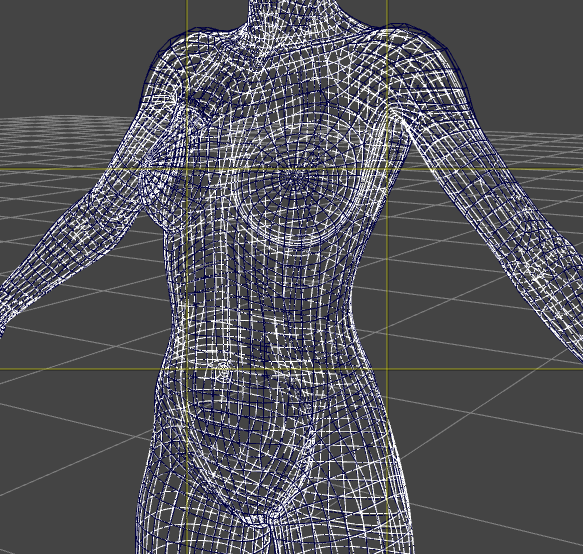
G3 in Blue, G8 in White. G3 starts in a T pose. One of the issues with T poses is that human shoulders and traps scrunch up when the arms are held like that. Without some seriously detailed and fiddly weight maps, when you bend the arms down, the shoulder end up bulging out.
In addition to this, G8's pecs, above the breasts, are curved differently, and so is her butt. For whatever reason, Autofit does not correct this entierly, so you end up with areas that are not quite right. There are other differences visible, like along the forearms, and the navel, but that's more sherical cow territory than practical problem.
This means, even using clones, the shoulders will be a bit off. But without a clone, G3's shoulder position combined with her JCMs cause distorition in the transfer, much the same ways as JCMs can cause distorition when trying to bake rotations for high heels.
Clones reduce the issue, but the only way to eliminate it entirely, is to edit your clone externally so that all the verts match up to G8 exactly. When dealing with older figures, there's no real point to that kind of thing, there's no one to one matching, so there's always going to be a variance, no matter what too you use.Morphs from G3 to G8While I'm breaking my arm (to quote noted pilospher James Tiberius Kirk) patting myself on the back for my ingeniuity, I actually have figured out, and tested, a method for bring over morphs with ERC intact, but it is (to borrow a term from the world of Games Workshop) beardy.
As in super beard.
Basically You copy the dsf files from G3, with their folder structure intact (you don't need to go higer than the vendor folder, but you need the rest or it gets that much more dificult).
You then use mass file editing to replace all references to Genesis 3 with Genesis 8 (Genesis3 becomes Genesis8 and Genesis%203 becomes Genesis%208). I use a program called FAR (Find And Replace, iirc) to do this. This requires renaming all the dsf files as txt because FAR won't edit anything it isn't sure is an ASCII file. For compressed dsfs this means uncompressing them first. Of course, they have to re-renamed to dsf once the edits are done.
Now copy those folders into Genesis 8's folder.
At this point, you proceed as above, but when you get to bit about transfering morphs, make sure "overwite existing" is checked. Also (and this important) at no point should you touch the sliders of the copied morph beofre doing the transfer. Bad things may happen. Until you do the transfer, the morph values are pointed at the wrong vetex order and in the wrong direction.
When TU overwites an existing morph, it does not change that morph's ERC links.
Things then proceed as they would above except if you choose the export and then import via morph loader method, you need to name the export file with the internal name of the morph, and then, when you morph load it, make sure Overwrite Existing is changed from Make Unique to Deltas Only.
This will overwrite the bad vertex ordered morph with the correct order.
Told you it was beardy.Wow this sounds scary. Is ths method instead of the "Redz method" or an addition to it? If additional, where does this fit into the "Redz method". Also, does this help fix the crazy hands that happens with some transfers? I have converted about 30 characters and I'm finding some hit and misses with the hands screwing up. BTW thanks for all the work everyone.
The renaming etc in the files is rediculously easy, but I must be missing a step as it keeps failing for me.
I'd love a step-by-step guide.
If you've got a lot of files to change the extension on, use bulk-rename utility; it's years old my copy, so not sure if still available, but something should be.
Well the first step there is to get the files loaded in G8. Is that what's failing?
To be clear, you don't want them working. In fact, you don't want to move any of the sliders at all. You don't want to confuse Studio. After the first step you've got morphs made for G3 loaded in G8, but they won't actually work right because math and stuff.
As for renaming, I do that old school.ren *.dsf *.txt
It's the bit where you replace the text inside the files that get's messy.
Once you've done that correctly, you'll know because the morphs will show on G8 when you load her. Let me know if you get (or have already gotten) that far, because trouble shooting these things is difficult over the internet, and if I just wrote a tutorial it would be as clear as what I already wrote. I need to understand what parts of what I said aren't getting across and it seems like you're volunteering to play victi- er, test subject. Yeah, test subject. That's the ticket. Test subject.I'm going to do some further testing. I know the file modifications are correct from the checks I did, and Ive used FAR previously. It's the other parts i'm not that confident on.
Is the method to use in conjunction with your, Sickleyields?
I tested it on my own method. Creating a clone and doing a direct transfer. Technically, it doesn't matter which method you use. I'm going to write up an actual tutorial on how to do this as time permits. It will take a few days, because I'm worn out and there's a tropical storm on, which is less dangerous and just kinda depressing.
Anyway. The main point, point is getting the sliders to populate on G8. At that point, my method is faster, and the Kattey, SY, Redz methods are safer. Primarily because those don't load directly into G8 so there's no risk of anything getting overwritten, but they do require you to populate morphloader manually, and change the sentting so they overwrite the deltas on the copied dsfs. Direct loading se transfer utility to automatically overwrite, but if there's a morph with the same name, already on G* it will be overwritten by the G3 version.
That's why I'm working on a tut. I believe I know how to avoid the danger. Also, I figure if I give detailed steps, someone with DazScript skills might figure out how to automate the whole thing.Awesome!
Morphs from G3 to G8I've been using this method (Thank you Redz et al) to convert all my Genesis, G2F and G3F's (how did I ever get so many characters?). Now I am trying G2M but I ran into a bit of a problem. When I get to the part where I load G8 and use the morph loader to import my G2M clone it tells me the geometry doesn't match. I've been doing this stuff all day so I've probably missed a step but my clone looked lik G8 (with breasts) and I wonder if it should look like G2M (without the breasts)? Just want to check (before I do it all again and get the same result) that - if converting from a Male figure - there might be another step. I saw someone talking about Male Clones for G8 (Ithink it said look in the parameters tab) but I couldn't see those and now can't find the thread where it was mentioned.
Can anyone shed light?
Much appreciated.
Victoria 8What's actually the point in creating a new character based on e.g. V8 rather than creating the same character directly from G8 so you don't need an intermediate figure? Technically I don't see anything that prevents you from doing that.
Same reason you migh use any of the head and body morphs instead of creating everything from scratch: it gives you a starting point closer to what you want to achieve than the base figure.
Moreover if you use "official" morphs as part of your character then clothes supporting those morphs will probably fit them better since they'll only have to autofollow the "delta" and not the whole custom morph.
Morphs from G3 to G8More testing. Still having the issue with disappearing parent pointers. It's strange, though. It doesn't impact every morph brought over, just some of them. Which migh explain why things were breaking after saving. I'm not exactly sure atm. Not that I fure it matters much. It's just one extra step in FAR to fix it, so ...
I'm not sure baked normals or displacement would be an effective means of creating an HD like effect. Unless there some way to control the strength of the maps via ERC. Doesn't seem like you can do that. I'd say it was unfortunate, but if it were that easy to hack around via displacement, Daz wouldn't have a lot of value add with HD.
I guess it's not that big a deal if you're only doing stills, but then you have to make normals/displacement at varying strength. Otherwise your only options are HD-like at 100% or at 0%.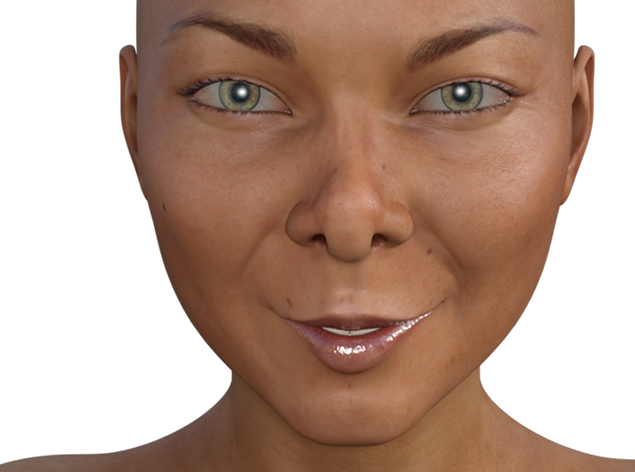
So far, every non-HD expression element I've tested between g3 and g8 is exactly the same, and HD makes a pretty big difference.No Genesis 8 Male?He's already out!
 Morphs from G3 to G8
1. I noticed Ears didn't work. I need my elf ears. I've got dozens of elf ears, all the way back to V3. I've already pulled my favorites from V4 into G3F but I couldn't even morph my clone with Izabella's ears. How do I get the ears in?
2. There's been some discussion about head morphs and how you have to use the vertex editor in order to save them. Does that apply to head-only morphs? Like SickleYield's Faces of Asia, etc.?
3. If I create a custom G3F with a whole bunch of partial morphs, you know - dial the eyes, the nose, the mouth, pear shaped hips, give her fangs, whatever. Can all that be transferred as a complete morph?
4. How do I save Favorites? I'd love to have to the morphs that I use the most available with one click every time I load a character (or at least the base characters).
By the way, Dimension-3D has some awsome DUF editor tools - one's called DSON Edit and the other is Morph Organizer. You'll probably want to wait for a sale on those but they're super useful.
It's usual for ear morphs that autofollow is disabled (so the hair doesn't deform around them.) In this case you'll need to enable autofollow on the morphs you wish to transfer. The autofollow won't apply until you unfit your G8 clone (right click and fit to none) then refit the clone to the donor figure and the ears should work.
This method is ideal for transferring custom dialled characters because you are basically transferring the entire shape as a single morph. That's also why you may get some unwanted vertex changes when transferring individual head/body part morphs.
You may find the transfer utility method better for individual head/body part morphs, as the transfer utility doesn't transfer the base figure shape. In fact if you use the transfer utility method, to get the exact shape of a character, you would need to dial in the donor figure's clone. (though that has it's own problems)
I don't think there's a way to save favourites. I wish there were.
Ack! I think it's time to crank up my source-code editor and other tools and just hack all the files at one time. This could get time-consuming.
And, of course, they're compressed. Google said something about a batch decompress tool in DS? I can't find anything except DSF Toolbox in the store. The OP made it sound like something built into DS.
Do you have an unzipping tool? I use 7zip - you can run it on a compressed .dsf or .duf and it will uncompress it for you - it won't work on encrypted files like .dse (for obvious reasons) and I've run into a few other files it won't do, but for morphs files it's generally fine.
Show Us Your Iray Renders. Part VIFor this render I tweaked the lighting and tone mapping settings a little.
And my Kalea is actualy a slightly custom shape. Shortened her to about 5'3" and 65% on the body size morph. JamesJAB's Art Studio Full of Renders and Incomplete Projects!
For this render I tweaked the lighting and tone mapping settings a little.
And my Kalea is actualy a slightly custom shape. Shortened her to about 5'3" and 65% on the body size morph.What do you have to turn off to morph Genesis 8?Ok, that explains it. I misstated the error message in my first post, the morph was failing to create, dispite the resolution, due to too many vertices. Any way to set the default to load without the lashes?
Daz 3D is part of

Connect
DAZ Productions, Inc.
7533 S Center View Ct #4664
West Jordan, UT 84084Licensing Agreement | Terms of Service | Privacy Policy | EULA
© 2026 Daz Productions Inc. All Rights Reserved.