-
Who said Blender was hard?
Yes I have to admit that learning Blender is akin to learning multiple other very advanced programs if one tried to truly understand it's full scope. Many Blender Gurus actually have very limited knowledge in many areas of Blender and are Gurus in a subset of what it can actually do. :)
This so very much. I know Blender because one day I had an idea and commenced to figuring out how to do that one thing. (I asked you to kill Superman, and you could even do that one, simple thing).
It would be a great, too, for externally editing morphs by any n00b if users didn't tend to balk at a new UIs. There's only one thing to learn: How to move a vertex/verticies. Because if you do anything other than move them, you'll break the vertex order, and the morph won't load.
As you get more familiar with the UI and tools, you can learn aditional methods. But, my experience at becoming competent with blender boils down to learning enough to understand how phrase my google search for the thing I don't know and a laser focus on what I'm trying to do right now. I'm pretty sure Blender is well past the point where any one person knows how it works or what it can do. Fortunately, there's Stack Overflow.Morphs from G3 to G8As I mentioned in my original post about ERC way back on page 3 or 4, you do not individually edit files. The use of FAR (or similar mass file editor) is implied to be mandatory. I admit, it isn't, but who wants to manually edit 40 files? The head and body morphs alone have something like 1000 items that have to be changed. (FAR tells you how man edits it makes to each file when you run it.) So, I suppose you can edit files by hand, but why?
Oh, no! I had no intention of editing one at a time. I have a source code editor that can do search & replace across file folders without even loading them. I was trying to avoid the tedious process of having to manually click each morph into Daz studio and turn auto-follow on. Unfortunately that option wasn't in the file which meant manually adding it to every single file. It's nice to have an explanation. There's so much I don't understand about the inner workings of Daz studio. Thanks.
Oh, that. Adding entries to a Daz file is tricky but it can be done using FAR. Of course, what Redz told you to do is much easier but here's how you would do it with brute force editing.
First you make a backup of the character's morph folder. That way, if you break it, you can just overwrite what you broke. You would then somehow isolate all the files you want to change. There will be a method for doing this simply in my tut, but I'n not going into that now. I'm going into this because it won't be in the tut.Now, the Daz file is particular about how things are formatted, so you get your files ready for FAR (or FAR ready for your files but I don't recommend that). Then you search for this string:
",
                "value"
This should populate all of the files in your group that do not have Autofollow turned on. Once you have that, you replace with this string:
",
                "auto_follow" : true,
                "value"
Mass editing to add something is a case of figuring out where that thing goes, if it always looks the same, and what the file looks like when it's not there. You then search in FAR for a string matching not-there and replace with is-there.
Even the most careful exploration might lead you to overlook something else that might be changed by your search and replace, and that's why you always backup your morphs before you begin, or create a copy of the files you want to change, and work on them separately. (Which is what the tut will do.) Always have a backup before committing rocket srgery on anything in you data folder.Updates to Minotaur 6 HD, or a new G3 MinotaurNo disrespect, MM. I have some of your stuff and like it. But the things I mentioned are indeed things DAZ won't support. I know because I already tried to get support.
I posted my request out of optimism and hope, not a desire to gripe, so try to read what follows as positively as possible.
I reported this problem https://www.daz3d.com/forums/discussion/175211/what-causes-this-weird-render-issue-with-minotaur-6-hd#latest and expected a non-committal but upbeat reply: "We don't know if this will get fixed, but we'll pass it along to the developers." What I got could be paraphrased as "That character comes with 3Delight textures. We can't support rendering in Iray." So it would be nice if the issue would be looked at one day, but it sounds as if it will go nowhere until and unless DAZ sells an Iray update specifically for the Minotaur in the store.
So I'm being optimistic and asking for such an update.
I also reported the issue that if you scale a character up 150% of man-sized and try to use a walking aniblock, DAZ or AniMate2 calculates its end position wrong after an iteration, and the character stutters backward to the wrong place each time the animation loops. The basics of 3D animation are translation, rotation, and scaling, so the fact DAZ can't handle scaling right is an actual bug that should be fixed. The answer from support was not "we'll pass this along to the developers," but (again paraphrased) "looks like you're right. Sorry for the inconvenience."
I get what you're saying, however from a support standpoint they are correct as it was made before iray was presented so an update is probably not possible. I know i had a textrue that looks great in 3delight, however it looks bad when in iray due to how they were made, so other than a full retexturing of the product (which is a redo of the product) the texture can't be used in iray. As the texture was made before iray support cannont be future-proof. Also you may want to look at if that product has normal maps; if it does, turn down the amount of the normal from 1.0 to something like .75 and re-render again as there may be issues with using HD and a Normal map at the same time in iray.
As far as scale, a PA won't be able to resove that. You may want to try to scale up your character to 150%, remove all the geografts, zero the figure and save that as a morph. Then set the minotaur back to 100%, reimport the obj as a morph, adjust rigging to shape for that morph and try to do the animation again as that's using rigging rather than scaling. I also mentioned trying to increase the size and the height using dials rather than scaling itself.
Those are some things that you can try to see if you can resolve it. But to be honest, I doubt DAZ is going to go back 2 generations to address an issue; I have a Scott G2M issue that I had to fix myself and that ticket was closed without work.. and that was right when Genesis 3 was released.
How do I import faceshift morphs into Daz Studio?I have been experimenting with this lately. Did you prepare you Daz figure beforehand to recieve Faceshift animation data? If not, that is your problem. Ideally, for every faceshift blendshape, there should be a corresponding face morph for your Daz figure. In practice, this can be tedious since there are about 47 faceshift morphs. You can get away with less. So the first thing you should do is duplicate the facial expressions that faceshift displays on your Daz character.
Is it possible to autofit clothing to make it look as if it is too small for figure's frame?I do not know how artist make the pic, but I think, you can still use morph.
becaues, when glow up figure scale, , the shut witch fit to the Actor mesh, usually keep to follow the correct positon by bone.
and auto adjust scale,, then when glowing up finished, you make new morph which reverse option, which change clothing to the current skiny shape.
you can manually adjust the morph value,for each glowing up size, I think.
if you try to automate it,, you need to learn JCM witch link with figure scale, or bone size. (there are some option, to tweak influence curve,, maybe key type animation curve is best, but It should be long story,, I recommend at first try to make morph, for glowing up-shape as you hoped, then if it wrok good with curent age, (current figure scale) try make JCM which change value with root figure scale as smooth curve.
Decimator.. how to use?Just a word of wording
if you plan to create low poly versions of figures
t be reused later in Daz studio they will not save
with decimation.
the only solution is to export/import the decimated mesh
and re rig it with the transfer utility
which will cause loss of some figure funtionality.Is it possible to autofit clothing to make it look as if it is too small for figure's frame?Problem solved... I unchecked the write groups options, and when I exported from Daz as object, with that setting, the correct vertices number appeared in Blender... And the morph was accepted by morph loader pro in Daz after the export from Blender... So I thank you! I finally figured it out! :D
But one last question... How do you think the streching on this clothing was made on the growing figure whilest the clothe stay the same size in this image?
http://imgur.com/a/LIYfcMorphs from G3 to G8I got my first elf ears done. Argghhhh! One down, 154 more to go and that's just G3F.
Did you catch my last response about the ears? If they are on G3F, there is a very simple method to get them over to G8F. Same goes for head/face morphs that are dependant on just a single dial.
Here are the steps
1. Load and zero G3F
2. Load and zero G8F
3. Favourite all the ear/face/head morphs you wish to transfer. If you're in edit mode on parameters, you can search 'ears', select multiple morphs, right click and add them all to favourites at once.
4. In the scene tab, go to Assets, transfer utility and use the settings in the picture. Source G3F, Target G8F. Leave item shape at default. Do NOT select any clone (or it will alter the body too). Uncheck everything except Morph Targets - From Source - Favourites. Click Accept.
5. Select G8F and find your transferred morphs. I find it easiest to add them to favourites so I can batch edit them.
6. On the parameters tab in edit mode, multiple select your new morphs, right click and enable limits. Right click again and set limits min 0. If they are ear morphs you may want to right click and disable autofollow so they won't distort hairs.
7. If they are just ear morphs you can save your morphs as morph assets at this point. If you have transferred full head morphs with this method, you will need to adjust rigging to shape and ERC freeze so the facial rigging is correct, then save as morph asset.
Notes: This method won't work for shapes dependant on multiple dials, eg Izabella 7 and Teen Josie 7's head morphs. It works because the head shapes are virtually identical between G3F/G8F. This is not the case for body morphs, and transferring using the default clone results in finger/arm deformities. It also won't transfer full characters. The tutorials get better results for body morphs, but for a large number of ear/head shapes that are already on G3F, the transfer utility is definitely your friend.
I vaguely remember that part. I probably shouldn't be morphing without enough sleep . I remember thinking something about I'll just test one and then I can do all the rest of them at once. Thanks for listing it out again.
Morphs from G3 to G8As I mentioned in my original post about ERC way back on page 3 or 4, you do not individually edit files. The use of FAR (or similar mass file editor) is implied to be mandatory. I admit, it isn't, but who wants to manually edit 40 files? The head and body morphs alone have something like 1000 items that have to be changed. (FAR tells you how man edits it makes to each file when you run it.) So, I suppose you can edit files by hand, but why?
Oh, no! I had no intention of editing one at a time. I have a source code editor that can do search & replace across file folders without even loading them. I was trying to avoid the tedious process of having to manually click each morph into Daz studio and turn auto-follow on. Unfortunately that option wasn't in the file which meant manually adding it to every single file. It's nice to have an explanation. There's so much I don't understand about the inner workings of Daz studio. Thanks.
Victoria 8 WOWIndeed... it might work after like 1 year, when you have enough content (Maybe) But perhaps you like do the same stuff with the same clothes over and over again. I know I don't.
And of course using the same forms of bodies over and over, with the only difference is like the head and some on the body. For me that is an anatomy expert it's just not fun. I create series, and games so I need tons of content and not just ONE thing that looks a little better. All rendering, and I mean ALL is about light effects, shadows and angles. I can make genesis 1 models to be close the same beauty as a genesis 3 with a lot of work.
And no, Victoria 8 does not look real. None does, that is what 3D is. They improved a little, but for me who knows how to put out lights not much was really that improved. The duck mouth you all are talking about is unexperienced anatomy mistakes. You can not make a 3D model smile without knowing the human anatomy of the body. So many factors are in. That you get a better smile with Victoria 8 is just because the morph is better then on Genesis 3. However, I do my own poses and face expressions so for me it's just blah.
Morphs from G3 to G8This is my alternative method, but I've found it better than the transfer utility for body morphs especially
Tutorial and helper scene/morphs included
Updated the tutorial file that (hopefully) sorts out those fingernail issues. Let me know how you get on with it. And huge thanks to everyone providing ideas and feedback, We'll get there together :)
I have tried this without complete success. I have een especially confused by the tranference of the textures etc., as you may note from the attachment. I have tried manually matching the G8 figure parameters (left) to the G3F (Molly tewaked, right) of the torso, but as is obvious I have something not working. Is there a simple way to transfer them without having to laboriously enter every parameter by noting its details on G3F and entering them on G8? The eyes also have not carried over, which is a pest because I have no idea which eyes I chose for Molly - probably not her originals. I haven't tried to match the face colouring etc.
Shaping is reasonable but not absolutely right, but I can live with that.
If you're just trying to transfer textures from G3F to G8F, just load and select the G3F character who's texture you want to us, go to File>>Save As>>Material Preset then name it what you want and save. You can then find it under your Library >> Presets >> Materials.
You can then select the G8F character that you want the materials/textures on and double click on the Materials Preset you just made. That transfers those textures and settings to the new figure.
Thank you so much for that. I have done that before, but like so many of the techniques, if you don't do it much and your brain is working less effectively, you forget. That has done the trick. I attach an image (quick render) but as it shows, the figures are not wuite the same. In aprticular I cannot find a way to change the G8F lips. G3F ins 'Actor' in the parameters tab offers loads of variations, but for G8f there is no option, which means we have those inflated lips so unlike most normal people's. Anyone know what I can do, please?
How do I import faceshift morphs into Daz Studio?I've been trying to work with Faceshift and Daz Studio for some time, but I can not find the form. When I import into Daz Studio the Faceshift file FBX is not morphs. I read that you could use the "Morph Loader" but I can not get it to work. Can somebody help me?
Morphs from G3 to G8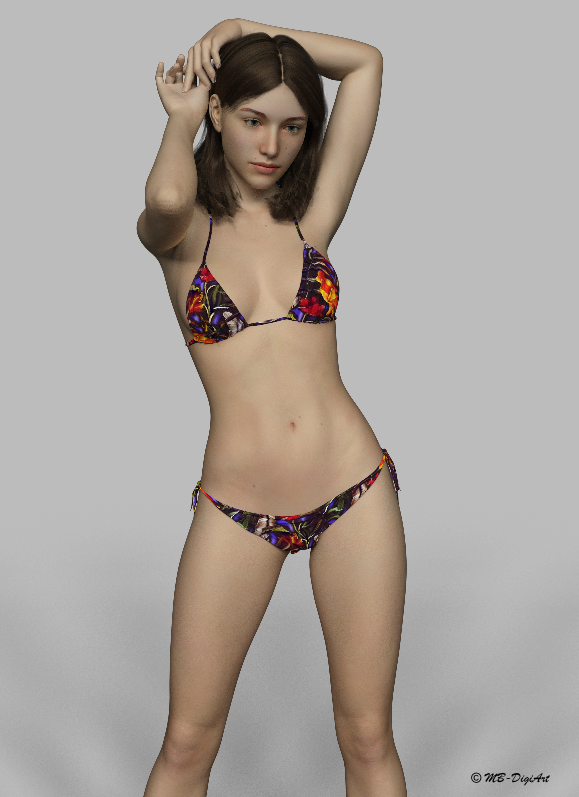
Here is the latest model by FWSA Melinda for Genesis 3 Female with bonus morph and textures for G8F. (Renderosity)
This is G8F with the Melinda bonus morph and texture.
Lighting is by DimensionTheory https://www.daz3d.com/iradiance-hdr-mesh-lights-volume-2-for-iray
Clothing by Powerage Hot Summer 2017 for G3F (Renderosity) with texture by 3-DArena 7th Ave Hot Summer 2017 (Renderosity)
Hair: https://www.daz3d.com/georgia-hair-and-oot-hairblending-2-0-for-genesis-3-female-s
Pose : https://www.daz3d.com/i13-perfect-pink-pose-collection-for-the-genesis-3-female-s
I used pose 09 and transfered it to G8 using Redz's Morph Transfer Helper. Many thanks Redz for making such a useful tool available to us.
I must admit that I was very sceptical like some others in the forums about spending more money to buy yet another 'New' shiny Genesis model. I couldn't see what all the fuss was about, until I saw the HD expressions, and started to play with G8 and Redz's morph transfer helper. This along with some great realistic renders of G8 in the forums, plus a great Daz discount, finally persuaded me.
I don't usually do a great deal of female renders, but with G8 I think this is about to change. Now looking forward to see how the G8 male will turn out when he is finally released.

Yeh, the expressions really sell it.
I've percevering with the morphs, and an now have some success; I'm having to create a couple of morph helpers for a couple of poses, but I'm happy enough.
... Just a suggestion to all the Morph producing PAs,,, hurry the hell heck up and release 'em!
 Morphs from G3 to G8
A quick question for Redz:
I used the first revised tutorial, (G8 Morph TransfersR1.zip,) to create my G3F morphs for G8F. (All 112...!) Will I get a better end result if I redo those morphs using instructions from the latest tutorial, (Genesis 8 Clones Tutorial_Redz.zip)?
Thank you.
Hi Adair. there's a small improvement using the new clones, for example the shoulder area looks and bends better, and if characters have custom hand details or nail morphs (Anneka Demon for example) these will transfer over. There is no added benefit for separate head morphs. (See my post above for the quiick and dirty method for transferring individual head/face morphs.)
If you have Genesis or Genesis 2 characters you want to transfer, or if you want your older characters to wear G8F clothes, then it may be worth making the clones.
Morphs from G3 to G8I got my first elf ears done. Argghhhh! One down, 154 more to go and that's just G3F.
Did you catch my last response about the ears? If they are on G3F, there is a very simple method to get them over to G8F. Same goes for head/face morphs that are dependant on just a single dial.
Here are the steps
1. Load and zero G3F
2. Load and zero G8F
3. Favourite all the ear/face/head morphs you wish to transfer. If you're in edit mode on parameters, you can search 'ears', select multiple morphs, right click and add them all to favourites at once.
4. In the scene tab, go to Assets, transfer utility and use the settings in the picture. Source G3F, Target G8F. Leave item shape at default. Do NOT select any clone (or it will alter the body too). Uncheck everything except Morph Targets - From Source - Favourites. Click Accept.
5. Select G8F and find your transferred morphs. I find it easiest to add them to favourites so I can batch edit them.
6. On the parameters tab in edit mode, multiple select your new morphs, right click and enable limits. Right click again and set limits min 0. If they are ear morphs you may want to right click and disable autofollow so they won't distort hairs.
7. If they are just ear morphs you can save your morphs as morph assets at this point. If you have transferred full head morphs with this method, you will need to adjust rigging to shape and ERC freeze so the facial rigging is correct, then save as morph asset.
Notes: This method won't work for shapes dependant on multiple dials, eg Izabella 7 and Teen Josie 7's head morphs. It works because the head shapes are virtually identical between G3F/G8F. This is not the case for body morphs, and transferring using the default clone results in finger/arm deformities. It also won't transfer full characters. The tutorials get better results for body morphs, but for a large number of ear/head shapes that are already on G3F, the transfer utility is definitely your friend.
Out with the old, In with the new V8Just sharing my perspective....
With Genesis 8 out of the bag... an update that caught me totally off guard.. Here I thought it had already gotten as good as it was going to get.. silly me. So now I don't want to spend any money on Genesis 3.. period. It's obsolete this week and while its true that you can put the old wine skins on the new wine, so far in my testing, the results haven't been very nice. The skin has been updated which means even if I can transfer the skins, I loose the added value of sub-surface updates that will go into the new characters... so if you want the best of the best, you have to be willing to wait for it and invest in that.I won't be buying any Genesis 3 or earlier and to be honest, I'm really fussy about exactly what it is I'm willing to invest in... because thats what all this is to me, an investment that I expect to have a return from... so excuse me if I'm not sentimental but the updates are a great investment. I'm looking for morphs.. I'm happy that my investment in Genesis clothings doesn't just go in the poopers and I don't have to wait months for the product to have the backdating... so I'm happy to buy clothing that is well designed but then my favorite outfits are the ones that have about a thousand different options like the Gesesis Supersuit..
Even then I would imagine that the with more articulation points, thats going to effect clothing somehow... Anyways.. Hopefully Zev0 and my favorites are hard on the case making all my favorite Genesis 8 goodies... Hope you don't take too long to release G8M... I can't wait to see the new Michael 8 now that I know he's coming. No doubt it will be amazing too.. Keep up the great work.
Is there a way to easily delete everything pre-genesis from my collection?
Morphs from G3 to G8I've been using this method (Thank you Redz et al) to convert all my Genesis, G2F and G3F's (how did I ever get so many characters?). Now I am trying G2M but I ran into a bit of a problem. When I get to the part where I load G8 and use the morph loader to import my G2M clone it tells me the geometry doesn't match. I've been doing this stuff all day so I've probably missed a step but my clone looked lik G8 (with breasts) and I wonder if it should look like G2M (without the breasts)? Just want to check (before I do it all again and get the same result) that - if converting from a Male figure - there might be another step. I saw someone talking about Male Clones for G8 (Ithink it said look in the parameters tab) but I couldn't see those and now can't find the thread where it was mentioned.
Can anyone shed light?
Much appreciated.
It sounds like you're trying to load G2M geometry to G8.
Having not looked at Redz's tut (it was my idea), you don't load a clone to G8. You load the clone to G2M. Trying to load it to G8 sounds like the issue. You shouldn't need to add a clone to G8 for that figure. G8 already has one.
EDIT: If your issue is in part two of Redz's tut, make sure when you are exporting your adjust G8 shape, nothing but g8 is visible in the scene, otherwise you'll end up with two or more figures in one mesh. This can be cause by having G2M visible, or by have g8's eyelashes visible.No it appears to be in the first part. I've done this over 50 times today with Male and female genesis characters' Genesis 2 & Genesis 3 Female characters. I'm following the instruactions from 1 to 24 but substituting G3F for a G2M. I'll do it again, just to be sure...but it does seem that, at some point, the clone .obj becomes female. I'll make a note of the step that seems not to work as it should.
Has anyone else successfully morphed a G8 into a Male character? Do I need to purchase cross-figure to do it? And I thought Male clones were included in the essentials but I can't for the life of me find anything like that - where would I look?
Thanks
Click with right mouse button on the parameters tab (on the letters "Parameters") to get the menu and from the menu activate "Show Hidden Properties". Now, when you have G8F selected you should see in parameters tab menu Hidden and its submenu Clones and you can dial G2M and G3M there.
Upcoming Products for Genesis 8 Females [commercial]You've got three things there that I've been asking for. Can't wait.
cool :) which ones?
The wounds, the flex/muscularity morph and the Wet Look.
Victoria 8What's actually the point in creating a new character based on e.g. V8 rather than creating the same character directly from G8 so you don't need an intermediate figure? Technically I don't see anything that prevents you from doing that.
Same reason you migh use any of the head and body morphs instead of creating everything from scratch: it gives you a starting point closer to what you want to achieve than the base figure.
Moreover if you use "official" morphs as part of your character then clothes supporting those morphs will probably fit them better since they'll only have to autofollow the "delta" and not the whole custom morph.
OK, thanks.
What's actually the point in creating a new character based on e.g. V8 rather than creating the same character directly from G8 so you don't need an intermediate figure? Technically I don't see anything that prevents you from doing that.
It also gives two shape options, with and without
Of course, but if you don't like V8 or whatever the required character is that's sort of moot. I don't really like V8 myself so I haven't bought her, but I bought a character that requires V8 for the texture. I do like the V8 version of that character but won't pay $20+ extra just to get that option. I got the G8 morph packages for less than that, with these I can create 100s of different characters myself.
Morphs from G3 to G8You didn't adjust the rigging to shape.
I see that you did, in fact, run the command. I'm assuming you did, anyway, based on your screen shots. Same with ERC freeze.
However, if you'd succeeded the bones would move with morph. My guess: You didn't dial the morph before adjusting rigging.
Backgrounder: Adjust rigging to shape is a math operation. I don't know what, but it's a computer. It's all math. Like any math, it needs inputs. The inputs here are the weight maps on the model. So when you run the command, (this abtraction may be to bassackwards, but it covers the point) it looks at the current postion of the weight maps, and compares that to the default postion. It doesn't matter what kind of math it's doing (leaving aside division). If you adjust riging without dialing the morph, the delta's generated by the math will be 0.
I've never had that happen so I don't know what Studio would do with that. If it was actually 0, then I suspect there's be nothing to freeze, and you screen shot shows there was. But, as a guess, some of the bones in the face are probably not where the computer would place them with pure math. I've noted the squint bones of g3 tend to move a lot more than they really ought to when adjusted. So my guess is, even without dialing a morph, the command will move some bones a tiny bit. Small enough that you don't see them moving now.
Short answer: No. You don't need to start over. You do need to open a new scene, add G8, and proceed from the step where you import the morph to her (assuming you've not deleted that obj file). Before adjusting rigging, make sure you dial the morph to 100% and leave it that way. After ERC freeze, switch to bone editor, and dial the morph off. The bones should start out alinged with the new morph, and stay alinged as the morph dials down, until they return to base shape along with figure.
Okay, so that wasn't really a short answer. I was on a roll,Daz 3D is part of

Connect
DAZ Productions, Inc.
7533 S Center View Ct #4664
West Jordan, UT 84084Licensing Agreement | Terms of Service | Privacy Policy | EULA
© 2026 Daz Productions Inc. All Rights Reserved.