-
Genesis 8 Characters I'd Like to See
I would like a Toon character morph that I can add to other figures and I really hope 3D Universe is watching!!
Transfering morphsWas wondering if I can transfer my genesis, genesis 2 morphs to genesis 8. If so how do I go about doing it.
Is it possible to autofit clothing to make it look as if it is too small for figure's frame?NICE! Thanks for all the help! I'll look into that "shrinking the clothing" morph and JCM! And by the way! I think I found the real problem that was adding vertices to my object... In the mesh resolution, in the SubDivision Algorithm, I chose Catmull-Clark Legacy, and after doing that, the vertices in Daz and Blender match correctly!
Some more reading and I'll continue to unlock the mysteries of fabric editing in Daz! THANK YOU for the information! :)
G8f Breast Morphs break autofitted clothesAlright, I am almost physically unable to approach a topic of this kind without some kind of joking, and I am physiologically incapable of joking about this without inserting a *puerile giggle* every three words, so I'll try to strike a level medium.
As good as the autofit templates for former generations are, whenever I make some changes (a bit of nip and tuck) on G8's almost uppermost area, the clothing distorts badly and starts showing jagged edges on the bottom of the mammalian glands--almost teeth-like, with all the worrying implications (*shudder*) that entails--and applying the "Breasts Gone" morph leaves behind a hollow crater where my hopes and dreams used to reside. Of course, I can enable smoothing, but distortions remain, wrinkles disappear, and now my beautiful Flight Jacket (Lindsay TM) starts looking like a water-filled balloon (again with the implications). As things stand, I think if G8 wants to remain clothed she will have to conform to a standard chest appendage size that, while generous enough, does not allow for a full range of... something not dirty... life-like models! Yeah, life-like models, that's it.
So, any suggestions? Any chance that the dev team will fix the templates? Or is this another one of those "planned obsolescence" things I keep hearing about? Because that really sounds naughty.
What features would you like to see appear in dazstudio 5?Can I get a 'Freeze Transforms' Button? Seriously ..all I wanna do is move something to a spot then set translate & rotate to zero.
Multi-Resolution Morph Loading would be awsome too ... none of this resetting to base resolution to
Why does HD automatically imply working at higher than base resolution? Why can't it be a means of ADDING polygons to the base resolution mesh to add details that will be subdivided? Nobody has given a good reason why they MUST work at high polycounts whenever this comes up.
Moprhs are critically dependent on the vertex cound and order - addin detail to the base mesh wil break existing morphs, and require the transfer of weight maps which can lead to undesirable effects requiring rerigging. The modified version would also not be distributable.
Morphs from G3 to G8Hey guys, that vertex stuff sounds a bit too heavy for me. Successfully transferd my first morph. Noticed that whereas it was a morph for a body part the posture changed a bit once I applied it to G8F. So maybe this is that vertex/vertices thing? Would not mind if one of you Guru's might add that to Redz tutorial.
But for the moment thanks to everyone exploring or documenting the necessary steps for transfering morphs enabling even a noob like me to do it.
You don't need to be a guru to do that. In fact, I didn't even know, this "Geometry Editor" exists, before Redz mentioned it. To create a partial morph (head morph for example) without affecting the other parts of G8, try this:
- Follow Redz's manual until you have loaded and dialed in your transferred G3 morph into G8 ("If all went well your morph imported and will be in the parameters tab. Dial it in and check that G8F has morphed correctly." in "Part two").
- Go to your morph in the Parameters tab and click on the heart in the top right of the morph to mark it as a "favorite".
- Activate the Geometry Editor:
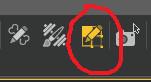
- Right click on your Genesis 8 in the Viewport and select Selection Type - Vertex Selection.
- Right click again on G8 and select Selection Mode - Lasso Selection.
- Drag the lasso around everything of G8, that should NOT be part of your morph. For a head morph, select the entire body, for example. It should look like this:
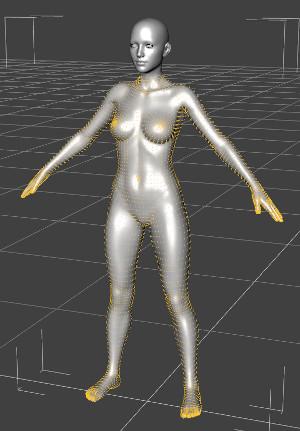
- Right click a 3rd time on G8 and select Morph Editing - Clear Selected Deltas from Favorits.
- Continue with Redz manual.
I'm trying this method, but I can't find "Morph Editing - Clear Selected Deltas from Favorites" when I right click on G8 after selecting what I don't want in the morph.
Are you in vertex mode? And if so, don't right click on G8F, right click anywhere in the viewport.
Morphs from G3 to G8Ah ha! That was it. I missed dialing up the morph BEFORE I adjusted the rigging.
It works now, thank you.
I'm glad to help. :)
Reasons not to rush into Genesis 8I saved out the GF8 surfaces as shader presets so that I could easily apply them to other figures. Of course ain't going to bother with trying a likely fail like trying to transfer the facial changes back to Genesis 3, Genesis 2, and Genesis (Genesis is where I'd like to really see all or most of the G8 improvements transfered too).
I agree get it all back to Genesis! And I have bought some really great packages for G2 & G3, but feel limited to the Male or Femal version. To mix all fo it together into ONE AWESOME BASE that has the versatility that the original Genesis carried would ROCK IT ALL!
Morphs from G3 to G8Hey guys, that vertex stuff sounds a bit too heavy for me. Successfully transferd my first morph. Noticed that whereas it was a morph for a body part the posture changed a bit once I applied it to G8F. So maybe this is that vertex/vertices thing? Would not mind if one of you Guru's might add that to Redz tutorial.
But for the moment thanks to everyone exploring or documenting the necessary steps for transfering morphs enabling even a noob like me to do it.
You don't need to be a guru to do that. In fact, I didn't even know, this "Geometry Editor" exists, before Redz mentioned it. To create a partial morph (head morph for example) without affecting the other parts of G8, try this:
- Follow Redz's manual until you have loaded and dialed in your transferred G3 morph into G8 ("If all went well your morph imported and will be in the parameters tab. Dial it in and check that G8F has morphed correctly." in "Part two").
- Go to your morph in the Parameters tab and click on the heart in the top right of the morph to mark it as a "favorite".
- Activate the Geometry Editor:
- Right click on your Genesis 8 in the Viewport and select Selection Type - Vertex Selection.
- Right click again on G8 and select Selection Mode - Lasso Selection.
- Drag the lasso around everything of G8, that should NOT be part of your morph. For a head morph, select the entire body, for example. It should look like this:
- Right click a 3rd time on G8 and select Morph Editing - Clear Selected Deltas from Favorits.
- Continue with Redz manual.
I'm trying this method, but I can't find "Morph Editing - Clear Selected Deltas from Favorites" when I right click on G8 after selecting what I don't want in the morph.
Who said Blender was hard?There's only one thing to learn: How to move a vertex/verticies. Because if you do anything other than move them, you'll break the vertex order, and the morph won't load.
This depends on what one is trying to accomplish with Blender. It is true with creating morphs, as mentioned. However, Blender is also used for importing from DAZ to use the powerful animation and post effect tools for instance. There are many workflows with DAZ and Blender and each have their own tools, methods and necessary conceptual frameworks. See, that's part of what makes it easy. ;)
On a related note, if Blender does make good on creating an environment where specialized interfaces can be spun up without having to 'fork' Blender, where using a specialized interface is as simple as loading a theme, then it opens up powerful options. Specifically, with integrating with DAZ for instance, one could create an interface just for creating DAZ morphs, another with importing DAZ assets for animation or post processing, each with only the tools necessary for the task at hand and each with those tools arranged in a logical pattern that makes sense for that particular task. There is no 3D tool on the market that is attempting this type of customization at the moment. It's like turning Blender into an 'app maker' for 3D, animation and fx that can also integrate with other tools via standards based import/export features that can also be customized. (No need to memorize import/export for a given product integration, it's saved in the specialized 'app.') All of this without having to risk breaking the app with upgrades to the base Blender tool since the changes are in an abstracted interface component. It follows best practices of coding (which are almost never followed) of tight integration with loose coupling.
On a side note... Many people think the whole 'app revolution' is new. It isn't. A fundamental concept of Unix from it's inception was to have smaller specialized tools that could be linked together in a fluid manner and swapped out lego block style to facilitate fluid and changing workflows. Apps vs the larger 'programs' are going through their next phase of vs... Blender, with the customizable interface is a whole new paradigm of having an engine that can support a large set of modular features that can be exposed app style. It's revolutionary. The next step to this would be to modularize the base application so one could create load scripts to only load the modules of the base package that would match a given task at the moment. If the base program were modularized like this, with load scripts, it would create an environment where all of the pieces were designed and tested to work together but could be assembled on an as need basis. Again, no one is doing this atm afaik. I haven't broached this in the larger Blender community yet am considering it. It takes some persistence to evangelize a shift in course like this though as I learned in trying to push the whole separation of interface and base app after Andrew Price first proposed redoing the Blender interface.
Reasons not to rush into Genesis 8I saved out the GF8 surfaces as shader presets so that I could easily apply them to other figures. Of course ain't going to bother with trying a likely fail like trying to transfer the facial changes back to Genesis 3, Genesis 2, and Genesis (Genesis is where I'd like to really see all or most of the G8 improvements transfered to).
Reasons not to rush into Genesis 8...I have to agree. Besides "realistic" characters there was a wide variety of toon and creature shapes as well a fit clones which has not been seen since. I'd like to see G8 work with say, Sadie or Mavka without using GenX/GenX2/GenX3
AMEN to that! I think Genesis is still my favorite generation because I could use the whole slew of morph shapes on either M ot F and clothes the same way.I think to truly find a place of backwards compatibility we need to be able to work with our content with out converters. I have GenX and am tempted to move everything back to Genesis to make that the MOST versatile character ever.
What features would you like to see appear in dazstudio 5?Can I get a 'Freeze Transforms' Button? Seriously ..all I wanna do is move something to a spot then set translate & rotate to zero.
Multi-Resolution Morph Loading would be awsome too ... none of this resetting to base resolution to
Why does HD automatically imply working at higher than base resolution? Why can't it be a means of ADDING polygons to the base resolution mesh to add details that will be subdivided? Nobody has given a good reason why they MUST work at high polycounts whenever this comes up.
Morphs from G3 to G8You didn't adjust the rigging to shape.
I see that you did, in fact, run the command. I'm assuming you did, anyway, based on your screen shots. Same with ERC freeze.
However, if you'd succeeded the bones would move with morph. My guess: You didn't dial the morph before adjusting rigging.
Backgrounder: Adjust rigging to shape is a math operation. I don't know what, but it's a computer. It's all math. Like any math, it needs inputs. The inputs here are the weight maps on the model. So when you run the command, (this abtraction may be to bassackwards, but it covers the point) it looks at the current postion of the weight maps, and compares that to the default postion. It doesn't matter what kind of math it's doing (leaving aside division). If you adjust riging without dialing the morph, the delta's generated by the math will be 0.
I've never had that happen so I don't know what Studio would do with that. If it was actually 0, then I suspect there's be nothing to freeze, and you screen shot shows there was. But, as a guess, some of the bones in the face are probably not where the computer would place them with pure math. I've noted the squint bones of g3 tend to move a lot more than they really ought to when adjusted. So my guess is, even without dialing a morph, the command will move some bones a tiny bit. Small enough that you don't see them moving now.
Short answer: No. You don't need to start over. You do need to open a new scene, add G8, and proceed from the step where you import the morph to her (assuming you've not deleted that obj file). Before adjusting rigging, make sure you dial the morph to 100% and leave it that way. After ERC freeze, switch to bone editor, and dial the morph off. The bones should start out alinged with the new morph, and stay alinged as the morph dials down, until they return to base shape along with figure.
Okay, so that wasn't really a short answer. I was on a roll,Ah ha! That was it. I missed dialing up the morph BEFORE I adjusted the rigging.
It works now, thank you.
How Do I Make a Morph that Correctly Effects an Already Morphed Figure?Shape key is a way to keep many morph targets of one mesh, in blender. of course it is useful,, because you can merge as you like. or mix, with vertex selection, then produce new morph. and you can make morph keep base shape (then you can return base shape when you need, without re-import mesh)
but after all,, I think,, we may better to understand reverse defomation option, to make morph for ds more felxible.
eg,, I pose figure, then apply smooth modifier,, then export it as obj. (smoothed shape) . next remove smooth modifier from current scene.
then import again, the obj as morph target,,, with reverse defomation option, DS generate,, new smooth morph for current posed figure.
(smooth modifer should cause heave lag when posing, then I often convert it as morph for current posing, but set smooth modifer off.
What features would you like to see appear in dazstudio 5?Can I get a 'Freeze Transforms' Button? Seriously ..all I wanna do is move something to a spot then set translate & rotate to zero.
Multi-Resolution Morph Loading would be awsome too ... none of this resetting to base resolution to export and import
How do I import faceshift morphs into Daz Studio?Thank you very much for the reply. Now I'm trying to do just what you say. I'm having trouble creating the morphs. For example, I have created the right eye morph closed but when I post that morph the figure of Genesis 2 becomes small. I can not make morph work. :(
How Do I Make a Morph that Correctly Effects an Already Morphed Figure?Reverse defomation "on" is simple.. I thnk like that,,
I load new base figure no morph, no pose,, all vertices positon located as start place. pick one vertex( NO 120),, then , vertex Postion can be discribed as (X0, Y0, Z0)
now you have applied shape with posing. all vertices position change in 3d wrold. if you follow the vertex (NO 120), it can be discribed , as new Postion1 (X1, Y1, Z1)
keep current pose and morph about the figure, then export current posed mesh, (keep all vertices position as same as scene), and tweak it in another aprication.
and save as new OBJ..now NO 120 vertex move as new Positon 2 (X2, Y2, Z2)
when you import the OBJ as new morph C ... if you use reverse defomation = YES,, DS try to circulate delta transform, from current scene positon = (X1, Y1, Z1)
the dela should be (X2-X1, Y2-Y1, Z2-Z1 ) then ds keep those delta as morph..
but if reverse deomation (NO), DS try to ciculate delta from zero posion (X0, Y0, Z0). ignore current vertex position.
the delta should be (X2 -X0, Y2-Y0, Z2-Z0),, then ds keep the delta as morph. about each vertex.
Identifying Morph SourceIs there a way, from a morph slider, to work out what product the morph was part of (or, alternately the path to the duf file that contains the morph, from which that could probably be determined)?
I can obviously pull up the "Parameters" dialog from the slider. It lists the name of the morph adjustment itself (don't know the technical name for it - the equation?) and the path within the UI, but I don't see any way of working back to the file on disk or the install package name. (Yes, I could try uninstalling DIM's until it vanished. That's tedious. And assumes it's something in a DIM, which not all my content is.)
Morphs from G3 to G81. I noticed Ears didn't work. I need my elf ears. I've got dozens of elf ears, all the way back to V3. I've already pulled my favorites from V4 into G3F but I couldn't even morph my clone with Izabella's ears. How do I get the ears in?
2. There's been some discussion about head morphs and how you have to use the vertex editor in order to save them. Does that apply to head-only morphs? Like SickleYield's Faces of Asia, etc.?
3. If I create a custom G3F with a whole bunch of partial morphs, you know - dial the eyes, the nose, the mouth, pear shaped hips, give her fangs, what wever. Can all that be transferred as a complete morph?
4. How do I save Favorites? I'd love to have to the morphs that I use the most available with one click every time I load a character (or at least the base characters).
By the way, Dimension-3D has some awsome DUF editor tools - one's called DSON Edit and the other is Morph Organizer. You'll probably want to wait for a sale on those but they're super useful.
It's usual for ear morphs that autofollow is disabled (so the hair doesn't deform around them.) In this case you'll need to enable autofollow on the morphs you wish to transfer. The autofollow won't apply until you unfit your G8 clone (right click and fit to none) then refit the clone to the donor figure and the ears should work.
This method is ideal for transferring custom dialled characters because you are basically transferring the entire shape as a single morph. That's also why you may get some unwanted vertex changes when transferring individual head/body part morphs.
You may find the transfer utility method better for individual head/body part morphs, as the transfer utility doesn't transfer the base figure shape. In fact if you use the transfer utility method, to get the exact shape of a character, you would need to dial in the donor figure's clone. (though that has it's own problems)
I don't think there's a way to save favourites. I wish there were.
Ack! I think it's time to crank up my source-code editor and other tools and just hack all the files at one time. This could get time-consuming.
And, of course, they're compressed. Google said something about a batch decompress tool in DS? I can't find anything except DSF Toolbox in the store. The OP made it sound like something built into DS.
Do you have an unzipping tool? I use 7zip - you can run it on a compressed .dsf or .duf and it will uncompress it for you - it won't work on encrypted files like .dse (for obvious reasons) and I've run into a few other files it won't do, but for morphs files it's generally fine.
Yes, I have 7Zip. Do I need to rename the files to .zip?Sorry I missed this question yesterday (I had to go out between my post and yours), but I see Singular Blues has given you a very full response (thanks to SB for that!) I don't rename, like SB said I just let it create a file without a suffix and edit that. I used this process to transfer all the 200-Plus-Head-and-Face-Morphs for G3F to G3M (before the G3M version came out).
Daz 3D is part of

Connect
DAZ Productions, Inc.
7533 S Center View Ct #4664
West Jordan, UT 84084Licensing Agreement | Terms of Service | Privacy Policy | EULA
© 2026 Daz Productions Inc. All Rights Reserved.