-
How to use hair on another character?
yuyu.atem said:
Oh, yes, it's the same icon! Thank you very much!
I have some other question:
- since I parented the hair to the head, when I want to selected it from the scene pane, I have to open G8M's subparts untill to find the hair:
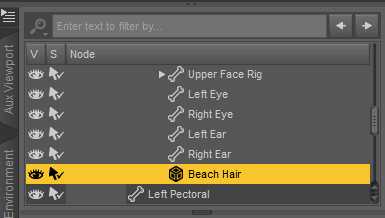
Is it possible to create a shortcut to access easilier to the hair?
You can directly select the parented hair in Viewport... LMB click to select it, or select it in RMB-click menu.
- If I want to be able to use this hair with any G8M character in any file, what would be the best way? Would have I to use the transfer utility? Or maybe after positionning and scaling the hair in one file, would it be possible to create and save a slider that would set the same postion and scale to the hair every times I would use it?
It's a short hair.. so direct parenting may work well in most of the cases. But you can always rig it to the figure with Transfer Utility if you want to. Before rigging, you have to check if the hair really well fit on the figure's head. If it's not, you better scale it or reshape it in external software. Export / import OBJ with baked transforms back to DS for rigging. Then save it as Figure asset.
Thank you in advance!
Thank you in advance!
How to save new character morphs?crosswind said:
Yep, perfect understanding ! Head morph goes to Actor/Head/..., Body morph goes to Actor/Full Body/...., characger single control property goes to Actor/People/...
Great, thank you very much!
 And if I do that, I have still to save the morphs by Save As -> Support Asset -> Morph Asset, right? It will not be automatically saved? Is the order in which I save them important? Have I to save first the head and the body, or have I to save them with the slider at the same time?
Thank you in advance!
How to save new character morphs?crosswind said:
You don't need to create a folder beforehand.... Just select Actor > Head > People > Real World or Sytlized, then type in "/Vendor Name" after it in Path field, e.g. Actor/Head/People/Real World/yuyu.atem
And it's up to you to add Vendor or Product name in the path... as long as it's easy for you to identify them.
Ah ok! And if I want to create several character, I save every head in the same folder, I don't create one folder by character, is it that?
So, if I create a morph for the body (without the head), I have to save it in Actor/Full Body/People/Real World/yuyu.atem, is it that? And if I create a slider that controls both the head and the body morphs, I have to save it in just Actor?
Yep, perfect understanding ! Head morph goes to Actor/Head/..., Body morph goes to Actor/Full Body/...., characger single control property goes to Actor/People/...
Use G9 skin on G8Well, I didn't save the scene files but I re-created them and re-wrapped the figure with texture conversion... I've found no issue so far.
Pls firstly check the settings in Map Transfer (ss1).
Besides, if you only want Coco G9's texture map to be converted to G8, when you export G8 to OBJ as the floating geometry, use High Resolution rather than Base. (same when export coco g9 as fixed geometry). High resolution will help with getting more accurate converted maps.
How to use hair on another character?Oh, yes, it's the same icon! Thank you very much!
I have some other question:
- since I parented the hair to the head, when I want to selected it from the scene pane, I have to open G8M's subparts untill to find the hair:
Is it possible to create a shortcut to access easilier to the hair?
- If I want to be able to use this hair with any G8M character in any file, what would be the best way? Would have I to use the transfer utility? Or maybe after positionning and scaling the hair in one file, would it be possible to create and save a slider that would set the same postion and scale to the hair every times I would use it?
Thank you in advance!
Thank you in advance!
How to save new character morphs?Oh, thank you very much! It's much more clear, now!
Richard Haseltine said:
- Right-click in the Parameters pane and check Edit Mode, if it isn't already.
- Right-click in the group to which you wish to add the controller>Create New Property
- Use the dialogure to give it a name, st limits, set the type etc. and click Accept
- Set the new property and the ehad and body morphs to 100%
- Right-click on the slider for the new proeprty and select ERC Freeze
- Check that the list of sub-components in the dialogue looks correct, uncheck any that shouldn't be there, if anything is missign cancel and set the missing property, click Accept when done.
I have again some questions to be sure to not make a misake:
- when I create the new property, have I to select "create as empy morph"?
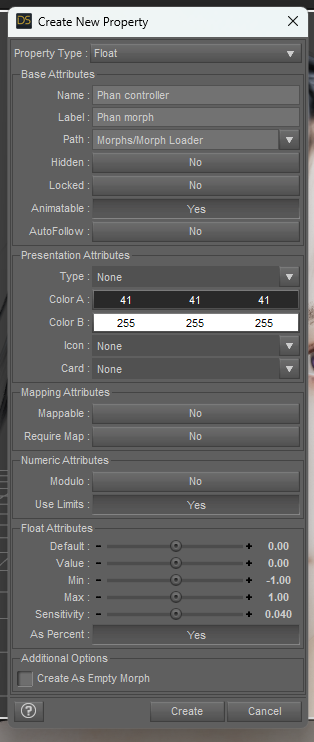
- After freezing it, my slider seems to work correctly, but I don't see any sub-component in the ERC Freeze dialogue:
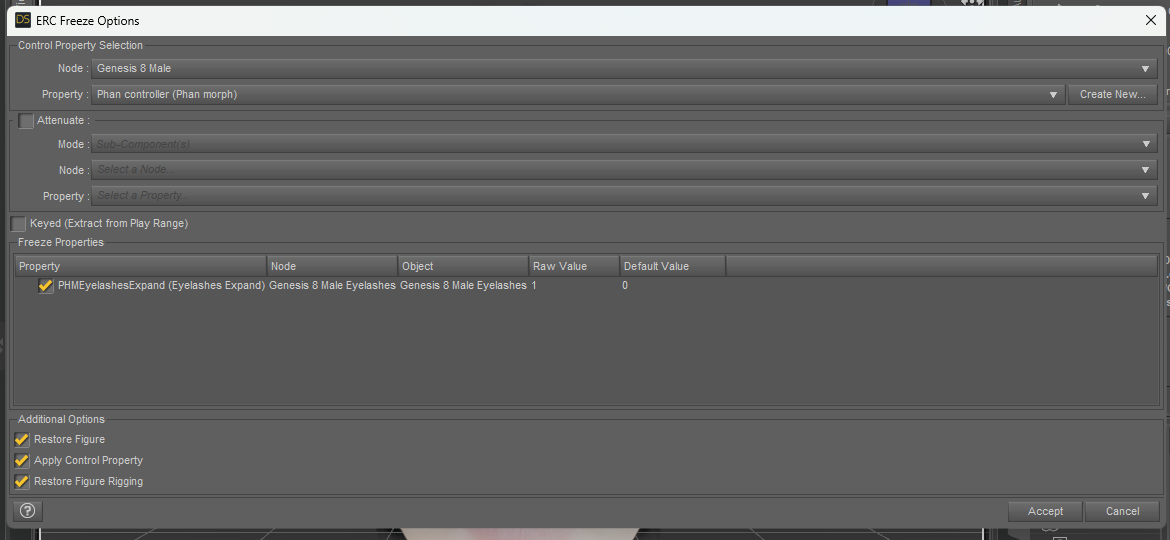
Or maybe it's the PHMEyelashesExpand in the Freeze Properties? But it's not the head morph that I created...crosswind said:
crosswind said:
You don't need to create a folder beforehand.... Just select Actor > Head > People > Real World or Sytlized, then type in "/Vendor Name" after it in Path field, e.g. Actor/Head/People/Real World/yuyu.atem
And it's up to you to add Vendor or Product name in the path... as long as it's easy for you to identify them.
Ah ok! And if I want to create several character, I save every head in the same folder, I don't create one folder by character, is it that?
So, if I create a morph for the body (without the head), I have to save it in Actor/Full Body/People/Real World/yuyu.atem, is it that? And if I create a slider that controls both the head and the body morphs, I have to save it in just Actor?
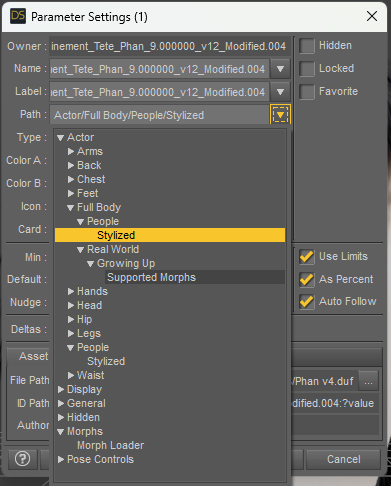
Edit:
How! I don't understand what happened! i created a new slider, and this time, there are more sub-componnents:
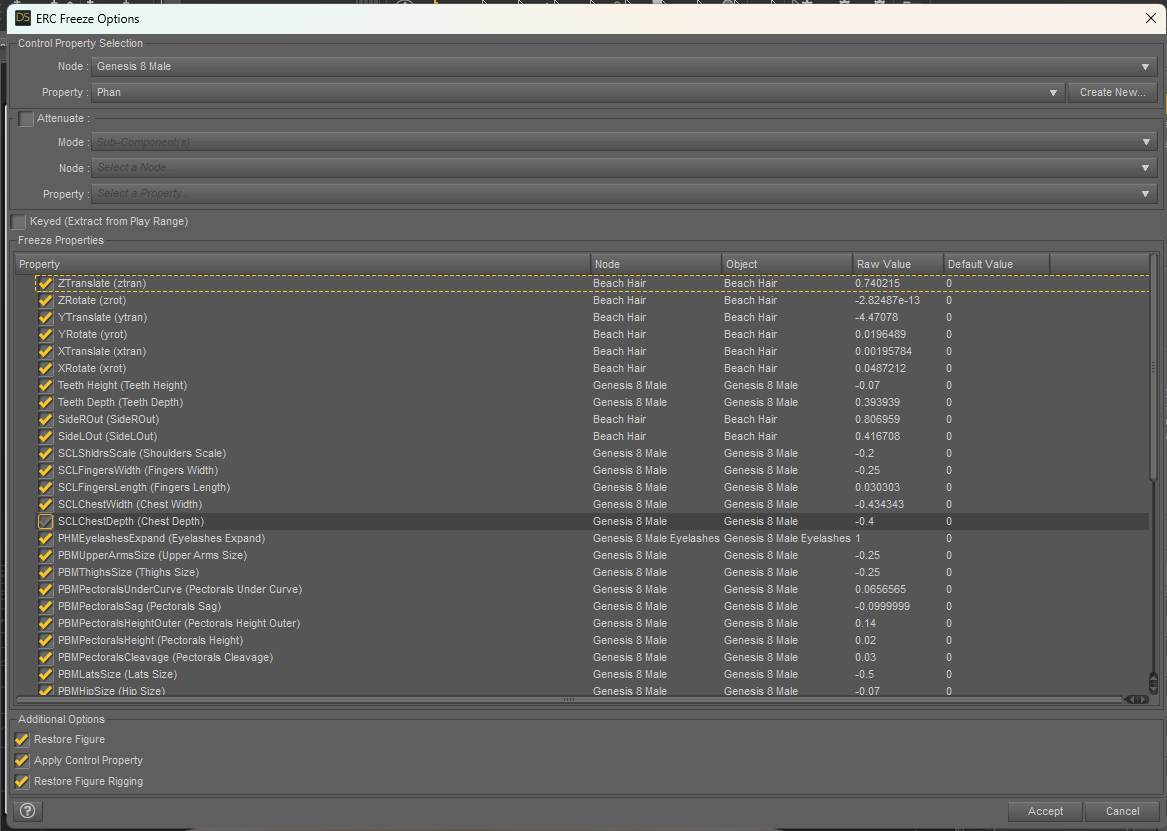
The Beach Hair is an hair from another generation, that I positionned and scaled before parented it to the head. Have I to uncheck it? When I do that, the position and scale I setted seem to be cancelled? Maybe I should create the slider before to parent the hair?
Thank you in advance for your answer!
Use G9 skin on G8Hi! I did it on G8M, since I wanted to convert G9 skin to G8M. I have only these possiblities on G8M:
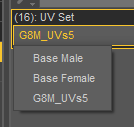
The G8M_UVs5 is the one I created by using the texture atlas (there is a "5" in the name because I made sevaral tests to understand how it works).
After using the texture atlas, I was automatically with G8M_UVs5. I conveted the skin with Wrap, and apply the map that I obtainded to G8M with G8M_UVs5. After that, I used the map transfer to separate the different parts...
How to save new character morphs?crosswind said:
Give a Path to the morph before saving morph asset.. don't leave it in the path or Morph Loader. Then it'll be easy to locate and manage the morphs you made.
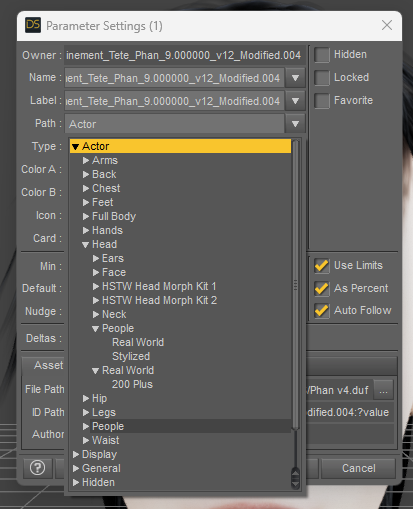
In "People", I have just "Real World" and "Stylized". Have I to create a folder with my name before choosing the path, or can I just write my name and the folder will be automatically created? (If I understand well, here, I have to give my name to the folder, right? Not the name of my character?)
Thank you in advance for your answers!
You don't need to create a folder beforehand.... Just select Actor > Head > People > Real World or Sytlized, then type in "/Vendor Name" after it in Path field, e.g. Actor/Head/People/Real World/yuyu.atem
And it's up to you to add Vendor or Product name in the path... as long as it's easy for you to identify them.
There's Always Another Sale Thread -- Discussions Only Pt 3Elor said:
kyoto kid said:
...hmmm, yeah. I open the top 200 sales and they all mainly feature G9 items.
You should not let your intense hatred for Genesis 9 cloud your judgement so much: with 14 items for Genesis 9, a 200 items selection is not in any definition of the word mainly featuring G9 items.
...last night when I made my post , that wasn't the case, only a small number of G8 items appeared at the end of the second page in each category. I was expecting a different collection for the "G8 Bkowout" (which may not have been set up at yet the time). What apparently happened right after the changeover last night was the sale page for the Grab Bag sale came up when I clicked on the links for the Top 200 G8 Blowout Sale. Obviously that was fixed afterwards.
It's not hatred for G9, its that I really don't need, nor can I afford to adopt an entirely new generation to get it to where I already have G3/G8 given my budget. I have a huge investment both that I built over the years and not about to "shelve" that. As I have mentioned elsewhere, I create my own custom "human based" characters and rarely ever use a figure straight "out of the box". With both G3 and G8, as well as merchant resource and transfer utility content, I have more than enough of material to work with for my character creation needs.
That said, I have purchased some G9 characters, most notably new mythical characters and creatures by PAs like RawArt and Oso3D, as that is where G9 tends to "shine". I also have the basic essentials needed to use them.
Actually looking at the selection for the G8 Blowout sale (I was mainly interested in hair content) it was not all that great. I as lookign for hair styles that would be more appropriate for younger characters as I have more than enough for the older ones. Did find a couole useful Sickle Yield utilities I didn't have in the clothing sale though.
G9 morph problemHello everyone,
I have a problem with the G9 morphs. The figure's thigh rates inwards. I don't know if I have changed anything, but it is the case with all figures. Can somebody give me advise?
Thanks.
Tom(Image removed by mod. Please reupload with the figure untextured https://www.daz3d.com/forums/discussion/3279/acceptable-ways-of-handling-nudity)
Let's appreciate/discuss today's new releases - more ongoinger threadIf you bought Cybertenko items, check them carefully. I bought the Retro Biker for G8M, which I used in the image above with Fabianas great new chains. The jacket has unwelded parts that separate and curve unnaturally and make holes in the garment, because of the smoothing that is applied by default when the item is loaded (screenshot). There is only one morph in the jacket (to fit over a thick T-shirt). There are no JCMs to help adjust to posing. I had a horrible time in Blender trying to make this thing look decent for my render. I don't believe this particular item is Daz ready at all. Of course there is no metadata, since it is imported from another store in a big batch of stuff. Buyer beware applies here.
Convert G9 Female to G9 Male & Vice VersaThere's no standard recipe to "maculinize" a character, you'll have to combine the shape with your G9 morphs until you're satisfied.
I would start by combining the shape with the "base masculine" morph or a masculine character body, and removing the "base feminine" morph if it's used.
You'll most likely need to play with chest morphs too to remove the breasts. The character you linked seems to have a specific breast morph included, so you'll probably use it to dial them down.
How to save new character morphs?Ah, if I understand well, you mean first create two morphs, one for the head and one for the body, and then, create a slider to control them, is it that? How can I create this slider? And after that, have I to save the each morph and the slider separately?
Thank you in advance!
Camera Magic (Commercial)"I dial a hair morph either in Perspective View"
This needs to be done on the desired camera...perspective view will not hold any data.
If you have Plus you dont need to use the standard Camera Magic anymore. The visibility/enable options are there in Plus. I don't know why it is not working for you. Send me a log file please. Under script settings/options there is a get log function.
Camera Magic (Commercial)Zev0 said:
Works fine here. Be sure to select All rigged assets....
Nope, still not working. With clothes and shaping combination set 1, I save visibility date and shaping data (all rigged assets) to Camera 1, and clothes and shaping combination 2 is saved to Camera 2. I dial a hair morph either in Perspective View, Camera 1 or Camera 2, and the moment I switch to another Camera, the morph is dialed back to zero.
Edit: to clarify, with Camera 1, I enable visibilty data saving in Camera Magic, then I go to Camera Magic Plus and save visibility and shaping data (all rigged models) to Camera 1. Then with a different clothing and shaping set, I repeat under Camera 2.
How to save new character morphs?Documents/Daz 3D/Studio/My Library/ is the default location for user saves, and was the default location for installed content back in the day. Install Manager uses the Public Docuiments folder location by default. So the one in your own documents, or a specially added content directory for your own creations (so you could just zip the contents up once done) would be my suggestion.
A better workflow is to create the head and body shapes, then add a new slider that isn't a morph but that sets the head and body to 100% - that way you only have two actual morphs (plus any correctives) to worry about.
How to save new character morphs?Thank you very much!
But I am not sure to understand everything yet...Richard Haseltine said:
In general I would say, for the last, use the one that has your files and that you back up - that way you won't lose your work. DS doesn't mind loading Genesis X morphs across different content directories (morphs for the older figures, certainly the ExP system used in the fourth generation Daz figures, such as Victoria 4, do have to be in the same content directory).
In fact, it's the first time that I try to create content, so I don't understand the difference between the two folder directories... (I even don't know why there are two folder directories, maybe I created one by mistake?)
If by "the one that has your files" you mean where I saved the file in which I shaped my character, it's an external file in my documents, not one of the two folders on the Base Data Folder tab... Maybe I shouldn't save my works in an external directory?You select your new morphs, not any thrid-party morphs or properties. So, your head morph and any new CBS/JCM shapes you cretaed to use with it but not the standard body morphs you used.
If you want separate head and body morphs then that is what you must create - you can't split them at the saving stage.
If I understand well, I have first to save a morph for the full body, and to separate hand and the body later, is it that? How could I to separate them? Since I just created a head orph, and used existing morphs to shape the body, how can I save a full body morph? Have I to save my shaped character as an obj file, and reimport it into a full body morph?
crosswind said:
Give a Path to the morph before saving morph asset.. don't leave it in the path or Morph Loader. Then it'll be easy to locate and manage the morphs you made.
In "People", I have just "Real World" and "Stylized". Have I to create a folder with my name before choosing the path, or can I just write my name and the folder will be automatically created? (If I understand well, here, I have to give my name to the folder, right? Not the name of my character?)
Thank you in advance for your answers!
Camera Magic (Commercial)Zev0 said:
RobertDy said:
I'm having a problem. When in one of the magic cameras, say I do a hair blow morph, then I switch to the Perspective View camera and tweak other things, then I return to the magic camera, but the dialed hair blow morph is gone. Please tell me how to fix this cos it's really going to affect whether I can continue using this product. I need to switch to the Perpsective view every now and then to make adjustments. EDIT this also happens when a switch to another magic camera when i apply the hair blow morphs from the previous magic camera.
Hi. What hair set is this....Also what setting did you ask the camera to remember?
Liv hair by outoftouch, but I don't think it matters? I asked Camera Magic and Camera Magic Plus to rememebr visibility data and shaping data. I have two cameras that have the characters wearing different clothes and having different body shapes, so naturally I'd want changes to the hair morph to be reflected in both cameras, and not disappearing when I switch cameras.
How to use hair on another character?Transfer utility, is usally used, when you have imported a model modelled for a specific (base) character. Then you can use (and/or save) for that character generation. You can also use it for other purposes, but this is the standard purpose.
Autofit dialogue should come up as soon as you try to fit an item to a character og another generation. You can also tricker the dialogue if you just have loaded it and in the scene tab right-click and slect 'fit to' and then the character.
Converters are individual for generation to generation, e.g. from G8F to G9. Try to search for converters in the store, and you should see a bunch. Riversoft and Sickleyield makes many together.
For parenting to the head. In scene tab select the item and rightclick and 'change parent' and then scroll till you find the head. Else in the scenetab you can select the hair and drag it, till you come to the head and let go.
Use G9 skin on G8Ah? Isn't it needed to use map transfer for G8? I mean, after using the texture atlas, every selected parts of the body are on the same map... Isn't it needed to use map transfer to "separate" these parts into the different templates?
Thank you in advance for your answer!
Daz 3D is part of

Connect
DAZ Productions, Inc.
7533 S Center View Ct #4664
West Jordan, UT 84084Licensing Agreement | Terms of Service | Privacy Policy | EULA
© 2026 Daz Productions Inc. All Rights Reserved.










