-
Motorcycle and vehicle poses
I have no idea why no one seems to have created a bundle of vehicular poses for cars and MOTORCYCLES.
All these hover bikes and such.
Generic poses. Something with morph dials to lean back, curl legs, widen grips....cross arms etc....
I don't think I own a single motorcycle pose in my library.
And I always use the truck driver one to start off for everything car-related.
Makes no sense....lol
Car and Vehicles
- Getting in car poses....
-Connecting seat belt poses.....
-passenger/back seat
- changing tire poses
-hanging on hood (engine area + roof of car)
- engaged in conversation while driving.
-working on car..under hood and under body....
- laying across hood car-show poses
- washing/polishing car poses
motorcycle/hover bikes
- wheelie
-leaning into a corner (+ mirrors)
- mounted normal
-mounted leaning forward for speed
-straddled
-passenger in front, passenger behind
-walking bike (+mirrors)
-------------------
With soooo many car and motorcycle products, it seems like an easy sell, but even if the poses only get us in the general and we do the fine tweaks after. (that's why I said morphs as an idea)
Necessary things/morphs I need to buyHey guys, I'm new and haven't purchased anything yet. I'm using daz for 3d character making but can't spend much on buying stuff. What i want to know is the necessary morphs that i require in creating a good looking 3d characters(nude mostly hehe). From what i've searched till now i need to get body morphs, head morphs and expression morph. So what else would you recommend me to get so i can make good looking characters lets say atleast 7-8 female characters and again i must tell i can't buy much so please recommend me least amount of good things i require to create good looking character.
Thanks
Daz Studio 4.9.4 Pro, General Release!So it work for you with your setting but Actually it did not work for me. I use same camera as view , then show spot render (it use gloval setting) and full render (it use local camera). Then I do not hope additional test any more.
I still have another problem, for me it is more improatnt. because I already send ticket 2 times and still wait clear answer. but have not gotten reply.
almost 1 years . then I decide , same test about all version and stik i there. . I definelty say genessi3 is unique and corrupt save scene process somehow.
This time, I load G2 with G3, then make morph for both, and import it by hexagon bridge one by one, then load and fit to clothings. and save the scene. (both fit well)
when I load the scene, both actor lost ability to auto follow morph, not only about G3 but about oher character (in this test I use G2M) . about this scene, I can not fit any clohitng about these shape. (load different clothing, ,then fit to,, not work.. simply morphs can not auto follow any more).
but I test samething with G2 only,, then save scene , and load scene,, it keep generate morph.(which not saved as morph) without problem.
I think, DAZ can not solve this problem forever. but do not you think , it need to be solve to keep compatiblity about save scene? why G3 not work?
Extremely long figure load times - ways to fix?Checked my logs. G3F takes 1:50 minutes. Have my main runtime on an external USB3 drive. Same goes for a second runtime for all stuff purchased elsewhere and a third runtime storing some my saved scenes and presets. There are several error messages ("could not find output property" and so on) but I guess the long load time might be mainly due to all the morphs & figures installed. At least studio has to load those to make the dials available, right?
Okay, the computer geek wants to ask a few questions:
You have a USB3 drive, is the drive plugged into a USB3 Port?
USB3 is backwards compatible with USB2, so you can plug a USB2 device into a USB2 port and a USB3 device into a USB2 port.

The Blue Tongue on the left is USB3.
If your USB3 Deive plugged into a Hub? and then to the computer? If this is the case, is the Hub a USB3 Hub and is it plugged into a USB3 port.
Do you have any other USB devices plugged into that Hub or into your computer's USB3 ports, which are not USB3 devices?
Here is a Microsoft Blog about common USB issues on Windows. it is a little technical, but it might help.
My rule of thumb: UBS3 devices are plugged into USB3 ports, USB1 & 2 deives to UBS2 ports. Who cares if your keyboard is on a slow port, No human can type fast enough to effectively fill a USB2 pipe.
On the other hand a USB3 device plugged into a UBS2 port or being recognized as a USB2 device, could drop your data transfer rate to a Tenth of what is shoudl be. (USB2 is 480 Mbit/s while USB3 is 5 Gbit/s)
Hope that helps you.
Should vertices count = Polygon count?Sure;
Load the blank (example) head in Blender as per video, create a morph for the nose, export as per video, and load in Poser in the head group..
Load the blank head again in Blender, (always start with the original exported if you work on individual vertex groups), create another moprhs for the ears, export and load in Poser.
You can create as many morphs as you like.why this underwear (ikaros bottom wear) can not auto-follow many morphs well?Though I like these style much (game character like) with layered parts as desgin.
I may send suport ticket as product bug, but I can not expect . And I afraid support said samething (use smooth modifier, or not every morph can follow, it supposed to be, here is additional morphs which can adjust shape etc,,)
But I believe if vendor can take time, and test this bottom wear again with each morphs, and compare with other product botome wears, which sold in daz shop, he may aggree, this panty not work well with many morphs. then I hope , he up-date this product.
I do not know what cause problem still, but this panty actually can not follow many morphs which other bottom wears can follow withotu many problem. the difference is too much for me.
in this pic, I compare Ikaros panty with layered Ikaros Socks (include in this set), and other product panty about same moprh. (FBMHeavy 50 to 33%)
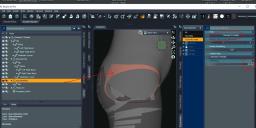
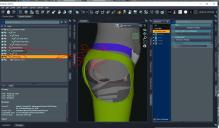
I do not hope to exgeretate problem, because I like this cos set desgin much (not only bottome wear, but dress ,layered Socks etc,, I think it is very well designed, maybe game or anime character costume was motif and vendor arange design as their taste. so that I bought it as soon as I found this set. (there are many cosutme set , game fantasy,SF etc,,, but to be frankely said, there is not so many Costume set, which I really hope to get,,)

(AFK about layered Socks which supposed to be overwrap panty, not fit well with zero pose zero shape already , left hip part bury under panty , but it is small problem, I could easy up-date geometry about this case,, but this panty can not. I do not hope to make too many morphs to remove this problem. because it is product.
I'm Stumped - Nyarai and Ceridwen **sometimes** load distortedI uninstalled Izabella 7 as a test. I restarted Daz Studio 4.9.3.166 and guess what - Nyarai and Ceridwen both loaded and posed correctly correctly. Of course, since the issue has been intermittent, I can't say for certain that Izabella 7 is the smoking gun.
You shouldn't have that problem. Morphs for each Character should be in separate folders in the Data directory. And looking at your listing they are in two different directories. Character A is not going to look in the directory for Character B, C , or D, for it's morphs. if you look in a DUF file you will see Morphs are called out with it's location. As an example, this is from a Character I created, "/data/DAZ%203D/Genesis/Base/Morphs/ram1520/FBM-Lisa/Polly-Buff.dsf" Each morph is going to be called out not only by name but by location.
Of course having to uninstall purchased content to get other purchased content to work is NOT a solution in my book. I wonder what would have happened if I had installed both with the DIM. Would one morph have overwritten the other, since they'd be in the same folder? What would have happened then? Would it depend on which product was installed second?
Using DAZ Connect it is impossible for one Product to over write another, due to each product being in a separate folder. I am sure that is one of the reasons, why DAZ 3D decided to use separate diretories for each product. This way one product can't corrupt another unrelated product, with installing, uninstalling, and installing again. If you had installed it with the DIM, there would be a posibility and DIM updates have been known to leave orphaned artifacts behind.
If you use Different Content Libraries for difference Content sources, and you create a Product inline, you will see that the Produce XML file will be in the Support directory for the Library the Product is in. Thus proving, DAZ Studio also respects Content Library separation.
Hope that helps.
I like World Travels Wagon... but it needed a few improvements.So... As I wait, I fiddle......
This time I'm fiddling with Romany Charm, due to their being no logical reason why it can't fit inside the Bow Top. And I've been fiddling with the Bow Top itself, cause, it just looks too tall.
Bow Top First:
So my first fiddle was with the Bow Top and it's Height. And in the process I found something very interesting.
I was working on poses and I was having a... Jolly time... getting anyone to sit on the side benches. The issue is they are just TOO high. Here is a render with Genesis 2 Male on the left and V4 on the right or V4 Assassin, and Genesis 3 Female on her cushion, in the middle.

You can see that G2M's feet are several centimeters above the Landing step and the same with v4's boot. Now I can modify the V4 pose so she is still sitting on the left seat, but G2m would be leaning at best.
But if I reduce the height of the Bow Top by say 87%.

Things sort themselves out quite nicely. I did not move G3F or the V4 Assassin, I just lowered G2M and V4until their feet hit the ground. Now let me move G3f and V4 Assassin off to the side so we can see the doors.

Now The left door is My Rework, the right door is the original; and the doors have not been resized. I would like you to notice that Michael 6 and Michael 5 Superhero, still have headroom. Of course Superhero is going to have to duck or whack his head on the door frame.
Romany Charm:
One of my goals was to resize Romany Charm so it could be placed inside the Bow Top. Well if I move Michael 6 and Michael 5 Superhero off to the side and open the bottom doors.

Yup, that is Romany Charm, resized for to fit inside the Bow top, I have made Sub-Scenes of both heights, the 87% and 100% versions. Due to there being no mesh or texture files involved here, I can include the Sub-Scene with the rework of the Original materials. These will used the original door, not the remakes.
Now Here are two more shots of Romany Charm, Inside of the Bow Top, of World Travels.

Over the work week, I'll look into doing a little candle light, work inside.

Note: The stove I am using here is actually the one for Boundless Journey. But I have to say I like it better. It also needs a Stove Pipe Collar, where it passes through the Fabric of the top. Also if we are going for any semblance of reality, there would be a ceramic and metal heat deflector around the stove and it would sit on a ceramic stand. This would protect the wood of the wagon from drying out, catching fire, and it would add to the thermal transfer of the heat to the inside of the wagon.
Now that I have the models made I can start on the poses and other tops. After seeing Romany Charms in side World Travel, I really want to make a Longer version of the Undercarriage for a little bigger version of the house wagon. To there can be a pull out table and Second bed which is a drawer, which pulls out.
I will start packing everything up next Sunday, Freebie's I will drop a link here for, the rest of it… We will see.
How Do I Make a Morph that Correctly Effects an Already Morphed Figure?Reverse defomation with Morph Loader in DS is an option but it is complicated to handle I think.
An better workflow with blender would be to first load the base shape figure geometry - then import the combined FBM-FHM character morph shape from DS as a second geometry object.
Select the base shape figure and create a Shape-Key the first one is called Basis. Next select the character morph object then Shift-Select also the base shape figure object. If done in the right order you see the Basis Shape-Key. Right next to it under the plus and minus sign there is the Shape-Key specials menu - select "Join As Shapes" and you get a new Shape-Key with the character morph also named like the source object that you can delete now.
If you plan to sculpt a new morph shape now first create a new Shape-Key for that. Now you can sculpt with the character morph applied but before you export your new morph simply turn the character morph back to zero so you dont need to deal with Reverse Defomation in DS.
I'm Stumped - Nyarai and Ceridwen **sometimes** load distortedI uninstalled Izabella 7 as a test. I restarted Daz Studio 4.9.3.166 and guess what - Nyarai and Ceridwen both loaded and posed correctly correctly. Of course, since the issue has been intermittent, I can't say for certain that Izabella 7 is the smoking gun.
Of course having to uninstall purchased content to get other purchased content to work is NOT a solution in my book. I wonder what would have happened if I had installed both with the DIM. Would one morph have overwritten the other, since they'd be in the same folder? What would have happened then? Would it depend on which product was installed second?
I'm Stumped - Nyarai and Ceridwen **sometimes** load distortedI think I've found a clue to the mystery. Somehow I noticed that when the problem occurs, the FBMHeight (Height) morph is dialed in by Nyarai and Ceridwen. (Gosh these names are going to kill me. I'm bound to misspell them pretty soon, if I haven't already.) If I dial Height back to 0, the bones and mesh match up again. Of course, that is not the way the artist intended the character to look. The problem seems to be that the Height morph is not adjusting the mesh along with the bones. I tried G3M and his Height morph DOES adjust his mesh along with his bones. Following this clue, I also discovered that I do have some other characters with the same problem - those characters that use the Height morph. I never noticed this problem on those characters before, so I'm beginning to think along the l lines that Serene Night suggested - some new content or update has caused the problem or conflict. I still don't have a clue about why the problem is intermittent, though. Perhaps there are two FBMHeight morphs conflicting with each other???? I still have the GenX morphs removed. The hunt continues... Please chime in with suggestions.
Issue with GeoGraft + SubDI once had that problem too - but I think I used DS 4.8 back then.
For some reason as I created morphs for the geograft in ZBrush and then replaced the base shape with some of that ZBrush Morph by Update Base Geometry - some but not all of the Geograft vertices fall appart when fitted to the figure - even if they still looking to be on the same spott. Then I switched to the geomerty editor again and repeated the Geometry Assignment for Graft-Faces and Auto-Hide Faces. I think the Re-Assignment is always a good idea after Update Base Geometry of the geograft.
I also thought of a precicion problem due to the import export process but I also had problems to mask the outer edges of the geograft in ZBrush and maybe some smoothing moved them silightly.
Whatever caused the problem I did invent a method to fix it with Blender.
Therfore I selected the Auto-Hide Faces of the Genesis Figure in DS and created a Face Group out of it (I didn't save the scene or figure with the new Face-Group not neccesary but its just handy to have it in blender).
Then I've exported the figure and the geograft as separate obj's 100% DS-Scale - and loaded the genesis figure with the new face-group and Geograft into Blender.
The next thing I did was I deleted the Auto-Hide Faces and joined the figure with the geograft to one object. Before joining objects take care of the Face-Groups/Vertex-Groups with same name on both objects and rename/delet/merge them as you like you just need to seperate the geograft from the figure later.
Then in edit mode I used vertex selection with Snap-To-Vertex option. I started to select some vertex from around the edgeloop of the geograft and select-snaped all vertecis back to the genesis figure vertex position all around the geograft edgeloop. While doing that I got problems to select the right vertex so I decided to first select the geograft edgeloop and g-grab move it away from the figure before I select-snaped the vertecis back.
After that I selected all genesis figure geometry and deleted it. Whats left is the geograft geometry with the outer edge-loop exactly aligned to the genesis figure again.
Then I've exported the geograft obj to use it as an update to the existing figure in DS with Update Base Geometry. I also did the Re-Assignment and fitted the geograft to the figure and it worked.
You can also import/replace new Face-Groups or default UV-Maps of figures or props I think - if you choose Update Full Geometry with no morph shape applied in the source geometry for Update Base Geometry.
Darwins' SchtuffSo-an HDRI test on the skin. At this point, it's about 80% photo resources with re-done bump and normal maps. I still have more details to put onto the bump/normal maps for the skin, double check seams, etc. Once this is final, then it will be the "junk" to do. Then it will be onto the human eye color materials to go with the four fantasy, save his ear shape preset. I have also added a corrective morph for the kink in G3M's neck when his head bends (which somehow I've never noticed before now) to give that area a more natural bunching of skin when his head is bowed.
Then it's off to his fantasy skin set!
I do have another 'fun' render to test him in with HDRI, a full scene of props, added emissive lights in the lamps, a fill and accent spot light each to see how his skin reacts going overnight. lol May as well show it, if I'm going to render it.
Anywho- here is this one. Time for bed.
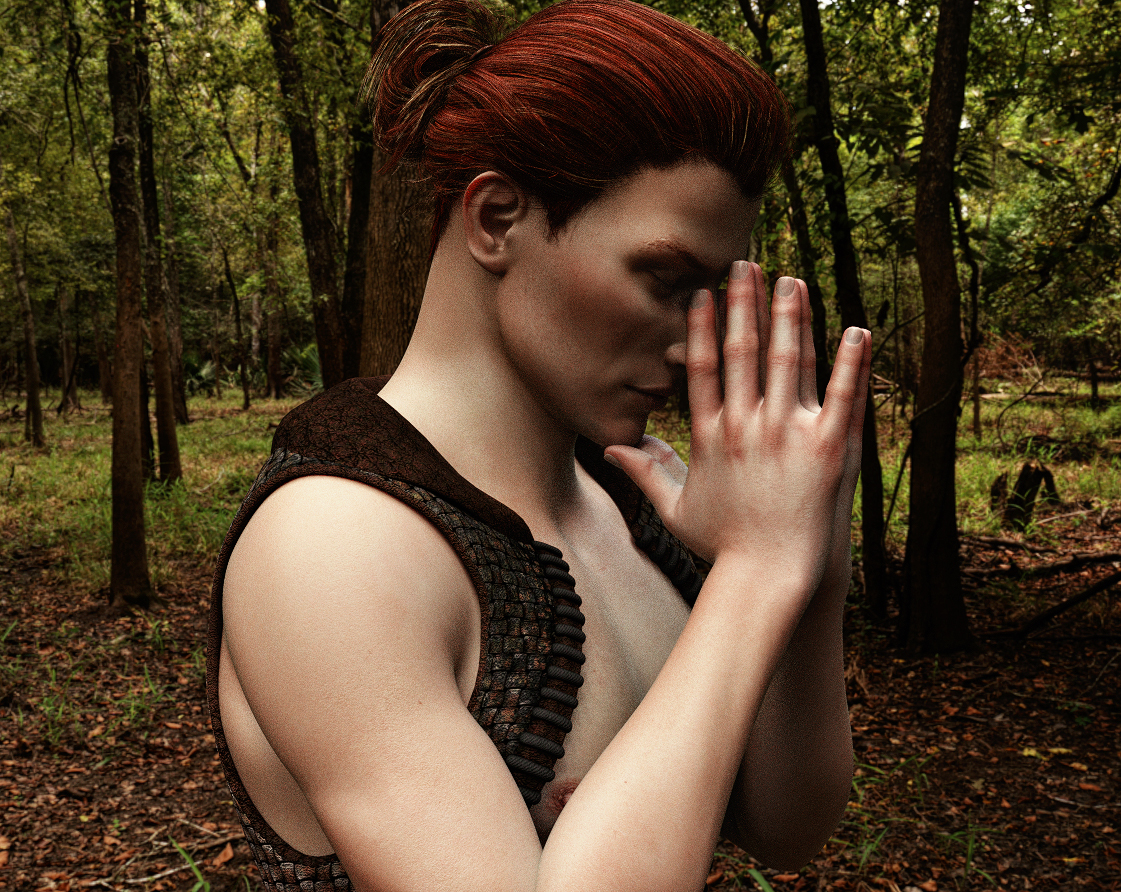
Edit: realized.......I fergot his veins. Bad crea-tor. Tsk. Will have to get those in as well.
Question about Character SelectionAlso, if its not marked actor in the thumbnail and called something else, like follower or morph, those, you have to load G3F first. If it says Actor, no need to do anything but double click on the icon.
Ooh, great tip! Thanks! :)
Question about Character SelectionAlso, if its not marked actor in the thumbnail and called something else, like follower or morph, those, you have to load G3F first. If it says Actor, no need to do anything but double click on the icon.
Extremely long figure load times - ways to fix?G3F loads in 45 secs for me. Dayanara (FWSA) loads in 25 sec. Cailin HD (Raiya) loads in 25.5 sec. LY Adair HD (Lyoness) loads in 28 sec.
My content is on an external USB3 drive and is 497Gb (739243 files). 286 Genesis 3 (and X7) Characters. 106 related morph packs.
Machine is an I7-4770K w/ 32GB ram. Win 7
I don't think it's the size of your library.
Transferring Arabella 7 character to Arabella HD: How?In addition to setting the Arabella HD Details morph to 100% you will also want to make sure the Render SubD Level (Minimum) is set to 3 or higher for the character. The HD details don't show up in the viewport very well so you may not notice them until you render and only on scenes where the camera is closer to the character.
Question about Character SelectionHowever, if depends on how the figure was built. Some may require you to load G3F first then apply the morphs. It will be easy to tel . If you need to load G3F first and your double click the figure morph on an empty viewport, you'll get an error.
Question about Character SelectionSince I never use any of the default character morphs that come with a package, let me understand better. Just clicking the character icon and loading the full characater at once, correct? If so, no, you don't need to load V7. V7 is just a morph in the list you have for genesis 3 female and that morph will usually activate when you load the character.
Transferring Arabella 7 character to Arabella HD: How?Take your character, and dial up the Arabella HD morph. If you like how it looks, great. If you don't, there's nothing you can do to change the HD details, so just stick with what you already had.
Daz 3D is part of

Connect
DAZ Productions, Inc.
7533 S Center View Ct #4664
West Jordan, UT 84084Licensing Agreement | Terms of Service | Privacy Policy | EULA
© 2026 Daz Productions Inc. All Rights Reserved.