-
Keri for gen8?
She does look a little different without V8, but you can get a very close proximate of the character without Victoria.
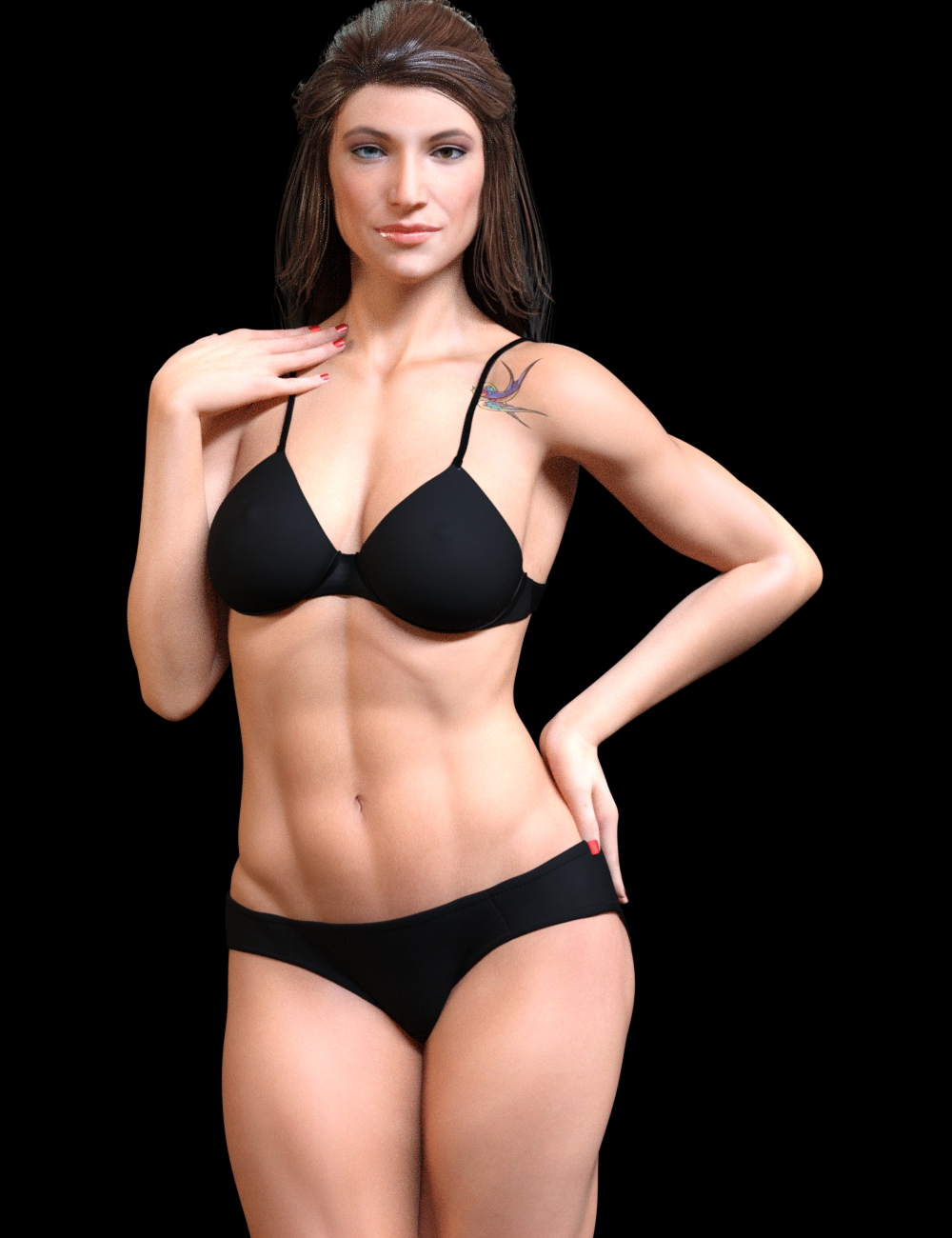
This is with the Genesis 8 Female body morphs and the custom head morph only.
Morphs from G3 to G8Problem with V8 Eyelashes Not Following the Morph Transfer
I made a morph transfer of a G1 face. Her eyes are shaped differently than V8, and the eyelashes are not following. How can I fix that?
Vicky8
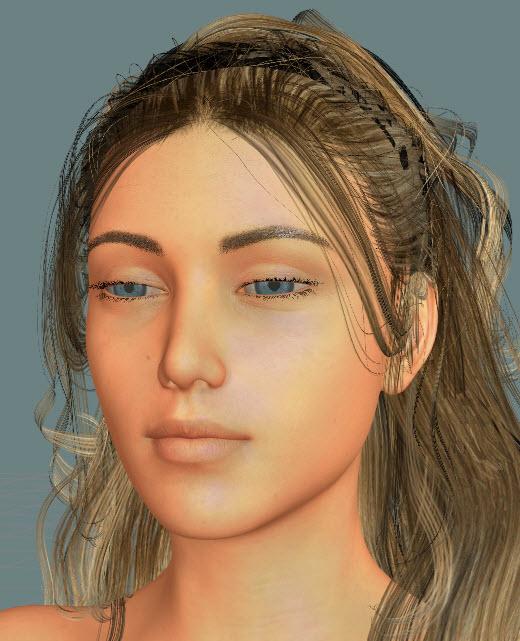
Vicky8 with G1 Lorella the Elf Maiden
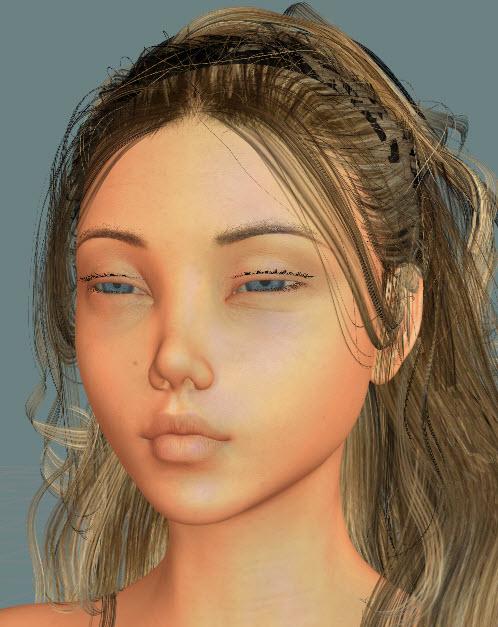 Morphs from G3 to G8
Thanks, lol The figure source is better it's actually baby luna but she doesn't transfer over well and clothes don't fit well but it was interesting doing the trial and error
Skin Builder 3 render competition - Closing Date 31st of May 2017...congratulations to the winners and those who placed.
I certainly would not have wanted to make the decision after seeing so many good entries.
Finding the more I use SBP3, along with Growing Up, and morph resource kits like Breast Control, the more I question why I ever would buy a premade character/figure unless it offered special custom morphs that were otherwise unavailable..
Show Us Your Iray Renders. Part VIInspired by another thread, Succubus.
Succubus wings/etc from the G2F thing, figure is G8F with transferred Exile (G3M) morph, NGS Anagenessis tossed at various bits.
AIUTO...CHI CONOSCE L’ITALIANO? PARTE UNDICIIo aspetto....
Sinceramente non ho visto tutta questa "evoluzione" rispetto a Genesis3...
Ancora adesso trovo molto, MOLTO più versatile Genesis1 per densità e numero di poligoni, adattibiltà dei prop (Sto usando vecchi abiti di Victoria2 su Genesis1 e ci stanno Daddio!) e flessibilità delle UV!
Ci faccio di tutto, da dolcissime bambine paffutelle ad orrendi mostri deformi, con un solo modello base...
Alla DAZ devono imparare a imitare se stessi...
Confido in Genesis 14...
E DAZ Studio 5!
Aspetta.....Victoia 8 non solo ha una retrocompatibilità praticamente unica....ma ha anche l'auto flex dei muscoli ( mai vista prima) una UVmap perfettamente compatibile che Genesis 1 ( e quindi con V4 volendo....) - un sistema di Iray superiore e migliore, una posa di default che permette un cloths crator migliore, più intuitivo e veloce. Perfetta compatibilità per esempio con il Marvelous Designer, che ti permette di fare abiti in meno di 1 ora per capirci. Nuovi morphs e dettagli prima impensabili! Guarda le sue espressioni!
Restano da menzionare gli IK rotti... Ti assicuro che non è un dettaglio da trascurare... Magari io solo l'unico in tutto il mondo DAZ a non usare le pose pronte e mi ostino ad usare IK e Pin, ma è necessario che funzionino bene... Non sono passato a Genesis3 proprio a causa degli IK, impossibile usare la figura in modo rapido e mi sarebbe anche piaciuto viste alcune caratteristiche! Non puoi perdere un'ora a posare UN braccio perchè non puoi pinnarlo, pena vedere il gomito partire diagonalmente che nemmeno nei peggiori incontri di Muay Tai...
Trovo utile il preset "Wall Flat" che converte tutto alla classica base 3DLight... Per il resto vedrò solo IRay dappertutto, inutilizabile nelle animazioni... Inoltre non mi piacciono le nuove UV, i seams mi sembrano posizionati male...
Un dettaglio che potrebbe attirarmi in quella direzione è la velocità di risposta al cambio di posa, decisamente rapido... Il ricalcolo dei Clone è velocissimo e la figura si muove in modo fluido anche con molti abiti addosso...
Se un giorno dovessero fixare gli IK e ci fossero dei morph decenti potrei anche pensare a fare un mezzo salto... Per ora utlizzerò solo Genesis1...
Ma trovi davvero così difficile posare senza pin e IK?
Morphs from G3 to G8Another baby transfer :/
Morphs from G3 to G8"AutoFollow" is under the parameters menu for each individual morph dial. So, if you have a whole body morph for a G3 character, or a head morph...etc., you click on the gear shaped "settings" icon within the dial slider. You should see a menu with "parameter settings" as on of your options. Click on that and you'll get a new pane with morph properties showing. There will be a check box for AutoFollow. If it is not checked, G8 will not shape itself to G3's morph. Once you've checked the AutoFollow, go back to G8 and set "Fit To" to "none." Then, redo the "Fit To" to G3. Your slider should now affect G8.
Thank you for that information. I found the Autofollow setting and switched it on and the morphs transfer now.
There is one slight oddity, when I apply the transferred head morph in G8F it also stretches the shoulders and chest upwards which the original G3F morph did not do, but the head morphs the same as G3F.
This was addressed... give me a minute to find the post...
2. There's been some discussion about head morphs and how you have to use the vertex editor in order to save them. Does that apply to head-only morphs? Like SickleYield's Faces of Asia, etc.?
Not sure I can clearly answer the rest of your questions, but this one, I can.
In a word, yes. Yes it does.
Basically, G3 and G8 need helper morphs to deal with the way a person should be shaped when they lower their arms vs when they raise them. The T pose requires a lot more help than the A pose, so you end up with slightly different placement of the shoulder areas, even if you line up the bones exactly. This different placement carries through to the morph, even if all you do is a head morph. To get rid of it, on a head morph, you need to exclude the body with facet or vertex selection.Morphs from G3 to G8"AutoFollow" is under the parameters menu for each individual morph dial. So, if you have a whole body morph for a G3 character, or a head morph...etc., you click on the gear shaped "settings" icon within the dial slider. You should see a menu with "parameter settings" as on of your options. Click on that and you'll get a new pane with morph properties showing. There will be a check box for AutoFollow. If it is not checked, G8 will not shape itself to G3's morph. Once you've checked the AutoFollow, go back to G8 and set "Fit To" to "none." Then, redo the "Fit To" to G3. Your slider should now affect G8.
Thank you for that information. I found the Autofollow setting and switched it on and the morphs transfer now.
There is one slight oddity, when I apply the transferred head morph in G8F it also stretches the shoulders and chest upwards which the original G3F morph did not do, but the head morphs the same as G3F.
3D Art FREEBIE CHALLENGE-JUNE 2017- BEST/WORST VACATIONS/KID ADVENTURES-Entries Thread OnlyDAZ 3D Art Freebie Challenge June 2017
"BEST/WORST VACATIONS/KID ADVENTURES""A day at the spa..."
Two songs come to mind, Reflections by Diana Ross and the Supremes, "Reflections of the way life used to be..." and Reflections Of My Life by The Marmalade...
Diana Ross and the Supremes - Reflections (1967)
https://www.youtube.com/watch?v=nV72YrB1454The Marmalade - Reflections Of My Life (1969)
https://www.youtube.com/watch?v=xTeI65yrhGwUSED FREEBIES:
#1! Relaxation Porch by inLite Studio
http://inlitestudio.com/3d/product/relaxation-porch/ **#2! Super Morphing Tree by Design Anvil
https://issuu.com/philatdsc/docs/ds_creative_08 (page 9)#3! Little Rose by klausdbg
http://www.sharecg.com/v/87286/gallery/5/3D-Model/Little-Rose **#4. M4 Regal poses by Portrait Studio (jlk)
http://www.sharecg.com/v/60821/browse/11/Poser/M4-Regal **#5! Indoor Plant 3 (OBJ) by 3DHaupt
http://www.sharecg.com/v/81046/gallery/5/3D-Model/Indoor-plant-3 **#6! Cola in takeaway cup (OBJ) by Animated Heaven
http://www.sharecg.com/v/79186/gallery/5/3D-Model/Cola-in-takeaway-cup **#7! School Swimsuits v2.1.1 for A4 by Redviper
http://viper2012.s602.xrea.com/x/ (item 4)#8! Nene Hair v1.0.1 for A4 by Redviper
http://viper2012.s602.xrea.com/x/ (item 5)#9! Far East Girls Collection II for A4 by Redviper
http://www.sharecg.com/v/62353/gallery/11/Poser/Far-East-Girls-Collection-II-for-A4 **#10! Mellora for V4.1, V4.2 by Adrella
http://www.sharecg.com/v/24157/browse/Poser/Mellora-for-V4.1,-V4.2 **#11. Stacked Linen by TrekkieGrrrl
http://www.sharecg.com/v/18187/gallery/11/Poser/Stacked-Linen **#12. Crushable Can by TrekkieGrrrl
http://www.sharecg.com/v/18196/gallery/11/Poser/Crushable-beer-can **#13! M4 Hipster Glasses by Cool Tuna Studio
http://www.cooltuna.com/poser/poser-freebies.html (item 8)#14! Hamburger (Ready made or DIY) by Treasure Chest
http://trumarcar.francemi.net/foodprops_tc.htm (item 29)#15! Straw (Milk and Juice Cartons not used) by Treasure Chest
http://trumarcar.francemi.net/foodprops_tc.htm (item 31)#16. Dystopia Soda Can by Team Dystopia
http://www.team-dystopia.com/product_display.php?category=gear&id=59
- Extra textures:
http://www.team-dystopia.com/product_display.php?category=gear&id=60#17. 4 diferent brands of textures for the Dystopia Soda Can by Area-50
http://www.sharecg.com/v/39968/gallery/11/Poser/4-Textures-for-the-Dystopia-Soda-Can **#18. Water Bottle Prop by AdamThwaites (Most-Digital-Creations)
http://www.most-digital-creations.com/free_poser_poses_textures_morphs_props_37.htm (Item 18)#19. BigBurger by AdamThwaites (Most-Digital-Creations)
http://www.most-digital-creations.com/free_poser_poses_textures_morphs_props_19.htm (Item 4)#20! Wind Chimes by Jim Farris (Xaa)
http://www.sharecg.com/v/41919/gallery/11/Poser/Wind-Chimes **#21. Tray by klausdbg
http://www.sharecg.com/v/75867/gallery/5/3D-Model/Jugcup-and-tray **#22! Blankets (Towels) by klausdbg
http://www.sharecg.com/v/74238/gallery/5/3D-Model/Summer-II-Blankets **#23! Suncreme by klausdbg
http://www.sharecg.com/v/74239/gallery/5/3D-Model/Summer-III-Suncreme **#24! Summer Cocktails by Sixus1
https://issuu.com/philatdsc/docs/ds_creative_20 (page 22)#25! Flip Flops for V4 by LMDesign
http://www.lmdesign.co.uk/flip_flops.htm#26! Evil Nurse Suit for V4 by ravenous
https://www.renderosity.com/mod/freestuff/evil-nurse-suit/57290 **#27! Buddha Statue (.3ds) by Vasari Giorgio
https://archive3d.net/?a=download&id=5b38497a#28. SOTO's Shaved Hair for Michael 4 by Hellboy
http://www.sharecg.com/v/62755/browse/11/Poser/SOTOs-Shaved-Hair-for-Michael-4 **#29. Genesis 2 Male Beard by Laticis Imagery
http://laticis.deviantart.com/art/Laticis-Imagery-FREE-Genesis-2-Male-Beard-512280041#30. freeSPEX Glasses for Genesis by Slosh
http://www.sharecg.com/v/69673/browse/21/DAZ-Studio/freeSPEX-Glasses-for-Genesis-DAZ-4.6 **#31. Sportsdress for G2F by Beat578 (Used the Training Bag, Trainingsuit Pants and Towel)
http://www.sharecg.com/v/83126/gallery/21/DAZ-Studio/G2_Sportsdress **
http://www.sharecg.com/v/83135/gallery/21/DAZ-Studio/G2_Sportsdress_PART2 **#32. Bonnie for V4.1 by wintervon200
http://www.sharecg.com/v/23363/browse/11/Poser/Bonnie-For-DazV4.1-and-Morphs++ **#33! Bubbling's Navel Piercing for V4 by fabiana (FK Design)
https://www.renderosity.com/mod/freestuff/bubblings-navel-piercing/69231 **#34. Morphing Puddle by TrekkieGrrrl
http://www.sharecg.com/v/18189/poser/Morphing-Puddle **#35. Basicwear for M4 by Daz Originals
https://www.daz3d.com/basicwear-for-m4 **#36! Day at the Beach Bundle by Daz Originals (Used String Bikini for Victoria 6 and Charm hair for G2F)
https://www.daz3d.com/day-at-the-beach-bundle **#37! Sally Mae Hair by Daz Originals, Propschick
https://www.daz3d.com/sally-mae-hair ** (Bi-weekly Freebie until Monday, July 3rd 2017)
OTHER FREEBIES USED:Basicwear for Victoria 4 by Daz Originals
Birdnest by Daz Originals
Bubblings Navel Piercing for V4 by FK-Design
Buddha 3D Model by Antonelli Alessandro
CandyCayne for V4A4 by 3DSublimeProductions
Cola with morph by TrekkieGrrrl
DAZ Millennium Cat LE by Daz Originals
Diner Tableware by blondie9999, Daz Originals
DLD Stone Shaders for DAZ Studio by Daz Originals, Digital, Lite Design
Enchanted Island by ARTCollab, Daz Originals
Fantasy Sleeve by AdamThwaites (Most-Digital-Creations)
Grace for V4 by Daz Originals
In Bed by Dreamlight (Freebie version)
Kerenza-Belle6 for G2F by Enchanted Pixie
Labeled Whiskey Bottle by Area-50
LE_Ancient Vase by AdamThwaites (Most-Digital-Creations)
LE_Songbird by AdamThwaites (Most-Digital-Creations)
Longdrink Glass by Area-50
Nose piercing for M4 by Cool Tuna Studio
Paper Pile by Morphography
Pure Hair: Bubblegum for Genesis by Daz Originals
REC Satin Shaders by RedEyeCat
Riley for Stephanie 5 by Daz Originals
Statue 3D Model by Ismail
Stephanie 6 Starter Bundle by DAZ Originals
Surf's Up Outfit and Board for G2M by Daz Originals
Sweet Dreams by ARTCollab, Daz Originals
The Egg by Traveler, RuntimeDNA, Daz Originals
The Fly by AdamThwaites (Most-Digital-Creations)
Toulouse Hair for Genesis 2 Female by Daz Originals
'Travis' Cat Texture for the DAZ Mil Cat (LE) by Lyne's Creations
Ultimate Shader Pack for DAZ Studio by Georgehaze
Valana Outfit by Daz Originals, PoisenedLily, Sarsa
PURCHASED/PAID FOR ITEMS:1. String Bikini for Victoria 6 Textures by Daz Originals, Sarsa
https://www.daz3d.com/string-bikini-textures **2. Zac Hair by Daz Originals, SWAM
https://www.daz3d.com/zac-hair **3. Genesis Bikini by Daz Originals, Bobbie25
https://www.daz3d.com/genesis-bikini **
** Registration required
#x! Countable items, New! (21)
#x. Countable items, used before (16).3ds models are converted to .obj here: http://www.greentoken.de/onlineconv/
Rendered in DAZ Studio 4.7.0.12
No postwork.
Other software used: GIMP v2.8.18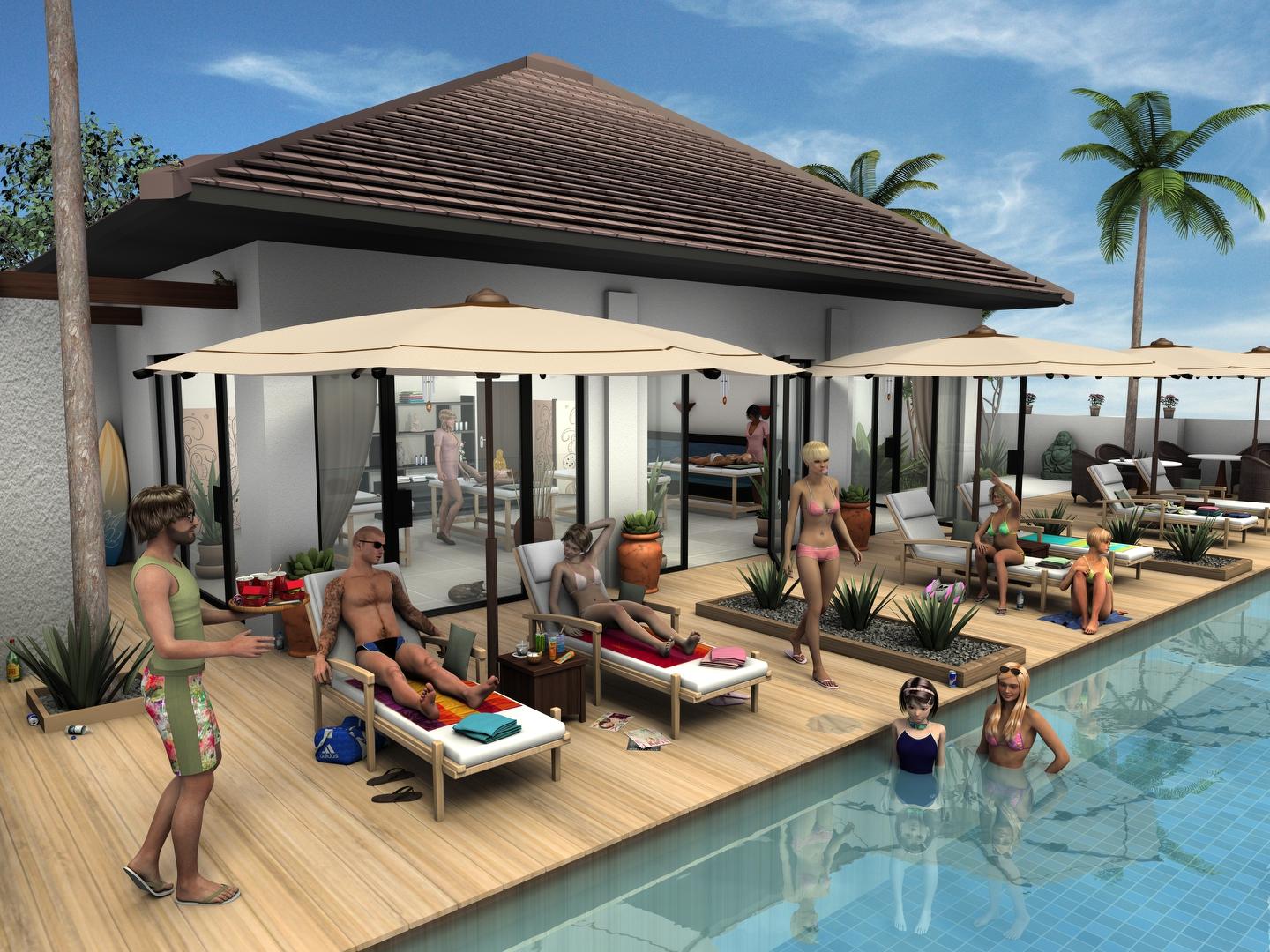 Zero pose after using "Adjust rigging to shape"
No, just trying to understand the situation. OK, so you have the imported scans and they are now rigged - you can't use Adjust Rigging to Shape, you have to get the bones aligned with the model (if they aren't) by hand, then memorise the rigging. If the issue is alignment, but the centre points are in roughly the right place, you can use the Align commands from the Joint Editor right-click menu to do a quick rotation into place.
It probably doesn't apply here since you are working with unique meshes, but once you have the base rigging set up and memorised you can then use Adjust rigging to Shape to move the bones to cope with a morph - but you need the starting point set up first.
How To Save Expressions and Poses in DAZ Studio?Expressions are poses, so they won't be saved to Shaping or (by default at least) Character presets. A Pose preset will save them.
How do I tell if a slider is a morph slider, or an expression slider? Like - raised eyebrows can be an expression of surprise, but also a morph.
"Sarah Jane Smith" TestsThese are Hair tests... do they look close to her?....
(The face morph is from blubeetle's Best Companion Morph with my tweaks: https://www.renderosity.com/mod/freestuff/the-best-companion/73300)
How To Save Expressions and Poses in DAZ Studio?Depends on what you click on ......when I save a pose I save all rotations only, but I don't normally save expressions with the pose ,I save them seperatly then I click on the head and unclick everything else .....don't know if this helps are you saving the character as a pose or a morph? If you have a character dressed ,posed and with the expression that you want it's easier to save as a scene preset , then you can just bring it up ready to use
Morphs from G3 to G8Could make for a good killer doll I have render going now mixing the baby morph and Lucille zombie :)
SuccubusYeah, how are those different than https://www.daz3d.com/succubus-add-ons ?
Hmmm... you know that's a good question which brought up another question. The Succubus add ons are for Genesis 2. Now, with backwards compaitbility you can put them on Genesis 3 and (presumably) Genesis 8, but would they morph the same on newer generation figures? I have that problem with certain clothing accessories (G2 to G3/8) where I will apply it... it looks great in a T (static) pose, but as soon as you move the figure, or apply a pose, it deforms into weird shapes. Would that kind of thing happen with the succubus addons on a Genesis 8 figure?
No need to retrofit. Genesis 3 already has them.
https://www.daz3d.com/dark-fantasy-add-ons-for-genesis-3-female-s
https://www.daz3d.com/dark-fantasy-add-ons-for-genesis-3-male-sGetting Duplicate Formula's found on a single morphWell, you need to bear in mind that for most users a list of morph names would not be useful and might seem overwhelming - for them there's enough information to report an issue, but it's simple enough not to daunt. It's not a question of not thinking of the userbase, but of which section of the userbase.
Transfer G3 daz original shaping settings to G8 shapingThis script will copy G3 Daz Original head and body morphs to the G8 head and body morphs.
- https://www.daz3d.com/genesis-8-female-body-morphs
- https://www.daz3d.com/genesis-8-female-head-morphs
- https://www.daz3d.com/genesis-3-female-body-morphs
- https://www.daz3d.com/genesis-3-female-head-morphs
There are some caveats for this script, all of which (I hope) are outlined in the user guide.
You need all 4 products listed above, and the character you are copying from must have the shaping dials visible when selecting the “currently used.” Even if the character requires those products, if the changes aren’t visible to the end user, they can’t be copied.
https://www.sharecg.com/v/88611/view/8/Script/Ekm-Presto-Morpho-G3F-G8F
Can I remove Fingers from "AUTO FIT"?When you use the Transfer Utility (I assume that is what yoyu are doing) it will almost certainly put some weights (that is values on vertices on the model) for the thumb bends, which you don't want. So you need to switch to the Node Weight Paint brush tool, then (in the Scene pane) select each thumb bone in turn and in the Tool Settings pane seelct the only map listed as active; right-click in the viewport and, I think in the Weight Editing sub-menu, select Clear Map. That shoulds top the thumb bends from afecting the mesh directly, instead it will bend with the hand (and fingers).
There may still be some effect from thumb bending as I'm pretty sure there are morphs in the hand - you may want to leave those, to avoid poke-through if you are going to bend the thumb to fit inside the suit, but if not you need to find them and create new, dummy morphs to block them. In the Parameters pane option menu (the lined button in the top corner) enable Show Hidden Properties, zero the figure pose, and bend the thumb. Now with the figure selected (not the thumb bones) click on the Currently Used group and you should see only the hidden adjustment moprhs - for each that you want to block click the gear icon on its slider, select Parameter Settings, and make a note of the Name (not the label, though they may well be the same in these). Now, select your clothing item and then Edit>Figure>Clear Generated Moprhs (this makes sure you are starting from a clean state). Right-click in the Parameters pane and put it in Edit mode. Finally, for each morph that you wish to block right-click and select Create Property, give it the name of one of the targets you want to block, and for neatness set it to Hidden.
SuccubusYeah, how are those different than https://www.daz3d.com/succubus-add-ons ?
Hmmm... you know that's a good question which brought up another question. The Succubus add ons are for Genesis 2. Now, with backwards compaitbility you can put them on Genesis 3 and (presumably) Genesis 8, but would they morph the same on newer generation figures? I have that problem with certain clothing accessories (G2 to G3/8) where I will apply it... it looks great in a T (static) pose, but as soon as you move the figure, or apply a pose, it deforms into weird shapes. Would that kind of thing happen with the succubus addons on a Genesis 8 figure?
Daz 3D is part of

Connect
DAZ Productions, Inc.
7533 S Center View Ct #4664
West Jordan, UT 84084Licensing Agreement | Terms of Service | Privacy Policy | EULA
© 2026 Daz Productions Inc. All Rights Reserved.