-
Morphs from G3 to G8
Had you saved the morph before you changed it?
Morphs from G3 to G8"AutoFollow" is under the parameters menu for each individual morph dial. So, if you have a whole body morph for a G3 character, or a head morph...etc., you click on the gear shaped "settings" icon within the dial slider. You should see a menu with "parameter settings" as on of your options. Click on that and you'll get a new pane with morph properties showing. There will be a check box for AutoFollow. If it is not checked, G8 will not shape itself to G3's morph. Once you've checked the AutoFollow, go back to G8 and set "Fit To" to "none." Then, redo the "Fit To" to G3. Your slider should now affect G8.
Thank you for that information. I found the Autofollow setting and switched it on and the morphs transfer now.
There is one slight oddity, when I apply the transferred head morph in G8F it also stretches the shoulders and chest upwards which the original G3F morph did not do, but the head morphs the same as G3F.
This was addressed... give me a minute to find the post...
2. There's been some discussion about head morphs and how you have to use the vertex editor in order to save them. Does that apply to head-only morphs? Like SickleYield's Faces of Asia, etc.?
Not sure I can clearly answer the rest of your questions, but this one, I can.
In a word, yes. Yes it does.
Basically, G3 and G8 need helper morphs to deal with the way a person should be shaped when they lower their arms vs when they raise them. The T pose requires a lot more help than the A pose, so you end up with slightly different placement of the shoulder areas, even if you line up the bones exactly. This different placement carries through to the morph, even if all you do is a head morph. To get rid of it, on a head morph, you need to exclude the body with facet or vertex selection.I've had a go at this but I'm getting confused again.
I found I was using an old version of the Helper file. With the new one the stretching of the chest is not as bad, the shouders go down instead of up and don't seem to distort.
I tried the method described by Ki-Jen on page 6 of this thread to limit the morph to the head. This worked at first, but when I went on to save it as a morph asset and tried to use that, the stretching and shoulder movement was back again. I did the adjust rigging to shape and erc freeze before saving the morph asset.
There is also a mention in Redz's tutorial that you can edit your morph dial to put it in a different category but I can't figure out how to do that.
For now I'll stick with loading the .obj files through Morph Loader Pro as I need them and using Ki-Jen's technique to limit them each time (I found if I tried to re-save the morph after doing this it wouldn't load as morph again).
Thank you to Redz, Ki-Jen, nicstt, Singular Blues, L'Adair and everyone else who has aadded their help in this thread.
Did you close studio or did you reload the figure.
If you use most method to edit a moprh, then delete and reload the figure, either the morph will be broken to the point of uselessness, or it will load as it was before the edit. This because Daz is loading the morph from its cache. If a morph is correctly saved, (Edit morph, finalize all changes, then save) it will load correctly either after completely clearing the scene by loading new, or restarting Studio. And, frankly, restarting takes less time.
Just deleting the figure and loading a new one will cause unexpected results.
Of course, if you did restart Studio, then this is not helpful.Yes, I did exit Daz Studio and restart it before trying to use the morph asset. I assumed that was the most reliable way if you've been messing with the morphs added to a figure, and I also wanted to check that it had been saved in a way that would reload it each time I started Studio.
Dare we Specul8the flexions are .dsf morphs, i can see them working.
because the distortion is only the 1 foot,
mebbe something happened when they applied symmetry to the morph?
i've tried the V8 morph on both the rigged and unrigged version. (it doesn't happen in DS.)i tried removing all the formulaes, it happens with the raw morph.
Morphs from G3 to G8"AutoFollow" is under the parameters menu for each individual morph dial. So, if you have a whole body morph for a G3 character, or a head morph...etc., you click on the gear shaped "settings" icon within the dial slider. You should see a menu with "parameter settings" as on of your options. Click on that and you'll get a new pane with morph properties showing. There will be a check box for AutoFollow. If it is not checked, G8 will not shape itself to G3's morph. Once you've checked the AutoFollow, go back to G8 and set "Fit To" to "none." Then, redo the "Fit To" to G3. Your slider should now affect G8.
Thank you for that information. I found the Autofollow setting and switched it on and the morphs transfer now.
There is one slight oddity, when I apply the transferred head morph in G8F it also stretches the shoulders and chest upwards which the original G3F morph did not do, but the head morphs the same as G3F.
This was addressed... give me a minute to find the post...
2. There's been some discussion about head morphs and how you have to use the vertex editor in order to save them. Does that apply to head-only morphs? Like SickleYield's Faces of Asia, etc.?
Not sure I can clearly answer the rest of your questions, but this one, I can.
In a word, yes. Yes it does.
Basically, G3 and G8 need helper morphs to deal with the way a person should be shaped when they lower their arms vs when they raise them. The T pose requires a lot more help than the A pose, so you end up with slightly different placement of the shoulder areas, even if you line up the bones exactly. This different placement carries through to the morph, even if all you do is a head morph. To get rid of it, on a head morph, you need to exclude the body with facet or vertex selection.I've had a go at this but I'm getting confused again.
I found I was using an old version of the Helper file. With the new one the stretching of the chest is not as bad, the shouders go down instead of up and don't seem to distort.
I tried the method described by Ki-Jen on page 6 of this thread to limit the morph to the head. This worked at first, but when I went on to save it as a morph asset and tried to use that, the stretching and shoulder movement was back again. I did the adjust rigging to shape and erc freeze before saving the morph asset.
There is also a mention in Redz's tutorial that you can edit your morph dial to put it in a different category but I can't figure out how to do that.
For now I'll stick with loading the .obj files through Morph Loader Pro as I need them and using Ki-Jen's technique to limit them each time (I found if I tried to re-save the morph after doing this it wouldn't load as morph again).
Thank you to Redz, Ki-Jen, nicstt, Singular Blues, L'Adair and everyone else who has aadded their help in this thread.
Did you close studio or did you reload the figure.
If you use most method to edit a moprh, then delete and reload the figure, either the morph will be broken to the point of uselessness, or it will load as it was before the edit. This because Daz is loading the morph from its cache. If a morph is correctly saved, (Edit morph, finalize all changes, then save) it will load correctly either after completely clearing the scene by loading new, or restarting Studio. And, frankly, restarting takes less time.
Just deleting the figure and loading a new one will cause unexpected results.
Of course, if you did restart Studio, then this is not helpful.Morphs from G3 to G8"AutoFollow" is under the parameters menu for each individual morph dial. So, if you have a whole body morph for a G3 character, or a head morph...etc., you click on the gear shaped "settings" icon within the dial slider. You should see a menu with "parameter settings" as on of your options. Click on that and you'll get a new pane with morph properties showing. There will be a check box for AutoFollow. If it is not checked, G8 will not shape itself to G3's morph. Once you've checked the AutoFollow, go back to G8 and set "Fit To" to "none." Then, redo the "Fit To" to G3. Your slider should now affect G8.
Thank you for that information. I found the Autofollow setting and switched it on and the morphs transfer now.
There is one slight oddity, when I apply the transferred head morph in G8F it also stretches the shoulders and chest upwards which the original G3F morph did not do, but the head morphs the same as G3F.
This was addressed... give me a minute to find the post...
2. There's been some discussion about head morphs and how you have to use the vertex editor in order to save them. Does that apply to head-only morphs? Like SickleYield's Faces of Asia, etc.?
Not sure I can clearly answer the rest of your questions, but this one, I can.
In a word, yes. Yes it does.
Basically, G3 and G8 need helper morphs to deal with the way a person should be shaped when they lower their arms vs when they raise them. The T pose requires a lot more help than the A pose, so you end up with slightly different placement of the shoulder areas, even if you line up the bones exactly. This different placement carries through to the morph, even if all you do is a head morph. To get rid of it, on a head morph, you need to exclude the body with facet or vertex selection.I've had a go at this but I'm getting confused again.
I found I was using an old version of the Helper file. With the new one the stretching of the chest is not as bad, the shouders go down instead of up and don't seem to distort.
I tried the method described by Ki-Jen on page 6 of this thread to limit the morph to the head. This worked at first, but when I went on to save it as a morph asset and tried to use that, the stretching and shoulder movement was back again. I did the adjust rigging to shape and erc freeze before saving the morph asset.
There is also a mention in Redz's tutorial that you can edit your morph dial to put it in a different category but I can't figure out how to do that.
For now I'll stick with loading the .obj files through Morph Loader Pro as I need them and using Ki-Jen's technique to limit them each time (I found if I tried to re-save the morph after doing this it wouldn't load as morph again).
Thank you to Redz, Ki-Jen, nicstt, Singular Blues, L'Adair and everyone else who has aadded their help in this thread.
Adding a tattoo design, NOT L.I.E.I made a video tutorial a few years ago addressing how to use the warp feature (in Corel Paintshop, but the basics should transfer to Photoshop, which also has a warp feature) to put a tattoo across seams. The vid is not by any stretch of the imagination professional, but you may find it helpful. https://www.youtube.com/watch?v=pdK3ygz76Pc
Dare we Specul8yeah autfit/follow not working. eyelashes, and victoria8 eyebrows. and clothes, especially in the shoulder area.
-it looks like the V8FBM isn't included in the basic wear morphs.
guess could transfer the old fashioned way.
it doesn't let ya scale a clothes item after it's conformed, or is there a secret way?fail - the Victoria 8 morph.
it looks like a few of the toe nails aren't welded in rara's weld tolerance?
mebbe a corrective morph to put those badgirl verts where they belong?the Victoria 8 body slider has the scaling baked in, when did they start doing that,
it used to be could use the body shape slider and/or head shape slider, and only the combo body/head slider included the scaling.on the bright side, the fiber eyebrows look pretty decent with antialias set to best.
V8's pose presets seem to work.
the add on body,head,expression morphs seem to work.
the eyelashes and eyebrows follow the face rigging and pose controls.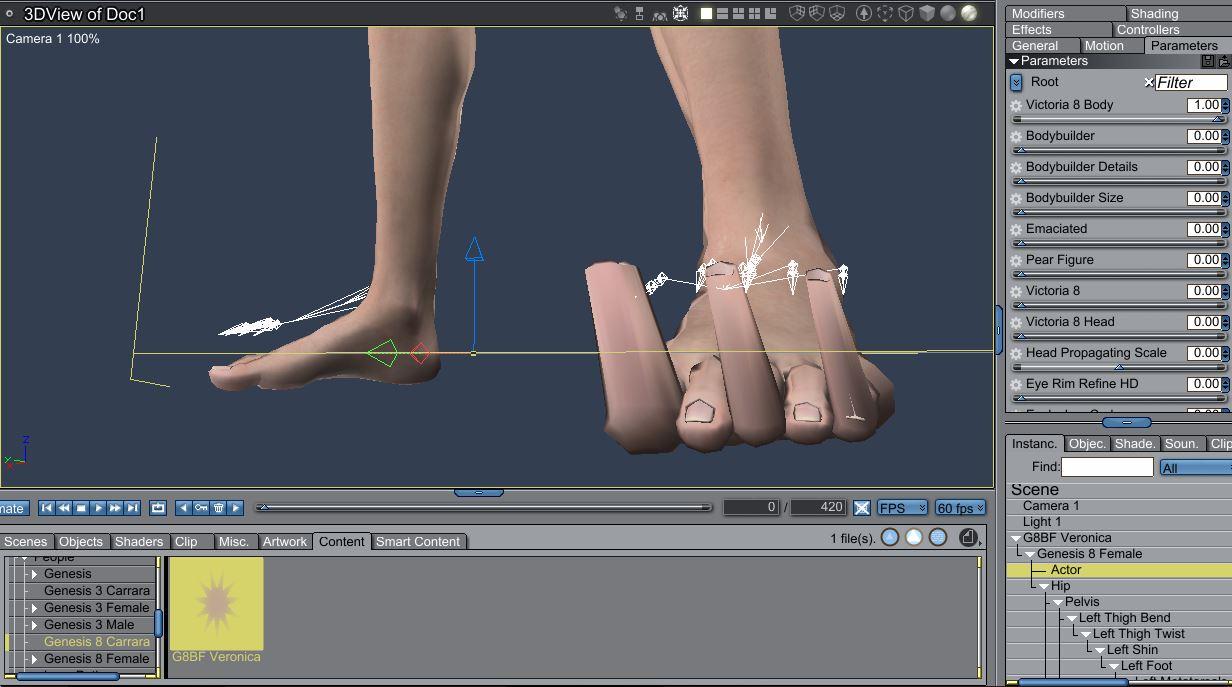 Zero pose after using "Adjust rigging to shape"
When you run Adjust Rigging to sahpe there should be an options to adjust the alignment of bones as well as their centre points. That's assuming that you mean, in step 2, that you are loading via a moprh loader to create a new morph on the base figure - if not then Ajust Rigging to Shape will do nothing for the reasons I explained above.
What I would like in the G8 SupersuitI want a suite of 4 to 5 supersuits all created to work together in layers with different material zones.
I would like material zones to be as as diverse as the original DAZ Supersuit for Genesis but with different material zone placement on each to emulate several different costume layers.
Three of the suits would be made with different UV templates to offer alternatives for hard to make costumes.
Each individual suit can be used multiple times if needed and an expansion morph can make the suit bigger or smaller so that it can be the next "layer" up or down.
Each set should also have a slew of morphs as the original had to smooth areas such as the buttocks or cleavage and also have enough morphs to give three or four wrinkle options in the most likely areas to wrinkle.
Several additions will be added including belt and super boots and mini skirt.
Capes need a special set of options, not only length, but also geo-grafted collar styles (Dr Strange-type, Dr Fate-Type, etc) that match along with a set of hoods. Capes also need a set of material zones for different materials such as piping, trim, inner lining, etc
Geo-grafted cowls which offer a different set of styles (Batman open face, full face mask, etc)
P.S. Joe Quick should be hired and paid well for his efforst as product director. :)
What Upcoming Daz Original Genesis 8 Character Are You Waiting For?Just make them unique. And most importantly, if compatibility is a real goal now, then do NOT create unique UV maps for every freaking character. Unless it is absolutely necessary. Unique UVs need to die in dumpster fire.I know what you mean... It sucks not being able to use Bethany 7 maps on Genesis 8.
I agree about making them unique. I want that more size and shape variation... We need more adult (non-toon) characters that are under 5' 8" and more than just Bethany to represent the non super model / bodybuilder people.You can transfer them.
Morphs from G3 to G8Problem with V8 Eyelashes Not Following the Morph Transfer
I made a morph transfer of a G1 face. Her eyes are shaped differently than V8, and the eyelashes are not following. How can I fix that?
Vicky8
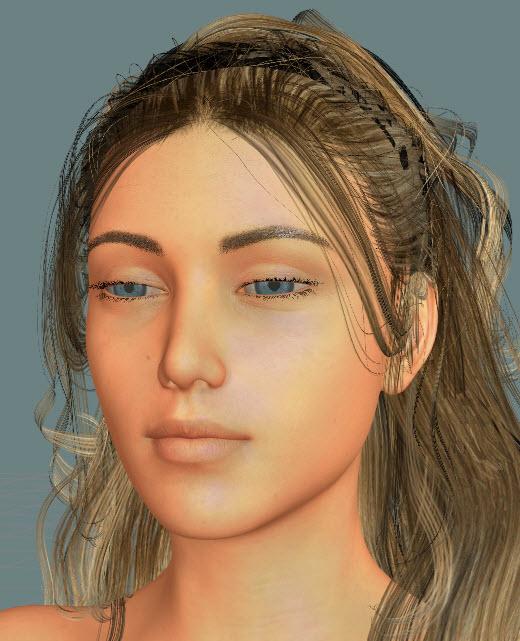
Vicky8 with G1 Lorella the Elf Maiden
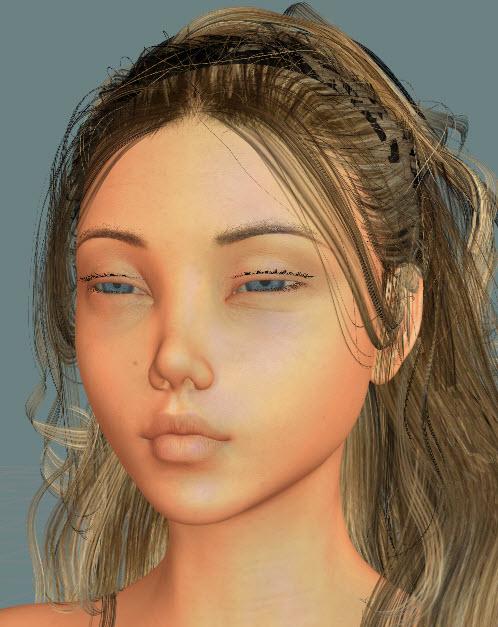
I'm assuming you adjusted the rigging and performed the ERC freeze as per the tutorial but did you save the morph? I've had this happen when I saved the scene but not the morph.
If not, zero G8F, save your morph as a morph asset, then reopen Daz Studio, preferably with a new scene. Load G8F and apply the morph and see if it is now fixed.
Show Us Your Iray Renders. Part VI.
Inspired by another thread, Succubus.
Succubus wings/etc from the G2F thing, figure is G8F with transferred Exile (G3M) morph, NGS Anagenessis tossed at various bits.
Very good, one of the best "creature" renders I've seen yet!
Diversity & Versatility?Diversity would be having ethnic and muscle morphs available the first week of the figure's release instead of having to wait months to get them like we did with Gen 3.
I'll never stop insisting that DAZ makes the best figures hands-down, but I don't particularly like their cookie cutter character of the month releases and the splitting up of ethncity and creature creator morph sets.
Actually for the next Genesis, Genesis 9 I guess, I've like to see a Genesis 9 Morph Pro Debut bundle with the head & body morph bundle and I would like if DAZ made or commished you to make, your series of Faces of the World morphs along with a set of 12 appropriate variant texture sets and body shapes even though I have FaceGen and could do it myself, there is something to be said about a bundle that is nicely and neatly organized from a 3rd party's perspective. That alone sounds like a 2 year project for a one person crew. And maybe add the genitalia to the body morph products as it always seemed sort of out of place to include them with character pro bundles and not anatomy related products and bundles. Also with Genesis 9 debut I would like a Hair Pro bundle of 12 typical hair styles for the Faces of the World. So 12 for G9F and later G9M. I also say I'd like the G9M to debut the same day as the G9F but other have indicated that ain't going to happen because of sales reasons although I think with the emergence of game making and animation hobbyists that old fashion model and art still dynamic will change that sales data.
It would be cool with Genesis 9 debut the customers could be off and running and later Genesis 9 bi-weekly or whatever releases would bring refinement and clothing fashion and story genre products.
I guess we will never get new anatomy sets like with V4 & M4 again either with the lower poly counts so I should stop putting off buying that and wait for the next sale.
Diversity & Versatility?Diversity would be having ethnic and muscle morphs available the first week of the figure's release instead of having to wait months to get them like we did with Gen 3.
I'll never stop insisting that DAZ makes the best figures hands-down, but I don't particularly like their cookie cutter character of the month releases and the splitting up of ethncity and creature creator morph sets.
I would be very happy if in the first three months after the release of Genesis 8 male and Michael 8, we could get Darius & Monique 8, Lee & Mei Lin 8, and Kimo & Kalea 8. Throw in the creature creator morphs and growing up morphs, and I will be extremely happy(and broke).
Diversity & Versatility?Diversity would be having ethnic and muscle morphs available the first week of the figure's release instead of having to wait months to get them like we did with Gen 3.
I'll never stop insisting that DAZ makes the best figures hands-down, but I don't particularly like their cookie cutter character of the month releases and the splitting up of ethncity and creature creator morph sets.
Show Us Your Iray Renders. Part VIInspired by another thread, Succubus.
Succubus wings/etc from the G2F thing, figure is G8F with transferred Exile (G3M) morph, NGS Anagenessis tossed at various bits.
LOL, I've never seen an angel so modestly place it's wings.
I really love Genesis 8!Here's the nail removers for gen8f
consider them the beta* version
* if I were doing them again I'd make the filled hole one bigger all round as it is they represent the nail bed, but that means they have a bit of a ridge, and since you can't export it out as a whole, making a morph for it would have required way more effort. They're definitely not perfect, but still pretty functional. I'll probably stick them on sharecg at some point, but, honestly, I'd have to render an image for them and I just... eh
Keri for gen8?She does look a little different without V8, but you can get a very close proximate of the character without Victoria.
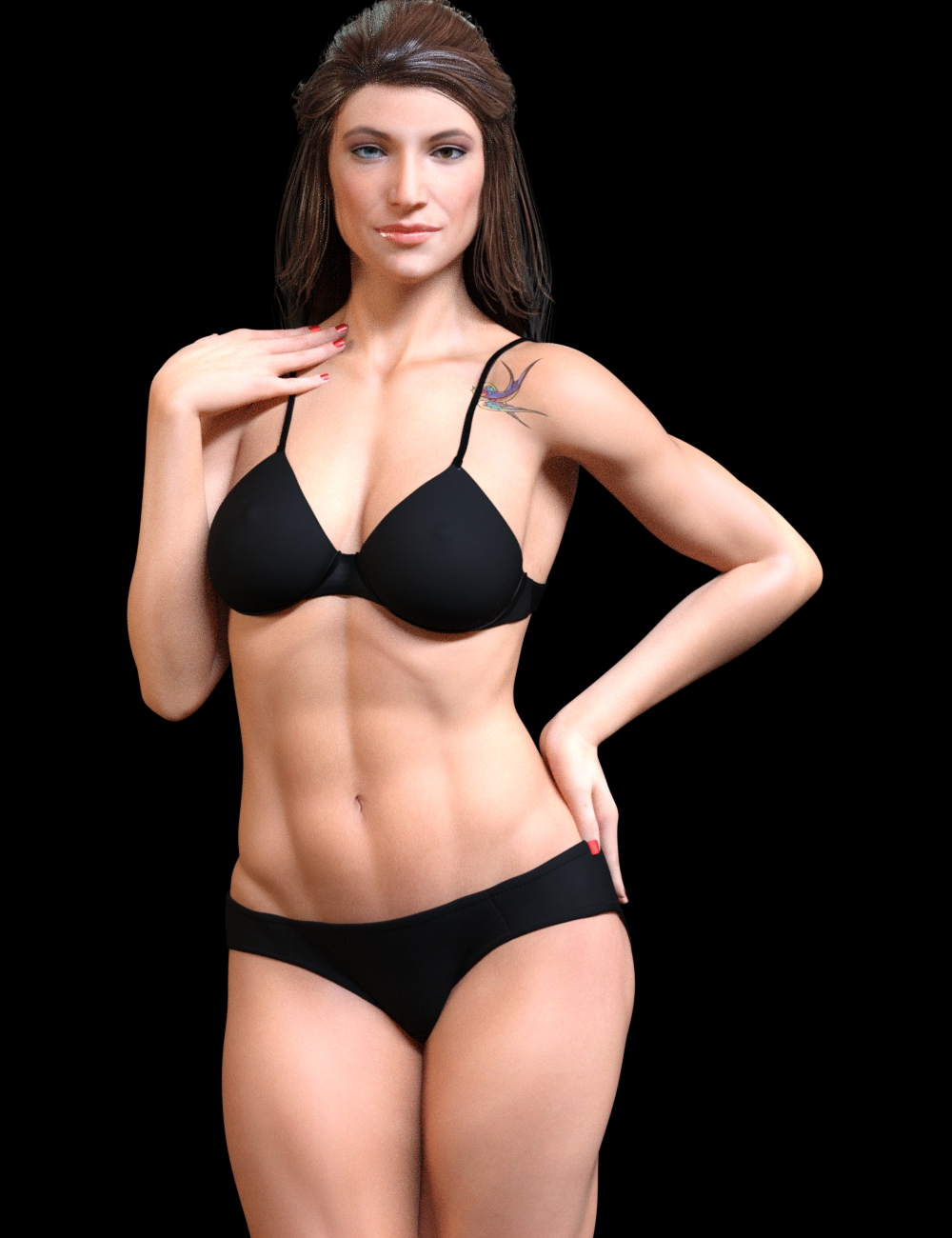
This is with the Genesis 8 Female body morphs and the custom head morph only.
Morphs from G3 to G8Problem with V8 Eyelashes Not Following the Morph Transfer
I made a morph transfer of a G1 face. Her eyes are shaped differently than V8, and the eyelashes are not following. How can I fix that?
Vicky8
Vicky8 with G1 Lorella the Elf Maiden
Morphs from G3 to G8Thanks, lol The figure source is better it's actually baby luna but she doesn't transfer over well and clothes don't fit well but it was interesting doing the trial and error
Daz 3D is part of

Connect
DAZ Productions, Inc.
7533 S Center View Ct #4664
West Jordan, UT 84084Licensing Agreement | Terms of Service | Privacy Policy | EULA
© 2026 Daz Productions Inc. All Rights Reserved.