-
Released: Easy Feet - Control Dials for Genesis 3 Female(s) [commercial]
ohhhh yeah. This did not happen when I created the product and also not in the Daz testing.
Seems that something has changed there, maybe there was a Genesis 3 Female Update, that broke the morphs. Actually all 3 morphs are affected.
However, I will recreate the morphs and fix this. THe update process will take a little while since it is going through the whole DAZ QAV process.
Please be patient and sorry for the inconvenience. Once the update is live I will let you know here, but you will be informed in DIM as well.
Thanks for the Heads up about this issue.if you need it urgent I can send you the 3 affected morph updated by mail too. Please tell me by PM then.
DAZ - PLEASE finish off the Ophelia 7 release" Genitalia should be included free with GF8 / G8M. "
Many educational institutions and other illustrators and animators
will never have a need to render nude genitalia.
I think it is reasonable that such "features" are a paid add-on.
Fair enough, but they shouldn't be locked behind a Pro Bundle purchase. The gens should be like an extra $10-$20. NOT locked behind a $135.00 (base price) Pro Bundle purchase. I've been doing 3D art for over a year now and STILL don't have the gens because I can't afford to purchase the pro bundles.
Honestly I think the gens should be part of the base mesh. I use G3 in other software as well and having a prop attached is always a mess. They could easily hide the gens with a morph by default, like they did it with the nipples and so there should be no issue with clothes and so on. This would avoid seams in 3rd party software as well.
On the other hands, they could make separate meshes for the eyes, as they are not really part of the skin. They already did it with the eyelashes in G8.
By the way: I'd favour displacement maps with alphas over HD morphs to avoid huge polygon numbers.
And I'm waiting for Ophelia/Sunny HD as well...
How to get rid of character morph saved in base genesis 8I believe I saved it as a scene file.
I have looked in the ....female/morphs directory and there is nothing there.
I created the morph by using REDZ G3 to G8 conversion tutorial found here in COMMONS. After I imported the .obj file containing the morphs using the Morph Loader Pro, I then saved the result as a scene, without changing the name (stupidly)
Carrara Non Photo Realistic Works
Thunder Wyvern (morph of The Great Wyvern) & Jabberwock II - Carrara Toon! part III render
Out with the old, In with the new V8Just sharing my perspective....
With Genesis 8 out of the bag... an update that caught me totally off guard.. Here I thought it had already gotten as good as it was going to get.. silly me. So now I don't want to spend any money on Genesis 3.. period. It's obsolete this week and while its true that you can put the old wine skins on the new wine, so far in my testing, the results haven't been very nice. The skin has been updated which means even if I can transfer the skins, I loose the added value of sub-surface updates that will go into the new characters... so if you want the best of the best, you have to be willing to wait for it and invest in that.
If you really think Gen3 is obsolete, you are way off the mark. G8 has yet to be established and only time will tell how long that will take.
Thanks for sharing your good opinion. When I compare the two characters side by side... it's no compitition to me. According to Arthur C. Clarke any sufficiently advanced technology is indistinguishable from magic.... so far (and DAZ should take this as a compliment) it appears the new characters are magic and the old ones look flat and dull. The revolution is here, hope you enjoy it. Happy rendering!
LOL, yes Clarke is right, however you do have to accept the word "sufficiently" in it's correct context. G8 is not much more advanced than G3. An improvement in some areas, I will grant. Worse in others such as base resolution. Hardly bedazzeling technology that looks like magic. :)
Less than 400 polys. And it's how the content artists (PAs) can manipulate the polys, with or without access to advanced tools that we can't use, that determines what a given character looks like, not the number of polygons they have available to work with.
"it's how the content artists (PAs) can manipulate the polys... not the number of polygons they have available to work with."
So daywalker, you seem to be suggesting that some people can make wonderful, realistic characters with a 20 poly figure. Have you got any examples? Now that would be magic!
No examples, but that wasn't the point I was trying to make. You're getting caught up in the perception that there aren't enough polygons to work with in the base mesh when you're actually impacting a lot more than the four you see when moving vertices around on a low poly mesh. PAs have reached the point that they understand that each moved vertex is affecting at minimum 16 polygons at the first level of subdivison, depending on the settings of your move tool, for example.
I'm not getting caught up in any such perception. What I have observed is that when I make a morph in a subdivided figure in Zbrush but then convert that back to base rez necessary for export to DS at the moment. The morph does not look the same on the DS subdivided (high rez) figure in DS. Perhaps there is an incompatability with the way Zbrush and DS do sub-division, I do not know. I just see the difference. I do know that it is possible to make great morphs on a subdivided figure in Zbrush that look the same when loaded on to the figure in DS (provided you have access to the DAZ HD technology). What I would like to see is that facility being made available to all DS users (under licence if necessary), or for DAZ3d to incorporate a set of morph brushes directly into DS to allow on the fly morphing within DS (at high rez). The latter option would be, by far, the most beneficial to the majority of DS users.
HD Add-on question1) A question:
Why can a HD morph not be created fully sharp and clearly visible when dialing them in at 100%?
IF some prefer a more "stylized version" then they could dial in the HD morph at 50 or 30%.
- - -
2) removed. will test again.
"Brace yourself, my dear wallet! There's always another Sale - and Glitches!"Shooting themselves in the foot with that ridiculous category restriction.
Agreed, I'm not going to waste my time looking at 13 different categories...
But would you be shopping in all 13 categories anyway?
Was a bit of a shock to the system to realize that, that you have to have 3 items from the one category to get the discount and not mix them....uh, not really impressed wiht that.
It makes decisions easier for me. No three items from a category? Skip to the next one. :)
Exactly. Followed by "I can only afford one category - out goes everything else until the next sale"
I'm with Nath and Ati. I found it much easier to skim through the 5-6 categories that interested me, pick out 3-5 things each, then trim the fat from my cart category by category. Much better than "100 items of content in the cart, 100 items of content! Take one out, watch the cart change, 99 items of content in the cart!" (To the tune of "One hundred bottles of beer on the wall").
Also, having passed on the V8 sale, I'm not *quite* as short on Daz funds as I usually am this time of month.
Agreed, this is a sweet sale for me. I have over 29 wishlisted items in the various categories. This is like mega A-list item fastgrab since most everything comes out to 70% off or more if you have three items.
I am going to be broke after today with this sale and the 50% off sale at rendo also on the VWD dynamic plugin
Anyone know if FaceGen Artist Pro will be supporting Genesis 8 in the near future? I want to get it on sale, but need to use it with G8 also.
I don't know what their plans are, but I have had good luck with using the transfer utility tool and Sickleyield's "favorite a morph dial and then use the transfer favorites option" trick to bring facegen-created dials over to G8. They *look* very different on G8 because the base face shape is different, but they're there.
Try using a G3F clone on G8F first, then use the Facegen morph. It should be much closer to the G3 version. Or try the Redz transfer method. It has the G3F clone as a base for transferring morphs.
"Brace yourself, my dear wallet! There's always another Sale - and Glitches!"Shooting themselves in the foot with that ridiculous category restriction.
Agreed, I'm not going to waste my time looking at 13 different categories...
But would you be shopping in all 13 categories anyway?
Was a bit of a shock to the system to realize that, that you have to have 3 items from the one category to get the discount and not mix them....uh, not really impressed wiht that.
It makes decisions easier for me. No three items from a category? Skip to the next one. :)
Exactly. Followed by "I can only afford one category - out goes everything else until the next sale"
I'm with Nath and Ati. I found it much easier to skim through the 5-6 categories that interested me, pick out 3-5 things each, then trim the fat from my cart category by category. Much better than "100 items of content in the cart, 100 items of content! Take one out, watch the cart change, 99 items of content in the cart!" (To the tune of "One hundred bottles of beer on the wall").
Also, having passed on the V8 sale, I'm not *quite* as short on Daz funds as I usually am this time of month.
Agreed, this is a sweet sale for me. I have over 29 wishlisted items in the various categories. This is like mega A-list item fastgrab since most everything comes out to 70% off or more if you have three items.
I am going to be broke after today with this sale and the 50% off sale at rendo also on the VWD dynamic plugin
Anyone know if FaceGen Artist Pro will be supporting Genesis 8 in the near future? I want to get it on sale, but need to use it with G8 also.
I spoke to the guys at Facegen...They don't have any projection as to when G8 will be supported. But, they're looking at it. Those guys have been great. So, I'm sure it will show up at sometime in the coming months. Until then, I've been having good luck porting my FG morphs for G3 to G8 via Redz transfer method in the "G3 to G8 Morphs" thread.
Released-Lennox for Genesis 3 Male (Commercial)Lennox is that tall, skinny guy for just about any render.
His head and body morphs are custom and do not require any morph packs to use.
I've included a reddish brow, a darker brow and a light blond brow along with a no brow option along with 8 different eye colors (two Heterochromia), two sclera, and two types of lashes with a dark and blonde coloring to go with the brows.
The tattoo options are varied between all presets for the arms and torso, and various mixes of both based off of different Irish and even Russian prison tattoos made to look as if they had been inked at different times from different tattoo artists.
Anatomical Elements are included, Materials are for the Iray render engine.
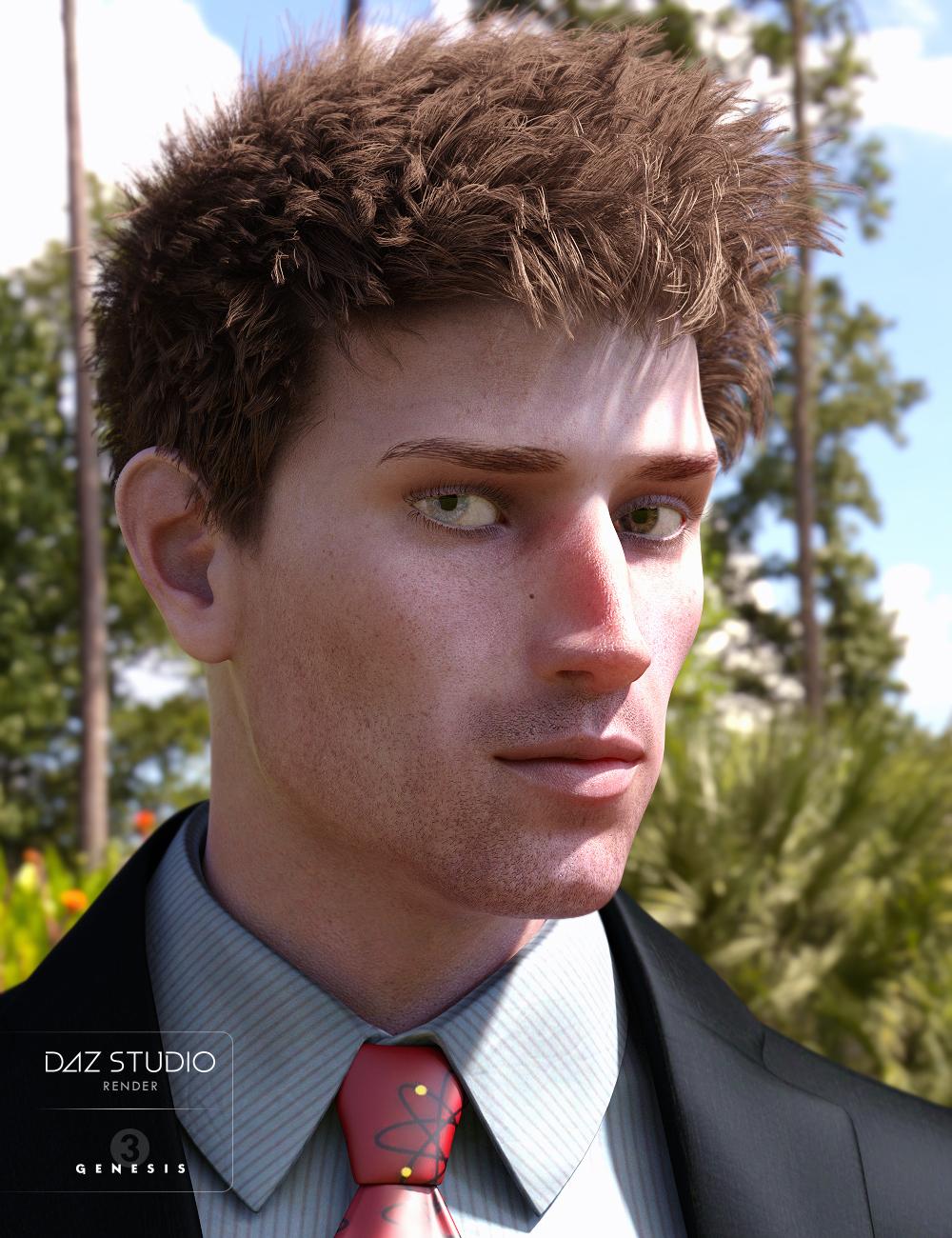
What HDR light you used in outdoor Promo?
Released: Easy Feet - Control Dials for Genesis 3 Female(s) [commercial]Had a slight issue with this. It seems that when I dial the Dorsum Shape control, it messes up the character's teeth. Any ideas?
Thanks for telling me. I will check this, and if there is a problem with that dorsum an update will be created of course.
Does this happen when no other morphs (from other packs etc.) are dialed in , so only the base character with the dorsum morph?
Which character did it happen, Genesis 3 Female base, or any other only or all?
Please let me know this (you can send me also a PM here)Transfer G3 daz original shaping settings to G8 shapingThis script works great! Very easy to use. Some tweaks may be needed afterwards, but this is quick, simple, and gets you pretty close to the original.
Here are a few test renders I did. G3F on the left, G8F on the right. (Click and zoom in for bigger pics and more details.)
thanks for the renders! I feel like height is the setting that transfers the worst, as far as accuracy goes. easy to fix, at least
Height is calculated differently between g3 amd g8 for some reason. There are some G3 hairs with savedsaved FBMHeight morphs that mess with the hair when it's fitted to G8 and height is adjusted. Presumably some clothing too.
oh hey, good to know. thanks for the tip. i wonder if a PA will make a product or a daz update will come out to convert fbmheight from g3 to g8. if thats even possible...
and marble, as i said in the FAQ section of the user guide, this script is quick and dirty. the morph transfer tutorials are multiple steps and more robust. if you want as close to 100% fidelity as you can get, or want to transfer custom morphs, then of course, use those methods
G8/3 Body/Head Shapes are just the name daz gave those products. they are morph dials like every other dial in the shaping pane
ZBrush w/ DAZ Studio?I've spent a LOT of time lately using Zbrush, trying to figure out how to use it and trying to decide if it's for me.
Well, FWIW, it's incredibly powerful and can do some awesome stuff, but if you don't need the stuff it's good at then it's real tough to justify the $800 for a license. I really WANT to like it, but honestly the whole user experience and UI is, well, horrendous. It's like they intentionally made their workflow and UI exactly opposite from every other 3D/2D app out there. It's really bad, IMO.
Really.
In fact you have to see it to believe it. Incredibly frustrating, IMO.
That being said, the ZModeler (basically the polygonal/box modeller application, which BTW is a brush if you can believe that...) is extremely powerful, and combined with the scuplting and ZRemesher it's incredibly powerful. But if you can't figure out how to do even the simplest stuff, then, well, what good is it? I mean, I actually had to spend about 5 hours, and watch 5 videos, to figure out just how the Transpose gizmo (basically the Move, Scale, Rotate gizmo) works, and even now I'm still shaky on how it works. Yeah, it's super powerful, but with that comes super confusing. And I never found a really comprehensive video from someone who really understood it. And that's just a gizmo. Geesh.
In the time I've used it I've generated clothing and morphs for D|S and yeah, it's nice when you figure it out. But thats after probably 30-40 videos, maybe more.
And honestly, I'd MUCH prefer to just generate a primitive clothing OBJ in Blender, bring it into D|S and use VWD to make some awesomely realistically draped clothing, and then just transfer bones and move on (if I need rigged clothing). Heck, 10 minutes in VWD vs. 3 hours or more banging your head with ZBrush?
Anway, I guess a lot of people use it to generate clothing meshes by extracting parts of the DAZ character mesh, and then smoothing and fine tuning with the ZBrush sculpting. But that's not really my goal, so I think I'll move on and stick with Blender.
How to get rid of character morph saved in base genesis 8How did you save the morph? Morph Assets?
Laurie
How to get rid of character morph saved in base genesis 8I inadvertantly saved a scene containing only the Base Genesis 8 female, to which I had added one slider morph for a character. It was saved over the default Genesis 8 female. I tried reinstalling Genesis 8 female essentials, however the morph is still there, which indicates to me that the program is picking up the morph slider from somewhere (possible in the "data" folder)? I looked in there for the morph, but I cannot locate it, so I am stuck trying to find it and/or removing it.
The character was created by importing an .obj file which I had converted from a Gen 3 character.
Any thoughts on how to delete the morph so I end up with the default Genesis 3 female?
Thanks
Dare we Specul8has anyone ever come across a morph that works in DS but not Carrara?
it's the same exact morph, the same exact geometry. it doesn't make sense!!!
... the subdivision level? there's a bunch hd morphs in V8 that wouldn't translate to rara. could it be a corrective morph that's HD?
"were fighting an army of robots, i have a bow and arrow, ... no sense."
yes lots of AM's DAZ studio versions of his animals.
problems beyond the fur?
Facegen now on sale...get it!@nicstt So the method you are descriving is as follows:
Create face gen character as usual using G3
Save the character as a material preset
Load G8 and select the wearables preset that you saved so that they go on G8
Does that also bring in the face shape/morphing that facegen creates?
I'm sorry if the answer is obvious, I'm not great with tech until I have played with it a lot and I'm pretty new.
I'm a bit late, yes the material works as is, and as another poster said, wont transfer the face shape.
Just be sure to have the eyelash mats (saved with the eye moisture, which is on both objects) saved as well; you could just use the same shader and right click and copy the materials across.
Save as Clone assets , Conditional Graft Modifiers guide from daz supportI got really usable answer from support about two things. I seldom say thanks DAZ, but Thanks Emmalee Hurst, and Jared Nailson. and they gave me permission to share in forum what I got by PDF, to and clear detail step and step tutorial,, then I hope to share for user who have same question about Clone assets and Coniditonal graft modifier usage. I can not guide them by my words, then just attach reply what I get.
1. Usage of Save as Clone assets, and how it work?
You need to create a morph and set it's content type as Modifier/Clone. That morph is what populates the list in Autofit.
The clone asset that you save is additional information that is used in addition to the morph. It tells it if a pose needs to be applied to the clothing to match the pose of the figure it is fitting to and tells it to remove certain morphs that shouldn't remain in the clothing.
There is a slight change in the newer versions of Studio. Now it pops a dialog and lets you choose which figure is the source and which one is the target. If you select them in the right order like they explain in the PDF it will pre-fill correctly, but it isn't necessary. Also, the new interface allows you to choose which morphs to include in the asset. Any morphs included in the asset will be removed from the clothing during the autofit process. Please see attached PDF.
Emmalee(I attach PDF, which I get from support,, hope it work)
2. How to use Conditional Graft Modifier (you can find this action,, from topmenu>edit>figure>geometry>add conditional graft modifier too)
Traditional GeoGrafts allow for the hiding of geometry on the figure. Our content team found they were using "Geografts" with dummy geometry as a means of hiding geometry on the figure. Because of this our developers came up with Conditional Graft Modifiers. The Conditional Graft Modifier allows you to hide (actually it temporarily deletes) geometry from a figure with the modifier applied.
Here is how you use it.
1. Load a figure into the scene
2. Select the figure
3. Right click on the Scene Pane tab and choose Edit-->Conditional Graft Modifer
4. Use the Geometry Editor tool to select the facets you want to add to the Conditional Graft Modifer
5. Right click in the viewport (with our selection) and choose Set Auto-Hide Faces for Attachment
6. Select the Conditional Graft in the list
7. Click Accept
8. In the parameters pane look for the Conditional Graft Property and use the button to toggle the geometry.You can save a ConditionalGraftModifer as a Morph Asset.
Jared
==================
If you want to document what I sent to you and upload and share it that would be great. We would have no problem with that. In fact I would be happy if you did that. The more people that know the better. Thanks, Jared
==================
Transfer G3 daz original shaping settings to G8 shapingI know I should know this but is there a difference between morphs and shapes? I'm just wondering if this is another way to transfer G3 morphs to G8 because there is a large thread in the commons about doing that - with tutorials/scripts, etc. Is this a different/quicker/easier method?
Morphs from G3 to G8Had you saved the morph before you changed it?
Looking back there could have been one problem. I kept going into and out of Studio but since I was re-doing the same morph it kept telling me there was already a morph with that name, so I deleted and re-loaded it. This time I did a re-run, first making sure there wasn't a morph already in Studio when I started. Here is the sequence.
First load and zero G8F, load the head morph. Try it out. the shoulder movement is there.
Add morph to favourites, in geometry editor select all vertices except the head and select morph editing->clear selected deltas from favourites. Exit from geometry editor. Try the morph, only the head morphs, the shoulder movement is gone.
With the morph set to 100% do the adjust rigging to shape and erc freeze. Try turning the morph down to 0 and up to 100%, the shoulders still don't move, it's still just the head that morphs.
Zero the figure, save as a morph asset, in the tick boxes only select the head.
Exit from Daz Studio, restart Daz Studio and load G8F.
Set the morph to 100%, the shoulder movement is back again.
In the tick boxes, you're selecting the entire head group? Actor > Head?
Are you changing the morph's Property group to Actor > Head? Using morph loader to add it, it defaults to Morphs > Morph Loader, unless you specify otherwise.
Also, if you checked Actor > then every morph in the Head group was saved out again and you now have two copies of each. Which Daz handles okay, but weird stuff can happen. I made that mistake on one trial run of my method and end up with a morphthat had no deltas but sill had ERC links and was basically stripping the bones ot of the body.
I though I'd fix it by getting rid of the doubled file, and then rerunning things. And it seemed to work. Morph plus ERC working. Saved it. Reloaded, retested, No morph, moving bones. In the end I had to remove all the files and rebuild the morph from first principles.
Sounds like a similar issue. Maybe not the same, but you probably have another file with same morph id in there someplace. Anyway, the property group thin is important, and I don't know if we're just talking past each other here. When you save a morph you should drill down in the check boxes until you get to that morph, unless you know for a fact that every morph in the group you check is new, or is in the same folder as you are going to save to.
The folder you saved to would default to Morphs\[YourVendorName]\Product, in curent Studio. In 4.8 you could get away with not entering a product name. Obviously, if you changed the vendor and product names (For ex, I change the Vendor name to FromG3F for all my transfers, Makes it easy to know which folder they are in) it would cange the above address accordingly. You may need to delete that folder, entirely, if you've be just check boxing the whole head group.Ahh, some light begins to dawn a bit. I thought those check boxes were supposed to say which body parts the morph would apply to, but looking at it again I now think they for me to say which morphs to save. But if that's right then I don't think I actually saved the morph at all, so why was it still there when I re-started Studio? And I did wonder why I couldn't find the product name I'd entered when I tried searching for the morph after the restart.
I dunno, I'll have to go away and think about this for a while. If I have been re-saving the wrong things I could have messed things up completly. Maybe I should de-install G8F and re-install her, or would that actually fix things?
I don't know. Depends on how you did it. You have to get rid of the folder where you saved all those morphs. Uninstall might not do that.
Just getting rid of the folder whouls do it. As for why the morph is still there; at least one time, you actually saved it, and the file is still in the Morphs folder somewhere. It's the only way it can keep showing up.
If you go into the morph's poperties and look at it's internal name, you have something you can use to searche you Morphs folder and see where it is.
Click on the gear icon on the right side of the slider. (Click, not right click) You'll get a men. Select Paramenter Settings.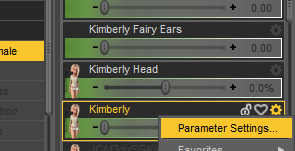
In the window that pops up there will be "name" and "label." Label is what Studio displays. Name is the internal ID of the morph, and usually the file name it is saved under. Copy the name, and seach you Morphs folder.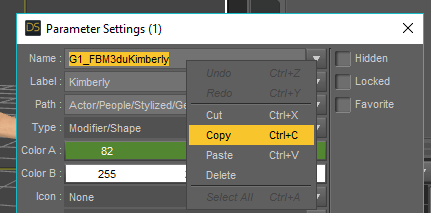
That should get you the location of the file and any more copies of it you have. You have to get rid of them. You probably do need to remove and reinstall G8 because of the saving the head morphs. Not sure. I mean you could try to hunt down all the copies you made, since you did more than once. They might all be ing the same folder. Might not. If they are all in the same folder, then there' won't be too many copies becuase they would have be overwriting themselves on each save. In that case, you just have remove that folder. But if you aren't sure, then you should uninstall G8. The go in and make sure the who G8 Folder inside the data\Daz 3D\ folder is gone. If not, delete it. The reinstall G8.is autofit and autofollow the same thing?Autofit is the system by which Daz rebilds a clothing or other wearble figure to be worn by a new figure.
Autofollow is the system by which Daz projects a morph into another figure.
You would not autofit the G8 Brows and lashes to G8 as they are already fit to her. Morphs with autofollow turned on that affect the lashes and brows should project to them while the lashes and brows are fit to G8. The most likely reason a newly created morph would not have the lashes and brows follow it is because the ERC was not correctly frozen. This means the figure bones are getting out of line with figure. While the lashes will take the projected shap from the eyes, they will take their position from the bones.
If this is happensing, you'll be seening the head rise above or sink below the lashes and brows.Daz 3D is part of

Connect
DAZ Productions, Inc.
7533 S Center View Ct #4664
West Jordan, UT 84084Licensing Agreement | Terms of Service | Privacy Policy | EULA
© 2026 Daz Productions Inc. All Rights Reserved.