-
G9 wearing G8F Clothes - some issues with saved files
As for the 2nd dress, I don't have MSO Dola but I could reproduce the issue on Victoria 9 (as well as G9 Base... only the shape was not that bad ~) (ss2)
I have to say the culprit is as same as the one in the first case. If you change Smoothing Type to Generic, the issue will be gone after you load the Scene Subset or the Scene. (ss3)
Chopsticks Poses: Sushi, Noodles, etc.jmucchiello said:
csaa said:
Thanks for the replies. This pose converter product went on sale this weekend. I'll give it a try.
This product works well. But I'd say get BJ Pose Zone Plugin instead. Why save a bunch of poses you already own to disk when you can convert them on the fly as needed. BJPZ does this for most figure types. I can't believe it didn't exist sooner.
I am not BlueJaunte and am not paid for this endorsement. :)
It basically did exist...there was an artist on DeviantArt who sold something similar back in the day, though that was when the newest figure was G8, though IIRC they've long since left that site. Similarly, that's basically what Riversoft's Bone Minion products do, though it breaks the functionality into seperate modules. Costs more that way, but besides the full Genesis line, Bone Minion also converts poses between those and Victoria 4 and Michael 4, as well as all four of the major horse models (Daz Horse 3, DAZ Horse 2, DAZ Millenial Horse, and the Hivewire Horse,) and also has an module that transfers transfers the positions of held/worn props between the generations.
RRRR Render Contest - Turn the tideIt's time for a new RRRR Render Contest!
The theme for this round is Turn the tide - The challenge of making the best of a bad situation. Something went south, but how was it turned into something better, like the classic when life gives you lemons, make lemonade.
RRRR stands for Random Runtime Roulette Renders, and it's a contest that has been running for over twelve years now, on and off. We invite anyone to enter, specially all those new users who have shown up the past years. This is not the usual make a very nice render contest but more like tell a really great story, often fun, with your render!How does it work?
Make your pull of 4 items, and if your any Lucky Bastards, you pull one extra item per LB.Who can play?
Anyone can play!How do you prepare yourself for play?
The rules are very simple, but first you need to have all your items in some kind of order in a text file, dumped from the itemized history into a text file or a spread sheet. Remove things like software, gift certs, and special plugins from the list and items that wil not work with the software you work with. For example if you have items for Poser, Bryce or Carrara, and want to use DAZ Studio, remove those other items from your list. If you have loads of older figures, M3, M4, a ton of non Iray stuff and you only want to use Studio with Iray, remove all the junk from you list.Then you use a randomizer to randomly pick items from your list (your Runtime/My Library) for your start pull . You can use items from any store. Now build a scene with those 4 items plus any other items you want to add to make a fun scene. For newcomers I heartly recommend looking at the previous contests below to get ideas how you can do this.
Working randomizer:: https://www.random.org/integers
There are some situations where you allowed to redraw, these are:
- You pulled something that doesn’t work, broken thing, only works in a version / software not used etc etc, or you forgot to remove that item from you list even though you knew it wont work, or figure that out later.
- You pulled a software or add-on to a software or anything you should have filtered out from the list.
- You pulled only huge environment props and will not be able to render a scene without crashing.
- You pulled an item you already have been using in two RRRR renders in this content and that was picked randomly. Three is a curse - rule!Lucky Bastard Rule!
I say this again: If you have Lucky Bastards, you pull one extra item for each LB you have, simple as that.
Explaination of Lucky Bastards.
Lucky Bastards, or LBs, are a form of handicap system which makes the contest a little more difficult for those who have won.Current Lucky Bastards Standings
Player LBs Totte 3 acb 2 Fae3D 1 katywhite 1 emanuela1 1 luci45 1 aprilshowers2065 1
How to play?
You pull, you compose and you Render. You post your images and pulls in this thread (Don't miss that, entries without pulls and posts in this thread will be disqualified!!).
Then the entry should also be posted in the Entries only thread.Bundles
If you pull a bundle, use two or three complete items from it, or more if you like, but you do not need to use all, but only picking a hairpin from Victoria 8 Pro Bundle is “too little”. Clarification: A bundle still counts as only one pulled item.Poses, Expressions and textures/colors
If you pull a pose pack, an expression pack or a texture/color pack, you only need to use one of them, not all. For example if you pull 500 expressions for Genesis 8 Female, use one, if you pull 128 colors for Frappe Hair, use one.
Accidenty breaking the TOS
If your entry is removed by the forum mods because it accidentally, not deliberate, broke the TOS, you do not have to redo that entry but can move on and make a new pull.The rules of madness!
Now you have successfully and randomly picked your items, make a scene, you can add other items as well but the one you picked should be prominent or cleverly used. Render it, post it and make us all laugh! Remember though that the renders must follow the TOS of the forum. As we have a theme on the contest, the render should in some way touch that theme.The contest categories!
There are two categories Best and Funniest. Every image will compete in both categories.Contest duration!
It starts now at Friday August 7 - 2026, and will go on until Sunday September 27 2026 at 23:59:59 local DAZ time.This months sponsors so far:
Totte (Code 66) is sponsoring with two items from his store
Dartanbeck is sponsoring with items from his storeWe want more sponsors!
Do you want to sponsor the RRRR?
Please chip in a gift card sponsorship, sponsors can play, they should play, they are even extra encouraged to play, as sponsors always plays for keeps.Maximum number of entries?
For this round it will be a maximum of 12 entries per player.So, good luck and start your render engines!
Limited Time Freebies Discussion ThreadAn update on time, what a novel and lovely idea

- The Bookcase Collection
- Country Kitchen Accessories 1
- Spirit of Punk Airship Aged
- Nimue Hair for Genesis 2 Female(s)
- The Bard Outfit for Genesis 3 Male(s)
- Alien Collector Flesh Mech I
- i13 Prayer and Worship Poses
- Fantasy Thief for Genesis 3 Female(s)
- FWSA Saffron HD for Victoria 7
- Fantasy Castle Keep 2 for Iray
- MEC4D HDRI Gardens Vol. 2 - Megapack
- Warrior Maiden Okami
Edit: Saffron use Genesis 3 UV, so you can use her skin textures without Victoria 7.
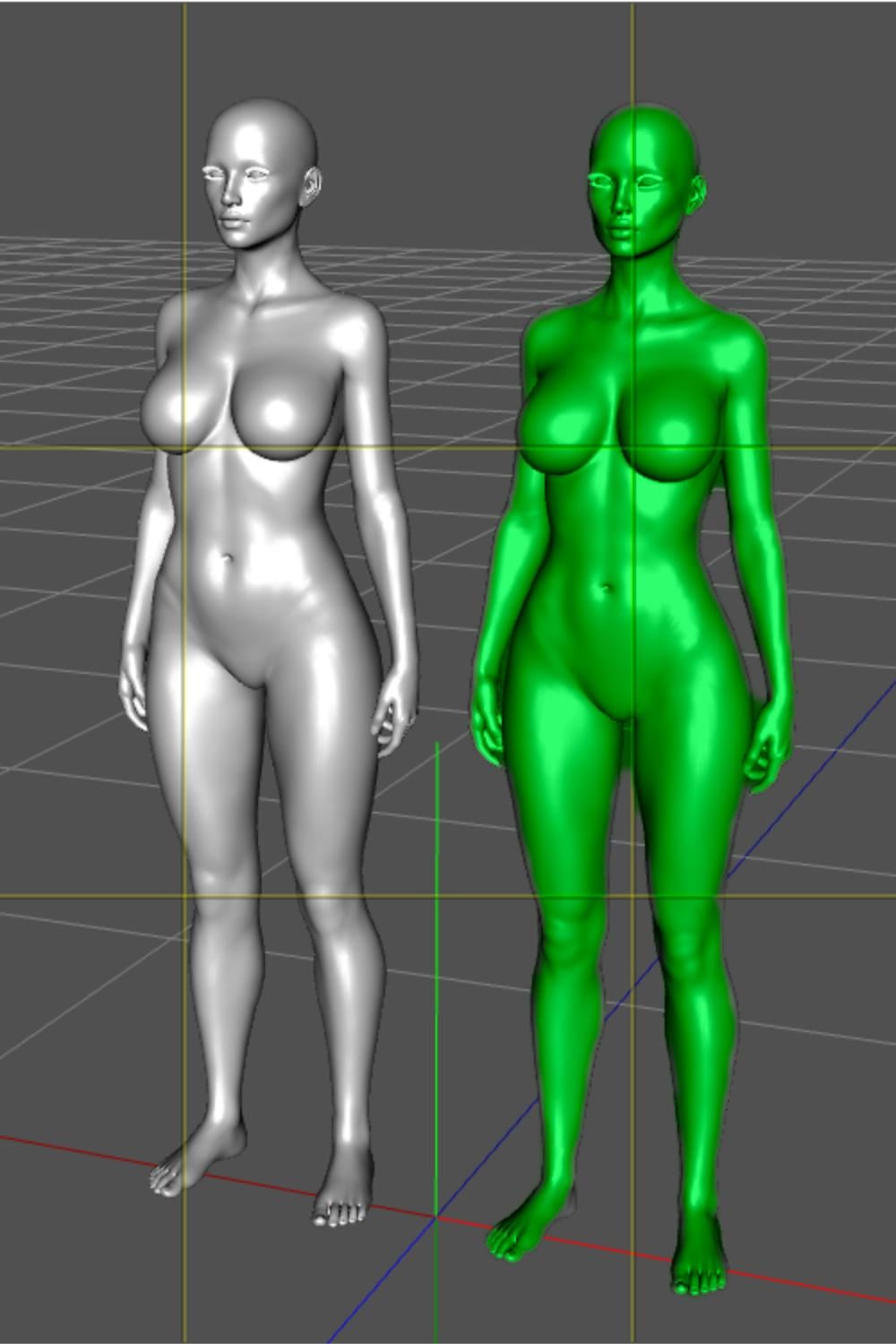
Her advertised shape is achieved with both Victoria 7 head and body dialed at 75%. On the following screenshot, Saffron is in green, and the gray model is Saffron without Victoria 7:
 Pose Copy/Mirror Scripts for G9, G8(.1) & G3
richardandtracy said:
As for the paid product here - Just looked it up. There are 10 signs language word poses in the product. None are letters which is what I'm doing, so there is no overlap, possibly they're complimentary.
I was speaking about these two products (each included in one of the two V8.1 bundles) and both have poses / animations for the 26 letters:
- https://www.daz3d.com/z-sign-language-alphabet-for-genesis-81-female-and-victoria-81
- https://www.daz3d.com/asl-animations-for-genesis-81-female-and-victoria-81
I was not trying to warn you about sharing your own ASL poses here due to their existence (I don't think there is a rule against sharing a freebie offering the same thing as a paid product) but as I didn't understand you already have done them so from my point of view, warning you about their existences would have allowed you to focus on SLs who didn't have already existing poses.
But, well, as you already did them, my point is moot.
Pose Copy/Mirror Scripts for G9, G8(.1) & G3They are already products for ASL on Daz Store (released alongside Victoria 8.1), one is a pose product (with renders showing all letters), one is an animations product.
Maybe it's better to focus on non US sign languages?
Tips for creating attractive Genesis 9 Female characters from all angles?To be honest, I had no idea about the multiple viewports! I’m testing them right now, and it makes creating faces so much easier. Thank you so much guys for the tip!
However, I'm not sure if that is the main issue, though it definitely helps. I’ve been experimenting with different female models, and even the smallest adjustments make the proportions look completely off—even though I have plenty of morph sliders. For instance, I find Victoria 9 incredibly difficult to mix with other models or to tweak without losing her realism. Is it just me? I don't rule out that I might just need more practice, but it's frustrating because I can easily create great-looking male models and faces.
I am still very new to Daz but eager to learn, so any advice is highly appreciated! I just find it really hard to create an attractive female face, which is strange since my male creations turn out exactly how I imagine them. At this point, I’m starting to wonder if this is just a 'Genesis 9 thing' and if I should switch back to Genesis 8 or 8.1.
LJ Studios - Art Work and TipsA Bond is Born
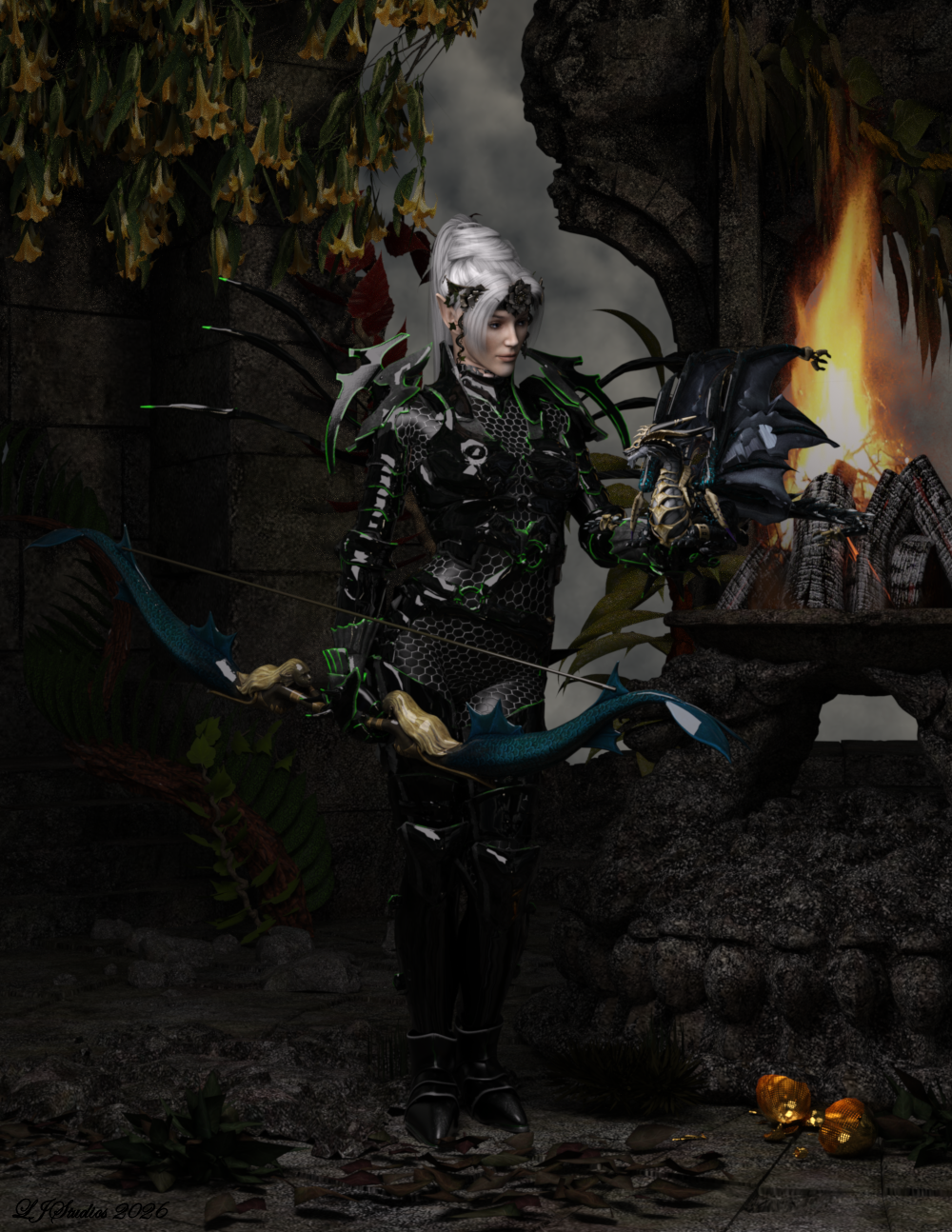
Victoria 3, Rendered in iRay.
This image started out with me wanting to see what ''KT Head Piece G9'' would look like in iRay. From there it was a let's see what is looks like on Victoria 3. A bit of scaling and presto one frecking amazing look appeared. The character for Victoria 3 is a spin dail morph I created called Julie. Her skin texture is Dreampaint's Yarishan with an iray shader applied to help with the skin. She is wearing jibicoco's Yvraine Ynnari corsair dark Eldar for v3, an armoured suit based upon the Eldar (40k). The freebie also included the hair. She is holding summoner's Lucent Drago in her left hand and summoner's Morphing Elves-Bow in her right. She stands in the middle of the old temple ruins by DAZ3D. Foliage is Lisa's Botanicals - Wisteria, and Dreanpaint's Forest vines. The fire is Traveler's Camp Fire. Environment is DAZ3D and Dimension Theroy's Skies of iRadiance - Night Sky HDRIs for Iray. Hope you like her.
List of items:
No longer available - Yarishan, old temple ruins, Forest Vines, Camp Fire, Lisa's Botanicals - Wisteria
Yvraine Ynnari corsair dark Eldar for v3 - No longer available but you might contact him to see if he would offer it again. Jibicoco - Download Daz Content at RenderHub
Lucent Drago - Summoner's Lucent-Drago_DS ( Daz Studio Fan Art ) - Free ( Public ) - Free Poser/DS - Free Poser ART - Freedom Of Arti
Morphing Elves-Bow - Summoner's Morphing Elves-Bow ( Fan Art For Poser DS ) - Free ( Public ) - Free Poser/DS - Free Poser ART - Freedom Of Art
KT Head Piece G9 - KT Head Piece G9
Skies of iRadiance - Night Sky HDRIs for Iray - Skies of iRadiance - Night Sky HDRIs for Iray | Daz 3D
Bastian 9Bastian is now in the Premier freebie bundle selection. I can't test if the code works on him, since I used mine for Axel.
(The rest of the roster is Kristina, Bovines, Axel, Charlie, Kaede, Cheyenne, Xola, Snow Queen, Nikolai, Minerva, & Victoria. If Daz sticks to their current pattern, Axel &/or Bovines won't be in the selection much longer, however.)
Transferring Morphs from V3 and V4 to GenesisNice, maybe you have some insight. When I try to transfer the morph I don't get the target selection button. Do you remember if you encountered something like this?
I attached a screen shot of what I see and a picture from the user manual showing what it should look like. Note the button labeled "Victoria 4" at the bottom is for the original shape and is correct. There should be another button under it for the target figure.
*** Edit ****
I noticed the panle says "Genx" and the about also says Gen X version 1.2 But DIM says that I have Gen X2 installed. Maybe my serial number is wrong and Studio thinks I only have Genx. I will investigate.
My G9 characters' heights are all WRONG - what content is making G9 bigger?Oh, just to add i've checked this in both DS 4.24 and DS6, so it's not a DS6 issue. The heights on the store pages are wrong, and despite the Genesis 9 sales blurb the Genesis 9 DAZ Original female characters [1] are, overall, a horde of incredibly tall women, like all the generations of Victoria before them.
[1] I haven't had the strnegth to check the male characters, but if the fault is a mess up in the figuremetrics, I experct i'll find the same and that ALL the DAZ G9 men should be, if in a historic setting, in a circus or freak show, or if modern shoudl just be a team of basketball players. QA? What's that then? Oh, I seem to rememger the QA team at DAZ getting cut back in 2006 or whenever ...
My G9 characters' heights are all WRONG - what content is making G9 bigger?There's something very wrong with the heights given in the store pages for all the DAZ Original Genesis 9 characters I've checked. They are nothing like the supposedly Measuremetric heights given on the store pages (we mere plebs don't have access to the figuremetric set for Genesis 9 like we do for the older figures, but we can certainly measure the figure's heights within DS as it uses real world units).
Preamble - what leads me to this, which you can skip if you're bored and just scroll down until you see measurements.
Right from when I started with Poser 4 in early 2004, then DS 0.9 Public Beta from the day that was released, I've been obsessive about my character's heights, as I start from being a writer, and I was trying to do, in Poser then DS, characters I already kew, and knew how tall each was supposed to be. Very early on, pre the first DS release, I had a problem in that the only unit of measurement within Poser was the PNU - the Poser Native Unit, with no official statement as to what that was in real world units. That led to much argument within the Poser community, various 'sides' and some major flame wars! It also meant that content made by different PAs that comprised objects with known fixed real world lengths - like an M16, or a coke can, or the normal heights of tables and doors - were often quite out of scale with each other where the different artists subscribed to different theories of how long a PNU was. I picked a side that seemed the most sensible to me, and before DS came out downloaded a measuring prop I've been using every since - it has a horizontal and vertical scale marked in feet and inches within Poser and DS, and moveable vertical and horizontal sliding bars. When the first 0.9 Public Beta DS was released, DAZ pickedd the same scale I had for PNUs, and as DS uses real world units, x y and z translations measured in cm, I checked and found my Poser prop still worked exactly in DS, a height it showed in the scene in ft and in matched exactly the ytrans of the sliding bar converting ft and in to cm. So I've used it since March 2004 in Poser 4 and it still works exactly in DS6 now. And I became obseesive about the measurements of the DAZ human figures, and their proportions. Victoria 3, the then state-of-the-art DAZ female figure is well out of proportion - for the torso size the legs are way too long and the head too small, and back then in both Poser and DS, altering proportions of body parts didn't work properly, with hideous effects on any conformed clothes. My quest for realism meant I actually downloaded a lot of the Peter Levius reference material, photos of real women and men, for whom actual body measuremetns were given, photographed in standard poses, and then added some photos off the internet of assorted actresses, sportswoem and the odd singer who ahppened to eb in the same poses. I found that if I took images of a selection of the women who had a range of real world heights from 5' 1" to 5' 11" and scaled them (x and y same amoount) so they were all matched in height, side by side, body landmarks lined up almost exactly - top of head, chin, collarbones, nipples and base of sternum, elbows, navels, hips, crotch, knees, ankles etc. So basically the body proportions of a random sample of real women remained the same irrespective of whether they were below average 5' 1", average height for (white) women in both the UK and US 5' 4", or towering 99th percentile 5' 11". Victoria 3 was way out. But Stephanie 3 'Petite' (which ws ironic, because she was actually 5' 6" at 100% scale as DS loaded her, which is 2" taller than the UK and US average and the 75th percxentiel for women in the US and UK) actually matched the real world bodypart proportions. (And when I had those real world pictures as textures on planes in DS, scaling each on its plane to be their real world height within DS, and was moving the SP3 figure amongst them to compare, I'm pretty sure I found who the DAZ modeller based SP3 on, as while the face was a bit different, the SP3 body EXACTLY matched one of the Peter Levius models .. who also made some porn films, I believe). I still have the text files I drew up then that give the percentage scales to use to give each height, inch by inch, to SP3, D3, M3 and V3, and V4.
Of course by the Generation 4 figures DS had fixed the issue so one could now change the proportions of body parts, even clothed, which made life easier for me, as little content was made for SP3, who I used for the correct body proportions, and I'd had had to learn how to convert V3, M3 and D3 clothing to SP3 the hard way, with a lot of work in CR2 files with a text editor and a lot of DFormers. But I have continued taking great care to have my main characters their actual heights - already known by me - within DS trhough scaling, especially as DS uses real world units so DAZ PA props, door heights, table heights etc ought to be their real world sizes. And I carried on scaling figures, because the default female of every generation tended to be around a reality-average shattering 5' 11" 99th percentile against the real world average 5' 4", and the female character - 5' 6", which is the 75th percentiile for women in the US and UK - who I've made a verion of with every DAZ main female figure from ... actually Victoria 2 and Stephanie 2 (my first ignorant purchases from DAZ, before understanding enough and rapidly getting V3 then SP3), through the 3s, 4s, Genesis, G2F, G3F and G8F. And with all of them I was checking the real world heights of the figures against the scale prop and in DAZ's internal cm units, and as I scaled characters to the height they were supposed to be. And measure-mertric heights given in DAZ Original character store promos were always correct within DS - it says on Freja 8's promo page, for example, thast she's 5' 8", and that's also what i get using measuremetrics on her, AND she's 5' 8" according to my ruler prop and the DS ytrans of putting something on top of her head from the ground (converting from cm).
So, I took a complete break from all this from just about when GF8.1 came out until recently, and I have been until just a few days ago carrying on with G8F and G8M. But having been shocked to find that the DS6 Beta I'd been ignoring renders 10 times faster than DS4.24 (which I hadn't realised couldn't use my RTX 5070 GPU, whereas DS6 DOES use it) when the 'proper' DS6 release happened, I thought maybe I should look at maybe using, or at least trying, Genesis 9. While I hadn't been using it, I had read and was really pleased to see the claimed Geneis 9 emphasis on real world proportions and sizes, and had glanced at a number of the the Genesis 9 DAZ Original figures and was VERY surprised, given the history above, and delighted to see there were DAZ Oriigininal female figures who were 5' 4", the real world average in the US and UK, and 3 and 2 and even 1 inch! Shock after two and a half decades of 99th percentile height women figures. But the last two nights, when I had a real look, I was: WHAT THE ACTUAL F$%&!!!!
I started playing with G9 by having a go at creating a female character who would be noticeably muscular for a woman (but not some She Hulk - realistically muscled for a non-steroid using but hard training woman with good genes for it), and 5' 8". And, there are several DAZ Original Genesis 9 women who are either noticeably somewhat muscular by default, or who have a noticeably muscular DAZ original add-on shape for that character, and there's usually moe support for DAZ Original characters in morphs in clothes etc. So, I loaded up, side-by-side into DS, a number of them to look at and see if one took my fancy as a base for me to then refine with more morphs of various types into this character I wanted to create. There they stood in DS, side-by-side - Freja 9 (with her bulk morpoh applied), Kara 9 Buff, Kristina 9 Athletic, Van Helsing 9 and Zahara 9 Muscular. Saw they were all different heights, which I remembered they were supposed to be from the store promos, but out of habit after over 22 years I then loaded up my ruler prop, showing ft and inches, always matching DS's ytrans in cm, and ...
Figures:
Freja 9. Promo page says measuremetrics says she is 5' 9.8" (177.4 cm), shade under 5' 10" and the tallest. SHe is NOT 5' 10". She is 6' 2 1/2 in (189.48 cm). Now, we mere mortals don't have access to G9 figuremetrics so I don't know if the one PAs and DAZ's own artists can use is screwed up, but I assure you, just load Freja 9 up, create a plane flat on the floor at her feet, and then Ytrans it to the top of her head and look at the number DS itself tells you is its height from 0 at the top of her head, i.e. her height: 189..48 cm = SIX FEET TWO AND A HALF INCHES, not five feet ten.
And it's the same with all of them. Character: actual height within DS / store page claimed 'measuremetrics' height ...
Freja 9: 6' 2 1/2 in = 189.48 cm / MM 5' 9.8" (177.4 cm)
Kara 9 (Buff): 5' 11 1/4 in = 180.920 cm / MM Height: 5' 6.5" (169.0 cm) - obviously modelled on Katee Sackhoff playing Kara Thrace on BSG, store page claimed height is Katee's actual height, but the ACTUAL height within DS is MUCH taller.
Kristina 9: 5' 9 in = 175.38 cm / MM Height: 5' 4.4" (163.6 cm) or Muscular Height: 5' 6.2" (168.2 cm). That one is very bizarre. The Kristina Muscular add-on store page says 'Athlete Kristina has hit the gym harder and added a few inches' - er. to her biceps and quads measurements one would expect, but it gives her a measuremetrics height two inches taller than the base Kristina 9 page gives her, and THAT'S not going to happen from gym work. And in fact they are bnoth the same height within DS, 5' 9", which is a lot taller than either 5' 4" or 5' 6", average for a woman and 75th percentile.
Van Helsing 9: 5' 11.38 in = 181.30 cm MM 5' 10.8" (179.8 cm) This is THE ONLY ONE that is close, only being a little over half an inch taller than claimed on the store page.
Zahara 9 (Muscular): 6' = 183 cm / MM 5' 7.3" (170.9 cm) Five inches taller than she is supposed to be.
(Oh, and I did check - the assorted Bulk, Buff, A|thletic and Muscular add-on morphsd do NOT chaneg teh ehigth wiht any of them - which is as it should be.)
First, this is just some weird ongoing slopiness. And secondly, when DAZ emphasise - EMPHASISE - that one big Genesis 9 benefit is it's all about realistic huan proportions and realistic human heights etc, this is just so ridiculous and makes a nonsense of the cliams. And means that yet again DAZ are peddling a horde of REALLY tall women - and this does actually show up if they are set against props/scenery that has actually been made to real world scales by other PAs.Did somebody mess up making the figuremetrics for the G9 measuremtrics, what, years ago now, and every DAZ figure creator and PA has been blindly using it, and NOBODY has bothered to check it very simply within DS and notice the screw-up? All it takes is to load a figure, create a 1m square plane primitive at 0 0 0 and ytrans it to the top of the figure's head then read the dial. Sheesh. So contrary to the DAZ sales blurb I have to carry on checking and scaling all my figures just like before. Rrrrrgh!
Need Help Fine-Tuning a Custom Genesis 9 Morph...I'm pretty happy with the result in the neutral pose, but that's where the good news ends.
Yeah, the figure in default A-Pose also looks fine to me but it merely means that you successfully got the job done in Faceform Wrap, i.e. you got the correct head / body shapes on G9 by having wrapped the source character. Then you need to do follow a key workflow in terms of morphing:
1) Check and fix Auto Follow Head morphs on the anatomical attachments on G9, e.g: Eyes, Mouth, Tears, Eyelashes, Brows...as they're separate wearables. This is the primary step before doing adjust rigging, fix corrective morphs, etc...
For Eyes and Tears, make sure they well fit in eyesockets, with no obvious distortion on irises, pupils.... For Mouth, make sure they well fit in mouth cavity, with no obvious distortion on gums & teeth.
lilweep showed you the key steps above, just a trick: Export OBJ (no matter from DS or Blender) by using the Name of Auto Follow head morph...so that you can more easily updating Deltas by using Morph Loader Pro.
Do the same check as well as fix on Tears / Eyelashes / Mouth nodes ~
2) Adjust Rigging to Shape and ERC Freeze on character's Head / Body morphs
3) Check and make necessary joint corrective morphs ( _body_cbs_ ) for the key bones (e.g. spines, head, necks, shoulders, upperarms, thighs and shins ) and set up ERC links
4) Check and make necessary facial corrective morphs ( _facs_cbs_ ) for key FACS properties (e.g Jaw, Mouth, Lips, Eyes, Eyelids... related... ) and setup ERC linksIf each key FACS property works well, most of the expressional Pose Control properties should be able to work well. A trick, when dialing or mixing expressional Pose Control properties, don't dial the values to 100% ~ Dialing or mixing with high values might make you character looks ugly or weird, or a bit "Frankenstein " lol ~
If some Pose Controls don't work well, you have to make dedicated corrective morph(s) (i.e. eJCMs / MCMs) to the existing ones.
As for using Faceform Wrap, I couldn't tell more as you didn't share the graph of nodes that you used but as per my experience of the workflow in Wrap, the below graph that I've been using works pretty well in most of the cases.
Besides, personally I don't think the above issues you mentioned came from wrapping process ~~ most likely you just need to adjust rigging and make some corrective morphs.
Edit: No worry ~ even the officially well-made Victoria 9 cannot 100% well handle all expressional properties lol ~~ Any more issues, just feel free to let us know.
Toyen What character is this?its snow queen skin for sure, maybe a mix of victoria and that, will play about and see
The older generation: Victoria 2/3, Michael 2/3 and their children rendersSo today I decided that I would play with DAZ Studio.
This is Victoria 3 as Dreampaint and Akahastur's character Urumi. A fairy with somewhat of an attitude, a morph and texture freebie.
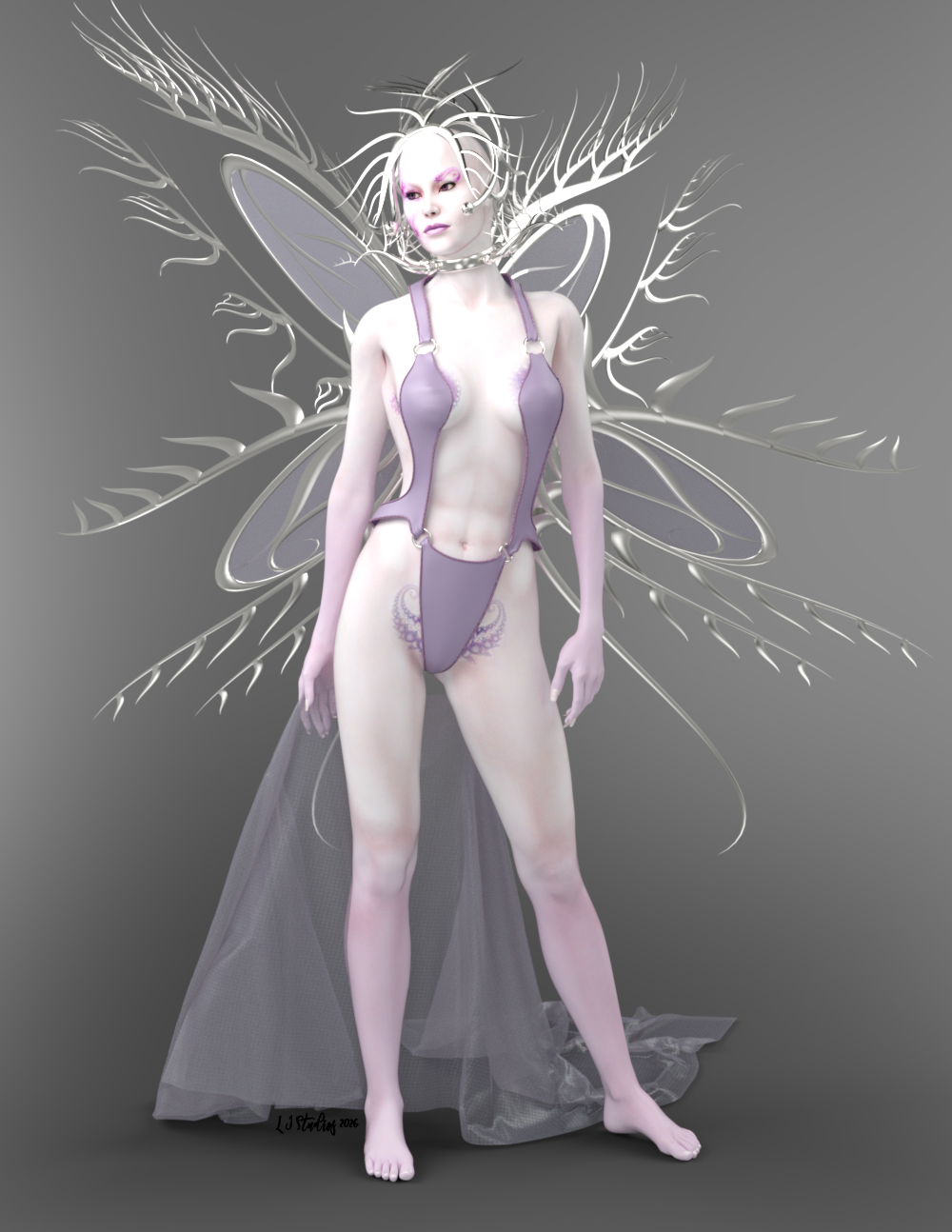
Urumi - DREAMPAINT objets 3D pour Poser page 12 includes the wings, crown and collar, along with the morph and texture.
V3 SwimSuit by Specs2 (who a long time ago was a PA for this site.) - V3 SwimSuit - Poser and Daz Studio Free Resources Wiki
V3 cloth is Jepe's Free Sample SheetZ For Victoria 4 (No longer available but the paid version for Genesis 8 is available here.)
V3 pose is Sexy Poses for Vicky3 - https://web.archive.org/web/20071215183048/http://www.sharecg.com/v/20456/poser/Sexy-Poses-for-Vicky3
All of the object materials were either converted to iray or I used iray shaders.
Daz Studio 6.25[.0.x], General Release!It's listed in Help>About Installed Plug-ins for me (as far as I know it is in the base application). I don't currently have Victoria 4 etc. installed, however.
Daz Studio 6.25[.0.x], General Release!Richard Haseltine said:
crosswind said:
Richard Haseltine said:
crosswind said:
Ron Knights said:
I just noticed I can't load "Generation 4" characters in DAZ Studio 6. (Kids 4, Freak 4, etc.)
They will load in DAZ Studio 4.24.
Is this a new development? If so, why?
This threw me off for a few hours. I'm trying to gear up to make some art for my book of Children's Poetry.
DS 6.x doesn support DSB scripts anymore (DSB scripts are used for loading genration 4 figures...). You can go to the folder where the figures locate, rename or delete DSB scripts. Then they can be loaded in DS6 but PowerLoader won't work anyway ~~
.dsb iss till an option when saving scripts, but that doesn't mean any given .dsb will work. PowerLoader is, in any event, a plug-in that is then cotrnolled by scripts - buty it is itself in DS 6.
So if you still want to use Generation 4 figures, just use them in DS 4.23 ... as you have no way to render 3Delight materials in DS6 after all ~~
Yes, Power Loader is a plugin but it's triggered by DSB script, without DSB, Power Loader never works. Not 100% sure but I'm afraid this plugin is useless in DS6 ~~
Anyway, w/o DSB, I could directly load cr2 in both DS4 / DS6 but Power Loader dialogue never showed ~ Is there any trick or work around ?
What do you mean by "without .dsb"? The format is still supported in DS 6. Of course individual scripts may or may not run.
My question is how Power Loader dialogue could be loaded in DS 6.x... AI Victoria clearly told me that Power Loader is triggered by DSB script .... but if DSB script files are there, all Gen 4 figures cannot be loaded in DS 6.x... is that correct ?
Again, how can I have Power Loader dialogue loaded in DS 6.x ?
High Fantasy PropsThis product is made for Victoria 3 and Micheal 3. Does anyone know if it still works with newer products and can it be made wearable for new products?
Large number of [WARNING] itemsI'm not sure there is a rule about character dial being linked with that same character proportion dial or other needed shapes: they are simply too many examples of the older core characters whose character dial won't load the proportion dial (Victoria 9, Olympia 9, Ivar 9, Michael 9, Nikolai 9, etc) or the needed shapes for alternative shapes (Mira 9 Young Adult or Victoria 9 Masculine are not loading Mira 9 and Victoria 9 head and body).
New Year, New Sales Thread: Report Issues Here 4 "Reporting Only"The name/product association of product "Surprise for School Uniform G8F" by alexanna in the "Scholastic Goodies" selection is incorrect/confusing, as it appears to actually be a texture set for the "dForce School Uniform for Victoria 8" by Halcyone and FaintbBlue, sold at Renderosity, Renderotica, and CGBytes.
Daz 3D is part of

Connect
DAZ Productions, Inc.
7533 S Center View Ct #4664
West Jordan, UT 84084Licensing Agreement | Terms of Service | Privacy Policy | EULA
© 2026 Daz Productions Inc. All Rights Reserved.