-
The "Animators Assemble!" thread for Daz animation WIPs, clips, and tips
wsterdan said:
Sven Dullah said:
wsterdan said:
The second part of my lip sync test:
-- Walt Sterdan
Great stuff, Walt!
I've a OT question for. you, since you are on a Mac:
So quicktime player has a limit of 1 min. when opening and saving image series? It does not seem related to file size, am I right?
Can you import image sequenses straight into something like daVinciResolve or Final Cut, without limits? Need to improve my workflow, thanks:)
Thanks!
I wasn't aware of a one-minute limit on Quicktime image import, as all my clips are shorter (I think the longest is about 48 seconds). I occasionally did have an issue where Quicktime couldn't load the full sequence and kept stopping at the same place, but by either restarting Quicktime and sometimes closing all other apps it then imported the full sequence. I know you have a lot more memory than I do, but you could try that just to check.
daVinci Resolve (https://jayaretv.com/tips/import-image-sequence-in-davinci-resolve/) and Final Cut Pro can both import sequances of images. I've never used either, but there are lots of tutorials that show how.
A neat little free app for working with videos is Adapter (https://macroplant.com/adapter), which will also import image sequances. I use it a lot when I want to take larger files and squish them down for messaging and such.
Let me know what you wind up using.-- Walt Sterdan
Looking into it, tks!
Porting Planets and Nebulas to BlenderUpdated to 1.7 and the import is better. I might like it better.
new version Ghost Lights by one click scriptDaremoK3 said:
Thank you, for the explaination. I was wrong in my assessment -- I believed you were retrieving specific data from Rob's scripts, but now I understand you fire those first and then your script kicks in.
And, I was incorrect regarding 'include' -- I do so much code study, and haven't had time to go back to code for Blender for so long (coding for DS), I was conflating BenderPy 'import' with all the C++ code study with 'include'.
Also, not to dissuade you, but I believe Daz has decryption capabilities we users do not have access to -- They created the way to encrypt, so logic is they have the reverse, so they can vet the scripts solicited to the store, new wanna-be PA's, or rogue freebie creators, to make sure they are in compliance.
Daz Studio must be able to decrypt, if it couldn't it wouldn't be able to run the script at all.
Regardless, thank you, function, for all your hard work -- I hope to see you continue creating scripts for DS.
Take care...
Ken
new version Ghost Lights by one click scriptThank you, for the explaination. I was wrong in my assessment -- I believed you were retrieving specific data from Rob's scripts, but now I understand you fire those first and then your script kicks in.
And, I was incorrect regarding 'include' -- I do so much code study, and haven't had time to go back to code for Blender for so long (coding for DS), I was conflating BenderPy 'import' with all the C++ code study with 'include'.
Also, not to dissuade you, but I believe Daz has decryption capabilities we users do not have access to -- They created the way to encrypt, so logic is they have the reverse, so they can vet the scripts solicited to the store, new wanna-be PA's, or rogue freebie creators, to make sure they are in compliance.
Regardless, thank you, function, for all your hard work -- I hope to see you continue creating scripts for DS.
Take care...
Ken
Get rid of unused faces in an object ?atoxic said:
Alright. I couldn't get rid of the trapped faces in the figure. So I used my old approach and modelled glass and screen of the console as separate meshes.
At the moment his is a kind of beta status, only a static prop, till now no moving parts or animation. But it fits well in some (retro) SF scenes.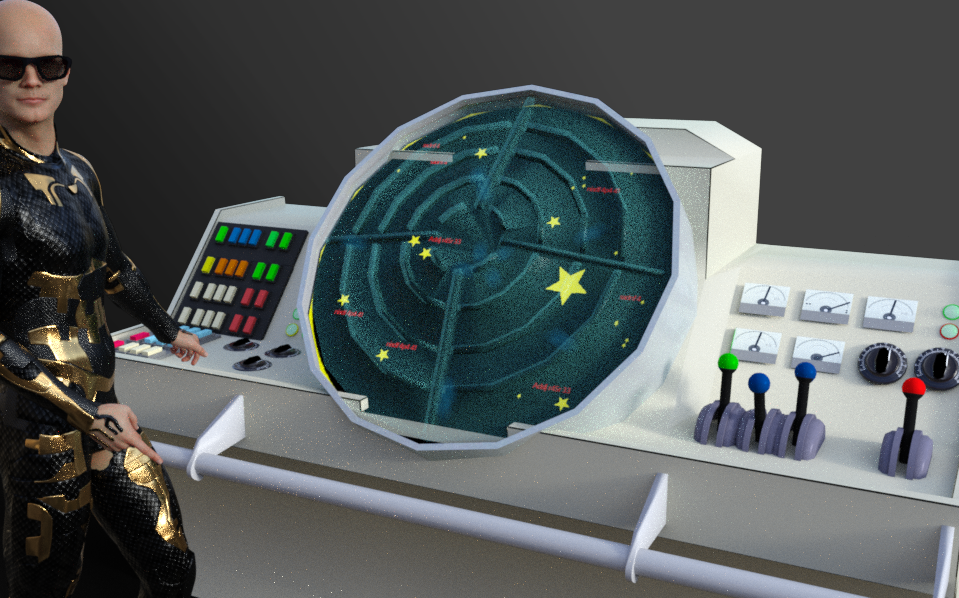
Coming along nicely.
Some ideas:
If one has transparency toggled on, then one can select mesh "through" mesh.
One can squish some mesh together so it's not visible where you don't want it.
How to make moving parts - can depend upon which program you plan to use next and also how you plan to rig them. If I recall correctly, the levers for examples, could be separate meshes [export out one by one] then grouped together on the scene tab in D/S. Some dials on the Parameters tab can be renamed if desired. Save each piece as a prop, THEN, select the root and save as a scene subset.
And a nifty big tip for making a bunch of pieces in Hexagon into 'one' mesh without loosing the uvmaps, is to rename all the pieces that are to be 'one' exactly the same. Select all those items and export out an .obj. In another session of Hexagon, import in that new .obj - it should be all the pieces now together as one group. If all went well, can then import said .obj into the working project and carry on. {for eg. to have all the bases for the levers glued to import/export as one with the console}
Schrödinger's Weight MapsGordig said:
I've never used Poser, so I don't know what you're referring to with the "has-buttocks philosophy". General weight mapping is what you want; I don't know that Triax is proprietary, but it's not how current figures are weightmapped. Since you're not specifying, I'm going to guess that you're importing as FBX? DS, to put it gently, doesn't have the best FBX import capabilities, so the best, and in the long run probably easiest, solution is to import an OBJ for your geometry, import the FBX for the rig, then set the FBX as a donor rig for the OBJ.
The "has-buttocks" thing is that from Mike/Vicky 1 to 3, and related figures, there was an extra body part between the hip and the xThigh, xButtock.
I'm loading them from a Poser runtime, not FBX. That's why I said I'm loading in Poser figures. They are not being turned into anything else along the way.
The "Animators Assemble!" thread for Daz animation WIPs, clips, and tipsSven Dullah said:
wsterdan said:
The second part of my lip sync test:
-- Walt Sterdan
Great stuff, Walt!
I've a OT question for. you, since you are on a Mac:
So quicktime player has a limit of 1 min. when opening and saving image series? It does not seem related to file size, am I right?
Can you import image sequenses straight into something like daVinciResolve or Final Cut, without limits? Need to improve my workflow, thanks:)
Thanks!
I wasn't aware of a one-minute limit on Quicktime image import, as all my clips are shorter (I think the longest is about 48 seconds). I occasionally did have an issue where Quicktime couldn't load the full sequence and kept stopping at the same place, but by either restarting Quicktime and sometimes closing all other apps it then imported the full sequence. I know you have a lot more memory than I do, but you could try that just to check.
daVinci Resolve (https://jayaretv.com/tips/import-image-sequence-in-davinci-resolve/) and Final Cut Pro can both import sequances of images. I've never used either, but there are lots of tutorials that show how.
A neat little free app for working with videos is Adapter (https://macroplant.com/adapter), which will also import image sequances. I use it a lot when I want to take larger files and squish them down for messaging and such.
Let me know what you wind up using.-- Walt Sterdan
The "Animators Assemble!" thread for Daz animation WIPs, clips, and tipswsterdan said:
The second part of my lip sync test:
-- Walt Sterdan
Great stuff, Walt!
I've a OT question for. you, since you are on a Mac:
So quicktime player has a limit of 1 min. when opening and saving image series? It does not seem related to file size, am I right?
Can you import image sequenses straight into something like daVinciResolve or Final Cut, without limits? Need to improve my workflow, thanks:)
Scale a mesh with skeleton setupcrosswind said:
If this 'size morph' is a partial head morph of the character, you need to fix the corresponding 'auto-triggered' morph in the hidden properties of the hair, e.g. rig the bone of the tail to the right position, export to obj, Morph Loader Pro - Import back to the hair to overwrite the hidden 'size morph' as a delta...
When I use the hidden slider to scale, it does not break the hair rig. So I guess this is the root of the issue. I tried what you said and made a morph out of the scaled down and manually fixed hairs. Loading it back to the hairs without scaling but it doesn't solve anything. Not sure if I got you right. I can not use the morph to scale the hair, because the hair is fittet to genesis 8. -Scaling like this will never match the character. Can you be more detailed on the last part and on how to overwrite the 'size morph' delta please?
The size morph of the character is a full body morphScale a mesh with skeleton setupIf this 'size morph' is a partial head morph of the character, you need to fix the corresponding 'auto-triggered' morph in the hidden properties of the hair, e.g. rig the bone of the tail to the right position, export to obj, Morph Loader Pro - Import back to the hair to overwrite the hidden 'size morph' as a delta...
Strand based hair. It aint easySince I am no shader mixer expert, I had set up my shader by just copying most of the Blended Dual Lobe shader. I think the shader preset .duf file i uploaded earlier in the thread has the same structure as the one im currently using.
To get the omnihair brick, I just took the OmniHairBase.mdl from the Omniverse Create app. If you download and open Omniverse Create, and go to Create>Materials>Omnihair, then on the right-hand sider under Outputs, you can find the drive location for this MDL and others. It should be like:
C:\Users\[username]\AppData\Local\ov\pkg\create-2022.3.3\kit\mdl\core
The OmniHairBase.mdl seems to import a few other .mdl files from other folders in that \core directory, so you will need to add a few paths to the directory manager in Shader Mixer so that the OmniHairBase.mdl can load properly. Besides the OmniHairBase.mdl, i notice there are two others, omnihair and omnihairpresets which I havent looked into much, but I do notice they have much more sockets on the shader brick compared to OmniHairBase, so may offer some more solutions.
Anyway, I personally wasnt able to get Opacity nor Emission properties of the OmniHairBase MDL to work in render.
Schrödinger's Weight MapsDS has never been able to use Poser content "as is", everything has to be converted on import, it's what happens when you use completely different engines to try to do the same things.
In DS4 all Poser rigged content is converted into a poormans version of Genesis.
In Poser the mesh is split into "props" using the mesh groups, these are then "parented" to the bones, DS4 turns this and any Parametric joint parameters into poor general weight maps.
Studio then uses "hidden helpers" to control how these "bend" giving the appearance that the figure still bends the same, Poser WM figures don't have enough Parametric rigging left for DS to convert, resulting in really poor bending and the odd strange behavior.
Basically you are looking at a complete rerig of the figure in DS.
Random Extended Lock-Up timesPerttiA said:
I have barely scratched the surface with animation, but when I started with DS4, I tried to use the same methods telling my stories that I had used with Poser - Ie. using the timeline like a storyboard, but I soon found out that in order to keep finished frames from changing due to me doing something in later frames, I needed to create keyframes for every frame I didn't want to change, pinning everything (didn't realize the consequences yet) at least on the characters that were moving around. For one character that meant creating a memory point for the character, all of the morphs on the character, any and all rotational data (and morphs) for all the children of the character (fingers, toes, everything), even when the information had not changed. That alone is a huge amount of data, and if the character had body hair for different parts of the body, the keyframe was memorizing all the morphs on all the parts of the hair, the same with clothing and the hair on th the characters head - All of that for just one character.
I had a scene with maybe 25-30 keyframes and two characters in a tropical environment, the size of the savefile was over 3GB's before I lost it due to running out of space when I allowed DS to save the file while closing. Opening and saving the file took well over an hour...

That is how I know what creating keyframes for 'everything' can do.DS is a RAM hog and 32GB's may not be enough for what you are describing. I didn't think I was doing anything that heavy, but when I upgraded my 32GB's to 64GB's, I noticed the computer becoming more responsive as Windows didn't have to use virtual memory (disk space) to compensate for the missing RAM.
Thanks for the input, dude. From the sound of it, your work process is actually quite simular to mine (like using the timeline to storyboard, etc) so your info is extra useful because of that.
Things have been improving steadily will of this in mind. I've been taking the old fashioned phrase of "pencil milage" and applying to keying methods. When I star a new scene, I open a group for all the clothes, for the set, and for anything that is not typically going to move frame-by-frame, and put all the actors and moving doodads into a different group. Thus, when marking a frame I just need to select the latter group, selecty children, and mark the frame. It's still keyframing in bulk, but cutting the CPU/DAZ some slack while doing it.
Another process I've developed are pre-keyed zero-poses. --- I basically get G8 solo in a blank scene, make sure all their transforms/poses are zeroed, select all, keyframe about 10/11 frames on the timeline, and save the pose. This method allows me to pose the model freely without being concerned about whether or not making the keyframe is going to cause any stress. Also, if I'm using importable poses, I can have 2 G8's in a group, import the pre-keyed poses for each of them, and apply poses freely, perhaps moving the group if I need their placement moved.
It's working like a dream. It's just a case of finding tips and tricks to make the marking of frames as easy as possible for Daz, in my opinon. The lock-ups seem at their worst when CREATING a keyframe, but not adjusting or updating it, so that's what I've been attacking the issue from. Thanks again for your input, it significantly helped how I was approaching and understanding the whole thing! This is considerably less of an issue now.
- Doc
Schrödinger's Weight MapsI've never used Poser, so I don't know what you're referring to with the "has-buttocks philosophy". General weight mapping is what you want; I don't know that Triax is proprietary, but it's not how current figures are weightmapped. Since you're not specifying, I'm going to guess that you're importing as FBX? DS, to put it gently, doesn't have the best FBX import capabilities, so the best, and in the long run probably easiest, solution is to import an OBJ for your geometry, import the FBX for the rig, then set the FBX as a donor rig for the OBJ.
Save scene issueI was able to fix the problem, but not sure why it fixed it.
1. First I saved the User Data as Richard suggested.
2. Then I logged in to DAZ Studio so that the metadata could be updated. There were about 60 products that updated.
3. I rebooted my computer after the above two steps.
4. Saved a scene in DAZ Studio without any issues.
But darned if I know what the issue was, or which step fixed it.
I'm just glad it's fixed.
Schrödinger's Weight MapsOver in DAZ Studio, the import with the messed up thighs form the buttocks as seen above, but with the skin textures just off, here's Liz's head with the EXACT same pose.
As you can see, she is not melting and only really bitey.
This is, to me, proof positive that the weght map from Poser is being used. Right?Schrödinger's Weight MapsI am having problems with attempted conversion from Poser.
This is a learning experience, and they say you only learn by failing, so this should give me a doctorate right out the door because, oh boy.
So I take a figure that I made for and in Poser and import it to DAZ|Studio. (Or is it just Daz Studio? Did youse stop using the pipe and stuff? Is "DAZ" all caps or not? It's an acronym after all--for "DAZ Ain't Zygote", right? It looks like you did but I don't know the official stance there. Anyway.)
I import it and all seems to go well except a lot of "couldn't find weight map" messages, which were weird as you'll see in a sec.
This figure uses the "has buttocks" philosophy from long ago, because I still like that approach. It helps with sitting, even with full weight mapping, and anyway, I can wiggle my butt cheeks without moving my leg, so it seems that's a good idea to me so I stull use it.
This figure also has a jaw and the mouth can be controlled form the jaw. This is important as you'll see in the pics because it creates a weird question.
I'm importing Poser content, and it is acting like it's importing weight maps, but then... says it didn't. And then uses them.
More in continuing followup.
BTW: About me, since it's been long enough I may need some re-introduction.
I am attempting to delve into DAZ. Some of you know me, most of you who do hate me, deservedly so. You totally should. I'm afwul. Just the worst. But usually if you are familiar with it, you like my content (even if you won't admit that because you hate me), and I haven't done a lot lately, and sometimes I get ripped off by people who have too much money for me to sue; so I'm like the Harlan Ellison of consumer-grade 3D content or something. So yeah. I am trying to get back into this and make some DAZ content. I used to have beef with DAZ but honestly, I don't anymore. The people that I bumped elbows with (and who then got upset because I put on razor sharp armour after the first time) are mostly long gone, and anyway I always had way MORE beef with a certain OTHER company. So I may as well, and I have rent to try and pay and no work, and most techbro companies are hella ageist and I'm over 50 now so, yeah.Help Warnings and the Log File after OS wipe.Windamyre said:
Thanks for the quick replies. I've done a few things based on what you two said that seems to help a lot. The clue from Richard about 'product not installed' was very useful.
- Reran the "Reimport Metadata" and "Condense Database" from the Content DB Maintenance menu. Wouldn't have thought that would help, but SofaCitizen mentioned it and I figured I wouldn't hurt.
- Reactivated all morph packages from Turbo Loader. It's a great utility, but it's also bolted on. An integrated tool that can trace dependencies would be a welcome sight for Daz 5.
- Reinstalled the starter packages and a few of the base expression packs that seemed to show up a lot in the log.
- Removed Auto Face Enhancer. I've always had problems with that product either (1) slowing my loads to a crawl or distorting faces horrifically. Maybe I just need to work with it more.
- Removed a few (not many) 3rd party items that were kicking up some errors.
Now I'm down to a couple dozen errors that take about 10 seconds to work through. Now the challenge is to either (1) uninstall stuff I'm not likely to use or (2) carefully use Turbo Loader to reduce load times.
For reference, here's the kind of errors I was talking about:
...Oh! And I'm still looking for something better than Notepad++ to view the log file.
The warning msg means: some DSON Support Files (morphs) in Zev0's Expression Smoother and Bend Control products were defined for unique characters: Stephanie 8 and Monique 8, but you didn't have them installed. You may install the characters or just ignore the messages... or deactivate (e.g. by Turbo Loader ) these DSF files.. (ES8 Angry Smoother.dsf , Smoother M8 R.dsf)
The most reliable editor software is EmEditor, IMO... I've been using it for years to resolve all these stuff... You can easily convert strings like %20 to unicode, switch encoding, change format by language, quick search and mark ... etc., like the screenshot attached... anyway it is a powerful tool..
 Help Warnings and the Log File after OS wipe.
Thanks for the quick replies. I've done a few things based on what you two said that seems to help a lot. The clue from Richard about 'product not installed' was very useful.
- Reran the "Reimport Metadata" and "Condense Database" from the Content DB Maintenance menu. Wouldn't have thought that would help, but SofaCitizen mentioned it and I figured I wouldn't hurt.
- Reactivated all morph packages from Turbo Loader. It's a great utility, but it's also bolted on. An integrated tool that can trace dependencies would be a welcome sight for Daz 5.
- Reinstalled the starter packages and a few of the base expression packs that seemed to show up a lot in the log.
- Removed Auto Face Enhancer. I've always had problems with that product either (1) slowing my loads to a crawl or distorting faces horrifically. Maybe I just need to work with it more.
- Removed a few (not many) 3rd party items that were kicking up some errors.
Now I'm down to a couple dozen errors that take about 10 seconds to work through. Now the challenge is to either (1) uninstall stuff I'm not likely to use or (2) carefully use Turbo Loader to reduce load times.
For reference, here's the kind of errors I was talking about:
2023-05-06 15:13:15.816 [WARNING] :: ..\..\..\..\..\src\sdksource\fileinput\dzassetdaz.cpp(6969): Formula target property not found: Genesis8Female:/data/DAZ%203D/Genesis%208/Female/Morphs/DAZ%203D/Stephanie%208/FHMStephanie8.dsf#FHMStephanie8?value - in file: /data/DAZ%203D/Genesis%208/Female/Morphs/Zev0/Expression%20Smoother/ES8%20Angry%20Smoother.dsf#ES8%20Afraid%20Smoother
2023-05-06 15:13:15.816 [WARNING] :: ..\..\..\..\..\src\sdksource\fileinput\dzassetdaz.cpp(6969): Formula target property not found: Genesis8Female:/data/DAZ%203D/Genesis%208/Female/Morphs/DAZ%203D/Monique%208/FBMMonique8.dsf#FBMMonique8_Cage?value - in file: /data/DAZ%203D/Genesis%208/Female/Morphs/Zev0/Bend%20Control/Smoother%20M8%20R.dsf#Smoother%20M8%20R
Thanks again for the help.
Oh! And I'm still looking for something better than Notepad++ to view the log file.
I Keep Getting an Error Message When Starting Daz Studiocrosswind said:
plarff said:
crosswind said:
plarff said:
is your Windows User a default 'Administrators --
That will be a yes.
Is that the same case in you Render PC ? ! Also default 'Administrators' ? I ever helped a couple of my friends to fix some weird issues caming from such 'Administrators', though the issues were not related to cms but I just thought of a possibility...
Render pc also has full administrator rights and yes Render PC has no DAZ issues. I have an idea what might be happening here. I have posted a install to v4.21 issue and Richard helped or was trying to help me with where i couldn't for some reason Upgrade from v4.20 to v 4.21 using DIMS on my Work pc the one im having postgr issue's with.
I could Upgrade to v4.21 on my Render-PC so i copied the complete DAZ3d/Studio4 folder over from the Render-PC to my Work-PC Daz3d/Studio4 folder and now i can use v4.21. BUT i think this is maybe messing with the postgr and the metadata that kept updating.It's no biggy as ive said before, just annoying.
Wow, that was the story ! So suggest you try in your Work PC:
1) Shut Ds, open file browser, go to the path: %AppData%\DAZ 3D\Studio4\, there's a file named 'dazstudio.dau', delete it then open Ds to see if the message still popps up;
2) If the above doesn't work, try to install a fresh Public Build version...Ok i will try a bit later on and let you know... Once again thank you for your suport dude.
Daz 3D is part of

Connect
DAZ Productions, Inc.
7533 S Center View Ct #4664
West Jordan, UT 84084Licensing Agreement | Terms of Service | Privacy Policy | EULA
© 2026 Daz Productions Inc. All Rights Reserved.