-
[SOLVED] After using Transfer Utility Template, a bunch of unused, 0% body shapes are saved
crosswind said:
That's because Daz provided lots of morphs (body morphs from Daz Originals as well as PBMs, etc.) within the projection template(s) ~~ For instance, you can check the template of Bodysuit Loose in : your Daz Library\data\DAZ 3D\Genesis 9\Base\Tools\Projection Templates\G9 Bodysuit Loose\Morphs\Daz 3D\Base
If you don't want to have those morphs transferred, you either can replicate the template to a new one and delete the morphs that you don't want (in fact some partial body morphs are really useful...)... How to create a projection template with a Category, pls check: https://www.daz3d.com/forums/discussion/comment/9257551/#Comment_9257551
or just simply uncheck Morph Targets > From Projection Template option in Transfer Utility when rigging the clothing ~~ (screen shot 1) In this way, no morphs will be transferred ~~
Since they're already transferred and I did some work on the objects I don't want to have to replicate, can I simply delete those 0% morphs from the project's Base folder, or will that create dependency warnings?
[SOLVED] After using Transfer Utility Template, a bunch of unused, 0% body shapes are savedThat's because Daz provided lots of morphs (body morphs from Daz Originals as well as PBMs, etc.) within the projection template(s) ~~ For instance, you can check the template of Bodysuit Loose in : your Daz Library\data\DAZ 3D\Genesis 9\Base\Tools\Projection Templates\G9 Bodysuit Loose\Morphs\Daz 3D\Base
If you don't want to have those morphs transferred, you either can replicate the template to a new one and delete the morphs that you don't want (in fact some partial body morphs are really useful...)... How to create a projection template with a Category, pls check: https://www.daz3d.com/forums/discussion/comment/9257551/#Comment_9257551
or just simply uncheck Morph Targets > From Projection Template option in Transfer Utility when rigging the clothing ~~ (screen shot 1) In this way, no morphs will be transferred ~~
[SOLVED] After using Transfer Utility Template, a bunch of unused, 0% body shapes are savedMorning folks,
I don't normally use the Transfer Utility templates (or G9 for that matter), but I've been working on an outfit where it made sense to use the long boots and bodysuit templates. When I save the Figure/Prop assets, a long list of bs morphs are saved to the Base morph folder, like for Neanderthal9...which I don't even own... I'm not a fan of file bloat or unnecessary things I can't explain. Is there a way to clean these up? (partial list atttached).
The assets that didn't use the template have no base morph folder as one would expect.
Face transfer questionHalcon Bluesky said:
TSasha Smith Face Transfer is a good utility, which one are you using for Genesis 8 or Genesis 9?
You may need to get these tutorial made by the brillant mind of Catherine3678A (aka PetuniaPetals) in rendo.
All you need is the following:
Face Transfer The Basics
Face Transfer The Sequel
Using The Face Transfer Plug-In in Daz Studio
Get 'em, there is some useful information.
Good luck!
Thanks!
Face transfer questionTSasha Smith Face Transfer is a good utility, which one are you using for Genesis 8 or Genesis 9?
You may need to get these tutorial made by the brillant mind of Catherine3678A (aka PetuniaPetals) in rendo.
All you need is the following:
Face Transfer The Basics
Face Transfer The Sequel
Using The Face Transfer Plug-In in Daz Studio
Get 'em, there is some useful information.
Good luck!
[Released] Turbo Loader for Genesis 9 [Commercial]Another attempt: I found https://www.daz3d.com/forums/discussion/557186/released-turbo-loader-for-genesis-8-and-8-1-commercial/p17 that points to the registry. I found two TLMG9 keys there (certainly because the reinstall put it in a different directory) and I removed both. When I tried to open the TLM window, I got prompted to create a new list. After it ran over the morph list with many AddRelPathToListView in the log, the window did not open (same message as before) and no key was created in the registry. I guess I will try to reinstall TL again to see if the registry key is recreated in an empty state. I will report only if anything different happens.
Using the Transfer Utility to move rigs between hard surface modelsHi Richard, in my testing I've found that the transfer utility messes up the weight maps and the face groups which makes it a toss up which is quicker, just redoing the rig or trying to sort out the mess. It obviousy works fine with clothing but for a hard surface model I need precision. the models are effectively identical but the vertex order will change. I was hoping there might be some secret sauce to the settings to get the precision I'm looking for.
Using the Transfer Utility to move rigs between hard surface modelsHi,
I have a hard surface model that I've rigged in Daz Studio, all the weight maps are at 100%, i.e. there's no blending between bones as its a mechnical object. I've needed to go and make some changes to the base mesh which has necessarily changed the vertex count so I can no longer update the base mesh using update geometry. The rig was fairly time consuming to create so before I start again and do it all from scratch I was wondering if there are a combination of setting in the transfer utility to move the rig across to the new object with precision. My experiments have found that the transfer process tends to blend face groups and weight maps making the clean up more time consuming that starting from scratch. What effect for example would changing Distance Tolerance, Use Near Vertices or UV space make?
Thanks
Installing Michael4 in Poser on Mac?Martirilla said:
M4 needs a one-time offline "activation", after installing. Tutorial, which also covers the ++ morphs: https://jurn.link/dazposer/index.php/2017/12/28/tutorial-how-to-activate-and-load-micheal-4-and-morphs/
It neds to be done everytime a ne ExP product (most morph sets, some characters) is added so that Poser reads the files that add the channels into which the morph data is injected.
There's Always Another Sale Thread -- Discussions Only Pt 5Elor said:
SilverGirl said:
I WL'ed those as they look fantastically useful... once I get far enough along my learning curve to be able to use them. Right now just reading the description is overwhelming LOL.
I don't have it, but reading the description, if you know how to manually dial a morph, you know how to use this product: the PA already did the majority of the work and once you have activated the single dial the description is speaking about, you're done and everything else will happen automatically depending on how each finder is posed.
I manually dial in morphs I've bought, but haven't worked with making my own (aside from one pair of elf ears with Mesh Grabber close to two years ago). Something I should probably get around to eventually, but there's so much other stuff (like dForce, ugh) that's higher on the priority list.
There's Always Another Sale Thread -- Discussions Only Pt 5SilverGirl said:
I WL'ed those as they look fantastically useful... once I get far enough along my learning curve to be able to use them. Right now just reading the description is overwhelming LOL.
I don't have it, but reading the description, if you know how to manually dial a morph, you know how to use this product: the PA already did the majority of the work and once you have activated the single dial the description is speaking about, you're done and everything else will happen automatically depending on how each finder is posed.
There's Always Another Sale Thread -- Discussions Only Pt 5Cam Fox said:
XiousDs said:
The exceptions are when someone hits something I don't have yet and I really could benefit from, at which point I will relax on waiting for as high of a discount.Yes, same! This week I grabbed the new Morph Tools pack by 3D Universe at launch price because I'll use it well before it's likely to go on sale.
I WL'ed those as they look fantastically useful... once I get far enough along my learning curve to be able to use them. Right now just reading the description is overwhelming LOL.
That KA wearable lights and cameras, though? That looks like that's going to /entirely/ solve the problem I have with my blue-skinned character that even when the lighting is perfect in the rest of the scene and for all the other characters, he's still insufficiently lit. I haven't pulled the trigger yet, but if it comes to the last day of my tokens and no better sale has come along, I'll likely do it then.
(And yeah I'm sure if I messed around long enough I could manage it on my own, but... I've messed around with it a lot already and still haven't to my satisfaction. And especially with how sparse my art time has been lately, it'd be nice to not spend what little I get being frustrated.)
There's Always Another Sale Thread -- Discussions Only Pt 5XiousDs said:
The exceptions are when someone hits something I don't have yet and I really could benefit from, at which point I will relax on waiting for as high of a discount.Yes, same! This week I grabbed the new Morph Tools pack by 3D Universe at launch price because I'll use it well before it's likely to go on sale.
[Released] Turbo Loader for Genesis 9 [Commercial]fullerdb said:
RiverSoft Art said:
fullerdb said:
I've been having trouble with Turbo Loader for G9. It used to work and I have many disabled morphs. When I search for new morphs, though, it stops working. The morph list updates, but, if I try to uncheck any item, Daz Studio crashes. When I try to click any button, like Save Config, nothing happens. I tried to click Execute and I saw this message in the log:
2025-11-17 23:14:20.101 [DEBUG] :: Delete Products: Genesis 2 Male Body Morphs,Genesis 2 Starter Essentials,Genesis 3 Developer Kit,Genesis 3 Female Body Morphs,Genesis 3 Female Expressions,Genesis 3 Female Head Morphs,Genesis 3 Male Body Morphs,Genesis 3 Male Expressions,Genesis 3 Male Head Morphs,Genesis 3 Starter Essentials,Genesis 8 Male Body Morphs,Genesis 8 Male Body Morphs Pre-Release PA Build,Genesis 8 Male Expressions,Genesis 8 Male Expressions Pre-Release PA Build,Genesis 8 Male Head Morphs,Genesis 8 Male Head Morphs Pre-Release PA Build,Genesis 8 Male Pre-Release PA Build,Genesis 8 Starter Essentials,Genesis 9 Body Shapes,Genesis 9 Expressions (DO NOT ENABLE),Genesis 9 Head Shapes (DO NOT ENABLE),Genesis 9 Starter Essentials,Genesis Starter Essentials,Mouth Realism
2025-11-17 23:14:20.272 [WARNING] :: \src\sdksource\general\dzscript.cpp(1192): Unhandled error while executing script.
2025-11-17 23:14:20.272 [WARNING] :: QScriptEngine::popContext() doesn't match with pushContext()When I reopen Turbo Loader, the list has not been updated.
I also saw, in the log, this message repeated a few times among the AddRelPathToListView entries:
2025-11-17 23:14:19.771 [INFO] :: Loaded image: TurboLoader Missing Product.jpg
I have tried to uninstall some products listed around the Missing Product warnings, but that made no difference.
Any suggestions about what the issue could be?
First, it has nothing to do with the TurboLoader Missing Product, so we can ignore that. What version of DS are you using? What version of TL? What are the directories in your Content Directory Manager?
DS version: 4.24.0.3
Turbo Loader version: 1.60. The problems manifest only in Manager for Genesis 9 Base, but I also have 8 & 8.1 Male and Female installed, as well as the Booster Utilities, in case that is relevant.
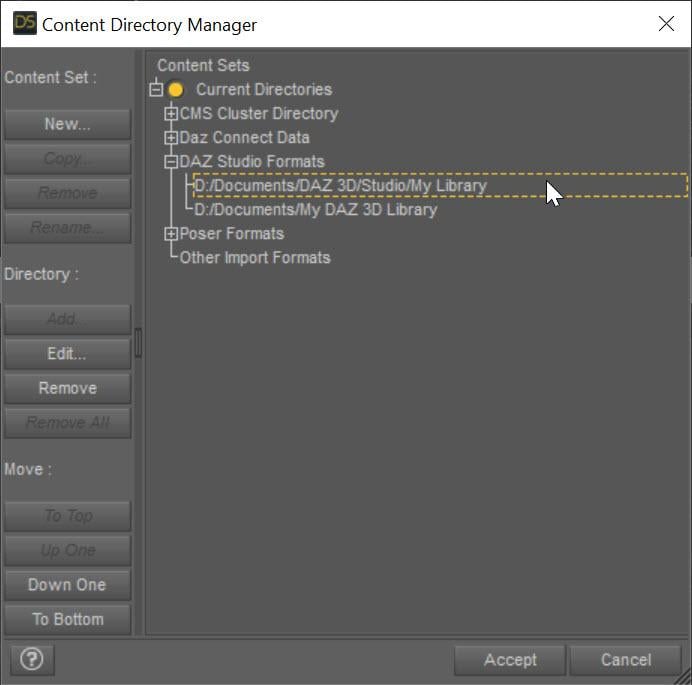
Do you mean the library directories? I have a few: E:\daz\lib, D:\daz-libs\lib2, D:\daz-libs\lib3, D:\daz-libs\lib4, D:\daz-libs\lib-r.
I appreciate the help.
I mean what the Content Directory Manager lists for each of its types:
 Freebie Challenge November 2025 - "The Winter Witch!" - Entries Thread
The Ice Summoner

KT Child G9 by katyee (morph)
https://www.renderosity.com/freestuff/items/98181/kt-child-g9
Breasts Pack for G9
https://www.renderhub.com/hyp-st/breasts-shape
Worker Cap and Hair for Genesis 8 Females (hair)
https://elleque.net/?p=8540
Anime Style Witch Hat for Poser 12 by kalebdaark
https://www.renderosity.com/freestuff/items/92935/anime-style-witch-hat-for-poser-12
String Camisole for G9 by yomiuri
https://www.renderosity.com/freestuff/items/99349/string-camisole-for-g9
Spring Dandelion Outfit for G9 by Arah (skirt)
https://www.renderosity.com/freestuff/items/95083/spring-dandelion-outfit-for-g9-dforce
Sexy Lingerie for G9 by yomiuri (arm cover)
https://www.renderosity.com/freestuff/items/98517/sexy-lingerie-for-g9Ice Palace by Chaosqueens-World
https://www.renderosity.com/freestuff/items/84069/ice-palace
Texture: Stylized Ice 001
https://3dtextures.me/2024/06/19/stylized-ice-001/
Texture: Snow 003
https://3dtextures.me/2018/03/01/snow-003/
Merpal_6165 by Nursoda
https://www.renderosity.com/freestuff/items/74631/merpal-6165
Winter In A Bottle by forester (trees)
https://www.renderosity.com/freestuff/items/94569/winter-in-a-bottle30 FREE ANIME SKY BACKGROUNDS - PACK 91
https://cubebrush.co/era7/products/g8pmnq/30-free-anime-sky-backgrounds-pack-91
Free Snow Photoshop Brushes 2
https://www.brusheezy.com/brushes/57761-free-snow-photoshop-brushes-2Sagan: A DAZ Studio to Blender Alembic ExporterTheMysteryIsThePoint said:
starslinger said:
So I've tried exporting basic Genesis 9 nothing more, I get error "Failed sanity check". This is what I found in logs:
2025-11-21 06:57:00 C:\Users\Owner\Documents\iwasserious\src\lib\sagan4\packaging\packaging.cpp:546 - Couldn't parse asset file d:/daz3d_content/data/Daz 3D/Genesis 9/Base/Morphs/Daz 3D/Base/body_bs_Navel_HD3.dhdm
2025-11-21 06:57:00 C:\Users\Owner\Documents\iwasserious\src\lib\sagan4\packaging\packaging.cpp:546 - Couldn't parse asset file d:/daz3d_content/data/Daz 3D/Genesis 9/Base/Morphs/Daz 3D/Base/head_bs_MouthRealism_HD3.dhdm
Also, could you add a quick export action, so something we can keybind into. Something that directly exports according to current config, so we don't have to open the panel, click dropdown then click export?
Thanks for putting in the time to help test.
This error was with gathering, right? These are DAZ Studio's HD morph files that are encoded in a binary format, and not JSON; definitely not something Sagan should be trying to parse. Good catch.
As for the hot key, I don't know how to do that but it seems like a pretty useful function. I put it on the TODO list.
Thanks again!
I am not sure what gathering is, however what I can say is that the first thing I did is save the scene, then I did the gathering thing to see what it is, it exported some daz files to a folder, then i tried running just export from the top of the dropdown menu, I did it in that order if it matters. So gathering didn't error, it was the export itself.
As for the hotkey it is very simple, in the workspace customization miscellaneous section where you put the sagan action that opens a window, add another action that directly exports thats equal to clicking the export button. Then we can just assign a key to it like we would for opening the panel.
Also could you elaborate on the gathering and what it's intended use would be?
Sagan: A DAZ Studio to Blender Alembic Exporterstarslinger said:
So I've tried exporting basic Genesis 9 nothing more, I get error "Failed sanity check". This is what I found in logs:
2025-11-21 06:57:00 C:\Users\Owner\Documents\iwasserious\src\lib\sagan4\packaging\packaging.cpp:546 - Couldn't parse asset file d:/daz3d_content/data/Daz 3D/Genesis 9/Base/Morphs/Daz 3D/Base/body_bs_Navel_HD3.dhdm
2025-11-21 06:57:00 C:\Users\Owner\Documents\iwasserious\src\lib\sagan4\packaging\packaging.cpp:546 - Couldn't parse asset file d:/daz3d_content/data/Daz 3D/Genesis 9/Base/Morphs/Daz 3D/Base/head_bs_MouthRealism_HD3.dhdm
Also, could you add a quick export action, so something we can keybind into. Something that directly exports according to current config, so we don't have to open the panel, click dropdown then click export?
Thanks for putting in the time to help test.
This error was with gathering, right? These are DAZ Studio's HD morph files that are encoded in a binary format, and not JSON; definitely not something Sagan should be trying to parse. Good catch.
As for the hot key, I don't know how to do that but it seems like a pretty useful function. I put it on the TODO list.
Thanks again!
[Released] Turbo Loader for Genesis 9 [Commercial]RiverSoft Art said:
fullerdb said:
I've been having trouble with Turbo Loader for G9. It used to work and I have many disabled morphs. When I search for new morphs, though, it stops working. The morph list updates, but, if I try to uncheck any item, Daz Studio crashes. When I try to click any button, like Save Config, nothing happens. I tried to click Execute and I saw this message in the log:
2025-11-17 23:14:20.101 [DEBUG] :: Delete Products: Genesis 2 Male Body Morphs,Genesis 2 Starter Essentials,Genesis 3 Developer Kit,Genesis 3 Female Body Morphs,Genesis 3 Female Expressions,Genesis 3 Female Head Morphs,Genesis 3 Male Body Morphs,Genesis 3 Male Expressions,Genesis 3 Male Head Morphs,Genesis 3 Starter Essentials,Genesis 8 Male Body Morphs,Genesis 8 Male Body Morphs Pre-Release PA Build,Genesis 8 Male Expressions,Genesis 8 Male Expressions Pre-Release PA Build,Genesis 8 Male Head Morphs,Genesis 8 Male Head Morphs Pre-Release PA Build,Genesis 8 Male Pre-Release PA Build,Genesis 8 Starter Essentials,Genesis 9 Body Shapes,Genesis 9 Expressions (DO NOT ENABLE),Genesis 9 Head Shapes (DO NOT ENABLE),Genesis 9 Starter Essentials,Genesis Starter Essentials,Mouth Realism
2025-11-17 23:14:20.272 [WARNING] :: \src\sdksource\general\dzscript.cpp(1192): Unhandled error while executing script.
2025-11-17 23:14:20.272 [WARNING] :: QScriptEngine::popContext() doesn't match with pushContext()When I reopen Turbo Loader, the list has not been updated.
I also saw, in the log, this message repeated a few times among the AddRelPathToListView entries:
2025-11-17 23:14:19.771 [INFO] :: Loaded image: TurboLoader Missing Product.jpg
I have tried to uninstall some products listed around the Missing Product warnings, but that made no difference.
Any suggestions about what the issue could be?
First, it has nothing to do with the TurboLoader Missing Product, so we can ignore that. What version of DS are you using? What version of TL? What are the directories in your Content Directory Manager?
DS version: 4.24.0.3
Turbo Loader version: 1.60. The problems manifest only in Manager for Genesis 9 Base, but I also have 8 & 8.1 Male and Female installed, as well as the Booster Utilities, in case that is relevant.
Do you mean the library directories? I have a few: E:\daz\lib, D:\daz-libs\lib2, D:\daz-libs\lib3, D:\daz-libs\lib4, D:\daz-libs\lib-r.
I appreciate the help.
I have eliminated all PA folders!Ron Knights said:
There are no conflicts. None whatsoever.
You are repeating this emphatically, but I'm not understanding your actual underlying point.
Are you asserting that you do not believe conflicts are possible, that you do not believe conflicts have happened, or do you just believe that the conflicts are rare?
Is your point that Daz should abandon this as their standard, or are you just pointing out that this is an option for other users?As has been pointed out, it is exceedingly common for characters to be published with the same name. Here's a list that barely starts to scratch the surface...
Two G9 Jennys:
https://www.daz3d.com/js-jenny-hd-for-genesis-9
https://www.daz3d.com/enn-jenny-for-genesis-9-feminineTwo G9 Ursulas:
https://www.daz3d.com/pn-ursula-for-genesis-9
https://www.daz3d.com/p3d-ursula-hd-for-genesis-9Two G9 Beatrices:
https://www.daz3d.com/fn-beatrice-hd-for-genesis-9
https://www.daz3d.com/beatrice-and-bartholemew-for-genesis-9Two G9 Nicoles:
https://www.daz3d.com/v3d-nicole-hd-for-genesis-9
https://www.daz3d.com/e3d-nicole-hd-for-genesis-9and five G8 Nicoles:
https://www.daz3d.com/nicole-for-genesis-3-and-8-female-s
https://www.daz3d.com/v3d-nicole-g8f
https://www.daz3d.com/feng-nicole-hd-for-genesis-81-female
https://www.daz3d.com/gdn-nicole
https://www.daz3d.com/sc-nicole-for-genesis-8-femaleThree G9 Zoes:
https://www.daz3d.com/lala-zoe-hd-for-genesis-9-feminine
https://www.daz3d.com/p3d-zoe-hd-for-genesis-9
https://www.daz3d.com/vo-zoe-hd-for-genesis-9Who also have three G8 Zoes to go with them:
https://www.daz3d.com/v3d-zoe-g8f-g8-1f
https://www.daz3d.com/meshgames-zoe-g8f-morph
https://www.daz3d.com/mbm-zoe-for-genesis-8-femaleTwo G9 Lins:
https://www.daz3d.com/pa-lin-for-genesis-9-feminine
https://www.daz3d.com/lala-lin-for-genesis-9-feminineThree G8 (and G8.1) Eves:
https://www.daz3d.com/hid-eve-for-genesis-81-female
https://www.daz3d.com/deepsea-eve-hd-for-genesis-through-genesis-8
https://www.daz3d.com/eve-enhanced-virtual-entity-hd-for-genesis-8-female
(I'm not counting https://www.daz3d.com/eve-3022-hd-morph-for-genesis-8-females as she has her presets called EVE 3022)Two G8 Celestes:
https://www.daz3d.com/celeste-for-teen-raven-8
https://www.daz3d.com/celeste-for-genesis-8-and-8-1-femaleTwo G8 Stephanies, despite one being a preexisting core character, and a name Daz has used for several generations of core character:
https://www.daz3d.com/mbm-stephanie-for-genesis-8-female
https://www.daz3d.com/stephanie-8Two G8 Taras (in this case, the PA character preceded the DO core character):
https://www.daz3d.com/tara-2-hd-for-victoria-7-victoria-8
https://www.daz3d.com/tara-8Two G8 Zaras:
https://www.daz3d.com/zara-g8f
https://www.daz3d.com/ly-zara-hd-for-genesis-8-femaleTwo G8 Jamies:
https://www.daz3d.com/krashwerks-jamie-for-genesis-8-female
https://www.daz3d.com/jasa-jamie-for-genesis-8-and-8-1-female... I think it's a fair assertion that there's a significant chance that any character with a common name has a significant chance of a duplicate, and even a few slightly more fanciful ones do too.
Without being differentiated by vendor specific initials or folders, these products would clash.
It is a major task formally resaving every file in a product under a new name (as I explained before, it is strictly incorrect to simply rename the files; while it normally works, they will have incorrect internal paths and that can on rare occasions cause a problem, so while it's mostly okay for end users to do, it is not legitimate for a vendor as a way to rename their product). Moreover, renaming the user accessible library files is only part of the situation. If a character's name is changed in the library, then the underlying data files probably need renaming as well. And renaming files like this can actually break user's scenes.
It would not be good practice for a vendor to rely on being able to rename products after release. This is something that should be reserved for emergency cases.As such, I could only see that a wild west system would result in a load of neo-spellings such that characters were called Daeyvide or Rhiebeckah.
Now, as far as real-life, I have a pet peeve about neo-spellings like this, because parents making their little snowflake have a unique name is going to cause the kid a metric butt-tonne of problems down the line. No-one is instinctively going to know how to spell their name, and then that's going to cause things like paperwork not matching exactly. Seriously, don't try to be clever with your kids' names.
In the Daz store, it just means no-one would be able to find any of them half the time. The store search has a long history of being very poor at fuzzy matching, and if you don't get a spelling exactly right (and sometimes even if you do), it won't find the product.In the end, if you're just pointing out that this is an option for other users, then fine... but I don't think you're going to convince Daz to conform to the standards you want, because they know that file clashes have been a problem in the past, and I don't think it's worth you trying to press the point to them.
[Released] Hat Check for Genesis 9 [Commercial]I don't know if I did something wrond while using it with Daz Studio 4.24 on Windows, and I'm not completely sure what cause the problem, but when I tried to use Hat Check with a cylinder (to create morphs for a headset) I encountered a strange behaviour.
If I'm using the slider to change the various scale, then type a numerical number, the scale of the visible cylinder can be reduced a lot and more importantly will be off compared to the one that will be used by the script.
At one point, I ended with the whole hairs being taken into account by the script: while what I saw was a cylinder with a diameter close to the headset ear covers, the script thought it was big enough to cover the whole head.
If feels like typing a numerical value will apply the percentage typed on the current size of the cylinder instead of applying it to the base size.
1. I used the slider to set the X and Z scale at 57.9%:
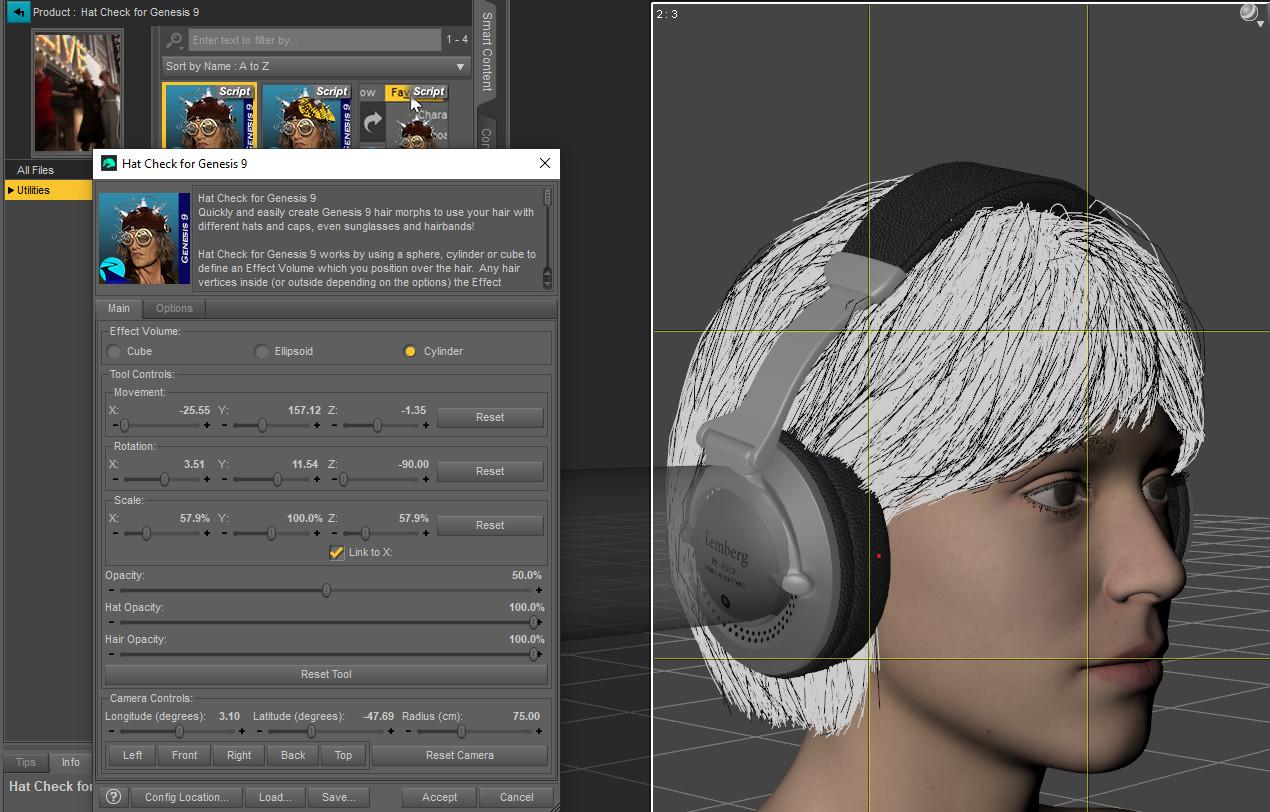
2. Then, later, I typed 60 and ended with a cylinder smaller that it was at 57.9% (sorry, I didn't think to place the camera in the same position as on the previous screenshot, but the cylinder is smaller):

The first time it happened (the one which ended with the script working on the whole hairs), reseting the value didn't reset the cylinder to it's original scale. I don't remember trying to type a numerical value over 100% to see if it would actually made the visible cylinder bigger though.
The good new is that I read the manual and will track all the morphs loaded on Genesis 9 Dev that are triggering the script to say the figure is not in a zero state

A more practical question: to create a morph for the ear covers of a headest, do you think it's best to do it one ear at a time or both at the same time, with a cylinder going from ear to the other?
Daz 3D is part of

Connect
DAZ Productions, Inc.
7533 S Center View Ct #4664
West Jordan, UT 84084Licensing Agreement | Terms of Service | Privacy Policy | EULA
© 2026 Daz Productions Inc. All Rights Reserved.