-
Genesis 8.1 / Victoria 8.1
Thyranq said:
Siciliano1969 said:
Thyranq said:
Finally got my first try with Victoria 8.1 - she's pretty great!
There's certain angles that I don't much care for the look of her, but once I get in and add some morphs and do the mix & match thing I'm sure I can find something I like. Skin settings look great (DEFINITE improvement in the eyes, particularly the corners, and the mouth/teeth look MUCH better)
The vellus hair that she comes with is good, but not spectacular. If I recall, there's a separate section of it for the mouth, and that's where my biggest issue with it is, so if that's on it's own it can easily be removed or just not added. I can't really say for sure yet, as I've only done the one render, but the mouth area seems a bit much with it, but that could just be a one off with the lighting that I used.
Lighting definitely needs a tweak for the new skin shader, or at least with Victoria 8.1's settings. I tried so many of my favourite light setups with her and found most of them to be very lackluster, from traditional 3 point setups with spotlights, to HDRI's, to mesh lights - the default load for the vast majority of them needed a lot of work. I eventually found a HDRI that looked like it had some promise, but I ended up tweaking just about every setting to get something I liked, then added in a backlight and fiddled around with that.
It looks great, once you get the right setup for it, which will take a bit of time. Even the promos for her, I find the lighting in a lot of them doesn't really do her justice. I'll have a bit of a dig in tonight and see what I really think once I get a few real tests going, as this one was just supposed be a quick set-up and render to see what she was like.
I ended up photoshopping out most of the vellus hair around her mouth, had to fix some pokethrough, and added some extra depth and vibrance, but so far overall I'm impressed and looking forward to seeing what comes in the future to really bring out the potential.
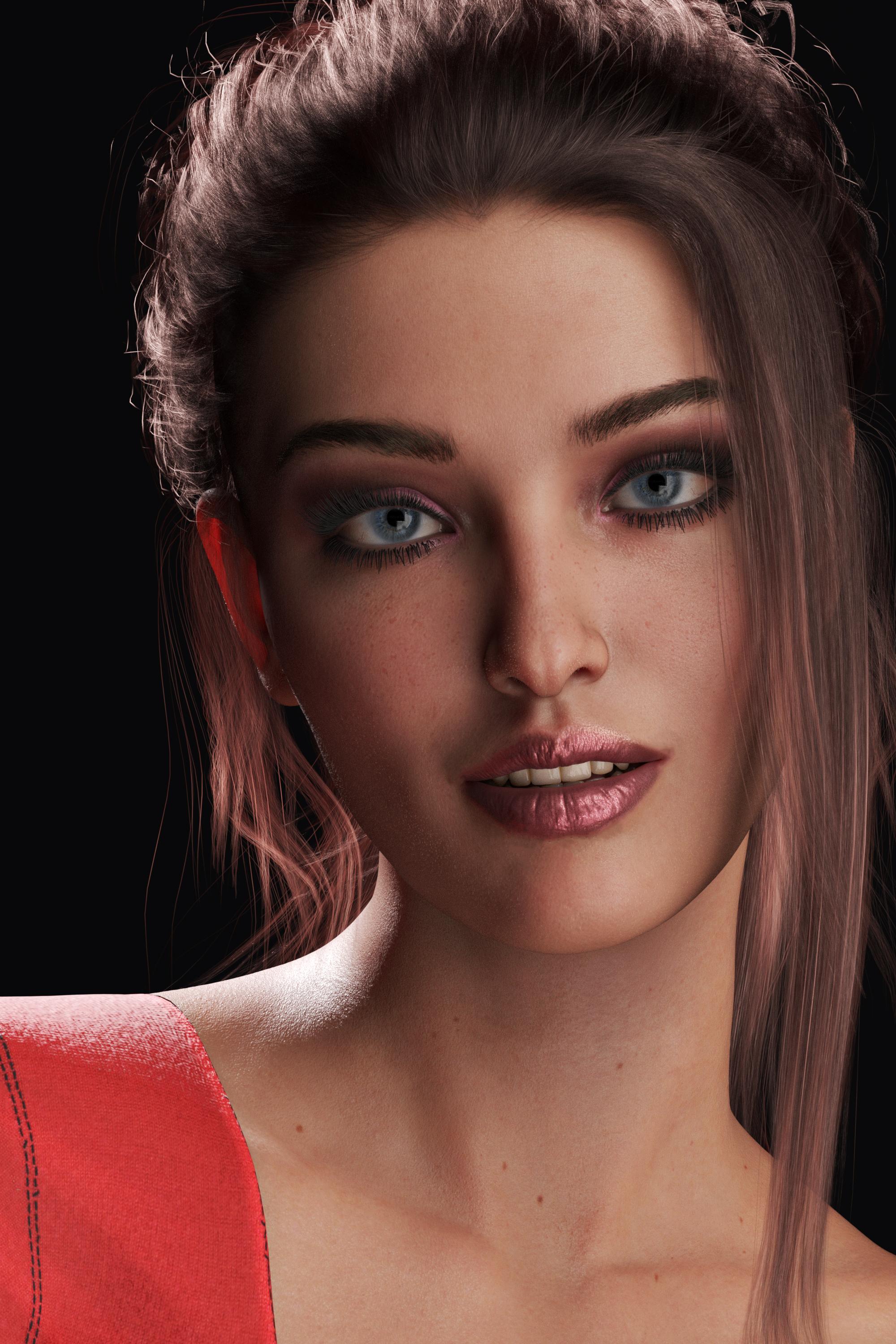
Excellent job! What hair is that? She is super beautiful!
Thanks a lot!
That would be Linda Ponytail Hair by outoftouch, and it's currently on sale! It's probably my favourite hair in terms of realism. If anything I'm probably guilty of using it TOO much lol
Excellent, I love that hair! Love to see more of her!
 Genesis 8.1 / Victoria 8.1
Siciliano1969 said:
Thyranq said:
Finally got my first try with Victoria 8.1 - she's pretty great!
There's certain angles that I don't much care for the look of her, but once I get in and add some morphs and do the mix & match thing I'm sure I can find something I like. Skin settings look great (DEFINITE improvement in the eyes, particularly the corners, and the mouth/teeth look MUCH better)
The vellus hair that she comes with is good, but not spectacular. If I recall, there's a separate section of it for the mouth, and that's where my biggest issue with it is, so if that's on it's own it can easily be removed or just not added. I can't really say for sure yet, as I've only done the one render, but the mouth area seems a bit much with it, but that could just be a one off with the lighting that I used.
Lighting definitely needs a tweak for the new skin shader, or at least with Victoria 8.1's settings. I tried so many of my favourite light setups with her and found most of them to be very lackluster, from traditional 3 point setups with spotlights, to HDRI's, to mesh lights - the default load for the vast majority of them needed a lot of work. I eventually found a HDRI that looked like it had some promise, but I ended up tweaking just about every setting to get something I liked, then added in a backlight and fiddled around with that.
It looks great, once you get the right setup for it, which will take a bit of time. Even the promos for her, I find the lighting in a lot of them doesn't really do her justice. I'll have a bit of a dig in tonight and see what I really think once I get a few real tests going, as this one was just supposed be a quick set-up and render to see what she was like.
I ended up photoshopping out most of the vellus hair around her mouth, had to fix some pokethrough, and added some extra depth and vibrance, but so far overall I'm impressed and looking forward to seeing what comes in the future to really bring out the potential.
Excellent job! What hair is that? She is super beautiful!
Thanks a lot!
That would be Linda Ponytail Hair by outoftouch, and it's currently on sale! It's probably my favourite hair in terms of realism. If anything I'm probably guilty of using it TOO much lol
G 8.1 vellus hair included or not in base character ?there doesn't seem to be good communication between marketing, sales and Website personal at DAZ

From the page alone one would expect it to be included with the base but it appears from what has been posted in that thread it is now with any paid 8.1characters starting with Victoria 8.1
initially it was only with that University bundle but not even listed as such.
its all very confusing
I myself was only curious about it not particularly interested in it otherwise as actually have two G8 characters one male one female with facial vellus hair I never use already

I do like male body hairs though but since future dforce ones will likely be G8.1M only when he rocks up I will probably pass on those too
the non dforced ones I have do, it doesn't need to fly around like a furry
 Genesis 8.1 / Victoria 8.1
Thyranq said:
Finally got my first try with Victoria 8.1 - she's pretty great!
There's certain angles that I don't much care for the look of her, but once I get in and add some morphs and do the mix & match thing I'm sure I can find something I like. Skin settings look great (DEFINITE improvement in the eyes, particularly the corners, and the mouth/teeth look MUCH better)
The vellus hair that she comes with is good, but not spectacular. If I recall, there's a separate section of it for the mouth, and that's where my biggest issue with it is, so if that's on it's own it can easily be removed or just not added. I can't really say for sure yet, as I've only done the one render, but the mouth area seems a bit much with it, but that could just be a one off with the lighting that I used.
Lighting definitely needs a tweak for the new skin shader, or at least with Victoria 8.1's settings. I tried so many of my favourite light setups with her and found most of them to be very lackluster, from traditional 3 point setups with spotlights, to HDRI's, to mesh lights - the default load for the vast majority of them needed a lot of work. I eventually found a HDRI that looked like it had some promise, but I ended up tweaking just about every setting to get something I liked, then added in a backlight and fiddled around with that.
It looks great, once you get the right setup for it, which will take a bit of time. Even the promos for her, I find the lighting in a lot of them doesn't really do her justice. I'll have a bit of a dig in tonight and see what I really think once I get a few real tests going, as this one was just supposed be a quick set-up and render to see what she was like.
I ended up photoshopping out most of the vellus hair around her mouth, had to fix some pokethrough, and added some extra depth and vibrance, but so far overall I'm impressed and looking forward to seeing what comes in the future to really bring out the potential.
Excellent job! What hair is that? She is super beautiful!
Show Us Your Iray Renders. Part VII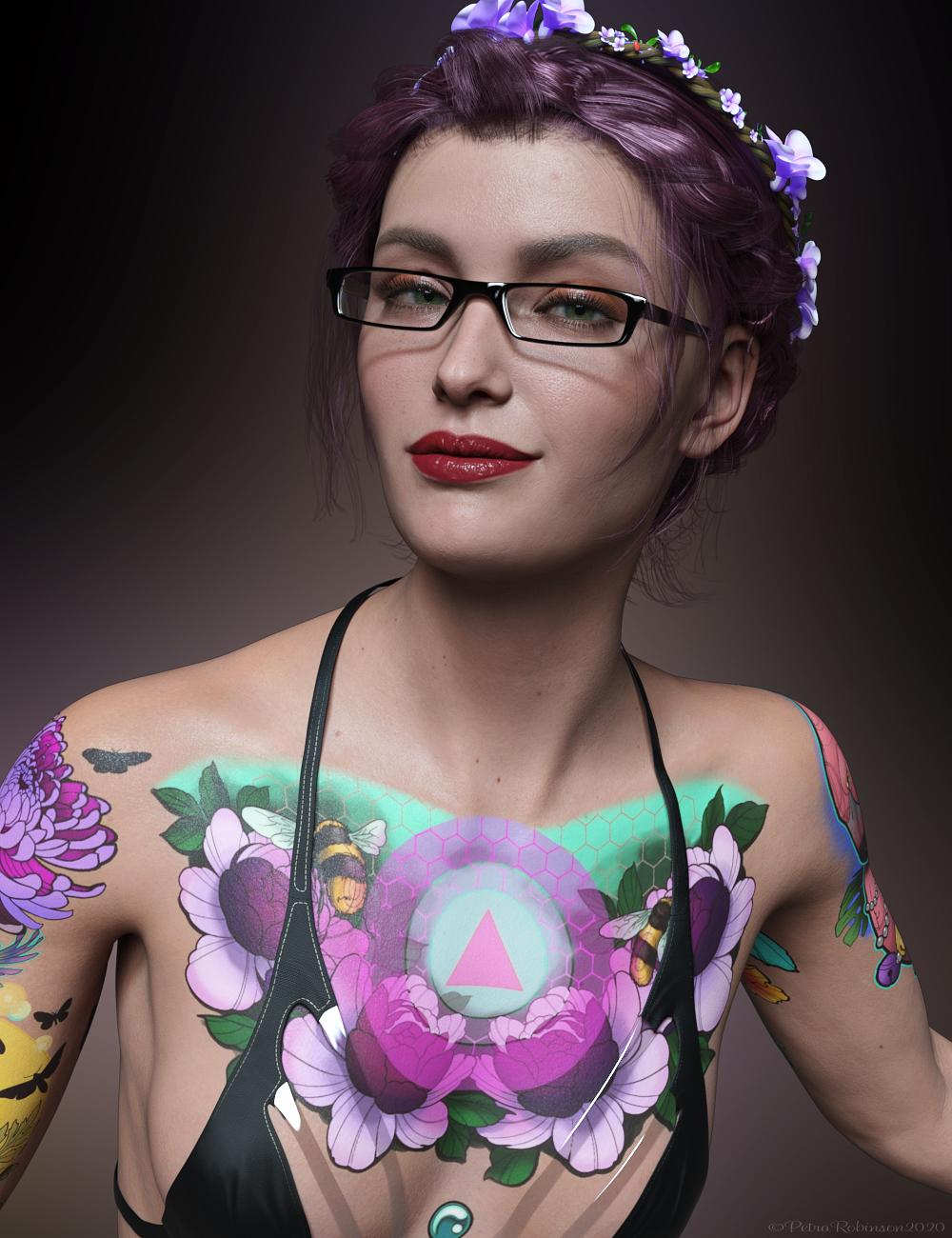 My first render with Victoria 8.1.Genesis 8.1 / Victoria 8.1
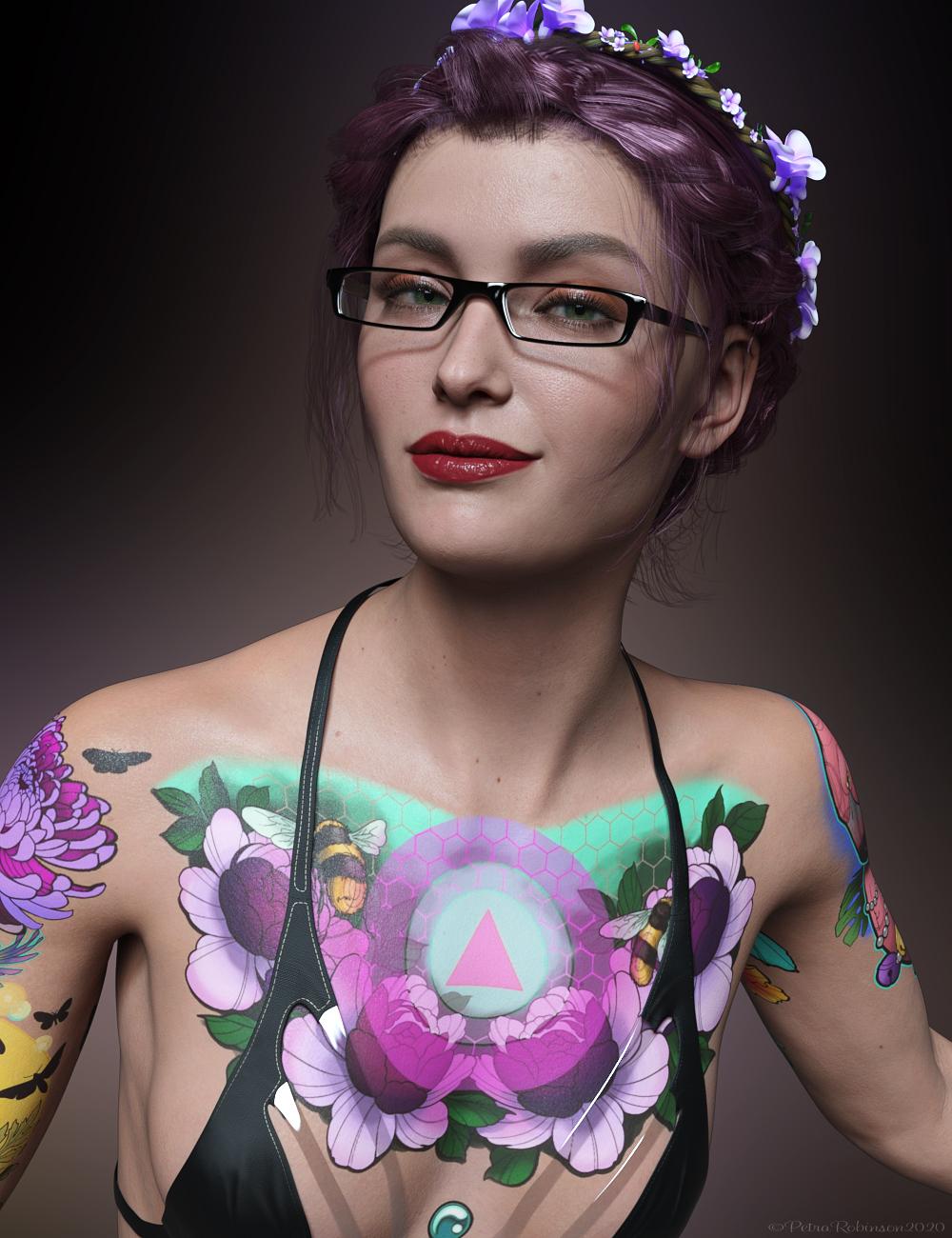 My first render with Victoria 8.1.
I think she is very cute.
Step-by-Step: Using the new PBR Skin on Genesis 8Because I like this shader so far and I want my characters to look fairly consistent, I'm already tackling how to do the Joker's skin because he's without fail the biggest pain. My designs for him are "I fell in a vat of corrosive chemicals" bleached and not goth makeup white, so his skin needs to retain a lot of detail, and it has to look white in all light. If you've ever picked up an Iray character whose skin looks ghostly white in promos, loading them under the default render settings usually reveals that it's heavily lighting dependent, and their actual skin color is anything from dark grey to brown. I made a comparison a while back to demonstrate to my fellow Batman nerds who were thinking of making their own figures:

As far as I can tell the uber shader is a chaos entity and takes the base map color as more of a suggestion than anything, so I got used to adjusting color settings to get the right shade. The PBR shader--being, I suppose, physically-based--inisists that you wake up on time every morning, eat a healthy breakfast, and put blood colors in your blood-under-the-skin slots. This is definitely more commonsensical and will probably work out better for me if I can nail it because of the kind of postwork I do. The skin looks really consistent across different lighting conditions, in terms of where the shadows define the face (thank you @melissastjames for the HDRI rec):

For this test I started with Victoria 8.1's default material preset and did a quick-and-dirty gamma adjustment to the diffuse maps in Photoshop. The translucency color is a slightly bluer version with a very low saturation. I can only get away with very light tweaks on the transmitted and SSS colors before it stops looking like flesh altogether, although this may be less of a concern if your character has not-red blood.
Also, this was a fun experiment--the first one is Nenana's normal Iray materials, the second is with the PBR shader applied out of the box (all settings except makeup and metallic flakes on, no adjustments), and the third is Victoria 8.1's material preset with Nenana's maps in the base color and translucency color channels (red for base, blue for translucency, pardon seam issues due to mixed UV maps). So it's definitely a thing that requires more tweaking to look right, in my experience, but when it works it looks super cool IMO.

(One interesting note is that Nenana looked pretty much the same with PBR applied from start to finish, no matter what I enabled; she didn't go through the usual "oh no she's transparent now" sequence I've had with characters who have more human-colored skin.)G 8.1 vellus hair included or not in base character ?ChangelingChick said:
Have y'all checked in your Products Library on the website by chance?
Yep
If I click the Victoria 8.1 entry on the left it shows up at the bottom of that page saying "This product is a bundle that contains the following product..."
It doesn't show as a separate item with it's own entry on the left though.The page for it doesn't load so can't manually download it, and it doesn't show up in my DIM.
I'll give it the weekend, if I don't see it my DIM come Monday after work, I'll put in a ticket.
Genesis: The Early YearsI was pretty excited when DAZ released the first Genesis almost 10 years ago, mostly because of the many versatile morphs and Autofit clothes.
This thread is dedicated to renders of Genesis figures and their hair and wardrobes. Please join me if you like and feel free to alter maps and textures.
Edit: Here are links to more threads dedicated to older figures:
V2/3 and M2/3 and children Appreciation Thread:
Aiko 3 and Hiro 3 Appreciation Thread:
https://www.daz3d.com/forums/discussion/8629/generation-3-aiko-and-hiro-appreciation-thread
Genesis 2 Appreciation Thread:
https://www.daz3d.com/forums/discussion/734706/genesis-2-appreciation-thread
 Genesis 8.1 / Victoria 8.1
Nathanomir wrote"
All right, I decided to give G8.1 a try, since I do like a healthy dose of realism in my flagship character.
I downloaded and installed Studio 4.15, Genesis 8 Starter Essentials (with the G8.1 stuff), and Victoria 8.1.
This is what happened. I can't show you since Galleries isn't working.
1. Loading Victoria 8.1 gave me a clay figure. DAZ 4.15 could not find the PBR skin, and I didn't know how to tell it to manually. That probably botched the whole experiment right there.
2. I loaded the V8.1 skins to the figure and got ... 3Delight shaders. Really? And the icon said they were for Iray.
3. I have no idea how the G8.1 skins look since DAZ wouldn't load them.
4. V8.1 did take my character's shaping and materials presets without many problems. V8.1 is set at 95% scaling for some reason, but that's an easy overrride. The Riversoft converted V7 for V8 face preset came in at 50% instead of 100%, and took some time to find, but not too bad.
5. The basic emotions and EJ expressions I use work, although she lost her signature brow arch.
6. The end result is G8F and G8.1F verisions of my character both look identical. So, why bother with the update?
G8.1 is probably great for animators (they have the patience to work with that PITA Power Pose) and maybe closeup portrait artists, but for action scene artists, there isn't anything here.
People always leave out, reloading the new Default Daz resources which is separate from the Genesis 8 Starter Essentials; you did that too, correct?"
Genesis 8.1 / Victoria 8.1All right, I decided to give G8.1 a try, since I do like a healthy dose of realism in my flagship character.
I downloaded and installed Studio 4.15, Genesis 8 Starter Essentials (with the G8.1 stuff), and Victoria 8.1.
This is what happened. I can't show you since Galleries isn't working.
1. Loading Victoria 8.1 gave me a clay figure. DAZ 4.15 could not find the PBR skin, and I didn't know how to tell it to manually. That probably botched the whole experiment right there.
2. I loaded the V8.1 skins to the figure and got ... 3Delight shaders. Really? And the icon said they were for Iray.
3. I have no idea how the G8.1 skins look since DAZ wouldn't load them.
4. V8.1 did take my character's shaping and materials presets without many problems. V8.1 is set at 95% scaling for some reason, but that's an easy overrride. The Riversoft converted V7 for V8 face preset came in at 50% instead of 100%, and took some time to find, but not too bad.
5. The basic emotions and EJ expressions I use work, although she lost her signature brow arch.
6. The end result is G8F and G8.1F verisions of my character both look identical. So, why bother with the update?
G8.1 is probably great for animators (they have the patience to work with that PITA Power Pose) and maybe closeup portrait artists, but for action scene artists, there isn't anything here.
Genesis 8.1 / Victoria 8.1Genesis 8.1 and Victoria 8.1 are gorgeous
Dammit... I wasn't going to buy into Genesis 8.1 but Victoria 8.1 is...FSMCDesigns said:
martin36 said:
I am wonder how Victoria 8.2 will look next month :)
LOL. I'm personally holding out for 8.5 myself. Thinking maybe 6-7 months out, LOL
I think it will be Genesis 10 next.
Genesis 3 was like Windows 7, Genesis 8 was like Windows 8, then Windows 8.1 so next we'll have Genesis 10. Although I think they will need to do something to Daz Studio first, it's limitations are causing speed issues already when you have a lot of content.
Steve.Genesis 8.1 / Victoria 8.1Finally got my first try with Victoria 8.1 - she's pretty great!
There's certain angles that I don't much care for the look of her, but once I get in and add some morphs and do the mix & match thing I'm sure I can find something I like. Skin settings look great (DEFINITE improvement in the eyes, particularly the corners, and the mouth/teeth look MUCH better)
The vellus hair that she comes with is good, but not spectacular. If I recall, there's a separate section of it for the mouth, and that's where my biggest issue with it is, so if that's on it's own it can easily be removed or just not added. I can't really say for sure yet, as I've only done the one render, but the mouth area seems a bit much with it, but that could just be a one off with the lighting that I used.
Lighting definitely needs a tweak for the new skin shader, or at least with Victoria 8.1's settings. I tried so many of my favourite light setups with her and found most of them to be very lackluster, from traditional 3 point setups with spotlights, to HDRI's, to mesh lights - the default load for the vast majority of them needed a lot of work. I eventually found a HDRI that looked like it had some promise, but I ended up tweaking just about every setting to get something I liked, then added in a backlight and fiddled around with that.
It looks great, once you get the right setup for it, which will take a bit of time. Even the promos for her, I find the lighting in a lot of them doesn't really do her justice. I'll have a bit of a dig in tonight and see what I really think once I get a few real tests going, as this one was just supposed be a quick set-up and render to see what she was like.
I ended up photoshopping out most of the vellus hair around her mouth, had to fix some pokethrough, and added some extra depth and vibrance, but so far overall I'm impressed and looking forward to seeing what comes in the future to really bring out the potential.
Wardrobe doesn't the CharactureYou didn't choose a Gen 8 wardrobe item. That only pops up when you pick any other generation (Victoria 1-4, Genesis to Genesis 3) besides the one the figure is (Genesis 8).
Click the link above for more info.
PS: This has been a option for years now by the way.
Genesis 8.1 / Victoria 8.1Victoria 8.1 is loaded very heavily. When you apply the characters prepared for Genesis 8 to V 8.1, much more realistic renderings emerge.
Realism is ultimately about anatomy. Anatomy also depends on the number of polygons. As the number of polygons increases, the screams of our graphics cards increase.
Ryzen 5 3600X with 6 core processor, 8 GB video card and 64 GB ram
still not everything happens at the speed I want. I went through Poser program to DazStudio program. I still miss Poser. I used Poser for a very long time. Why is DazStudio taking a long time to install V8.1?Genesis 8.1 Face ControlsAllenArt said:
MxD said:
Just picked up the Victoria 8.1 upgrade and started exploring. So far i am extremly unimpressed, the face controls seem to be a disaster in the making. As soon as you inadvertently touch the wong part of any control DAZ crashes instantly every time. It's just completly useless and utterly frustrating. For any one contemplating this UPGRADE??? i would suggest to wait a while and see if DAZ gets the controls working unless of course you enjoy constantly recreating what has allready been done or have the discipline to save after each and every adjustment you make.
THIS IS VERY DISAPPOINTING
So many people say it's been crashing on them and I haven't had one crash using it. What version of DS are you using? Public or beta?
This is a known issue if the bone is dragged directly, rather than through its gizmo, with IK enabled - it's because the controller figure is not set up in an IK-friendly way. The issue is understood and will be resolved in a future build of DS; for now try to avoid dragging on a bone, use sliders or the Viewport gizmo.
Genesis 8.1 / Victoria 8.1kimh said:
My first render of Victoria 8.1. I am pleased with her. Other then fixing a few poke-throughs and adjusting the lighting a little in Paintshop Pro this is her out of the box
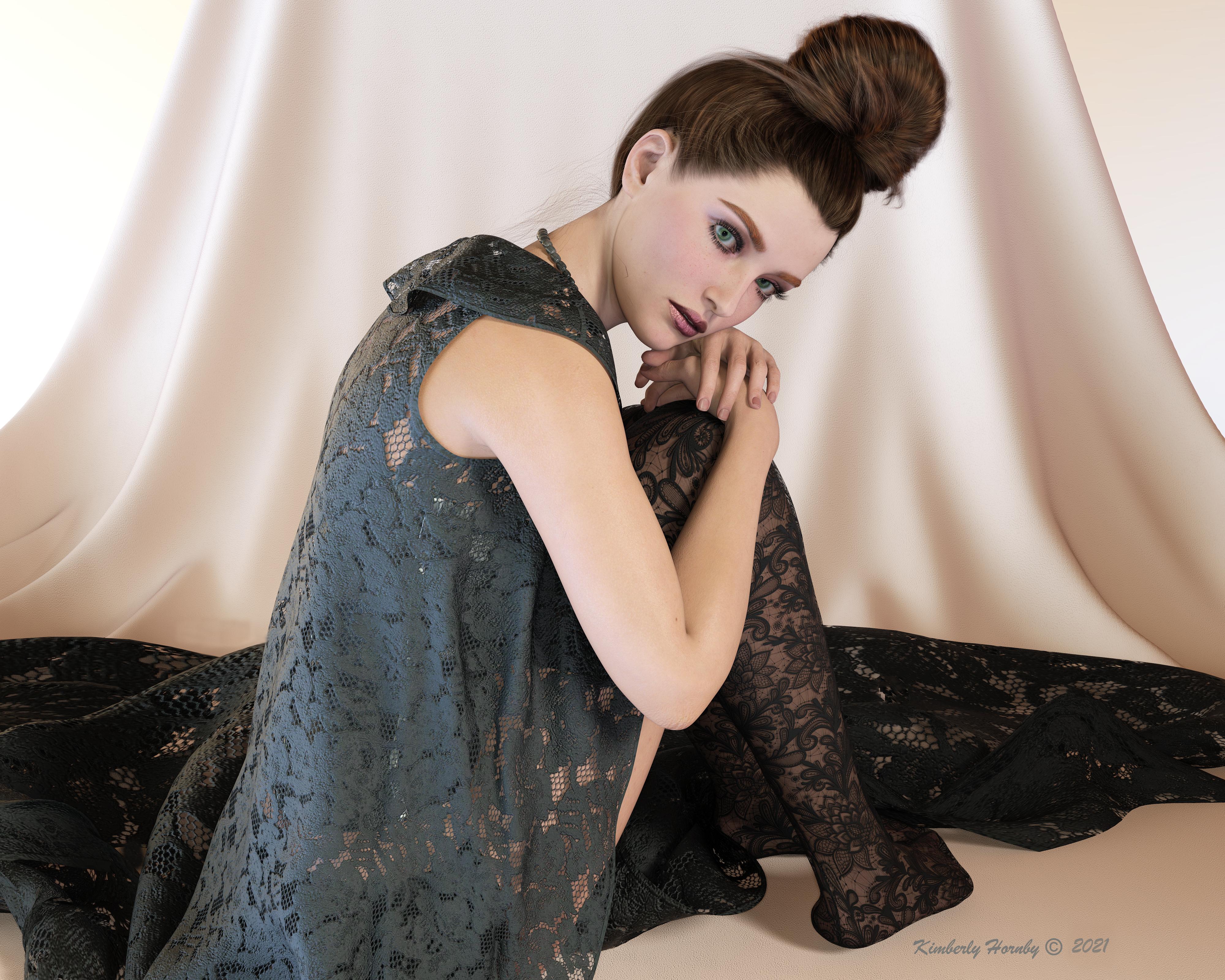
if i cover up her robotic face and awkward hand pose with my hand, then this looks photoreal. Her skin looks really good here in this light set up.
G 8.1 vellus hair included or not in base character ?Sven Dullah said:
scorpio said:
Anim said:
Sorry to create a new thread - I did not find a final answer in the G 8.1 thread.
Is the vellus hair included in the Genesis G 8.1 base female?
A: Yes, but not yet available in the starter essentials (you have to wait for an update of the package)
B. No, you have to buy Victoria 8.1 base package.
C. No, you have to buy the Victoria 8.1 University Bundle
Yea - just ignore the advertising.
Forgive them, for they know not what they are doing! (Sven 1:1)
Oh I think they know what they are doing very well.
Dammit... I wasn't going to buy into Genesis 8.1 but Victoria 8.1 is...martin36 said:
I am wonder how Victoria 8.2 will look next month :)
LOL. I'm personally holding out for 8.5 myself. Thinking maybe 6-7 months out, LOL
Daz 3D is part of

Connect
DAZ Productions, Inc.
7533 S Center View Ct #4664
West Jordan, UT 84084Licensing Agreement | Terms of Service | Privacy Policy | EULA
© 2026 Daz Productions Inc. All Rights Reserved.