-
BLENDER TO DAZ...
There is no 'simple" how to. The only way to get it into Daz Studio is to import as an OBJ, which means it will have no rigging and in order to pose it in Daz Studio, you will have to re-rig it from scratch since blender and DS use two different types of rigging. It will also be a stand alone chartacter which means it won't be able to use any Genesis assets like hair or clothing. The bridge AFAIK only goes from DS to Blender and not the other way around.
Converting a Figure into a Prop using Blender (or other program)?crosswind said:
RedSoul said:
When I convert the figure to a prop within Daz, all of the clothing and hair disappear and it's just the naked base model. How do I retain the clothes/hair?
You're not able to convert a figure with fitted wearables to a prop... all the sub-nodes will be removed unless you merge fitted figures geometry. Suggest you export / import obj...
Ah. I got it now. Thanks!
Converting a Figure into a Prop using Blender (or other program)?RedSoul said:
When I convert the figure to a prop within Daz, all of the clothing and hair disappear and it's just the naked base model. How do I retain the clothes/hair?
You're not able to convert a figure with fitted wearables to a prop... all the sub-nodes will be removed unless you merge fitted figures geometry. Suggest you export / import obj...
What Model Formats Will Open in DAZ Studio?Click on File->Import and in the drop down list in the bottom right hand corner "All Formats" .
Here you can see a list of all file types DS can import. A lot of them are poser formats, but there are others as well, but none of the ones you mentioned.
Repackaging morph assets used in presetsAre you going to be distributing the metadata? having a file in more than one product shouldn't be an issue - I am aware of Daz store products where PAs have reused certain utilities (e.g. RiverSoftArt code snippets or the Out of touch hair Blending materials) without major problems (and those are generally with Connect installs, when each product has its own copy of the file, if different products have different versions of the file - which i don't think would be a problem here).
Diffeomorphic - Problem when converting IK to FKPadone said:
1. For the simple rig once it's generated it stays as it is, so no you don't need to reimport.
3. No, you need to clear constraints as usual, unless you do a partial baking for some reason.
Thank you for your reply.
Also I have a question that is not related to the topic.
I noticed that in version 1.7.1 MHX and Rigify added a new option called "Keep DAZ Rig".I read this post:https://bitbucket.org/Diffeomorphic/import_daz/issues/1528/ (actually, I don't understand it at all).
Sorry, I'm a newbie to blender, I tried it myself, I really don't understand what it does, should I use it to make animations or import poses to it(I tried it causes an error.)?
Converting a Figure into a Prop using Blender (or other program)?Though I'm a blender user, for such a requirement, you don't need to export the figure (with pose, wearbles, etc.) to blender as there'll be more work.... You just export the figure with all wearables to an obj file and import it back to DS then it's a Prop. Next, you may use Decimator plugin to decrease polygons / resolution as needed. Like the example I attached down below. I tweak it to 40% but maybe you don't really need to decimate it as it depends on what wearable you use on it, etc...
Converting a Figure into a Prop using Blender (or other program)?Okay, I'm going to preface this by saying that I am a complete noob when it comes to Blender, even though I've had it on my PC for years.
So anyway, let's say that I wanted to take a figure (Genesis 3/8-based) and import them to Blender, and then use Blender to convert said figure into a single prop with less polygons--pose, clothes, hair, and material settings included--which is then brought back into DAZ to be used in a scene so that it'd hopefully have less overhead when it comes time to render.
What would be the step-by-step way to accomplish that? Or is there a better program out there that could pull this off?
Error when importing Daz model into Blender DiffeomorphicEverything has been setup correctly.
From Daz I export with Export To Blender.
No errors are reported.
In blender I go to "Daz Importer" and select the Easy Import DAZ then select the duf file.
The error I get is:
Mesh fitting set to DBZ (ISON).
Export "/Users/omarguzman/Documents/DAZ 3D/Studio/My Library/Scenes/frankie.dbz"
from Daz Studio to fit to dbz file.From the errors I see online the Diffeomorphic build is obsolete but I'm using the updated 1.7 (latest build)
Any idea what I'm doing wrong?
Combining Multiple Converted G8 Morphs in a G9 Figure: Help!It took me a while to get back to this, but it's not working for me.
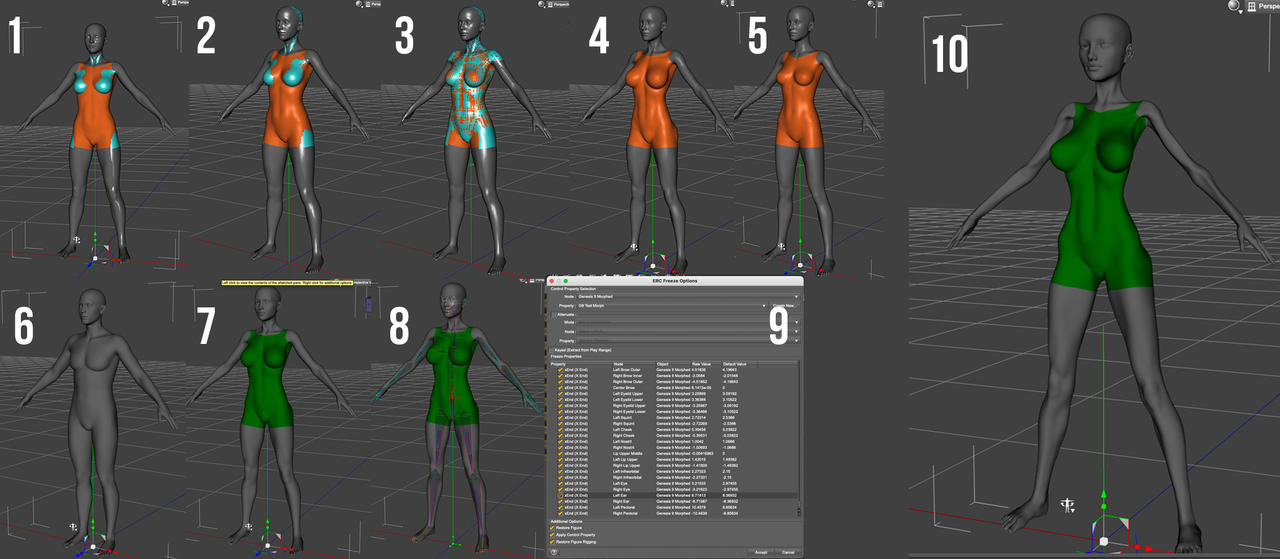
My steps:
- Load G8.1 Dev load and G9 Dev Load and apply the hidden G8F Clone to the G9 figure (G8 in cyan, G9 in orange)
- Export the G9 (with fit clone applied at base geometry level) as an obj file and import it back in
- Transfer G8 rigging to G9
- Dial in morph to G8, then export the G9 again
- Remove prior morph and dial in new one, export as new obj
- Load new G9 Dev figure
- Use Morph Loader Pro to add 1st morph
- Adjust the rigging to the figure
- Freeze the ERCs (and then repeat septs 7-9 for morph 2, not shown)
- Apply both morphs at 100%
The original morphs applied together on G8F work fine:
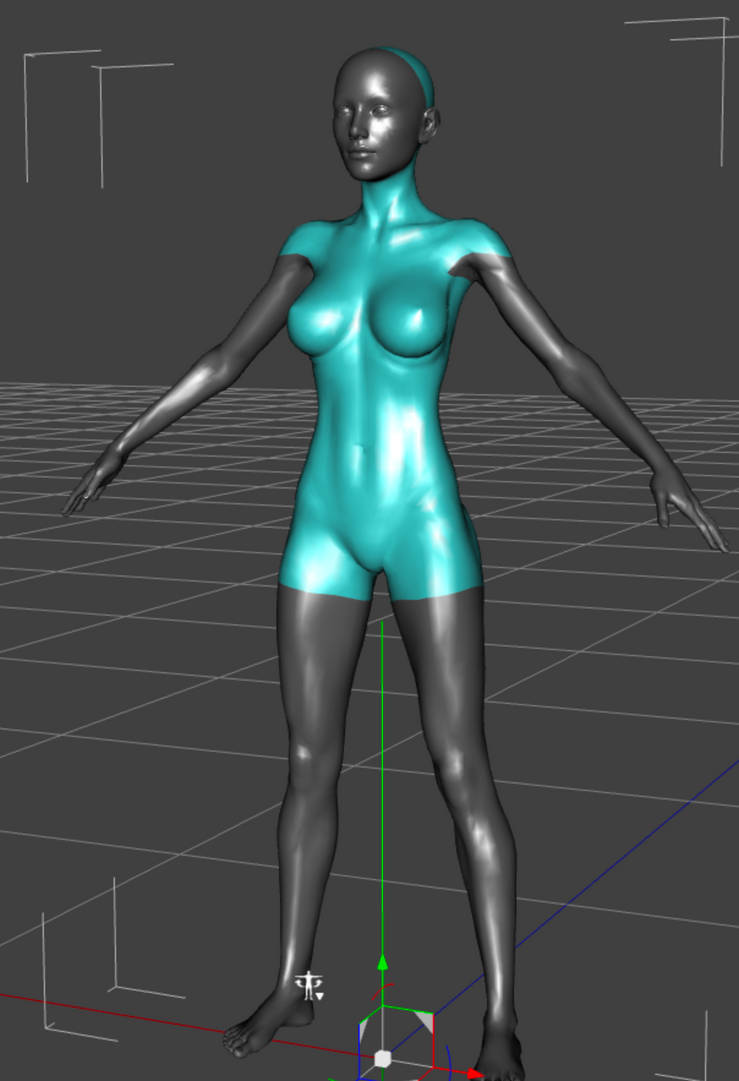
Both of the G9 morphs work perfectly by themselves, but the combination is unusable. I have no idea how to make this work. I tried importing the moprhs with Reverse Deformations set to (Yes), but I didn't see a way to set it to Reverse Deformations + Delta Only.
Insane long delay when saving a new scene@crosswind: Thanks for the suggestion!
@Padone:
YES - that was it! Nice!
I shut down CMS before saving to a new scene file, and DS was done saving it immediately.
Now I just have to figure out how to fix my CMS instances. I use a lot of custom categories and need CMS to quickly find assets.
I seem to remember that you can export that database and then re-import it. I wonder if that will get rid of any corruption issues that have caused those saving delays.But - at least now I know what's causing this issue! Thanks again!
Update:
OK, to wrap this up;
I've exported the db and reset it. After re-importing it, I got all my categories back AND it not longer hangs while saving a scene for the first time.
Never would have guessed that CMS might have been the issue here, so, thanks again, Padone!Insane long delay when saving a new sceneDoes it happen just on some specific scene or all of them ?
You may try with a clean content folder with just the G8 pack installed. If the issue goes away then it means it's some conflicting assets in your project, or you may also have nested content folders.
It may also be that for some reason it takes a long time to update the metadata, that would explain why it happens only the first time you save. If you use manual install instead of dim then there's no metadata to update. Also you may avoid "smart" content and use the content librray directly. Or you can stop the CMS and/or reset the database and see if it does the trick, the daz assets will work just fine without the CMS apart that you have to autofit by hand.
Daz To Blender Bridge ... doesn't work?You used DTB to have this imported in Blender ?! It seems a pure FBX import... Yes, DTB works but strongly recommend Diffeomorphic Daz Importer.
dForce Prop Necktiefelis said:
Succees...
Here it is as an obj.
Import it into DS in scale 10000%.
Thank you so much! Very kind of you.
dForce Prop NecktieSuccees...
Here it is as an obj.
Import it into DS in scale 10000%.
Genesis 9 clothing questions & answersDiomede said:
Hmm. Just brainstorming. Can you isolate it in obj form and reimport it? At least you would not have to remke it. Thinking of something like exporting as obj, selecting its shader domain, inverting, and deleting. Then import it. Or perhaps essentially the same process using the Hexagon bridge? Or, is this reimporting-OBJ approach what you are trying to avoid?
I did try exporting it from the G8 shirt and going through the same conversion process I did with the shirt geometry, but the verticies were not in identical places on the converted shirt and the converted addon geometry, so I think that means that it will not work as a dForce dynamic addon.
Genesis 9 clothing questions & answersHmm. Just brainstorming. Can you isolate it in obj form and reimport it? At least you would not have to remke it. Thinking of something like exporting as obj, selecting its shader domain, inverting, and deleting. Then import it. Or perhaps essentially the same process using the Hexagon bridge? Or, is this reimporting-OBJ approach what you are trying to avoid?
Tafi Announces Revolutionary Text-to-3D Character EngineCategorization is one specific task that networks typically perform in many cases, and this appears to be a great way to leverage the metadata for DAZ assets. Combine this with the ability to understand text prompts (another thing that networks are already trained to do) and it seems like a perfect fit to me.
The video I watched didn't look like it was promising anything that isn't achievable - just a useful application of the technology. It's like a layer of abstraction above dial spinning. Personally, I'm excited to try it out and signed up for the beta.
- Greg
Local User empty - can anyone help?Hello all,
I recently had to install a new drive and transfer all my Daz studio content onto the E drive because my C was nearly full. It was a bit of a head ache. I had to uninstall and reinstall twice, but I finally got everything transfered onto the new drive and working. The only problem is now I can see anything in the Local User tab!
I have a number of custom characters that I shaped and saved as scenes and then I would use the Local User tab in smart content to import my characters into scenes because I'm making a comic book. But now the Local user tab no longer shows up under saved files. I have to search for it in All Products. And when I select Local User, I see nothing. I have made several test scenes and saved them to see if it would populate the Local User tab in smart content and nothing happens.
I have all my original characters saved as scenes in another duplicate file that I can use to load the characters, but now I have no way of loading more than one into a scene together. I really need the Local User tab to do what it did before and show my all my save files.
Does anyone know how to fix this?
I've got 2 images for reference but can't get them to upload to daz because that's just the way my day is going lol. Here is the link: https://www.deviantart.com/mademoiselle3dart/art/Local-User-001-966111754 ; and: https://www.deviantart.com/mademoiselle3dart/art/Local-User-002-966112421
Any advice appreciate! Thanks in advance.
AIUTO...CHI CONOSCE L’ITALIANO? PARTE TREDICI@Crios Si con altre versioni non va che il plugin di import non è aggiornatoDaz 3D is part of

Connect
DAZ Productions, Inc.
7533 S Center View Ct #4664
West Jordan, UT 84084Licensing Agreement | Terms of Service | Privacy Policy | EULA
© 2026 Daz Productions Inc. All Rights Reserved.