-
Diffeomorphic DAZ Importer version 1.6.0 released
Hi! I have some problems with genesis 9 pose imorting. It doesnt imort poses properly. It kind a impors but pose is wrong and it goes weirdly. Should I tick the option called ''optimise pose for IK in'' in import menu?
Something wrong with geometry editor's merge graph?I'm a Blender user and using Diffeomorph Daz Importer (DDI) as well. However, if you just use Blender to make morph, fixing pJCMs, etc., suggest not use DDI but just standard OBJ export / import.
I post a merged one (G8M figure + DK Anatomy), flawless...
 Diffeomorphic: Bendy Buttocks & Swollen Thighs (Vice Versa)
From your picture it seems you didn't import jcms, or not all of them. Most figures provide additional jcms that you can load with "import baked correctives", or as custom morphs. If you load jcms in rest pose you should get the same deformations as daz studio. Then to adjust deformations that you don't like you may try with a smooth modifier masked by a vertex group to only affect the parts you want.
Another way is to use a corrective smooth instead of jcms, eventually prebending the figure. Works fine enough if you don't need too much realism.
https://diffeomorphic.blogspot.com/2023/01/using-pre-bended-figures-also-works-for.html
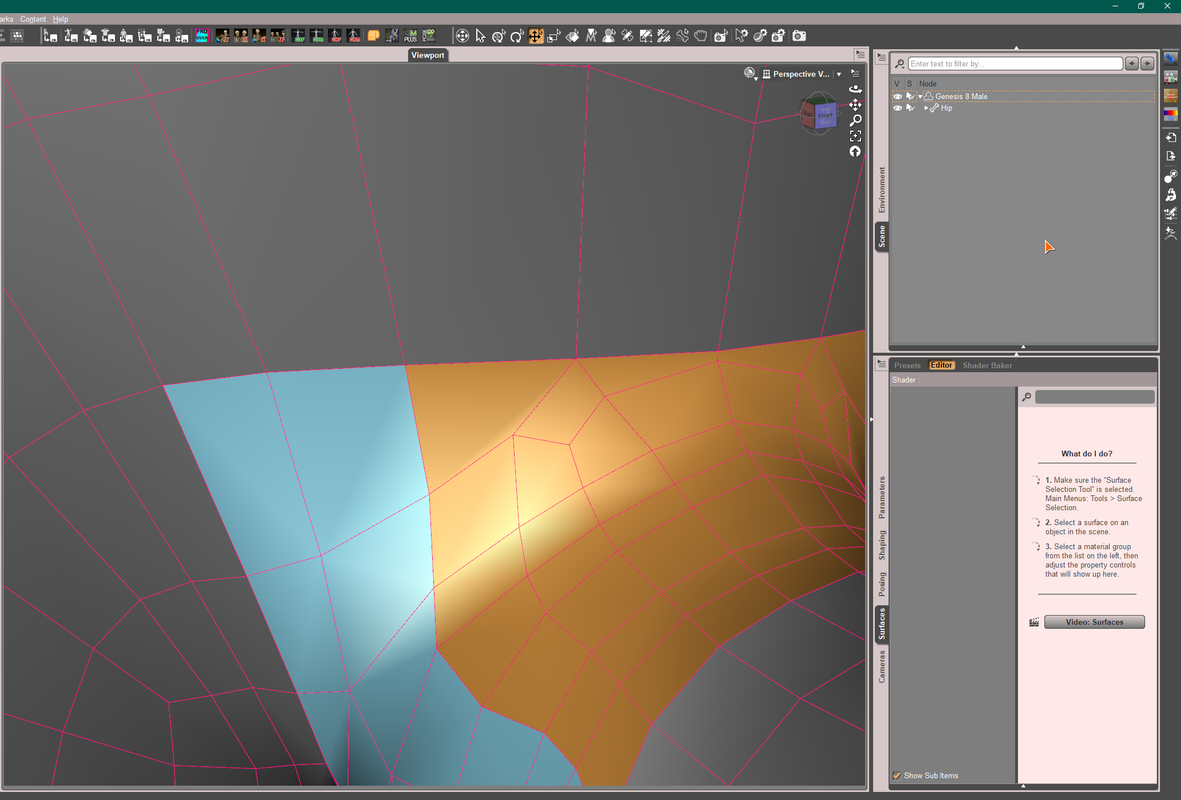
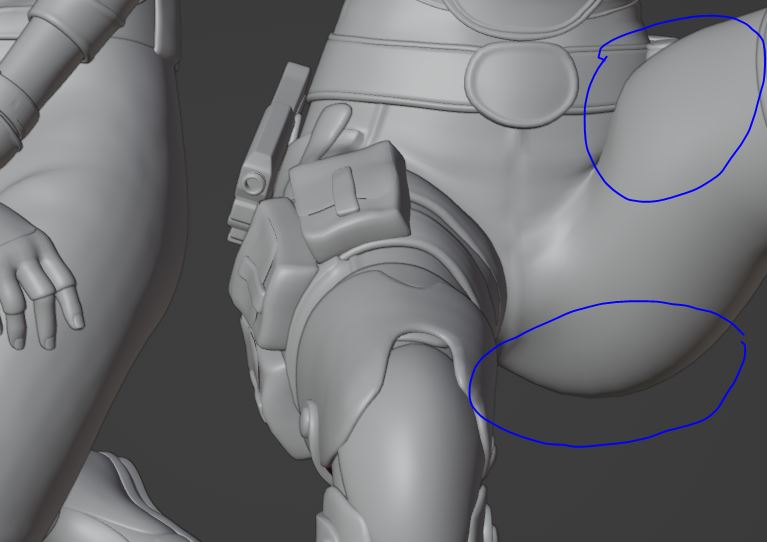
Diffeomorphic: Bendy Buttocks & Swollen Thighs (Vice Versa)I've noted distortions in the thigh and buttocks areas of the G8.1 I import from Daz via Diffeomorphic. With exteme poses, the mesh becomes bloated. In the Daz store I've seen Bend Control for Genesis 8 Female(s) which I believe remedies the problem in Daz. Can anyone suggest any quick and easy technique to do the same in Blender?
Cheers!
 Struggling with Weight Mapping for rigged ArtStation clothing [solved]
If go for resimulation in MD with a G8F default A-Pose , more or less is as above steps by using Morph Target. Then export the garment to obj, import into DAZ for fitting to the figure with Transfer Utility (no need to set Current / Reverse Deformations in this way) . Lots of tutorials could be found on youtube.
Well since you're familiar with Blender, you may export the garment (in Pic 2) to blender, smooth the armpits with smoothing brush, then export to obj file. In DS, use Edit - Figure -Geometry - Update Base Geometry to change the Vertex Positions with the obj file. Done ~ Most of the time I myselft go for this way as it's faster...
~ I simulated your case as below, the mechanism is almost the same ~
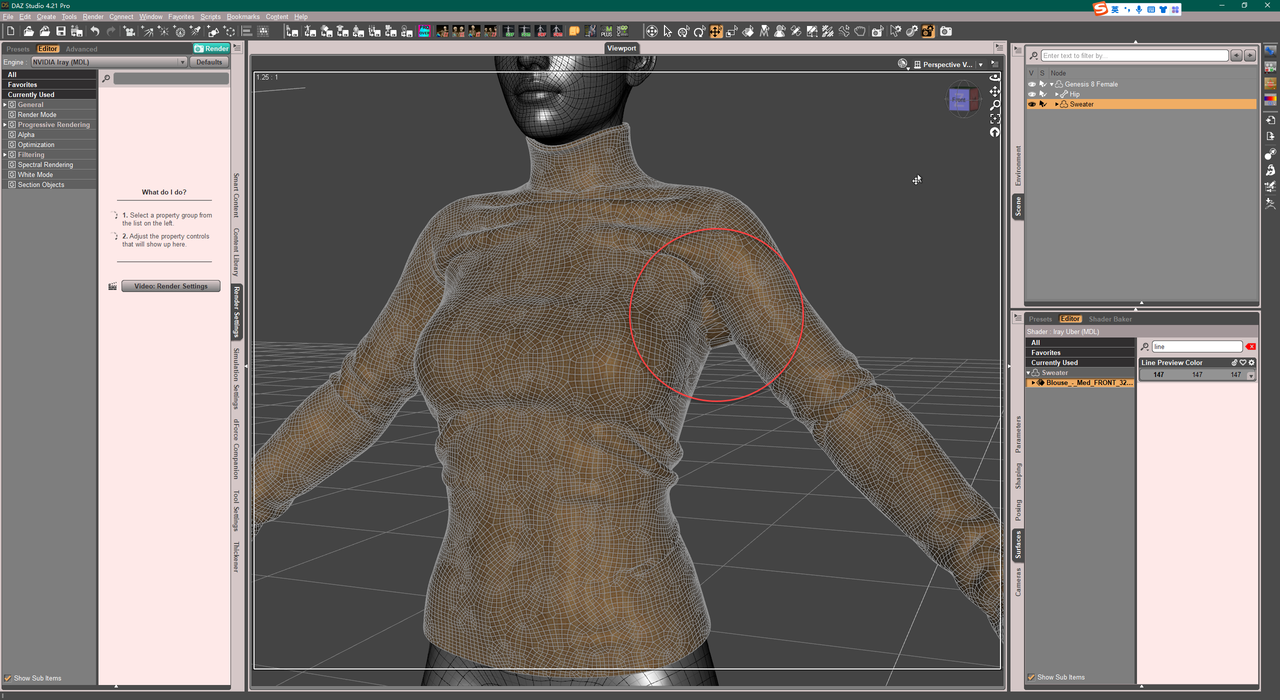
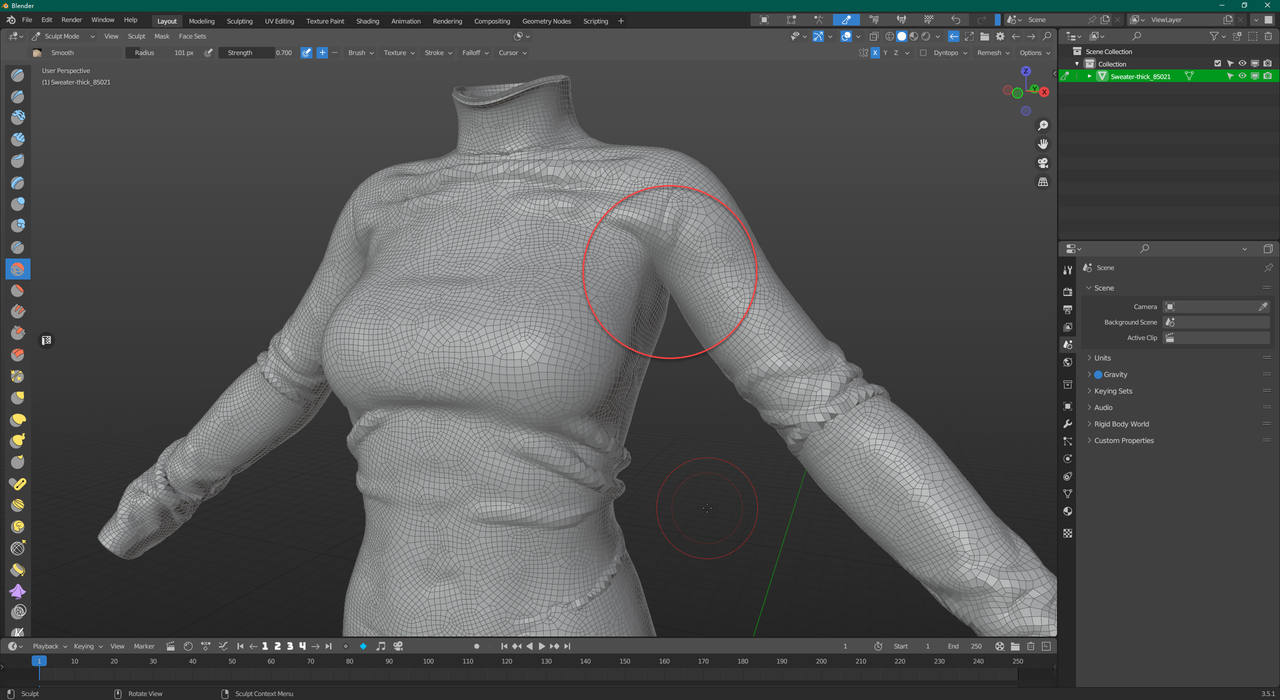
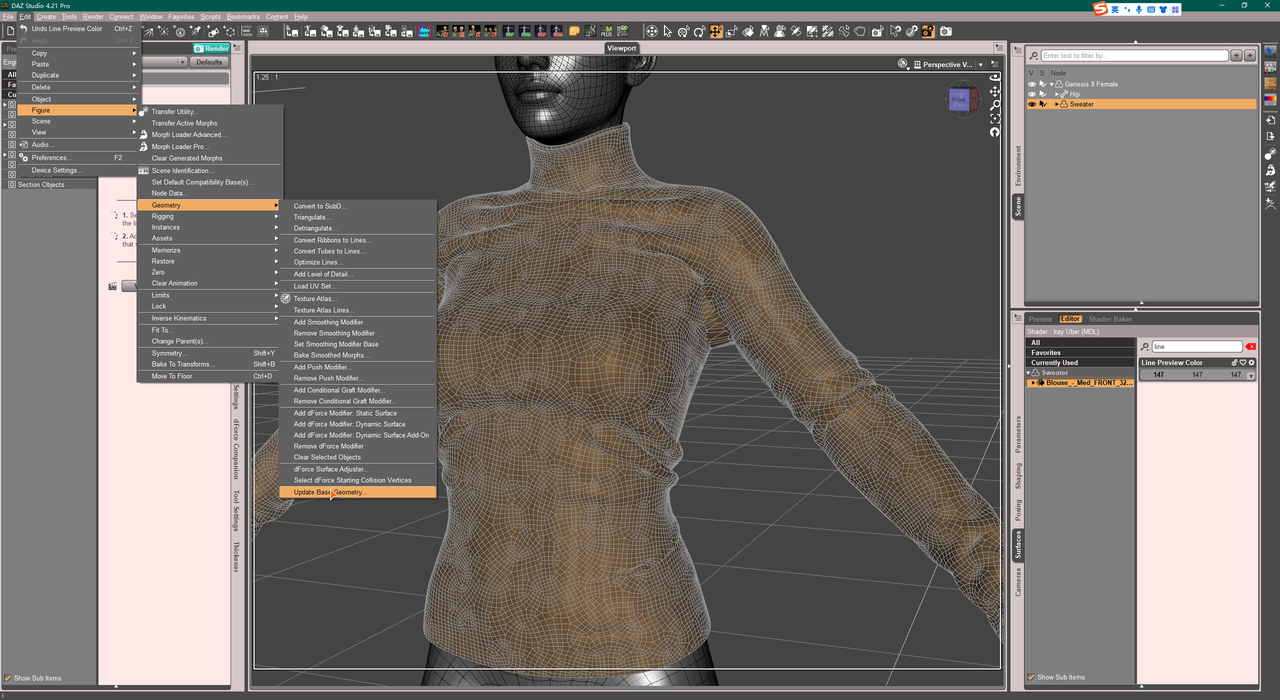
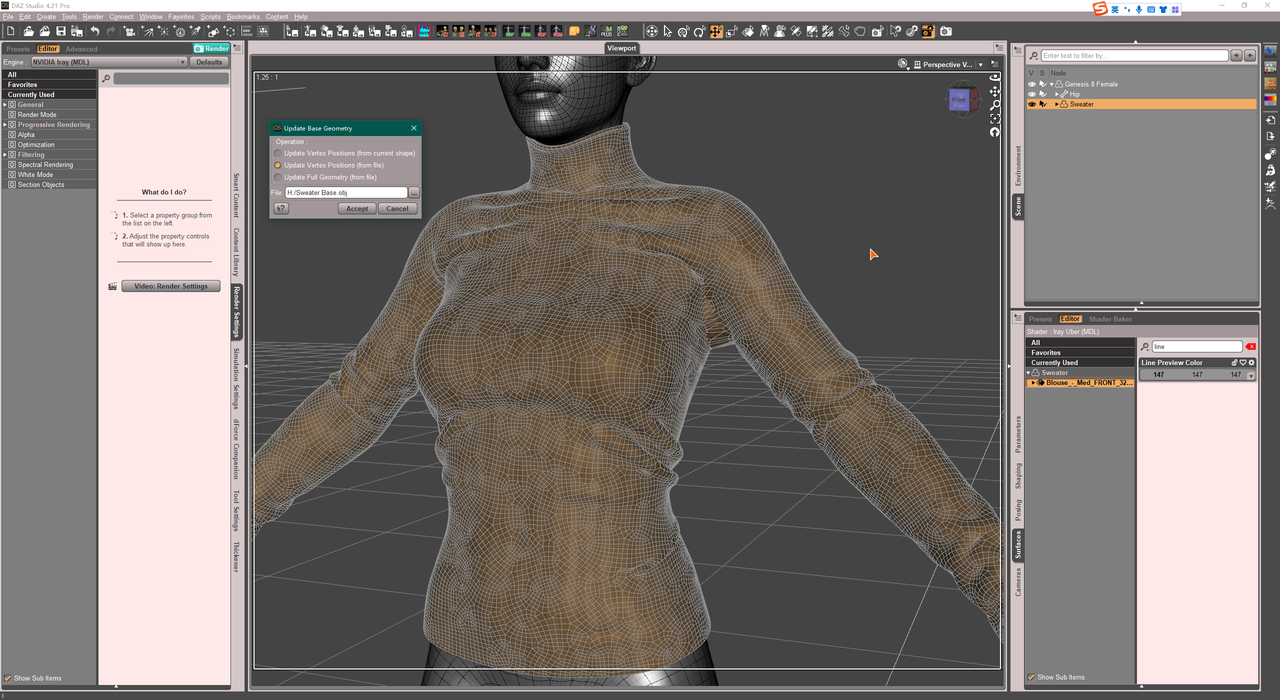
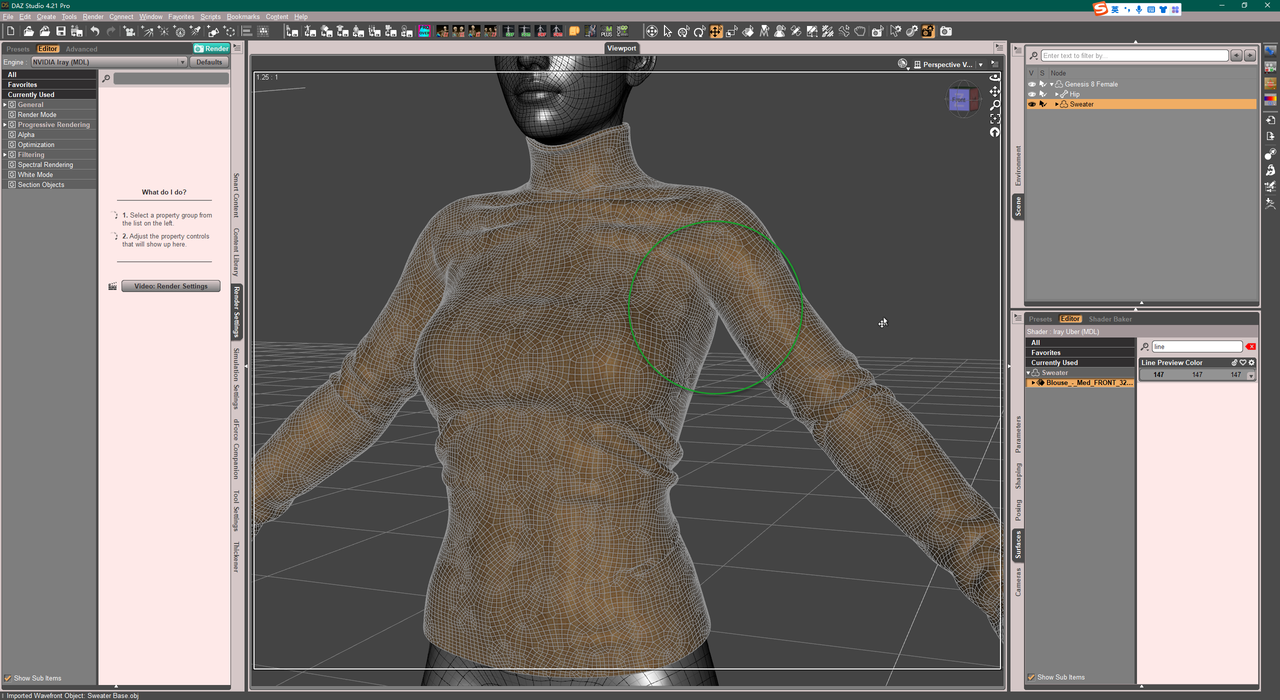
PS: You better do Quadrangulate in MD...
Struggling with Weight Mapping for rigged ArtStation clothing [solved]arstropica said:
For whatever reason, the suit does not retain its basic shape when simulated in marvelous designer with a correctly posed avatar. But TBH, having just gotten MD, I am not very knowledgeable with that software so I am not sure if this is due to a flaw in the clothing design, or if it's something else.
MD is a very basic program and easy to brush up on how to use it in a few hours.
It will probably give a petter result to just simulate in MD to the correct default pose than do anything else to get it into that pose.
The fille you purchased presumably comes with a .zprj file.
- Open that in MD.
- Select all pattern pieces in the 2D Viewport
- in the pattern properties window, put the Particle Density to something high, like 10 or 15 or 20 to start with. Having Particle Density too low is hard to simulate as too high poly. Highpoly (low Particle Density) should only be used for final simulation.
- Import/add obj of avatar with the pose that lines up with garment.
- Simulate so garment settles on avatar.
- Resimulate to correct Daz default pose by either
- (1) load avatar as morph target (your transition is likely small, so this is probably good option)
- (2) delete current avatar and load a short pose transition animation in alembic format (check out Sagan alembic exporter on forums for a good animation exporter for Daz Studio), recording the simulation in the Animation window
- Resimulate again so garment settles on new pose
- Change Particle Density of all pattern pieces again to desired poly count, maybe something like Particle Density = 10. Possibly need to go lower to something like PD = 5 for some parts. Do final sim.
- Select all pattern pieces and click Remesh, if you want better topology
- Select all pattern pieces and export as obj selected.
Important concepts when exportting:
- Fabric names become new Surfaces in Daz (anything after a space is ignored so a fabric named Fabric 1 and Fabric 2 will collapse into single Surface called Fabric)
- Checking Unified Coordinates will use the UV Mapping from the UV Editor window, while leaving it unchecked will use any repeating textures set up in MD
Environment prop (car) morph issue - affecting pose controlsOK I seem to have solved the problem of the doors opening and closing. I did this by setting all the pose control values to zero before I exported to .obj. I re-imported my morph and now the doors don't open and close when I adjust the morph percentage. The only thing left are the wheels. When I adjust the value of my morph, the wheels scale in size. The higher I set my morph, the smaller they get. There is a pose control that can be used to spin the wheels, and it's default value (clean import into a new scene) is -100.0%. I set this to zero as well before I exported, but the problem still remains.
Animation messed after importingAre you attempting this in DAZ 4.21? There has been major changes to the FBX import/export code.
no thumbnail, not able to load content *FIXED*Richard Haseltine said:
PerttiA said:
crosswind said:
Alghough this ' Syntax error - expected '{' or '[' ' can be rarely encountered, I really found one in a recent product 'JS Micah HD for Genesis 9'... However, after checking Stylish Attic, I found neither of these two files (Stylish Attic Bed.duf and Stylish Attic Comfort Chair.duf) has such an error.
The files that DAZ Connect installs are encrypted on the server and decrypted on the fly when installing, so one cannot see problems someone else has.
In order to get DIM installed files working, one has to uninstall the DAZ Connect installed ones first and maybe refresh the metadata in the database (And stop logging into DS forever). When that is done, one can install the product with DIM.
If the files are there but not decrypted it is OK to open the ZIP and copy the folders from the Content folder into the /data/cloud/1_SKU/ folder (where SKU is the five digit product code).
I'll try that now. Thanks. I take it, if I run across this with the "young wizard" content, the same appies? Find the SKU folder and put it in there?
EDIT: That did it! Thanks for the heads up, now I know how to fix that issue in the future! much appreciate it.
Btw. In the "available" tab. I have it set for "sort by order date: recent first" it...never shows that I always have to go scrolling through to find what I just ordered(I have not installed everything I have on my content list as some of it I just dont need right now, like g2 stuff) I have tried to put it to "oldest first" close it, re-open it and reset it to "recent first" and close it, open it and...nope. It still is all hilly piggly. Right now. according to my list I just purchased the g2 contentno thumbnail, not able to load content *FIXED*PerttiA said:
crosswind said:
Alghough this ' Syntax error - expected '{' or '[' ' can be rarely encountered, I really found one in a recent product 'JS Micah HD for Genesis 9'... However, after checking Stylish Attic, I found neither of these two files (Stylish Attic Bed.duf and Stylish Attic Comfort Chair.duf) has such an error.
The files that DAZ Connect installs are encrypted on the server and decrypted on the fly when installing, so one cannot see problems someone else has.
In order to get DIM installed files working, one has to uninstall the DAZ Connect installed ones first and maybe refresh the metadata in the database (And stop logging into DS forever). When that is done, one can install the product with DIM.
If the files are there but not decrypted it is OK to open the ZIP and copy the folders from the Content folder into the /data/cloud/1_SKU/ folder (where SKU is the five digit product code).
no thumbnail, not able to load content *FIXED*crosswind said:
Alghough this ' Syntax error - expected '{' or '[' ' can be rarely encountered, I really found one in a recent product 'JS Micah HD for Genesis 9'... However, after checking Stylish Attic, I found neither of these two files (Stylish Attic Bed.duf and Stylish Attic Comfort Chair.duf) has such an error.
The files that DAZ Connect installs are encrypted on the server and decrypted on the fly when installing, so one cannot see problems someone else has.
In order to get DIM installed files working, one has to uninstall the DAZ Connect installed ones first and maybe refresh the metadata in the database (And stop logging into DS forever). When that is done, one can install the product with DIM.
no thumbnail, not able to load content *FIXED*Hi,
I purchased the "stylish attic" when it was on sale abit back. Today I went to try and use one of the chairs.
But I noticed when I tried to go to "smart content" There is no thumbails for the items. I uninstalled it, and reinstalled it(via the smart content) But that didnt fix it.
Every time I try and load an item, it gives an error and tells me to look at the log.
Which shows.
2023-06-24 23:44:08.392 [INFO] :: Begin asset load (merge): /Environments/Architecture/Tesla3DCorp/Stylish Attic/Zero Props/Stylish Attic Comfort Chair.duf
2023-06-24 23:44:08.392 [INFO] :: E:/MY DAZ/Applications/Data/DAZ 3D/My DAZ 3D Library/Applications/Data/DAZ 3D/My DAZ 3D Library/data/cloud/1_53193/environments/architecture/tesla3dcorp/stylish attic/zero props/stylish attic comfort chair.duf (1,1): Syntax error - expected '{' or '['
2023-06-24 23:44:08.392 [INFO] :: Error loading asset: E:/MY DAZ/Applications/Data/DAZ 3D/My DAZ 3D Library/Applications/Data/DAZ 3D/My DAZ 3D Library/data/cloud/1_53193/environments/architecture/tesla3dcorp/stylish attic/zero props/stylish attic comfort chair.duf
2023-06-24 23:44:08.392 [INFO] :: Operation failed
2023-06-24 23:44:08.498 [INFO] :: Unlocking viewport redraw...
2023-06-24 23:44:08.498 [INFO] :: Viewport redraw unlocked.
2023-06-24 23:44:21.514 [WARNING] :: ..\..\..\..\..\src\sdksource\cloud\dzcloudtasknotifier.cpp(178): Could not adjust thumbnail path from support path: /Runtime/Support/DAZ_3D_7877_Michael_4_Base_Puppeteer_StudioCF.dsx
2023-06-24 23:44:29.290 [INFO] :: Updated metadata for 0 of 1 items.
2023-06-24 23:44:30.676 [INFO] :: Updated metadata for 1 of 2 items.
2023-06-24 23:44:30.835 [WARNING] :: ..\..\..\..\..\src\sdksource\cloud\dzcloudtasknotifier.cpp(660): sync completed successfully, 2 items succeeded, 0 items failed.
2023-06-24 23:44:30.835 [INFO] :: Metadata update succeeded.
2023-06-24 23:44:41.801 [INFO] :: "Stylish Attic": Uninstall Succeeded.
2023-06-24 23:44:44.556 [INFO] :: Beginning Install of "Stylish Attic"
2023-06-24 23:46:04.225 [INFO] :: "Stylish Attic": Install Succeeded.
2023-06-24 23:46:13.257 [INFO] :: Prepare asset load (merge): /Environments/Architecture/Tesla3DCorp/Stylish Attic/Zero Props/Stylish Attic Bed.duf
2023-06-24 23:46:13.257 [INFO] :: Locking viewport redraw...
2023-06-24 23:46:13.257 [INFO] :: Viewport redraw locked.
2023-06-24 23:46:13.321 [INFO] :: Native format content directories: 2
2023-06-24 23:46:13.321 [INFO] :: Poser format content directories: 3
2023-06-24 23:46:13.321 [INFO] :: Other import format content directories: 2
2023-06-24 23:46:13.321 [INFO] :: Begin asset load (merge): /Environments/Architecture/Tesla3DCorp/Stylish Attic/Zero Props/Stylish Attic Bed.duf
2023-06-24 23:46:13.322 [INFO] :: E:/MY DAZ/Applications/Data/DAZ 3D/My DAZ 3D Library/Applications/Data/DAZ 3D/My DAZ 3D Library/data/cloud/1_53193/environments/architecture/tesla3dcorp/stylish attic/zero props/stylish attic bed.duf (1,1): Syntax error - expected '{' or '['
2023-06-24 23:46:13.322 [INFO] :: Error loading asset: E:/MY DAZ/Applications/Data/DAZ 3D/My DAZ 3D Library/Applications/Data/DAZ 3D/My DAZ 3D Library/data/cloud/1_53193/environments/architecture/tesla3dcorp/stylish attic/zero props/stylish attic bed.duf
2023-06-24 23:46:13.322 [INFO] :: Operation failed
2023-06-24 23:46:13.418 [INFO] :: Unlocking viewport redraw...
2023-06-24 23:46:13.418 [INFO] :: Viewport redraw unlocked.I know the "young wizard" clothing for gen 8 doesnt show Icon(thumbnails) Either but I havent tried it as yet.
Any way to delete keyframes after dforce?feldarzt said:
Feels like this thing: https://www.daz3d.com/dforce2morph can help you.
Or a cheaper but more work-consuming way of "save your object as a .obj file, then import it with Morph Creator Pro".What's Morph Creator Pro, never heard of it before, not in the Daz store and nothing showed up in google search.
Coloring BookWhat would be the best way to turn Daz renders into coloring pages? I tried Line Render 9000, but it doesn't give me very satisfying results. I also tried some postwork, filters etc also. There has been a toon render for Daz, but it doesn't seem to be available anymore. Maybe there is a way to import the Daz scene into another program, to get better results? Any suggestions?
Location for Mattymanx product (llamaghini)There're metadata file along with the product. If you wanna locate the folder, go to Poser Format - Figures - Mattymanx - Llamaghini.. If you wanna see it in Smart Content, go to Smart Content to search: Llamaghini. If you can't see it in Smart Content ,re-import metatdata of 17129
Any way to delete keyframes after dforce?Creating a morph for the 'simulated result' of the garment on the last frame would be the only way. If your figure's transform values are not 0,0,0, dforce2morph won't work for you.
Just go the last frame, export the garment (simulated) to obj file with Base Resolution, then import it as a delta morph with Morph Loader Pro. Save a Wearable preset then.. this morph will be working for the current pose of the figure in other scene.
Any way to delete keyframes after dforce?Feels like this thing: https://www.daz3d.com/dforce2morph can help you.
Or a cheaper but more work-consuming way of "save your object as a .obj file, then import it with Morph Creator Pro".lou_harper said:
I did a timeline deforce of a figure wearing a robe. Now I want to merge the result into a larger scene, but can't without dragging a whole timeline with it. Is there any way to get rid of the timeline and keep only the final result of it?
[RELEASED!!!] Dynamic Character Animation in Daz Studio [commercial]I go way beyond that - even though that is Huge in making animation really fun and easy in Daz Studio.
No more having to export to something else. Stay right in Studio where Everything we're using is compatible and really works!
Making Partial aniBlocks has also been essential to my animation workflow. I might get a bit wordy here because I really love how this works. Just hang in there with me, okay?
Since I started with Daz 3d my first purchases went toward aniMate 2+ and the content I needed to get started animating. Sure, I was getting deep into Carrara, but that all led me here - and I still love Carrara!
Since then I've been really happy with the professional job that these motion capture artists did with their aniBlock packs. I'm suprised to discover that I still don't own all of them, but I will soon enough. GoFigure's are really great and have a different 'feel' than Posermocap, now Reisormocap, whose motions have really wonderful cause and effect motions in the arms. BoneTech 3D hit the scene and I really like those too.
So when it finally came to the point where we could make our own animated pose data using software and a couple of X-Box cameras, I really wanted to get into that. But then I thought about it some more while looking at my already large collection of aniBlocks, and determined that I can pretty much make anything I need with what I had.
While I was animating in Carrara, I used Daz Studio and aniMate to create custom 'partial' aniBlocks that only controlled certain parts of the body. Carrara has a built-in NLE (non-linear animation) Clip system that I used for this sort of thing a Lot. Then I decided to make actual aniBlocks with these changes already worked in. You see, the real-time feedback in Studio when working with aniMate 2 is Fantastic - much easier to see what was going on than in Carrara.
So to combine various motions with each other, I started creating these partial aniBlocks for just the arms and head, just the hip and legs, etc., and combine them using Sub Tracks in aniMate 2, bake to the timeline, work through the transitions much the way I do in this course, but back then I didn't have these awesome Pose Control dials beyond the default MorphForms, and then create a new aniBlock that I would import into Carrara.
I lost all of that stuff several years ago during a complete PC melt-down. But not the knowledge I gained. So it was actually a blessing. Building new from scratch after the testing process has been really well worked is very satisfying. But it turned into a whole new Learning curve when Linday had to go and make the Perfect Hair for Rosie!
So that put me on a determined drive to learn how to animate in Daz Studio, which was right around the time you and I started our first chats. I was met then with all of that "You can't. Use Diffeomorphic to send to Blender." So I actually did that, which I think you saw. A lot of other comments, like use Maya and/or Houdini... What? I'm just Me! I'm not spending that! Nor do I relish the time it will take me to learn to use it... I have to work too!
Although I did get pretty far in Blender, which really is a fun way to do it, if you like that, I realized that I was feeling like a school kid learning to spell again when I tried making hair that I like - which I never successfully did. Not Rosie hair!
Oh... wait. I have Carrara and I love animating in that... why am I torturing myself?
Right... that hair! That isn't for Blender either. Come on, Dartanbeck, you know Daz Studio's tools pretty well. You can figure out how to make this work!
Staying in aniMate 2 longer, using it's amazing tools was where I started. But I was encountering the same issues that always drives me into the graph editor, which feels unfriendly in Studio. So little we can do - so few animation-helping tools in that workflow.
Still, I was using aniBlocks with partial aniBlocks to make entirely different actions - all using that professional motion capture that I like so much!
Like combining the arms and head movements from Angry Hands over a walk cycle... pretty cool.
Adding my Custom Pose Dials took that to an entirely higher plane!!!
Pre- Genesis 9outrider42 said:
I just want to point out that I am not against breaking some compatibility if the improvements are big enough. I just don't think the improvements are big enough to warrant breaking all compatibility. At least with Genesis 3 to 8 it was easier to make the move, even though G8 was not a big jump at all. (And I still question why we needed G8 in the first place, but whatever.)
What I am saying is that if we must break things, then the new thing must be better in every possible way. Not just for PAs. From my perspective, I do not see it enough in Genesis 9 to make me want to leave the almost 6 years of content I created for Genesis 8. That is what a new model has to do, it has to really wow me to get me on board. I do make some models as well, sculpting and texturing some things. I still don't see the big deal. G9 has more polys, yet I cannot sculpt a belly button. Perhaps that sounds ridiculous to some of you, but it is still a fact. To get the best details you still need a normal or displacement map, unless you are a PA with access to the HD import. So the extra polygons are like a very small bone for a hungry dog.
That's another thing. Genesis 8 ran 5 full years. The first 3 Genesis generations combine for just 6. Genesis 8 nearly matches the first 3 put together. Things are different than they were in 2017. There are more people using Daz Studio, and more people actually know what Daz and Genesis are today. Technology has rapidly advanced, and even though the GPU market went crazy for a while, a 3060 nearly doubles a 1080ti performance in Iray, the fastest GPU in 2017, for half the price and 100+ fewer Watts of power. 3D rendering has never been more accessible to the public.
What improvements do I want? I want skin that deforms like skin. I want posing to have an AI element that knows how muscles move as a bone moves and how expressions distort the face, so you don't need a thousand JCMs clogging up the runtime. These things are hard, but that would be real innovation. Epic's Metahuman is freaking wild, and while it is very limited in what you can do with them, it gives us a taste of what can be done. Until Daz can give us that kind of innovation, they need to just tweak Genesis instead of breaking all forms of compatibility.
Oh, I am so with you on every single point.
 Diffeomorphic worked! Now, how do I...?
To integrate the information by Donald.
1. Diffeomorphic will import all the daz cameras with their main properties, so you can use them in blender. To switch cameras there's: scene properties > scene > camera.
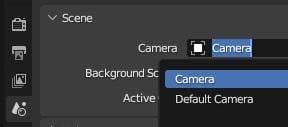
2. Go to the shader editor, there you can modify all the shader properties as you like.
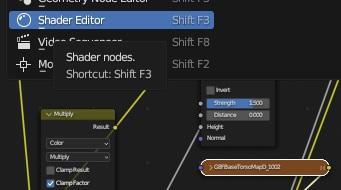
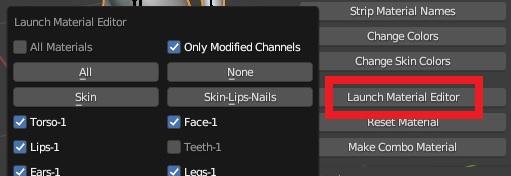
3. I agree with Donald that this is a weak point in blender and oddly never addressed by the blender developers. Creating and editing material groups is not supported. That's why Thomas implemented a set of tools for materials, so you can load/save palettes that's the same as material presets in daz studio, and also edit material groups as you do in daz studio. You may want to read the material sections in the docs for a set of available tools.
https://bitbucket.org/Diffeomorphic/import_daz/wiki/Setup/Materials/Launch Material Editor
https://bitbucket.org/Diffeomorphic/import_daz/wiki/Advanced/Materials/Make Palette
4. Diffeomorphic will import the daz environment, including the HDRI and background images. Be sure that you have it enabled: global settings > world > always.
https://bitbucket.org/Diffeomorphic/import_daz/wiki/Global/Materials
Daz 3D is part of

Connect
DAZ Productions, Inc.
7533 S Center View Ct #4664
West Jordan, UT 84084Licensing Agreement | Terms of Service | Privacy Policy | EULA
© 2026 Daz Productions Inc. All Rights Reserved.