-
Adding a character shape parameter to clothing
marble said:
crosswind said:
marble said:
Ok, thanks although I think I need to dig a little deeper into your answer as there are bits beyond my present understanding.
The character morph I have is the result of a playing with numerous morph dials so I don't have a single parameter to dial-in to change to that shape. I believe it is possible to do that - is that what you are suggesting? I saved my character as a scene subset.
By "fix the FBM" do you mean the process of exporting to Blender and using the Edit/Sculp tools to make it fit nicely? I then re-import it to the original garment using Morph Loader Pro. That creates a morph but I am not sure that's the same thing as FBM, is it (I wish I had a better understanding of these DAZ terms - what on earth is a pJCM??).
Thanks also for the tip on the free scripts - I'll take a look. It was already on my to-do list to scroll through all the Casual scripts too - I bet he has one.
OK, I got it ~ there's no single dial of Full Body Morph (FBM) and Full Head Morph (FHM) of your character, but still you will find lots of 'morph dials' in the hidden properties of the clothing, and most of them shoud be Partial Body Morphs (PBMs) or Partial Head Morphs (PHMs, esp. on headwear etc.) or sth. like those...
In fact you may create single dials of FBMs and FHMs with ERC Freeze for you characters, just like what PAs (who make character products) do. That turns out to be a pretty optimal and clean way, and you still can save it as a Scene Subset or a Character preset.As for 'Fix the FBM' and the process you mentioned, yes, that was what I meant. If you have a single dial of FBM of your character, there'll be a hidden FBM on the clothing, you export the figure + clothing as obj to Blender, sculpt the clothing well with the best fitting result, then export the clothing to obj and import it back to DS 'as a delta' with Morph Loader Pro, so as to 'overwrite' the hidden FBM on the clothing. That's a typical process of 'Fixing FBM' for a piece of clothing.
pJCMs - Pose JCMs which means JCMs triggered by a Pose. You must've known JCMs (Joint Corrective Morphs) --- when a figure's joints rotate (Bend, Twist, Side-Side), the relevant partial body morphs could be automatically corrected by pJCMs (hidden morph dials as well).
All these pJCMs from the figure will be also injected on the clothing. So, for instance, if the figure's upper arms bend, you need to check if the pJCMs around the armholes of the clothing are correct or not. If there're some distortions, you have to fix them. More or less, the process is as same as fixing an FBM.Yes, I thought that (create a single dial) was possible although I am not familiar with the process (ERC Freeze, etc.). Maybe there's a tutorial somewhere.
I do know what JCMs are but I had not heard of pJCMs. Still not sure what the difference is, TBH. A pose is just moving the joints/bones isn't it?
I have seen all those hidden parameters in the clothing - they do a good job of hiding them because, in my viewport, I can't read the labels with highlighting each individual parameter.
Not sure what the Morph Loader Pro "delta" is but I usually say "Yes" to Reverse Deformations - is that what you mean?
1) Yea, Jay ever made a tutorial - how to create 'a single dial' - : https://www.youtube.com/watch?v=mZ1TOAqIzeU&t=323s
2) pJCMs and eJCMs (Expression JCMs) are just the naming convention of those 'hidden corrective morphs' (as SS 1 - 2 down below) The former is driven by poses, the latter by expressions,
3) Oh, for better reading, I think you may tweak the color in menu: Windows - Style - Customize Style...
4) Yes, Delta (or Delta Only) is one of the options of 'Overwrite Existing' in Morph Loader Pro dialogue box. Normally we export a pJCM for fixing, we just make a 'delta' change on the morph with sculpting tools in ZB or Blender, then update the pJCM on the figure or garment with this 'Delta'. (SS - 3)
5) A table of frequently-used abbreviations... (SS - 4)
Adding a character shape parameter to clothingcrosswind said:
marble said:
Ok, thanks although I think I need to dig a little deeper into your answer as there are bits beyond my present understanding.
The character morph I have is the result of a playing with numerous morph dials so I don't have a single parameter to dial-in to change to that shape. I believe it is possible to do that - is that what you are suggesting? I saved my character as a scene subset.
By "fix the FBM" do you mean the process of exporting to Blender and using the Edit/Sculp tools to make it fit nicely? I then re-import it to the original garment using Morph Loader Pro. That creates a morph but I am not sure that's the same thing as FBM, is it (I wish I had a better understanding of these DAZ terms - what on earth is a pJCM??).
Thanks also for the tip on the free scripts - I'll take a look. It was already on my to-do list to scroll through all the Casual scripts too - I bet he has one.
OK, I got it ~ there's no single dial of Full Body Morph (FBM) and Full Head Morph (FHM) of your character, but still you will find lots of 'morph dials' in the hidden properties of the clothing, and most of them shoud be Partial Body Morphs (PBMs) or Partial Head Morphs (PHMs, esp. on headwear etc.) or sth. like those...
In fact you may create single dials of FBMs and FHMs with ERC Freeze for you characters, just like what PAs (who make character products) do. That turns out to be a pretty optimal and clean way, and you still can save it as a Scene Subset or a Character preset.As for 'Fix the FBM' and the process you mentioned, yes, that was what I meant. If you have a single dial of FBM of your character, there'll be a hidden FBM on the clothing, you export the figure + clothing as obj to Blender, sculpt the clothing well with the best fitting result, then export the clothing to obj and import it back to DS 'as a delta' with Morph Loader Pro, so as to 'overwrite' the hidden FBM on the clothing. That's a typical process of 'Fixing FBM' for a piece of clothing.
pJCMs - Pose JCMs which means JCMs triggered by a Pose. You must've known JCMs (Joint Corrective Morphs) --- when a figure's joints rotate (Bend, Twist, Side-Side), the relevant partial body morphs could be automatically corrected by pJCMs (hidden morph dials as well).
All these pJCMs from the figure will be also injected on the clothing. So, for instance, if the figure's upper arms bend, you need to check if the pJCMs around the armholes of the clothing are correct or not. If there're some distortions, you have to fix them. More or less, the process is as same as fixing an FBM.Yes, I thought that (create a single dial) was possible although I am not familiar with the process (ERC Freeze, etc.). Maybe there's a tutorial somewhere.
I do know what JCMs are but I had not heard of pJCMs. Still not sure what the difference is, TBH. A pose is just moving the joints/bones isn't it?
I have seen all those hidden parameters in the clothing - they do a good job of hiding them because, in my viewport, I can't read the labels with highlighting each individual parameter.
Not sure what the Morph Loader Pro "delta" is but I usually say "Yes" to Reverse Deformations - is that what you mean?
Adding a character shape parameter to clothingmarble said:
Ok, thanks although I think I need to dig a little deeper into your answer as there are bits beyond my present understanding.
The character morph I have is the result of a playing with numerous morph dials so I don't have a single parameter to dial-in to change to that shape. I believe it is possible to do that - is that what you are suggesting? I saved my character as a scene subset.
By "fix the FBM" do you mean the process of exporting to Blender and using the Edit/Sculp tools to make it fit nicely? I then re-import it to the original garment using Morph Loader Pro. That creates a morph but I am not sure that's the same thing as FBM, is it (I wish I had a better understanding of these DAZ terms - what on earth is a pJCM??).
Thanks also for the tip on the free scripts - I'll take a look. It was already on my to-do list to scroll through all the Casual scripts too - I bet he has one.
OK, I got it ~ there's no single dial of Full Body Morph (FBM) and Full Head Morph (FHM) of your character, but still you will find lots of 'morph dials' in the hidden properties of the clothing, and most of them shoud be Partial Body Morphs (PBMs) or Partial Head Morphs (PHMs, esp. on headwear etc.) or sth. like those...
In fact you may create single dials of FBMs and FHMs with ERC Freeze for you characters, just like what PAs (who make character products) do. That turns out to be a pretty optimal and clean way, and you still can save it as a Scene Subset or a Character preset.As for 'Fix the FBM' and the process you mentioned, yes, that was what I meant. If you have a single dial of FBM of your character, there'll be a hidden FBM on the clothing, you export the figure + clothing as obj to Blender, sculpt the clothing well with the best fitting result, then export the clothing to obj and import it back to DS 'as a delta' with Morph Loader Pro, so as to 'overwrite' the hidden FBM on the clothing. That's a typical process of 'Fixing FBM' for a piece of clothing.
pJCMs - Pose JCMs which means JCMs triggered by a Pose. You must've known JCMs (Joint Corrective Morphs) --- when a figure's joints rotate (Bend, Twist, Side-Side), the relevant partial body morphs could be automatically corrected by pJCMs (hidden morph dials as well).
All these pJCMs from the figure will be also injected on the clothing. So, for instance, if the figure's upper arms bend, you need to check if the pJCMs around the armholes of the clothing are correct or not. If there're some distortions, you have to fix them. More or less, the process is as same as fixing an FBM.Adding a character shape parameter to clothingOk, thanks although I think I need to dig a little deeper into your answer as there are bits beyond my present understanding.
The character morph I have is the result of a playing with numerous morph dials so I don't have a single parameter to dial-in to change to that shape. I believe it is possible to do that - is that what you are suggesting? I saved my character as a scene subset.
By "fix the FBM" do you mean the process of exporting to Blender and using the Edit/Sculp tools to make it fit nicely? I then re-import it to the original garment using Morph Loader Pro. That creates a morph but I am not sure that's the same thing as FBM, is it (I wish I had a better understanding of these DAZ terms - what on earth is a pJCM??).
Thanks also for the tip on the free scripts - I'll take a look. It was already on my to-do list to scroll through all the Casual scripts too - I bet he has one.
Adding a character shape parameter to clothingYes ~ as long as Auto Follow is checked in the property of your character full body morph / head morph, it'll be injected on the clothing the moment you dial it on the figure (or with auto-fit...) But in most cases, you still have to fix the FBM on the clothing especially with such a 'heavily-morphed' character. I use Blender as well and I rely on it very much for fixing all these morphs / pJCMs, etc. etc.
WelI I believe Shapes Injector can trigger / import FBMs on wearables all together, but there're some free scripts as well, for instance, some good scripts from a PA - MikeD : http://www.mikededes.com/category/3d-section/3d-gifts/free-scripts/
Confuse! My morph acts unexpectedlyJames said:
Since you pointed about the dforce saved simulation result on my hijab.
I made the correction. By hitting the clear button on the simulation pane.
And save it again.
But it didn't work for me.I've already shown the right way and steps above: - clear > export > import > Refit with Transfer Utility > Save figure asset...
Then...
I see something.
Here's the differenceThe image number 3. Step 1-3
If you do that, the hijab will work only for Sarah.The reason why I used a character morph was just because I thought you did not use G9 Base figure, so I just replicated your case so as to reproduce the issue.
You must've known the best way to make a garment is always to use a Base figure other than a custom figure, no matter you're a user or a PA / author...That's the similar process as when I created the hijab for the base model only (with minor differences)
Every morphs, I made afteraward also works flawlessly. No complaint.
So the correct way you mentioned, I already applied it at the beginning.That was great if you've done so from very beginning !

The problem started when I wanted to make the hijab also work on different body,
by making morphs for the intended body. (Dforce simulation cleared as suggested)
for example:
Helena Body,
Sarah Body,
and so on body.Right, no problem for this process since you were creating FHMs / FBMs for the hijab to make it well fit on the figures you use.
Could you make the hijab that you have created for Sarah works on different body,
by making a morph, so it will work on multiple bodies?
Cos here's where I meet my problem.Nope~ extra work will be needed. I also have to go for the above process to make FHMs / FBMs on hijab as needed.
BTW, I recommend Mada's Daz University, you may watch her SOP and tips/tricks... though she nearly doesn't use MD but the process in DS is almost the same.
https://www.youtube.com/watch?v=Ii16tUmLzD8&list=PL2SdKrOTXeXA1qMgNE84AsM8_Wq63gOBF
[Solved!]Issue with Category Classification in Smart Content Tab - DAZ Studio 4.21 Procrosswind said:
Because the metadata was 'wrongly' defined... you either - :
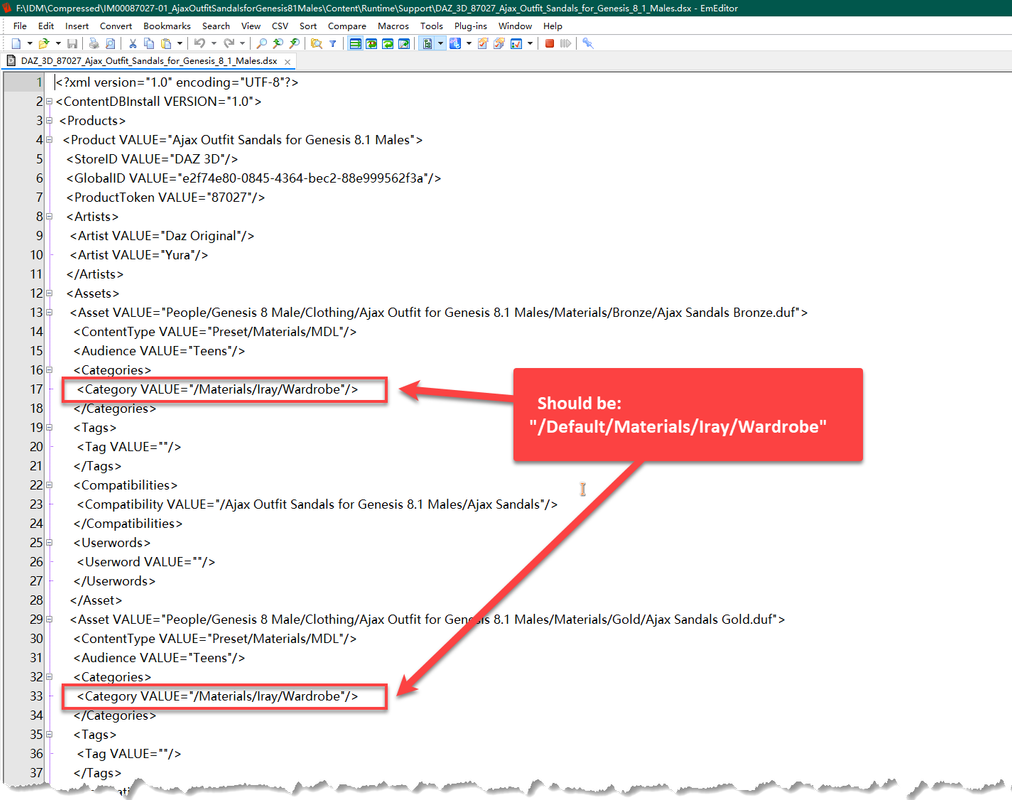
1) Go to the directory: Your Daz Library\Runtime\Support, search dsx file: 'DAZ_3D_87027_Ajax_Outfit_Sandals_for_Genesis_8_1_Males.dsx'. Open it with a Text Editor (EmEditor, Notepad++, etc), replace "/Materials/Iray/Wardrobe" with "/Default/Materials/Iray/Wardrobe", and save...
2) Then Re-Import Metadta: Smart Content - context menu (hamburger menu in the upper-right corner) - Content DB Maintenance - Re-Import Metadata...
Or - :
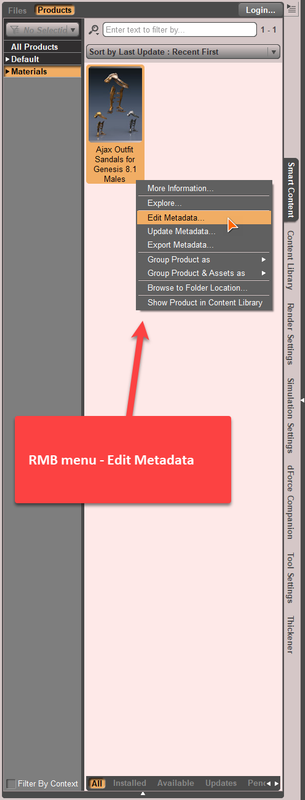
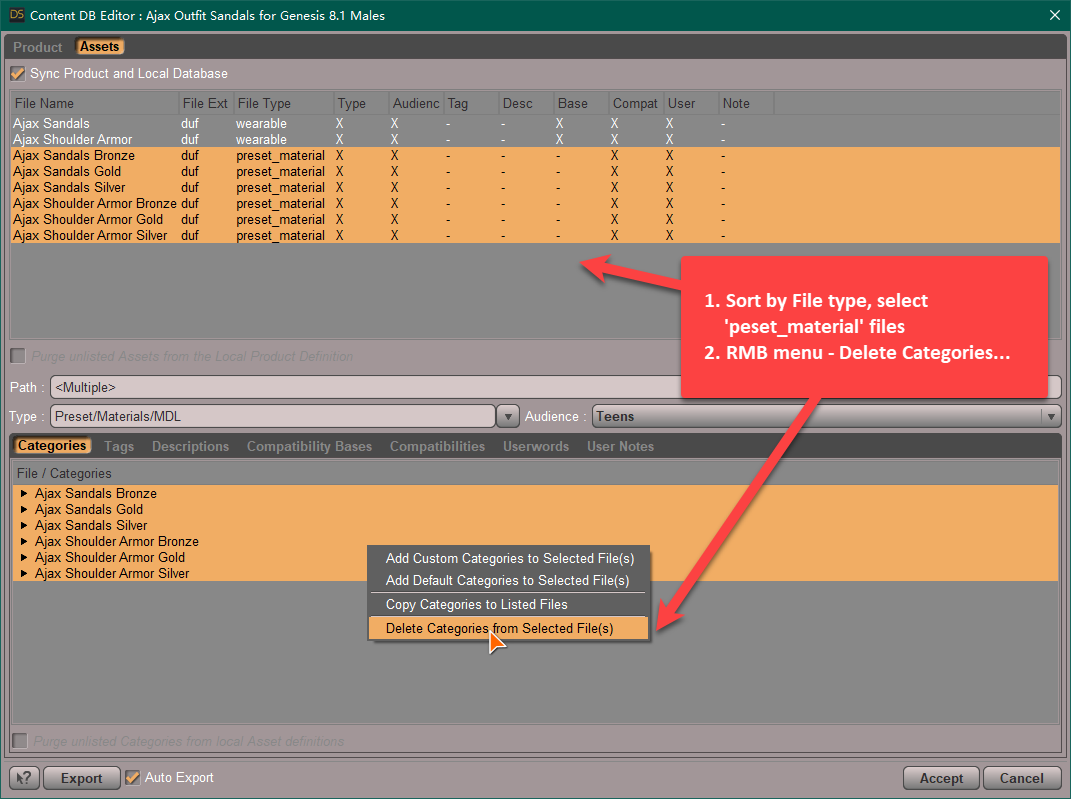
1) Edit Metadata in Smart Content directly, as below:
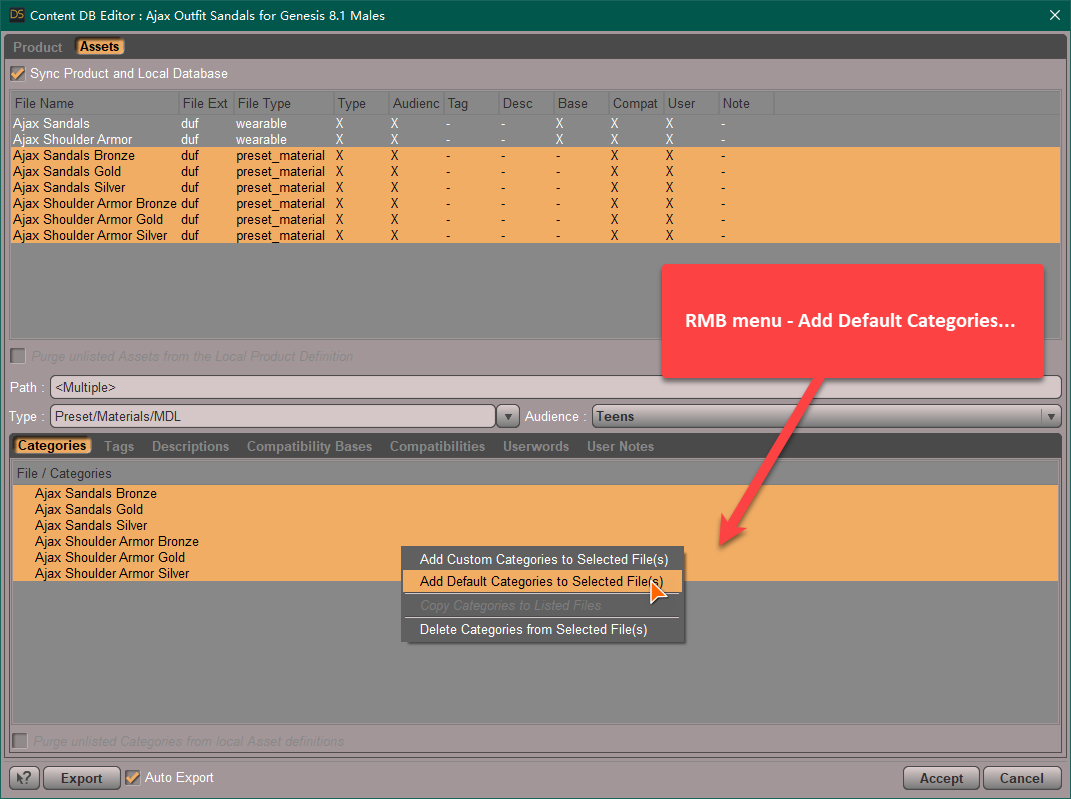

I would like to express my gratitude for your kind and detailed guidance with accompanying images.
Although I was not successful in editing "DAZ_3D_87027_Ajax_Outfit_Sandals_for_Genesis_8_1_Males.dsx" and executing "Re-Import Metadata," I found success in using "Edit Metadata" in the "Smart Content" tab.
During this process, I learned the importance of checking the "Sync Product and Local Database" option.Your assistance has been greatly appreciated!
Is there an easy way to punch a rectangular hole into a wall ...I'm afraid the only way of 'punching that hole' in DS is to use Gescon plugin. Well another free and easy way is to add subd and make a 'boolean' in Blender... then import back to DS and shade it.
Confuse! My morph acts unexpectedlyI did not use G9 Base, it is JS Sarah... I don't have Helena and your issue is irrelevant to the character morph.
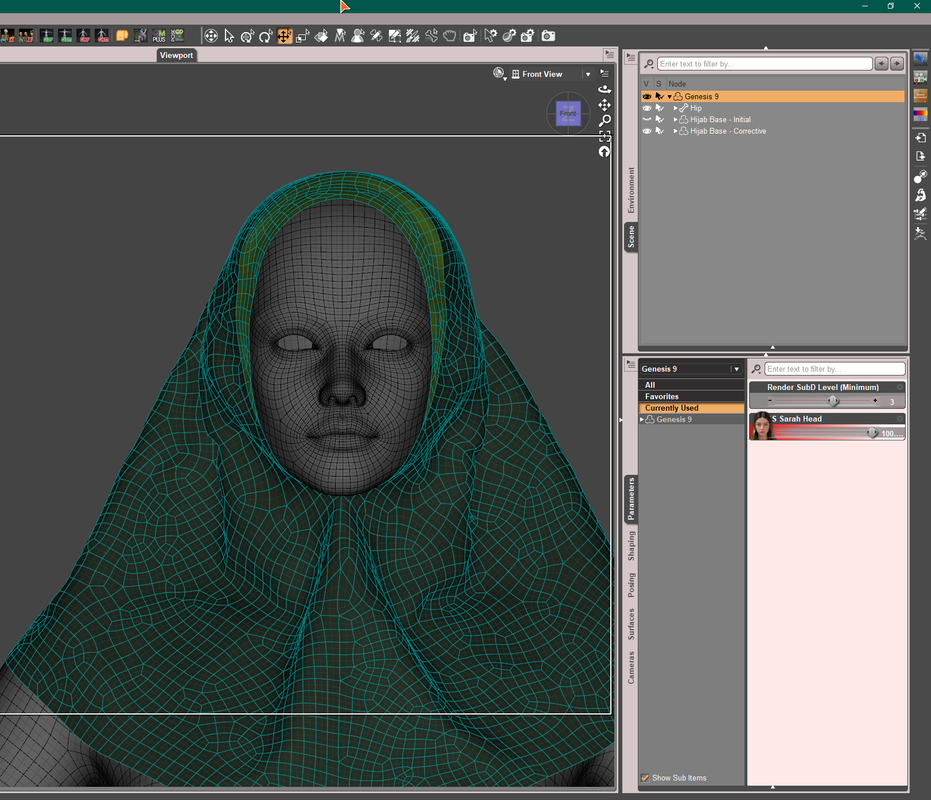
You've not got the point yet... You 'Figure asset of Hijab saved with a dForced sim. result' won't work on any G9 base or character when you go for fixing morph with external application and import back as a delta morphs.
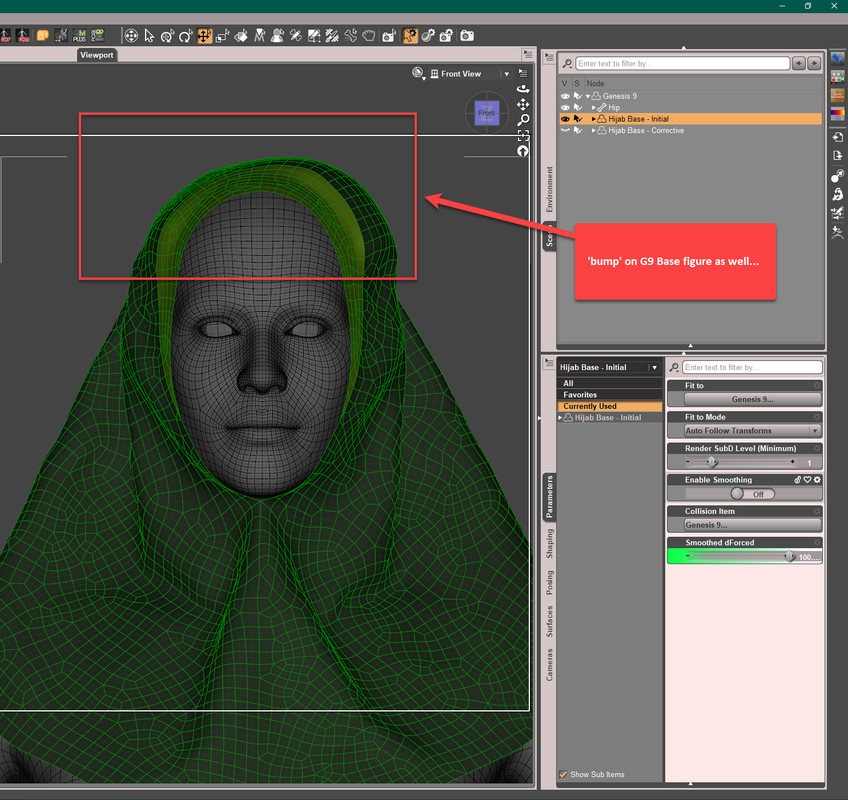
I made and converted lots of clothing w. or w/o dForce but never save Figure asset in that way, my PA friends (who make garments) don't do that either.... so suggest you go for the correct way.
Confuse! My morph acts unexpectedlyI see that you are using the base model.
Try using not the Base Model.
You see, I don't experience any problem with the hijab put on the base model.
It works as it should, with all the morphs imported using morph loader pro.
My problem starts to occur on a certain figure. In my case 'Helena'.
As I mentioned (or tried to explain), I was trying to make a morph to make the hijab looks correct on a certain figure.
I tried your solution - Clearing dforce.
So, I start again.
I put the hijab on base model.
Clear dforce.
Save as wearable.
Next,
I Load Helena figure
Put hijab on Helena.
Export it, fix it.
Import as a morph - Morp Loader Pro.
Doesn't work. It doesn't morph as sculpted.
As you can see the hijab on Helena has some minor issues on the back. Which I tried to fix, including smoothing the head area.[Solved!]Issue with Category Classification in Smart Content Tab - DAZ Studio 4.21 ProBecause the metadata was 'wrongly' defined... you either - :
1) Go to the directory: Your Daz Library\Runtime\Support, search dsx file: 'DAZ_3D_87027_Ajax_Outfit_Sandals_for_Genesis_8_1_Males.dsx'. Open it with a Text Editor (EmEditor, Notepad++, etc), replace "/Materials/Iray/Wardrobe" with "/Default/Materials/Iray/Wardrobe", and save...
2) Then Re-Import Metadta: Smart Content - context menu (hamburger menu in the upper-right corner) - Content DB Maintenance - Re-Import Metadata...
Or - :
1) Edit Metadata in Smart Content directly, as below:
[Solved!]Issue with Category Classification in Smart Content Tab - DAZ Studio 4.21 ProI am currently facing an inconvenience with the category classification in the Smart Content tab of DAZ Studio 4.21 Pro. Whenever I toggle the "Filter By Context" checkbox, the previously selected category gets reset, and I have to start the selection process from the beginning.
After investigating, I believe the issue stems from a specific product named "Ajax Outfit Sandals for Genesis 8.1 Males." This product's items are categorized differently from other products, resulting in its items being isolated and affecting the selection of other items.
I have attempted to locate the metadata or support folder for the product, but I have been unable to find them. I have also searched within the metadata file "Sandals_27868.dsf," but I could not find any relevant lines for category classification.
I kindly request your assistance in resolving this issue. If anyone has encountered a similar problem or has any insights or suggestions on how to modify the category classification for the "Ajax Outfit Sandals" product without deleting it, your guidance would be greatly appreciated.
Thank you.
Confuse! My morph acts unexpectedlyGot it ~ I checked the hijab, you saved it as the Figure asset / Wearable with dForced result... as screenshot 1 - 2, so it was the culprit...that was why I first asked you about the dForce modifier and clearance...
If you'd like to use the 'dForced result' as the base geometry of the hijab, you simulate it first and then export it as obj and import it back to DS. Then use Transfer Utility to make it 'refitted' to the figure, and save as Figure asset, as shown in screenshot 3 - 4.
DAZ not downloading through DIM on new computerHoping someone can give me some input here: I have had DAZ installed and running on my current computer (running Windows 10) for about 4 years, and successfully installed both DAZ and all its content to the computer's D drive following the instructions in the tutorial DAZ posted on YouTube. I've run out of space on that computer, and now have a new computer (running Windows 11) with the intention of installing DAZ and all its content on THAT computer's D drive following the same tutorial. I went through the same steps, got DIM installed, changed the paths, and.... nothing will download. Nothing. Any ideas? Might it be something to do with metadata in the installation on the current computer? Could ANYTHING from that installation be affecting the ability of the DIM to even download assets? Is Windows 11 the problem?
Any help would be greatly appreciated!
DAZ Pose Preset CrashHello All!
I'm new to the forums, but not DAZ! Still, I'm no expert. The project is a secret one, so I won't be showing any specific details. My issue:
Pose Preset crashes DAZ when I attempt to import it:- It's an animation {MMD Retarget plugin -> Genesis 8.1 -> Bake Animation -> Save Pose Preset (Diffeomorphic Blender Plugin)}
- Its 2217 frames long {dance sequence}
- It could definitely be my specs {*see below}
- I could just be doing something wrong.
The animation was a .PMV that I converted using a plugin. But everything appears to be normal until I get to DAZ. I didn't post this in the Blender section because I'm sure it's DAZ...
Images below:Duplicate files in Smart ContentNah, just a single character product... I found no problem on my side. I'm without Connect for years so I dare not log on any more...otherwise my 'fixed metadata' will be destroyed, again...
Is it possible to transfer UV maps to new figure?felis said:
kaotkbliss said:
but getting it back into DS at the exact correct size is a pain and I have not figured the correct import scale yet.
I don't know how you have tried, but blender unit is 1 m, while Daz Studio is 1 cm, so a factor 100 in difference..You must correct either when exporting from blender or when importing into DS.
I use blender to open DS's .duf file directly, merge the geografts, then export as an obj leaving the default size at 1. Which I then try to import the obect into DS but it almost seems as if when blender opens the duf, the width and depth of the model is scaled a slight bit more than the height (the character doesn't quite look the same)
Also if I can get the model imported back into DS at the correct height, the ears don't look to line up with the original model.
I wonder if I should try exporting as an obj from DS, then import that to blender instead.
*edit*
I think I got something that will work, although around the merged area isn't very smooth when posed.
I finally got the export as object without writing seperate groups working so I just exported as obj, reimported as obj, converted to figure (maybe I should have used general weight mapping instead of Triax?), then transfered rigging and morphs.
Top Header, Bridges quietly replaced something.marble said:
Does anyone know whether the new bridges (are they actually new/updated?) can export figures with geografts yet? I know that Diffeomorphic can (to Blender, of course) but I haven't tried anything else.
The geografts import, but I can't get the figure to pose in the pose I want. I keep getting an error. I found Diffeomorphic easier to work with (once set up) and has more options.
 Daz to blender bridge not showing up in Daz
sugarthemis said:
I want to help because i had the same issue
NOT SHOWING in :script -> ok it is ot any more here but ...
NOT SHOWING EITHER in SEND TO
so for those in my case :
when i installed the bridge via the DAZ central or EVEN MANGER it doesn't show up
WHY ?
because it has installed the dll file (dzblenderbridge.dll) in another folder than the daz studio file which is in C:\Daz 3D\Applications\64-bit\DAZ 3D\DAZStudio4
SO here is what i have done : i copy paste the dll file INTO the path above C:\Daz 3D\Applications\64-bit\DAZ 3D\DAZStudio4>>>>> PLUGINS
FIRST STEP RESOLVED : the send to blender appear in daz studio > fILE > send to
i don't know if the entire process will worked but ... if my answer can help resolving at least this first step .... then i am happy .....
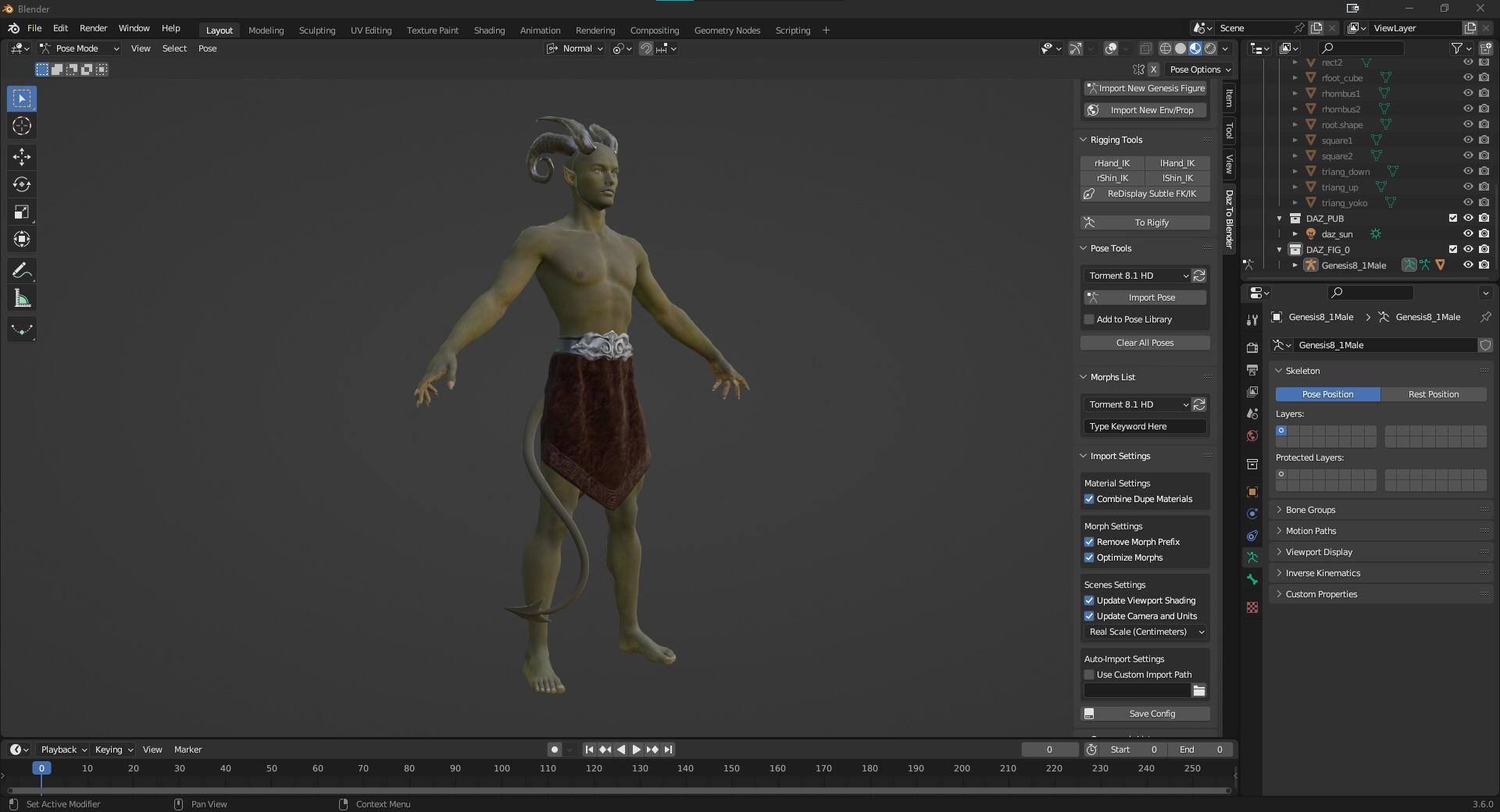
Your resolution worked. Thank you. Also, if you are using the new Blender 3.6, when you download the bridge it only includes 3.2. and 3.5 scripts even though on the DAZ web page it says it supports 3.6. What I had to do was go to the Blender AppData, C:\Users\<UserName>\AppData\Roaming\Blender Foundation\Blender and copy the directory 3.5 to a new directory 3.6. Then Daz will display the 3.6 option, and Blender 3.6 will find the import scripts.
What do people here use to animate?benniewoodell said:
Padone said:
benniewoodell said:
it's still not perfect as there's still feet slippage
That means you didn't bake to FK before exporting, or didn't bake correctly, remember that daz poses are FK so you need to bake IK to FK. Plus now Thomas is working to support hierarchy poses, so you can animate figures with geografts in blender then export the pose preset for daz studio directly from blender.
Then personally I'm not interested to import animations back in daz, I mean blender is so much better to animate and render.
I totally did bake to FK before I exported, I'm following the instructions you've shown me before.
I agree Blender is so much better to animate in, but my clients need these animations rendered out quick and I can't get cycles to render nearly as good quality as I can render in iray in the same amount of time. I can render frames at 1920x1080 in iray in 45 seconds to a minute with the post denoiser on and it's looks perfect with no streaks, but I can't get cycles to render without it looking all water painter-like unless I bake for at least 6 minutes and I've gone through all the youtube videos on how to render out cycles faster, and I can't apply any of that to Daz models. So I'm kind of stuck needing to use Daz to render because the difference is astronomical in terms of rendering. For personal projects, I just let it run as long as it needs to in Blender, but I can't do that when clients want the turn around that they do.
Here's another of those YouTube videos just in case you missed it ... who knows, it might help?

Daz 3D is part of

Connect
DAZ Productions, Inc.
7533 S Center View Ct #4664
West Jordan, UT 84084Licensing Agreement | Terms of Service | Privacy Policy | EULA
© 2026 Daz Productions Inc. All Rights Reserved.