-
G8F pose question
Sevrin said:
Taoz said:
Is it normal that if you apply a full body G8F pose which affects the hands, hand poses you apply from other sets afterwards may not work correctly?
It happen. I've had success selecting the hands and children and using zero selected items. It takes a while, but usually works.
I hear that. Used to be, you select the hand, held Shift, and selected thumb 3, and the whole hand expanded and was selected. Now it requires 4 separate moves to get to the same point: Select Hand, Shift, Carpal 4, right click, Expand Selected, and the thumb and fingers only open to the first joint, but the rest are not part of the selection. So, select them all again, and Expand again, and now 2 joints are selected. Do it a third time, and you have all the parts expanded, but none of the tips are in the selection, so you have to do it yet again. after all those moves, you've now gotten to the point where - from (at least) Victoria 2 and all the side characters throught Victoria 4 - you can get it using a click, hold the Shift, click again, and Bob's your uncle. Been this way since Genesis, and I'm guessing it wouldn't be a hard fix to correct.
..Joe
I think we have to talk about Houdini... :)When the digital animated movie "Final Fantasy" came out 20 years ago, the end credits listed a team of about ten people who were credited with modeling and animating the protagonist's hair (which was a short, straight bob). They literally had a ten-person team working full time to make the hair for just one character look more or less real.
They actually did a pretty good job. Aki's about Victoria 3-level, but her hair and facial animations still look pretty good. But they needed ten professionals and who knows how many hours of computing time on high-end machines to make it happen. Two decades on, one (very talented) person with a consumer PC can turn out animations using off-the-shelf tools with a level of realism that blows away anything they could do then.
We're not out of the Uncanny Valley yet. We're so attuned to the way that things -- especially people -- move in the real world that even in an animation as spectacular as the one @TheMysteryIsThePoint posted above, we can still notice details that aren't quite right (for me it was one lock of hair that moves as a unit rather than individual strands). But damn, the technology has come a long way.
SCI-FI CelebrationThis was my first try at sci fi image rendered on31 January 2005. And virtually my last, I admit. I used a speedster that no longer seems to be in my DAZ products list and layered it over a background rendered in Vue2 from a modified version of the 'Argon 2' included scene. Characeter is Jim Burton's Victoria 3 based 'Glamorous Vickie' with the V3 spandex morphs used to create clothes. Think I must have rendered it in Poser 4.

Regards,
Richard
Ultimate PBRSkin Manager (Commercial) ** 2 additional utility scripts available here **https://www.daz3d.com/ultimate-pbrskin-manager
Ultimate PBRSkin Skin Manager is the best and most efficient tool ever made to adjust, customize, or even completely set up any existing Iray skin based on the new PRBSkin shader (and will work with Generation 4, Genesis, Genesis 2, 3, 8 and 8.1).
Thanks to a clear and synthetic overview and control of all the surface key properties determining the final look of the skin, sorted by categories of effects and organized in four tabs (Tone, Gamma, Gloss/Bump (Details), Additional Effects), you will be able to reach the skin characteristics you have in your mind fast, easily and efficiently. The organization of these key properties has been carefully thought so that everybody, beginners and advanced users, gain a huge amount of time, and get a clear overview of the whole skin shader while they customize the skin of a figure.
For the ones who already know "Ultimate Iray Skin Manager", this is the same principle, but everything was adapted for the new PBRSkin shader.
The rest of the interface has been developed in order to add a maximum of useful additional options and a great comfort of use, this is why you can directly from within the interface decide on which surfaces you work (skin including or excluding Lips and/or Nails, Lips only or Nails only), but you can also change the Viewport Style, the Environment Mode, the camera you use, the orbit node, the zoom, and the angle of the Perspective View, open the pdf documentation, etc, etc.
Don't be afraid to test new sets of parameters because save and load tools are also included directly in the interface. At any time during your skin shader adjustment, you can save in text files full or partial presets of the properties used by Ultimate PBRSkin Manager for your skin shader without leaving the interface. This way, you can load them later on, during the same or another session, on the same or on another figure, of the same or another generation (save/load skin properties without image maps). A specific script is also included in order to transfer the new properties of the figure to the surfaces of its anatomical elements.
Thanks to Ultimate PBRSkin Manager, not only you will find a synthetic and logical organization of the parameters you can change to reach the skin look you want, but also it will help you to make the skin adjustment process more methodical, faster, easier and more comfortable.
This is not a new shader, these are not shader presets. This is just a super efficient tool to adjust and customize PBRSkin based figure of any generation in a clear and efficient way. Considering the fact that there are not tons of PBRSkin figures right now, some of the promos were made using old figures that I converted to PBRSkin, before using Ultimate PBRSkin manager to adjust them. Furthermore, Ultimate PBRSkin manager can easily evolve to adapt to the eventual "new habits" PA will use to create their Genesis 8.1 figures. Ultimate PBRSkin manager will work on any figure of any generation from Victoria 4 to Genesis 8.1 as long as their Skin+Nails+Lips and eyesockets when they exist shader use PBRSkin. I am developping an eyesocket patch which will be an additional file allowing the eyesocket conversion to PBRSkin, because it seems that some PA will forget to convert their eyesocket surfaces to PBRSkin.
Joined to this post as well as later on in this thread you will find two utility scripts allowing you to see what Skin/lips/nails surfaces are not PBRSkin in a figure, and to apply PBRSkin shader to Eyesocket (skin surface) and Fingernails and Toenails (nails surfaces). They are useful only if the author of the figure forgot to set up these surfaces as PBRSkin surfaces too. You can use them from your content library, or drag and drop them from anywhere on your computer on your selected figure. They will be finally included in PBRSkin Manager, either stand alone as it is the case here, or embedded in the main script.
This thread is here to answer any technical questions you could have. Please use this thread for this project, and not "Ultimate Iray Skin Manager" thread, so that things remain clear for everybody. Now a few images.
 "The Girl 4" & DAZ Central
Don't forget that this is a Poser character, and is an add-on for Victoria 4. Install both Victoria 4 and Girl 4, which should be available in Daz Central as far as I know, and they will be in Poser Formats>My Daz 3d Content>Figures>Daz People.
Viewport Animation slow and choppy using Genesis 8 charactersHi everyone,
I wanted to know has anyone has had slow and choppy animation performance issues with using Genesis 8 characters?
So, when I add an aniblock to a G8 character, the playback is slow and choppy. But when using a Genesis 3 character, it is smooth as butter.I haven't used any special morphs and there is no clothing or hair either, just the naked G8 character with the supplied morphs it comes with. Such as 'Jaklin' or Sydney 8 or even Victoria 8.
It is playable, but not as fast as Genesis 3 characters.
I'm just curious if anyone has noticed.What do you backup to restore your Daz Studio?joegerardi said:
I stuck with Windows 7 so that I can continue to use ClickFree backup. It makes an image of all the drives the first time it runs, then doesn incremental backups daily.
Unfortunately, MS got rid of Volume Shadow Copy with Windows 10, making the device obsolete. Sad, that: it's saved me several times over the years from disk crashes.
I also write every purchase to a DVD. (CDs in the early days.) I have disks all the way back to DAZ Studio version .8, and Victoria 3: every product I've ever purchased, or gotten as a Freebie. (Since 2005.)
..Joe
The Windows 7 backup option is still available in Windows 10. It's called, wait for it: "Windows 7 Backup and Restore"

You can not only restore, you can also still use it to backup drives, like the system drive.
What do you backup to restore your Daz Studio?I stuck with Windows 7 so that I can continue to use ClickFree backup. It makes an image of all the drives the first time it runs, then doesn incremental backups daily.
Unfortunately, MS got rid of Volume Shadow Copy with Windows 10, making the device obsolete. Sad, that: it's saved me several times over the years from disk crashes.
I also write every purchase to a DVD. (CDs in the early days.) I have disks all the way back to DAZ Studio version .8, and Victoria 3: every product I've ever purchased, or gotten as a Freebie. (Since 2005.)
..Joe
Digging into 8.1, day 1. With pictures.cajhin said:
*why won't it read??* (southpark)
left>right or top>bottom: BJ Amira / Ginny 8.1 / Ginny 8.0 / Victoria 8
Thanks!
Uber is killing it so far. Although the topmost example of PBR is pretty nice. BJ still wins by a mile.
Digging into 8.1, day 1. With pictures.*why won't it read??* (southpark)
left>right or top>bottom: BJ Amira / Ginny 8.1 / Ginny 8.0 / Victoria 8
Digging into 8.1, day 1. With pictures.I was curious about 8.1, bought Mousso's Ginny because it comes in both an 8.0 and a 'real' 8.1 version.
For your convenience, I'll attach two images with my first impressions:
1. Side-by-Side Portraits for general appearance, and testing some expressions that exist for both 8.0 and 8.1
2. Eye area closeups
(left>right or top>bottom: BJ Amira / Ginny 8.1 / Ginny 8.0 / Victoria 8 )This is not a better/worse figure comparo or a beauty contest (I think those are frowned upon here anyway), it's about the differences of 8.1.
This is not scientific and I'm not a pro. I post this at the end of the day, because nobody else did (?) and I was interested in this.
Various notes...
- Bog standard Sun-Sky light, I hope that's fair (every skin has it's favorite light)
- the lighting angle and shadows vary slightly, the figures actually stand side by side
- V8 looks a bit dated, but that's ok, I believe it's the first G8F ever made. I included her because a) it's Vic and b) I think many PAs studied the V8 shaders. It's generally quite translucent and tends to glow a bit too red (nose, corners of eyes and the mouth)
- Included a Bluejaunte, those are my go-to reference skins for 'looks real'
(DAZ, I know you're busy and all, but can you give the BJ 8.1 figure a fast-track treatment? Pretty please? I need it :)
Issues...
- Ginny 8.1 is a bit broken. Out of the box she has a yellowish tint (see portraits 2-5) and strangely dull eyes.
I found out late that you have to manually apply the 8.1 MATs after creating the figure. - with 8.1, expressions are not listed under 'Currently used', which is inconvenient. Only the sub-poses that were dialed in by the expression are listed.
- Gaah. This feeds one of my pet peeves. I actually hope that selling a figure with both 8.0 and 8.1 MATs will NOT become standard. Because nobody ever labels the icons, so you get "Eyes01" and "Eyes01". Now in the "genesis8" and the "genesis8" folders. Somewhere down in the filename or a subfolder there might be a hint if it's 8.0 or 8.1. This is a microannoyance 30 times a day with iray/3dl g3/g8 already...
Opinions... (those might change anytime)
- To my eyes, the new PBRSkin shaders look a bit more subdued, less intense gloss, less red
- for a Mousso figure I might prefer 8.0 shaders (IMO these ladies aim for max pretty, not ultimate realism, so a slightly more 'flashy' skin suits well)
- I don't really notice the better resulution on the neck, resulting from the new UVs (Vampires with a neck fetish might disagree here)
- For expressions, overall, no contest; 8.1 is a big improvement
Is the Victoria 8.1 HD Add-On missing an interactive license?Hi everone! I recently purchased some content for 8.1 and am considering purchasing some interactive licenses. I noticed most of the daz originals hd add ons have this option but don't see it on the Victoria 8.1 add on. Was this intended? (I'm assuming it's not.) Thanks for your time!
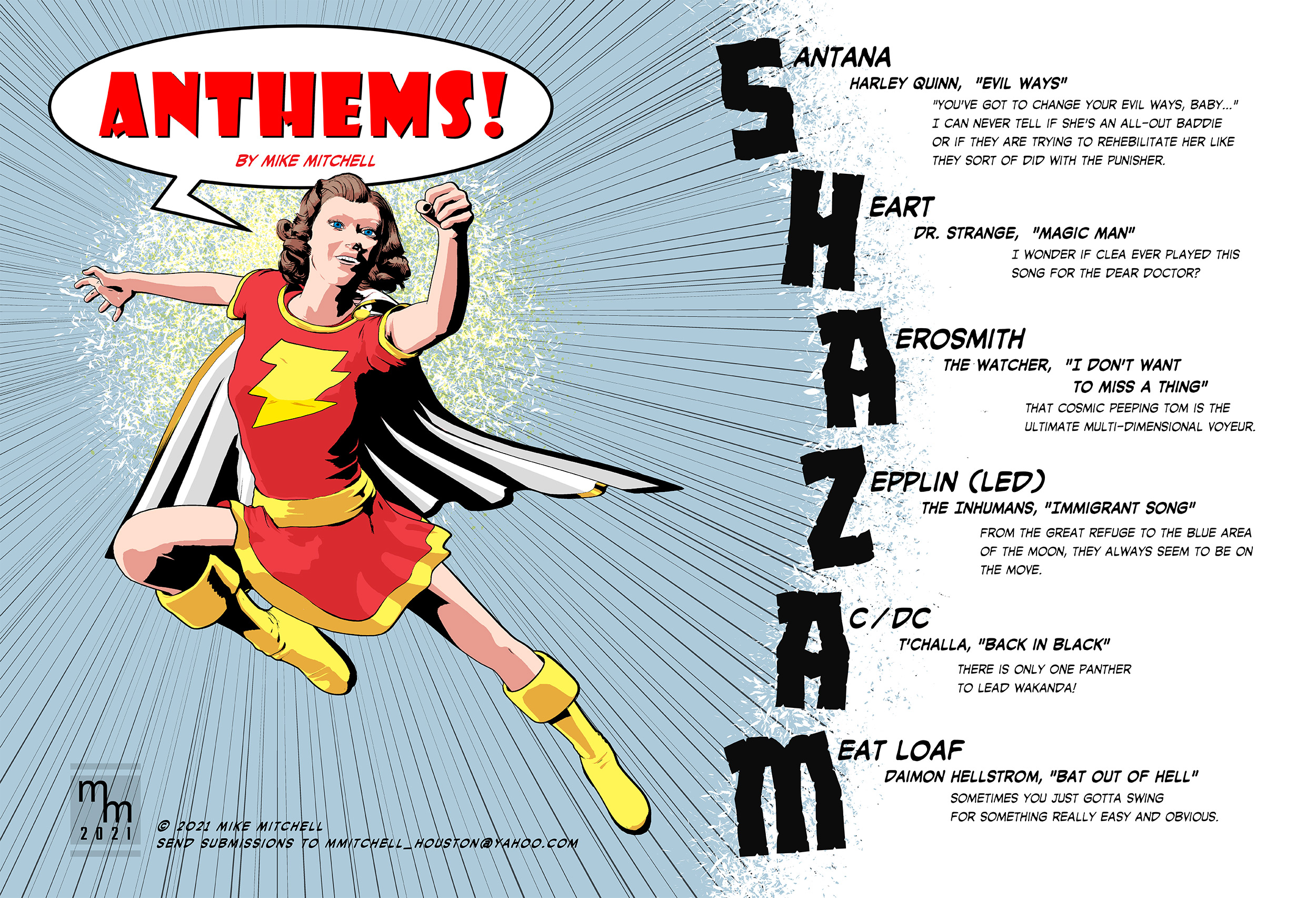
Superheroes Rebooted - Renders AssembleHere's a fun little image I did for a fanzine. The "Anthems" column matches superheroes to various songs. It's a bit silly, but fun. Here's a recent illustration I did. The figure is Victoria 4 with a variety of morphs. Rendered in Poser with clean up and
 Superheroes Rebooted - Renders Assemble
Here's a fun little image I did for a fanzine. The "Anthems" column matches superheroes to various songs. It's a bit silly, but fun. Here's a recent illustration I did. The figure is Victoria 4 with a variety of morphs. Rendered in Poser with clean up and other elements added in Clip Studio Paint.
(Released) - Cute Braids for Genesis 8 and 8.1 FemalesCrushguy05 said:
Is that just Victoria 8.1 in the main promo pic? I haven't seen much of her yet but she looks cute in that one. Definitely picking up these braids soon nice work!
Hello there! It's V8.1 with some other head shapes added to the mix. I think I definitely used some of Zelara 8 :)
(Released) - Cute Braids for Genesis 8 and 8.1 FemalesIs that just Victoria 8.1 in the main promo pic? I haven't seen much of her yet but she looks cute in that one. Definitely picking up these braids soon nice work!
[Released] RSSY Hair Converter from Victoria 4 to Genesis 8 Female [Commercial]amysparkles said:
Here's the log from the hair converter:
15:00:42 GMT+0200 (Jerusalem Standard Time): Adding Files...
15:00:42 GMT+0200 (Jerusalem Standard Time): Adding "Follower/Hair" file: C:/Users/Public/Documents/My DAZ 3D Library/Runtime/Libraries/Hair/DAZ Victoria 4/SWAM/Ibby Hair/Ibby Hair.cr2
15:00:49 GMT+0200 (Jerusalem Standard Time): Executing Script
15:00:49 GMT+0200 (Jerusalem Standard Time): Selecting Preset: C:/Users/Public/Documents/My DAZ 3D Library/Runtime/Libraries/Hair/DAZ Victoria 4/SWAM/Ibby Hair/Ibby Hair.cr2
15:00:49 GMT+0200 (Jerusalem Standard Time): Converting hair from C:/Users/Public/Documents/My DAZ 3D Library/Runtime/Libraries/Hair/DAZ Victoria 4/SWAM/Ibby Hair/Ibby Hair.cr2 to C:/Users/Me/Documents/Daz 3D/Studio/My Library/People/Genesis 8 Female/Hair/DAZ Victoria 4/SWAM/Ibby Hair/Ibby Hair.duf
15:00:59 GMT+0200 (Jerusalem Standard Time): Copy Icons from C:/Users/Public/Documents/My DAZ 3D Library/Runtime/Libraries/Hair/DAZ Victoria 4/SWAM/Ibby Hair/Ibby Hair.cr2 to C:/Users/Me/Documents/Daz 3D/Studio/My Library/People/Genesis 8 Female/Hair/DAZ Victoria 4/SWAM/Ibby Hair/Ibby Hair.duf
15:00:59 GMT+0200 (Jerusalem Standard Time): Copy Categories from C:/Users/Public/Documents/My DAZ 3D Library/Runtime/Libraries/Hair/DAZ Victoria 4/SWAM/Ibby Hair/Ibby Hair.cr2 to C:/Users/Me/Documents/Daz 3D/Studio/My Library/People/Genesis 8 Female/Hair/DAZ Victoria 4/SWAM/Ibby Hair/Ibby Hair.duf
15:01:03 GMT+0200 (Jerusalem Standard Time): Execution Complete.
And here's the entries relating to the conversion process from my Daz Studio log file. I attached the appropriate log entries as a text file due to its length.
Since this one worked it won't tell me much, but in the log you can see the rigging was transferred:
Transferring rigging to Hair item from figure
[Released] RSSY Hair Converter from Victoria 4 to Genesis 8 Female [Commercial]Here's the log from the hair converter:
15:00:42 GMT+0200 (Jerusalem Standard Time): Adding Files...
15:00:42 GMT+0200 (Jerusalem Standard Time): Adding "Follower/Hair" file: C:/Users/Public/Documents/My DAZ 3D Library/Runtime/Libraries/Hair/DAZ Victoria 4/SWAM/Ibby Hair/Ibby Hair.cr2
15:00:49 GMT+0200 (Jerusalem Standard Time): Executing Script
15:00:49 GMT+0200 (Jerusalem Standard Time): Selecting Preset: C:/Users/Public/Documents/My DAZ 3D Library/Runtime/Libraries/Hair/DAZ Victoria 4/SWAM/Ibby Hair/Ibby Hair.cr2
15:00:49 GMT+0200 (Jerusalem Standard Time): Converting hair from C:/Users/Public/Documents/My DAZ 3D Library/Runtime/Libraries/Hair/DAZ Victoria 4/SWAM/Ibby Hair/Ibby Hair.cr2 to C:/Users/Me/Documents/Daz 3D/Studio/My Library/People/Genesis 8 Female/Hair/DAZ Victoria 4/SWAM/Ibby Hair/Ibby Hair.duf
15:00:59 GMT+0200 (Jerusalem Standard Time): Copy Icons from C:/Users/Public/Documents/My DAZ 3D Library/Runtime/Libraries/Hair/DAZ Victoria 4/SWAM/Ibby Hair/Ibby Hair.cr2 to C:/Users/Me/Documents/Daz 3D/Studio/My Library/People/Genesis 8 Female/Hair/DAZ Victoria 4/SWAM/Ibby Hair/Ibby Hair.duf
15:00:59 GMT+0200 (Jerusalem Standard Time): Copy Categories from C:/Users/Public/Documents/My DAZ 3D Library/Runtime/Libraries/Hair/DAZ Victoria 4/SWAM/Ibby Hair/Ibby Hair.cr2 to C:/Users/Me/Documents/Daz 3D/Studio/My Library/People/Genesis 8 Female/Hair/DAZ Victoria 4/SWAM/Ibby Hair/Ibby Hair.duf
15:01:03 GMT+0200 (Jerusalem Standard Time): Execution Complete.
And here's the entries relating to the conversion process from my Daz Studio log file. I attached the appropriate log entries as a text file due to its length.
Cleopatra 8.1 Ancient Treasure Bundle - The continuing decline of DAZ bundlesWendyLuvsCatz said:
the base figure has veins
My DAZ 3D Library\Runtime\textures\DAZ\Characters\Genesis8\FemaleBase the maps for Subsurface Scattering
Yeah, those maps are actually for monochromatic sss. By comparison, Victoria 7 has the best vessel detail and I use her maps quite frequently when customizing and building out new chromatic sss with blending, etc.
Cleopatra 8.1 Ancient Treasure Bundle - The continuing decline of DAZ bundlesMark_e593e0a5 said:Thanks @Wolfwood for the comparison. For me it seems that the bundle is basically made from "leftovers". All the SKU's for the individual items are in the 73xxx range, with the exception of the main character. If you check the previous Egypt themed bundles (e.g. Khemsit or Twosret), their bundle SKU and most product SKUs are in the same range. Given the quality e.g. from the Egyptian Oasis, I am supprised that these items did not make it into one of the previous bundles.
Just a guess here, but Cleo probably took a very long time to convert into a G8.1F. Then, her headdress and collar were added to one of the outfits (which is the only thing I've bought from this bundle.) And of course, they had to wait to release the "remake Victoria" first.
Daz 3D is part of

Connect
DAZ Productions, Inc.
7533 S Center View Ct #4664
West Jordan, UT 84084Licensing Agreement | Terms of Service | Privacy Policy | EULA
© 2026 Daz Productions Inc. All Rights Reserved.