-
Daz to Blender Bridge, How do I get it....
I have the most current version of DS that Daz Central will install 4.12.1.118 the send to blender option isn't there.
I try File>export, its not there either.Is this something still in beta? what am I missing?
I have already completely uninstalled and reinstalled Daz Studio multiple times with reboots inbetween.
Any serious help is greatly appreciated.
-Michael
aka
DP
Haydina hair shapes not working.Thanks for posting the information. I've never tried Daz Central. I use DIM. Daz Central is designed for new users, so since you are new, it might be the right choice for you.
Haydina is a really nice looking hair, so we need to get this fixed!
It sure looks like the shaping presets got installed, but the morphs that those presets use, did not get installed (or did not get installed correcty to the right place, or Daz Studio isn't looking in the right place for them). Let's go look and see if they are installed at all:
- In your OS file explorer, open your content library folder.
- If you are in the right place, you should see subfolders like data, People, Props, Runtime, among others.
- Open the data folder.
- You should see a WinField folder (the name of the PA that created Haydina Hair). Open the WinField folder.
- You should see a Haydina Hair folder. Open the Haydina Hair folder.
- You should see a Haydina Hair Genesis 8 Female folder. Open the Haydina Hair Genesis 8 Female folder.
- You should see a Morphs folder (among other things). Open the Morphs folder.
- You should see a WinField folder. Open the WinField folder.
- You should see a Base folder. Open the Base folder.
- Now finally you have drilled down to the level where the morphs should be stored. You should see over 100 files with the dsf extension. Those are the actual morph files that define the way the hair vertices should move when one of the shaping presets is applied.
Do you have those files? If not, we have to figure out why not. If you do have them, we have to figure out why Daz Studio doesn't see them.
By the way, what operating system are you using? What version of Daz Studio are you using (go to Help>About Daz Studio to get the exact version)?
Do you own any other hair products with shaping presets? Do those work?
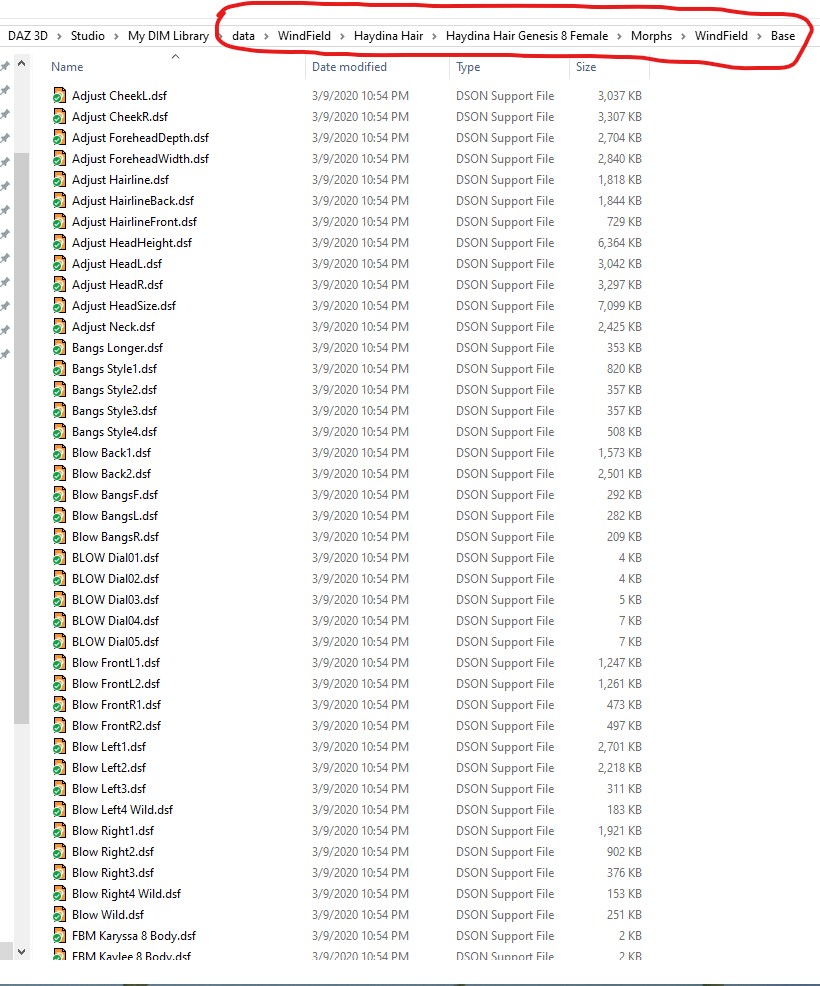
Okay, so I found all of the .dsf files just like they're displayed in your screenshot, I think we're getting somewhere. I've also found the morph preset files that are displayed in my content library, but they're in a different directory (E:\Program Files\DAZ 3D\Applications\Data\DAZ 3D\My DAZ 3D Library\People) than where the actual morph files are (E:\Program Files\DAZ 3D\Applications\Data\DAZ 3D\My DAZ 3D Library\data\WindField etc). I'm not sure if this is what's causing the issue.
OS is Win 10 build 17763.1339 and my DAZ Studio version is 4.12.1.118.
So the morphs files are installed and seem to be in the right place.
It is correct for the presets to be in the People folder (People\Genesis 8 Female\Hair\WF Haydina Hair\Presets) and the morphs to be in the Data folder. So that is not the issue. Since you can see the presets and the material presets even work, it seems like your content library is properly mapped in Daz Studio. This is a puzzle!
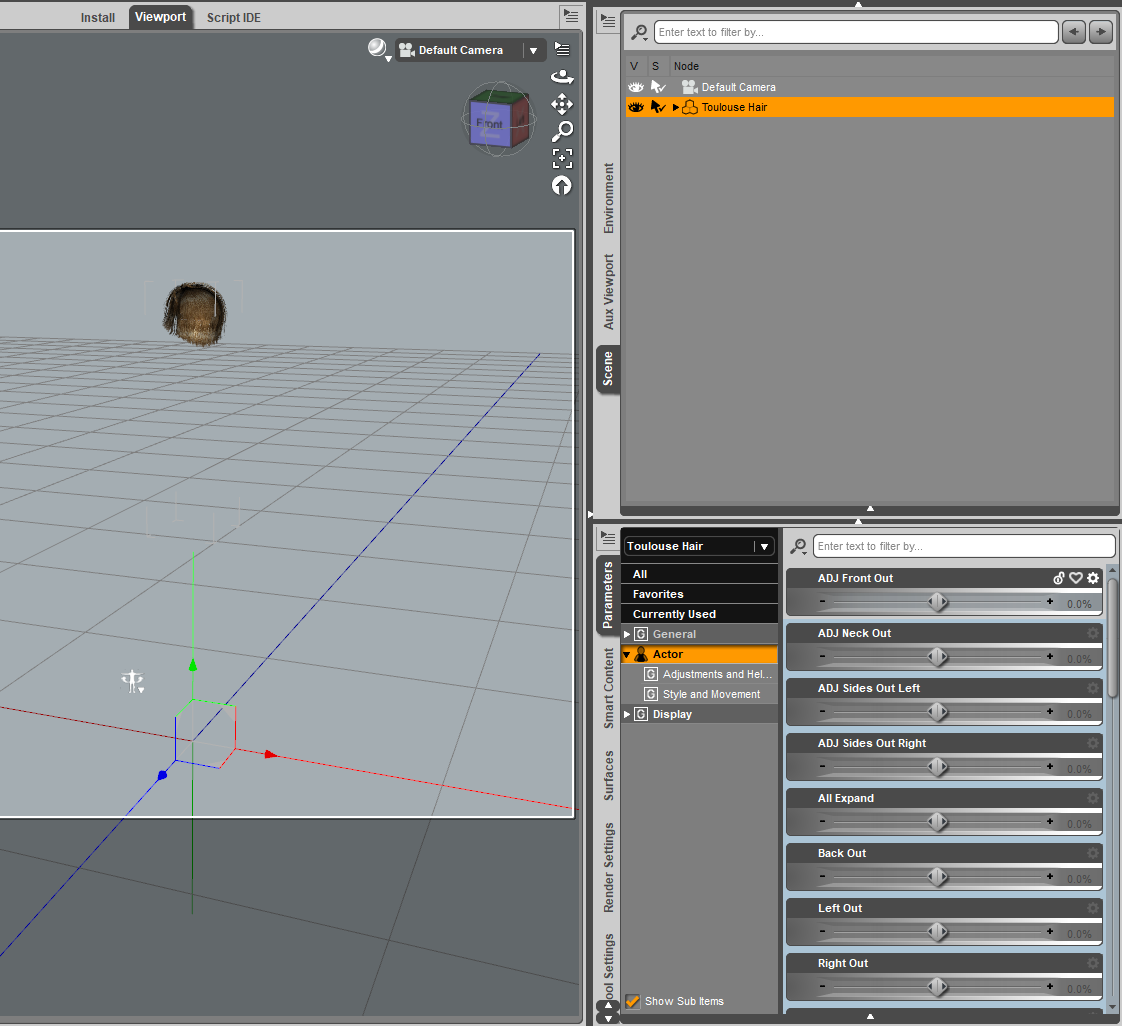
Let's see if it is only Haydina hair that is the problem or if it is a broader problem. If you load the Toulouse Hair from Genesis Starter Essentials, do those morph show up in the Parameters pane? They would be in the Actor section.
 Haydina hair shapes not working.
Thanks for posting the information. I've never tried Daz Central. I use DIM. Daz Central is designed for new users, so since you are new, it might be the right choice for you.
Haydina is a really nice looking hair, so we need to get this fixed!
It sure looks like the shaping presets got installed, but the morphs that those presets use, did not get installed (or did not get installed correcty to the right place, or Daz Studio isn't looking in the right place for them). Let's go look and see if they are installed at all:
- In your OS file explorer, open your content library folder.
- If you are in the right place, you should see subfolders like data, People, Props, Runtime, among others.
- Open the data folder.
- You should see a WinField folder (the name of the PA that created Haydina Hair). Open the WinField folder.
- You should see a Haydina Hair folder. Open the Haydina Hair folder.
- You should see a Haydina Hair Genesis 8 Female folder. Open the Haydina Hair Genesis 8 Female folder.
- You should see a Morphs folder (among other things). Open the Morphs folder.
- You should see a WinField folder. Open the WinField folder.
- You should see a Base folder. Open the Base folder.
- Now finally you have drilled down to the level where the morphs should be stored. You should see over 100 files with the dsf extension. Those are the actual morph files that define the way the hair vertices should move when one of the shaping presets is applied.
Do you have those files? If not, we have to figure out why not. If you do have them, we have to figure out why Daz Studio doesn't see them.
By the way, what operating system are you using? What version of Daz Studio are you using (go to Help>About Daz Studio to get the exact version)?
Do you own any other hair products with shaping presets? Do those work?
Okay, so I found all of the .dsf files just like they're displayed in your screenshot, I think we're getting somewhere. I've also found the morph preset files that are displayed in my content library, but they're in a different directory (E:\Program Files\DAZ 3D\Applications\Data\DAZ 3D\My DAZ 3D Library\People) than where the actual morph files are (E:\Program Files\DAZ 3D\Applications\Data\DAZ 3D\My DAZ 3D Library\data\WindField etc). I'm not sure if this is what's causing the issue.
OS is Win 10 build 17763.1339 and my DAZ Studio version is 4.12.1.118.
Haydina hair shapes not working.Thanks for posting the information. I've never tried Daz Central. I use DIM. Daz Central is designed for new users, so since you are new, it might be the right choice for you.
Haydina is a really nice looking hair, so we need to get this fixed!
It sure looks like the shaping presets got installed, but the morphs that those presets use, did not get installed (or did not get installed correcty to the right place, or Daz Studio isn't looking in the right place for them). Let's go look and see if they are installed at all:
- In your OS file explorer, open your content library folder.
- If you are in the right place, you should see subfolders like data, People, Props, Runtime, among others.
- Open the data folder.
- You should see a WinField folder (the name of the PA that created Haydina Hair). Open the WinField folder.
- You should see a Haydina Hair folder. Open the Haydina Hair folder.
- You should see a Haydina Hair Genesis 8 Female folder. Open the Haydina Hair Genesis 8 Female folder.
- You should see a Morphs folder (among other things). Open the Morphs folder.
- You should see a WinField folder. Open the WinField folder.
- You should see a Base folder. Open the Base folder.
- Now finally you have drilled down to the level where the morphs should be stored. You should see over 100 files with the dsf extension. Those are the actual morph files that define the way the hair vertices should move when one of the shaping presets is applied.
Do you have those files? If not, we have to figure out why not. If you do have them, we have to figure out why Daz Studio doesn't see them.
By the way, what operating system are you using? What version of Daz Studio are you using (go to Help>About Daz Studio to get the exact version)?
Do you own any other hair products with shaping presets? Do those work?
Haydina hair shapes not working.Haydina Shaping and Parameters are working correctly for me. I attached a screenshot showing the parameter sliders you should see. Here is a video in my dropbox showing the Shaping and Parameter sliders in action.
You haven't answered some of Richard's important questions:
- How did you install? (Daz Install Manager (DIM), Daz Connect (inside Daz Studio), Daz Central, Manual installation)
- What does the Parameters pane show when the hair is selected? (show a screenshot like I did so we can compare.)

1) Used DazCentral (I also tried reinstalling it that way to no effect)
2) See below.The completely gratuitous complaint thread...well, they started demolishing the old Central Postal Distribution Centre across the intersection from my building oday so in for some rather noisy mornings and afternoons for a while. The USPS operation was moved out to east county by the airport a couple years ago and the buildings here just stood vacant with only the customer service portion (basic post office functions save for PO boxes) remaining open. The entire block (actually about 4 square blocks in area is scheduled to be developed into a residential and commercial complex with greenways so even more noise for years to come Originally there was talk of it becoming an Amazon distribution house, but glad that didn't work out as we'd have big rigs pulling in and out 24/7,often engine braking as they came down the ramp from the bridge.
The basic plan actually looks nice and enhances hte area, but will take about 3 - 4 years to complete. I say just make it a nice open space, put in a foodie cart pod and a farmer's market, and call it a day.
Scene Subset can't find morphs despite them being downloadedLately I've completely deleted DAZ and redownloaded it through Daz Central to start fresh and now I'm having trouble loading in characters I saved as scene subsets. The morph set in question is the SY 200 free morphs by SickleYield and even though they are present in the side bar, when I try to load in my custom characters, I get this message saying that they couldn't find the related sliders. Is there a way I can tell Daz where they are - similar to how you can locate textures if those go missing?

Silly question, but did you actually reinstall that SY 200 free morph set? It's not a DAZ Product, so DAZ Central would not have reinstalled it for you. If you did reinstall it, then where did you put it and is it in a content library known to Daz Studio?
The versions available to download no longer have the morphs in the "morphs/daz 3d/sy200" folder, instead they are in the "morphs/sickleyield2018/sy200" folder.
When you save a scene etc any active morphs get added to the DUF file, which just so happens to include the pathway to where DS found the morph.
can't open the programDaz studio that is. I submitted a ticket about this, but I thought I would ask here as well in case someone else has encountered this.
I'm having trouble opening the program periodically. As an example, this morning I opened Daz studio and worked on a scene for a bit. I closed the program, then tried to reopened it. Clicking on the icon from my start menu did nothing. Trying to open it from Daz Central did nothing. Opening the EXE directly did nothing. I tried running the EXE in admin mode and was told I need elevated privileges to open the software. What? Then, after clicking on the icon several dozen more times from daz central, the program finally opened. How does that even make sense? Anyone else had this happen - know what is going on here?
Scene Subset can't find morphs despite them being downloadedLately I've completely deleted DAZ and redownloaded it through Daz Central to start fresh and now I'm having trouble loading in characters I saved as scene subsets. The morph set in question is the SY 200 free morphs by SickleYield and even though they are present in the side bar, when I try to load in my custom characters, I get this message saying that they couldn't find the related sliders. Is there a way I can tell Daz where they are - similar to how you can locate textures if those go missing?
Silly question, but did you actually reinstall that SY 200 free morph set? It's not a DAZ Product, so DAZ Central would not have reinstalled it for you. If you did reinstall it, then where did you put it and is it in a content library known to Daz Studio?
Surface Base Color Own Image not proportionalYou probably need to change the texture tiling to make it fit.
In the Surfaces tab, try changing both H and V Tiling to 2.0, see how that fits, then adjust it up or down until it's just right.
(That's a very pretty design you made, by the way)
ETA: I just noticed that your .png file has a black border and that will show if you simply tile it. You will need to adjust the horizontal and vertical alignment too, so that your design fits in the exact correct space - I'm afraid that will take a bit of trial and error.
You could alternatively copy the original (green and pink roses) texture then use an image editing application (do you have Photoshop, or maybe GIMP?) to copy your pink design into the middle and size it so it exactly covers that central section visible in the render and save with your own texture name.
Help! I want my download manager back!I had to install DAZ on a new PC. The download insists on giving me DAZ Central, which I definitely don't want. Where can I find my old Download Manager?
Scene Subset can't find morphs despite them being downloadedLately I've completely deleted DAZ and redownloaded it through Daz Central to start fresh and now I'm having trouble loading in characters I saved as scene subsets. The morph set in question is the SY 200 free morphs by SickleYield and even though they are present in the side bar, when I try to load in my custom characters, I get this message saying that they couldn't find the related sliders. Is there a way I can tell Daz where they are - similar to how you can locate textures if those go missing?
Did you notice there are lots of class rooms and school corridors but...I should take up modelling to re-create my high school - four buildings, a cafeteria, and an annex. The original Central High was on the North-West corner of the block, 3 stories, built in 1913. The "New" high school occupied the rest of the north side of the block and was finished around 1935 (two stories). In 1949 or 1950 the Industrial Annex was built, Extending South from between (and connecting) the two other buildings - two stories, connecting to the first and third story of the old building. Around 1955 or 1956 the school corporation purchased a church that was on the East side of the block and tied it to the "new" building with a cafeteria. And about 1960 the city built a new library and the school corporation purchased the old Carnegie library - located diagonally North-East of the block the rest of the school was on.
The first day of each school year the incoming sophomores got a page on how to find their classrooms.
If it is a two-digit room number it is in the old Central building and the first digit is the floor.
If it is a three digit number and the second digit is a 3 it is in the Industrial Annex and the first digit is the floor.
If it is a three digit number and the second digit is a 4 it is in the old church; the first digit is the floor.
If it is a three digit number and the last digit is a 5 it is in the old Carnegie library; the first digit is the floor.
All other three digit numbers are in the "New" high school; the first digit is the floor.
Room 224 can only be reached by passing through room 222.
I was in the last graduating class from this complex in 1966. The replacement was a bog-standard modern two-story built a mile away, and the old complex got demolished in 1968.
interface Daz 3D 4.12 is not openingalready download Daz Central and my interface, Daz3D 4.12 in not opening my system is Win 10 64 Bit what should i do ??????
Haydina hair shapes not working.Haydina Shaping and Parameters are working correctly for me. I attached a screenshot showing the parameter sliders you should see. Here is a video in my dropbox showing the Shaping and Parameter sliders in action.
You haven't answered some of Richard's important questions:
- How did you install? (Daz Install Manager (DIM), Daz Connect (inside Daz Studio), Daz Central, Manual installation)
- What does the Parameters pane show when the hair is selected? (show a screenshot like I did so we can compare.)
How are you greeting the end of the world?...I remember one way back in the late 1960s that occurred in the lower Great Lakes area. Felt a shaking and just thought it was another freight train rumbling by, then a bulletin came over the radio that we had experienced an earthquake. We all thought "?" as that was usually something we hears about in Alaska, California, or Japan Of course shortly afterwards we learned that there was a major fault to the south near th confluence of the Mississippi and Ohio Rivers and the strongest earthquake ever recorded in the lower states occurred there in 1811. Fortunately at the time the area was sparsely settle unlike today (St. Louis, Chicago and Milwaukee were at best, forts or trading posts then).
It has actually been found to be a network of faults called the New Madrid Seismic Region that reaches from Central & Eastern Texas up through eastern Oklahoma, Arkansas, Missouri, Southern Illinois, Southern Indiana and western Ohio Parts of it are becoming active again with an increase tremors recorded over the last couple years in various areas. Should another large event on the level of the 1811 quake were to occur there, it would be devastating as few of the cities in the region have built to withstand a major quake. Even newer buildings will be susceptible as they are not built or have been retrofitted to the same seismic standards as in areas where quakes are a more common occurrence like the West Coast and Japan.
Genesis 8 Male Anatomical Elements Add On? (Not What you Think)Ok, I see what happened. Daz's presentation is, as so often, confusing. Maybe that is just in the nature of this kind of business with rapidly changing software.
What I mean by confusing. After I paid for the Dasan pro bundle, I went to my dashboard at Daz Central. There I saw eight or nine icons under the heading "recent purchases." I then assumed, reasonably I think, that Daz had included the whole pro bundle under the "recent purchases" heading -- that Daz did not leave some of the included products I had just bought, off the list of "recent purchases." Each icon in the "recent purchases" section has a convenient install button right below it, so I promptly installed all the products, thinking that was the complete pro-bundle. I open DS and start playing around, then start searching for the gens fruitlessly for a while, wondering if the download went wrong, or what, so then I asked the question I asked here. Finally, I went back to Daz Central and instead of going to my "dashboard," I happened to go to "My Assets." There I saw an "anatomical elements" icon from the pro bundle, and it still needed to be installed. So, problem solved. But as far as I am concerned, Daz created that problem in the first place by poor signage, which I think has been pretty typical with Daz. But again, maybe that is just more or less inevitable in this business.
Genesis 8 Male Anatomical Elements Add On? (Not What you Think)Purchased Dasan Pro Bundle, downloaded through Daz Central, and I now find Gen mats, but no gens to apply the mats too. Where might the gens be?
DIM, Smart Content, DazCentral all biffed by DC InstallDaz Central - Large and In Charge!
Quite the mess, I have (as far as I know) not lost any content, but I do resent the forced installation of the regular DAZ4.12, I was happy with the pro beta 4.12, but now all of my paths have been taken over, and my custom content scattered between 2 installs, and none of my Installed Content is showing up in the smart content pane of 2 different installs. Now I have to fetch all of my files, especially my saved content, which reprents a few years of work, unique custom characters, some modelling, my scenes (hundreds if not over a thousand), Install packages, gather them all in one location seperate from Daz, then proceed to uninstall everything, and then do a fresh install and then re-insert my saved files and then re-install every single package, Probably about a five to ten hour process. Careful with this, it's nice to see that new users will get an easy way to do it, but DIM was not exactly a rigamarole. General IQs must be dropping that DAZ3d saw the need for this. I don't blame them, but wow, talk about being blind-sided and regretting the install. Guess I'm probably not going to use DAZ for another week or so. My runtime folder just clocked in at 945GB; maybe a break and re-organization can be a good thing. Guess it will be a few days before I can resume work on my projects. Might need another HD as well...
Word of advice, be careful and make sure you have a backup of your MyDaz3d Library (or just yank it before installing) because there could be a heart attack for users that are not careful here. It won't delete your work, but it might look as though it has until you dig.
That's NOT a "realistic" Police Woman OutfitI have travelled across Canada and central/east/south USA quite often in the past few years. The police I have seen in public are uniformed in a fashion that, in my opinion, suggest a para-military force. The dark clothing, combat boots, and body armor bring to my mind the desire create fear and intimidation. The different forces wear different hats, but otherwise everything else is quite uniform across Canada and the USA.
Kind of ignoring the RCMP there, and it's certainly not all the same across the U.S. by a long shot. I live in Houston Texas and just within our general area we have something like 40 different police orgainizations that you're liable to see driving by in a single day from the Texas Highway Patrol, Houston Police, Harris County Constables, Metro Police, Texas Rangers, US Marshalls, the Port Police, DPS, plus campus police for at least a dozen different universities and multiple incorporated town that have their own small Police departments. Many of them are similar, but many are not, and it's not uncomon to see a Marshal and a Sheriff pulled up alongside the HPD or constables. I just grabbed a few images to show some of the variety but I hit the load limit at 6 images so I tried to get the widest visual range.. (edit - just noticed that one of them is actually from Virginia, but wa\e have a service that wears an almost identical uniform.)
Mounties don't patrol in the red serge if that's what you're thinking. Those are dress uniforms only worn on formal occasions and for stuff like the Musical Ride. What distinguishes RCMP uniforms is a yellow stripe down the pant leg and around the frame. The various provincial and municipal police departments are different again.
There's no accounting for every single variation, so as long as it's got some texture options, anything that's not embarrassing would be welcome. But yeah. This is definitely a stripper cop uniform.
Unless they first came to Chicago on the trail of the killers of their father and, for reasons that don't need exploring at this juncture, have remained, attached as liaison officer with the Canadian Consulate.
Was that Northern Exposure?
Due South but Northern Exposure was so good too, just don't pay attention to the story and watch the scenery and Janine Turner instead.
Daz 3D is part of

Connect
DAZ Productions, Inc.
7533 S Center View Ct #4664
West Jordan, UT 84084Licensing Agreement | Terms of Service | Privacy Policy | EULA
© 2026 Daz Productions Inc. All Rights Reserved.