-
The Newest Evolution Is Here: The Daz Season Pass!
plasma_ring said:
GeoffreyHawkins said:
Until now, I never realized that DAZ assets were in a sense "collectible." I just assumed people purchased the assets they needed or desired, based on commissions or their own artistic interests. Purchasing every base character is essentially "collecting." DAZ says they are expliciting appealling to that part of the customer base with Season Pass. DAZ has made that clear, as have many of these collection-driven customers who have posted here.
I guess I've just viewed these assets as artistic tools and nothing more. Never realized they were in a sense, virtual action figures.
Live and learn.
It's actually one of the things that hooked me about Daz. I get attached to 3D models like I do to my MMO characters, and this is the only community I've seen where that's a normal, understandable thing. I'm not really a collector, but I've picked up characters just to play with them rather than specifically for render projects.
All of us are collectors, some may even be hoarders... whether we're conscious of it or not.
I definitely like the Season Pass concept — having access to as many base figures with HD details as possible is important to me. I've hardly ever used a base figure "as is" in any render, and I'm a dial spinner since Poser 1.0 in the 90's — always looking for something unique to add into the latest 3D character gene pool, and always trying to come up with something that doesn't look like the default, off-the-shelf, "stock" character.
At the end of the day, if it looks obvious that I used Victoria or Michael out-of-the-box without customizing them or adding any kind of value to them, I will feel like I've failed to create something new or unique from those resources.The Newest Evolution Is Here: The Daz Season Pass!markgoode77 said:
AbyssalEros said:
bytescapes said:
But all this is speculation. Maybe Brooke is actually a water elemental, and she'll be followed by two months of nothing but midget octopus space-centaurs.Don't tempt me - I do not want to buy that SP or any figure that needs DAZ Studio 4.15. Don't make me succumb.
I've got 4.15. All I need now is the hardware to make it work.
It could be that my hardware is sufficient enough, but I really do not want to test it out, only to realize that all I got is a constantly crashing system with disappearing icons and other hick-ups.
Technically, there is no reason to upgrade from 4.14 to 4.15 aside from the wish to use the new generation models.
But in my view, the new Genesis 8.1 base characters are too overpriced, while in addition, the bundles, especially the Victoria 8.1, Michael 8.1, and August 8.1 bundles, lack severely in quality.
I am still learning, as I have only begun with 3D arts a bit over two years ago, and thus I am hardly knowledgeable about all the quirks of working with Genesis 8 and DAZ Studio itself.
Working with Genesis 8.1 affords apparently a totally different workflow, which is even confusing artists much more professional than me, while at the same time, most expressions and a lot of poses from the Genesis 8 generation are not working correctly on Genesis 8.1 characters due to changes done.
It might be dubbed Genesi 8.1, while in reality, it is rather Genesis 9.0 Alpha because of all the incompatibility with Genesis 8 assets.
If DAZ Productions, Inc. would have really wanted me to jump on that new generation adventure, they should not have increased the prices while at the same time reducing content, quality, and buying enticements.
That's the long explanation why the season pass is a clear pass for me, as I am not using Generation 8.1, and I do not see myself using it. I better stay with Genesis 8 until Genesis 9.0 RC appears on the scene.
What’s the deal with G8.1?ArgleSW said:
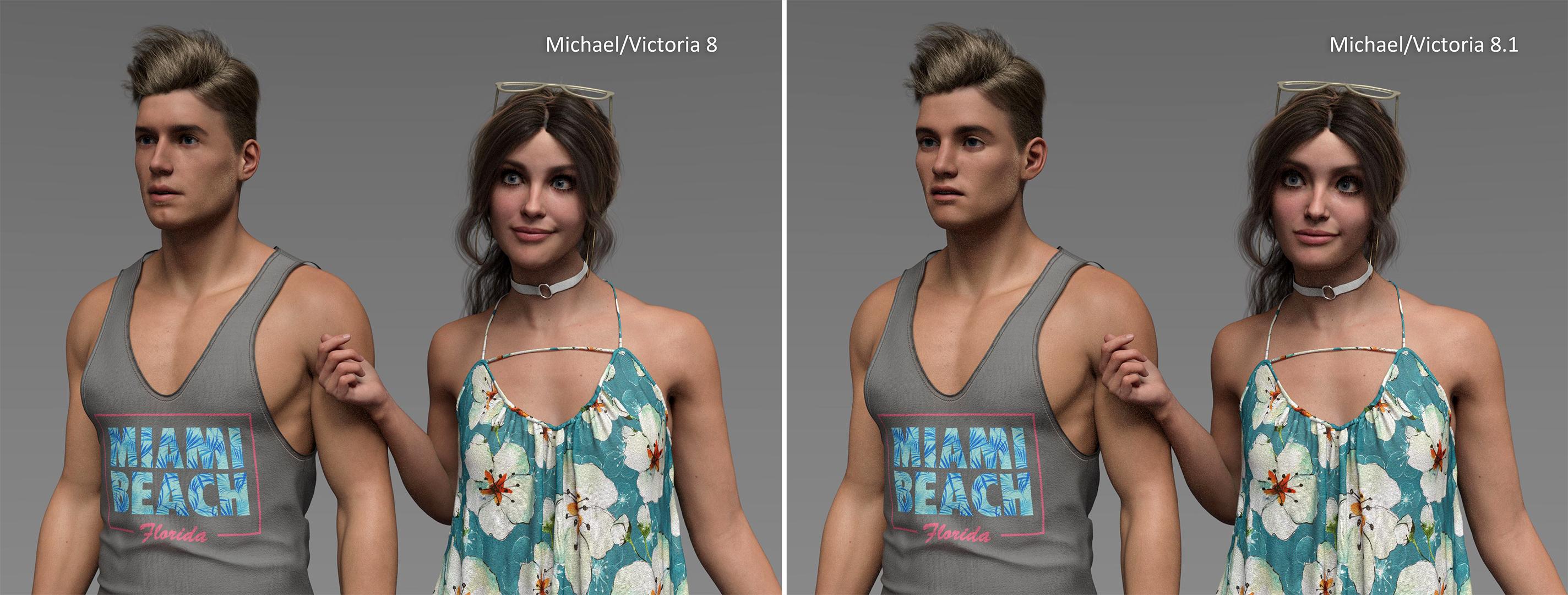
The 8.1 generation appears like an art direction change rather than an update. My issue is that the art is shifting towards a more stylized look (cartoony/exaggerated features). When you mix classic 8.0 with 8.1 models in the same scene, they don't match well. Yes the older gens offered a mix of cartoony and photoreal characters, but my point is more about the overall art direction as a whole for Daz. Not sure if Daz got a new artist recently but the direction is changing fast towards this. Maybe stylized sells better and more people prefer this, but in my opinion this is not ideal in the long run. Hopefully this was just the case for the first few 8.1 models released.
Look at the comparison in this image. Using the same textures, the only difference is the face morphs using Michael/Victoria 8.0 vs 8.1. Which one looks closer to real?
https://www.daz3d.com/forums/uploads/FileUpload/34/c9f76e127f82b86f0193fea62d83e2.jpgWow — there's a much bigger difference in the face of Michael 8.0 vs. 8.1 — the crispness of the facial details seem to be getting lost in the 8.1 version... the cleft chin, jawline, angles on the upper lips, and sternocleidomastoid muscles near the ear are all appearing to be smoothed over in the 8.1 version. Is this normal?
I didn't like the look of Michael 8.1 (or anything in his pro bundle), I held off buying it, so I only have Victoria 8.1 to compare for now...What’s the deal with G8.1?ArgleSW said:
The 8.1 generation appears like an art direction change rather than an update. My issue is that the art is shifting towards a more stylized look (cartoony/exaggerated features). When you mix classic 8.0 with 8.1 models in the same scene, they don't match well. Yes the older gens offered a mix of cartoony and photoreal characters, but my point is more about the overall art direction as a whole for Daz. Not sure if Daz got a new artist recently but the direction is changing fast towards this. Maybe stylized sells better and more people prefer this, but in my opinion this is not ideal in the long run. Hopefully this was just the case for the first few 8.1 models released.
Look at the comparison in this image. Using the same textures, the only difference is the face morphs using Michael/Victoria 8.0 vs 8.1. Which one looks closer to real?
What’s the deal with G8.1?ArgleSW said:
...
Look at the comparison in this image. Using the same textures, the only difference is the face morphs using Michael/Victoria 8.0 vs 8.1. Which one looks closer to real?
In my opinion the 8.1 versions really looks a bit cartoonish. Are you sure everything is set the same - e.g. eye size of Victoria or some age sliders on Michael?
What’s the deal with G8.1?Kaleb242 said:
Remember Victoria 4, Victoria 4.1, and Victoria 4.2?
Those were more like bug fixes with incremental updates...
There's also the vellus hairs with G8.1 too, right?
Another good feature for close-ups...Mousso already has that on many their G8 characters that can be used on any character.
What’s the deal with G8.1?Remember Victoria 4, Victoria 4.1, and Victoria 4.2?
Those were more like bug fixes with incremental updates...
There's also the vellus hairs with G8.1 too, right?
Another good feature for close-ups...Is There A Plan To Speed Up G8 (and future generations) Loading Times?thenoobducky said:
I interpret Richard's comment as saying reading the file from disk is not the bottleneck, which I think is correct, it is converting from the text file to objects that Daz can use that is slow. Put it another way, reading file not slow, scanning the content of the file to figure out what to create slow. Daz would need to parse all the formulas to figure out what the figure would finally look like. Because there is no mechanism for Daz to figure out if a formula is active or not (my limited understanding is a formula can either by an input like a dial or applying the dial to something so daz need to figure out the value of all dials and apply all the formulas even if most inputs by default are zero). This is also the reason for morph corrupting the default figure. Now I think about it, this part what is what is causing the load time to be slow cannot be skipped unless there is a way to tell Daz don't load this morph (currently done by hiding it from daz). Why this is not trivial to multithread is addressed below.
If parsing the file would be a bottleneck then multithreading would be an obvious solution as I understand bottleneck is the function that populates morph dependencies with appropriate formulas
No what I mean is if I have a figure loaded and then I unhide a character preset or morph set, I can't use it unless I reload the figure because there is no other way to get new shape dials and pose dials to appear.
This is not a problem because Daz should read all names to get a list of sliders and built all that property tree, It should just not go any deeper and don't loom at their dependencies until something from that tree is activated.
The senario I want to be addressed is this: I have a figure loaded. I install zev0's Shape Shift, how do I use it without reloading.
Getting a way to delay load morph / reload morph contained in a base directory would really improve
This would be pretty easy to do if morphs are straightforward, but unfortunately, the Daz logic is too perverted here. which I will explain later
I agree its possible to multithread, just the implementation will be non trivial. The issue to consider is: thread 1 load morph A which reference morph B, at the same time thread 2 is loading morph B. How can thread 1 figure out morph B has been loaded or not. Its solvable but care must be take to ensure the solution dont accidentally end up being single threaded. Another issue: thread 1 create morpha A with name X, thread 2 create morph B also with name Y, how does Daz ensure the names are unique because duplicate formula is an issue that need to be detected.
If you look at the morph properties it is not that hard, after all, you can see that every property parameter contains Sub-components and controllers list which has to be populated, (I think populating that list takes most of the time.)
I can't see any problems with multithreading because every entry in that list is independent. You load a morph and then add the appropriate formula to the appropriate list the order of how things will be added to the list does not matter.
What do you mean correction morph, I guess you are talking about erc formulas? Can you give some concrete example? I find all the talk so far about high level concept a bit confusing and too much guess work. I think what is slow is loading formulas, but a lot of formulas are actually morphs and expressions. For example, Victoria 8 have something around 60-70 morph file, each file contain around 2 formulas. Whereas eJCMSilly_HD_div2.dsf from Genesis 8 Female Expression pack can have 100+ formulas.
Now a formula looks like this:
{
    "output" : "Genesis8Female:/data/DAZ%203D/Genesis%208/Female/Morphs/DAZ%203D/Base%20Pose%20Head/eCTRLNostrilsFlex.dsf#eCTRLNostrilsFlex?value",
    "operations" : [
    { "op" : "push", "url" : "Genesis8Female:#Z%20FO%20Angry?value" },
    { "op" : "push", "val" : 1 },
    { "op" : "mult" }
    ]
},
As you can see, Daz know where to find the formula it references. So that is no a problem. One problem would be in a multi thread safe way to figout out if the output it refernces already exist or is being created by another thread or it need to create it. Again now I have think about this a bit more, the issue is Daz dont know if this formula will result in no change at all or cause some morph changes until Daz parsed the formula and applied it, which is the slow process we are trying to avoid here. There is no mechanism to tell Daz to skip formula in this folder until I tell you to load it functionality. I think something like this for advanced user would be useful.
Another problem, for example I like to use Zev0's shape shift which contains lots of formulas, but I use it often when creating a character so I would like Daz to always load it. How would Daz know which morph need to be loaded? Currently the only way is to selectively add base folders, this is almost workable with manual curation of installed files, or program to automate it, maybe Daz can come up with a better approach (maybe by reworking the way files are installed).
In short we need a better way to optionally tell Daz skip loading certain folder until it is needed by some file.
I can't comment on that because I need to see a complete picture, I will give an example in the next post
The Newest Evolution Is Here: The Daz Season Pass!Brooke 8.1 in the Season Pass — does this hint at the return of Liquid Rust???


Remember Brooke 2.0 for Victoria 4?
https://www.daz3d.com/brooke-2-0What’s the deal with G8.1?ArgleSW said:
The 8.1 generation appears like an art direction change rather than an update. My issue is that the art is shifting towards a more stylized look (cartoony/exaggerated features). When you mix classic 8.0 with 8.1 models in the same scene, they don't match well. Yes the older gens offered a mix of cartoony and photoreal characters, but my point is more about the overall art direction as a whole for Daz. Not sure if Daz got a new artist recently but the direction is changing fast towards this. Maybe stylized sells better and more people prefer this, but in my opinion this is not ideal in the long run. Hopefully this was just the case for the first few 8.1 models released.
Look at the comparison in this image. Using the same textures, the only difference is the face morphs using Michael/Victoria 8.0 vs 8.1. Which one looks closer to real?
8.1s victoria and Mike are college age so their look is a lot younger than Version 8. Daz store seems to equate youth with toony.
The Newest Evolution Is Here: The Daz Season Pass!What's even the difference between a $45 "core" or "base" figure and a $20 PA character these days, aside from $25 price hike for an official Daz endorsement? In the old-old days, all characters were built off the small number of base characters so they were essential. In the less old days, they became characters that lots of other characters were built off of, not necessarily essential but nice to have with good quality textures and shaping. Now, they're pumping out new characters faster than they can QA and it doesn't seem like many other characters use them as a base (probably why they've been renamed "core" figures).
Can't imagine wanting to collect them all sight unseen, but at the very least, I'd wait until a better sale than the season pass. Something like Victoria/Michael has brand recognition at least but the rest of the traditional base figures (Aiko, Hiro, Gia, Monique) seem to have been skipped for things like Cleopatra.
Damsel said:
And why the heck would I want to buy a sprite of somebody I've never heard of? NFTs? I know I'm old, but that makes absolutely no sense to me. Why spend money for a gif that's all over the Internet, for God's sake?
You're not old. I mean, maybe you are, but that's not why you're confused why anyone would want the $100+ Shudu sprites. They unstickied the NFT thread presumably because no one wants or likes the NFTs. Most of the NFT sales, and only a couple have sold, seem to be going to one buyer. From what Diigitals has said, it looks like they got into NFTs for the hype and didn't bother doing research first. The only artists who seem to defend them are a small number of established, already highly successful professionals (but none here, even Shudu's creator seems to regret not doing research first), and for buyers it seems to just be wealthy tech enthusiasts, the kind who get enthusiastic about new tech for the sake of being shiny new tech, and even then largely just wealthy folk interested in speculative trading through the block chain.
What’s the deal with G8.1?
A while back, there was a blog entry that said DAZ got a new art director. https://blog.daz3d.com/daz-interview-series-corey-belina-daz-3d-art-director/ But I don't think that has to do with the 8s and 8.1s that were Art Station buyouts. Those characters seemed to have been done independently before DAZ got involved with them. I personally don't mind the toon look ("realism" gets dated fast), but with toons you're often limited to that one style, unless you can shape your own with another app.ArgleSW said:The 8.1 generation appears like an art direction change rather than an update. My issue is that the art is shifting towards a more stylized look (cartoony/exaggerated features). When you mix classic 8.0 with 8.1 models in the same scene, they don't match well. Yes the older gens offered a mix of cartoony and photoreal characters, but my point is more about the overall art direction as a whole for Daz. Not sure if Daz got a new artist recently but the direction is changing fast towards this. Maybe stylized sells better and more people prefer this, but in my opinion this is not ideal in the long run. Hopefully this was just the case for the first few 8.1 models released.
Look at the comparison in this image. Using the same textures, the only difference is the face morphs using Michael/Victoria 8.0 vs 8.1. Which one looks closer to real?
Is There A Plan To Speed Up G8 (and future generations) Loading Times?onix said:
I was talking about different issues here. Building your morph on top of another morphs is normal.
Let's say you want to create a smile expression morph for your character which will reference victoria 8 smile.
normally you would just create an expression folder for your character and populate it with your custom expression morphs that refer to morphs of other vendors.
but some perverted vendors rather do this:
They insert extra logic into the genesis 8 smile expression morph which tells it that if character X morph is activated activate Smile correction morph for character X. You will not even be aware that you got a custom expression morph along with that character.
So if you will ever install this character it will be sucking your CPU power forever because every time you use smile morph that formula for character X (which you maybe never even used) will be executed.
And how many vendors may have JCMs that are constantly hooked to character joints and every time you change your pose Daz has to process hundreds of those parasitic formulas that do nothing else but just check if character X is loaded?
What if the vendor screws up and makes that his JCM gets activated all the time not just when their character is loaded? Now your figure will be screwed up forever because you have no way to even identify buggy JCM
Can you give an example of this? I would really like to see it.
Edit: Also I dont get the point of it, For example, anything in /data/Daz 3D/Genesis 8/Female/Morphs get loaded when you load genesis 8 female. Normal convention is morph for a product go to /data/Daz 3D/Genesis 8/Female/Morphs/Vendor/Product. So it would get automatically loaded already, placing things in /data/Daz 3D/Genesis 8/Female/Morphs/Daz 3D/Character would give no benefit and would not be treated any differently by Daz. The buggy JCM would easily be part of the vendor's file.
Is There A Plan To Speed Up G8 (and future generations) Loading Times?onix said:
I think Daz already have those infomation stored with the formula, but the question is what would be the trade off. A system that delay load everything would have less consistant performance when applying a pose or expression as daz have to find missing morphs. It could be slower for people with fewer morphs installed as it makes harder to cache things, resulting in more file I/O that would be slower. Should Daz scan all morphs files to create all the sliders for shapes and poses, because this is very useful for novice user to find things they need. But scanning all those files and creating slider might be half of the required work already and might just as well go ahead and finish creating the formulas so it will just work.
Richard explained that all this scanning task is not really that time-consuming to care about and it can be multithreaded easily. also it can be safely deferred and just continued after your scene is already loaded.
I interpret Richard's comment as saying reading the file from disk is not the bottleneck, which I think is correct, it is converting from the text file to objects that Daz can use that is slow. Put it another way, reading file not slow, scanning the content of the file to figure out what to create slow. Daz would need to parse all the formulas to figure out what the figure would finally look like. Because there is no mechanism for Daz to figure out if a formula is active or not (my limited understanding is a formula can either by an input like a dial or applying the dial to something so daz need to figure out the value of all dials and apply all the formulas even if most inputs by default are zero). This is also the reason for morph corrupting the default figure. Now I think about it, this part what is what is causing the load time to be slow cannot be skipped unless there is a way to tell Daz don't load this morph (currently done by hiding it from daz). Why this is not trivial to multithread is addressed below.
Hiding stuff from Daz wont fully fix the issue because then you can't use an expression or morph that is not loaded until you reload the character / scene. Some sort of load formulas used by this character / expression / shapes function would be super useful.
Of course, you cant use what you hide, but the reason to hide things I precisely because they are not required in that scene
No what I mean is if I have a figure loaded and then I unhide a character preset or morph set, I can't use it unless I reload the figure because there is no other way to get new shape dials and pose dials to appear.
The senario I want to be addressed is this: I have a figure loaded. I install zev0's Shape Shift, how do I use it without reloading.
Getting a way to delay load morph / reload morph contained in a base directory would really improv
With regard to multithreading I can see how to figure out if a formula referenced in another formula already exist or being made in a thread safe way being a difficult problem to tackle and have potential to accidentally make everything single threaded.
If you think more actually there is no reason why multithreading cannot be implemented even now.
My guess in how Daz works is that first, it loads a full list of morphs then it iterates through every one of those morphs and populates controllers and subcomponents lists. so every correction morph that has controllers has to scan at least half of the full list every time to find where it will inject references to itself.
This process can be easily multithreaded as you can process multiple morphs at the same time
I agree its possible to multithread, just the implementation will be non trivial. The issue to consider is: thread 1 load morph A which reference morph B, at the same time thread 2 is loading morph B. How can thread 1 figure out morph B has been loaded or not. Its solvable but care must be take to ensure the solution dont accidentally end up being single threaded. Another issue: thread 1 create morpha A with name X, thread 2 create morph B also with name Y, how does Daz ensure the names are unique because duplicate formula is an issue that need to be detected.
In short, any way to solve a complex problem will have advantages and disadvantages. I would prefer things to work correctly over being fast, and beginner friendly over complicated to use but faster for advanced user. But there are definitly still rooms for improvement. For example some sort of rescan a selected base directory to add newly installed morphs functionality would be useful.
In my understanding, the main problem here is with correction morphs as this functionality srews up everything and possibly can be the reason why loading times are so long in the first place (unless Daz actually spends most of the time allocating memory for formulas and inserting them into the table)
Correction morphs are the reason why you can't know in advance what files you need to load because any of those new files may decide to hook up on something random in your existing system. And if you are very paranoid about not missing any of those correction morphs you have to rescan everything every time you load a new file as you probably can not even know if some of the correction morphs wanted to reference your new file and did not find it at that time.
What do you mean correction morph, I guess you are talking about erc formulas? Can you give some concrete example? I find all the talk so far about high level concept a bit confusing and too much guess work. I think what is slow is loading formulas, but a lot of formulas are actually morphs and expressions. For example, Victoria 8 have something around 60-70 morph file, each file contain around 2 formulas. Whereas eJCMSilly_HD_div2.dsf from Genesis 8 Female Expression pack can have 100+ formulas.
Now a formula looks like this:
{
    "output" : "Genesis8Female:/data/DAZ%203D/Genesis%208/Female/Morphs/DAZ%203D/Base%20Pose%20Head/eCTRLNostrilsFlex.dsf#eCTRLNostrilsFlex?value",
    "operations" : [
    { "op" : "push", "url" : "Genesis8Female:#Z%20FO%20Angry?value" },
    { "op" : "push", "val" : 1 },
    { "op" : "mult" }
    ]
},
As you can see, Daz know where to find the formula it references. So that is no a problem. One problem would be in a multi thread safe way to figout out if the output it refernces already exist or is being created by another thread or it need to create it. Again now I have think about this a bit more, the issue is Daz dont know if this formula will result in no change at all or cause some morph changes until Daz parsed the formula and applied it, which is the slow process we are trying to avoid here. There is no mechanism to tell Daz to skip formula in this folder until I tell you to load it functionality. I think something like this for advanced user would be useful.
Another problem, for example I like to use Zev0's shape shift which contains lots of formulas, but I use it often when creating a character so I would like Daz to always load it. How would Daz know which morph need to be loaded? Currently the only way is to selectively add base folders, this is almost workable with manual curation of installed files, or program to automate it, maybe Daz can come up with a better approach (maybe by reworking the way files are installed).
In short we need a better way to optionally tell Daz skip loading certain folder until it is needed by some file.
How to fit V4 (victoria 4) hair into G8F (Genesis 8 Female)Hello Friends,
I want to add a V4 hair (preferably the wet hair for V4) to my Genesis 8 Female. I used RSSY Hair Converter v4 to G8F tool, but they are not loading the files at all. I use the latest Version of DAZ Studio i.e. 4.15
So I am now looking for an alternate way to do so.
If anyone can help, please let me know.
With regards,
Souwrit Ray
What’s the deal with G8.1?The 8.1 generation appears like an art direction change rather than an update. My issue is that the art is shifting towards a more stylized look (cartoony/exaggerated features). When you mix classic 8.0 with 8.1 models in the same scene, they don't match well. Yes the older gens offered a mix of cartoony and photoreal characters, but my point is more about the overall art direction as a whole for Daz. Not sure if Daz got a new artist recently but the direction is changing fast towards this. Maybe stylized sells better and more people prefer this, but in my opinion this is not ideal in the long run. Hopefully this was just the case for the first few 8.1 models released.
Look at the comparison in this image. Using the same textures, the only difference is the face morphs using Michael/Victoria 8.0 vs 8.1. Which one looks closer to real?
Is There A Plan To Speed Up G8 (and future generations) Loading Times?PerttiA said:
It's not only JCM's, but also morphs and characters from some other PA, as one cannot copy the work of someone else to one's own product.
If you make a character that is built on top of Victoria 8, then the dial for your character should activate the Victoria 8 dial as well. The same with products like "Growing Up" or even the DAZ Head and Body Morphs.
I was talking about different issues here. Building your morph on top of another morphs is normal.
Let's say you want to create a smile expression morph for your character which will reference victoria 8 smile.
normally you would just create an expression folder for your character and populate it with your custom expression morphs that refer to morphs of other vendors.
but some perverted vendors rather do this:
They insert extra logic into the genesis 8 smile expression morph which tells it that if character X morph is activated activate Smile correction morph for character X. You will not even be aware that you got a custom expression morph along with that character.
So if you will ever install this character it will be sucking your CPU power forever because every time you use smile morph that formula for character X (which you maybe never even used) will be executed.
And how many vendors may have JCMs that are constantly hooked to character joints and every time you change your pose Daz has to process hundreds of those parasitic formulas that do nothing else but just check if character X is loaded?
What if the vendor screws up and makes that his JCM gets activated all the time not just when their character is loaded? Now your figure will be screwed up forever because you have no way to even identify buggy JCM
IRAY Photorealism?
It's... Completely different? The backscattering node is a specular effect it works roughly like the velvet node in blender. What you're doing would have no effect to counter the darkening of the specular at the edges which is what I am using it to correct for.Padone said:j cade said:
So I went into the shader editor and added backscattering ..How does this differ from the sss direction in the uber shader ? Below an example with Victoria 8 where I added backscattering via sss direction, first and after. Also it seems that the sss backscattering reduces the transmission backscattering that comes from back lights, that makes sense. So I'd not go with very high sss backscattering to avoid a "plastic" effect.
The Newest Evolution Is Here: The Daz Season Pass!
Victoria 8.1 launched on 20 January IIRC. Now we already have Michael, Cleopatra, Torment and August, so having 30 core figures in one year is not unattainableJason Galterio said:Granted this is a gamble, but I weighed the risks and figured it was worth it.
Length of the Season: Already stated ~2 months. I am expecting it to be about 10 weeks. Which would mean a new base figure every two weeks. Maybe once or twice with only a week between. So that would be 8-10 weeks.
Random Figures: I would have probably picked them up anyway. They are usually fairly varied as they are the skeleton that the derivative morphs require. I usually don't buy those. At the very least they should have varied texture maps.There is usually enough difference between the bases that this will make it worth while.
HD Morphs: I don't normally add these on since I don't usually do close up renders. However I have been trying to get better at these and with the advent of 8.1 facial rigs, this seems like a good vehicle to experiment.
Random Package: This is probably the biggest gamble of it for me. If the ad text had said five or ten random items then I would be concerned that they would be minor or inconsquential give aways. Since there is only two I expect they will probably be moderately substantial; an environment or a wardrobe set that might be themed around one of the base figures.
Contest: Honestly, probably won't participate. But I don't see this as quantifiable benefit anyway.
Forum Flair: Don't really care for it, but then I am not overly active in the forum anyway.
Early Access: If the timing is right, this might be useful, but again, not something I can quantify into a value.
Online Lesson: This caught my eye as I was curious what might be covered. If it will be about using the 8.1 facial rig, then I would be interested in that. DAZ hasn't really given online lessons themselves and documentation has been lacking in the past. I am hoping that participation in this might set a precident going forward.
I really don't think this "Season Pass" will be an every two month thing, just because of the overhead. If it was..
- There would be 30 new base figures in the next year. (5 Base Figures x 6 Season Passes.) As well as 6 online lessons. I just don't see this happening.
- The "Season" part of the Season Pass denotes no more than four times a year. The games I can think of usually use 4-5 month seasons. So maybe this will go for ~2 months with an equal amount of cool down.
- I don't mind "paying in advance" for the development of new models. I've paid years in advance for albums, knowing that the prepayment was going directly towards the development of the album. So it's not a foreign concept to me.
It's the first time out for this, so I am willing to give it a shot and take a leap of faith. Will I regret it at the end? Possibly. I doubt it though. At worst I might have a "meh" attitude.
However, being in on the ground floor means I may be able to offer input to the development. Whereas, if I hadn't bought in, my opinion would mean nothing. I'm not banking on having an input, but as many people said, talking with your wallet works.
IRAY Photorealism?j cade said:
So I went into the shader editor and added backscattering ..How does this differ from the sss direction in the uber shader ? Below an example with Victoria 8 where I added backscattering via sss direction, first and after. Also it seems that the sss backscattering reduces the transmission backscattering that comes from back lights, that makes sense. So I'd not go with very high sss backscattering to avoid a "plastic" effect.
Daz 3D is part of

Connect
DAZ Productions, Inc.
7533 S Center View Ct #4664
West Jordan, UT 84084Licensing Agreement | Terms of Service | Privacy Policy | EULA
© 2026 Daz Productions Inc. All Rights Reserved.