-
Daz to Blender Bridge - Meet the Team
Good afternoon. Please tell me what is the reason for the incorrect display of some poses. After successful transfer, I select the skeleton of the character and go to the import point, some poses are transferred with a strange offset or incorrect display, and sometimes such an error pops up(https://drive.google.com/file/d/1ZpVacMG2MCLUFHyElWKg85J48qp1EO6V/view?usp=drive_link). Tell me how to correctly transfer poses from the Daz with the removed restriction of bones.
Too Many DAZ folders...Need Correct PathIceScribe said:
SofaCitizen: Quote This is not quite right - the "meta" here refers to metadata that Daz Connect is downloading to your Daz Connect base folder - nothing to do with Facebook. This is happening because you have signed in to your Daz account within Daz Studio and so this process happens everytime you startup Daz Studio (I think you can disable that if you still want to use Daz Connect to install products). End quote
I appreciate your reply. However, I am driven to find out what's going on.
This is a good article about the partnership of Microsoft with Meta formerly known as FaceBook.Meta and Microsoft announce partnership to integrate Workplace and Teams (cnbc.com)
note snip "Although Workplace has integrations with Microsoft’s Office 365, SharePoint, Azure Active Directory, OneDrive and now Teams, there is no integration with Yammer, Singh said." end snip from above link
I saw the json files uploading to Meta, thousands of them all by themselves, after I'd unlinked, unsyched, uninstalled, and deleted as many OD files as I could. All by itself ithat uploading event started that process through OD, not FB. I had to chase that down, something else to get rid of. I have no other clouds associations, except with DAZ and Rendo, but have n't loaded Rendo products yet.. I do not use DAZ Connect at all. I use the DIM Installer without problems both to hard drive and external driveevery . I do my own categories when I chose to have a more specific category. My problems is with the OD product that I cannot rid my machine of its noxious interference in my work flow. Every day since I started my new computer, a new folder with parts of DAZ is made, such as My DAZ Library, and a stupid folder for Video placed in my Render Library, every day. I don't make, watch, or download videos. Dont do animation. Just want to create my scene, save that and render it "to the same place it was yesterday".
Apparently, "permission to uninstall" certain MS OD items is through "Trusted Installer" which I finally located. I may have to venture into unknown territory there. Spent so much time trying to locate my original files swept up to the cloud, and their folders in a daily made new folder, as names only, not "here". Thing is, I killed 2 previous computers with the cloud sucking up my rather full hard drives, then downlaoding those files again and again until the computers could take no more, over and over.
Now they do want to charge for cloud space over 5 GBs. What is that? A Gen 9 character and a couple of outfits? Not paying, I declare. Thank you for taking time to make your comments
Well, I am not doubting any posible/potential integrations between Microsoft and Meta/Facebook - I wouldn't trust either company as far as I could throw them. Just pointing out that the hundreds/thousands of json files under the "Daz Connect/cloud/meta" folder are being synced because you are using Daz Connect - if you install products via DIM you should logout of your account within Daz Studio ASAP and ensure that you are always "working offline" there. This will then stop those json meta data files from being synced/downloaded by Daz Studio. You should probably purge your Daz Connect installs too since those usually conflict with DIM installs but if you are not having missing file errors then perhaps best to leave that alone for now.
Again, there is no point in you fighting with OneDrive while you still have it running and logged in. You need to disable OneDrive first and set it to not start-up when the computer does. Also, have it "forget" your login details so it is not able to reconnect even if you do accidentally run it. If you have to, you can change your microsoft account via the web interface so that the OneDrive install does would not be using the correct one. This is entirely possible as I have done it on my Windows 11 machine - OneDrive is not loaded on startup and if I accidentally click on it then it complains that it cannot do anything because I am not signed in. Thus I am safe from it's interferance and this is what you need to do also.
Finding Tutorials...Is there ANY way to filter the product library to specifically find tutorials, plugins, and/or utilities? The site/store has a "hide items I already owned" option, so why not add a "show items I own" option? I've purchased a great number of tuts, plugs, and utilities over the years, but it's often hard to narrow down what I still need to grab (if anything).
Maybe there's an easy workaround I'm just not considering. Anyone else interested in something like this...or have any ideas how to use it?
I use a product manager for DAZ Studio, and it's an amazing product, but not every tutorial, plugin, or utility has that word in its name/metadata.Too Many DAZ folders...Need Correct PathSofaCitizen: Quote This is not quite right - the "meta" here refers to metadata that Daz Connect is downloading to your Daz Connect base folder - nothing to do with Facebook. This is happening because you have signed in to your Daz account within Daz Studio and so this process happens everytime you startup Daz Studio (I think you can disable that if you still want to use Daz Connect to install products). End quote
I appreciate your reply. However, I am driven to find out what's going on.
This is a good article about the partnership of Microsoft with Meta formerly known as FaceBook.Meta and Microsoft announce partnership to integrate Workplace and Teams (cnbc.com)
note snip "Although Workplace has integrations with Microsoft’s Office 365, SharePoint, Azure Active Directory, OneDrive and now Teams, there is no integration with Yammer, Singh said." end snip from above link
I saw the json files uploading to Meta, thousands of them all by themselves, after I'd unlinked, unsyched, uninstalled, and deleted as many OD files as I could. All by itself ithat uploading event started that process through OD, not FB. I had to chase that down, something else to get rid of. I have no other clouds associations, except with DAZ and Rendo, but have n't loaded Rendo products yet.. I do not use DAZ Connect at all. I use the DIM Installer without problems both to hard drive and external driveevery . I do my own categories when I chose to have a more specific category. My problems is with the OD product that I cannot rid my machine of its noxious interference in my work flow. Every day since I started my new computer, a new folder with parts of DAZ is made, such as My DAZ Library, and a stupid folder for Video placed in my Render Library, every day. I don't make, watch, or download videos. Dont do animation. Just want to create my scene, save that and render it "to the same place it was yesterday".
Apparently, "permission to uninstall" certain MS OD items is through "Trusted Installer" which I finally located. I may have to venture into unknown territory there. Spent so much time trying to locate my original files swept up to the cloud, and their folders in a daily made new folder, as names only, not "here". Thing is, I killed 2 previous computers with the cloud sucking up my rather full hard drives, then downlaoding those files again and again until the computers could take no more, over and over.
Now they do want to charge for cloud space over 5 GBs. What is that? A Gen 9 character and a couple of outfits? Not paying, I declare. Thank you for taking time to make your comments
Too Many DAZ folders...Need Correct PathSorry, I missed your reply earlier, however:
IceScribe said:
Frankly, I am surprised by no other comments about file problems with DAZ STudio files due to OneDrive. I noticed a couple days ago--after I thought I'd unistalled it, json meta files uploading to Meta. Those were not my files, per se, but the meta data associated with the DAZ Studio products I've installed. I did not know MicroSoft made an agreement to share uploaded data with Meta, yep, the FB one. I interrupted that, as I thought that was an error. So, including DAZ meta files, ALL your files are uploaded, and you get a folder installed which looks like File Explorer with your usual folders...
but those are only "Names" to call up to the cloud-your actual files are removed to the cloud, including Desktop, Downloads, etc. I don't need DAZ files uploaded, they are already on their own cloud, and I don't want my works taken from my computer haphazardly. I still can't kill this vampire program.
This is not quite right - the "meta" here refers to metadata that Daz Connect is downloading to your Daz Connect base folder - nothing to do with Facebook. This is happening because you have signed in to your Daz account within Daz Studio and so this process happens everytime you startup Daz Studio (I think you can disable that if you still want to use Daz Connect to install products).
There are a few previous threads complaining about OneDrive so you are not entirely alone. I won't speak for everyone else, but as someone who does not want it I disabled it from running and that seems to have fixed it on my Windows machine. However, I also do not store any Daz content under the "My Documents" folder and so if it did somehow come back to life on my machine then it would not start messing with my assets.
There are at 14 items with OneDrive in the title that are not permitted to be deleted. Not permitted?
Unfortunately, like with many things packaged with MS Windows, OneDrive is considered essential by Microsoft so they block you from removing it. It should be possible to disable it tho.
I don't quite remember what I did to get rid of OneDrive, but I am pretty sure it wasn't too much more than going into the config and telling it not to run on startup and then quitting it. Maybe there was more to it but if so there will be some instructions out there that will be easy enough to find.
Daz menu/layout/script backup - Current best practicesWindow>Workspace>Customise has an Import button at the bottom which can be used to import only one of the types of UI settings. If you use that to import the saved layout it shouldn't touch Toolbars or Menus, just restore the panes. Not the questuion you asked, sorry (I just have Backblaze include the AppData folders), but it should avoid the problem with restoring the full UI from a save.
SOLVED - Smart Content / Content Library folder merge?Should plus one more step -: Go to the remaining 'Main Product', Edit Matadata - Export to dsx file. As all the above steps only write metadata to postgreSQL cms database without update product *.dsx file. In case you clean, lose cms or migrate to new PC someday, it can assure that the metadata of this product is intact when re-importing metadata. And better delete dsx files of those 'partial products' and never re-install these items from DIM, otherwise... messy again...
BTW, 'multi-packages' from a single Product really made me sick at that time.. I had to combine the packages and install them with Content Wizard... I'm also pleased Daz stopped doing so again...
SOLVED - Smart Content / Content Library folder merge?Well, if you are still keen on this then I imagine the steps would be something like this. Note, I don't want to do this in my own install so please proceed at your own risk (although you can probably re-install the products if it goes wrong):
- Locate the product that you want to move all the items into and copy the product name, e.g. "X-Fashion Stylish Outfit for Genesis 8 and 8.1 Females Bundle"
- Navigate to the other products under Content Library - either by right-clicking an asset in Smart Content and selecting "Show Asset in" -> "Content Library -> Products" or by going to the Content Library tab manually and navigating to "Products" -> X
- Select one of the "partials" products, highlight all the assets inside, right click on one and select "Create Product From".
- In the box that pops up paste the Product Name from step 1
- I believe this should open up a confirmation dialog window about the product already existing and would you like to add the products to it. Click yes here.
- Repeat steps 3 to 5 for the other partial products
- Now go back to Smart Content and double-check that everything is part of the same one product. Note: you may have to right-click the background and hit refresh here to update the screen.
- In theory, you can now go back to Content Library, select the partial products and select Delete. I am pretty sure this just removes that product from Smart Content (CMS) it doesn't actually uninstall or remove the physical files.
- Hopefully now, you have eveything in one product as you wanted.
Again, this is a theoretical process and not one I have gone through myself as I am going to leave them as 5 products in my library. So please proceed with caution.
You may want to check this page (Adding Metadata to Products) from the Daz Wiki for more info.
SOLVED - Smart Content / Content Library folder merge?I have this product and I believe I can see what Ch79Fly means. This is one of those outfits where Daz experimented with offering each part as a separate product. See: X-Fashion Stylish Outfit for Genesis 8 and 8.1 Females Bundle. Therefore, this effectively shows up as 5 products within Daz Studio which is pretty messy.

I would be inclined to just leave them as they are since any future product updates would mess with the manual changes. Also, I would point out that moving/copying the files will not have any effect on Smart Content - changes there need to be done by amending the metadata and specifically adding/removing them from Products.
Can I use Mesh Grabber for custom morphs on clothes?If you export the clothing after mesh grabber modification at base resolution, you can import it as a morph and save that.
daz transfer utility I have some questionsAfter creating a character, switch to base, export obj, and then pour it into DAZ. If I use the transfer utility to import obj models, they will change. Even if I do not create new vertices, the model will still be disordered
Trouble with fur on OBJ filekirstinetheartist said:
crosswind said:
kirstinetheartist said:
crosswind said:
found no problem with this product.. there're 30 Fun Fur shader presets, which one did you use ? You selected surface of your object and apply it?
That's why I'm confused. But no fur shows up on my import.
And the Draw Style you use? Iray preview or not?
Iray preview, yes.
Pls take a look... I just showed you the result as - : https://mega.nz/file/2OZ3wDoa#JX-eEyVd16p-qyBPsfKJFCC79grcf-6kT50f06_eQNo
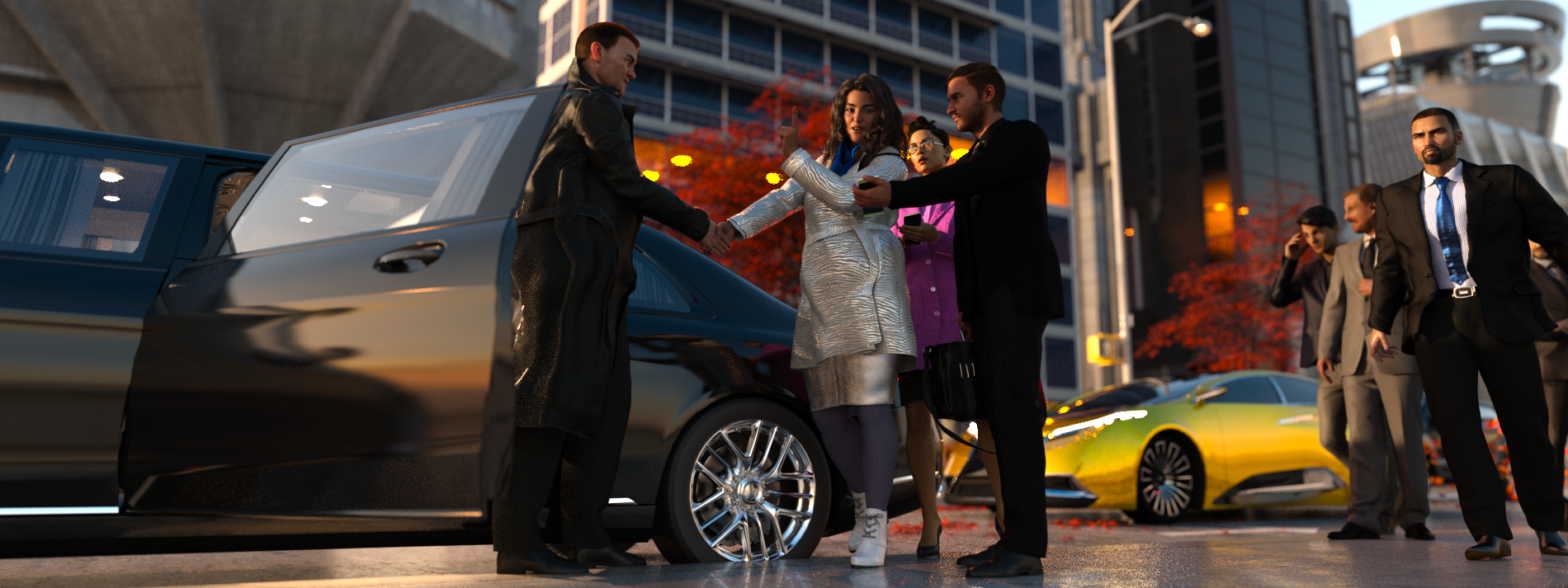
Do you have to use Kitbash3D to Kitbash?I use Kitbash3D items in Daz with no issues, though I have to use Poser Pro 11 to import FBX, save, then import into Daz. ["Import" is just like "load;" you just click a different word]. After that, I merely scale to Genesis, do a quick Uber Iray conversion of surfaces, and they're ready. I save the lot, then geometry edit out each building and save. It's neither difficult nor challenging, and I'm not that technically proficient.
If you catch them on 50% sale, the kits are competitively priced for what you get. The background buildings in this render are all KB3D.
 Do you have to use Kitbash3D to Kitbash?
Kitbash offers several format types so you only download what version you want for the program you use. Their textures are a seperate download as they have several sizes, from 2k to 8k, so you can choose the size of the textures you want. Both can be imported to Daz, just keep in mind a full scene is a large file, they do have the objects seperated so you only import the one's you want from each set.
As for importing to Daz and not having textures, it's easy to apply by going thru the surface tab and applying them manually. They don't offer one click solutions for their products.
Once you have an item in Daz and textures applied, you can save it in a number of ways so you won't have to do it again.
Trouble with fur on OBJ filecrosswind said:
kirstinetheartist said:
crosswind said:
found no problem with this product.. there're 30 Fun Fur shader presets, which one did you use ? You selected surface of your object and apply it?
That's why I'm confused. But no fur shows up on my import.
And the Draw Style you use? Iray preview or not?
Iray preview, yes.
Do you have to use Kitbash3D to Kitbash?WendyLuvsCatz said:
Nath said:
WendyLuvsCatz said:
it's like any term, somewhere exists another thing or product using that name
DAZ is a laundry powder and a rap artist for example
the Game model vendor Kitbash3D actually has very little to do with the term kitbashing which is simply using stuff you have handy to make other things
their stuff is not even DAZ friendly needing other software like Blender to even use it
They do offer OBJ downloads, so models can be imported into DAZ.
I have no idea how their models import in DAZ, since I use their stuff in Blender.
not well
I use Blender to export it as individual props with textures myself
D|S obj import it's one obj and no textures last time I tried with Mission to Minerva
Good to know, saves me trying! Better to go the other way if necessary and use Diffeomorphic.
Do you have to use Kitbash3D to Kitbash?Nath said:
WendyLuvsCatz said:
it's like any term, somewhere exists another thing or product using that name
DAZ is a laundry powder and a rap artist for example
the Game model vendor Kitbash3D actually has very little to do with the term kitbashing which is simply using stuff you have handy to make other things
their stuff is not even DAZ friendly needing other software like Blender to even use it
They do offer OBJ downloads, so models can be imported into DAZ.
I have no idea how their models import in DAZ, since I use their stuff in Blender.
not well
I use Blender to export it as individual props with textures myself
D|S obj import it's one obj and no textures last time I tried with Mission to Minerva
Trouble with fur on OBJ filekirstinetheartist said:
crosswind said:
found no problem with this product.. there're 30 Fun Fur shader presets, which one did you use ? You selected surface of your object and apply it?
That's why I'm confused. But no fur shows up on my import.
And the Draw Style you use? Iray preview or not?
Do you have to use Kitbash3D to Kitbash?WendyLuvsCatz said:
it's like any term, somewhere exists another thing or product using that name
DAZ is a laundry powder and a rap artist for example
the Game model vendor Kitbash3D actually has very little to do with the term kitbashing which is simply using stuff you have handy to make other things
their stuff is not even DAZ friendly needing other software like Blender to even use it
They do offer OBJ downloads, so models can be imported into DAZ.
I have no idea how their models import in DAZ, since I use their stuff in Blender.
Trouble with fur on OBJ filecrosswind said:
found no problem with this product.. there're 30 Fun Fur shader presets, which one did you use ? You selected surface of your object and apply it?
That's why I'm confused. But no fur shows up on my import.
Daz 3D is part of

Connect
DAZ Productions, Inc.
7533 S Center View Ct #4664
West Jordan, UT 84084Licensing Agreement | Terms of Service | Privacy Policy | EULA
© 2026 Daz Productions Inc. All Rights Reserved.