-
Disappearing files
all. would that effect DAZ CENTRAL?
No DIM for IGD Just Sit Poses for Genesis 8 Female? - RESOLVEDThere won't be a Daz Central installer either - the listing is spurious, it seems to show for pretty well everything. We have reported the lack of files for this product, unfortuantely I think it's unlikely to be fixed until Monday at this point.
DAZ Central installing DAZ Studio to C:/DAZ3D, ignoring Program Files folderSince installation/uninstallation is handled by DIM/Daz Central (if you use those rather than stand-alone versions) the applications and content are not added to the system uninstall list - that would be redundant at best, and would have the potential to cause conflicts. Uninstalling the isntaller won't remove user-generated/system updated data - otherwise they'd be lost on updates. As long as the data itself is not removed reisntalling the installer will allow uninstalling the rpevious installs. I suspect, however, that Revo Uninstaller may have stripped out some of that data leaving you with a partially there/partially gone situation.
No, the base path should not be in the Program Files folder as that is protected by the OS, so things that require modifying files (e.g. the CreateExPFiles tool for ExP figures or the database itself) would fail.
You can disable the Install Sets dialogue by unchecking Show Automatically at bottom-left.
Who's Next to Join the G8 Family?@vwrangler - yep I bought as much as I could. But would love some that is dForce and more offerings from their culture.
This is just an idea where we look at a rich culture and explore it in a realistic manner. There are so many in our world that we have little knowledge unless we are lucky to live, travel, or study them. Yet they could be great sources of inspiration. So much more interesting than another 'pretty white girl' and American Dystopian 'Now' environments. Examples: Peru, Brazil (away from the beaches & tourists), Central America, Africa's varied cultures, etc...
Daz has been doing a great job of expanding their lineup, the supporting characters are looking a lot more like real people all the time. (I have nothing against fairies and elves, buy them as well.)
Is Daz Studio (as we know it) Heading South?Well, if DAZ Central is an example of the future, I'll stick with the past.
Is Daz Studio (as we know it) Heading South?After the introduction of Daz Central ... one has to wonder. Will there be a DAZ 4.13 or will there be a new animal in the barn?
DAZ Central installing DAZ Studio to C:/DAZ3D, ignoring Program Files folderReinstalling Studio via DIM after uninstalling DAZ Central, Studio (via Revo), and deleting C:/DAZ3D
Okay, had a couple of coffees, downloaded and installed DIM (Install Manager) 1.4.0.67 64-bit, and then ran DIM.It asks me to login to my account, and the username and password are already filled in.
Obviously a registry leftover from when I installed Studio via DAZ Central an hour or so ago.It then gave me a popup with a preselected list of required (and optional) files for an install of Studio, as below:
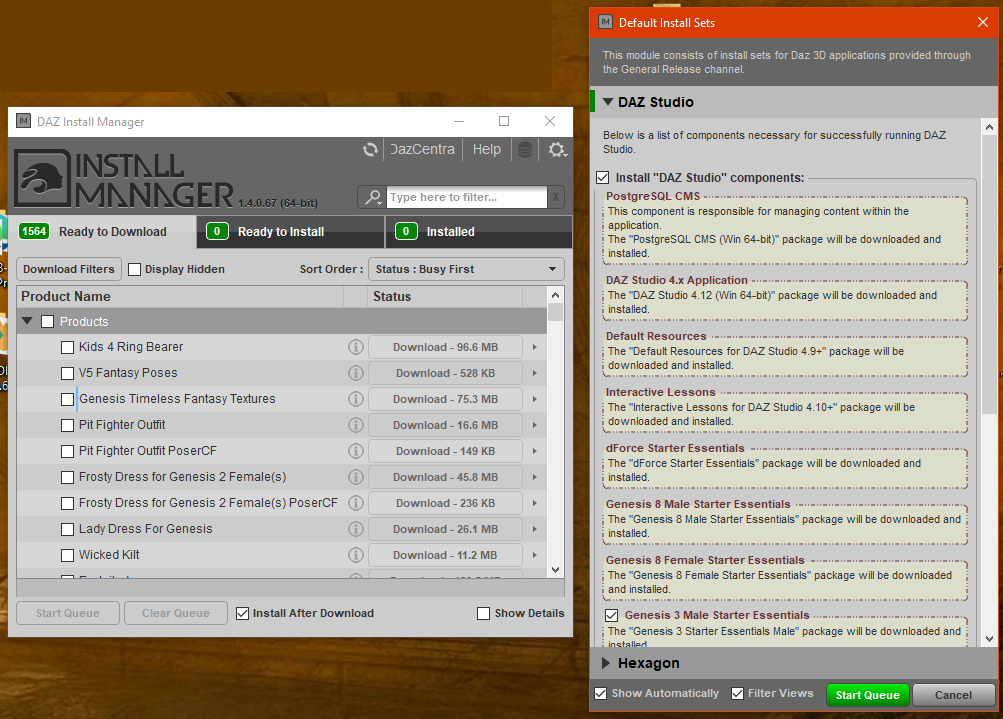
Luckily the coffee kicked in before I could click 'Start Queue'...
Where is it going to install to ?
To check the I cancelled the start queue popup, went to settings (the little cog top right), and selected the Basic view:
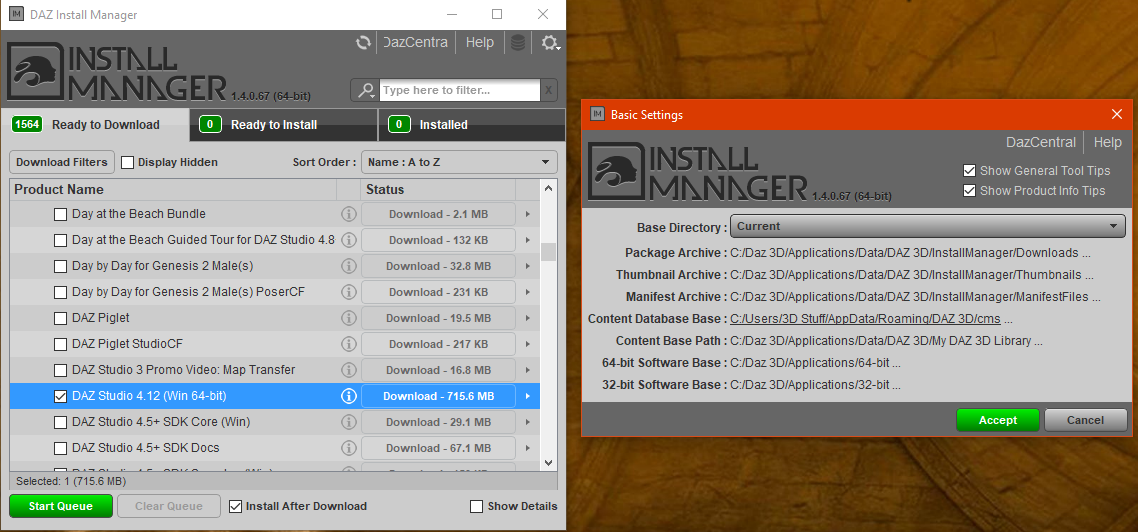
So it's obviously picked the C:/DAZ3D/.. path up from a leftover registry entry too.
Not a problem, as I can change all the default installation paths with the Settings > Advanced view.
But I think another bucket of coffee is in order to make sure my brain is alert...
OT - California is on fire...I live in the Central Valley due east of San Francisco. Air quality is especially bad because the biggest fire, caused by lightning, is burning 30 miles south of us.
Yesterday there was ash all over my car.
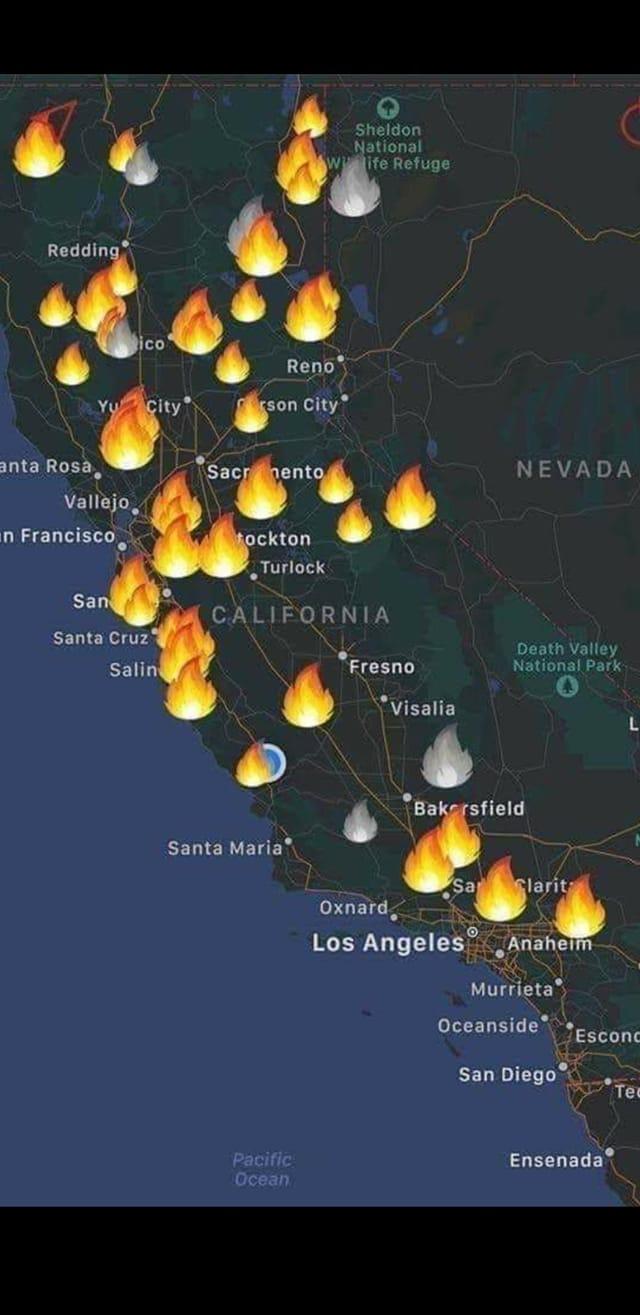
...that map reminds me of how the Northwest looked back in 2017-2018 Oregon alone had 36 uncontained fires burning at the same time during a summer when we had 33 days of temperatures over 90° (several above 100°) in Portland. In an average summer we usually see between is 7 - 10 days of sweltering temperatures. In 2018, There were major fires ranging from Eastern British Columbia through Washington State, Oregon, down to California. It was as if the entire west coast was on fire and it was easily seen from space.
One of the worst in 2018 was one started by a couple careless teenagers in a forested areas along the Columbia River just east of Portland when they tossed fireworks into dry grass and brush. Within mere minutes the fire that resulted grew so quick that it appeared to almost "explode" into an inferno. A number of hikers off guard and were threatened with being trapped by the flames. That fire burned for nearly a week, darkening the skies in Portland and on several days I could see the ash falling through the trees in the city centre.
I feared this year would be bad because we red flag warnings were issued back in April, but then had a reasonably wet May and June. We've been under another red flag alert since July but so far nothing major...yet. There's been little cloud cover and conditions haven't been conducive to creating thunderheads, thus we haven't had the dry lightning storms like California has been getting.
The last couple days we had a little rain but not enough to really do anything though. Fortunately temps here are forecast to be in the 70s all next week (at least for now).
Take care and stay safe
No DIM for IGD Just Sit Poses for Genesis 8 Female? - RESOLVEDI bought the IGD Just Sit Poses for Genesis 8 Female and didn't realize until I went to install it that it doesn't include DIM for install types. Is this just an oversight? I don't want to use DAZ Central and know I can manually install it, but I prefer to install everything with DIM. I'm putting a ticket in for this because I just discovered when I tried to manually download it took me to the product page and there is no download.
DAZ Central installing DAZ Studio to C:/DAZ3D, ignoring Program Files folder...Daz Central is essentially a simplified UI for Install Manager, one of the simplifications being to have only a single folder as a base path within which applications, content, and the database are placed. If you want more control you should use Install Manager
Shouldn't that single base path be C:/Program Files/DAZ3D ?
Not C:/DAZ3DI wonder whether that was a deliberate decision or an oversight ?
DAZ Central installing DAZ Studio to C:/DAZ3D, ignoring Program Files folderThanks Richard. I decided to uninstall DAZ Studio / DAZ Central and go via Install Manager.
Uninstalling Studio after installing it via DAZ Central, which put it in C:/DAZ3D/... which is NOT what I wanted...
(Note: I should probably have run DAZ Central and uninstalled Studio from there, if that's possible. And then uninstalled DAZ Central. But I didn't)First problem - no uninstaller for DAZ Studio.
Neither in Windows Start > System > Apps, nor in C:/DAZ3D/.../DAZStudio4.
So I simply ran the DAZ Central uninstaller (via Windows Start > System > Apps, assuming that it would also automatically uninstall anything it had installed - i.e. DAZ Studio.*
Of course, it didn't. And it didn't warn me that I should do that.DAZ Studio was still there in C:/DAZ3d/...
So I ran DAZ Studio and used Revo Uninstaller Free in hunter mode (which confirmed that there was no uninstaller for DAZ Studio). I used the moderate scan mode and blatted** all the registry entries and files it found. Also needed to reboot.
Hmmm... C:/DAZ3D/... is still there, containing the PostGreSQL stuff and default content. I don't think that the PostGreSQL has any UI that I can use RevoInstaller in hunter mode to uninstall, and the default content definitely doesn't. So at this point I decided*** just to delete the complete C:/DAZ3d/ folder, reckoning that when I reinstall DAZ Studio via DIM all (well, most... or at least some) of the leftover registry entries will be overwritten with correct ones. See, still an optimist at heart. (Or looking at it another way, isn't there a saying that a fool never learns from his mistakes?)
Next step, have my morning coffee before installing DIM...
I really do have to remember not to do anything like this before I've woken up, or while I'm falling asleep...

*In hindsight I should probably have tried running DAZ Central to see if there was an uninstall option for DAZ Studio, since DAZ Studio was installed from within DAZ Central.
But I didn't. And the DAZ Central uninstaller didn't warn me that I should do that first. Darn software monkeys!)**technical term
***In hindsight Revo Uninstaller's hunter mode probably has a way to uninstall things which don't have UIs, but I didn't feel like investigating that - I've only used Revo Uninstaller a few times, and only quite recently.
Disappearing filesI purchased The Streets of the Wild West (Stonemason) yesterday. Installed thru DAZ Central. Everything worked fine. Today, it doesn't appear in my Smart Content, Product Library or in DAZ Central (even though items purchased just before and after it appear in DAZ Central). I reinstalled manually. No help but If I load a saved scene created before it disappeared, it loads fine.
I purchased Alice Wet & Dry hair years ago. It's always worked fine. Today, I load it and just get the raw building blocks used to create it. Then I downloaded the file manually and reinstalled it. Same result. So I clicked on the icon and then clicked install. Now the icon doesn't appear in my Smart Content and th product isn't listed in my DAZ Product Library
Using DAZ 4.12, Windows 10. DAZ Content Libary is on an external hard drive but it has been working just fine
Gremlins?
DAZ Central installing DAZ Studio to C:/DAZ3D, ignoring Program Files folderInstall Manager is still available, I grabbed a fresh copy yesterday having done a Windows reinstall. I searched the store for Install Manager but it's also linked from the release threads (currently https://www.daz3d.com/forums/discussion/382131/daz-install-manager-dim-1-4-0-67-now-available-updated/p1#top ) and from most pages in the Product Library.
Daz Central is essentially a simplified UI for Install Manager, one of the simplifications being to have only a single folder as a base path within which applications, content, and the database are placed. If you want more control you should use Install Manager
Crashing in Windows 10Daz studio crashs keep getting fatal error Daz central will not open all this started aug 15-16 have a summit into Daz ---6 day now no responds yet --any help
DAZ Studio 4 Installation Guide WindowsI just installed DAZ Studio 4 on a clean Windows 10 PC using DAZ Central, and it was installed to the root of my C drive (C:/DAZ3D), not the C:/Program Files/DAZ3D where good programs live.
I've started a separate thread here - DAZ Central installing DAZ Studio to C:/DAZ3D, ignoring Program Files folder
DAZ Central installing DAZ Studio to C:/DAZ3D, ignoring Program Files folderSo has anybody else discovered that their copy of DAZ Studio 4 is somewhere under C:/DAZ3D instead of C:/Program Files/DAZ3D or am I the only one ?
Has anybody else tried installing DAZ Studio via DAZ Central from a Local user account ? Or does everybody else use cloud/web-enabled or admin accounts ?
DAZ Central installing DAZ Studio to C:/DAZ3D, ignoring Program Files folder(I forgot to mention that I was doing all this from a Local user account. Not a Microsoft web/cloud account. Not an admin account. That may or may not be relevant)
I ran the DAZ Central installer, giving admin permission as required.
All seemed to go smoothly, and the DAZ Central window ended up showing me what I was actually after - the option to install DAZ Studio. Which I clicked.
The installation didn't ask (or tell me) where it was going to install, but I went ahead assuming that the monkeys who did the programming knew what they were doing.
All seemed to go smoothly. I think it then automatically started DAZ Studio. I entered my serial number and the main DAZ Studio UI opened up.
And then a little popup appeared saying something like "New content directory found at C:/DAZ3D/..." I thought "That's not right..."
So I had a look and sure enough, there's now a DAZ3D folder in the root of my C drive. That can't be right. I delved into it and DAZ Studio 4 is deep down under there.
DAZ Central is under C:/Program Files/DAZ3D, so I'd say that something in the DAZ Studio installer has screwed up
I also noticed that there's no desktop shortcut to DAZ Studio or DAZ Central. And neither of them appear appear in the Apps I see from the Windows Start button. That's when I thought about the user/admin rights. Sure enough, the shortcuts were created on the admin accounts desktop.
DAZ Central installing DAZ Studio to C:/DAZ3D, ignoring Program Files folderI've just replaced the HDD on my system, which crashed, with an old HDD that I just reformatted and gave a clean install of Windows 10 Home 2004 64-bit using a bootable USB created from the Microsoft site download.
Rather than reinstalling an older version of DAZ Studio 4 from my backups I decided to grab the latest version.
I went to the DAZ homepage, and clicked the blue Get Started For Free button.
I had to login again on the Get Studio page, even though I was already logged in.
On the Download Studio page it automatically downloaded DAZ Central. I couldn't see any option to download the DAZ Studio installer directly, or even an option to download DAZ DIM. Too old-fashioned I guess.
The downloaded DAZ Central installer was the 64 bit one, version 1.5.0.11
Edit:
Things I've discovered while doing this thread.
I'll add links from each observation to the relevant post at some time.
There may be changes or additions to this list as time goes by.
(note: I use Windows. No idea whether any of this applies to Mac)1) If you use DAZ Central to install Studio it installs everything, programs and content, to C:/DAZ 3D (i.e. a DAZ3D folder in the root of the C drive) without any option to change it.
2) If you want to install the software and/or content to specific locations you shouldn't use DAZ Central. You need to use DAZ DIM (Install Manager, which should be in your Product List), or the manual installers. on your computer.
3) If you install Studio via DAZ Central then no uninstaller for Studio is created on your computer, so you can't uninstall Studio from Windows > Apps (or whatever it's called in your version of Windows). Apparently you need to run DAZ Central, and you can uninstall Studio from there (I never tried this). I think it's the same with DAZ DIM.
4) If you install Studio using DAZ DIM from a non-admin local account you may find a spurious product called 'LOCAL USER' in you content directory pane. See the picture at the very bottom of this post (or go to the next post and scroll up a bit)
5) The DAZ Central UNinstaller hasn't been signed. See this post
OT - California is on fire...I live in the Central Valley due east of San Francisco. Air quality is especially bad because the biggest fire, caused by lightning, is burning 30 miles south of us.
Yesterday there was ash all over my car.
Rory HD is loaded on every G8FYou should report this to Technical Support, so it can be fixed at source, but in the mantime a trick I was previously aware of, if you installed through Install manager or Daz Central (or manually), is to load the Developer version of Genesis 8 Female (so everything is zeroed if it doesn't have a non-zero default), click the gear icon on each of the Rory sliders to get Parameter Settings, and then set the Default value to 0. Now use File>Save As>Support Assets>Save Modified Assets.
Daz 3D is part of

Connect
DAZ Productions, Inc.
7533 S Center View Ct #4664
West Jordan, UT 84084Licensing Agreement | Terms of Service | Privacy Policy | EULA
© 2026 Daz Productions Inc. All Rights Reserved.