-
Use G9 skin on G8
yuyu.atem said:
Thank you very much!
This product doesn't convert G9 textures into G8F ones, it modifies your G8F figure so it accepts G9 textures. To do that, it needs to replace parts of the figure's geometry with geografts, because it needs to redefine G8F surface boundaries in those areas and there aren't polygons in the right place for that.
Couldn't it make some issue when I use clothes, hair or wings for G8 with it?
In my experience, nope, it won't bring issues to wearable ~~ not relevant.
It's worth noting that there might be a few problems if you're using morphs (especially HD morphs) which would alter the areas with the geografts a lot, as the geografts may not be able to react in the same way as the original figure's geometry.
Would it ocurs when the morph was used before using the G9 UVs for G8, or only if I want to use a morph after using it?
It's a well-known issue that geo-graft cannot perfectly support HD morph especially with high SubD Level, no matter you dial HD before or after... Like the screenshot attached, it's a V8.1 HD using V9's textures with this product. If you view or render SubD Level 4, the issue can be apparently seen.
But I know there're some alternatives:
a) convert G9F's texture to G8M in FaceForm Wrap; b) convert them in Blender with UV projection than bake the maps. However, I myself haven't done them before 'cause the process requires even more domain knowledge, while the steps turn out to be cumbersome...
Do you know some tutorials that explain how to do?
Rarely ~~ You may search on youtube / internet.
c) you may convert your G8M figure to G9. (by using SkinSuit method or FaceForm Wrap which you've already known how-to...) That'll be much easier. Then you may freely use any G9's texture maps on it.
I would like to use the Avija Wings (https://www.daz3d.com/avija-wings-and-tail-for-genesis-8-and-81-males) on my character; do you think I could use it on a G9 character, even if it created for G8? Wouldn't it create some isses?
Nope, you cannot, this Wings product is a geo-graft for G8.X which cannot be used on G9. Besides, this Wings cannot adopt G9's Body texture either, you have to convert G9's body textures as well so as to apply on the head / body surfaces on the Wings.
Thank you in advance for your answers!
Vo Julie, Young, and Male HD for Genesis 9 BundleI did one, but the forum seems to be having issues with attachments again.
The Sky is Falling Complaint Thread...I'd almost want one without the thermostat as that is likely what went wrong with the one I have.
As Chief Engineer Montgomery Scott said after he, Kirk and the rest of the bridge crew stole the Enterprise in The Search or Spock...
 buyimg a new computer
...depends on where you get it according IBuyPower a 4TB (WD Blue) is around 98$ The one caveat with many build houses as they can have limited selections For example IBuyPower offers the Western Digital Blue as their only 4 TB HDD, I would prefer a WD Black or Seagate Barracuda [the latter I have which has been reliable for years]).
Below ie what I cobbled together at AVA Direct. The price is a litttle higher than the one at Amazon, however, it includes the RTX 4060 16 GB and 64 GB of DDR5 5200 memory. The two changes to keep it below 2,000$ are this system is built on the I7 13700KF (a step down form the i7 14700KF) and it has active air cooling for the CPU rather than a liquid cooling system (however it is more than capable to handle that CPU).
This is just to give an idea of what can be done under the 2000$ budget limit Of all the build houses I surveyed, AVA appears to offer the widest selection of components.
It is sad that EVGA stopped producing GPUs after the 3xxx series as I would definitely have gone with them for the 4060.
ETA:
Ugh, seems the old "Attach a file" bug is back as it just sits there sayiing "Uploding" without attaching the file selected.
As the original is a web page and not an image I cannot import it through the froum Image function so had to jump through some hoops to send it to one of my gallery sites to be able to import it as a "url" image through the Image funciton above..
ETA2
A pox on the forum software, spent more time than I should have taken, first gettting it into a folder on the gallery site that wouldn't post it on my main gallery and then being unable get the image to post without it gong over Daz the forum page size so I had to go back edit it down to get it to fit and resubmit to teh gllery gallery site befoire importing it in here.. If I could have simply attached it you could click on the image to expand it to full size so it would be eaier to read.. It probably would have taken less time to manually type everything in from the on screen summary.
...pardon my ire but not very pleased with all the time this took out of my afternoon for something that should have been so simple.
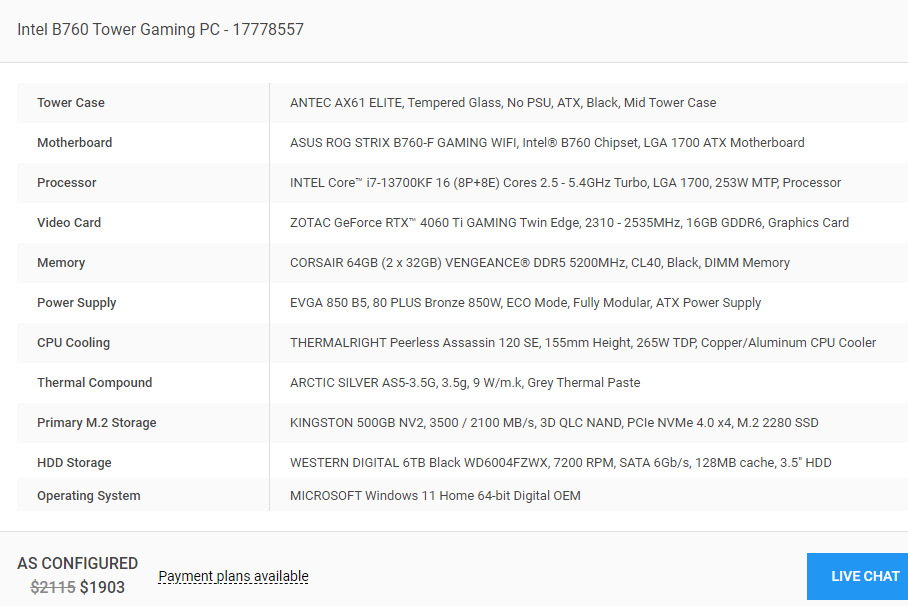
:
Use G9 skin on G8Moved to Product Suggestions as it is a search for an add-on tool, not a post related to the Daz Studio application itself.
Missing Files - Outoftouch's new Turbulent Warrior hairartxtap said:
don't have this product - so this just a [wild] guess
search for those files in the duf and see if those files have a
"//" at the start of the file path
it should be a
"/" ............................................not //
If the path starts with data, or Runtime for textues, it probably isn't that issue - though it could be mid-path.
Missing Files - Outoftouch's new Turbulent Warrior hairdon't have this product - so this just a [wild] guess
search for those files in the duf and see if those files have a
"//" at the start of the file path
it should be a
"/" ............................................not //
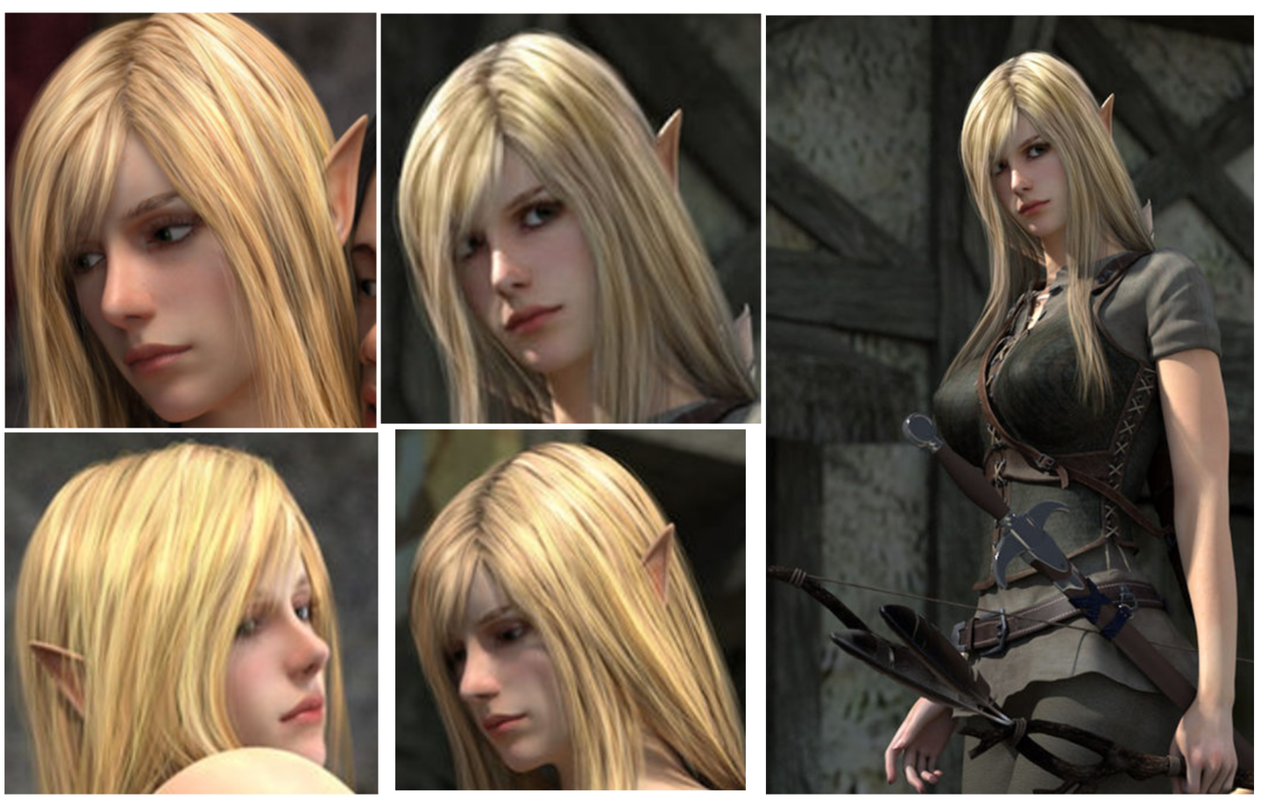
Does anyone know which G3F model is this girl based on?Hi everyone,
Hopefully this is the right forum to ask :) Been searching for a while but without success... am trying to identify the model behind this elf girl.
Based on the date these were rendered it's most likely a Genesis 3 model. Unlikely to be V4 due to the smoothless.
And sorry for the resolution ^^:
any help will be much appreciated! Thanks in advanced!

 Dimples?
- if you own some morph products, try to search Dimple morph and dial the propertie(s) (e.g. https://www.daz3d.com/rarestone-s-face-morphs-collection-for-genesis-8-female)
- or you may sculpt dimples in exteral applications like Blender, then send OBJ back to DS for creating Dimple morph(s).
HAS THE CLOCK STARTED TICKING FOR DAZ?FirstBastion said:
Silent Winter said:
kyoto kid said:
... Of course I just had to see what typing in the perennial Naked Vicky In A Temple With A Sword would produce.
Clearly Daz AI doesn't know the history, or at least hasn't read the old forums for the acronym - I just tried the prompt 'NVIATWAS' , admittedly on 'Fast' quality, though I did choose 'Victoria 9' as the model, and got this result:

Kinda abstract interpretation.
Stretching the acronym 'NVIATWAS' out into words. Vicky In A Temple With A Sword will give you something.
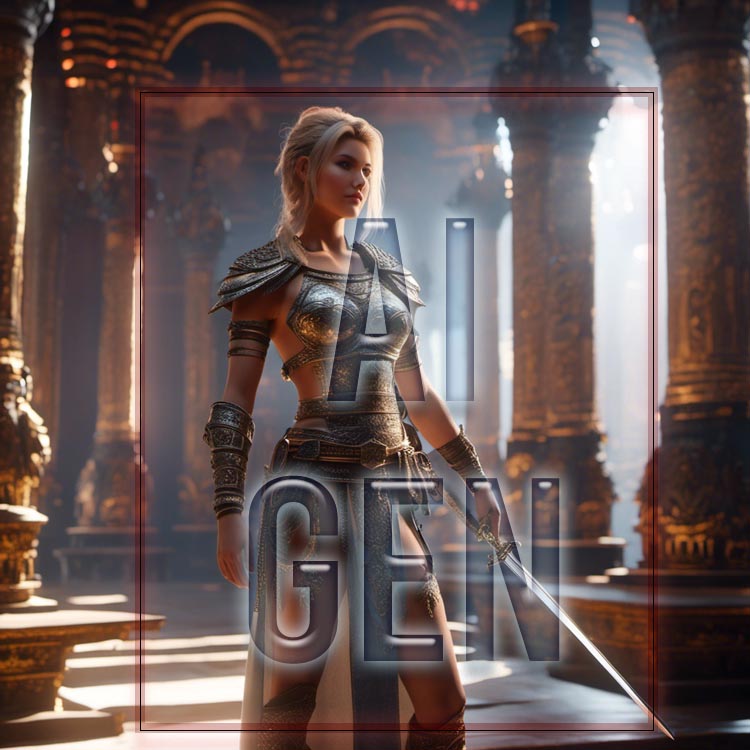
You missed a word
 (presumably for forum TOS purposes).
But again, I wasn't really bothered by the outcome - just wanted to share the scribble.
She's kinda holding the sword funny in yours.
Can't Get Motion Matching to WorkHas anyoone been able to get motion matching to work for Genesis 8 or 9 characters in UE5.4? I could not. I tried following this tutorial but the G8F animations I imported from DAZ Studio didn't show up in the Pose Search Database window
Various Questions About Character in Battle Suit.TimberWolf said:
This is what Studio is really great at - mixing and matching. You'll need to buy the Eleanora character from the store and the battle suit.
There are many ways to go about this but this will work: Load the Eleanora character and then switch to your parameters tab. Click the 'Currently Used' option and dial the Eleanora head morph to zero, essentially reverting the head shape to the default G8F. Just below Currently Used you will see the actual character which you should should switch to. In the filter at the top of the right hand side of this pane (contains the text 'Enter text to filter by') search for Jill and dial in just the head morph. Now load the suit onto your hybrid character.
One of the best bits of Studio is that you don't have to dial in these morphs at 100% or 0%. Try playing about with 60% of Jill's head and 50% of Eleanora's, or any other character you like the look of. Same for the body. You don't have to slave away trying to reproduce someone else's work when you can add your own touch to it. Perhaps people will ask you how *you* did it...
Another way to do this is to load a base G8 figure and then use the parameters tab to find the head and/or body morphs you want. Getting something you like and resembles what's in your mind's eye will take some time and effort as you learn what works and what doesn't. The technical side of it can be explained by pretty much everybody on the forum; the artistic side of it is up to you.
Thank you for the helpful instructions. I'll have to try it. I have Daz Studio 4.22 installed. I noticed with the Eleanora character there's options for just loading the head. See helpful attachment. I'll attach the Jill BattleSuit image again
Various Questions About Character in Battle Suit.This is what Studio is really great at - mixing and matching. You'll need to buy the Eleanora character from the store and the battle suit.
There are many ways to go about this but this will work: Load the Eleanora character and then switch to your parameters tab. Click the 'Currently Used' option and dial the Eleanora head morph to zero, essentially reverting the head shape to the default G8F. Just below Currently Used you will see the actual character which you should should switch to. In the filter at the top of the right hand side of this pane (contains the text 'Enter text to filter by') search for Jill and dial in just the head morph. Now load the suit onto your hybrid character.
One of the best bits of Studio is that you don't have to dial in these morphs at 100% or 0%. Try playing about with 60% of Jill's head and 50% of Eleanora's, or any other character you like the look of. Same for the body. You don't have to slave away trying to reproduce someone else's work when you can add your own touch to it. Perhaps people will ask you how *you* did it...
Another way to do this is to load a base G8 figure and then use the parameters tab to find the head and/or body morphs you want. Getting something you like and resembles what's in your mind's eye will take some time and effort as you learn what works and what doesn't. The technical side of it can be explained by pretty much everybody on the forum; the artistic side of it is up to you.
GenX2 all buttons and options greyed and "No definitions found" errorThanks to everyone who responded! I am very glad that there are so many people on this forum who are ready to help newbies. I solved the problem differently - I applied all the necessary morphs on the Victoria 4.2 character, exported it as .OBJ and, using 3DSWRAP, adjusted the standard Genesis2 character to it and exported it as a morph. Since V4 and G2 are very similar overall, the result is excellent. In many places the morph is so well adjusted that if you turn on both characters the textures overlap and ripple.
Where is the Daz 4.22 stuff?I clicked onto your page for the Daz+ Summer Sale and tried to look for items for Daz 4.22 in the Free Gift Item where Daz+ members can get 2 free products from a list using the code Just-Free. I clicked to search for Daz Studio 4.22 items and not one of the were for Daz Studio 4.22. They were all for Poser and Daz-to-whatever. So, my question is where is the Daz Studio 4.22 items that doen't require to be Daz-to-whatever?
Daz Studio only opens in thumbnailThank you very much. I'll look into that. I already did, remembering something you said about CMS another time, and things seemed in order except that it had a "START" by the CMS under preferences, which I clicked. It didn't seem to do anything. I'll check the folder directories and the other things you mentioned. Thanks again.
P.S. - This is an article I found which addresses the database CMS error, too. I thought I would post it here for people who might run into the error and search for a solution, perhaps finding it in this thread. Honestly, most of what is said on these things just goes over my head, but eventually I seem to learn.
https://bugs.daz3d.com/hc/en-us/articles/207812393-PostgreSQL-CMS-Connection-and-no-Smart-Content
-BillMightyMitethere's the forum message service. It might be a bit difficult to talk to more than one person at a time but its possible to add others to a ocnversation asfaik
Show us your Daz AI Studio ImagesFSMCDesigns said:
Nova said:
Nice to see that you can now post AI images here too, when I initially showed this in DAZ many didn't know what AI generated images were and despite much praise they were all deleted.
Work from the year 2022 & 2023 / KI + PS & NIK
Cool images. Just an FYI, this thread and forum are just for AI images generated with the DAZ AI Studio https://www.daz3d.com/ai-studio not general AI
Thanks for the information
Plant FactoryHoro said:
Thank you Hansmar. I was aware that these Vue things are available for free, there is a thread in the Commons (6 May)
https://www.daz3d.com/forums/discussion/685816/vue-plant-factory-now-free/p1Thanks, Horo. Maybe I should read the commons forum to not miss too many things (I only focus on Bryce).
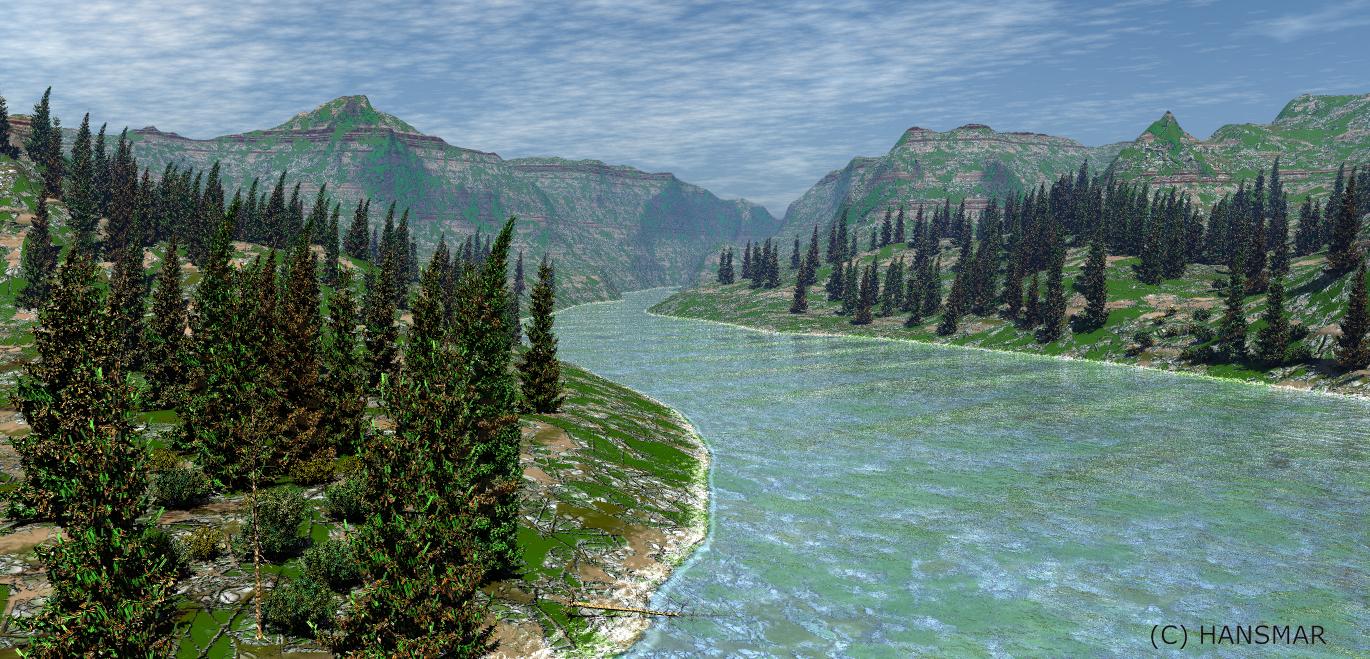
I made a scene with the Gritstone Hills (David and Horo), carving out a river, using the texture of the Bonus terrain of the High Resolution Terrains Set 4 (David and Horo) and a sky with IBL by Horo. There are four versions of a pine tree from PlantFactory, though I was too lazy to properly modify the (picture) texture of the planes that create the leaves. Because there are so many leaves, I just put the texture on no transparency. If you look closely at the closest trees, you can see that there are rectangles where there should be trees. But it is not too problematic here. However, I could probably have reached the same result with two versions of the tree, instead of four. You do not recognise the different versions very well in this render. I instanced these trees multiple times. I further added three instances of a dead pine tree and several instances of two versions of a bush.
 Genesis 9 No Breast/Pectoral.. Possible?
Yeah, you finally fix the chest then hardly anything fits. I was happy to see G9 return to something like G1, but I frequently fit G1 clothes to G9 better than G9 clothes on G9 with a flattened chest. I've been experimenting with smoothing the clothes and baking it or updating geometry, but I guess I need more info to make it work - afaik, it's possible. The search for tuts goes on
/ peace P.S. Thank you Masterstroke for your freebies!Daz 3D is part of

Connect
DAZ Productions, Inc.
7533 S Center View Ct #4664
West Jordan, UT 84084Licensing Agreement | Terms of Service | Privacy Policy | EULA
© 2026 Daz Productions Inc. All Rights Reserved.