-
Daz Studio download stuck at 43% in Daz Central
and goes back and forth between 42% and 43%.
DIM download fails everytime, starts up and goes to about 20% then the progression just disappears to zero and fails sometime after.How uninstall this softwareUninstall in the same way you installed - if you used Install Manager or Daz Central the unisntall option should be there, then when you have uninstalled the applications and content you should be able to uninstall the installation tool from Applications and features as normal.
None Of The Daz Apps Open On My 2020 Mac with Catalina OS On ItI tried opening the Central download and it said this: “DazCentral_1.5.0.11_Mac64” can’t be opened because Apple cannot check it for malicious software. This software needs to be updated. Contact the developer for more information." Same for Daz 3D. They all need to be updated by they Daz company. The downloads need to have Mac computers with Catalina on it to check for "malicious software". For some reason these apps can't be checked. So Apple will not install any Daz programs. Please fix this problem ASAP. Thank you.
Im GOING CRAZY! Daz to MAYA installHello I have been trying for months to install daz to MAYA which i payed $40.00 for the retired version and never got it to work. Now i have supposedly installed the new daz to maya bridge and i can not find it in Daz3d even though Daz Central says it is installed. The you tube video keeps saying click on the scripts tab from the menu bar. I do not have a scripts button on my menu bar there is only File, Edit, Create, Tools, Connect, Window and help.
SOMEONE PLEASE HELP.........................................
Please help me, I can't get rid of itYes, it's Daz Studio. I have already uninstall it and all of its components on Daz Central andon the interface of Daz Central the install button is available right now, so it means Daz Central considers it as uninstalled. Yet, in reality it is not.
Please help me, I can't get rid of itI assume this is Daz Studio? Daz Central should have uninstalled it - how is it being shown within Daz Central now?
DAZ Central installing DAZ Studio to C:/DAZ3D, ignoring Program Files folderThe common root folder is new to Daz Central, previous methods still spread the files to locations in the more standard master folders (Program Files for the executables, AppData for settings and the database itself, and documents for the content).
Local User is a catch all for content that isn't part of an explicitly decalred product, and for locally created files.
Not sure what is happening with the uninstaller.
The issue with the uninstaller is that it is generated locally, by the installer, so can't be signed.
UltraScenery [Commercial]Great renders, all!
This is all I managed today - I was installing my latest haul of other products so didn't have much time left.
Tangy Apple Orchard (the last one in the list, number 14?) and dirt-track 2 with hedgerow. Incidentally it does have extended trees (just visible at the end of the track) - is this one of ecologies where other people were missing the trees?
Great scene! TAO12 was mentioned by Artini at the top of the page, regarding extended forest not working with it and Dirt Track 1 with Hedgerow.
https://www.daz3d.com/forums/discussion/comment/5936451/#Comment_5936451
TAO 11 and 12 are the ones I know of that don't have extended forest.Thanks @barbult. Hopefully there will be an update for this product soon.
Yes, I'm also hoping for another update. There hasn't been any response yet from TangoAlpha to the additional errors I pointed out here. I've edited my copy to correct the errors, but it would be nice for everyone to get a corrected version.
I knew there were more. Thank you for linking to them. Because all the add-ons are discussed here, it would be helpful if Howie added "In Progress Updates" in his first post, then we have a central place to locate them. Once they're fixed, just cross them off the list. I'm waiting until these are resolved before buying it.
DAZ Central installing DAZ Studio to C:/DAZ3D, ignoring Program Files folderThe common root folder is new to Daz Central, previous methods still spread the files to locations in the more standard master folders (Program Files for the executables, AppData for settings and the database itself, and documents for the content).
Local User is a catch all for content that isn't part of an explicitly decalred product, and for locally created files.
Not sure what is happening with the uninstaller.
installation issuesHi,
The installation from DAZ Central crashes when it reaches about 67% then I have to start the whole process over again and the Genesis 8 Starter is not installing.
What could be happening?
OT, Mornington Crescent: Round 8 :- (Tudor Court Rules)Tower Gateway > Euston > Banc > Charing Cross > Harlesden > Eliffant a Castell > Capel Gwyn (Whitechapel) > Baching > Llanfairpwllgwyngyllgogerychwyrndrobwllllantysiliogogogoch > Shepherd's Bush > B(r)econ[tree] (Beacons) > Pontarfynach (Devil's Bridge) > Angel > Heathrow Terminal 5 >Llandudno Junction > Amersham > Clogwyn> Beddgelert > Pontrhydyfen > Llanwrtyd Wells > Caerdydd Canolog [Cardiff Central] > Hobbs End > Hickory Road >Timbuktu > Darjeeling > Earl's Court > King's Cross >
Since we're playing the Crwssynt Morgantonio LLwdiu variation I'll try...
Mornington Crescent ?
DAZ Central installing DAZ Studio to C:/DAZ3D, ignoring Program Files folderDAZ Central UNinstaller not correctly signed ?
One other thing I forgot to mention regarding uninstalling DAZ Central. Windows popped up the standard-type warning asking "Do you want to run this program from an unknown publisher". So it appears that the DAZ Central UNinstaller wasn't correctly signed, or whatever you call it.(I think the DAZ Central installer was fine)
OT - California is on fire...yet another reason I am glad I don't live in California. The worst natural things I have to deal with are drought, tornados and hail. I love the beach, but I am a realist and know that if there is a chance something can happen, it will at one point, no sense chancing it if I can help it which is why I will never live in a place where a hurricane can wipe out my house.
Indeed

That and rising sea level are the reasons that I don't invest in Florida property. Oh that, and the fact that I have no money to invest with.

A place that has next to no life threatening animals on land or water, doesn't have tornado's, hurricane's, tsunami's and/or wildfire seasons, a place where the continental crust is stable and over 30 miles thick (surpassed only by the Himalayas) and the ground level is rising faster than the sea = Finland
It's going to turn into a volcano.
Central Australia, is about as stable a place as it's going to get. But take extra water with you.
Actually, here in western NY State is quite nice. East of the Great Lakes. Winds are almost always from west to east over the lakes, bringing rain in the summer, and snow in the winter. No significant earthquakes, low hills, so no landslides, a little flooding now and then but very localized and minor. Tornados don't grow big here. A few trees and a ramshackle barn may get downed but that's about it. There's lots of forested area but the moist weather from the lakes keeps fire threat low. Sinkholes are unheard of. We're a thousand feet above sea level and 400 miles from the sea. Hurricanes are just a longer rainy day by time they get here. We've never had an elephant stampede. The biggest disasters in this area have been the loss of the Chesnut trees 100 years ago, and the Dutch Elm disease taking the Elms in the last 50 years. Yeah, we get a lot of snow in the winter, but we know how to deal with it. And no big mountains so no avalanches either.
Central Australia may not be all that great. Depending of how much sea levels rise, it may revert back to being an inland sea.
DAZ Central installing DAZ Studio to C:/DAZ3D, ignoring Program Files folderSince installation/uninstallation is handled by DIM/Daz Central (if you use those rather than stand-alone versions) the applications and content are not added to the system uninstall list - that would be redundant at best, and would have the potential to cause conflicts. Uninstalling the isntaller won't remove user-generated/system updated data - otherwise they'd be lost on updates. As long as the data itself is not removed reisntalling the installer will allow uninstalling the rpevious installs. I suspect, however, that Revo Uninstaller may have stripped out some of that data leaving you with a partially there/partially gone situation...
I didn't think of that.
So uninstalling Studio from DAZ Central before uninstalling DAZ Central would probably have been the best choice, option one
Reinstalling DAZ Central, using it to uninstall Studio, and then uninstalling it again should have been option two.
I opted for option three, or lower....No, the base path should not be in the Program Files folder as that is protected by the OS, so things that require modifying files (e.g. the CreateExPFiles tool for ExP figures or the database itself) would fail...
I'm fairly sure that Studio was never installed to C:/DAZ 3D before, and that it's always been C:/Program Files/DAZ 3D. At least up until DS 4.10 which is the most recent one I had before my HDD crash.
Not sure about the content database - I vaguely recall that also being under C:/Program Files/DAZ 3D.
(Up until maybe a year ago, I think I had Studio installed on a separate disk partition, outside the OS protection. However, my memory tells me that the default program location in the old Studio installers was always in C:/Program Files/DAZ 3D and not C:/DAZ 3D. Of course, my memory may be playing up.)
Regarding CreateExpFiles, etc - the files they modify are in the content, not the program itself. So that's not a problem, at least not for me, since my default content location is on a different drive.
And doesn't anything running from within the program itself have the same rights as the program ? So Studio has the rights to modify things under its own installation path ? I remember discussing this over on the Renderosity PoserPython forums with regard to whether PoserPython scripts could change things in the Poser program's installation path....You can disable the Install Sets dialogue by unchecking Show Automatically at bottom-left.
Ah yes. It's even on my screenshots
~ ~ ~ ~ ~ ~ ~ ~ ~ ~ ~ ~ ~ ~ ~ ~ ~ ~
Regardless of all that: Before I saw Richard's post I'd already had my bucket of coffee and reinstalled Studio to where I wanted it using DIM. Here's what I did:
Setting the paths in DIM
I want DAZ Studio installed where it's always been installed, under C:/Program Files/DAZ 3D (Note: I read Richard's comment in the previous post after my reinstallation of Studio via DIM as described in this post).I had my coffee and was raring to go. Time to run DIM to install Studio.
However, there's no shortcut to Install Manager on my desktop, and it doesn't appear under Windows Start > All Apps.
Logging in on my computer as admin I can see the desktop shortcut, so I guess the DAZ DIM installer only puts a desktop shortcut on the admin account's desktop, not all users' desktop's. Most programs create the desktop shortcut for all users. Microsoft Edge, Bitdefender, Malwarebytes, Poser 11, and Revo Uninstaller definitely did - I see their shortcuts on my non-admin local user desktop and they appear under Windows Start > All Apps, but if I try to delete those shortcuts I need to enter an admin password. I just tested that.
Anyway, that's not a real problem as I can just create a desktop shortcut manually.Okay, here we go. Run DAZ Dim and set up the paths as I want (DAZ DIM settings cog top right, Advanced):
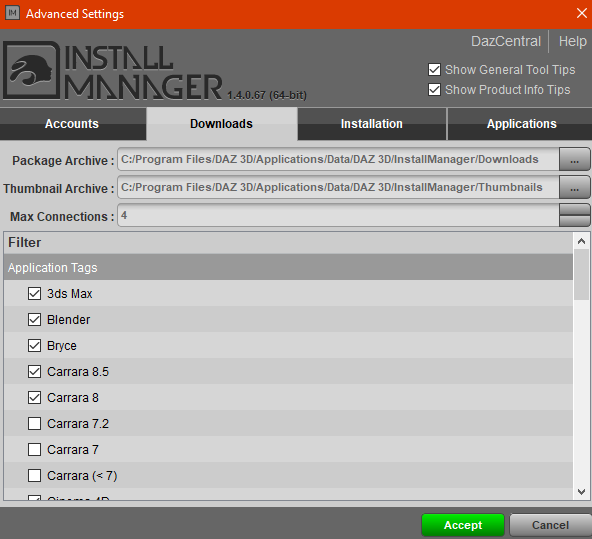

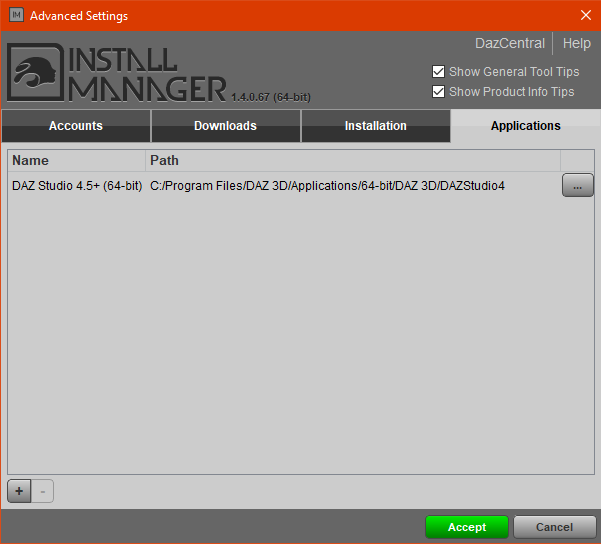
Installing Studio and default content from DIM
Accept those changes, and then go back to the Default Install Sets (DAZ DIM settings cog top right again). Tick all optional components in that list (the Genesis 3 male/female starter essentials were both unticked by default) and click the green Start Queue. Everything downloads as it should (from what I recall of previous use). I can't recall whether I had to enter an admin password at any time during this process - I probably did: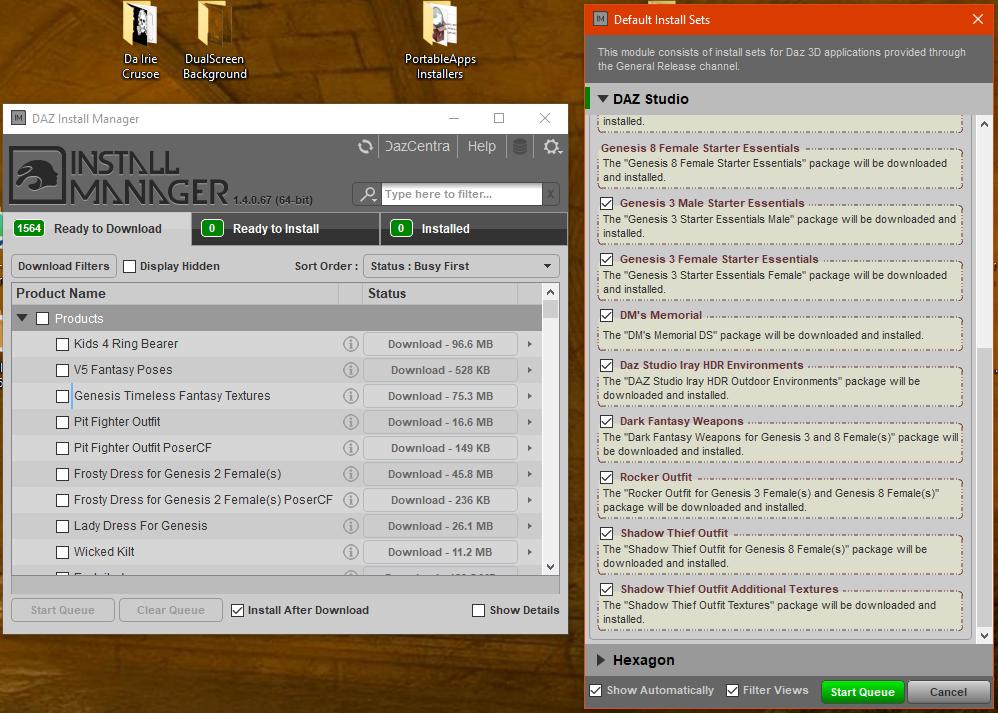
Quick test of newly installed Studio
After that finished I ran Studio - I can't recall whether it automatically ran after installing, but once again there's no desktop shortcut, and it doesn't appear under Windows Start > All Apps on my non-admin local user account. So I create one manually.
It runs and finds the content on my removable HDD: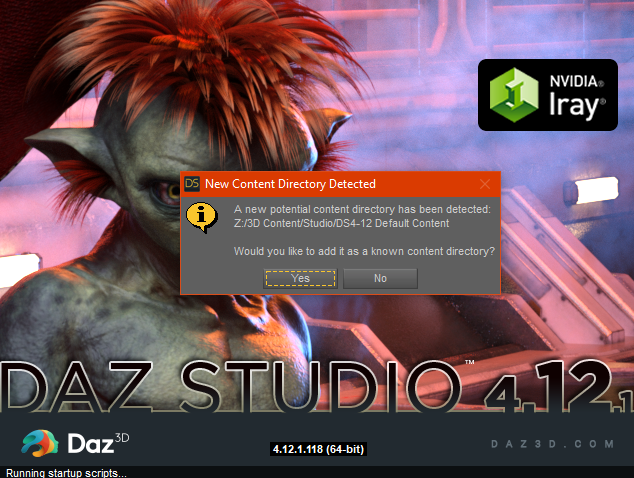
I have a quick play with Studio and it all seems okay. I shut it down and remove the external HDD with my content (I have to restart my computer since it tells me that somethings still using the HDD and it can't remove it)
Try running Studio without any external HDD - works fine. No content of course, but the program's up and running.
Shut down Studio, reconnect HDD, start Studio and carry on playing.
Errr...what on earth is this ?
Wait a moment... what on earth is 'LOCAL USER' doing under Products !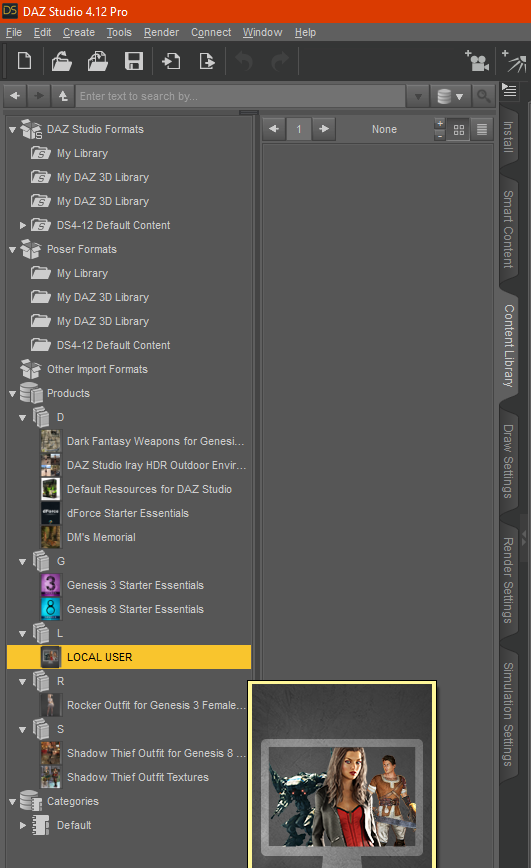
That can't be right can it ?
OT - California is on fire...yet another reason I am glad I don't live in California. The worst natural things I have to deal with are drought, tornados and hail. I love the beach, but I am a realist and know that if there is a chance something can happen, it will at one point, no sense chancing it if I can help it which is why I will never live in a place where a hurricane can wipe out my house.
Indeed
That and rising sea level are the reasons that I don't invest in Florida property. Oh that, and the fact that I have no money to invest with.
A place that has next to no life threatening animals on land or water, doesn't have tornado's, hurricane's, tsunami's and/or wildfire seasons, a place where the continental crust is stable and over 30 miles thick (surpassed only by the Himalayas) and the ground level is rising faster than the sea = Finland
It's going to turn into a volcano.
Central Australia, is about as stable a place as it's going to get. But take extra water with you.
Actually, here in western NY State is quite nice. East of the Great Lakes. Winds are almost always from west to east over the lakes, bringing rain in the summer, and snow in the winter. No significant earthquakes, low hills, so no landslides, a little flooding now and then but very localized and minor. Tornados don't grow big here. A few trees and a ramshackle barn may get downed but that's about it. There's lots of forested area but the moist weather from the lakes keeps fire threat low. Sinkholes are unheard of. We're a thousand feet above sea level and 400 miles from the sea. Hurricanes are just a longer rainy day by time they get here. We've never had an elephant stampede. The biggest disasters in this area have been the loss of the Chesnut trees 100 years ago, and the Dutch Elm disease taking the Elms in the last 50 years. Yeah, we get a lot of snow in the winter, but we know how to deal with it. And no big mountains so no avalanches either.
Is Daz Studio (as we know it) Heading South?After the introduction of Daz Central ... one has to wonder. Will there be a DAZ 4.13 or will there be a new animal in the barn?
I don't understand this question...
Is Daz Studio (as we know it) Heading South?Yeah, there's no reason to think that DAZ Central has anything to do with waning DAZ Studio support or that the program will change in any significant way. As far as it being more like Blender, I'd much prefer they just keep adding features to the bridge (well, I'd actually prefer they look into whether a real-time Substance Painter bridge like the one UE has would be possible). :)
The weekly new character bundles used to bug me a bit because I remember a time when a new Victoria or something like Lee was a huge deal. Now I just think of them as product-heavy release days with a DAZ Original texture. In my opinion, the texture quality is improving (despite my complaints about Babina and Sahira having tan lines, they're both excellent textures), but the clothing releases seem rushed - not bad products, but as if the PA was on too tight of a schedule to do their best. Looking to Artstation talent has been beneficial, but I wish they could come on as regulars rather than giving us a single very good but very stylized product.
Is Daz Studio (as we know it) Heading South?Considering DAZ Central's only reason for existence that I can see is to manage content for DAZ Studio, I am not clear on the logic jump that goes towards thinking it is a sign that they will be... moving away from DAZ Studio?
I've also ignored DAZ Central too, so I don't know if there's something within the software making it look like they are moving another direction.
Is Daz Studio (as we know it) Heading South?To get back to ArtAngel's questions, Daz Central's introduction had nothing to do with how Daz Studio works. I think there are many reasons to believe that there will continue to be incremental changes to Daz Studio, and so we will see a 4.13, 4.2, and so on. I suspect they are working on making something more useful for animation. Whether that will be a future iteration of Daz Studio or a new app with a different name, flip a coin.
Yes, dForce has been a mixed bag. Yes, the Pro Bundles are arriving pretty much every week. Those don't seem to be doing much to expand the envelope of possible renders, but if I were in the business, I would do what I could to milk cash cows at the end of the product cycle for Genesis 8 (A new line of figures is a topic for another thread.).
Complaints about quality control and standards are not new. My guess is that Daz feels that additional investment in QC just isn't worth it. The vast majority of products range in quality from satisfactory to brilliant. A notable few can have annoying bugs, and a few are unusable. The refund rate is probably low enough to live with it.
Disappearing filesThe Installed state would show items with metadata loaded (which would include items installed via Central/Install Manager, barring issues) and Available would show items not installed according to the database (including items manually installed without importing metadata) but known to the system (that is, DS has been allowed to connect to the stroe since they were purchased). All shows both.
When you say Product Library do you mean in your account on the Daz site? Assuming you don't have two accounts that should happen, so I'd suggest opening a support ticket (if possible including the order numbers).
Daz 3D is part of

Connect
DAZ Productions, Inc.
7533 S Center View Ct #4664
West Jordan, UT 84084Licensing Agreement | Terms of Service | Privacy Policy | EULA
© 2026 Daz Productions Inc. All Rights Reserved.