-
Now that I'm finally making moves from V4/M4/K4 to G8MF ... is there a way to convert that far?
Daventaki said:
Getting the characters transferred is going to be your hardest thing. Check out this thread. Biggest thing to keep in mind is GenX2 is no longer supported because the creator is no longer with this world. Zev0 has the XTranfer utility also along with RSSY's Characer converter but none of those convert from V4. This thread has a small tutorial on how to convert to genesis manually if your interested in that. RSSY also has hair converters.
I'm grabbing RSSY's hair converters: RSSY Hair Converter from Michael 4 to Genesis 8 Male & RSSY Hair Converter from Victoria 4 to Genesis 8 Female
If I already have the Genesis & Genesis 2 base and a couple of characters, will I still be able to make the conversion?
Now that I'm finally making moves from V4/M4/K4 to G8MF ... is there a way to convert that far?I see I will want to add RSSY Clothing Converter from Victoria 4 to Genesis 8 Female to this list :)
I forgot I also will need to convert so much hair! lol
(Released) - Debutante Hair for Genesis 8 and 8.1 FemalesCrushguy05 said:
Very nice! Always on the hunt for regal looking hair so this is going on my list.
Do you remember what figure you used for the main promo picture?
It's Victoria 8.1 mixed with a bunch of other head shapes :)
Character based on Victoria 8, can I get Victoria 8.1 instead?I have no idea what you want to do with your own 3D projects but the Head and Body Morphs for the Genesis figure you want to use, (for G8F in this case) are always good buys. Also, Raiya has other good characters that don't need Victoria.Clothing conversion?I will try this - thank you!
Richard Haseltine said:
perlk said:
Well, I applied the clothing to G8F and then said it was a Genesis outfit then tried to mess around with the dimensions. It just didn't work. I didn't see Victoria 4 in the AutoFit dialogue. Do I need to install something to make that work? Even so, shoes don't really work at all :-(
Richard Haseltine said:
How did you manually convert? The results will vary but you could fir the clothes to Genesis, selecting Victoria 4 in the AutoFit dialogue, then fit the results to Genesis 8, selecting Genesis in the AutoFit dialogue. It may be worth trying that first, though the RSSY Clothing Converters have more features and may well do a better job for some items.
Fit the Victoria 4 clothing to the original Genesis, then fit the clothing converted to Genesis to Genesis 8 - it's a two-step process.
Character based on Victoria 8, can I get Victoria 8.1 instead?First, if this is your first step, I wouldn't start with mixing 8.0 and 8.1 (that adds complications).
Second, you can apply Leony to the G8F base figure, too, but these figures describe the differences. Basically, V8 says "make everything taller and slimmer", and Leony says (I think) "make everything more muscuLara". If you skip V8, then you'll get a more muscular base figure.
Third: hey, V8 and Leony were exactly my 2 first figures a year ago :) Probably not a popular opinion around here, but, *cough* IMO Victoria isn't as essential as it used to be. I'd look for a figure that is directly modeled on the base figure, something with a shape you like (and get DAZ' Gen 8 Female Body Morphs, it's fun and some figures depend on it). But then, Leony's nice and sooner or later you'll probably want Victoria anyway.
Broken HairAh, its starting to make sense. As i said it only happens with the same hair i used on the original character, so something must be baked in.
I'm surpised to hear you say that combining morphs isnt a good idea (although it makes sense now) as i followed a tutorial that said it was the best way of storing your custom characters. I mainly liked the idea as i could load my custom character shape on to a straight Gen 8.1 instead of the Victoria 8.1 it is based on.
Can i ask what your recomended way of saving custom charaters is? Sub scene? and is there a way of transfering my custom character settings to other base models?
Broken HairHello, I have just made a single morph combining a bunch of smaller morphs (including my own from blender) i done on Victoria 8.1 HD. Removed all extras from body, zero everything, base mesh export as obj, morph loader pro, save morph, adjust rigging, freeze erc and then loaded on to a gen 8.1. I'm now getting issues when i use Marigold Hair from OOT. It sits fine but if i use any sliders or try and move bones then the hair stretches in weird ways. Is there something in the morph process that could cause this? I tried a different hair style and it was fine so i thought it might be because i was using Marigold on the old model, but i had deleted it when making the morph. Is it something to do with the erc freeze?
Thanks for now.
Character based on Victoria 8, can I get Victoria 8.1 instead?Leony needs Victoria 8 to look like she does in the promos, because her shape is a mix of a custom one and Victoria 8 shape at 100%. Victoria 8.1 looks nothing like Victoria 8, so if you try to substitute 8.1's shape for 8, your results will not look like the promos.
Genesis 8.1 Female is backwards compatible in the sense that I can use G8F's shapes, including HD ones, on G8.1F without having to re-buy stuff. So you can use Victoria 8's shape and skin on G8.1F, but G8F can't use Victoria 8.1's shape or UV. Especially the UV because it has different material zones. (Head and Body, instead of just Torso.)
Bluejaunte appreciationoutrider42 said:
If you are wondering how, you can do this all inside Daz itself by baking the textures. When I did this, the resulting renders for Gaia look exactly the same with the new 8.1 converted textures as they do with her out of the box textures.
There is a tutorial somewhere in the forums, but here are highlights for those who don't know, and tailored to this specific task:
1- Load a basic 8.1 figure
2- Load your Genesis 8 material preset. Before going further, double check your default templates that everything is in place and note what surfaces are under which template. Since this is just for the torso, it is pretty easy.
3- Go to the surfaces tab. Locate the menu, the triangle with lines at the top left or right depending on where your surface tab is docked.
4- From this menu, locate Map Transfer. You will see two fields here. On the left there is Templates, and this will be blank. On the right you have Surfaces. Hover your mouse over the Templates field and right click. Pick the option to create a new template.

5- Template 1 is for the face and related textures. You can leave this blank because there is no change between 8 and 8.1. Template 2 is for the new Head texture. Template 3 is for most of the old torso texture. If this is all you want, you can stop creating templates right here. If you wish to try baking the eye, you can go further to the template for them. However I don't see a point in doing that. All you do is click on the surface and drag it to the template it goes to. You will notice that the surface you dragged is now missing from the surfaces section. That means you are doing it right.
6- To get going, you need to highlight the Default Templates. We want the torso, so we highlight BOTH templates 2 and 3. Doing this will allow us to continue. If you do not highlight the templates, you cannot proceed. Do not highlight the surfaces! You will see the target template is 8.1, and the source is "current". This is what we want. You can select where to save. Saving in the same location as the original textures makes sense, but you can do whatever you want here as long as you can find them.
7- I suggest keeping the file types the same, Gaia has JPGs. Crank the baking quality up to the max of 10. Hardware Cutoff was already maxed, I changed the bleed factor down a bit.
8- Then just hit accept.
9- Your new textures will have generic names. So it is a good idea if you do this a lot to save in new locations to not overwite previous convertions. This is where saving new files in the location of the original folder probably works better. All textures associated with Templates you chose are converted.
10- So for this character, I now have "Template2 Detail Normal Map", "Template2 Diffuse Color", "Template2 Normal Map", and "Template2 Specular Lobe Roughness". I also have these same maps for Template3. SInce the torso map for G8 already covers Template 3, there is no need to replace Template 3. You only need to go to Template 2 in your surface settings and replace the torso map with the equalivant texture you just created. Then go down the surface settings for the Head and change it to Base 8.1 Female.
11- You are done. You can do a test render to see if it looks ok. You can also save this as a material preset for future use. If you like messing with textures, you can now use your favorite blejaunte and other PA textures from 8.0 and mix them with native 8.1 textures.
12- Celebrate your bad self. WHOOO!
FYI this same process is also how you convert the unique UV maps from Victoria 7 and friends to standard Gensisis 3 (as well as Victoria 6 to Genesis 2.) So with this you can also convert any of the 7 series models that have unique UVs all the way to Genesis 8.1 by first converting them to Genesis 3. If you own the Gender swap UV product, then can also use this technique to convert textures from one sex to the other. This is how I cretaed a set of bluejaunte MALE textures. MWAHAHAHA!.
If you do see a seam, it is more likely do to the material settings using the new tiling feature in PBR Skin. How many times the tiles repeat can be adusted in the settings. This is a potential downside to using any kind of tiling for skin details if you like to do extreme close up pictures. But this is Gaia skin using newly converted head textures. There is no seam.

Thanks a lot everyone, but I am specially gratefuf to outrider42, for the time to explain all of this.
That is what I am interested in, but did not know, how to ask for.
Thanks again for such a nice explanation.
Character based on Victoria 8, can I get Victoria 8.1 instead?Hi! I'm looking at spending my first money in the store and quite confused to how it all works together with Genesis 8 and 8.1. I want to get the "Leony Character, Clothing and Hair Bundle" which includes "Leony HD for Victoria 8". So it requires Victoria 8 to work. But I should be able to get Victoria 8.1 instead and get the benefits that comes with 8.1 or? It only says that it is compatible with Genesis 8 Female. But 8.1 is supposed to be backwards compatible and Victoria 8 and 8.1 are the same price. Or is there any other reason why this would be a bad idea?
And as far as I understand it I don't need the HD packs for any of the versions of Victoria to use a HD pack of another character which is based of Victoria or?
Thaks for any answers!
Bluejaunte appreciationThey wanted to be able to mix and match your Gaia (and other) 8.0 UV based textures with native 8.1 UV based textures. So after doing this they can use your Gaia specularity maps with Victoria 8.1 color maps if they wanted to. This is for the kit bashers out there.
I do the same. I will frequently use the gloss maps from certain characters with other characters, stuff like that. It helps make them cohesively blend together in scenes with multiple characters, and I just like them that way. And like I said in the post, I used this to create male textures from your girls. So I can use the gloss maps from bluejaunte characters on males.
So it very much has its uses.
It should also be possible to use this to go in reverse, to bake the 8.1 textures into good old 8.0 textures.
Clothing conversion?perlk said:
Well, I applied the clothing to G8F and then said it was a Genesis outfit then tried to mess around with the dimensions. It just didn't work. I didn't see Victoria 4 in the AutoFit dialogue. Do I need to install something to make that work? Even so, shoes don't really work at all :-(
Richard Haseltine said:
How did you manually convert? The results will vary but you could fir the clothes to Genesis, selecting Victoria 4 in the AutoFit dialogue, then fit the results to Genesis 8, selecting Genesis in the AutoFit dialogue. It may be worth trying that first, though the RSSY Clothing Converters have more features and may well do a better job for some items.
Fit the Victoria 4 clothing to the original Genesis, then fit the clothing converted to Genesis to Genesis 8 - it's a two-step process.
Bluejaunte appreciationIf you are wondering how, you can do this all inside Daz itself by baking the textures. When I did this, the resulting renders for Gaia look exactly the same with the new 8.1 converted textures as they do with her out of the box textures.
There is a tutorial somewhere in the forums, but here are highlights for those who don't know, and tailored to this specific task:
1- Load a basic 8.1 figure
2- Load your Genesis 8 material preset. Before going further, double check your default templates that everything is in place and note what surfaces are under which template. Since this is just for the torso, it is pretty easy.
3- Go to the surfaces tab. Locate the menu, the triangle with lines at the top left or right depending on where your surface tab is docked.
4- From this menu, locate Map Transfer. You will see two fields here. On the left there is Templates, and this will be blank. On the right you have Surfaces. Hover your mouse over the Templates field and right click. Pick the option to create a new template.
5- Template 1 is for the face and related textures. You can leave this blank because there is no change between 8 and 8.1. Template 2 is for the new Head texture. Template 3 is for most of the old torso texture. If this is all you want, you can stop creating templates right here. If you wish to try baking the eye, you can go further to the template for them. However I don't see a point in doing that. All you do is click on the surface and drag it to the template it goes to. You will notice that the surface you dragged is now missing from the surfaces section. That means you are doing it right.
6- To get going, you need to highlight the Default Templates. We want the torso, so we highlight BOTH templates 2 and 3. Doing this will allow us to continue. If you do not highlight the templates, you cannot proceed. Do not highlight the surfaces! You will see the target template is 8.1, and the source is "current". This is what we want. You can select where to save. Saving in the same location as the original textures makes sense, but you can do whatever you want here as long as you can find them.
7- I suggest keeping the file types the same, Gaia has JPGs. Crank the baking quality up to the max of 10. Hardware Cutoff was already maxed, I changed the bleed factor down a bit.
8- Then just hit accept.
9- Your new textures will have generic names. So it is a good idea if you do this a lot to save in new locations to not overwite previous convertions. This is where saving new files in the location of the original folder probably works better. All textures associated with Templates you chose are converted.
10- So for this character, I now have "Template2 Detail Normal Map", "Template2 Diffuse Color", "Template2 Normal Map", and "Template2 Specular Lobe Roughness". I also have these same maps for Template3. SInce the torso map for G8 already covers Template 3, there is no need to replace Template 3. You only need to go to Template 2 in your surface settings and replace the torso map with the equalivant texture you just created. Then go down the surface settings for the Head and change it to Base 8.1 Female.
11- You are done. You can do a test render to see if it looks ok. You can also save this as a material preset for future use. If you like messing with textures, you can now use your favorite blejaunte and other PA textures from 8.0 and mix them with native 8.1 textures.
12- Celebrate your bad self. WHOOO!
FYI this same process is also how you convert the unique UV maps from Victoria 7 and friends to standard Gensisis 3 (as well as Victoria 6 to Genesis 2.) So with this you can also convert any of the 7 series models that have unique UVs all the way to Genesis 8.1 by first converting them to Genesis 3. If you own the Gender swap UV product, then can also use this technique to convert textures from one sex to the other. This is how I cretaed a set of bluejaunte MALE textures. MWAHAHAHA!.
If you do see a seam, it is more likely do to the material settings using the new tiling feature in PBR Skin. How many times the tiles repeat can be adusted in the settings. This is a potential downside to using any kind of tiling for skin details if you like to do extreme close up pictures. But this is Gaia skin using newly converted head textures. There is no seam.
Clothing conversion?Well, I applied the clothing to G8F and then said it was a Genesis outfit then tried to mess around with the dimensions. It just didn't work. I didn't see Victoria 4 in the AutoFit dialogue. Do I need to install something to make that work? Even so, shoes don't really work at all :-(
Richard Haseltine said:
How did you manually convert? The results will vary but you could fir the clothes to Genesis, selecting Victoria 4 in the AutoFit dialogue, then fit the results to Genesis 8, selecting Genesis in the AutoFit dialogue. It may be worth trying that first, though the RSSY Clothing Converters have more features and may well do a better job for some items.
Clothing conversion?Thank you!
FSMCDesigns said:
i personally have not had great success with that product, but it seems others are happy with the results. here is the commercial thread to see the results users are getting https://www.daz3d.com/forums/discussion/304091/released-rssy-clothing-converter-from-victoria-4-to-genesis-8-female-commercial/p1
Clothing conversion?i personally have not had great success with that product, but it seems others are happy with the results. here is the commercial thread to see the results users are getting https://www.daz3d.com/forums/discussion/304091/released-rssy-clothing-converter-from-victoria-4-to-genesis-8-female-commercial/p1
Clothing conversion?How did you manually convert? The results will vary but you could fir the clothes to Genesis, selecting Victoria 4 in the AutoFit dialogue, then fit the results to Genesis 8, selecting Genesis in the AutoFit dialogue. It may be worth trying that first, though the RSSY Clothing Converters have more features and may well do a better job for some items.
Clothing conversion?Hi everyone, I'm a former Poser user, and I have about 15,000 clothing items (well, so it seems) for V4 and M4. I tried to manually convert V4 clothes to G8F but found it challenging and tedious.
Thinking about purchasing https://www.daz3d.com/rssy-clothing-converter-from-victoria-4-to-genesis-8-female - has anyone had really great success with this product and if so, can you link some renders where you used it? How easy is it to use?
TIA!
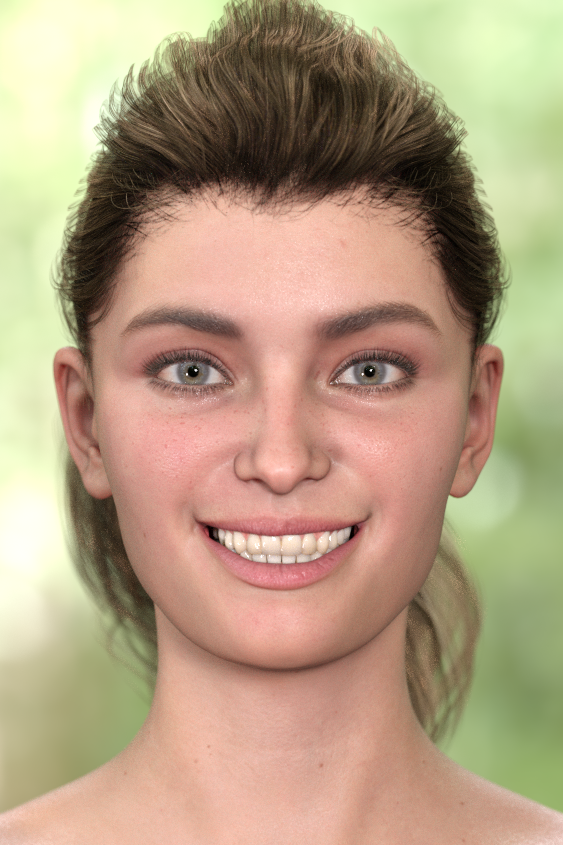
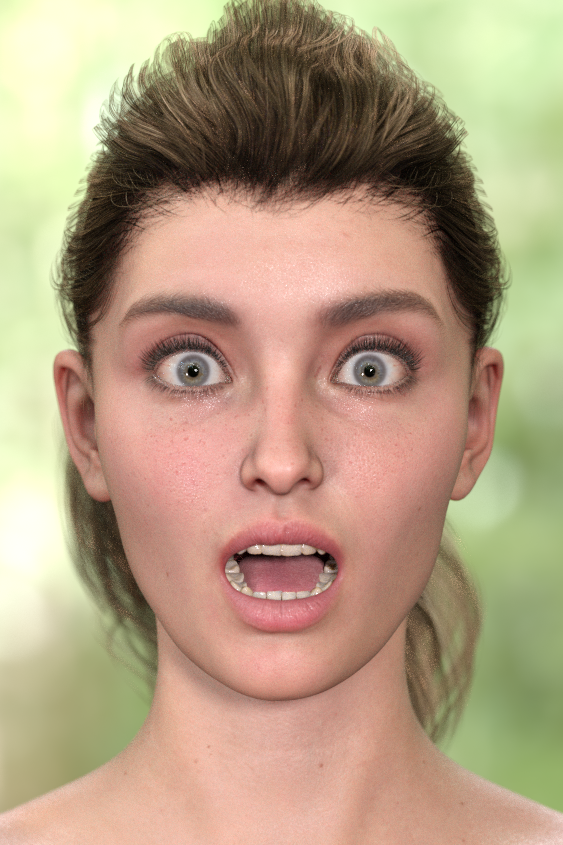
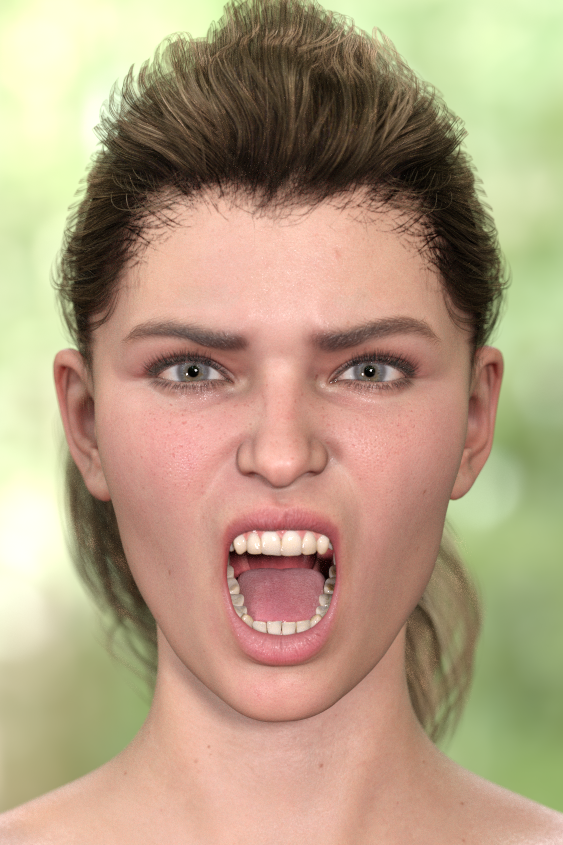
"Anatomy of Facial Expression": A Genesis 8.1 Companion Guide?A few weeks ago, I asked for recommendations about a FACS reference guide, to achieve scientifically-accurate facial expressions for the new Genesis 8.1 face rig. Amidst the dozens of replies basically saying, "Just eyeball it, it'll be fine," one helpful soul ( @Ceridwen ) recommended "Anatomy of Facial Expression." I just now got around to checking the book out and I decided to post my preliminary findings. While the book itself is a very good resource, I very quickly ran into problems when I tried to apply the Action Units to the G8.1 face rig, because I have no idea what half the controls should be. Like AU17, "Chin Raiser". Nothing on the Daz rig is named that, so what the heck do I move? Nevertheless, the book is 200+ pages and has a great deal of information about musculature, so I'm sure if I read the rest more closely I can figure it out, but it's still annoying.
Anyway, onto my first renders with my lucky volunteer, Victoria 8.1.
SMILE
SURPRISE
RAGE
In conclusion...
If you want a technical reference guide to human expressions--or you just plain don't want to "eyeball it" when making faces--the book is a pretty good buy for $45. Especially since the official FACS reference guide costs $400 and you need to study for 100 hours and take a certification test before they send you the good stuff.
I have my issues with Genesis/Victoria 8.1 itself--the oddly-named control handles, the lack of realistic skin creasing, her eyes not blinking properly due to the new tear node--but I'm overall satisfied with the book. It seems to have a wealth of insight on how faces are put together, so even if you don't use it for FACS you can probably learn some useful stuff when you're making expressions.
Daz 3D is part of

Connect
DAZ Productions, Inc.
7533 S Center View Ct #4664
West Jordan, UT 84084Licensing Agreement | Terms of Service | Privacy Policy | EULA
© 2026 Daz Productions Inc. All Rights Reserved.