-
Figures Loading with Long Nails
Hi, So sorry your having an issue with any of my characters, I have just been made aware of this issue here in the forums and am fixing immediately. Appologies for the inconveniance. If you require an immediate fix for this morph please contact me directly, if not it will be issued as an update as soon as Daz can get it out to you.
As a side note, should you ever have any issues with one of my products the fastest way to get answers is to message directly as it can take longer via the forums.
Again huge appologies!
Nail issue with G9 - CynderBlueHi, So sorry your having an issue with one of my characters, I have just been made aware of this issue in the forum and am fixing immediately. Appologies for the inconveniance. If you require an immediate fix for this morph please contact me directly, if not it will be issued as an update as soon as Daz can get it out to you.
As a side note, should you ever have any issues with one of my products the fastest way to get answers is to message directly as it can take longer via the forums.
Again huge appologies!
[Released] Oso Zombie for Genesis 9Several things:
If you select the graft, you can add whatever skin texture you want, or copy from the base figure and paste it to the graft (the grafts are set to be Head surface so should take Head textures)
For the decals, all you have to do is select your figure, go into one of the Overlay material subfolders and click on whichever item you want; this will add a decal with the appropriate texture on it.
If you don't like a decal effect just delete it and add a different one.
Originally I had a bunch of materials for the different decals but I think that workflow was way more confusing; now you just click on whichever decal you want and bam.The only somewhat complicated thing is that if you want to apply Overlay wet/dry material preset, you have to select the Overlay decals on the figure.
Also, the nose and ear effects aren't geografts but morphs. There's also a 'thin face' morph you can use to shrivel a bit of the face around the mouth.
Oh, also note that decals will only be displayed in Iray render (or viewport), not any of the other modes.
Freebie Challenge July-August 2024 - "Take a Break" - Main Threademanuela1 said:
Take a break
Take a break from stress on a beautiful tropical beach!:)
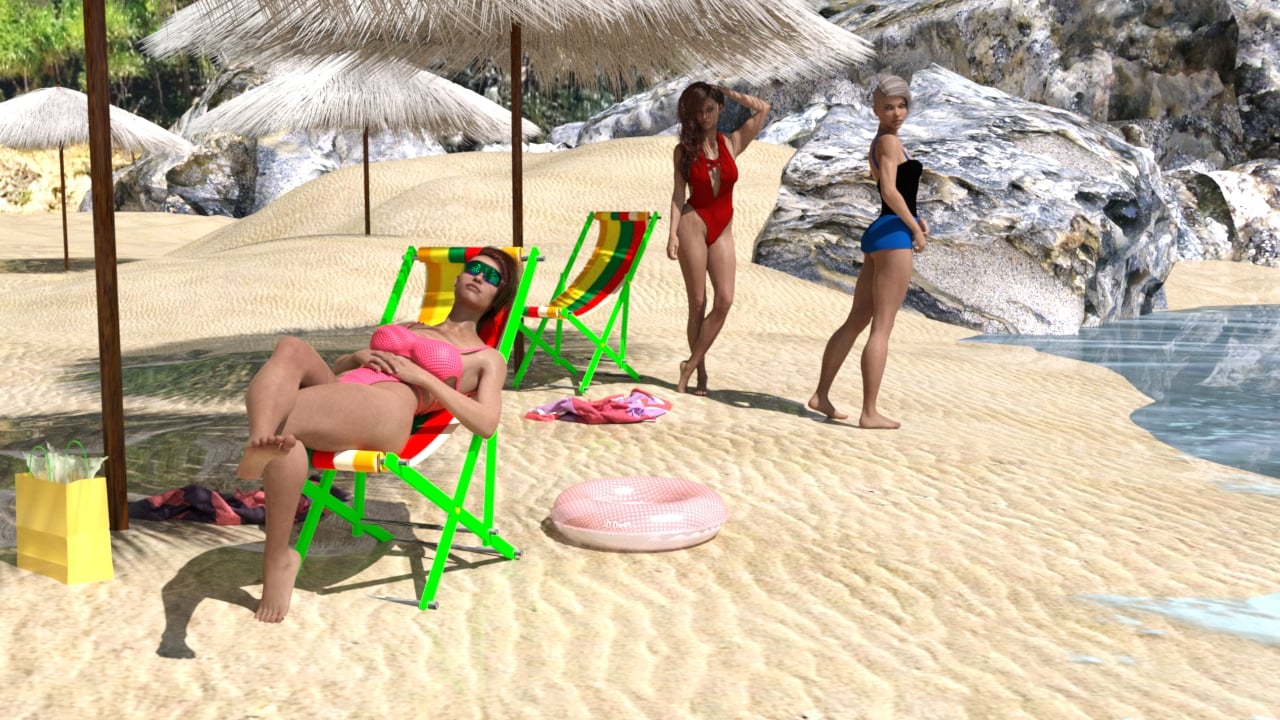
Freebies
Tropical Beach
https://sharecg.com/v/97113/gallery/21/DAZ-Studio/Tropical-BeachA_la_plage by chacornac
https://www.renderosity.com/freestuff/items/75792/a-la-plageFree Beach Towel (Updated with Morphs and Materials)
https://www.daz3d.com/forums/discussion/206316/free-beach-towel-updated-with-morphs-and-materials/p1Beach Pack for DAZ Studio v2 - Free 3D Models By BubbleCloud (ball and ring)
https://www.deviantart.com/bubblecloud/art/Beach-Pack-for-DAZ-Studio-Free-3D-Models-757215388Hell-O-Ween Candy by AphoticInferno (bag)
https://www.renderosity.com/freestuff/items/76585/hell-o-ween-candy
Kk Grace Character for Genesis 8.1 Female
https://www.renderhub.com/melovephoto/kk-grace-character-for-genesis-8-1-femaleVickie Character Morph for Genesis 8.1 Female
https://www.renderhub.com/lambdax/vickie-for-genesis-8-1-femalePS Raeny Shape Morphs for Genesis 8 or 8.1 Female by pixeluna
https://www.renderosity.com/freestuff/items/88639/ps-raeny-shape-morphs-for-genesis-8-or-81-femaleSwimsuit 30
https://www.most-digital-creations.com/g8f_swimsuit_30.htmswimsuit 25
https://www.most-digital-creations.com/g8f_swimsuit_25.htmbikini 7
https://www.most-digital-creations.com/g8f_bikini_7.htmEA Sidecut Hair for Genesis 3 & 8 Female(s) by EichhornArt
https://www.renderosity.com/freestuff/items/82972/ea-sidecut-hait-for-genesis-3-amp-8-femela-s-Side Swept ROse Hair
https://www.renderosity.com/mod/freestuff/side-swept-rose-hair-g3f-g8f-part-1/79533 and
https://www.renderosity.com/mod/freestuff/side-swept-rose-hair-g3f-g8f-part-2/79534Syncope Sunglasses Genesis 8
https://sharecg.com/v/99138/browse/21/DAZ-Studio/Syncope-Sunglasses-Genesis-8CRP Standing Cute Poses 1-8 by crpprod
https://www.renderosity.com/freestuff/items/93477/crp-standing-cute-poses-1-8CRP Couples Bench Poses 01 - 04 by crpprod
https://www.renderosity.com/freestuff/items/93115/crp-couples-bench-poses-01-04HDRIs / Rosendal Mountain Midmorning
https://polyhaven.com/a/rosendal_mountain_midmorningShaders for DAZ3D (bikini)
https://www.wilmapsdigitalcreations.co.uk/view_products.php?cat=8all Freebies approved, please move to entries
Can't edit pose (locked gaze)I imported a pose and tried to make my character to look down. But the head tilted back up as soon as I'm out of the Blender Pose mode. It seems like the gaze is locked on to the camera. Not sure if it's Blender or some bone drivers option I have to change. I tried 'Transfer eye to gaze' and 'gaze to eye', uncheck rotation locks and disable drivers. None seems to be doing anything. I'm using a converted riggify armature option from Diffeomorphic if that matters. Any idea on how to fix this?
UDIM Seam Genesis 8 in Substance 3d PainterThat seems still not correct in terms of your operation... As I said above, you must go for conversion with both figures in default A-Pose (zeroed pose) !
Redo your conversion, then Adjust Rigging to Shape and ERC Freeze the morph(s) you created. Check this tutorial by Jay, https://youtu.be/jROlY34tNNU?si=nAE_XuBWZFCi-jxA the part in between 17 mins ~ 19 mins.
I also recommend Rigger Plus for G9 https://www.daz3d.com/shape-rigger-plus-genesis-9-edition which is now with 60% discount. This script is faster and accurate than DS default function of ERC Freeze.
UltraScenery - new(er) territory [Commercial]johnbuckeridge said:
Richard Haseltine said:
barbult said:
Richard Haseltine said:
johnbuckeridge said:
barbult said:
I've edited this about 10 times! It is so confusing.
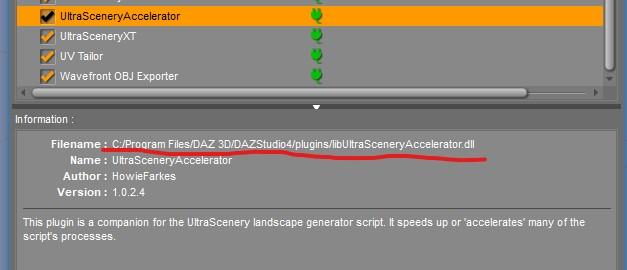
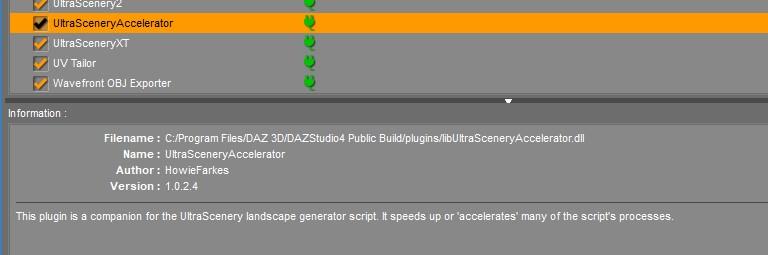
All of my Daz Studio plugins are installed by DIM into a plugins folder in an entirely different path than yours, @johnbuckeridge. I think Totte led us to the problem. We need to figure out why your Accelerator is in a different path. Maybe you have an old version in different path??????? (Oops, I also posted and image from the Public Build version of DS.I've added the General Release plugin path image now.) I don't know if your plugin path is a valid path or not, or why mine is so different. Maybe it is because my DIM Applications settings path is different and was setup 12 years ago. Your path may be a more recent default location for plugins.
General Release plugin path
Public Build (Beta) plugin path
So, from what I can see, where we differ is that your path element is /Program Files/ whereas mine is /Applications/64-bit/ Otherwise everything else looks the same. My system was set up just over three years ago - the beginning of my Daz journey - and Accelerator would have been installed rather later than that. Maybe that accounts for the difference?
So I'm wondering what I should try next: would you recommend I try moving the location?
The path difference is Daz Central deault (you) vs. DIM/standalone default.
Thank you, Richard! I never used Daz Central, so I needed this reminder of how it changed default library locations. I wonder if John's DIM settings now match those Daz Central settings, or if DIM is now installing to a different path. So now we have Daz Connect, Daz Central, and DIM involved while we are trying to locate possible installations in different locations. DIM should match Daz Central, but we all know it didn't when Daz Central was first released.
DIM will not, by itself, change the Daz Central paths (nor vice versa) but of course they can be overridden.
Good morning, all (UK time!) Barbult, Totte and RichardHaseltine - thank you all so much for your tireless input and detective work. I'm pretty sure the whole problem stems from my heady youth (three years ago!) when I just piled everything in either through Daz Connect or Daz Central, in happy ignorance of the tech.
So. Following Barbult’s questions in order
(1) For some reason, I hadn’t reinstalled Accelerator for UltraScenery for Daz Studio 4.5+ (Win 64-bit). I’ve just put it in, though, added to Accelerator for UltraScenery. Pic shows how it looks in plugins menu now.
(2) Totte is quite right and I’ve found two copies of UltraSceneCreator.dse – pathways are;
-F:\DAZ TRANSFER\My Daz 3D Library\Environments\Landscapes\Ultrascenery (which, from what Barbult was saying, sounds like the right one)
-E:\My Daz Connect Library\data\cloud\1_67835\environments\landscapes\ultrascenery
Presumably you’re going to tell me to delete one of those, but obviously I’ll wait for further advice.
Again, I cannot say how grateful I am for all your help.
Forgot to add picture!
UltraScenery - new(er) territory [Commercial]Richard Haseltine said:
barbult said:
Richard Haseltine said:
johnbuckeridge said:
barbult said:
I've edited this about 10 times! It is so confusing.
All of my Daz Studio plugins are installed by DIM into a plugins folder in an entirely different path than yours, @johnbuckeridge. I think Totte led us to the problem. We need to figure out why your Accelerator is in a different path. Maybe you have an old version in different path??????? (Oops, I also posted and image from the Public Build version of DS.I've added the General Release plugin path image now.) I don't know if your plugin path is a valid path or not, or why mine is so different. Maybe it is because my DIM Applications settings path is different and was setup 12 years ago. Your path may be a more recent default location for plugins.
General Release plugin path
Public Build (Beta) plugin path
So, from what I can see, where we differ is that your path element is /Program Files/ whereas mine is /Applications/64-bit/ Otherwise everything else looks the same. My system was set up just over three years ago - the beginning of my Daz journey - and Accelerator would have been installed rather later than that. Maybe that accounts for the difference?
So I'm wondering what I should try next: would you recommend I try moving the location?
The path difference is Daz Central deault (you) vs. DIM/standalone default.
Thank you, Richard! I never used Daz Central, so I needed this reminder of how it changed default library locations. I wonder if John's DIM settings now match those Daz Central settings, or if DIM is now installing to a different path. So now we have Daz Connect, Daz Central, and DIM involved while we are trying to locate possible installations in different locations. DIM should match Daz Central, but we all know it didn't when Daz Central was first released.
DIM will not, by itself, change the Daz Central paths (nor vice versa) but of course they can be overridden.
Good morning, all (UK time!) Barbult, Totte and RichardHaseltine - thank you all so much for your tireless input and detective work. I'm pretty sure the whole problem stems from my heady youth (three years ago!) when I just piled everything in either through Daz Connect or Daz Central, in happy ignorance of the tech.
So. Following Barbult’s questions in order
(1) For some reason, I hadn’t reinstalled Accelerator for UltraScenery for Daz Studio 4.5+ (Win 64-bit). I’ve just put it in, though, added to Accelerator for UltraScenery. Pic shows how it looks in plugins menu now.
(2) Totte is quite right and I’ve found two copies of UltraSceneCreator.dse – pathways are;
-F:\DAZ TRANSFER\My Daz 3D Library\Environments\Landscapes\Ultrascenery (which, from what Barbult was saying, sounds like the right one)
-E:\My Daz Connect Library\data\cloud\1_67835\environments\landscapes\ultrascenery
Presumably you’re going to tell me to delete one of those, but obviously I’ll wait for further advice.
Again, I cannot say how grateful I am for all your help.
[Released] Turbo Loader for Genesis 8 and 8.1 [Commercial]joealotofthings said:
I posted here as I was redirected to do so after posting on another section. . After attempted uninstall of Turbo Loader G8/G8.1 no G8 face control. I need to start with the fact that I did attempt to correct this myself over a three day period of time looking up in Bing/Google and Daz forum. I am unable to get this corrected on my own and need assistance. . To help expidite loading of G8 female base model I purchased Turbo Loader G8/G8.1. I ran configuration and added Icons and Menu to my Daz Studio. Then ran the scan recommended by in instructions. A total of 8,000+ morphs were found. A lot of the morphs (4460) were on C drive and the rest on E drive. (Note: A couple of years back I started adding and moving characters to E drive to save space on my 2tb NVME C drive. Because these were not installed by Install Manager but were downloaded from Daz as Zip / Rend as Zip and a few others as zip files I just unzipped and placed in correct folder.) . I selected a good deal of the C drive morphs and only E drive morphs that were packaged body morphs adjustments (as an example Body Factory was a selected moph). I started to notice right away problems with reloading previous work that had to deal with any morph in E drive. Daz looked for the address as a relative address and not absolute (something I missed in the instructions). I then made sure all morphs were on (enebled) and uninstalled TL. The relative issues remained not being seen as E drive. After the first uninstall I cleared the morph list and executed so no references would be left by TL. . It was at this point I noticed that my Daz 8 dials/controls for face were not showing when I loaded Daz 8 base female or any of my previous created items featuring a Daz 8 female. Any expressions in my Poses/Expressions were no longer working. Over the next couple of dayys I uninstalled Daz 8 female / reinstalled a couple of times with and without the powerpose. I removed from Content Directory Manager the entire referrence to E drive and perfoemed a database vacuum. I installed and uninstalled a couple of more time TL without success. I even upgraded my 2tb NVME to a 4tb and moved everything to C drive also without success. . I did notice that when uninstalling Turbo Loader the references for the icons remained and had to be manually removed under customize. Also a turbo loader folder remained on my C drive under ProgramData/Daz 3D/Turbo Loader with the follwing sub-folders Cache and Genesis 8 & 8.1 Female. Cache contained 2 files each over a meg titled Genesis8Female.txt and Genesis8_1Female.txt. Genesis 8 & 8.1 Female contained a sub-folder Enabled Only with a file . InitialConfiguration.txt. I deleted the files which also did not prove helpful. BTW: I mentioned above after the first uninstall I cleared the morph list. When doing this no InitialConfiguration.txt was found. After uninstalling I deleted the remaining Turbo Loader Folder and sub-folders. . I have done mutiple searches for files under "Turbo", "Loader", "RiverSoft" and have come up with no additional files. . I have no idea where I originally screwed up causing my G8 female to no longer have face contrls. I need someone to brainstorm where something might have gone wrong and why I can no longer use/ and no longer see any controls for G8. Any assistance would be greatly appreciated. . btw: I am not saying TL did anything incorrectly as I do believe I was in error with TL somewhere as mentioned above.
If you want to get everything back, load one of the Turbo Loader Manager scripts, Options tab, "Reset Content Directories" will do what you want.
I messed up the teeth with some morphs... how do I overwrite them?I'm not sure. I didn't realize that link is in a Daz+ member area, that's probably why.
I think I fixed it? Also it seems like they may have been updated, but the filesystem (Windows 11) didn't show a modification in the time. So I assumed it didn't happen. What I did was shut down Daz Studio, then copy the morphs to my Daz content library from my personal one and delete the personal content library morphs. Then I edited the morphs and saved them out to my personal content library. Shut down Daz again and delete the ones in my Daz content library.
I think changing properties of the morphs is written, because the whole deal is from the "Mouth Realism" morph. By default it loads on my Genesis 3 female. So I went into the morph properties, edited it, and set it to zero. That seemed to stick (I've shut down and started up Studio many times now and kind of tired, so I'm not 100%).
How to properly reduce the number of fingers and toes in the Daz Dragon 3Firstly, probably we better work on Dragon 3's Pinky finger(s).
1) Select Left Pinky joints, set Scale values to 0. Export Dragon3 to an OBJ file with Base Resolution. Reset Pinky joints Scale value to 100%. Import OBJ file into Blender or the modeling / sculpting software you use. (ss1)
2) Sculpt ! Using Draw + Smooth + Grab brushes will mostly do. Especially adjust the palm size (side) and ring finger's shape (ss2)
3) Export Dragon3 from Blender to an OBJ file. (ss3)
4) Import OBJ file in DS with Morph Loader Pro with the settings in (ss4). Dial the imported Morph, you'll get 4 fingers on its "both hands" (ss5)
Then make 4 toes in almost the same way.
I messed up the teeth with some morphs... how do I overwrite them?How did you fix them and save the morph assets ? The link you posed could not be found... but if saving the existing morph assets, the morph dsf files should be overwriten as long as they're writable... any error message or show your DS log ?
[Released] Turbo Loader for Genesis 8 and 8.1 [Commercial]I posted here as I was redirected to do so after posting on another section. . After attempted uninstall of Turbo Loader G8/G8.1 no G8 face control. I need to start with the fact that I did attempt to correct this myself over a three day period of time looking up in Bing/Google and Daz forum. I am unable to get this corrected on my own and need assistance. . To help expidite loading of G8 female base model I purchased Turbo Loader G8/G8.1. I ran configuration and added Icons and Menu to my Daz Studio. Then ran the scan recommended by in instructions. A total of 8,000+ morphs were found. A lot of the morphs (4460) were on C drive and the rest on E drive. (Note: A couple of years back I started adding and moving characters to E drive to save space on my 2tb NVME C drive. Because these were not installed by Install Manager but were downloaded from Daz as Zip / Rend as Zip and a few others as zip files I just unzipped and placed in correct folder.) . I selected a good deal of the C drive morphs and only E drive morphs that were packaged body morphs adjustments (as an example Body Factory was a selected moph). I started to notice right away problems with reloading previous work that had to deal with any morph in E drive. Daz looked for the address as a relative address and not absolute (something I missed in the instructions). I then made sure all morphs were on (enebled) and uninstalled TL. The relative issues remained not being seen as E drive. After the first uninstall I cleared the morph list and executed so no references would be left by TL. . It was at this point I noticed that my Daz 8 dials/controls for face were not showing when I loaded Daz 8 base female or any of my previous created items featuring a Daz 8 female. Any expressions in my Poses/Expressions were no longer working. Over the next couple of dayys I uninstalled Daz 8 female / reinstalled a couple of times with and without the powerpose. I removed from Content Directory Manager the entire referrence to E drive and perfoemed a database vacuum. I installed and uninstalled a couple of more time TL without success. I even upgraded my 2tb NVME to a 4tb and moved everything to C drive also without success. . I did notice that when uninstalling Turbo Loader the references for the icons remained and had to be manually removed under customize. Also a turbo loader folder remained on my C drive under ProgramData/Daz 3D/Turbo Loader with the follwing sub-folders Cache and Genesis 8 & 8.1 Female. Cache contained 2 files each over a meg titled Genesis8Female.txt and Genesis8_1Female.txt. Genesis 8 & 8.1 Female contained a sub-folder Enabled Only with a file . InitialConfiguration.txt. I deleted the files which also did not prove helpful. BTW: I mentioned above after the first uninstall I cleared the morph list. When doing this no InitialConfiguration.txt was found. After uninstalling I deleted the remaining Turbo Loader Folder and sub-folders. . I have done mutiple searches for files under "Turbo", "Loader", "RiverSoft" and have come up with no additional files. . I have no idea where I originally screwed up causing my G8 female to no longer have face contrls. I need someone to brainstorm where something might have gone wrong and why I can no longer use/ and no longer see any controls for G8. Any assistance would be greatly appreciated. . btw: I am not saying TL did anything incorrectly as I do believe I was in error with TL somewhere as mentioned above.I messed up the teeth with some morphs... how do I overwrite them?I used this excellent tut by @CGI3DM to fix teeth in a bunch of morphs I made. But when I tried to save as morph assets again in the same Daz content directory with same names, they didn't overwrite. How do I overwrite them?
Hide in Scene View(s)PerttiA said:
[A]t the time manual editing of the file didn't help.
It's difficult to believe that the start essentials file (the base G8) was the problem. If that were the case bones like "center brow" would have disappeared from all G8 figures, not just some. The problem was consistent (maybe is consistent) across a load/save and, so far as I have ever been able to determine, across multiple updates of the base files.
I suspect we have rogue characters with the nodes hidden and that applying those characters to G8, possibly even just as a % on a head morph, hides the nodes in the scene view. It might even be an add-on; I don't know if add-ons can taint the base character properties.
I do remember that it seemed to happen to both G8M and G8F. Could it even be clothing?
Freebie Challenge July-August 2024 - "Take a Break" - Main ThreadTake a break
Take a break from stress on a beautiful tropical beach!:)
Freebies
Tropical Beach
https://sharecg.com/v/97113/gallery/21/DAZ-Studio/Tropical-BeachA_la_plage by chacornac
https://www.renderosity.com/freestuff/items/75792/a-la-plageFree Beach Towel (Updated with Morphs and Materials)
https://www.daz3d.com/forums/discussion/206316/free-beach-towel-updated-with-morphs-and-materials/p1Beach Pack for DAZ Studio v2 - Free 3D Models By BubbleCloud (ball and ring)
https://www.deviantart.com/bubblecloud/art/Beach-Pack-for-DAZ-Studio-Free-3D-Models-757215388Hell-O-Ween Candy by AphoticInferno (bag)
https://www.renderosity.com/freestuff/items/76585/hell-o-ween-candy
Kk Grace Character for Genesis 8.1 Female
https://www.renderhub.com/melovephoto/kk-grace-character-for-genesis-8-1-femaleVickie Character Morph for Genesis 8.1 Female
https://www.renderhub.com/lambdax/vickie-for-genesis-8-1-femalePS Raeny Shape Morphs for Genesis 8 or 8.1 Female by pixeluna
https://www.renderosity.com/freestuff/items/88639/ps-raeny-shape-morphs-for-genesis-8-or-81-femaleSwimsuit 30
https://www.most-digital-creations.com/g8f_swimsuit_30.htmswimsuit 25
https://www.most-digital-creations.com/g8f_swimsuit_25.htmbikini 7
https://www.most-digital-creations.com/g8f_bikini_7.htmEA Sidecut Hair for Genesis 3 & 8 Female(s) by EichhornArt
https://www.renderosity.com/freestuff/items/82972/ea-sidecut-hait-for-genesis-3-amp-8-femela-s-Side Swept ROse Hair
https://www.renderosity.com/mod/freestuff/side-swept-rose-hair-g3f-g8f-part-1/79533 and
https://www.renderosity.com/mod/freestuff/side-swept-rose-hair-g3f-g8f-part-2/79534Syncope Sunglasses Genesis 8
https://sharecg.com/v/99138/browse/21/DAZ-Studio/Syncope-Sunglasses-Genesis-8CRP Standing Cute Poses 1-8 by crpprod
https://www.renderosity.com/freestuff/items/93477/crp-standing-cute-poses-1-8CRP Couples Bench Poses 01 - 04 by crpprod
https://www.renderosity.com/freestuff/items/93115/crp-couples-bench-poses-01-04HDRIs / Rosendal Mountain Midmorning
https://polyhaven.com/a/rosendal_mountain_midmorningShaders for DAZ3D (bikini)
https://www.wilmapsdigitalcreations.co.uk/view_products.php?cat=8After attempted uninstall of Turbo Loader G8/G8.1 no G8 face control.I need to start with the fact that I did attempt to correct this myself over a three day period of time looking up in Bing/Google and Daz forum. I am unable to get this corrected on my own and need assistance.
To help expidite loading of G8 female base model I purchased Turbo Loader G8/G8.1. I ran configuration and added Icons and Menu to my Daz Studio. Then ran the scan recommended by in instructions. A total of 8,000+ morphs were found. A lot of the morphs (4460) were on C drive and the rest on E drive. (Note: A couple of years back I started adding and moving characters to E drive to save space on my 2tb NVME C drive. Because these were not installed by Install Manager but were downloaded from Daz as Zip / Rend as Zip and a few others as zip files I just unzipped and placed in correct folder.)
I selected a good deal of the C drive morphs and only E drive morphs that were packaged body morphs adjustments (as an example Body Factory was a selected moph). I started to notice right away problems with reloading previous work that had to deal with any morph in E drive. Daz looked for the address as a relative address and not absolute (something I missed in the instructions). I then made sure all morphs were on (enebled) and uninstalled TL. The relative issues remained not being seen as E drive. After the first uninstall I cleared the morph list and executed so no references would be left by TL.
It was at this point I noticed that my Daz 8 dials/controls for face were not showing when I loaded Daz 8 base female or any of my previous created items featuring a Daz 8 female. Any expressions in my Poses/Expressions were no longer working. Over the next couple of dayys I uninstalled Daz 8 female / reinstalled a couple of times with and without the powerpose. I removed from Content Directory Manager the entire referrence to E drive and perfoemed a database vacuum. I installed and uninstalled a couple of more time TL without success. I even upgraded my 2tb NVME to a 4tb and moved everything to C drive also without success.
I did notice that when uninstalling Turbo Loader the references for the icons remained and had to be manually removed under customize. Also a turbo loader folder remained on my C drive under ProgramData/Daz 3D/Turbo Loader with the follwing sub-folders Cache and Genesis 8 & 8.1 Female. Cache contained 2 files each over a meg titled Genesis8Female.txt and Genesis8_1Female.txt. Genesis 8 & 8.1 Female contained a sub-folder Enabled Only with a file InitialConfiguration.txt. I deleted the files which also did not prove helpful. BTW: I mentioned above after the first uninstall I cleared the morph list. When doing this no InitialConfiguration.txt was found. After uninstalling I deleted the remaining Turbo Loader Folder and sub-folders.
I have done mutiple searches for files under "Turbo", "Loader", "RiverSoft" and have come up with no additional files.
I have no idea where I originally screwed up causing my G8 female to no longer have face contrls. I need someone to brainstorm where something might have gone wrong and why I can no longer use/ and no longer see any controls for G8. Any assistance would be greatly appreciated.
Script: Create Morphs from Poser PMD FilesIn order to use older Poser models that have the morphs written in PMD you will just need to save a copy of the desidered model in Poser it self.
Load the figure in Poser, load the morphs if they are not already in the figure it self. Often the Morphs if not seperate Packages are already a part of the model but saved with a seperate Pmd Loader, this shortens the load time in poser.
Now that you have your figure loaded in Poser save it as a copy , turn off the option in general preferences, Misc, use external binary morph target before saving a copy. Your new copy will now have the morphs geometry loaded ( Integrated ) in the Cr2 PP2 and will load just fine in Daz Studio.
Note: after Poser 11 the morph geometry is written a little differently in the Cr2, it means that morphs written as masterdials will not work in DS, in order to avoid this phenomenon you need to make a save in Poser 2014. Masterdials are not really morphs these are a setting that controlls different morphs or controlers at once, used for interactive movements.
This is the easiest method and will make sure that the morph will work as it was meant to be. other methods like a Pmd editor will not assign the correct settings if converted into a Jnj geometry target script. Saving the morph as Obj might also not work if the Pmd Morph assigns additional scaling, rotations, translations these will be set to zero in the obj save and not loaded.
UltraScenery - new(er) territory [Commercial]johnbuckeridge said:
barbult said:
johnbuckeridge said:
barbult said:
John posted a log file in another thread. (I suggested he post his problem here to get more eyes on it and keep UltraScenery issues in one thread.) The log shows this error:
2024-08-11 09:45:52.946 [INFO] :: Loaded image: usc_grass_patch_02_512_diffuse.png
2024-08-11 09:48:41.674 [WARNING] :: Script Error: Line 933
2024-08-11 09:48:41.674 [WARNING] :: TypeError: Result of expression 'hf_app.ui.wWaterLevelAdjust' [undefined] is not an object.
2024-08-11 09:48:41.674 [WARNING] :: Stack Trace:
	<anonymous>()@F:/DAZ TRANSFER/My DAZ 3D Library/environments/landscapes/ultrascenery/ultrascenecreator.dse:933
2024-08-11 09:48:41.683 [INFO] :: Error in script execution: F:/DAZ TRANSFER/My DAZ 3D Library/environments/landscapes/ultrascenery/ultrascenecreator.dse
I searched that log file for the "usc_grass_patch_02_512_diffuse.png" file it says it is loading when the problem occurs. I found this line:
2024-08-11 06:17:50.232 Iray [INFO] - IMAGE:IO :: 1.0 IMAGE io info : Loading image "E:\My Daz Connect Library\data\cloud\1_67835\runtime\textures\howiefarkes\ultrascenery\plants\usc_grass_patch_01_512_diffuse.png", no selector, pixel type "Rgb", 512x512x1 pixels, 1 miplevel.
It appears that at some point in time, some UltraScenery files were installed with Daz Connect (from inside Daz Studio.) UltraScenery will not work with files installed with Daz Connect. Even if you later install them with DIM, that will not solve the problem. They must first be uninstalled from Daz Connect. @johnbuckeridge I think uninstalling all UltraScenery related products from Daz Connect is the first order of business to solve this problem. Then we can see if other problems still remain.
Edit: I don't know why the forum chose to make my pasted text white on black.
Good morning, Barbult. I will try that, although currently having issues with my Microsoft cloud access. Will report back.
The Daz Connect "cloud" is a folder on your E drive, as shown in the log file message I highlighted. It is not located remotely; it is on your computer. Daz simply chose to name the folder "cloud" to totally confuse users
 and it worked! The number of users confused about the Daz Connect cloud is about 90% of users IMHO. The Daz Connect "cloud" folder has nothing to do with a Microsoft cloud, unless you have allowed One Drive to offload folders from your E drive to One Drive and remove the files from your computer.
If you look on your computer in E:\My Daz Connect Library\data\cloud and the subfolders, do you see a bunch for folders and fiHey Daz - that's cheating! I come to the table fully pre-confused, lol. No need to pile it on!
 Right, so, little update for you. I've now resolved my issues with logging into Daz studio. I had, as I thought, purged my Daz Studio of all things Ultrascenery: switched to working offline first of all, then went into products and systematically deleted everything related, even the scenes I'd created with UScenery and closed Studio. I also uninstalled everything on DIM. Reinstalled everything again on DIM, restarted Studio, logged in and.... (drum roll, please) ...same result, same problems. (Booo!)
 I can only imagine that I must have missed something in the purge. I've also included a screenshot of how my newly installed UScenery products are looking in Smart Content: basically, as if I need to install them via Daz Connect, but I'm not listening to its siren song!
Thought it might be useful to post my latest log file - contains only information regarding my most recent - doomed! - attempt to build a scene.
UDIM Seam Genesis 8 in Substance 3d PainterAgain, the reminder for the original case : After loading G9 into the scene, DO NOT load shoes to G9. Keep the default A-Pose, then convert the figure with Figure Converter. (ss 1 ~ 2)
Then, you were making things more complicated... What you did was rigging a shoes object to a non G9 Base figure (i.e. with converted body morph dialed)... Kelvin Jin (Shinteo) is a character converter (by ripping character models from video games and convert them to DS format, etc....) and what he did is a non-standard case... as he directly rigged wearables on a character rather than Base figure, which is not a standard procedure and not really recommended. But yes, that is the typical workflow when we rig / convert wearables on customized characters...
As for the issue in your last screenshot: after fixing the shoes, you need to, either (better) : save a Figure/Prop asset as well as the feet pose preset (ss3); or (temporarily) : save a Wearable Preset of the shoes with feet pose (ss4). Then reload the saved Figure or the Wearable Preset to the converted G9 figure after re-opening your project scene.
Daz 3D is part of

Connect
DAZ Productions, Inc.
7533 S Center View Ct #4664
West Jordan, UT 84084Licensing Agreement | Terms of Service | Privacy Policy | EULA
© 2026 Daz Productions Inc. All Rights Reserved.