-
added jcms driving me crazy!!
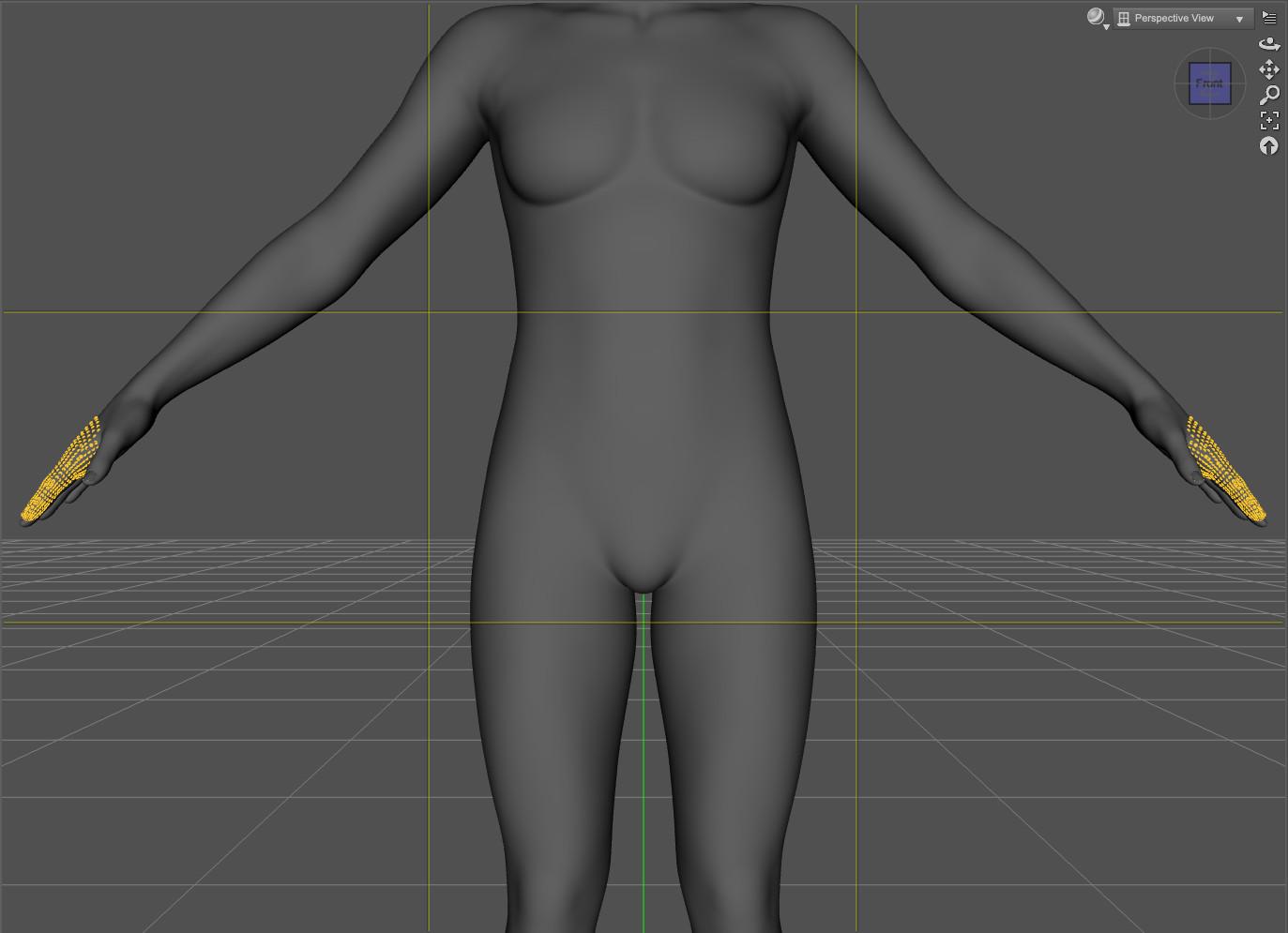
3duJCMFF_Index1Bendp95_r also have vertices on both hand.
What's strange, while 3duJCMFF_Index1Bendn95_l only have vertices on the left hand, the selection is very different compared to 3duJCMFF_Index1Bendp95_r when these morphs should, I think , be mirrored.
3duJCMFF_Index1Bendp95_r:
3duJCMFF_Index1Bendn95_l:
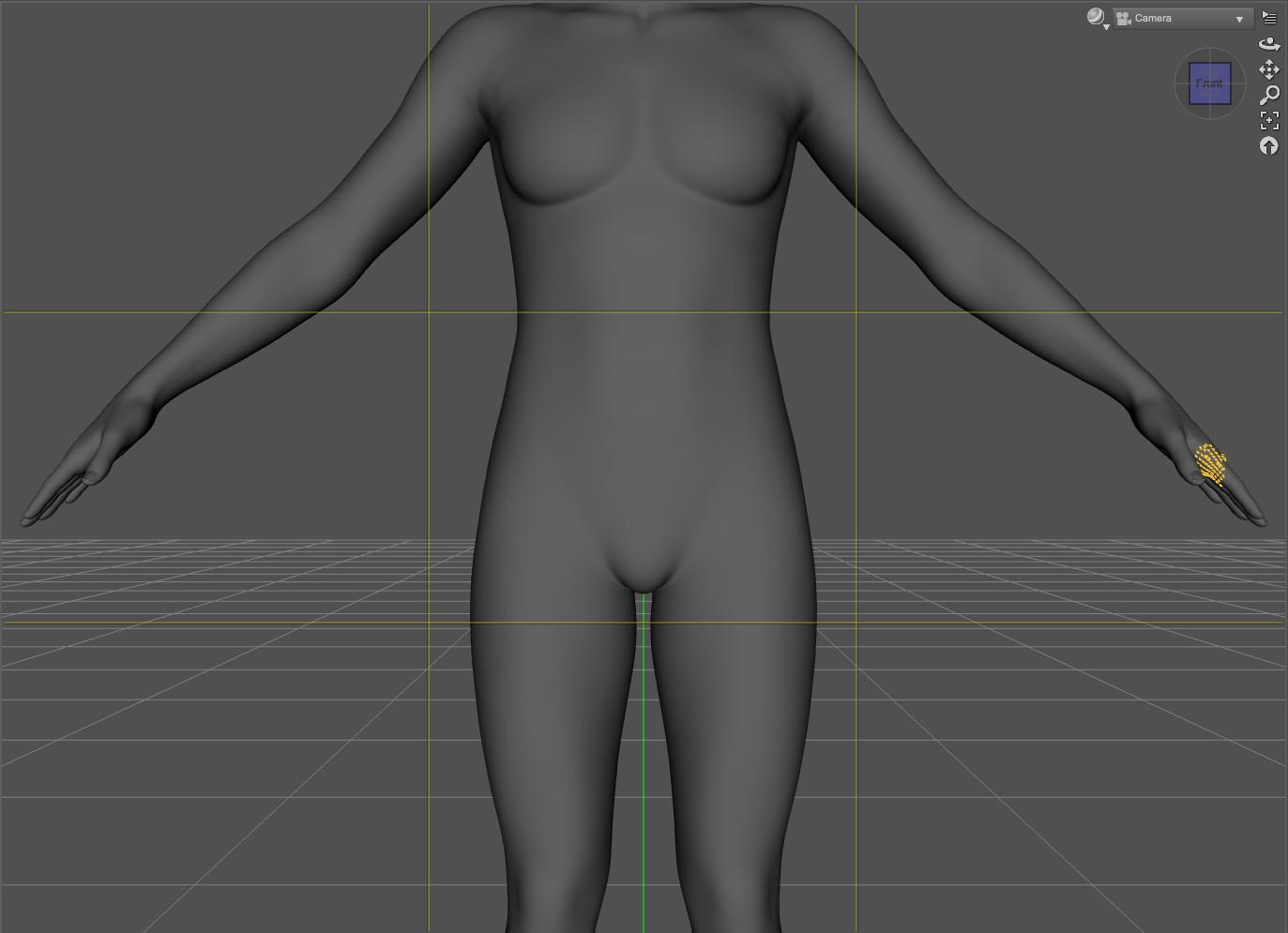
Edit: looking at other finders, similar 95 bend morphs have an influence only on the bone they are named after, so it's just a guess, but should someone wanted to fix the problem on 3duJCMFF_Index1Bendp95_r, it'll likely require mirroring 3duJCMFF_Index1Bendn95_l
I don't know if there is a better way than exporting 3duJCMFF_Index1Bendn95_l (dialed at 100%) and asking Morph Loader Pro to mirror it before applying (I'm not exactly sure how to do that either
 ).Daz To Unity Bridges need an update - April 2026 - 6000.3.13f1
Hope you can still use Daz Studio 4.x to transfer to Unity..
Just wonder what would be the advantage to use bridge from DS 6.
It probably will take a lot of time to update all the plugins to work with DS 6.
Dynamic Morphs?crosswind said:
You need to check if there're modifiers related to this ES3D Hayden are saved within the Scene file by using Notepad++.... so as to make sure if these morphs were disabled or not when you saved that Scene last time... If they're in the DUF files under "modifiers" section, it means they were not disabled when you saved the scene file.
11 minutes seems fairly long to me though it does take some time for the script to enable the disabled DSFs... but still, you better check how many loaded Properties on the G9 in Parameters pane...
You may post the below script in Script IDE, with the loaded G9 selected in Scene pane:
var node = Scene.getPrimarySelection();
var nPr = node.getNumProperties();
print("No. of Properties: " + nPr);Execute the script, you'll see a number of counted properties in the bottom of Script IDE. The number can tell something ~~
Besides, enabled DSFs may bring other issues that may slow down the loading speed... You may have to check in the log as well.
I'm fairly sure the properties were active when the DUF file was saved. But why would it save defaulted properties? I've seen inside DUF files other places where an object with have an X translate and Y translate but not a Z translate because that value was zero. Or similar left out defaults.
I'm not sure what I would check in the log. For example, after the log "Applying projection morphs..." there are a bunch of odd listed morphs. LIke EG Zou isn't used by any figure in the scene and while there are 8 parameters shown in the parameters tab, only these two were "projected"
2026-06-15 00:13:42.826 [INFO] :: Loaded morph deltas: 0m 0.2s - /data/Daz 3D/Genesis 9/Base/Morphs/Ergou/Zou/facs_bs_EyeSquintRight.dsf
2026-06-15 00:13:42.826 [INFO] :: Loaded morph deltas: 0m 0.2s - /data/Daz 3D/Genesis 9/Base/Morphs/Ergou/Zou/facs_bs_EyeSquintLeft.dsfIs this something I should look for? What do I do when I find it? Where do I look for the thing in the morph files that says "only apply this to FIGURE ABC"?
I selected a G9 figure in the same DUF that was inspected above:
Executing Script...
No. of Properties: 5371
Result:
Script executed in 0 secs 2 msecs.
added jcms driving me crazy!!barbult said:
crosswind said:
barbult said:
There appear to be more problems with morphs from one side modifying vertices on the opposite side, This time I noticed that a LEFT side morph 3duJCMFF_Index1Bendn60_l modifies vertices on the RIGHT side also. And the vertices on the right side aren't even a mirror of the vertices that are modified on the left side. Earlier, we found problems with the morphs for the right side, but now the left side also has problems.
EDIT: And correspondingly, 3duJCMFF_Index1Bendp60_r modifies vertices on the LEFT side also. (Hmm I can't reproduce this error now.Anyone else see this problem with the 3duJCMFF_Index1Bendp60_r?)
I don't know any reason that bending a finger on one hand should affect the opposite hand. These morphs must both be wrong.
Yea, I could reproduce the issue. This cbs property moves index vertices on both sides... but not symmetrically.
I think the cause of the issue might be :
1) The vendor sculpted the right index on a G9 Base that already has delta vertex change on the left index for some reason. Before exporting to OBJ, they didn't clear the delta on the left ~
2) Or, if the vendor imported OBJ by using Mirroring or Attenuate option in Morph Loader Pro, they should've checked n' cleared the Delta on the other side... or just attenuated on the right side...There may be other reasons that I have no idea by now...
Thank you for checking. 3D Universe sells his own set of utilities to work with morphs (good tools, I recommend them). He probably used those, but made mistakes and/or didn't finish the job, especially on the right finger morphs. Or he made corrections and sent updated files to Daz and they lost them, and the files never made it into DIM.
Hmm, probably ~~
And thanks ! I have that set of utilities but it seems that I rarely use them till now, haha ~
Will check!
Dynamic Morphs?*deep breath*
I have Premiere Autosave which annoyingly put scene files in the content library so I clicked on of them. I click one of the scene files and watched every morph in my system go by. The screen that results 11 minutes later was identical to the Turbo Loader Configuration that I have setup for G9. What was the point of this? This is telling me every morph I have is used in the scene file. EDIT. Not identical. Only 1/3 of the items are there. See next paragraph
It says I'm using 14166 morphs in this scene. Considering I have 41000 morphs in my whole G9 library, that's impressive. I have 889 G9 figures in that library (not counting non-Daz shop stuff). Somehow a few morphs from nearly every one of those assets are "In use" in a scene with a handful of G9 figures.
Daz Studio 6.25[.0.x], General Release!DoctorJellybean said:
automaticcolors said:
crashworship said:
Leana said:
mjmeyer said:
b) Is DAZ Studio 6 only a temporary trial version and will I have to subscribe to an expensive plan to really use it?
No, it's not. It works like DS4 did, there's a free version and if you're a Premier member you have access to more features.
"Premier member you have access to more features"
Eventually, because I've discovered that even though the the Premier plugins have been installed, they are unavailable, at least on my Mac version. No auto save, no pose conversion, no face transfer, no geometry sculpting, no shape transfer. Or, all the things I upgraded to Premier to have available. Daz sure does want you to use that AI feature though. Really wants you to. Why is that?
Geometry Sculptor is working correctly on my system.
Environment: M5 MacBook, 16 GB RAM, DAZ Studio 6.25.2026.14722.Did you login; Connect - Login? It needs to be authorized to be enabled.
OK....I was thinking I was the only one having this issue since I've seen no one else with it. I D/Led and installed DS6 when it was released
I'm running a Window11 (12th gen)i5 16 gig ram with Gigbyte RTX4060
And I too am missing all the features of my Premier package of DS6 and yes, I did log in to my Daz accout with suscess. And still nothing.
Everything work find on my latest version of DS4. Juust not in DS6. I've tried re-installing it a couple of time when first installed on release day. But look like I may wanna hold off on that till thats fixed from the looks of things.
(Edited by mod to fix quote)
added jcms driving me crazy!!crosswind said:
barbult said:
There appear to be more problems with morphs from one side modifying vertices on the opposite side, This time I noticed that a LEFT side morph 3duJCMFF_Index1Bendn60_l modifies vertices on the RIGHT side also. And the vertices on the right side aren't even a mirror of the vertices that are modified on the left side. Earlier, we found problems with the morphs for the right side, but now the left side also has problems.
EDIT: And correspondingly, 3duJCMFF_Index1Bendp60_r modifies vertices on the LEFT side also. (Hmm I can't reproduce this error now.Anyone else see this problem with the 3duJCMFF_Index1Bendp60_r?)
I don't know any reason that bending a finger on one hand should affect the opposite hand. These morphs must both be wrong.
Yea, I could reproduce the issue. This cbs property moves index vertices on both sides... but not symmetrically.
I think the cause of the issue might be :
1) The vendor sculpted the right index on a G9 Base that already has delta vertex change on the left index for some reason. Before exporting to OBJ, they didn't clear the delta on the left ~
2) Or, if the vendor imported OBJ by using Mirroring or Attenuate option in Morph Loader Pro, they should've checked n' cleared the Delta on the other side... or just attenuated on the right side...There may be other reasons that I have no idea by now...
Thank you for checking. 3D Universe sells his own set of utilities to work with morphs (good tools, I recommend them). He probably used those, but made mistakes and/or didn't finish the job, especially on the right finger morphs. Or he made corrections and sent updated files to Daz and they lost them, and the files never made it into DIM.
Celebrity Look-a-Likes for 3D figures Part 4AbrahamRockwell said:
magikhs said:
That Charlie Cox is a snack and a half. Ooof
When I saw the JP Harrow morph, it was just so obviously Charlie Cox it was painful (particularly with one of the example images).
This led me to think of, and now ask, the one 'Forbidden' question concerning these morphs: What is the exact 'legality' of pruducing such morphs?
It seems like it may be walking a fine line, as there have some celebrities that have sued movie/TV producers for using their likeness without compensation before (either an actual performance for which they weren't paid, or a 3D scan that was put in post production).
And now we have AI Slop which can do the same easily with anybody's face, and without the consent of the person.
I think that these morphs simply fly 'under the radar' low enough that their producers don't get into trouble.
That being said, I do recall many years ago how one 'Lara Croft Cosplay' outfit suddenly disappeared from the market, and if memory serves, the example images did use a 'Angelina Jolie' face morph (for Poser's Victoria 4), but I think it may have had to do with the outfit being an exact copy of the game version, and not the face used.
Basically that it can't be mistaken by a reasonable person for the celebrity themselves. While AI tends to ignore this, those who do it are opening themselves up. This one isn't going to be mistaken for the actual person, so there should be no issue.
added jcms driving me crazy!!barbult said:
There appear to be more problems with morphs from one side modifying vertices on the opposite side, This time I noticed that a LEFT side morph 3duJCMFF_Index1Bendn60_l modifies vertices on the RIGHT side also. And the vertices on the right side aren't even a mirror of the vertices that are modified on the left side. Earlier, we found problems with the morphs for the right side, but now the left side also has problems.
EDIT: And correspondingly, 3duJCMFF_Index1Bendp60_r modifies vertices on the LEFT side also. (Hmm I can't reproduce this error now.Anyone else see this problem with the 3duJCMFF_Index1Bendp60_r?)
I don't know any reason that bending a finger on one hand should affect the opposite hand. These morphs must both be wrong.
Yea, I could reproduce the issue. This cbs property moves index vertices on both sides... but not symmetrically.
I think the cause of the issue might be :
1) The vendor sculpted the right index on a G9 Base that already has delta vertex change on the left index for some reason. Before exporting to OBJ, they didn't clear the delta on the left ~
2) Or, if the vendor imported OBJ by using Mirroring or Attenuate option in Morph Loader Pro, they should've checked n' cleared the Delta on the other side... or just attenuated on the right side...There may be other reasons that I have no idea by now...
Dynamic Morphs?Bejaymac said:
Yes and No.
Character presets have a "morph call", this tells DS what morph to load and where to find it and to even set the "parent".
The problem is the morphs would have to be outside the figures "Morphs" folder to stop DS loading them with the base figure.
The morph call in the preset would have to be setup manually as DS wont do that.
A few years back I did a very tongue in cheek POC with G8F to show this.
Character Presets are the only files that can do this, so not only is it a lot of work, it's not very practical.
I'm not sure what you mean by "morph call" in a Char. Preset...
If you mean the section of loading modifiers in its DUF, all Presets that include shaping data may have this section.
If you mean Post Load script in Char. Presets, other than DUFs, I'm not aware of that it can literally load DSF files, assign Parent as well as set Values to make modifiers fully functional...
If you can show how to do that with Post Load script, we'd love to learn from technical perspective.
added jcms driving me crazy!!lilweep said:
barbult said:
@lilweep that's helpful info. The only thing I could find online for info about keyed morphs was about using the timeline, but it was beyond my ability to understand. Using your method, how do I turn an unkeyed morph into a keyed morph so I can find that + to add a key? You can see I am really clueless about this topic. I'd like lo learn a new skill.
For controller "Type" on the 1st Stage Controller, you can choose between different controller types - Add, Subtract, Keyed.
Just like on 2nd Stage Controller, you can choose between Multiply or Divide.Click on 'Type' and choose the option. Perhaps it involves right-clicking to bring up the options.
Im not at computer. attaching Allstereo's guide for reference, which should have everything one needs to know about ERC options and settings.
Thank you again! Even without being at your coumputer, you described it well enough for me to follow. I never would have figured this out without good help. I'll look at the attached document, for other insights, too, but you really provided the targeted answers I needed for this particular case.
 added jcms driving me crazy!!
barbult said:
@lilweep that's helpful info. The only thing I could find online for info about keyed morphs was about using the timeline, but it was beyond my ability to understand. Using your method, how do I turn an unkeyed morph into a keyed morph so I can find that + to add a key? You can see I am really clueless about this topic. I'd like lo learn a new skill.
For controller "Type" on the 1st Stage Controller, you can choose between different controller types - Add, Subtract, Keyed.
Just like on 2nd Stage Controller, you can choose between Multiply or Divide.Click on 'Type' and choose the option. Perhaps it involves right-clicking to bring up the options.
Im not at computer. attaching Allstereo's guide for reference, which should have everything one needs to know about ERC options and settings.
Daz Studio 6 Beta - version 6.25.2026.19821! (Updated July 23, 2026)gelstat said:
Richard Haseltine said:
gelstat said:
Again and again and again, is 2026 the year of the crash?? ( daz4 not crash, then hardware are ok)
ryzen 5950x + rtx 3090 + 64gb ram
The first time it happened, I was sliding a morph; the second time, I was editing a morph's percentage; the third time, I was running an Iray pre-render.
I test 2 last nvidia driver game ready and actualy i have last ready studio, same fight...
So I'm going to work on a beta version of 2025.27507—when it wasn't crashing—to see if the problem is with the computer.
EDIT : 0 crash after 8 hours work with build daz 2025.27507...
2026-06-14 17:37:39.670 +++++++++++++++ Daz Studio 6.25.2025.27507 starting +++++++++++++++++
2026-06-15 01:31:02.794 [INFO] :: Updating Scene...
So it's not the computer, The crashes in the last three builds occurred fairly quickly.
added jcms driving me crazy!!@lilweep that's helpful info. The only thing I could find online for info about keyed morphs was about using the timeline, but it was beyond my ability to understand. Using your method, how do I turn an unkeyed morph into a keyed morph so I can find that + to add a key? You can see I am really clueless about this topic. I'd like lo learn a new skill.Dynamic Morphs?Yes and No.
Character presets have a "morph call", this tells DS what morph to load and where to find it and to even set the "parent".
The problem is the morphs would have to be outside the figures "Morphs" folder to stop DS loading them with the base figure.
The morph call in the preset would have to be setup manually as DS wont do that.
A few years back I did a very tongue in cheek POC with G8F to show this.
Character Presets are the only files that can do this, so not only is it a lot of work, it's not very practical.
added jcms driving me crazy!!barbult said:
I don't know how to create the keyed part. It has something to do with keys on the timeline.
No it doesnt. (I mean, theoretically you can ERC freeze from timeline but that's not how one would do this).
Keyed method for ERC is very simple.
[Value 1] : [Value 2]
which means, when the controller is at [Value 1] the subcomponent will become [Value 2].
e.g., it will be staged in Keys like:
0: 00.5: 0.9
1.0: 1.0
That would be an example for two parameters that go from 0.0 to 1.0
For a joint it might be in degrees like:
-95:0
0: 0
30: 1.0
You add a new key by clicking the [+]
You would need to know what the vendor intended as the keys for the controller. If you have the correct values for the mirrored side, then you can make an informed guess that it would be mirror on the other side. But if you do not know what the vendor intended, then you would have to guess as to where it starts and finishes for the range of motion of the joint/controller. You can infer this from the name of the morph as to where its max "peaks" but may not be clear if it gets dialled out beyond the peak and when it should start (again in this example it might be clear, but more generally speaking it may not be clear). Given the other problems with the product you are all talking about, just uninstall.added jcms driving me crazy!!There appear to be more problems with morphs from one side modifying vertices on the opposite side, This time I noticed that a LEFT side morph 3duJCMFF_Index1Bendn60_l modifies vertices on the RIGHT side also. And the vertices on the right side aren't even a mirror of the vertices that are modified on the left side. Earlier, we found problems with the morphs for the right side, but now the left side also has problems.
EDIT: And correspondingly, 3duJCMFF_Index1Bendp60_r modifies vertices on the LEFT side also. (Hmm I can't reproduce this error now.Anyone else see this problem with the 3duJCMFF_Index1Bendp60_r?)
I don't know any reason that bending a finger on one hand should affect the opposite hand. These morphs must both be wrong.
Dynamic Morphs?The shape data is not loaded until used, but the property details (slider name, location, and links) are. If you want to have the morphs unavailable until you add them just uninstall/reinstall - reloading the figure after that is going to be needed regardless of how the process is handled.
If a morph from the Daz store that you own but do not have installed is needed for a character, and if DS has it in the CMS database, then it will offer to download and install it when you try to load the character. But that is using Connect to install, which some people wish to avoid, and does require updating metadata.
Dynamic Morphs?lilweep said:
jmucchiello said:
Is it possible to dynamically load a morph?
This is a hypothetical example.
Load a base figure in Daz (G9, for example).
Apply a character morph, let's call it ABC Jane Doe 9. (Totally made up)
Daz does its thing and the figure now looks just like a textureless ABC Jane Doe 9 from whatever store Jane comes from.
Save the scene and close Daz.
Go into the /data directory and move all the ABC Jane Doe 9 morphs outside of the Daz content library.
Restart DAZ and load the scene. Jane won't be looking like herself
Is there anyway, at this point, to point Daz at the morphs (currently sitting outside the content library) and have them applied to Jane?
I didnt read all this thread, but to answer your question yes this is easy, just put the files in a new directory
Daz doesnt care about root path, only relative path, so as long as your new directory still has all folders from /data and onwards kept the same, daz will find it, provided:
- the scene .duf still has all the same reference (i.e., you didnt resave it after it declared missing files)
- the /data folder is in one of the directories that you have added to your content library in daz studio (and it is structured properly)i dont understand why the thread is titled "dynamic morphs". How is this dynamic morphs? This is "moving content to a new content library".
I have six library paths. It's called dynamic because I want Daz NOT to know about the morphs until I tell it to load them: dynamically.
added jcms driving me crazy!!Richard Haseltine said:
It used not to be selective, which meant it could crate new problems by overwriting things that were legitimately in a non-zero state or whatever. Now that we can be selective that isn't a certain issue, but it is still a bit risky iin terms of user error.
mrpenguin76 said:
@Elor As Richard mentioned, I've had some "Unintend Consequenses" with saving that way (due to similar to what is being discussed here where morphs were active that should not be, and not necessarily just JCMs) so it is the safest way to know that you are saving ONLY what you have modified.
Thank you :)
SilverGirl said:
Well, aside from the apparently far more extensive issues also disclosed in this thread... personally, I don't buy assets if I know there are issues with them that I have to fix. I've spent enough of my life fixing problems that ought to have been the responsibility of the person who created them. Having to so in order to use a product I paid to have fun with (and in this case that was supposed to solve a problem, not create one!) just puts me in a foul mood.
I understand, doubly so now that the problem is much more extensive than initially though.
I'm out of the refund window, so I'll have to see how to fix these problems myself (I will also see if I find the time to file a ticket).
Speaking of fixing the problem: does someone know how to create the missing keyed part of some of the properties? Adding controllers or removing deltas from a morph (as long as it's not an HD morph of course) are both something I know how to do, but the keyed part, I have never done it and I don't know where to start.
Daz 3D is part of

Connect
DAZ Productions, Inc.
7533 S Center View Ct #4664
West Jordan, UT 84084Licensing Agreement | Terms of Service | Privacy Policy | EULA
© 2026 Daz Productions Inc. All Rights Reserved.











