-
FaceGen vs Face Transfer vs Headshop 12. Pros & Cons?I honestly cannot think of a single advantage for Daz Face Transfer over the other 2 aside from its price, and its a Daz Original...I guess? Both Facegen and Headshop have vastly more features than Face Transfer.
Facegen limits its source texture resolution to 1024 x 1024. I think Face Transfer use the full source texture resolution, so the face map has much more detail. You can tell the difference, because when I use FG, the eyebrows are sometimes blurry, but when I use FT on the same picture, the eyebrows have much finer details.
And Facegen uses a blackbox approach to generating faces, which places limitations on what kind of face it can generate. FT uses no such approach, so it may be better on generating faces outside the 'normal' range of Facegen.
Yet another reason why you might want to throw out textures generated by Facegen has to do with its eyebrows. Compare the shape of the eyebrows between FG and FT, and you may notice FG tends to create straight eyebrows, while FT creates curved eyebrows. If you used Facegen for a long time, this observation may surprise you if you haven't noticed it.
Face Transfer has its own problems, like stretching the neck, flattening the upper lip, and gives no options to remove asymmetry.
Despite of all this, you could probably use a combination of FG and FT if you're a good artist.
FaceGen vs Face Transfer vs Headshop 12. Pros & Cons?My ranking is:
1) FaceGen Artist Pro
2) Headshop
3) Face Transfer
Include a layer function with jpg display ability^In which case, just add a plane, add the picture to the diffuse channel in surfaces (then either make sure it's a square picture or scale the plane in x/y axis to match picture dimensions), then lower the cutout-opacity slider in surfaces to make it partially transparent. Rotate 90-degrees in the x-axis and position over your character's face.
(Or try Face-Transfer / Headshop / etc as that'd be easier if you get the results you want).
FaceGen vs Face Transfer vs Headshop 12. Pros & Cons?I honestly cannot think of a single advantage for Daz Face Transfer over the other 2 aside from its price, and its a Daz Original...I guess? Both Facegen and Headshop have vastly more features than Face Transfer.
I agree. Actually I use HS and FG together. HS is better with pictures. FG is better with textures. I turn both morphs down to 40 to 50%. One nice thing about FG is that you can export the texture to other skin texturs that you own, not just the base Genisus character.
HeadshopYou probably want to read this recent discussion: https://www.daz3d.com/forums/discussion/381026/facegen-vs-face-transfer-vs-headshop-12-pros-cons#latest
The headshop author also chips in at the end.
HeadshopAnyone using this product and does it work as it says it does? How many still angles do you need? Cheers
FaceGen vs Face Transfer vs Headshop 12. Pros & Cons?Let's not forget that HeadShop also:
1. Auto-finds all 50 points - no need to manually pick points
2. Automatically turns/aligns heads to frontal - you can use photos that are turned away from frontal
3. Lets you morph between two people via LoveChild.
Otherwise I agree with Outrider's assesment.
FaceGen vs Face Transfer vs Headshop 12. Pros & Cons?None of them are going to be a substitute for a proper sculpt, but under good conditions they can work pretty well. They rely heavily on the photo texture detail to provide their illusion. Like if you have a face of a person with wrinkles those wrickles are purely textures on the 3d model it creates. They are not capable of that level of sculpting. Rather you will get a general head shape. Of the 3, only Facegen will offer a full set of textures for the face and body. FG attempts to blend the texture with the body. The other 2 options only blend the photo into the face texture, leaving the rest alone. This makes them more prone to looking like a clown face where the face is an obvious mismatch for the body. Though FG can also do this as well, it does handle it better. So in this area FG is the best one. Headshop is unique in that it can handle a smiling photo. The other two need photos that are more like mugshots. But your results will vary. I honestly cannot think of a single advantage for Daz Face Transfer over the other 2 aside from its price, and its a Daz Original...I guess? Both Facegen and Headshop have vastly more features than Face Transfer. Oh, one cool thing about Facegen is that it uses .fg files to save within its app. These files can be freely shared, and you can find places where people have uploaded their own Facegen creations. Sometimes you can also find Daz characters with some bits of Facegen in them. At sharecg there is dumbuser who uploads various characters which were created with Facegen.Headshop 12I got headshop 12. I had no problem with the installation, but when i go to use it the window where you import the image is too small and cuts off part of ther options. So I can import the image i want to use but can not apply it *the apply button is not visible). I have tried a few times to adjust the size of the window but nothing works. Any help would be appreciated
Please try to adjust your screen resolution down. There's an issue when using ultra-high (5K) screens, but they can be adjusted down to 3K or less.
Can we FIX this issue? I just discovered your product and am quite interested, but I'm also planning to buy a 4k monitor soon and this seems like a pretty basic UI-scaling/compatibility issue that should have been addressed before shipping the product. Lowering resolution might be a short-term workaround for a small percentage of users, but this is not an acceptable solution for a $50~100 product.
Please address the sacaling bug and release an update if you want more customers. One simple way is to base the scaling, as the OP implied, on WINDOW size instead of SCREEN RESOLUTION. Make sure everything fits within the current program window. Also, adding hotkeys for things like Apply and Cancel can help in these situations, or even letting the dialog window in question SCROLL its own overflow content so you can get to the button in question.
I was both curious and perterbed when I saw the note on the product page that said to avoid using with a 4k monitor... and google led me to this thread.
FaceGen vs Face Transfer vs Headshop 12. Pros & Cons?Just curious as to what the pros and cons of [FaceGen, Face Transfer, and Headshop 12] each are, as compared to each other, in your own experience. Anyone here worked with all 3? If so, what are your thoughts? How well do they do in relation to each other as far as replicating faces and such? What issues have you noticed for each in relation to the others?
Headshop 12I got headshop 12. I had no problem with the installation, but when i go to use it the window where you import the image is too small and cuts off part of ther options. So I can import the image i want to use but can not apply it *the apply button is not visible). I have tried a few times to adjust the size of the window but nothing works. Any help would be appreciated
Please try to adjust your screen resolution down. There's an issue when using ultra-high (5K) screens, but they can be adjusted down to 3K or less.
Headshop 12I got headshop 12. I had no problem with the installation, but when i go to use it the window where you import the image is too small and cuts off part of ther options. So I can import the image i want to use but can not apply it *the apply button is not visible). I have tried a few times to adjust the size of the window but nothing works. Any help would be appreciated
face transfer shapesThis morning I bought Face Transfer and Face Transfer Shapes. The first image I produced with Face Transfer was amazing which surprised me because I have not had the same success with either FaceGen or Headshop. The second image was good except the subject was an older woman and the shape is not bad but it took about 30 years off of her age. I was going to try to correct it with Face Transfer Shapes but I can't find it. Where in Daz do I find the utility. Its not showing up in the panes panel, smart content or content library. I'm old and whenever I want to feel stupid as well I start messing with Daz and Poser. Any help would be appreciated.
Roger in Tucson
How to move eyelashes?HeadShop 12 was used. After the eyelashes, they were detached from the eye sockets: http://joxi.ru/5mdM3RPS3YoK12. How to put and back?
Wow! Did you try selecting the eyelashes and fitting them to 'none' ... then select them again and fit them to the figure? Hopefully they'll bounce back into place.
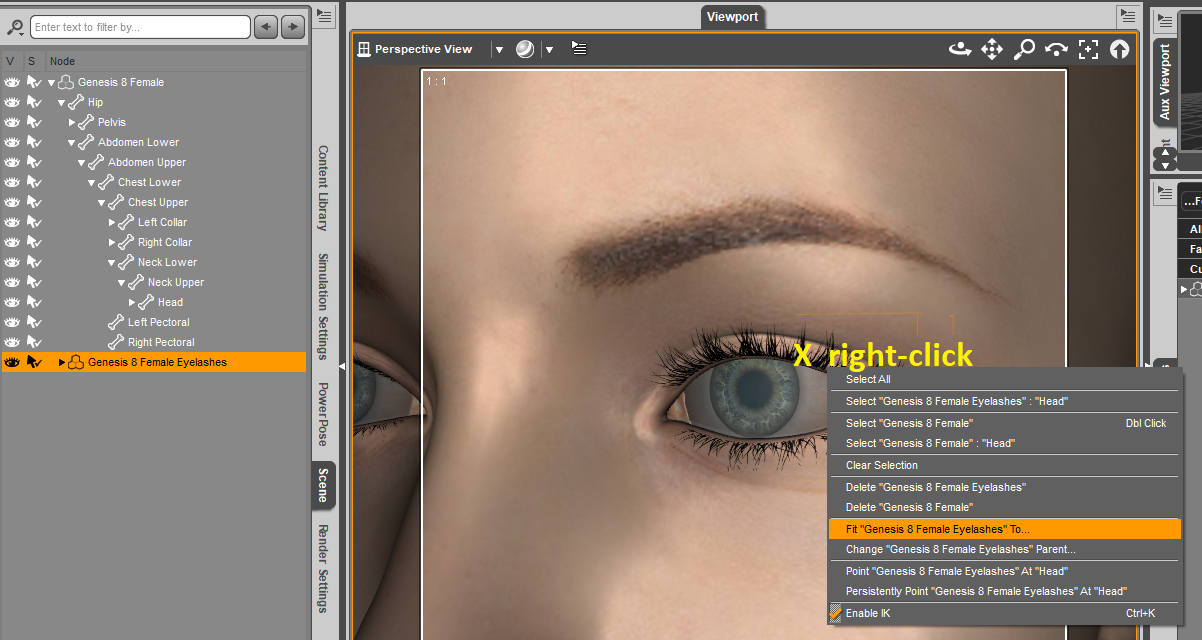 How to move eyelashes?
HeadShop 12 was used. After the eyelashes, they were detached from the eye sockets: http://joxi.ru/5mdM3RPS3YoK12. How to put and back?
Headshop 12 for G8 does not installlet me know the updates. i want to upgrade my hs 11 to 12
Here's the upgrade product from HS11 to HS12. It was released on 12/2/2019.
https://www.daz3d.com/headshop-12-with-lovechild-win--upgrade-from-hs11
Headshop 12?Did they ever manage to fix the issue that headshop won't work if your library is not installed to the default location on C:?Yes, the user has to redirect library.
Headshop 12?Can you use this to create a character for sale, where you can take the character into a sculpting program to refine it and create your own skins and morphs for it, or can you only use what you get out of the program as is?
Yes you can create and sell anything using HeadShop
Headshop 12?Does headshop allow you to use profile/side pictures again yet? I never ubderstood why they took that feature out.
Headshop 12?Did they ever manage to fix the issue that headshop won't work if your library is not installed to the default location on C:?Daz 3D is part of

Connect
DAZ Productions, Inc.
7533 S Center View Ct #4664
West Jordan, UT 84084Licensing Agreement | Terms of Service | Privacy Policy | EULA
© 2026 Daz Productions Inc. All Rights Reserved.















