-
Face Group issue when Transfer Utility
Geograph ? You mean a geo-graft or sth. else ?
If you don't want Face Groups auto transferred from Genesis figure when rigging with Transfer Utility, just uncheck Face Groups in Transfer Utility dialog...
Alternatively, always tweak Face Groups after rigging...
Face Group issue when Transfer UtilitySo i have a geograph and i am trying to keep the face groups i created for the bones... They are all listed in the Geometry editor and coorspond to the correct faces. BUT when i go and transfer utility to G9 all the face groups dissapear..... I even tried to merge heirarchies but nothing works???? this is very frustrating to say the least. Why does DAZ delete the face groups? What i mean is that they are still there, but they are zeroed out, loosing all faces to zero...
Let's appreciate/discuss today's new releases - more ongoinger threadWendyLuvsCatz said:
https://www.daz3d.com/barnabus-ragwort-character-collection
why does it need the base clothes addon?
they are just textures AFAIK
It does need... 'cause there's no new morph as well as texture maps in this collection but just a morph blending + color tweaking... etc. with Fantasy Figure and Clothes Add-On products ~~
Auto-Fit Partially Disabled in a Figure?This was a weird one (aren't they all?)
Created a new figure/morph for G8F. I saved it as both a Scene and as a Character Preset.
When I load the figure as a Scene file, everything works fine. If I try to load a non-G8F hair or clothing item, Auto Fit appears as it always does.
When I click on the character preset, Daz loads the same figure into the scene... but, if I try to fit any non G8F clothing/hair, the Auto Fit window only gives the first option ("What Figure Was the Item Originally Designed For?"). No matter what I select, the second drop-down menu ("What Type of Item is it?") remains grayed out and unselectable.
I can only assume that there's a setting gone wrong in the character preset but, for the life of me, I have no idea what it could be, or why it would affect the preset and not the scene-loaded figure. If I choose a vanilla G8F and load the character preset onto her (as opposed to loading a new figure into the scene) that figure can also use Auto Fit correctly.
First thought was to check the compatability base for the Character Preset figure, but that's all set to G8F like normal.
(edit: also tried deleting the Character Preset and creating a new one from the Scene file, no luck there either. Saved just fine, loads just fine, same partial Auto-Fit problem)
Need help with duplicate resourceAs per our experience of fixing this sort of issues for years, this is the quickest and safest way. You can also manipulate morph, Bake ERC, re-freeze ERC and re-save morph assets....yada yada, if you want to go for the traditional way.
The vendor would probably do the former if they know well about it ~~ BTW, it was no a typo but came from the wrong process of ERC... on the vendor's side...
[SOLVED] Make toes of the socks follow toe spread (and vice versa)Dolce Saito said:
crosswind said:
Dolce Saito said:
Some of the socks I have, despite looking exactly how I want, doesn't follow toe spread morph. That causes them to poke through shoes, etc... How can I make them follow it?
The reason is just because there's no weight on the corresponding toe bones of the socks...e.g. if you select the joint node of Big Toe1, switch to Node Weight Brush tool, you'll find no weight map on it (ss1). If you add a weight map and some weight, you'll find it work (ss2), but it's cumbersome ...
Then it's simple to fix the issue: just re-rig the socks to the figure with Transfer Utility. Then it'll work. (ss 3 ~ 4)
And vice versa; Especially on a retro-fitted clothing (like g9 shoes to g8), they follow the toe spread, but I don't want them to follow that particular morph.
The reason is the same. To fix it, just do it reversely: remove the weight maps on toe bones (ss 5 ~ 6)
Any help would be appreciated. Thanks.
I noticed the tfs socks don't have toe bones by default. So, when I run transfer utility (without expanding more options), then toe bones are added to the socks. However, the "Toes Spread" pose still doesn't move the sock. What would I be missing? (The character is G8F and socks are also for G8F)
Right ~ case by case. For this TFS socks, increase Distance Tolerance to 0.5 when re-rigging ~
Feedback/Questions on dForce FE Strand-Based Long Straight Hair for Genesis 9Guess it's worth trying to tag @FeSoul on this.
I'm looking at this hair and it looks really great - but wondering if it might be possible to add a morph/option to shorten the fringe so it is not covering the characters eyes, likewise something to move the fringe. I don't see these listed in the list of morphs.
No more "Young adult" shapes available for core figures...why???...indeed it takes a bit of work and a degree of expense to build a set of tools that works without causing distortion of he base mesh whcih can affect clothing fits.
Sadly detailed textures like stripes, plaids, polka dots, gingham and text are apparently designed with the Genesis default bust size in mind and often warp badly on characters with more petite builds.
In the image attached below I had to substitute another texture (which wasn't even meant for clothing) to get something that still had the "period look" and didn't distort. Also attached was the original texture I wanted to use, but on the character's build (a "Twiggy" type physique after the 1960s model of the same name) it warped badly even trying to fix it with Zev0's Projection Morph Manager and Fit Contrtol utilities.
Error w hair morphRichard Haseltine said:
I'm not surprised, if you open the .dsf file for the morph it has no deltas (that is, it moves no vertices).
"deltas" : {
"count" : 0,
"values" : [
]
}Please report this to Daz as a product bug.
Thanks for the reply. How? a helpticket but choose product bug as a reason? or a another type of help ticket? I will NOT have the energy to do this any time soon, will take weeks or something. Lost my father a few ds ago, and I was in hell mentally before that. Was hoping a mod could report it, this much effect all buyers, so is it sensible w tons of reports of the same issue? In any case - thanks for the reply.
Need help with duplicate resourceThat looks like an error in /data/Daz 3D/Genesis 9/Base/Morphs/Luna3D/-G9-Young-01/-G9-Young-01.dsf - which, by the folder names, should be a product from Luna3D. Do you have any products from that vendor for Genesis 9 that might have a Young morph included?
Error w hair morphI'm not surprised, if you open the .dsf file for the morph it has no deltas (that is, it moves no vertices).
"deltas" : {
"count" : 0,
"values" : [
]
}Please report this to Daz as a product bug.
Anyone managed to import custom JCMs using Diffeomorphic?I'm particularly trying to import Ultimate Natural Bend Morphs by K H Studio for Genesis 8 female. The morphs import and have drivers assigned, but they are all set to 0 and don't respond to bone movement.
I'm trying to import through Setup > Morphs > Import Custom Morphs.
A user in this forum seems to have successfuly imported this very set of JCMs here.
[SOLVED] Make toes of the socks follow toe spread (and vice versa)crosswind said:
Dolce Saito said:
Some of the socks I have, despite looking exactly how I want, doesn't follow toe spread morph. That causes them to poke through shoes, etc... How can I make them follow it?
The reason is just because there's no weight on the corresponding toe bones of the socks...e.g. if you select the joint node of Big Toe1, switch to Node Weight Brush tool, you'll find no weight map on it (ss1). If you add a weight map and some weight, you'll find it work (ss2), but it's cumbersome ...
Then it's simple to fix the issue: just re-rig the socks to the figure with Transfer Utility. Then it'll work. (ss 3 ~ 4)
And vice versa; Especially on a retro-fitted clothing (like g9 shoes to g8), they follow the toe spread, but I don't want them to follow that particular morph.
The reason is the same. To fix it, just do it reversely: remove the weight maps on toe bones (ss 5 ~ 6)
Any help would be appreciated. Thanks.
I noticed the tfs socks don't have toe bones by default. So, when I run transfer utility (without expanding more options), then toe bones are added to the socks. However, the "Toes Spread" pose still doesn't move the sock. What would I be missing? (The character is G8F and socks are also for G8F)
Error w hair morphI bought this beautiful hair a few ds ago: https://www.daz3d.com/fe-princess-whiskers-updo-hair-for-genesis-9 , just made my first render with it, love it very much
 . I have an error with it though, the morph:
 - Bangs Curly does NOT work. I hope this can be fixed somehow, I downloaded through DIM as I always do. I see the pick w that morph and I love it SO much, looks so cute, so if it can be fixed that would be great. Do I need to open a ticket for it? seams to me like this can't be happening to just me, so hopefully a mod can report it to Daz? reply so I know if I need to open a ticket, I'm in a dark place in my life now, so I would prefer to just reporting it in this thread. Thanks in advance for help w this. If the problem is at my end - how could I have f..d up just downloading through DIM? I didn't do anything else w the files.
Edit: I am using it on G8.1, but I loaded it without having G8.1 selected, the parented it to her head, so that could not have caused the error I think.
Issue with some poses after creating a new face morphYes, you have to fix it by creating an eJCM corrective morph, and Base resolution just will do. As per the 3rd screenshot you attached, you just need to further drag down the middle part of the upper eyelid with Grab brush in Blender.
Then update the corrective morph with MLP. In Property Hierarchy, set Eyes Closed as its 1st Stage Controller, set the character's head morph as its 2nd Stage Controller.
Issue with some poses after creating a new face morphHi! I realized that I have an issue with the Eyes Closed pose on my character. When I activate the Eyes Closed pose to 100%, the eyes are not completly closed:
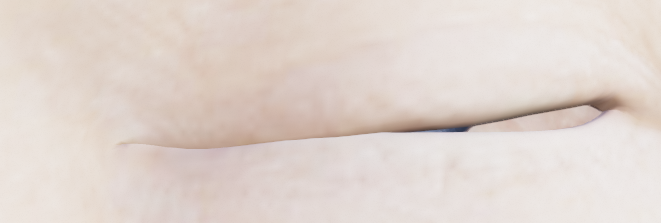
Since I already ajusted the rigging to the shape, I guess I have to create a corrective morph, so I tried to fix it in Blender, and on the Base resolution mesh, the issue seems to be fixed:
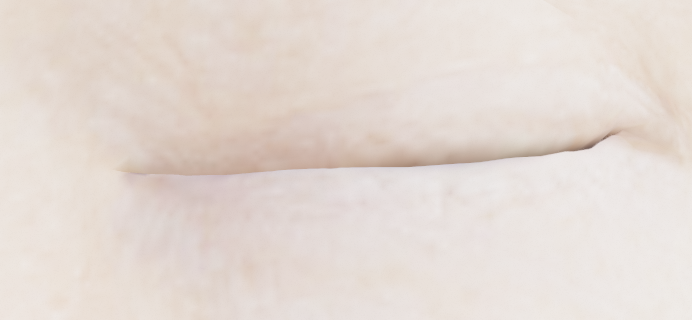
But in high resolution, the eye is still not completely closed:
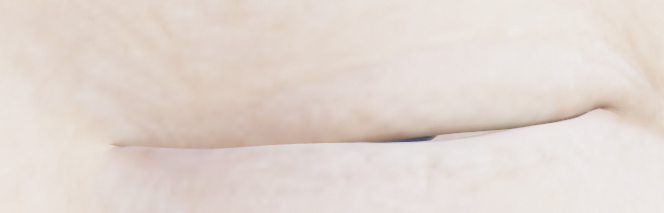
Since I can't fix it directly on the high resolution mesh, I wonder what I should do... How to fix an issue on the high resolution, that I can't see on the base resolution?
Hoping that it could help, I tried to subdivide the base resolution mesh, to fix the eye closed on the subdivided mesh and after that, to unsubdivide the mesh, but when I came back to DS, the eyes are still not completly close... Isn't there any way to work directly on the DS high resolution mesh to create a corrective morph? Or maybe a corrective morph wouldn't be the best solution here?
Tank you in advance!
No more "Young adult" shapes available for core figures...why???kyoto kid said:
...for young adult and teen females having a separate breast morph utility helps a lot as I've noticed the base adult female characters load in fairly well (in some cases "over") "endowed" (evne ones that appear more slender in the promos). . I have several including Zev0's Breast Control, Soto's Breast Utilities, and SF-Designs Girls for G8F (the latter which has individual beast adjustments).
Oh yes, many models come pretty well endowed. And there's plenty of products available to, uh, highlight that fact, too.
Luckily, it's all easily changable with all the products you listed, and many more!
[Released] Turbo Loader Booster Utilities [Commercial]Submitted an update (affects all Turbo Loader products)
v1.6
- Fixed RSTurboLoaderFunctions unit to handle Genesis 9 era morph files that reference morphs WITHOUT a path. Updated GetMorphsFromJSON function to handle Genesis 9 era output morphs that do NOT include the relative path anymore. Uses the file's relative path (i.e., the included morphs "should" be in the same directory) as that works for all tests conducted in 2024/09.
- Fixed an infinite loop on some morph files by fixing the GetMorphsFromJSON function to not include current morph in list of morphs.
- Added FindAllJSONPropertyMatches function override so that it can handle patterns
[Released] Hat Check for Genesis 9 [Commercial]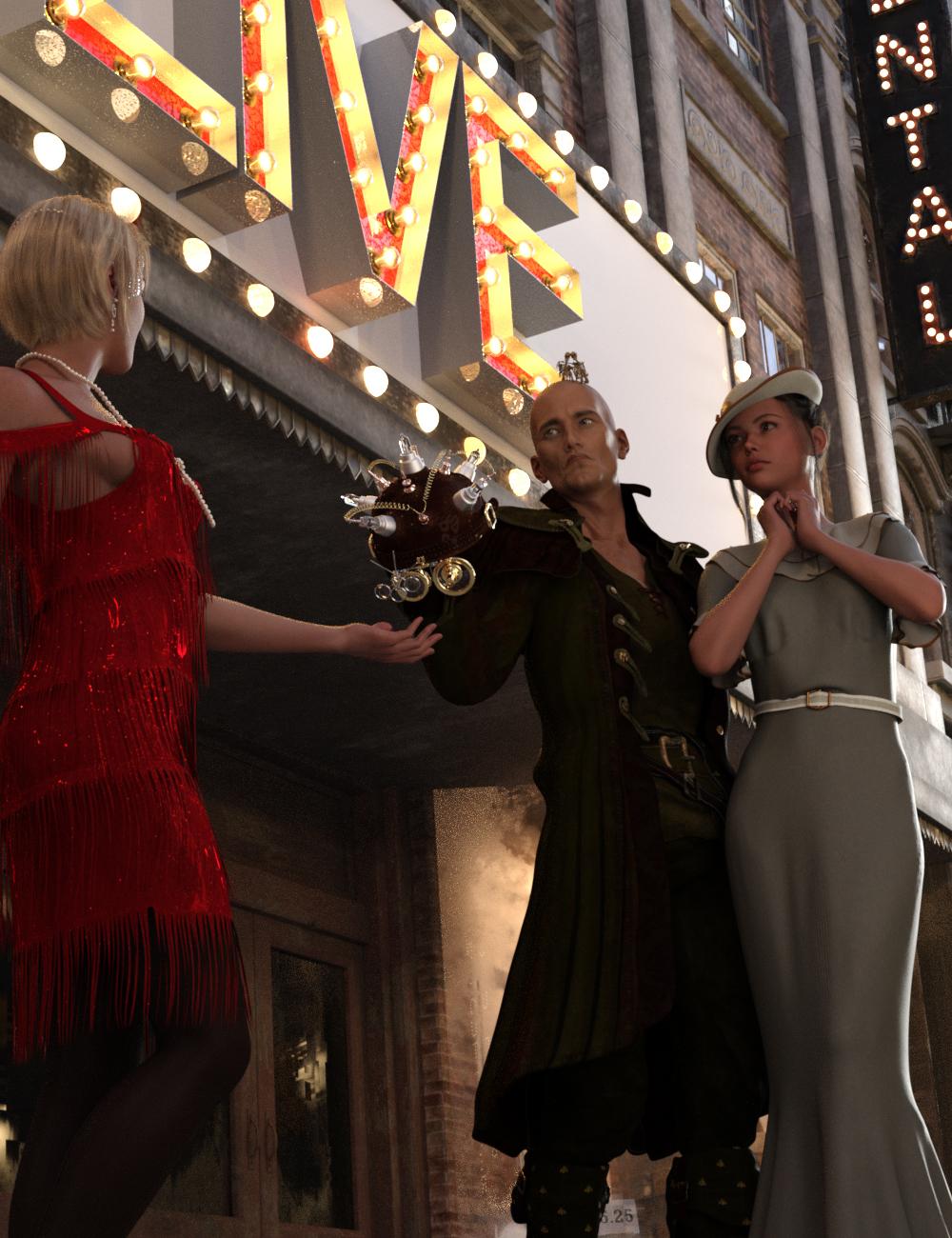 Quickly and easily create hair morphs to use your hair with different hats and caps, even sunglasses and hairbands! Hat Check works by using a sphere, cylinder or cube to define an Effect Volume which you position over the hair. Any hair vertices inside (or outside depending on the options) the Effect Volume will then be pulled close to the head of the figure. Any hair vertex outside the Effect Volume, but within the feathering distance, will be pulled partially towards the head of the figure.
Hat Check creates 2 morphs for the hair based on the label of the "hat": one using the label name (e.g., "RS Fleur Hat") that controls all hair vertices inside the Effect Volume, and one using the label name plus "feather" (e.g., "RS Fleur Hat Feather") for all the vertices at the edge of the Effect Volume.
- Quickly create hair morphs
- Includes 2 scripts for creating hair morphs
- Use Effect Volumes (Cube, Ellipsoid, or Cylinder) to specify the hair vertices to morph
- Use Selected Vertices to specify the hair vertices to morph
- Morphs can be saved separately or as part of the scene file
Morphs created by Hat Check are a Merchant Resource, which you can distribute with your Hair product.
Tutorial
 [SOLVED] Make toes of the socks follow toe spread (and vice versa)
If you're rerigging using the transfer utility use Genesis 9 as the donor instead of one of the templates - that will keep the toe bones. The bodysuit and footwear will remove the toe bones because shoes look weird if they move with individual toe bones :)
Daz 3D is part of

Connect
DAZ Productions, Inc.
7533 S Center View Ct #4664
West Jordan, UT 84084Licensing Agreement | Terms of Service | Privacy Policy | EULA
© 2026 Daz Productions Inc. All Rights Reserved.