-
Morph loads automatically on base G8.1F character
Go to Parameters pane, locate this morph property, click the Gear icon on the right to open Parameter Settings dialogue, check the value in Default field. If it's 1, set it to 0, and resave Morph Asset of it.
Or simply go to the above data folder in your Daz Library, open that DSF file with Notepad++, then go to "channel" coding block, there's a "value", set it to 0. (screenshot 1)
If DSF file is compressed, uncompress it via DS > Windows > Panes (Tabs) > Batch Convert...
Morph loads automatically on base G8.1F characterI don't know exactly what I did by mistake, but now, when I load a base version of genesis 8.1, it also loads with a morph that I created (Aubrey Knight 8.1 Body.dsf). See log file.
How can I get rid of that, so the base character is loads without any morph?Make a cloth stop moving with the figure without reseting it.Okay, you have a bit complicated case.... First thing's first, if the pose in the first screenshot is not the final pose that you want other than the one in the second screenshot... suggest you simulate the outfit based on the final pose ( simulate with a Timeline !)
Because you used a G8M Coat on a G9 ( I assume you Auto Fitted it on G9...), then the Coat lost all its corrective morphs (from G8M version), after you rotating figure's shin, you'll get more poke-thru and distortion on it.
Well, it's not a "that bad" dForce one but just some settings on dynamic surface are not that good... as well as lack of enough dForce weight for various Poses. You can retrieve dForce weight by adding back the dForce Weight node, and tweak it a bit by adding more weight, then it'll drape better.
I roughly tweaked weight to make it drape better, as well as fixed a corrective morph, as an example. (ss 1 ~ 3) Tweak settings on dynamic surfaces beforehand (s4)
How to paint weight, check this : https://www.youtube.com/watch?v=y5mXJlVIUYY
AutoShape Enhancer for Genesis 8 Female Not Applicable When Using Diffeomorphic(solved)Just tested and seems to work fine here. Again be sure to update. I used diffeomorphic 4.2.1.2286 and blender 4.2.1, with the new spline drivers in the global settings.
steps:
- easy import G8F with jcms
- import custom morphs for all the ASE morphs, it's the "D.Master" folder, select all and import
- activate the ASE morph, it is correctly applied
Crash Sitecrosswind said:
Optionally, make an initial shape with a plane. You can use Smoothing Modifier with setting Collision item with the plane + figure. Then export / import as an object or a morph (with OBJ + Morph Loader Pro).
Then finetune it with Mesh Grabber , DFormer etc... or sent to external software that you know for further sculpting.
Hello thank you for this smart steps but I don't know I tried to do it and here's what happened, can you help me to get a good result like yours?
AutoShape Enhancer for Genesis 8 Female Not Applicable When Using Diffeomorphic(solved)Padone said:
The best you can do is to import as custom morphs, then depending on the morphs complexity it may work fine or not. There's recent improvements for daz morphs so be sure to get the latest development version, also use spline drivers in the global settings. That said, personally I don't advise to import complex daz morphs in blender, it is better to keep it simple if possible.
Thank you for your reply but
I tried custom morph import to morph panel, but it doesn't seem to apply
How to get bought character to parameterssiiozz955 said:
Thank you all for your helpful responses!
To summarize:
I need to make sure that the characters have a "full character morph", but I don't necessarily need it since it's better to work with the "head morph" and "body morph" anyway.
Absolutely right, especially for the folks who always customize character by mixing morphs... For instance, to me, that full control morph property is totally useless, I never use it 'cause I just customize a char by mixing head morphs and partial body morphs.
Also, I can't just drag and drop the folders into my DAZ Library, because then the materials will only show up in the DAZ Contect Library. But here I have a question, the head morph and the body morph also appear in the parameters, even though I only dragged Chantel's folder into the library? So why not the materials? And is it better to use the mentioned installation tool? To be honest, I didn't even know it existed. I just found the drag and drop method all over the internet.
In fact they're different things... and work in different ways. What you get from Parameters pane are direclty loaded from data folder where morph files (geometry data) locate. But what you get from Surfaces pane > Preset tab are all from cms database. They're either Material Presets or Shader Presets that come from Products you bought... and can only work on Surfaces. However, the prerequisite of showing them there is that you need to install the Products with metadata. The products you bought in Daz3D store were installed by DIM with metadata, but the products you bought from other stores were just dumped into your Daz Library, so there's no metadata. You either manually create Products with metadata for them or INSTALL them with Content Wizard which can automatically generate metadata for you.
As for Genesis 8 vs. Genesis 9, I'll probably play around with both first, even though it sounds more difficult to have a unisex mesh. But I'll have to give it a try :)
Face and morph swap after I reload a savePerttiA said:
Making the G8 base expressions (and any expressions that are using them) work on G8.1 requires removing dummy/placeholder expressions that are installed to G8.1 morph folders - These dummy/placeholder expression files have no other function than to prevent the base G8 expressions from loading.
The dummy/placeholder files are located in;
...\Data\DAZ 3D\Genesis 8\Female 8_1\Morphs\Daz 3D\Base Pose Head\ (255 files, can be more if you have additional DAZ expression packs)
...\Data\DAZ 3D\Genesis 8\Female 8_1\Morphs\Daz 3D\Expressions\ (24 files, can be more if you have additional DAZ expression packs)
...\Data\DAZ 3D\Genesis 8\Male 8_1\Morphs\Daz 3D\Base Pose Head\ (255 files, can be more if you have additional DAZ expression packs)
...\Data\DAZ 3D\Genesis 8\Male 8_1\Morphs\Daz 3D\Expressions\ (24 files, can be more if you have additional DAZ expression packs)Please make sure you are removing the files from G8.1 morph folders and not G8 morph folders.
Note 1; If you are logging in to DS and letting DAZ Connect (within DS) to install/update your content, you may have these also in an other location that has "\Data\Cloud\" in it's path
Note 2; Do not remove any files from "FACS" or "FACSExpressions" foldersWorked like charm, thank you man.
Dartanbeck's Journey - CG Filmmaking Very excited!
Next month I'll be teaching a class via Digital Art Live on creating custom costumes within Daz Studio.
This is something I do on a near day-to-day basis, and have some really fun techniques that are just muscle-memory to me - making it a lot of fun to just get down and be super creative when designing an outfit.
Making them for my hero characters is, of course, always the biggest challenge - making them the most fun.
But what about everyone else?
Well, I have a lot of fun with that too, and have some specific philosophies that I go by when doing so.
So I thought that such a thing might be fun to show the world!
Shopping habits, surface editing, texture editing, mesh editing, morph making, dForce setup and use, saving it all out to work over and over again... these are the things I do all the time - often without even a thought. It's become one of the most comfortable things to do, because I love doing it, and do it all the time.
Should be a fun class! :)
how install mesh grabber ?3DmentiaNull said:
Thanks very much for the comments! I just checked my product library to see if anything had changed, but it's the same, Mesh Grabber and Mesh Grabber Morph Editor are manual download .exe files, that I succesfully installed, but Rotations has no download link at all. You both seem to confirm that it's just another .dll file that could have been put in a .zip but it wasn't done for some reason.
My PC with D/S is also offline, but I installed and use DIM on it anyway.
I download (using DIM) on my online laptop, copy the files that DIM downloads (.zip and .dsx) to a USB stick and copy from that to my offline PC. Then I point DIM there to the library where I copied those files to and run it in offline mode. That's a great solution! Sorry I didn't mention my online PC is running Linux - I download things at the library too but I wouldn't be able to first install the DIM there either. I guess there's actually a way to install some win programs in linux but that's out of my league, so far. Anyway, thank you both!
 / peace
 Ah... np~ I have no exp. of using linux, but simply dumping DLL files into plugins folder always works. Have fun !
how install mesh grabber ?3DmentiaNull said:
Thanks very much for the comments! I just checked my product library to see if anything had changed, but it's the same, Mesh Grabber and Mesh Grabber Morph Editor are manual download .exe files, that I succesfully installed, but Rotations has no download link at all. You both seem to confirm that it's just another .dll file that could have been put in a .zip but it wasn't done for some reason.
My PC with D/S is also offline, but I installed and use DIM on it anyway.
I download (using DIM) on my online laptop, copy the files that DIM downloads (.zip and .dsx) to a USB stick and copy from that to my offline PC. Then I point DIM there to the library where I copied those files to and run it in offline mode. That's a great solution! Sorry I didn't mention my online PC is running Linux - I download things at the library too but I wouldn't be able to first install the DIM there either. I guess there's actually a way to install some win programs in linux but that's out of my league, so far. Anyway, thank you both!
/ peace Maybe you could try opening a support request explaining your situation and ask if DAZ can send you a copy of the .zip file for Rotations? It may take a while to get a repsonse, but worth it if they will oblige?
How to get bought character to parametersThank you all for your helpful responses!
To summarize:
I need to make sure that the characters have a "full character morph", but I don't necessarily need it since it's better to work with the "head morph" and "body morph" anyway.
Also, I can't just drag and drop the folders into my DAZ Library, because then the materials will only show up in the DAZ Contect Library. But here I have a question, the head morph and the body morph also appear in the parameters, even though I only dragged Chantel's folder into the library? So why not the materials? And is it better to use the mentioned installation tool? To be honest, I didn't even know it existed. I just found the drag and drop method all over the internet.
As for Genesis 8 vs. Genesis 9, I'll probably play around with both first, even though it sounds more difficult to have a unisex mesh. But I'll have to give it a try :)
how install mesh grabber ?Thanks very much for the comments! I just checked my product library to see if anything had changed, but it's the same, Mesh Grabber and Mesh Grabber Morph Editor are manual download .exe files, that I succesfully installed, but Rotations has no download link at all. You both seem to confirm that it's just another .dll file that could have been put in a .zip but it wasn't done for some reason.
My PC with D/S is also offline, but I installed and use DIM on it anyway.
I download (using DIM) on my online laptop, copy the files that DIM downloads (.zip and .dsx) to a USB stick and copy from that to my offline PC. Then I point DIM there to the library where I copied those files to and run it in offline mode. That's a great solution! Sorry I didn't mention my online PC is running Linux - I download things at the library too but I wouldn't be able to first install the DIM there either. I guess there's actually a way to install some win programs in linux but that's out of my league, so far. Anyway, thank you both!
/ peace Crash Sitekpr said:
crosswind said:
Optionally, make an initial shape with a plane. You can use Smoothing Modifier with setting Collision item with the plane + figure. Then export / import as an object or a morph (with OBJ + Morph Loader Pro).
Brilliant
Ha ~
 How to get bought character to parameters
siiozz955 said:
Could the reason be that I have Chantel for Genesis 8 and she doesn't have a full body morph for the parameters tab? Also, for some reason her materials only seem to be available in the content library. They're definitely not in parameters and I can't find any materials in the data folder either. I can find the head and body morph there, but no materials and no full character morph. Off topic: Does it make sense to focus on Genesis 8 or should I start with Genesis 9? I haven't invested much money yet, so I could still switch to 9, but there seems to be a lot more stuff for 8.
Ah ha... folks always overlook something. You're 100% correct. We checked the product link above but that was for Genesis 9. Actually what you bought is this : https://www.renderosity.com/marketplace/products/165156/3dl-chantel-for-genesis-8-females
In its ReadMe, there's no full character control morph property. (ss1)
As for material issue, yes, my bad. People sometimes take things for granted... haha ~~ What can be filtered in Surface pane > Preset tab has to be based on Metadata. This product is from Renderosity, you must have just dumped the files into your Daz Libary rather than installing it with some tools ( Content Wizard ), so there's no metadata at all. Then you have no way to find material presets there other than Content Library ~~
How to get bought character to parameterssiiozz955 Something I learned while using Daz Studio.
You need to start Daz Studio by double-click the icon in Windows Desktop.
After loading, head at the left pane.
Go to Genesis 8 Female, double-click the icon.
It will load the base figure, then at the right pane go to the Parameters Tab.
From there, in this example I give you, I have typed Zhi; the morph will appear, if there are more than one it will be displayed too.
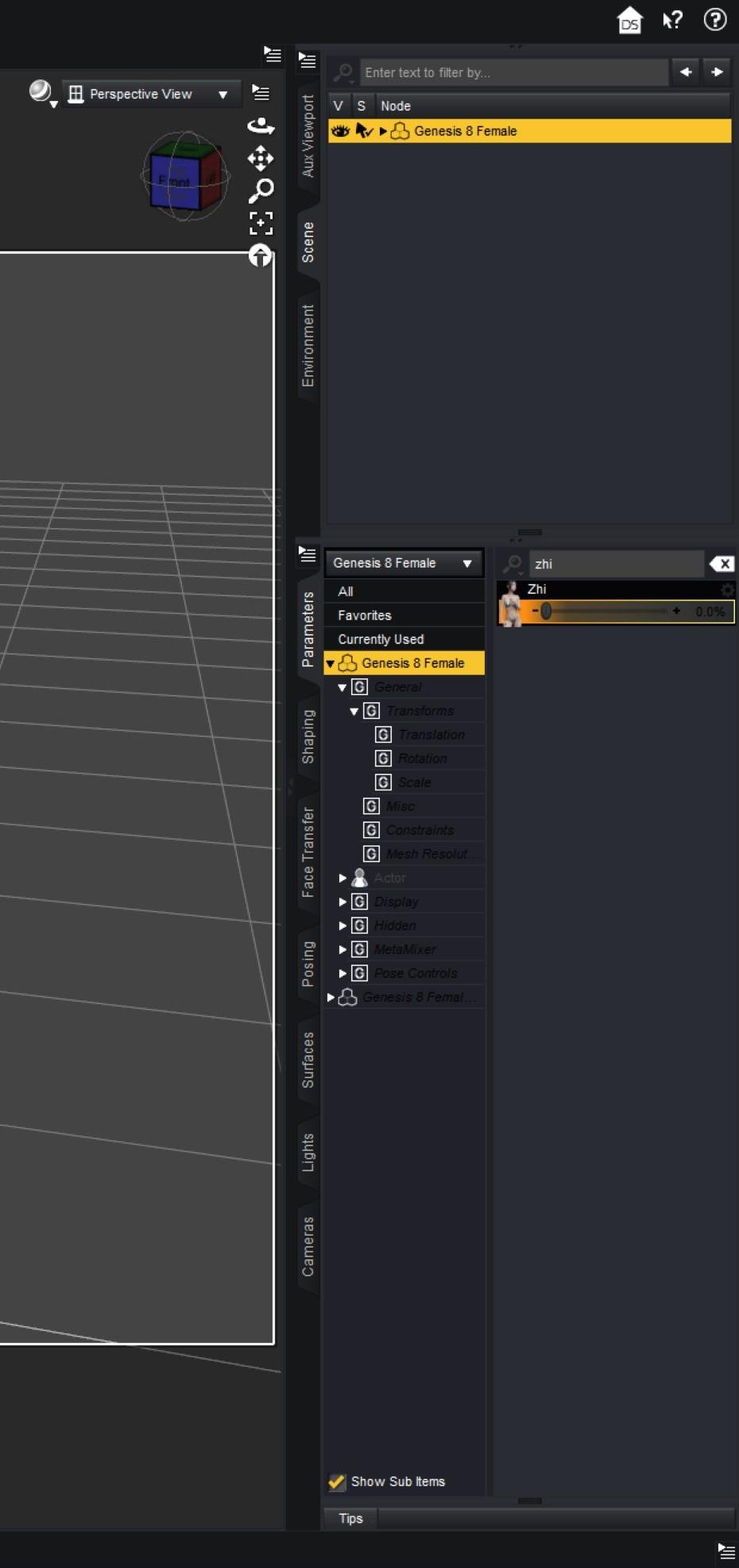
 Rigging problem: Figure feet end up 5cm below ground. [Solved]
crosswind said:
So... after zeroing them and redoing the workflow, it's good ?
I don't know. I did not try it (yet).
I do plan on zeroing the toe twists and repeating the workflow, because, in my case, I did not intend to twist the toes with my morph. So it's an error to correct.
But suppose I do so and it fixes the problem.
The consequences of the problem being fixed by zeroing out the slightly twisted toes would be ominous. Just imagine what that would mean. It would mean that people cannot morph feet even the slightest bit (without causing intractable rigging problems). This fact would contradict the overwhelming evidence that people do in fact morph feet, such as with various humanoid characters like trolls and orcs and so on. This contradiction would need addressing. Someone would need to explain why so many people get away with radically morphing feet when they make troll character, but I can't get away with a tiny twist of my character's toes.
But who knows? Computer code sometimes yields bizarre anomalies that in special contexts, favor big troll feet but forbid a slight toe twisting. In that case, the explanation for the contradiction would just be "bizarre anomaly - bad luck - find an ad hoc work-a-round - have a nice day".
I'll let you know what happens when I remove the toe twists.
Crash Sitecrosswind said:
Optionally, make an initial shape with a plane. You can use Smoothing Modifier with setting Collision item with the plane + figure. Then export / import as an object or a morph (with OBJ + Morph Loader Pro).
Brilliant
How to get bought character to parametersCould the reason be that I have Chantel for Genesis 8 and she doesn't have a full body morph for the parameters tab? Also, for some reason her materials only seem to be available in the content library. They're definitely not in parameters and I can't find any materials in the data folder either. I can find the head and body morph there, but no materials and no full character morph. Off topic: Does it make sense to focus on Genesis 8 or should I start with Genesis 9? I haven't invested much money yet, so I could still switch to 9, but there seems to be a lot more stuff for 8.How to get bought character to parametersNope, that DSF file: 3DL_Chantel_figure_ctrl_Character.dsf locates in data folder, so it should be the characters' full control dial. You can find and attach the file in here, we may easily find why...
However, even if this property slider shows in Parameters list, you better use Head and Body morph to custmize your characters(s) rather than using a "Control Dial".
As for material presets, it depends on the file names of the presets... if there's no string of "Chantel" in Material Presets, you'll find nothing related to "Chantel"... dbl-check them. And in your 3rd screenshot, I notice that you didn't select anything in the list...You need to at least select Materials.
Daz 3D is part of

Connect
DAZ Productions, Inc.
7533 S Center View Ct #4664
West Jordan, UT 84084Licensing Agreement | Terms of Service | Privacy Policy | EULA
© 2026 Daz Productions Inc. All Rights Reserved.









