-
Duplicating head shape to genesis
crosswind said:
PerttiA said:
crosswind said:
How to copy a Head to DS...? Parent? Geo-graft?
Export the base Genesis figure into Blender, bring the original figure there, line them up and use the basic tools to make the Genesis mesh to match the original figure, then import the Genesis figure into DS as a morph
FaceBuilder makes a Head (portraite) only geometry with unique shape as per the given photo, how could you "match" a Genesis Base figure to that Head geometry in Blender?
What has this to do with FaceBuilder?
The Genesis base figures are meshes that can be modified
One can import/open whatever source figure from where-ever to Blender, scale it and align it with the Genesis base mesh, and then scale/move the vertices of the Genesis mesh where needed (utilizing mirror and falloff)
Nothing fancy or difficult[Released] Bone Minion for DAZ Horse 3 Poses [Commercial]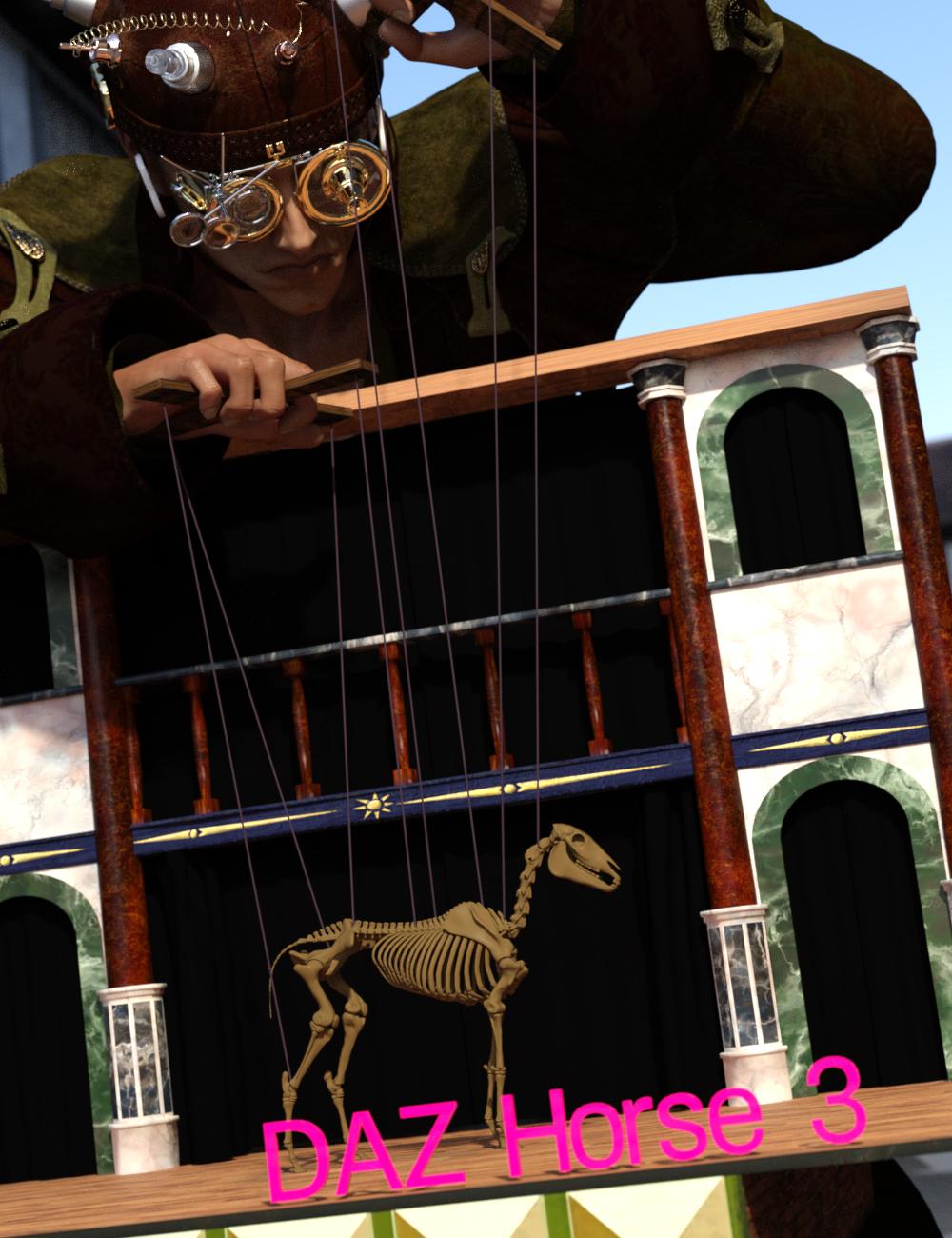 Quickly expand your library of poses for DAZ Horse 2, LoREZ Horse 2, and HiveWire Horse! With Bone Minion, you can directly use poses for DAZ Horse 3 for other Horse figures. Your Bone Minion will do the hard work for you by acting as a bone "catcher" for a pose and then transferring (and converting if necessary) the pose to its parent DAZ Horse 2, LoREZ Horse 2, or HiveWire Horse.* Simply load the Bone Minion on your DAZ Horse 2, LoREZ Horse 2, or HiveWire Horse, select the Bone Minion, and start applying poses!
- On the fly conversion of DAZ Horse 3 poses to DAZ Horse 2
- On the fly conversion of DAZ Horse 3 poses to LoREZ Horse 2
- On the fly conversion of DAZ Horse 3 poses to HiveWire Horse
- Works with DAZ Horse 3 full poses, partial poses*, hierarchical poses**, Horse and Rider hierarchical poses***, and even AniBlocks!
- Automatically applies full poses when they are loaded*
- Supports pose properties (using the Create Heavyweight Bone Minion script)
Note that converted poses (and especially props if they are hierarchical poses) may not be perfect and may require tweaking. Facial Bones (i.e., expressions) except for the eyes are not transferred.
* Any pose that sets the hip of the Bone Minion will be automatically converted on the fly and applied to the target figure. The Apply Changes script can be used to transfer any pose (including partial poses) on the Bone Minion to its target figure.
** Hierarchical poses with props require the props loaded on both the Bone Minion and the target figure. The prop will be properly rotated for the pose but may need to be manually translated to the correct location. DAZ Horse 3 has different bone names than other Horse figures. You will need to manually move the prop to the correct bone on the Target Figure.
*** For Horse and Rider Poses, you must have the correct figure Bone Minion product installed (i.e., if the hierarchical pose is for DAZ Horse 3 and Genesis 9, you must have the DAZ Horse 3 Bone Minion and the Genesis 9 Bone Minion), the bone minions must set up as the hierarchical pose expects (e.g., if the Genesis 9 is supposed to be on the Hip bone of the DAZ Horse 3, the G9 Bone Minion must be on the Hip bone of the DAZ Horse 3 Bone Minion), and the Target Figure of the Figure Bone Minion must be set to your Target Figure.
Bone Minion Tutorial
Horse and Rider Bone Minion Tutorial
Horse Skeleton Model in Main Promo is by Diego Luján García (Creative Commons Attribution) and is available at https://skfb.ly/6nYOS. No changes were made.
AIUTO...CHI CONOSCE L’ITALIANO? PARTE QUATTORDICIKainjy said:
Che cosa usi ? Transfer Utility ? Con che settaggi ?
Certo che uso il Transfer Utility, che altro dovrei usare?
I setaggi sono Bodysuit Loose (è una barba lunga), setaggi default tranne per il trasferimento dei morph che sono i preferiti. Sul personaggio ho impostato come Favorites tutti i moprh faccilai che voglio trasferire... Ma non ne trasferisce nessuno.
Se però imposto "Favorites and subelements", mi trasferisce si i morph ma anche una valanga di altra roba che non mi serve e la barba finisce per pesare quattro giga.
 E non posso passare sei ore a cancellare uno per uno i canali che non mi servono, ce ne sono almeno mille...Duplicating head shape to genesis
Fit Suit method won't work either because the source item is just an OBJ geometry of a Head / Portrait... rather than a Genesis figure, so no weight / shape could be transferred to G9 "Suit". The "Suit" can be only rigged on a Genesis figure by using Transfer Utility... And Auto-Fit plugin can be only triggered when loading a wearable figure rather than a Genesis figure to another figure.
Well, if these simple ways can work it out, we never had to buy that expensive Wrap software...to bring whatever scanned mesh or chars. from other platforms ~~
Duplicating head shape to genesisPerttiA said:
crosswind said:
How to copy a Head to DS...? Parent? Geo-graft?
Export the base Genesis figure into Blender, bring the original figure there, line them up and use the basic tools to make the Genesis mesh to match the original figure, then import the Genesis figure into DS as a morph
FaceBuilder makes a Head (portraite) only geometry with unique shape as per the given photo, how could you "match" a Genesis Base figure to that Head geometry in Blender?
Duplicating head shape to genesiscrosswind said:
How to copy a Head to DS...? Parent? Geo-graft?
Export the base Genesis figure into Blender, bring the original figure there, line them up and use the basic tools to make the Genesis mesh to match the original figure, then import the Genesis figure into DS as a morph
Can someone explain the V3/V4 workflow to me?Sadly "transfer active morphs" doesn't always work, we learned with DS3's version that there is a lot of content out there that actually has the morphs, it's that they just don't work in DS due to bad ERC.
As a result we learned that "transfer active morphs" wont overwrite existing morphs, which means a fair bit of editing to fix the ERC yourself.
AIUTO...CHI CONOSCE L’ITALIANO? PARTE QUATTORDICIImago said:
Ancora nessuno mi ha detto per quale motivo le barbe in DAZ Studio non vengono più trasferite in modo corretto... Sul serio, devo davvero fare di nuovo rollback a 4.12.0.86?

Che cosa usi ? Transfer Utility ? Con che settaggi ?
"Duplicate formulas found" - SOLVEDWhat is this slider doing? Why are you naming it "Apply All" rather than giving it a unique name for the character? Is it in fact a newly created morph or are you editing an existing .dsf in a text editor to create a driver property, which would certainly short-circuit any automated postfixes intended toa void duplicates?
"Duplicate formulas found" - SOLVEDRichard Haseltine said:
The fix is for PAs to use unique names - it isn't a DS issue, it's an issue with conflciting content (usually) or an outright content bug (much more rarely).
I'm not a PA but I am an experienced asset creator. Whenever I create a character who is diminutive I have to fight this struggle. It pops up whenever I make any adjustments to the Irises and the culprit is not the PA or me, but whoever did this:
Previous:
File: D:/- Products in development/Spanky 24/data/Daz 3D/Genesis 8/Female/Morphs/Causam3D/Spanky 24/Spanky 24 Apply All.dsf
Owner: Genesis8Female
Input URI: Genesis8Female:/data/Daz%203D/Genesis%208/Female/Morphs/Causam3D/Spanky%2024/Spanky%2024%20Apply%20All.dsf#Spanky%2024%20Apply%20All-0xa47d846?value
Input: Spanky 24 Apply All
Output URI: Genesis8Female:/data/Daz%203D/Genesis%208/Female/Morphs/DAZ%203D/Head/CTRLEyesIrisSize.dsf#CTRLEyesIrisSize?value
Output: CTRLEyesIrisSize
Duplicate:
File: D:/- Products in development/Spanky 24/data/Daz 3D/Genesis 8/Female/Morphs/Causam3D/Spanky 24/Spanky 24 Apply All.dsf
Owner: Genesis8Female
Input URI: Genesis8Female:/data/Daz%203D/Genesis%208/Female/Morphs/Causam3D/Spanky%2024/Spanky%2024%20Apply%20All.dsf#Spanky%2024%20Apply%20All-0xa47d846?value
Input: Spanky 24 Apply All
Output URI: Genesis8Female:/data/Daz%203D/Genesis%208/Female/Morphs/DAZ%203D/Head/CTRLEyesIrisSize.dsf#CTRLEyesIrisSize?value
Output: CTRLEyesIrisSize
When I use the Iris size control on a smaller character through a New Property slider, or simply ERC Freeze a morph with the Iris size controller dialed in, I get this kind of error. Now I'm not a coder, but it seems to me that two things need to happen:
1) Daz needs to stop including eyes in body morphs imported from Blender or anywhere else.
2) Creating a new property slider that utilizes a Daz native morph should not be throwing these errors.If I'm wrong, let me know, but if you're just a toady then don't bother. This is a legitimate concern.
Coming soon: Mesh Grabber 4.0 [Commercial]I have refrained from comment on this product simply because it apparently never did what I always wanted to be able to do in DAZ studio but never could, freely move vertices around like I can in Carrara (or even to an extent in Poser with the morph brush) it did address some but not all of my needs, send to Hexagon semed still a better option.
but
it always was something I wanted to be able to do directly in DAZ studio and it's moving closer to actual 3D sculpting by what I have read, I may well buy this version if it ever materialises.
If it means getting an actual robust 3D sculpting plugin like the Poser morph brush then I support and appreciate ManFriday wanting to get it right.
So many plugins I don't even bother with regardless of how awesome they are simply because other applications I use do it better, a case in point being animated textures a thing I use a lot but never in DAZ studio if I can, I will always avoid it even with free scripts let alone paid ones that are still subject to the same API limitations.
Animated IBL is something even Poser7 did, you cannot use a series or even just animate rotation or intensity of HDR images in DAZ studio with any plugin.
I do this surprisingly a lot in Carrara and even iClone 6 with spherical render png series or videos as backgrounds
Likewise physics, booleans, metaballs, fluids etc, the work done by PAs getting such stuff into DAZ studio is tremendous don't get me wrong but it's just so much easier to do elsewhere.
I honestly thought I wanted a decent FBX importer too until it was possible and I realised it's still easier to export the DAZ content instead and render in other software.
yes getting way off topic but if I am going to delurk a bit, I honestly don't care
somebody could even add machine learning functionality to DAZ studio for that matter
unsure of ManFriday's stance on this but very aware a lot of people totally against it to the point of leaving DAZ over just adding DAZAI to the site
personally
I would kill for something generative that could mask and affect only parts of animated renders easily, something I cannot easily do with all the generative fill AI apps I use, realistic hair movement and water interaction being the big one, what I can get out of Stable Video diffusion on my own PC using a 3D rendered image is sometimes pretty awesome but totally uncontrollable, unpredictable, not actually promptable. Even things like Luma Dream Machine with prompts are more miss than hit but when it hits it goes hard.
90% of things I do using AI start out as a 3D render BTW, to flesh out the scene I want, also I use actual photography, editing in Gimp etc
We live in interesting times.
Using Carrara and Zbrush is likely to still remain my preferred option for shaping stuff, MeshGrabber would only ever be a handy quick fix for a poke through or something pn the fly and I still have to think about how badly I really need that.
I still actually do more 3D rendering than AI rendering BTW
I am just not against it
Can someone explain the V3/V4 workflow to me?Gordig said:
Victoria 4, Aiko 4 and the Girl are actually distinct figures, so if something is compatible with one, you can't assume that it will be compatible with the others.
While V3, A3 or SP3 are indeed different figures with different rigging and don't share much (they can share textures, but by default that's all), A4, G4 and S4 are actually morphs for V4.
However contrary to Genesis figures, content for V4 does not automatically follow morphs applied to the figure.
Some V4 clothes or hairs include morphs to fit G4, S4 or A4, or to match the basic head and body morphs, but not all. It is possible to make those items follow morphs you have used though, there's a command called "transfer active morphs" you can use for that. But you have to explicitely tell DS to do it.Regarding using morphs:
Basically when you load a figure DS/Poser loads a list of dials corresponding to the morphs. In order to use those morphs, DS/poser needs to load the "morph deltas" in memory so it knows how the morph works and can apply it.
For Genesis figures, DS automatically loads the morph deltas when you use the corresponding dial for the first time, but for V3 or V4 you need to explicitely tell DS/poser to do it, by "injecting" the morph delta into the figure. The dialog which asks you which morphs you plan to use when you load V4 will then "inject" the select morphs so that you can use them directly. If you want to use other morphs afterwards, you can use the corresponding "INJ" pose to activate them. Conversely, you can use a "REM" pose to remove/unload the deltas for a morph you don't want to use.Can someone explain the V3/V4 workflow to me?Most of the time what you find in the "Figures" library is the base figure, V3/M3 and V4/M4 etc.
Characters in the "Pose" library come in a couple of flavours, you have the MOR-pose PZ2 which is similar to a shaping preset in DS4, it just holds the morph names and the values for the dials.
Then there's INJ/REM, these come in different flavours to, but they all do the same thing, INJect/REMove morph deltas from specific channels in the figure and then change the dial setting.Hair and clothing not always fitting is usually because they weren't edited after being saved. In Poser when you save back to the Figure library it's almost like saving a scene, if it's in the scene then it's just been added to that CR2. Having one rigged item in the scene means it's saved as a "Figure" rather than as a "Conformer", so the creator is meant to edit the file and change "conforming 0" to "conforming 1", some do many don't, as a result it doesn't auto-conform in Poser or DS. In DS just right click the item in the viewport and select Fit "item name" To.. from the menu.
Make a cloth stop moving with the figure without reseting it.As I said above, this is a dForce Coat, and auto-fit transfers almost 90% correct weight to its Joints, so as long as you well tweak the dForce weight, as well as optimize settings on the dynamic surface (already show you the settings), the coat will drape pretty well for various pose. For tiny distortion fixing, bring it to Blender or fix it with Mesh Grabber as needed,
If there's still "freeze issue" when simulating, still, first of all tweak the settings on dynamic surfaces (shown in 4th screenshot I attached above)
As for fixing corrective morphs in Blender, never touch Pose in blender. Export posed figure + clothing to Blender, fix on clothing only, then export to OBJ from which you import in to DS with Morph Loader Pro to update corrective morph.
I ever recorded full workflow for it but I couldn't find it by now, check this one from Jay: https://youtu.be/w2zngVlncec?si=s76ieYH8v86OU5Si
Make a cloth stop moving with the figure without reseting it.crosswind said:
Actually you don't need to follow that tutorial from Jay because what you need is just to tweak the weight on dForce Modifier rather than the weight on Joints for rigging & fitting. Well, in case there's very ugly / awful result after auto-fitting, you DO need to tweak Joints weight, you should do it with Figure in A-Pose. Besides, what Jay mainly showed in the tut, was fixing corrective morphs by re-painting / smoothing weight... however that way is cumbersome.
Oh, okay. I really don't understand why it's all about a Dforce modifier when I am not even using Dforce. I think I might missunderstand what was going on with that tool:
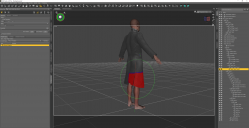
I thought you coud unpaint the red zone (here for the Right Tigh of the coat), and then when you move the Right Tigh of the G9, this part of the coat does not move with the figure anymore. But anyway, for this specific part, the Right Tigh Twist, I could not erase the red zone for some reason. I could totally erase it for many other bones, but not that one.
But I guess there must be a tool, or something, that link the bones of my character to the bones of the cloth. And if I can undo that link (for the bottom of the coat), perhaps it might solve my issue...?
If you know a sculpting software like Blender, I stongly suggest you direcly fix corrective morph in external software.
Yeah, I have some really basic Blender knowlegde. So what you tell me is to :
1 - move the top of my character as I want to, at least, the torso and arm parts of the coat fit the torso / arm of my G9,
2 - import Coat + G9 into Blender
3 - move the G9 legs in Blender so that the coat does not move with the legs?
You mean when you simulate the coat, you DS crahsed ?!
The Dforce windows opens up, it loads a bit, and then it freezes forever (at 0, 10, 20%, depends on the position of the G9 and how far I move away the cloth fabric from the G9).
Hoping, as you mention, that the issue comes from the G8 to G9 auto fit.
Or using a G8 character and redo the whole pose (I have a script that takes a pose from a G8 and applies it to a G9 but I am not sure it works the other way around).Agreed... to a certain extent, haha ~~

... I am actually not even sure about that anymore since I just tried that with a G8 and, well, when I move the G8 legs, the bottom of the coat moves as well!!! I am screwed. G8 or G9, it does not matter at the end. Daz still does not provide a simple way of freezing a cloth (without reseting it), not matter if you use a G8 or a G9... :/
Make a cloth stop moving with the figure without reseting it.IlliciteS said:
Hey, thank you for your answer.
Indeed, I auto fitted that coat on G9 (I chose the dress loose template I think. And I retried with none, but still no luck.)
So, I've tried different things:
I tried to use the Node Weightmap Brush to adjust the bone influence as Richard mentioned it. I followed this video as an exemple:But there are lots of bones, and some bones for which I cannot completly remove the bone influence. The bottom of the cloth will keep its red color, even with a 1.00 intensity and a radius of 200 (inner and outter). Sometimes, even some pixels here and there cannot be changed. I suppose it means I cannot reach them, even if I hover and brush everywhere on the coat, keeping the alt key down. And it even started to deform the cloth, for some reason.
Actually you don't need to follow that tutorial from Jay because what you need is just to tweak the weight on dForce Modifier rather than the weight on Joints for rigging & fitting. Well, in case there's very ugly / awful result after auto-fitting, you DO need to tweak Joints weight, you should do it with Figure in A-Pose. Besides, what Jay mainly showed in the tut, was fixing corrective morphs by re-painting / smoothing weight... however that way is cumbersome. If you know a sculpting software like Blender, I stongly suggest you direcly fix corrective morph in external software.
And the issue here is I really can't use Dforce. it's an instant crash, and I have to wait for a minute, then run Daz, then load my whole scene again... It's really tedious. I retried again, just to be sure. Like I had my figure naked, except for the coat. I reset the leg position so the coat is not wrapped around the leg. I then used the Mesh Grabber to move the coat's fabric away from the character's leg, in order to avoid contact. I run the simulation. It crashed again. Just to be sure, is there any difference between using a Dforce simulation right away vs a Dforce simulation with a Timeline?
Again, I've used Dforce a lot and I find it really usefull, but always without the timeline (this stuff is absolutely not handy and really easy to mess up, so I'd rather not to deal with it).You mean when you simulate the coat, you DS crahsed ?!
I guess I have only two solutions left:
Try this product : https://www.daz3d.com/rssy-clothing-converter-from-genesis-8-to-genesis-9Well, if you convert clothing by using RSSY's converter series, more or less you'll get the similar result... only the converters use a few templates as well as some adjustment morphs... They still cannot handle the issues of custom bones, corrective morphs, RFN, dForce flexibilities, yada yada. So, you know what, auto-fitting + manual fixing + some tricks is always the best way. Trust me, I'm a tinker who almost fix things everyday for my clients.
Hoping, as you mention, that the issue comes from the G8 to G9 auto fit.
Or using a G8 character and redo the whole pose (I have a script that takes a pose from a G8 and applies it to a G9 but I am not sure it works the other way around).Agreed... to a certain extent, haha ~~
Can't find any realistic police uniform with short-sleeve blue shirtThere's a huge lack of decent uniforms for DAZ figures in general... which is odd considering how many people use them for comics and cover illustrations. Fortunately, changing textures on this one is easy as IH Kang tends to build their products in a very mod-friendly way. Just select the clothing item using the surface tool, go to the "default" selection tab, then select the "base color" setting and delete JUST the image (so that you retaining the textures from the bumps & normals) and then replace the light blue with the color of your choice. Here's a quick rendering of the shirt with a light tan color, which took maybe a minute to knock out.

Now, what IS a pain is changing the name and numbers on the badge and collar if you have more than one character in uniform in the same scene, or want to change the info on the shoulder patches, but neither is really that big deal if you have a set of 3D numbers for the collar and a basic familiarity with photoshop. (Or if you're really fealing lazy, you can just hide them.)
I agree there are too many similar outfits but not many usable. For example, if i want to open the shirt, I have to find another shirt or create a morph for that, requiring more time. Regarding texture, thanks for your tip. I will eventually have to edit the texture image to change the number, name, and color.
Octopia for G9 [commercial]barbult said:
If it was Decapia, you'd have to add a severed head morph and texture.
well played!!
Octopia for G9 [commercial]If it was Decapia, you'd have to add a severed head morph and texture.Creating Assets for DAZGordig said:
Not a PA, but you'll want to make sure it has metadata and is properly categorized and rigged. Know that any rigging you do in your modeling program probably won't survive the transfer to DS, so expect to do your rigging inside DS. Content Package Assist creates DIM-compatible zip files.
The metadata gets added by Daz when they package it up for the store, same for categories (Smart-Content-wise). You will need to set up the folder structure the way they like (currently something like: content\environments\sci-fi (or whatever)\Artist-Name\product name etc. The rest is correct though. You can reach out to Daz with a support ticket if you're interested in becoming a PA and they can give you the main points to adhere to.
I use Blender and Substance Painter for the most part, but also GIMP for 2D editing of texture maps. There's no one programme that you have to use. I find Blender easy (and there are loads of tutorials), but some people find it hard (it has way more options that I use, so maybe that confuses some people).
Best bet is to make a few smaller sets (e.g. useful props) as freebies and get feedback before making a set to submit to Daz.
Daz 3D is part of

Connect
DAZ Productions, Inc.
7533 S Center View Ct #4664
West Jordan, UT 84084Licensing Agreement | Terms of Service | Privacy Policy | EULA
© 2026 Daz Productions Inc. All Rights Reserved.