-
Daz Studio Pro BETA - version 4.22.0.15! (*UPDATED*)
The change log is full of comments about in-app notifications, but the highlights thread makes no mention of it. Can anyone explain what it does or point me to documentation? I'm afraid to install this beta version without more understanding of the purpose and mechanism of in-app notifications. Does a customer have to be logged in to their account in Daz Studio? I avoid logging in, because I don't want to accidently install anything with Daz Connect and don't want automatic metadata updates that I have no control of.
Not many daz 9 Animations to buy - How do people do their animations?Hi,
Can you import animation from other fbx files so that they work in gen 9 characters? Looked like there was only about 12 animations packs for gen 9 in the store. Can you convert gen 8 animations to gen 9 etc?
What do people do to get some generic animations?
G8F Expressions morphs are stored in wrong body node in G8.1F modelsAlias files are basically a redundant system using code "borrowed" from the Poser Import system.
Badly done alias file can and do have an effect on load times, but it depends on just how much [stuff] DS is having to load.
Load times are down to three things-
The number of DSF files in the Morphs folder, think of it like a truck, the more [stuff] you put in the trailer the heavier it gets and the more effort the truck needs to use to move, that's the sort of effect it has on DS.
The number of Formulas it's having to process, these add to the heavy load DS is already dealing with from the number of DSF files, and as the average character has just under 1600 formulas in it files it can get really heavy very quick.
Last is the number of errors being generated, and not just the ones you see in the log, on a 10-15 minute load they can stretch load time out to an hour.
So cutting down on the amount of [stuff] in the Morphs folder is always advisable.
Daz Studio Pro 4.22(.0.x) - Highlights4.21.1.80 (August 11, 2023)
- Code Signing
- Executables are signed (once again) on Windows
- User Account Control (UAC) prompt is now blue with publisher name instead of yellow with unknown publisher
- Addresses a known issue in the current (4.21.0.5) General Release
- Executables are signed (once again) on Windows
- Recent Files
- Added a "Set Max Recent Files..." action
- Causes an input dialog that allows viewing/setting the maximum number of recent files (within the [0,100] range) to be displayed
- Increased the default from 10 to 15
- Added a "Set Max Recent Files..." action
- New Item Creation
- "Create New Item" dialog
- Fixed a memory leak
- Fixed an issue with naming for new point at target nodes
- D-Formers
- Fixed an issue where hidden pre-defined options could still have an influence on the resulting node
- Manifested when using the “Create New D-Former…” action with the "Weight Map Mode" option active, by resulting in the selected node(s) having their "Point At" target unintentionally set to the newly created D-Former node
- Fixed an issue where hidden pre-defined options could still have an influence on the resulting node
- "Create New Item" dialog
- Property Limits On/Off (Rotation) actions
- Fixed an issue where the actions would not recurse the node hierarchy using the default configuration
- A "Change Limit State" option dialog is displayed if [Ctrl/Cmd] is pressed when triggering the action
- The default configuration is Nodes:Root, Skeletons:Exclude, Propagation:Recursive
- Fixed an issue where the actions would not recurse the node hierarchy using the default configuration
- Property Reset actions
- Changed the label of the "Reset" action in the options menu to "Reset Value"
- Added a "Reset Attributes" action; see the Change Log for more detail
- Property Hierarchy pane
- Added actions to the context menu
- Expand All
- Expand Selected
- Expand from Selected
- Collapse All
- Collapse Selected
- Collapse from Selected
- Moved context menu "Set" actions to a submenu
- Set > Limits To Extents
- Set > Limits To Extents Recursive
- Set > Scalars...
- Set > Save With...
- Added actions to the context menu
- Daz Connect
- Fixed an issue with remembering username/password
- Fixed a possible crash on macOS when updating metadata
- Logging
- Modified message severity of many entries
- Added capture of many more events; see the Change Log for more detail
- Scripting API
- Made additions in various areas; see the Change Log for more detail
- Fixed bugs and/or made improvements in various areas; see the Change Log for details
SIGGRAPH 2023, AI, and USDRichard Haseltine said:
TheMysteryIsThePoint said:
So, today is the last day of SIGGRAPH 2023 in Los Angeles. It's always a blast seeing tomorrow's new technologies, but this year one cannot fail to have the sense that things are going to change drastically, and very soon because of two things: AI and USD.
This time last year, everyone was talking about USD. This year, everyone is actually adopting it. With no exaggeration, every company I came across is buying in to USD with gusto and everyone is saying that all other file types are going to be deprecated because their developers don't want to deal with anything other than USD now that they've had a taste of it for a while. The enthusiasm for USD at every level is like nothing I've seen before.
NVidia is integrating ChatGPT-like features into Omniverse.
Because USD is completely open, ChatGPT knows all about it. Because one of USD's manifestations is just a declarative DSL in plain old ASCII, ChatGPT can output it. I tried a simple experiement: "Write a USD ascii file that represents a unit cube."
#usda 1.0
def Xform "UnitCube"
{
def Mesh "Mesh"
{
int[] faceVertexCounts = [4, 4, 4, 4, 4, 4]
int[] faceVertexIndices = [0, 1, 5, 4, 1, 2, 6, 5, 2, 3, 7, 6, 3, 0, 4, 7, 0, 3, 2, 1, 4, 5, 6, 7]
point3f[] points = [(0, 0, 0), (1, 0, 0), (1, 1, 0), (0, 1, 0), (0, 0, 1), (1, 0, 1), (1, 1, 1), (0, 1, 1)]
}
}Importing that into Blender gives, sure enough, a unit cube. USD is elegant, simple, and easy to generate programmatically... the tools that are going to be built around it are going to begin to flood in. I saw and heard the enthusiasm from the crowd of mostly devs at every session about USD.
My point with all of this: DAZ, seriously, we need USD. Not just export but import, too. The 3D world's train is leaving the station and our bags are not packed.
and how well do materials transfer between render engines using USD? How about rigging between applications? Geometry itself is easy, and long has been.
Easy enough as Omniverse has MDL's to translate to or from Unreal Engine, from an MDL Standpoint. So USD will be easy enough as demonstrated by Omniverse itself.
Bruises, no materials in productcrosswind said:
'Cause no metadata was given to those LIE presets... if you use Smart Content, right click on the tip thumbnail, menu Show assets in - Mapped folder
Thanks for the replies. That would explain it.
How do I install Renderosity content in DAZ Studio 4.10?If one never uses Smart Content, just follow the video as above... we call it "direct dump", but truly truly not recommended nowadays, especially you have lots of 3rd-party products.
We always suggest use Smart Content first and Content Wizard to install 3rd-party products to your Daz Library.
The reason is pretty simple -: e.g. It'll take 3 seconds for a Smart Content user to find all "Sneaker Products", while it'll take...I don't really know, maybe 3 mins for a Content Library user to get the results by searching Files other than Metadata...
Spend more of your valuable time on your scenes other than searching assets...Genesis 8 "Actors" aren't recognized by contextI think that is what they are using. Sounds like a metadata problem. Load a generic G8 base figure, and a G8 character from the presets. Compare the SceneID's to see if they match or are obviously wrong. Node Name, Scene ID and Compatibility Base should be the same for both. The Node Label can be different, it is just for presentation.
Bruises, no materials in product'Cause no metadata was given to those LIE presets... if you use Smart Content, right click on the tip thumbnail, menu Show assets in - Mapped folder
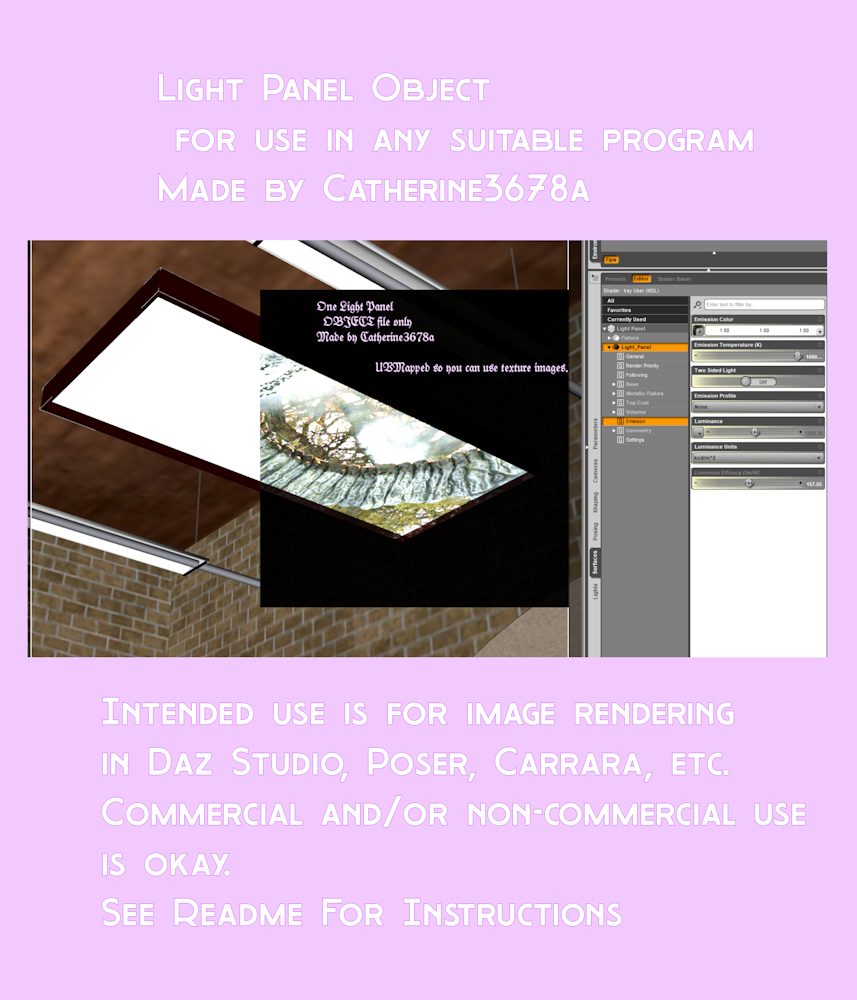
Light Panel ObjBasically, just the .obj to use as a light panel in D/S or any other program you want. No textures or other scene stuff included.
In D/S, import using Daz measurements, resize and position to where you want it ... hiding or removing all else from the scene, export out the .obj. Then remove that from the scene. Import back in your new .obj file; apply desired shader presets etc. and save as a Figure/Prop to a sensible location.
UVMapped so one can use texture images.
At Renderosity.
 SIGGRAPH 2023, AI, and USD
TheMysteryIsThePoint said:
So, today is the last day of SIGGRAPH 2023 in Los Angeles. It's always a blast seeing tomorrow's new technologies, but this year one cannot fail to have the sense that things are going to change drastically, and very soon because of two things: AI and USD.
This time last year, everyone was talking about USD. This year, everyone is actually adopting it. With no exaggeration, every company I came across is buying in to USD with gusto and everyone is saying that all other file types are going to be deprecated because their developers don't want to deal with anything other than USD now that they've had a taste of it for a while. The enthusiasm for USD at every level is like nothing I've seen before.
NVidia is integrating ChatGPT-like features into Omniverse.
Because USD is completely open, ChatGPT knows all about it. Because one of USD's manifestations is just a declarative DSL in plain old ASCII, ChatGPT can output it. I tried a simple experiement: "Write a USD ascii file that represents a unit cube."
#usda 1.0
def Xform "UnitCube"
{
def Mesh "Mesh"
{
int[] faceVertexCounts = [4, 4, 4, 4, 4, 4]
int[] faceVertexIndices = [0, 1, 5, 4, 1, 2, 6, 5, 2, 3, 7, 6, 3, 0, 4, 7, 0, 3, 2, 1, 4, 5, 6, 7]
point3f[] points = [(0, 0, 0), (1, 0, 0), (1, 1, 0), (0, 1, 0), (0, 0, 1), (1, 0, 1), (1, 1, 1), (0, 1, 1)]
}
}Importing that into Blender gives, sure enough, a unit cube. USD is elegant, simple, and easy to generate programmatically... the tools that are going to be built around it are going to begin to flood in. I saw and heard the enthusiasm from the crowd of mostly devs at every session about USD.
My point with all of this: DAZ, seriously, we need USD. Not just export but import, too. The 3D world's train is leaving the station and our bags are not packed.
and how well do materials transfer between render engines using USD? How about rigging between applications? Geometry itself is easy, and long has been.
SIGGRAPH 2023, AI, and USDSo, today is the last day of SIGGRAPH 2023 in Los Angeles. It's always a blast seeing tomorrow's new technologies, but this year one cannot fail to have the sense that things are going to change drastically, and very soon because of two things: AI and USD.
This time last year, everyone was talking about USD. This year, everyone is actually adopting it. With no exaggeration, every company I came across is buying in to USD with gusto and everyone is saying that all other file types are going to be deprecated because their developers don't want to deal with anything other than USD now that they've had a taste of it for a while. The enthusiasm for USD at every level is like nothing I've seen before.
NVidia is integrating ChatGPT-like features into Omniverse.
Because USD is completely open, ChatGPT knows all about it. Because one of USD's manifestations is just a declarative DSL in plain old ASCII, ChatGPT can output it. I tried a simple experiement: "Write a USD ascii file that represents a unit cube."
#usda 1.0
def Xform "UnitCube"
{
def Mesh "Mesh"
{
int[] faceVertexCounts = [4, 4, 4, 4, 4, 4]
int[] faceVertexIndices = [0, 1, 5, 4, 1, 2, 6, 5, 2, 3, 7, 6, 3, 0, 4, 7, 0, 3, 2, 1, 4, 5, 6, 7]
point3f[] points = [(0, 0, 0), (1, 0, 0), (1, 1, 0), (0, 1, 0), (0, 0, 1), (1, 0, 1), (1, 1, 1), (0, 1, 1)]
}
}Importing that into Blender gives, sure enough, a unit cube. USD is elegant, simple, and easy to generate programmatically... the tools that are going to be built around it are going to begin to flood in. I saw and heard the enthusiasm from the crowd of mostly devs at every session about USD.
My point with all of this: DAZ, seriously, we need USD. Not just export but import, too. The 3D world's train is leaving the station and our bags are not packed.
GENERAL FREEBIE REQUESTS part 3Catherine3678ab said:
DoctorJellybean said:
Hopefully there is a ceiling panel light like this one out there
https://gcdn.daz3d.com/p/24359/i/02-i13-bowling-alley-environment-with-poses-daz3d.jpg
Maybe but figured it'd be faster to simply make one. Obj. file is uploaded to Renderosity, pending approval. Concept is one can move and/or resize it as please, export out a new .obj file. Then import it back in and save it as a Figure/Prop file.
Oh, thank you. Looking forward to it being approved.
Visemes to UnityI have a question I am able to export my charactar from daz to unity with visemes. however they are not the same visemes as the oculus ovr lipsyinc? the ovr lipsynic starts with sil exc. the dazs ones are different i can figure out how to change them or rename them or how to get this to work. im assuming there is a way to do it in daz before the import. if anyone can help thanks.
Importing OBJ+MTL+JPGsIf you just wanna use it as a Prop in DS, just follow the above process of obj import and texture maps assignment. If you wanna make this pair of shoes conforming to the figure as a Wearable, suggest you skip it.. I checked them while they were not designed based on any of Genesis figure, so there'll be lots of work to do... and not easy.
GENERAL FREEBIE REQUESTS part 3DoctorJellybean said:
Hopefully there is a ceiling panel light like this one out there
https://gcdn.daz3d.com/p/24359/i/02-i13-bowling-alley-environment-with-poses-daz3d.jpg
Maybe but figured it'd be faster to simply make one. Obj. file is uploaded to Renderosity, pending approval. Concept is one can move and/or resize it as please, export out a new .obj file. Then import it back in and save it as a Figure/Prop file.
Importing OBJ+MTL+JPGsDoes it line up with the base figure in a zeroed state when you import it? If not your first job would be to make each shoe do so, in a modeller or using the DS tools then export that as a new OBJ and reimport so that it lines up be default. You can then use Edit>Figure>Transfer Utility to rig it (Source set to the figure, target to the imported OBJ) - but the heel will almost certainly bend, so you are going to have to do a lot of tidying up with the weight maps and additional morphs. Another option would be to get it placed on the heels, but then pose the feet to fit inside the shoe and just parent the shoe to the nearest joint; that requirs less work, but it won't adjust at all to poses (not entirely bad as shoes like that are fairly rigid) or shape changes.
Mesh Smoothing QuestionIf you fit a clothing item or simply add the smoothing modifier to it in Daz Studio and export it as is you will get the smoothed version of that item even if you don't reapply smoothing if you re-import it or if you use that geometry as a morph for the clothing. Same principle applies to items modified by a Push Modifier or Dformers. Provided you export the item at base geometry (and don't change the vertex order or the polycount on another 3D Modeller) you won't get a geometry mismatch error.
How to fix a bending heels?Yes, there're similar cases in other high heels products as well... you can fix them -:
- with figure's A-pose + Feet pose, export the shoes to Blender with Base resolution, use Grab brush to make the heels straighter
- Import the shoes back as a Base Fix morph (Reverse + Delta Only).
- pJCM will be fine in such a way. If there's still some bend, just fix pJCMs
- Save all modified morph assets.Mesh Smoothing QuestionIs there any sub-node (figure or prop) attached to the top ? The safe way -: select the top first, use the settings as below when export... Then import obj file back to DS, check the count of Vertices and Faces on Node info. pane... to make sure they're as same as the top figure.

Daz 3D is part of

Connect
DAZ Productions, Inc.
7533 S Center View Ct #4664
West Jordan, UT 84084Licensing Agreement | Terms of Service | Privacy Policy | EULA
© 2026 Daz Productions Inc. All Rights Reserved.














