-
Clothing commission from existing 3d model where/who to ask?
ladywolf1 said:
Catherine3678ab said:
As the work required is pretty much the same for all similar pieces, you might wish to spend a day learning how to address the issues. [as getting conversions on a per piece could get rather expensive] There are some tools to help the process [available for sale here] however the nitty gritty is a piece by piece activity.
1. Single layer, quad mesh, welded, "no stitches" etc. "one piece"
2. uvmapped etc.It 'must' load into D/S exactly where you want it on the figure.
Use the transfer utility to turn the .obj into a clothing piece.
Save the clothing piece as "figure/prop"Then the fun begins ;-)
This is likely where you're running into problems with shirts -- the arms/sleeves. What are required are called partial Joint Correction morphs "pJCMs" with most figures. G9 has some different naming conventions. But the idea is the same. The existing correction morphs from the figure get projected into the clothing. Therefore the clothing needs to have its own morphs named exactly the same, these will be activated when those in the figure are. Then the shirt sleeves will look fine [or at least better than without the pJCMs].While I have some .pdf tutorials on Renderosity [PetuniaPetals] and DeviantArt [Catherine3678ab] there are some nicely done Video tutorials specific for making clothing with M.D. over on YouTube.
https://www.deviantart.com/catherine3678ab/art/Making-pJCMs-for-Clothing-872454630
There's also a dedicated thread somewhere in the forums for making clothing for Genesis 9.
Thank you for the reply.
I'm getting desperate tbh. I tried learning, I tried with marvelous designer with the various tutorial around youtube but:1) the marvelous designer interface doesn't match, I guess it got updated and A LOT of fuctions/options are now different/added/not anymore there.
2) When I load a daz animation (to fix the pjcms as mdd file because fbx doens't work?) on a native basic marvelous deisgner shirt, the garment gets deformed BADLY in marvelous designer during simulation, thus useless.
3) When I load a custom OBJ shirt instead, perfectly alligned on the avatar as it was designed specifically for g8/g9, the simulation freezes or explodes (not my pc's fault as I have a 4090 GPU / intel i9-13900K 3.00 GHz / 128 GB ram).Clearly I'm doing something wrong, but I have no idea what :( In ALL the videos I'm watching, it looks so easy. Just export, add animation for simulation, reimport, fix creating morphs. I spent 9 hours today attempting, failing every single time resulting in the above described situations and I have no idea who to ask and how to achieve this... I only wanted convert my simple shirts/pants and use them in daz without that deformation under arms/legs T___T
Think most of us have experienced that type of frustration, hang in there. There is a way, it shall be found ;-)
Back in a few minutes.
Okay, here's the list to comb through:
https://www.youtube.com/playlist?list=PLPcx_LSSGfZf7IY-V263RMOkcgRdIOP1W
He has several programs and has a tutorial for making the morphs using Hexagon, Blender and Zbrush.
Morphs are made [normally] using a modeler to create the shapes, but are formed as/made into, 'morphs' in Daz Studio. [after making a morph remember to save it]
Morphs to replace the generated morphs I found to be rather tricky unless one goes through the renaming of them process while working. Not everybody does everything the same way but when I tried to follow instructions years ago they simply would not work. So that renaming method I've got in the tutorial works over here.
Daz Studio will not accept 2 morphs for the same item with exactly the same name. In order for the desired morph to kick in when the JCM of the figure is activated, it must have the same name. Once the generated morph has either been renamed [and/or deleted when no longer needed] then the new morph will work.
Clothing commission from existing 3d model where/who to ask?Catherine3678ab said:
As the work required is pretty much the same for all similar pieces, you might wish to spend a day learning how to address the issues. [as getting conversions on a per piece could get rather expensive] There are some tools to help the process [available for sale here] however the nitty gritty is a piece by piece activity.
1. Single layer, quad mesh, welded, "no stitches" etc. "one piece"
2. uvmapped etc.It 'must' load into D/S exactly where you want it on the figure.
Use the transfer utility to turn the .obj into a clothing piece.
Save the clothing piece as "figure/prop"Then the fun begins ;-)
This is likely where you're running into problems with shirts -- the arms/sleeves. What are required are called partial Joint Correction morphs "pJCMs" with most figures. G9 has some different naming conventions. But the idea is the same. The existing correction morphs from the figure get projected into the clothing. Therefore the clothing needs to have its own morphs named exactly the same, these will be activated when those in the figure are. Then the shirt sleeves will look fine [or at least better than without the pJCMs].While I have some .pdf tutorials on Renderosity [PetuniaPetals] and DeviantArt [Catherine3678ab] there are some nicely done Video tutorials specific for making clothing with M.D. over on YouTube.
https://www.deviantart.com/catherine3678ab/art/Making-pJCMs-for-Clothing-872454630
There's also a dedicated thread somewhere in the forums for making clothing for Genesis 9.
Thank you for the reply.
I'm getting desperate tbh. I tried learning, I tried with marvelous designer with the various tutorial around youtube but:1) the marvelous designer interface doesn't match, I guess it got updated and A LOT of fuctions/options are now different/added/not anymore there.
2) When I load a daz animation (to fix the pjcms as mdd file because fbx doens't work?) on a native basic marvelous deisgner shirt, the garment gets deformed BADLY in marvelous designer during simulation, thus useless.
3) When I load a custom OBJ shirt instead, perfectly alligned on the avatar as it was designed specifically for g8/g9, the simulation freezes or explodes (not my pc's fault as I have a 4090 GPU / intel i9-13900K 3.00 GHz / 128 GB ram).Clearly I'm doing something wrong, but I have no idea what :( In ALL the videos I'm watching, it looks so easy. Just export, add animation for simulation, reimport, fix creating morphs. I spent 9 hours today attempting, failing every single time resulting in the above described situations and I have no idea who to ask and how to achieve this... I only wanted convert my simple shirts/pants and use them in daz without that deformation under arms/legs T___T
There's Always Another Sale Thread -- Discussions Only Pt 3
To each their own. I really like the custom jcms that HH does with his characters for really realistic bends and thing like that. The extras like vampire, cyberpunk, demon, etc. appearances are all nice extras for $2.99.SilverGirl said:XiousDs said:
SilverGirl said:
Calliope23 said:
The Golden Ticket item looks good: https://www.daz3d.com/hh-scarlett-for-genesis-9. For $3.00 I get an interesting looking G9 female character and then can purchase a bunch of AM's animal critters for cheap, as AM is one of the featured artists. Now I just need to decide if I need ALL The Rabbits or only a few.
I was excited at having a G9 for cheap as the GT until I saw she'd been sculpted with perma-pout. I'm sure that's to somebody's tastes, but definitely not mine.
Keep the body and skin, change the head morph maybe? Or apply 50% head with something with smaller lips. Might still work well for you then.Eh, not into supporting that trend with my pocketbook. If I wait, some other character that's to my tastes will wind up on sale, and I'd rather use the money there.
[Released] Content Wizard [Commercial]OK, I found the Daz3d log file
2024-09-01 15:02:33.037 [INFO] :: Copying "General/Abalone LLC/HeadShopPRO 2023 Win/morpher/lib/numpy/core/tests/data/umath-validation-set-sin" to "F:/Daz3D unified library/Applications/Data/DAZ 3D/My DAZ 3D Library/General/Abalone LLC/HeadShopPRO 2023 Win/morpher/lib/numpy/core/tests/data/umath-validation-set-sin"
2024-09-01 15:02:33.039 [DEBUG] :: ...Success
2024-09-01 15:02:33.040 [INFO] :: ...Success
2024-09-01 15:02:33.053 [DEBUG] :: Installation Completed Successfully
2024-09-01 15:02:33.054 [INFO] :: Installation Completed Successfully
2024-09-01 15:02:37.585 [DEBUG] :: Analyzing Product...
2024-09-01 15:02:37.586 [INFO] :: Analyzing Product...
2024-09-01 15:02:37.587 [DEBUG] :: ScanDirectory( productName, dirName, lv, bAddUnknown, bMetaData, bProgress, bRestrictSurfaceSearch, bAppendCharCB )
2024-09-01 15:02:37.587 [DEBUG] :: Morathi hair and face morph F:/Daz3D unified library/Applications/Data/DAZ 3D//DAZStudio4 Temp/SCI/ [object Object] true true true true true
2024-09-01 15:02:37.588 [DEBUG] :: Scan Directory F:/Daz3D unified library/Applications/Data/DAZ 3D//DAZStudio4 Temp/SCI [object Object] true true
2024-09-01 15:02:37.607 [DEBUG] :: Skipping General directory
2024-09-01 15:02:37.621 [DEBUG] :: Analysis Complete.
2024-09-01 15:02:37.621 [INFO] :: Analysis Complete.
2024-09-01 15:02:37.621 [DEBUG] :: SetAnalyzed true
2024-09-01 15:02:37.621 [DEBUG] :: Update Install Controls
2024-09-01 15:02:37.621 [DEBUG] :: Validate Working Directory... "F:/Daz3D unified library/Applications/Data/DAZ 3D//DAZStudio4 Temp/SCI/"
2024-09-01 15:02:37.630 [DEBUG] :: Directory File Count 77
2024-09-01 15:02:37.632 [DEBUG] :: Directory File Count 9
2024-09-01 15:02:37.634 [DEBUG] :: Zip Files Count 109
2024-09-01 15:02:37.634 [DEBUG] :: Validation = false
2024-09-01 15:02:58.592 [DEBUG] :: SaveProductToSettings Morathi hair and face morph
2024-09-01 15:02:58.595 [DEBUG] :: SaveInfoToSettings
2024-09-01 15:02:58.596 [DEBUG] :: SaveProductToSettings Morathi hair and face morph
2024-09-01 15:02:58.596 [DEBUG] :: SaveInfoToSettings
2024-09-01 15:02:58.599 [INFO] :: Script executed successfully: F:/Daz3D unified library/Applications/Data/DAZ 3D/My DAZ 3D Library/scripts/riversoft art/content wizard/content wizard.dseTearing in Clothes/Outfits. Can it be Fixed?Different options for fix.
- Add smothing modifier to belt with suit as collision item.
- Add push modifier to belt, potentially with a weightmap if needed.
- Mesh grabber
- DFormer can also be an option
- Make a morph in a 3rd party application
My choise would probably be start with smoothing modifier, and if that doesn't solve it use mesh grabber or push modifier (with/without weightmap)
Render your buys! Use buys from the current month and the previous month of salespaulawp (marahzen) said:
"The Happy Couple"
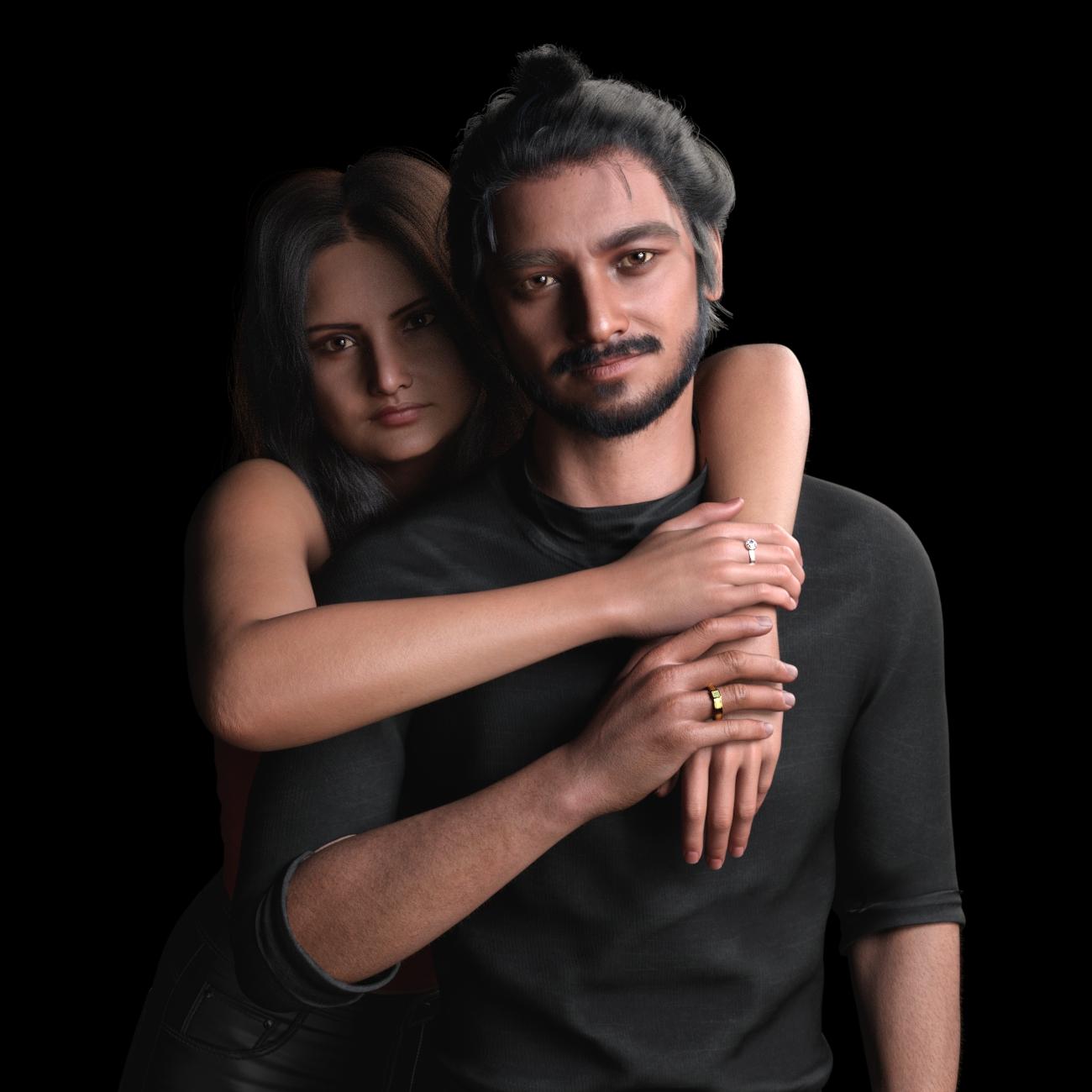
Made with some stuff I picked up recently:
https://www.daz3d.com/z-besties-couple-poses-for-genesis-9-and-8
https://www.daz3d.com/toshi-9*
https://www.daz3d.com/toshi-hair-and-beard-for-genesis-9
https://www.daz3d.com/dforce-urban-samurai-outfit-for-genesis-9
https://www.daz3d.com/modern-style-rings-for-genesis-9
https://www.daz3d.com/dforce-strand-based-summer-style-wavy-long-bob-hair-for-genesis-9
https://www.daz3d.com/su-winter-outfit-for-genesis-9-81-and-8-female
https://www.daz3d.com/exquisite-jewelry-for-genesis-9* The guy is a Face Transfer character, with Base textures from FaceGen, but the underpinnings of the skin are Toshi 9.
Great lighting and super realistic! Very original characters too. And thanks for listing everything used. Put a couple of things in my wishlist.
Render your buys! Use buys from the current month and the previous month of sales"The Happy Couple"
Made with some stuff I picked up recently:
https://www.daz3d.com/z-besties-couple-poses-for-genesis-9-and-8
https://www.daz3d.com/toshi-9*
https://www.daz3d.com/toshi-hair-and-beard-for-genesis-9
https://www.daz3d.com/dforce-urban-samurai-outfit-for-genesis-9
https://www.daz3d.com/modern-style-rings-for-genesis-9
https://www.daz3d.com/dforce-strand-based-summer-style-wavy-long-bob-hair-for-genesis-9
https://www.daz3d.com/su-winter-outfit-for-genesis-9-81-and-8-female
https://www.daz3d.com/exquisite-jewelry-for-genesis-9* The guy is a Face Transfer character, with Base textures from FaceGen, but the underpinnings of the skin are Toshi 9.
Clothing commission from existing 3d model where/who to ask?As the work required is pretty much the same for all similar pieces, you might wish to spend a day learning how to address the issues. [as getting conversions on a per piece could get rather expensive] There are some tools to help the process [available for sale here] however the nitty gritty is a piece by piece activity.
1. Single layer, quad mesh, welded, "no stitches" etc. "one piece"
2. uvmapped etc.It 'must' load into D/S exactly where you want it on the figure.
Use the transfer utility to turn the .obj into a clothing piece.
Save the clothing piece as "figure/prop"Then the fun begins ;-)
This is likely where you're running into problems with shirts -- the arms/sleeves. What are required are called partial Joint Correction morphs "pJCMs" with most figures. G9 has some different naming conventions. But the idea is the same. The existing correction morphs from the figure get projected into the clothing. Therefore the clothing needs to have its own morphs named exactly the same, these will be activated when those in the figure are. Then the shirt sleeves will look fine [or at least better than without the pJCMs].While I have some .pdf tutorials on Renderosity [PetuniaPetals] and DeviantArt [Catherine3678ab] there are some nicely done Video tutorials specific for making clothing with M.D. over on YouTube.
https://www.deviantart.com/catherine3678ab/art/Making-pJCMs-for-Clothing-872454630
There's also a dedicated thread somewhere in the forums for making clothing for Genesis 9.
Transfer hd morphs to G9 NO PAYou could bake to displacement in ZBrush, though you might need to use something like Blender to transfer to the Genesis 9 UVs, then use the generated maps in Daz Studio (using the Genesis 8 UV compatibility tools if you didn't bake to the Genesis 9 UVs).
Transfer hd morphs to G9 NO PAHi
please is there a manual method of transfering g8 HD morphs to G9 using Zbrush ? Maybe through the Zproject all? Or any other software??
Freebie Challenge July-August 2024 - "Take a Break" - Entries ThreadPatriarchy
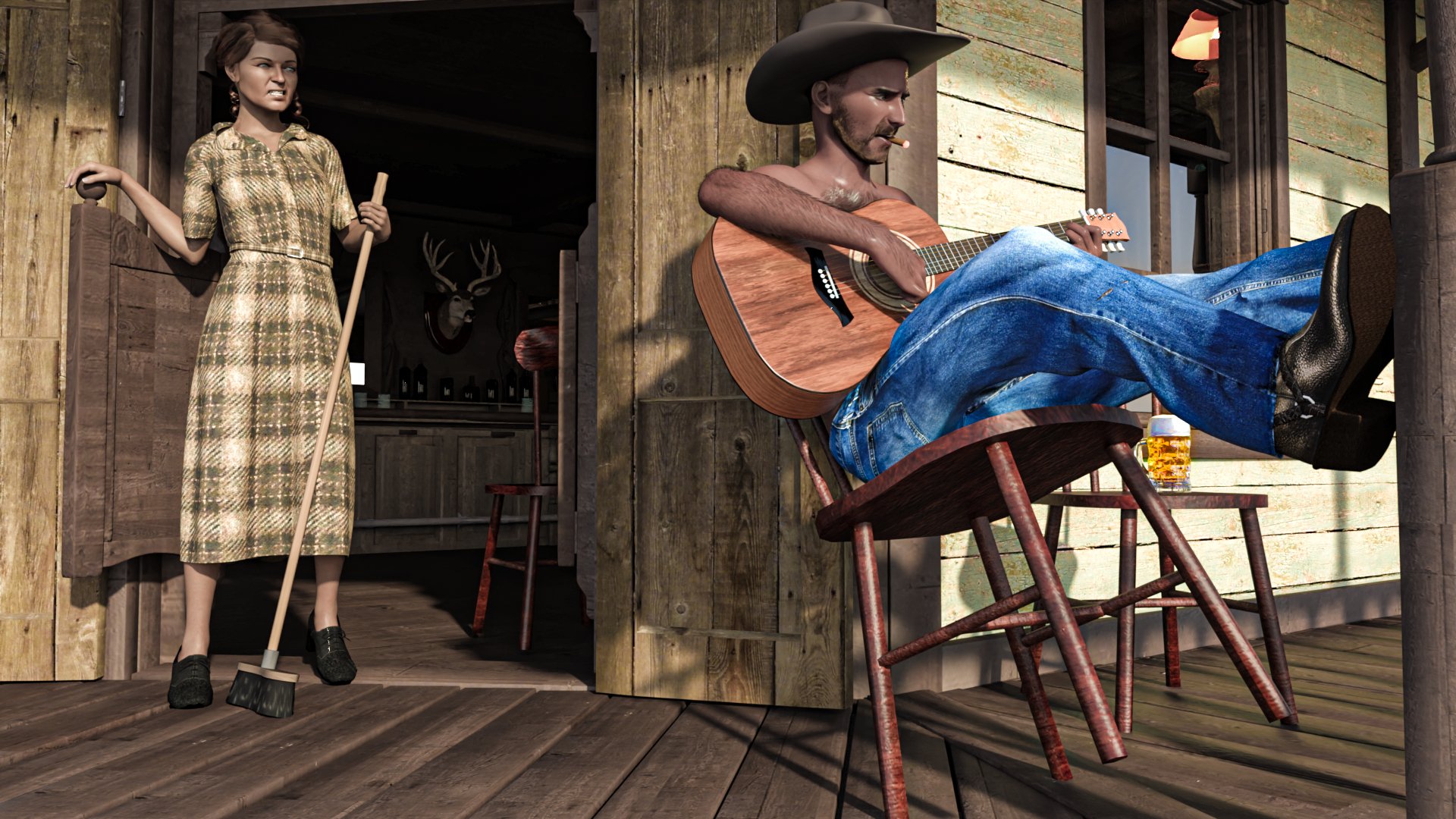
Free:
https://www.renderosity.com/freestuff/items/94025/wild-west-saloon-for-dazhttps://www.renderosity.com/freestuff/items/83886/david10-for-g8m
https://www.renderosity.com/freestuff/items/90916/uv-remapped-dforce-g8m-jeans
https://www.renderosity.com/freestuff/items/93700/el-mariachi-guitar-part-1
https://www.renderosity.com/freestuff/items/93701/el-mariachi-guitar-part-2
https://www.renderosity.com/freestuff/items/60729/cowboy-hat-for-m4
https://www.renderosity.com/freestuff/items/59858/cigar-m4-smartprophttps://www.renderosity.com/freestuff/items/97895/a-huge-glass-of-beer-daz3d-iray-obj-included-part-1-of-2
https://www.renderosity.com/freestuff/items/97896/a-huge-glass-of-beer-daz3d-iray-obj-included-part-2-of-2
https://forum.daz3d.com/forums/discussion/626321/aobb-s-freebie-head-morph-passionate-v2-for-g8-1f-based-on-rita-hayworth-no-materials-nor-textures
https://www.renderosity.com/freestuff/items/93268/1940s-style-oxford-heels-for-g8f
https://www.renderosity.com/freestuff/items/91990/1940s-style-shirt-dress-for-genesis-8-females
https://www.renderosity.com/freestuff/items/81937/dforce-french-twist-hair-for-genesis-8-female-s-
https://www.renderosity.com/freestuff/items/78292/straight-broom-balai-droitBought:
https://www.daz3d.com/big-boss-hair-and-beard-for-underbellyThere's Always Another Sale Thread -- Discussions Only Pt 3XiousDs said:
SilverGirl said:
Calliope23 said:
The Golden Ticket item looks good: https://www.daz3d.com/hh-scarlett-for-genesis-9. For $3.00 I get an interesting looking G9 female character and then can purchase a bunch of AM's animal critters for cheap, as AM is one of the featured artists. Now I just need to decide if I need ALL The Rabbits or only a few.
I was excited at having a G9 for cheap as the GT until I saw she'd been sculpted with perma-pout. I'm sure that's to somebody's tastes, but definitely not mine.
Keep the body and skin, change the head morph maybe? Or apply 50% head with something with smaller lips. Might still work well for you then.Eh, not into supporting that trend with my pocketbook. If I wait, some other character that's to my tastes will wind up on sale, and I'd rather use the money there.
Freebie Challenge July-August 2024 - "Take a Break" - Main ThreadAki3d said:
Patriarchy
Free:
https://www.renderosity.com/freestuff/items/94025/wild-west-saloon-for-dazhttps://www.renderosity.com/freestuff/items/83886/david10-for-g8m
https://www.renderosity.com/freestuff/items/90916/uv-remapped-dforce-g8m-jeans
https://www.renderosity.com/freestuff/items/93700/el-mariachi-guitar-part-1
https://www.renderosity.com/freestuff/items/93701/el-mariachi-guitar-part-2
https://www.renderosity.com/freestuff/items/60729/cowboy-hat-for-m4
https://www.renderosity.com/freestuff/items/59858/cigar-m4-smartprophttps://www.renderosity.com/freestuff/items/97895/a-huge-glass-of-beer-daz3d-iray-obj-included-part-1-of-2
https://www.renderosity.com/freestuff/items/97896/a-huge-glass-of-beer-daz3d-iray-obj-included-part-2-of-2
https://forum.daz3d.com/forums/discussion/626321/aobb-s-freebie-head-morph-passionate-v2-for-g8-1f-based-on-rita-hayworth-no-materials-nor-textures
https://www.renderosity.com/freestuff/items/93268/1940s-style-oxford-heels-for-g8f
https://www.renderosity.com/freestuff/items/91990/1940s-style-shirt-dress-for-genesis-8-females
https://www.renderosity.com/freestuff/items/81937/dforce-french-twist-hair-for-genesis-8-female-s-
https://www.renderosity.com/freestuff/items/78292/straight-broom-balai-droitBought:
https://www.daz3d.com/big-boss-hair-and-beard-for-underbellyAll freebies approved please move to entries
There's Always Another Sale Thread -- Discussions Only Pt 3
Keep the body and skin, change the head morph maybe? Or apply 50% head with something with smaller lips. Might still work well for you then.SilverGirl said:Calliope23 said:
The Golden Ticket item looks good: https://www.daz3d.com/hh-scarlett-for-genesis-9. For $3.00 I get an interesting looking G9 female character and then can purchase a bunch of AM's animal critters for cheap, as AM is one of the featured artists. Now I just need to decide if I need ALL The Rabbits or only a few.
I was excited at having a G9 for cheap as the GT until I saw she'd been sculpted with perma-pout. I'm sure that's to somebody's tastes, but definitely not mine.
Freebie Challenge July-August 2024 - "Take a Break" - Main ThreadPatriarchy
Free:
https://www.renderosity.com/freestuff/items/94025/wild-west-saloon-for-dazhttps://www.renderosity.com/freestuff/items/83886/david10-for-g8m
https://www.renderosity.com/freestuff/items/90916/uv-remapped-dforce-g8m-jeans
https://www.renderosity.com/freestuff/items/93700/el-mariachi-guitar-part-1
https://www.renderosity.com/freestuff/items/93701/el-mariachi-guitar-part-2
https://www.renderosity.com/freestuff/items/60729/cowboy-hat-for-m4
https://www.renderosity.com/freestuff/items/59858/cigar-m4-smartprophttps://www.renderosity.com/freestuff/items/97895/a-huge-glass-of-beer-daz3d-iray-obj-included-part-1-of-2
https://www.renderosity.com/freestuff/items/97896/a-huge-glass-of-beer-daz3d-iray-obj-included-part-2-of-2
https://forum.daz3d.com/forums/discussion/626321/aobb-s-freebie-head-morph-passionate-v2-for-g8-1f-based-on-rita-hayworth-no-materials-nor-textures
https://www.renderosity.com/freestuff/items/93268/1940s-style-oxford-heels-for-g8f
https://www.renderosity.com/freestuff/items/91990/1940s-style-shirt-dress-for-genesis-8-females
https://www.renderosity.com/freestuff/items/81937/dforce-french-twist-hair-for-genesis-8-female-s-
https://www.renderosity.com/freestuff/items/78292/straight-broom-balai-droitBought:
https://www.daz3d.com/big-boss-hair-and-beard-for-underbellyAnimation timeline help how to deleteladywolf1 said:
crosswind said:
ladywolf1 said:
Richard Haseltine said:
Make sure that all property types are visible in the Timeline, using the Types button,
thank you! what do you mean with "types button"?
Shown in the attached screenshot ~
This. OMG.... this was the issue. Now I can finally see the culprit morph/value :'''') thank you so much! Now the tl got much more easy to use
(I believe though, that zeroing figure/pose doesn't automatically remove eveyrthing regardless)Great!

 Animation timeline help how to delete
crosswind said:
ladywolf1 said:
Richard Haseltine said:
Make sure that all property types are visible in the Timeline, using the Types button,
thank you! what do you mean with "types button"?
Shown in the attached screenshot ~
This. OMG.... this was the issue. Now I can finally see the culprit morph/value :'''') thank you so much! Now the tl got much more easy to use
(I believe though, that zeroing figure/pose doesn't automatically remove eveyrthing regardless)Marvelous Designer 8 - UV exportI'm revisiting MD8 which has been sitting on my PC for years and sadly ignored. However, I recently revived my interest after trying to do something in Blender which could probably be acheived more easily in MD even though it is an old version (I am not interested in signing up for a subscription to get the new version).
The trouble is that the MD/CLO website doesn't seem to have manuals for older versions. I have exported a garment from MD8 to DAZ Studio and used the Transfer Utility to rig it for G8F but I can't figure out how to apply the textures. In MD I am in the UV Editor screen but I can't see any way to export the UV. I should add that I am not comfortable with texturing at all so working with UV maps is a new venture for me.
How do I tell Daz to render in 32 bit color?Richard Haseltine said:
PBR meaning? It isn'ta render engine, to be picked as an alternative to Iray, and the PBR Skin shader should support 32 bit colour output as any Iray shader should.
My bad: I meant Filament
sRGB is a colour space, the renders saved from DS do not have a colour space assigned (so many editors will, by default, assign sRGB).
sRGB also defines a transfer function and that is what is relevant to the observed banding. This is what I am referring to; the transfer function limits the dynamic range by making a balanced choice between dynamic range and precision. I should probably have added that no 8-bit encoding can ever be sufficient; Poynton's estimate was (is) 463 separate levels based on 1% accuracy, my estimate based on 1/60 accuracy is 279 levels but I maintain 100:1 dynamic range is not enough).
The colour space does not matter in this context, it only matters how that colour space is digitally encoded.
The portability has nothing to do with colour spaces - it's about being readily readable, using a common, published code base (unlike soem existing formats used for websites when it was released). PNG does support higher bit-depths
I sort-of agree with your definition. However while you or I can write an HDR PNG which matches the v0 specification, for example by using a high gamma encoding, as in the ITU's definition of PQ, here:
https://www.itu.int/dms_pubrec/itu-r/rec/bt/R-REC-BT.2100-1-201706-S!!PDF-E.pdfIt's still the case that the resultant image will hardly ever be handled correctly. You sort-of explained why:
PNG does support higher bit-depths, that isn't why the base render is limited to 8 bits per channel.
Indeed. Most punters monitors really are very close to sRGB, so even if the output image file (PNG or otherwise) isn't sRGB it will get reduced to sRGB and that will often be done incorrectly causing the bands to re-appear. Producing a PNG which is not sRGB is just going to lead to confusion, bug reports and bad press.
How to identify morphs that affect bones / skeletonI'm building my first script and I need a way to identify morphs that have bone movements. As far as I know, in the .dsf file you can tell when a morph has bone movements by checking whether there is any data in "forumlas". But I'm wondering if there is a way to identify these morphs through scripting, or at least point me in the right direction if there is a way to select or identify morphs with bone movements in Daz Studio.
Daz 3D is part of

Connect
DAZ Productions, Inc.
7533 S Center View Ct #4664
West Jordan, UT 84084Licensing Agreement | Terms of Service | Privacy Policy | EULA
© 2026 Daz Productions Inc. All Rights Reserved.