-
Content Question Time
Got it fixed. One more question is there a way to edit the ranger vest on victoria in that pose. If i select the model for the ranger top in the instance manager then click the icon to edit in assembly room the vest jumps off the character. If i select the ranger top and everything included with that model, hip, abdomen, etc. i can only edit it in the modeling room. The problem is I end up deforming the mesh a little more than I need and jumping back and forth between the two rooms which makes a bigger mess. So I make the edit jump back if it doesn't work I undo the edit and start again. If I had to fix several instances of poke through this way the vest would probably look a little off (odd bends and folds) I would think.
Identify ProductLooks like Hongyu's Bikini to me, but that came out substantially after Piper.
edit: oh, of course. Hongyu's Bikini for V7.
Identify ProductIt may be a long shot given that the product has been out for such a long time. But can anyone identify the bikini used in "FWSA Piper HD for Victoria 7 and Her Jewelry" I've looked everywhere, even tried to contact the creator, but no reply yet :( ThanksVictoria 8.1 renders grayHera said:
Leana said:
Hera said:
Hello!
When I render Victoria 8.1 out of the box she's colourless. Regardless of light.
Only way to get rid of this is to reset the texture and start over with basic Iray or select another set of textures.
What is wrong? What must I do?
I use DAZ 4.14Victoria 8.1 uses the new PBR shader, which requires DS4.15.xSo where does one find 4.15? The download studio link is broken these days and so are my automatic updates...
Download a fresh copy through DIM/Daz Central and install it, with DS closed. You can also use the Public Build (beta) which will leave the geenral release alone - that has to be installed through DIM.
Victoria 8.1 renders grayLeana said:
Hera said:
Hello!
When I render Victoria 8.1 out of the box she's colourless. Regardless of light.
Only way to get rid of this is to reset the texture and start over with basic Iray or select another set of textures.
What is wrong? What must I do?
I use DAZ 4.14Victoria 8.1 uses the new PBR shader, which requires DS4.15.xSo where does one find 4.15? The download studio link is broken these days and so are my automatic updates...
Getting V4 Hair To Stay In PlaceThank you I made sure Victoria was selected first then applied the hair and now it works.
Genesis 3 Alive!Hello everyone.
First of all, notice that I do not speak English so I am using Gooogle Translator to write to you.
Well, today I bought Genesis Alive (product link attached):
https://www.daz3d.com/genesis-aliveAnd I found it very good and just what I needed.
For the same reason, I plan to buy in the near future (when I collect money) Genesis 2 Alive!, Genesis 8 Alive!, Michael Alive and Victoria Alive.
However, there is something that bothers me about all this.
I can't find a GENESIS 3 ALIVE! Version.
Why didn't the car make such a version but it did make a Genesis 8 version?
Or is it that it existed but Daz removed the product listing?
Or is it just that they serve the same Genesis 2 or 8 Alive?If the version does not really exist and the version for Genesis 8 or 2 does not work, could you recommend a product that does the same but for Genesis 3 ?, that is, breathing, head movement, blinking, etc., that is, very movements basic ambience while you are still or doing something.
I await your responses.
Greetings.Getting V4 Hair To Stay In PlaceThe hair needs to be aprented to the head in order to follow it, since it is a prop rather than a fitted figure. That should happen on load, but since it isn't you could try parenting it with Parent In Place off (right-click the hair>Change Parent, uncheck the Parent In Place box) - that should snap it it to the head's orientation, and maybe position, so that it is relatively easy to settle. You could also try just rloading the hair with Victoria 4 selected, if it might not have been the first time.
What’s the deal with G8.1?Anim said:
ArgleSW said:
...
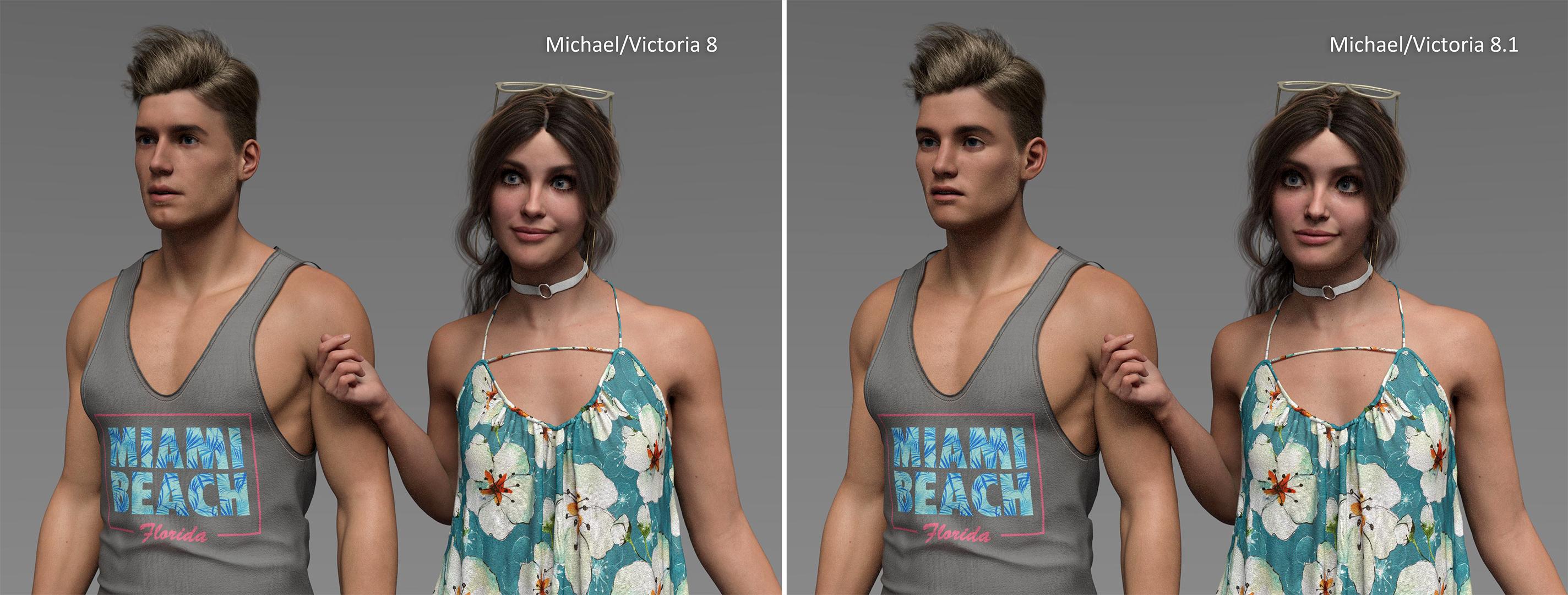
Look at the comparison in this image. Using the same textures, the only difference is the face morphs using Michael/Victoria 8.0 vs 8.1. Which one looks closer to real?
In my opinion the 8.1 versions really looks a bit cartoonish.
I think the same. There might be some improvements regarding skin shader and eye UVs, but overall, most images I saw have a noticeable cartoonish look.
I know that DAZ is trying to jump the non-binary trend with 8.1, but for me, Michael 8.1 looks not really manly. So, I definitely do not miss this character in my library.What’s the deal with G8.1?
Exactly. It's the art direction that doesn't appeal to me. Personal taste thoughArgleSW said:The 8.1 generation appears like an art direction change rather than an update. My issue is that the art is shifting towards a more stylized look (cartoony/exaggerated features). When you mix classic 8.0 with 8.1 models in the same scene, they don't match well. Yes the older gens offered a mix of cartoony and photoreal characters, but my point is more about the overall art direction as a whole for Daz. Not sure if Daz got a new artist recently but the direction is changing fast towards this. Maybe stylized sells better and more people prefer this, but in my opinion this is not ideal in the long run. Hopefully this was just the case for the first few 8.1 models released.
Look at the comparison in this image. Using the same textures, the only difference is the face morphs using Michael/Victoria 8.0 vs 8.1. Which one looks closer to real?
Issue with: data/daz 3d/genesis/base/morphs/daz 3d/victoria 4/fhmvictoria4.dsfThis is the Applied Figure to a V5 Model and I tried it even with a Basic Genesis Model too, same thing happened.
Also isn't Genesis Basic model supposed to have textures on it?
I can't remember if it did or not, I don't normally use Genesis characters much.
and I also have the files Genesis Starter Essentials, Genesis Evolution: Body Morphs, Victoria 4.2 Base,Victoria 4.2 Shapes++,
Is There A Plan To Speed Up G8 (and future generations) Loading Times?onix said:
If parsing the file would be a bottleneck then multithreading would be an obvious solution as I understand bottleneck is the function that populates morph dependencies with appropriate formulas
We are talking about the same thing, Parsing the data from text file and creating formula
No what I mean is if I have a figure loaded and then I unhide a character preset or morph set, I can't use it unless I reload the figure because there is no other way to get new shape dials and pose dials to appear.
This is not a problem because Daz should read all names to get a list of sliders and built all that property tree, It should just not go any deeper and don't loom at their dependencies until something from that tree is activated.
The problem is Daz don't know if a slider is active until it done the work of building all the formulas associated with the formula.
Take this example:
{
    "output" : "neck:/data/DAZ%203D/Genesis%208/Female/Genesis8Female.dsf#neck?center_point/y",
    "operations" : [
        { "op" : "push", "url" : "Genesis8Female:#FHMVictoria8?value" },
        { "op" : "push", "val" : 0.06736755 },
        { "op" : "mult" }
    ]
},
This formula is applies a correction to the base genesis 8 when Victoria 8 is used.The formula is "inactive" when victoria 8 is not used, ie when Genesis8Female:#FHMVictoria8?value is 0.But there is no way for Daz to know the formula is "inactive" until it parsed and created the formula. Daz need to know all the inputs value and output value to workout if the formula is going to have an effect on the character. This is the slow part that we want to address, but it is evident that it is nessasary for Daz to fully process all the formulas when loading the character to work out how the character should actually look and behave.
I hope it is now clearly established that Daz need to process all morph data to get the correct character look/behaviour because there is no way for Daz to differentiate if a formula is active or not. Just loading the name of the slider is insufficient. Currently we can work around it by hiding morphs we dont need, we need a better process for it but also not too laborious. Like the entire process should only take a few click of button, not a check all the morphs you want to use. (beside I think scanning all the files looking for name is not an negligble part of the parsing data to create formula work so will still be slow, but not as slow as doing the full work). Like I said, having a way to add load morph package we added after loading a character without having to reload the character would improve this hide morph from Daz process. In a sense it will achieve the delay load morph objective people have been asking.
In a sense this formula is always "active" but just do nothing unless we use Victoria 8. I think this is part of your complaint, but this appears to be the standard way of doing things. Not sure what alternative there is, but I certainly dont want to manually activate each morph required for an character. Any solution need to maintain the current way of automatically apply when it is needed.
I agree its possible to multithread, just the implementation will be non trivial. The issue to consider is: thread 1 load morph A which reference morph B, at the same time thread 2 is loading morph B. How can thread 1 figure out morph B has been loaded or not. Its solvable but care must be take to ensure the solution dont accidentally end up being single threaded. Another issue: thread 1 create morpha A with name X, thread 2 create morph B also with name Y, how does Daz ensure the names are unique because duplicate formula is an issue that need to be detected.
If you look at the morph properties it is not that hard, after all, you can see that every property parameter contains Sub-components and controllers list which has to be populated, (I think populating that list takes most of the time.)
Agreed, as explained above, the problem is Daz lack a way to indicate to it this morph is not used. The only way we can do it now is to hide the file from Daz.
I can't see any problems with multithreading because every entry in that list is independent. You load a morph and then add the appropriate formula to the appropriate list the order of how things will be added to the list does not matter.
Except the list is stored all over the place and generating the list is the slow formula creating process. Take the above example, neck:/data/DAZ%203D/Genesis%208/Female/Genesis8Female.dsf#neck?center_point/y is in one file, Genesis8Female:#FHMVictoria8?value is in another file, the formula that use it is in another. Daz would only get all the infomation it need after it processed all the formulas in all the files.
It is the parsing of all the files that is slow, that we want to multithread, but notice how the formulas is not independent, it require an input that can be another formula from somewhere else. This is where multithreading is wanted but difficult to implement.
Victoria 8.1 renders gray
Victoria 8.1 uses the new PBR shader, which requires DS4.15.xHera said:
Hello!
When I render Victoria 8.1 out of the box she's colourless. Regardless of light.
Only way to get rid of this is to reset the texture and start over with basic Iray or select another set of textures.
What is wrong? What must I do?
I use DAZ 4.14Victoria 8.1 renders grayHello!
When I render Victoria 8.1 out of the box she's colourless. Regardless of light.
Only way to get rid of this is to reset the texture and start over with basic Iray or select another set of textures.
What is wrong? What must I do?
I use DAZ 4.14The Newest Evolution Is Here: The Daz Season Pass!AbyssalEros said:
markgoode77 said:
AbyssalEros said:
bytescapes said:
But all this is speculation. Maybe Brooke is actually a water elemental, and she'll be followed by two months of nothing but midget octopus space-centaurs.Don't tempt me - I do not want to buy that SP or any figure that needs DAZ Studio 4.15. Don't make me succumb.
I've got 4.15. All I need now is the hardware to make it work.
It could be that my hardware is sufficient enough, but I really do not want to test it out, only to realize that all I got is a constantly crashing system with disappearing icons and other hick-ups.
disappearing icons are a store issue, not a DS issue. As for crashing, there's always the beta to test while leaving your older version alone (assuming it is a general release).
Technically, there is no reason to upgrade from 4.14 to 4.15 aside from the wish to use the new generation models.
But in my view, the new Genesis 8.1 base characters are too overpriced, while in addition, the bundles, especially the Victoria 8.1, Michael 8.1, and August 8.1 bundles, lack severely in quality.
I am still learning, as I have only begun with 3D arts a bit over two years ago, and thus I am hardly knowledgeable about all the quirks of working with Genesis 8 and DAZ Studio itself.
Working with Genesis 8.1 affords apparently a totally different workflow, which is even confusing artists much more professional than me, while at the same time, most expressions and a lot of poses from the Genesis 8 generation are not working correctly on Genesis 8.1 characters due to changes done.Exprssions are the issue, though some people choose to work around that.
It might be dubbed Genesi 8.1, while in reality, it is rather Genesis 9.0 Alpha because of all the incompatibility with Genesis 8 assets.
There are very few, as long as you are using DS 4.15.x.x - as I said, essentially expressions and some materials that rely on the existing surface names (sicne the group covering the body and back of the head has been split in two).
If DAZ Productions, Inc. would have really wanted me to jump on that new generation adventure, they should not have increased the prices while at the same time reducing content, quality, and buying enticements.
That's the long explanation why the season pass is a clear pass for me, as I am not using Generation 8.1, and I do not see myself using it. I better stay with Genesis 8 until Genesis 9.0 RC appears on the scene.
The Newest Evolution Is Here: The Daz Season Pass!plasma_ring said:
GeoffreyHawkins said:
Until now, I never realized that DAZ assets were in a sense "collectible." I just assumed people purchased the assets they needed or desired, based on commissions or their own artistic interests. Purchasing every base character is essentially "collecting." DAZ says they are expliciting appealling to that part of the customer base with Season Pass. DAZ has made that clear, as have many of these collection-driven customers who have posted here.
I guess I've just viewed these assets as artistic tools and nothing more. Never realized they were in a sense, virtual action figures.
Live and learn.
It's actually one of the things that hooked me about Daz. I get attached to 3D models like I do to my MMO characters, and this is the only community I've seen where that's a normal, understandable thing. I'm not really a collector, but I've picked up characters just to play with them rather than specifically for render projects.
All of us are collectors, some may even be hoarders... whether we're conscious of it or not.
I definitely like the Season Pass concept — having access to as many base figures with HD details as possible is important to me. I've hardly ever used a base figure "as is" in any render, and I'm a dial spinner since Poser 1.0 in the 90's — always looking for something unique to add into the latest 3D character gene pool, and always trying to come up with something that doesn't look like the default, off-the-shelf, "stock" character.
At the end of the day, if it looks obvious that I used Victoria or Michael out-of-the-box without customizing them or adding any kind of value to them, I will feel like I've failed to create something new or unique from those resources.The Newest Evolution Is Here: The Daz Season Pass!markgoode77 said:
AbyssalEros said:
bytescapes said:
But all this is speculation. Maybe Brooke is actually a water elemental, and she'll be followed by two months of nothing but midget octopus space-centaurs.Don't tempt me - I do not want to buy that SP or any figure that needs DAZ Studio 4.15. Don't make me succumb.
I've got 4.15. All I need now is the hardware to make it work.
It could be that my hardware is sufficient enough, but I really do not want to test it out, only to realize that all I got is a constantly crashing system with disappearing icons and other hick-ups.
Technically, there is no reason to upgrade from 4.14 to 4.15 aside from the wish to use the new generation models.
But in my view, the new Genesis 8.1 base characters are too overpriced, while in addition, the bundles, especially the Victoria 8.1, Michael 8.1, and August 8.1 bundles, lack severely in quality.
I am still learning, as I have only begun with 3D arts a bit over two years ago, and thus I am hardly knowledgeable about all the quirks of working with Genesis 8 and DAZ Studio itself.
Working with Genesis 8.1 affords apparently a totally different workflow, which is even confusing artists much more professional than me, while at the same time, most expressions and a lot of poses from the Genesis 8 generation are not working correctly on Genesis 8.1 characters due to changes done.
It might be dubbed Genesi 8.1, while in reality, it is rather Genesis 9.0 Alpha because of all the incompatibility with Genesis 8 assets.
If DAZ Productions, Inc. would have really wanted me to jump on that new generation adventure, they should not have increased the prices while at the same time reducing content, quality, and buying enticements.
That's the long explanation why the season pass is a clear pass for me, as I am not using Generation 8.1, and I do not see myself using it. I better stay with Genesis 8 until Genesis 9.0 RC appears on the scene.
What’s the deal with G8.1?ArgleSW said:
The 8.1 generation appears like an art direction change rather than an update. My issue is that the art is shifting towards a more stylized look (cartoony/exaggerated features). When you mix classic 8.0 with 8.1 models in the same scene, they don't match well. Yes the older gens offered a mix of cartoony and photoreal characters, but my point is more about the overall art direction as a whole for Daz. Not sure if Daz got a new artist recently but the direction is changing fast towards this. Maybe stylized sells better and more people prefer this, but in my opinion this is not ideal in the long run. Hopefully this was just the case for the first few 8.1 models released.
Look at the comparison in this image. Using the same textures, the only difference is the face morphs using Michael/Victoria 8.0 vs 8.1. Which one looks closer to real?
https://www.daz3d.com/forums/uploads/FileUpload/34/c9f76e127f82b86f0193fea62d83e2.jpgWow — there's a much bigger difference in the face of Michael 8.0 vs. 8.1 — the crispness of the facial details seem to be getting lost in the 8.1 version... the cleft chin, jawline, angles on the upper lips, and sternocleidomastoid muscles near the ear are all appearing to be smoothed over in the 8.1 version. Is this normal?
I didn't like the look of Michael 8.1 (or anything in his pro bundle), I held off buying it, so I only have Victoria 8.1 to compare for now...What’s the deal with G8.1?ArgleSW said:
The 8.1 generation appears like an art direction change rather than an update. My issue is that the art is shifting towards a more stylized look (cartoony/exaggerated features). When you mix classic 8.0 with 8.1 models in the same scene, they don't match well. Yes the older gens offered a mix of cartoony and photoreal characters, but my point is more about the overall art direction as a whole for Daz. Not sure if Daz got a new artist recently but the direction is changing fast towards this. Maybe stylized sells better and more people prefer this, but in my opinion this is not ideal in the long run. Hopefully this was just the case for the first few 8.1 models released.
Look at the comparison in this image. Using the same textures, the only difference is the face morphs using Michael/Victoria 8.0 vs 8.1. Which one looks closer to real?
What’s the deal with G8.1?ArgleSW said:
...
Look at the comparison in this image. Using the same textures, the only difference is the face morphs using Michael/Victoria 8.0 vs 8.1. Which one looks closer to real?
In my opinion the 8.1 versions really looks a bit cartoonish. Are you sure everything is set the same - e.g. eye size of Victoria or some age sliders on Michael?
Daz 3D is part of

Connect
DAZ Productions, Inc.
7533 S Center View Ct #4664
West Jordan, UT 84084Licensing Agreement | Terms of Service | Privacy Policy | EULA
© 2026 Daz Productions Inc. All Rights Reserved.