-
RELEASED!! CC Beard Boss for Genesis 8 Male(s) [Commercial]
I've made a couple morphs to adjust for this and a couple other things I've noticed. I'll put the update in asap to fix this.
Thank you for the update!
I'm going through the transformation process, and I was just wondering, when I transfer it to G3 and want to save it out, would I save it as a wearable Preset? Or an asset?
EDIT: I seem to do something wrong with the transfer to G2M. I do get it to fit properly using the above mentioned method, but I don't get the beard to follow the facial movements, even though I used the transfer tool. I think I missed something...
Is there anyone who successfully transferred the beard from G8M to G2M, who can give me a step-by-step rundown? (And yeah, I'd actually pay for a working version of the beard in G2M right now...)
Ah, that's because G2M doesn't have rigged faces. You have to transfer the morphs for expressions with the transfer utility.
S.H.A.D.O.ws from the past - [WIP]On a related note, has anyone managed to get the various sculpted head morphs from Steve Kitt (that are on ShareCG) to work via morph loader pro? I've been trying to get the Ayshea Brough morph from ShareCG to take using Victoria 4.2 as the target figure, but it gives me an error message:
- No deltas for morph, skipping mode
It says that it has created the morph successfully, but (as far as I can see/search) no new morph appears has appeared in my parameters or shaping list...
Just for fun, I tried importing Ayshea's head morph.obj into Daz, which just makes an invisible cube with no features/nodes. Importing or bridging to Hexagon doesn't work (head shape never appears in Hexagon).
Any suggestions?
Question about HD add-ons and how they work when mixing charactersI'm looking at the HD add-ons on offer today as related items, and have some questions about how these HD elements work with other characters. Actually, the question might be more about character mixing.
Let's say I load up the Genesis 8 basic figure, then apply Victoria 8. Then I apply a "for Victoria 8" character. Then maybe I use dials to mix characters. Some of these characters are HD and some are not. What takes precedence?
If I have Victoria 8 HD, will a child of that character type also have the HD elements?
If I use a child of the character that is HD, does it matter if Victoria 8 is HD or not?
How does applying a child character over a parent character differ from just mixing them via the morph dials?
More Non-photorealisitic Renders (NPR II)Star Fighter Pilot. Not what I was working on before that I didn't like.


Very, very nice. You're really getting the hang of this particular look.
Thanks. This was inspired by another artist I saw on DA. I was experimenting with the H4 morphs and visual style shaders to get a nice Animeish (but not over the top) look. I think I got it. I also wanted to try out the M4 aircrew outfit I got. I'm probably going to kitbash it with other outfits to see what looks I can acheive. Then, I may incorporate that into my graphic novel character, who is my Ace pilot. I'm still working on his look and what starfighter to use with him. I like the one in this render, but it's an OBJ with no rigging and no landed version. Right now I'm leaning toward using the free Cosmo Zero fighter available at VanishingPoint. If I use that one, I'll probably modify the textures a little.
I need to save this morph, so I can use it again. I just realized, I forgot to do that.
Free Hair and Hair related Items ListCute!
As long as you don't share the hair itself, only the morphs, you are fine.
(Creating morph injections with DazStudio: https://www.daz3d.com/forums/discussion/comment/206896/#Comment_206896 )
No host? Go to Renderosity or Sharecg, create a free account and upload there.
I have my (very old) freebies on both sites: http://www.sharecg.com/kerya and https://www.renderosity.com/mod/freestuff/?uid=422036
More Non-photorealisitic Renders (NPR II)Did a little more detail work on my fighter figure. I'm calling this one, Warrior of the Wastes. This is based on the M4 Warrior and a fantastic morph that was created by takezo_3001. I can't thank him enough for sharing it with me.
As usual, rendered in Poser Pro 11, editing in Photoshop and Manga Studio 5EX (aka Clip Studio).
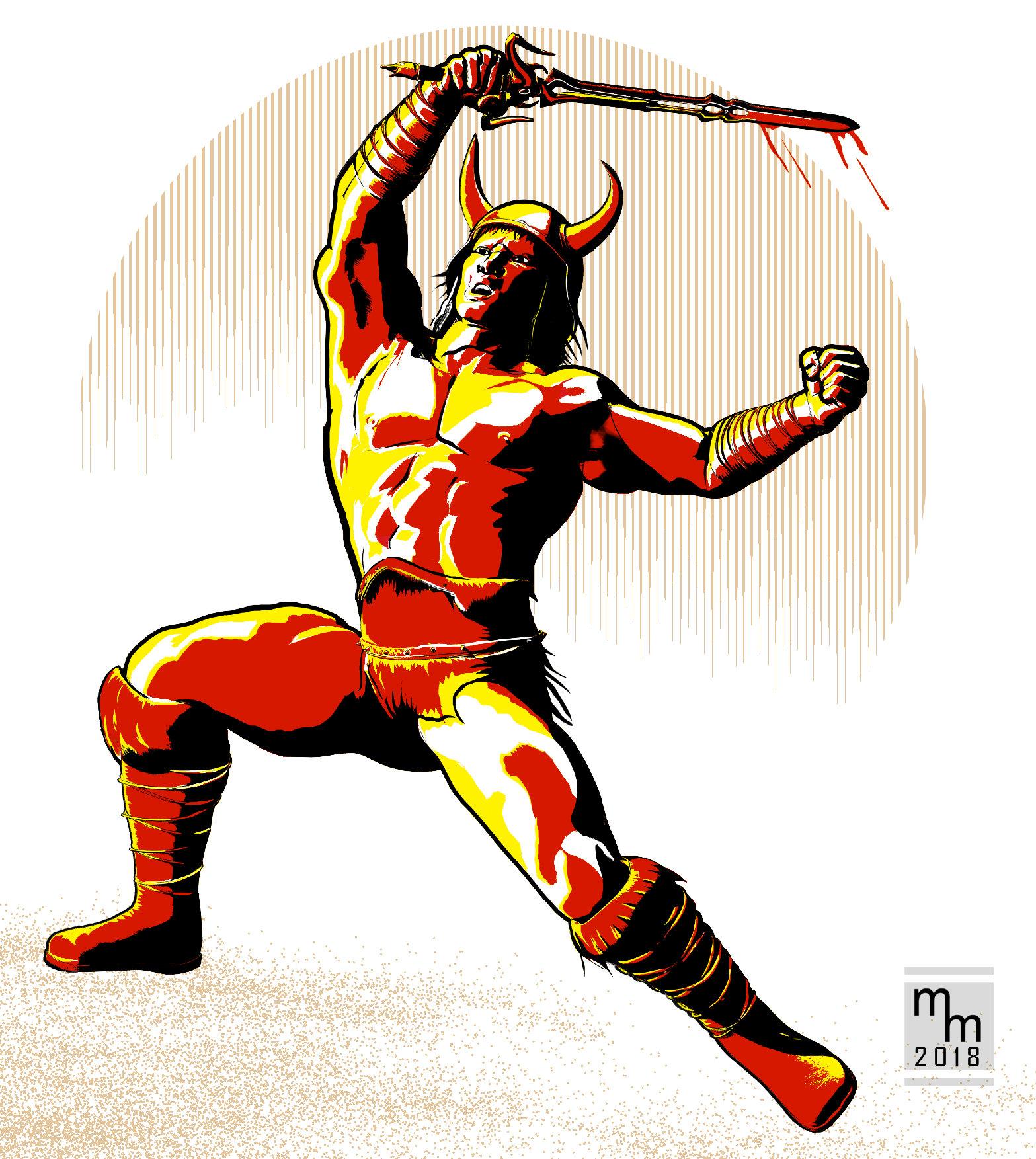
very nice, I'd love to see some shadows on the ground to amchor him - the balance of the figure is excellent
you've alo avoided that lit from below feeling that I have seen in your others
TO EVERYONE apologies for not being around and commenting on all the terrific work here
You know, you're right... I do tend to light from below. Probably an unconscious aspect of the "noir" look I'm going for in my work. I'll be cognizant of it going forward.
The sand scatter ground was added at the last minute to give him something to stand on, as this was strictly a figure study without any ground or background. I was just playing around with the graphic lighting and didn't want to be distracted. I actually did try putting a rock and ground in the scene. I played around with it for about 10 minutes,then I decided it was a distraction from the main figure, so I deleted it.
I must admit, I do like the way the moon came out.
BTW: Glad you're back! Looking forward to having you join us here again. You've been missed.
"Get Them While You Can!" If Not… Well… "There's Always Another Sale™"I'm at a bit of loss as to what exactly these new "[insert 7 name here] to [insert 8 name here]" products are. For instance this one:
https://www.daz3d.com/teen-josie-7-for-teen-josie-8
What happens if you don't have TJ8? I loved the look of TJ7 and I love her skin, and her skin doesn't work on G8 very well as she has her own custom UV, not the base G7female UV which works natively on G8. So if you don't have TJ8, can you apply this to Genesis 8 base, and still get the looks of Teen Josie 7?
TJ7 and all the rest work great on 8. I'm actually rendering a G2 skin atm; sorry can't post as NSFW (well other folk's work, and Daz); if I'm happy with it, it will go on Deviant Art.
Those that have the wrong UVs, you can use the Map Transfer option on the surfaces Tab.
"Get Them While You Can!" If Not… Well… "There's Always Another Sale™"Is this the reason why Singular Blues removed his script? DAZ and a PA was planning to sell G7 for G8 figures.
And speaking of today's sale, the banner shows what looks like to be an HD morph for Teen Josie. DAZ has never sold them, right?
About MorphHello.
If I export a default G8F obj model, and load it by Morph Loader Pro without any modification, then there will still be some small changes. Why this happen? I guess it is caused by the digit precision of obj file? Is there any way to avoid this?
Also, some product (for example https://www.daz3d.com/slinky-suit-for-genesis-3-female-s) provide body morphs that do not affect the clothes fit to the figure, how are these kind of morphs implemented?
Thanks.
More Non-photorealisitic Renders (NPR II)Did a little more detail work on my fighter figure. I'm calling this one, Warrior of the Wastes. This is based on the M4 Warrior and a fantastic morph that was created by takezo_3001. I can't thank him enough for sharing it with me.
As usual, rendered in Poser Pro 11, editing in Photoshop and Manga Studio 5EX (aka Clip Studio).
very nice, I'd love to see some shadows on the ground to amchor him - the balance of the figure is excellent
you've alo avoided that lit from below feeling that I have seen in your others
TO EVERYONE apologies for not being around and commenting on all the terrific work here

here's a website I made for my show presently on at Maitland Regional Art Gallery, NSW, Australia.
all made with Carrara and 20 works out of 21 are NPR
Show is on for three months - another month to go - so if you are in Oz I'd be honoured if you pop in :)
Black EyeMhh I have a problem with this morph and have stopped the download.
After I erased the scene, where I have created the morphs I always get a error message when I load a G8F.
Can abybody help me?
Found the failure be myself. I have forgotten to erase the old data file in on off the content libraries. (learning by do it, is a hard thing )
"Get Them While You Can!" If Not… Well… "There's Always Another Sale™"so the morphs that are used to make her look like Teen Josie 7, are the same morphs that are in TJ8? That's where I got a bit confused - I was trying to figure out how TJ8's morphs, could be made to look like TJ7, cos it could be done by the user themselves if that was the case. I know you need base figures for a lot of characters, as they use the existing morphs...but it just was doing my head in, thinking that Teen Josie 8 has the correct set of morphs that could make her look like TJ7, who I think looks very different. I wasn't sure if it was a case of TJ7 being manually converted to G8 - such as that manual method that exists - and for some reason, TJ8 was made a requirement even tho none of her specific morphs would be used.
Oh, and how embarrassing! I DO own that Redzstudios product. :blush: I think I forgot about it cos it works automatically and you're not actually doing any tweaking etc to get it to work. LOL. So yeah, product not needed at all now LOL.
and i don't see many improvements in the G8 line...
I'm at a bit of loss as to what exactly these new "[insert 7 name here] to [insert 8 name here]" products are. For instance this one:
https://www.daz3d.com/teen-josie-7-for-teen-josie-8
What happens if you don't have TJ8? I loved the look of TJ7 and I love her skin, and her skin doesn't work on G8 very well as she has her own custom UV, not the base G7female UV which works natively on G8. So if you don't have TJ8, can you apply this to Genesis 8 base, and still get the looks of Teen Josie 7?
You need TJ8 for https://www.daz3d.com/teen-josie-7-for-teen-josie-8 to work.
This gives you a set of shape morphs based on TJ8 to get the TJ7 figure shape, (like Darwin's Liam needs Ed8, for example.) When you load the figure, the shape morph for TJ7-8 would be at 100%, and the shape morph for TJ8 would also be dialed in, presumably to 100%.
You also get the TJ7 materials converted for use on G8F. However, if you've purchased Redz' Genesis 3 Character UVs for G8F, you won't need the converted materials. Redz' product allows you to use any of the Genesis 3 "7" female figures on G8F.
If you want the improvements of the G8 line, but the look of a specific 7 figure, these products will do that for you, provided you also have the corresponding 8 figure.
"Get Them While You Can!" If Not… Well… "There's Always Another Sale™"EDIT Woops, L'Adair just explained it as I was writing this post :) If I was to use a previous generation shape, I mostly use the morph loader pro. I presume the outcome is the same? I am a bit confused about the new G7 to G8 products: https://www.daz3d.com/michael-7-for-michael-8 I thought there were already products covering that bridge: https://www.daz3d.com/genesis-3-character-uvs-for-genesis-8-male Is there a difference between the two?Do You Have the Time - Carrara Challenge #39 WiPs ThreadSorry for not commenting lately. I'm struggling a bit more than usual this month. Reach exceeding the grasp type of thing. :)
HW - Very interesting Hugo render, and amazing wheelchair series. At first I liked the top wheelchair best, but now I am not so sure. You make it very hard to choose. :)
Varsel - your stargate is very well done!
Bunyip - as others mentioned, loved the shaders and idea on your plane render. Thanks for including the screenshot. Rather than the afterburner prop, would Carrara fire look better?
Stezza - another great series of renders, wildly different. Any of them could be a winner. :)
Diomede - Terrific POTA morph and hair. Better than you claim. Are you going to go for realism, or more of a toon look?
thanks UB :) Diomede, pleasure to see your exploits - no need to apologize!
"Get Them While You Can!" If Not… Well… "There's Always Another Sale™"I'm at a bit of loss as to what exactly these new "[insert 7 name here] to [insert 8 name here]" products are. For instance this one:
https://www.daz3d.com/teen-josie-7-for-teen-josie-8
What happens if you don't have TJ8? I loved the look of TJ7 and I love her skin, and her skin doesn't work on G8 very well as she has her own custom UV, not the base G7female UV which works natively on G8. So if you don't have TJ8, can you apply this to Genesis 8 base, and still get the looks of Teen Josie 7?
You need TJ8 for https://www.daz3d.com/teen-josie-7-for-teen-josie-8 to work.
This gives you a set of shape morphs based on TJ8 to get the TJ7 figure shape, (like Darwin's Liam needs Ed8, for example.) When you load the figure, the shape morph for TJ7-8 would be at 100%, and the shape morph for TJ8 would also be dialed in, presumably to 100%.
You also get the TJ7 materials converted for use on G8F. However, if you've purchased Redz' Genesis 3 Character UVs for G8F, you won't need the converted materials. Redz' product allows you to use any of the Genesis 3 "7" female figures on G8F.
If you want the improvements of the G8 line, but the look of a specific 7 figure, these products will do that for you, provided you also have the corresponding 8 figure.
The end of MM only brings. . .I've been a paying DAZ-customer since 2004 and I'm only at 53 pages - well, I had a hyatus between 2009 and 2016, where I only picked up some occasional freebies.
This year's March Madness was mostly lost on me.
I never jumped on the Genesis and iRay-bandwagon, because of a very limited budget; I'm still on a very old workstation that I bought way back in 2008 when I still had cash to burn (currently at two 3 Ghz E5450 quadcore Xeon CPUs, 36GB RAM and a new GTX 1050 ti since my old 500MB Quadro 1700 died on me. It's still okayish but not up to big iRay scenes, and it consumes a lot of electricity)
The only Genesis base characters that I have are the ones that they gave away for free; I only bought some morph expansion packs for the first Genesis generation. I'd have to invest way too much money into Genesis expansions, clothing, texures, etc to get some decent use out of them and I can't afford that kind of cash any more. I upgraded my Poser 7 to Poser 11 two years ago, for $50, EZSkin can make my older textures look decent, I have Reality for Poser and I'm still mostly using Mike and Vicky 4. There's still clothing for these characters that I have wishlisted, as well as older sets.
I'm basically not buying DAZ Studio only products, meaning that most new DAZ releases are lost on me. No, it all looks great, but I can't afford it, and neither can I afford the kind of hardware to really play around with it; I'd have to save for a over year to afford me a GFX 1080, would actually have to invest in an entirely new PC - that's not in there. DAZ is momentarily geared towards people who have the kind of cash to invest in the latest computer technology only. Heck, I professionally animated in Maya on much lower specs machines. (It's a bit funny; used to be a professional traditional pencil animator, never really managed to get into Maya, and 3D animation made me mostly obsolete, so I can't really afford a 3D hobby any more, hey, that's gotta be irony.)
And while I'm still on a very very tight budget I rarely buy anything at over 50%.
Last year's March Madness worked fine for me; this year March I spent more at Renderosity as here at DAZ, because, frankly, they got the better deals for me. Most of the older DAZ content has been on much better discounts than during this years' 'Madness', so I decided to hold my breath. I'm not currently a PC-member and it's probably wisest to save me some cash and invest it in a yearly membership, as a lot of my wishlisted items are actually PC-items, and that would be the cheapest way to obtain them..
I'm hoping for some better random sales here at DAZ. (Loved february's Mike and Vicky 4 blowout sale, for instance, where I spent way more than during March Madness)
RELEASED!! CC Beard Boss for Genesis 8 Male(s) [Commercial]I've made a couple morphs to adjust for this and a couple other things I've noticed. I'll put the update in asap to fix this.
Thank you for the update!
I'm going through the transformation process, and I was just wondering, when I transfer it to G3 and want to save it out, would I save it as a wearable Preset? Or an asset?
EDIT: I seem to do something wrong with the transfer to G2M. I do get it to fit properly using the above mentioned method, but I don't get the beard to follow the facial movements, even though I used the transfer tool. I think I missed something...
Is there anyone who successfully transferred the beard from G8M to G2M, who can give me a step-by-step rundown? (And yeah, I'd actually pay for a working version of the beard in G2M right now...)
GENERAL FREEBIE REQUESTS Part 2I am looking for pants, preferably jeans, that have working pockets. I know there are some out there, as I have seen and heard of them, thought I had a pair, but the item has every concievable morph but that one...lol Free is preferable but not an absolute. As to the figure I want them for, I have to be able to make them work on G2M, so any M4 or Genesis or G2M should do the trick.
Favorite body and face morphsi am extremely new to Daz and recently purchased https://www.daz3d.com/ej-body-shape-and-detail-morphs-for-genesis-8-female-sto help with body shaping. i am also considering getting 200 Plus Head and Face Morphs for Genesis 8 Female(s).
My question is ... what are your favorite body and face morph programs or do you prefer another method of making unique characters?
You can do quite a bit with the default head and body morphs for G8. Shape Shift from Zevo is also really good https://www.daz3d.com/shape-shift-bundle-for-genesis-8-female-s-and-male-s
. If you like creating your own characters, this is a great tool for creating random shapes based on whatever morphs you have installed. https://www.daz3d.com/simtenero-randomizer
Adjust Rigging to Shape - Custom Figure issueI believe I've stumbled upon a potential cause what's been happening in my figure. It involves "correctives" when a morph is dialed in the base figure. Is there a way to disable correctives? And if so, can it be disabled on a case by case basis?
Daz 3D is part of

Connect
DAZ Productions, Inc.
7533 S Center View Ct #4664
West Jordan, UT 84084Licensing Agreement | Terms of Service | Privacy Policy | EULA
© 2026 Daz Productions Inc. All Rights Reserved.