-
Europan Style Apartment
I would have expected a Europan style apartment to have much more radiation shielding and central heating at the very least.
Living in northern europe, the heating systems have gone under the floor. No radiators visible anymore.
Not familiar with the term "radiation shielding"... The effects of Chernobyl were not THAT severe

Yep, that's the place. If you zoom in far enough near the north pole, you can see my cache of retired cars - Trying hard to warm up the surroundings as firewood is hard to come by.
No manual download for Fluidos CompanionThere is no manual download being offered. From the product page: Install Types:
 DIMEuropan Style Apartment
I would have expected a Europan style apartment to have much more radiation shielding and central heating at the very least.
Living in northern europe, the heating systems have gone under the floor. No radiators visible anymore.
Not familiar with the term "radiation shielding"... The effects of Chernobyl were not THAT severe
Europan Style ApartmentI would have expected a Europan style apartment to have much more radiation shielding and central heating at the very least.
Living in northern europe, the heating systems have gone under the floor. No radiators visible anymore.
Not familiar with the term "radiation shielding"... The effects of Chernobyl were not THAT severe
MacOS Catalina & Daz StudioDaz Central install doesn't work on Mac Os Catalina 10.15.6
Failed Installs in DIM and CentralApologies in advance if I am beating a dead Sleipnir, but I searched the forums and did not find a solution.
I had this issue before the previous patch but it cleared up after the patch was installed to DIM, however it has reared its ugly head again after the latest patch. When I attempt to install any new content, it downloads just fine, however it seems to fail on decompression, or that is what the log file tells me:
2020-09-10 20:43:01.315 Installing: 62395-1 : Cyborg Motorbike
2020-09-10 20:43:01.783 Could not extract file: G:/Documents/My DAZ 3D Library/Runtime/Support/DAZ_3D_62395_Cyborg_Motorbike.jpg
2020-09-10 20:43:02.178 Install Failed: Cyborg Motorbike
2020-09-10 20:43:02.180 Install Queue Finished: 0 min 0.8 secI extract it just fine in both 7-zip and the default Windows tool. The same issue happened in Central, but I uninstalled it to reduce some headaches. DIM is also installed on the non C:drive, but that has not been an issue over the last few years.
Anyone else have this issue and have a solution?
Thanks in advance
D
"There's Always Another Sale™" (Report sales issue here.)gift cards processing really slowly today?
usually there's a little lag. but it's been 45 minutes since i got the purchase confirmation from paypal.
j
I don't know about today, but last night I bought one around 7pm central time (an hour later than Daz time, aka Mountain time) & I had the email within minutes, with a working code. I paid with my bank card, not Paypal.
The completely gratuitous complaint threadmelange?
Melange, often referred to as simply "the spice", is the name of the fictional drug central to the Dune series of science fiction novels by Frank Herbert and derivative works. Wikipedia
First appearance: Dune; 1965
Function: Ingested to lengthen lifespan, improve health, and heighten awareness
September 2020 - Daz 3D New User Challenge - Depth of Field and CanvasesAfter the Fall
Beginner Challenge
Software: Daz Studio 4.12
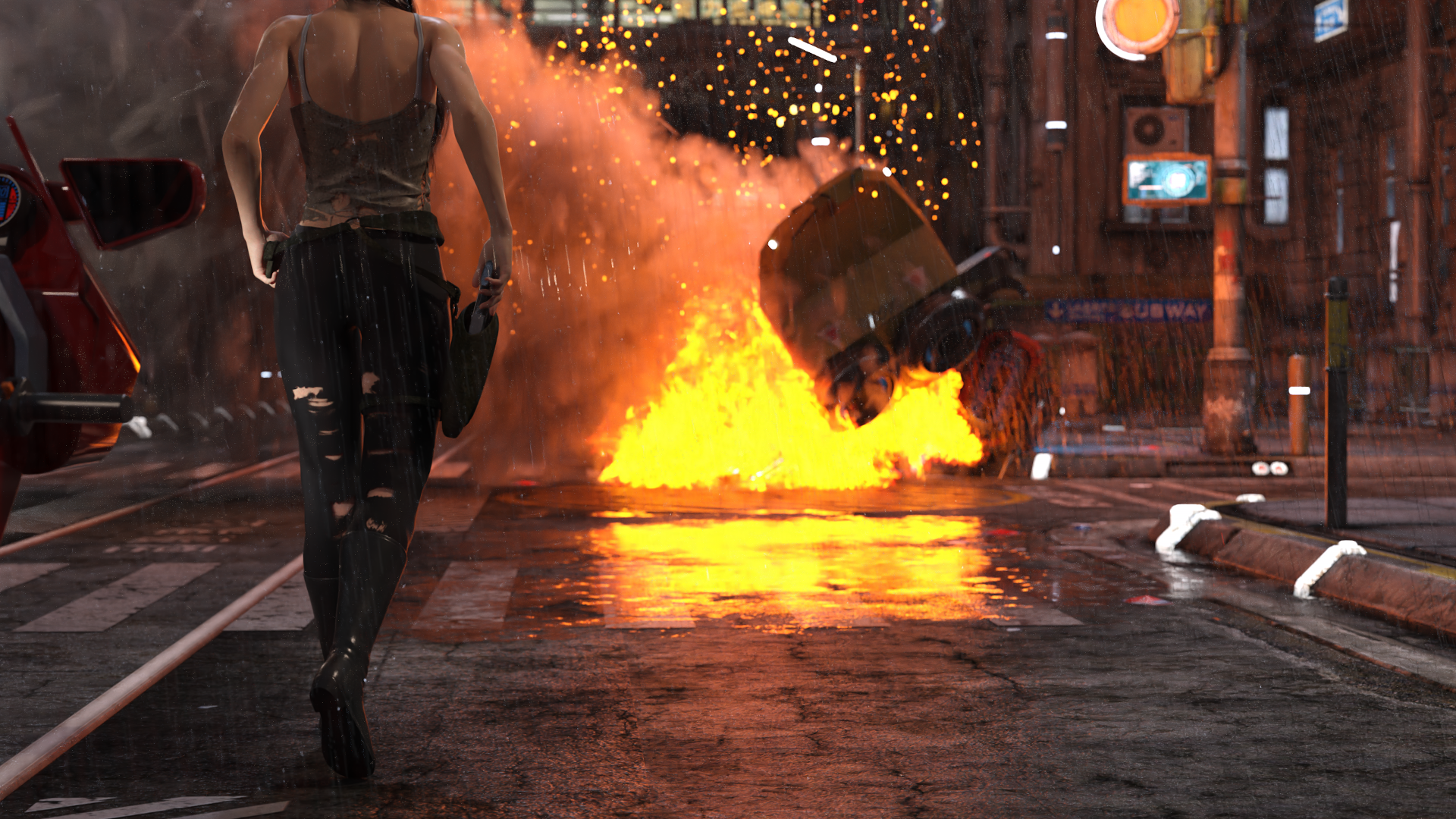
This has had a post render denoise applied to it. The rain and emissive lights (there are about 50 emissive surfaces in the visible portion of the shot) combine to extend this render time considerably (after 12 hours it was still hovering around 20% convergence). I still have quite a bit of learning to do with regards to scene optimizing (in addtion to needing to upgrade my GPU). I am starting to understand why post-work effects are so popular as they would shave a lot of render time.
This is a companion render to one in my gallery. I have been playing with Depth of Field for a few weeks now, and this challenge was a great chance to try and work with a more complex scene. The DoF is fairly tightly centered around the central figure, with both the bike in the foreground (and parts of the rain) and the wreck in the background out of focus.
Comments and suggestions are welcome. Until this challenge I had not even heard of the canvass features of Iray so I plan to composite a scene for that challenge as well.
Tirick
[Released] ManFriday's Mesh Grabber [Commercial]I just purchased this and it shows downloaded in Daz Central, but not under the tools menu. What should I do?
Click Window - Workspace - Update and Merge Menus
Lost OrderOkay...so I purchased Animate2 some time ago and from the info I can gather...I never downloaded it. Or something. I don't know. I can't find it in DIM or Daz Central and the Manual Install option doesn't let me click on it. How can I find my purchase so I can get it installed/reinstalled?
[Released] ManFriday's Mesh Grabber [Commercial]I just purchased this and it shows downloaded in Daz Central, but not under the tools menu. What should I do?
Morphs ExplodingDaz Central? I can't imagine why it would make a diffrence, but you can still use Install Manager.
Europan Style ApartmentI would have expected a Europan style apartment to have much more radiation shielding and central heating at the very least.
Questions about DIMI've been using DIM since it was released. No problems. Where it might get complicated is in defying install, download, paths etc. If you're not using default path setup. I tried Daz Central which proceeded to destroy my custom install paths. Even after deleting it, DIM DID NOT WORK properly. I'm still messing and have products in places I dont want them. If I had a huge C drive I would use default, but it's only 500gig SSD. SO I INSTALL STUFF TO D drive.Questions about DIM1) Maybe. On the rarest of occasions, downloads don't match size, but sometimes they get corrupted undetectably.
2) You can dedicate several download connections at once (simultaneous files, mine goes to 6 max, as fast as the weakest link in the chain, some people report 300Mb/s, maybe more)
3) Absolutely no difference. In fact, if DIM can't download for some reason, you can download manually and drop it in the download folder and install with DIM after a refresh.
4) Apparently it was aimed at new users to make the process of installing and loading your new toys "simple, clean, and easy-to-use". See the blog. Apparently, DIM was too complicated for some users, which is probably true, but there are no really good instructions on how to set up your system for anything other than the default configuration. Central is supposed to use the same files and servers, but based on the users' "comments", not ready for prime time. Don't know if it has improved, I will never touch it.
Sounds a rediculous thing really; I mean lets fix DIM because folks can't use it. I wonder if anyone suggested actually having a simple set of instructions on installation - pretty damn sure that would have been both cheaper and not garnered the illwill Daz bloody Central seems to have.
... And no one considered that those folks having issues with DIM are likely to have far more issues with the more complicated piece of software that is Studio (a streamline and reduced 3D package).
Daz Studio 12 and macOSCouple of quick questions:
1. Did they fix the issue where due to some previliges stuff we couldn't open files on the Mac?
2. Does Daz Central play nice with Daz Connect? (since it the only way to install DS12 on a Mac atm) I installed it when it first came out on my PC and it made a mess of my Daz Connect library and I had to re-install everything. Don't want that.
DAZ Studio 4 Installation Guide WindowsHelp, I'm using Daz Central Installer and it's stuck at 57%. The Status percentage just disappears and goes back to Install Button. I click install, and it continues to around 70% but then it goes back to Install Button again, I click it but then it goes back to 57% and goes up again to 70% but closes and Install Button appeara again, so I have to click Install again, but instead of 70%, it's back again to 57% and the cycle goes on.
Questions about DIM1) Maybe. On the rarest of occasions, downloads don't match size, but sometimes they get corrupted undetectably.
2) You can dedicate several download connections at once (simultaneous files, mine goes to 6 max, as fast as the weakest link in the chain, some people report 300Mb/s, maybe more)
3) Absolutely no difference. In fact, if DIM can't download for some reason, you can download manually and drop it in the download folder and install with DIM after a refresh.
4) Apparently it was aimed at new users to make the process of installing and loading your new toys "simple, clean, and easy-to-use". See the blog. Apparently, DIM was too complicated for some users, which is probably true, but there are no really good instructions on how to set up your system for anything other than the default configuration. Central is supposed to use the same files and servers, but based on the users' "comments", not ready for prime time. Don't know if it has improved, I will never touch it.
Questions about DIMSo I recently used a temporary DIM installation (install, download, uninstall) to get the rotations add-on for Mesh Grabber (which is not available via normal download). To be honest, I was expecting a bloated monstrosity with an awful user interface - in a nutshell, modern programming (not all, of course, but far too common). I was pleasantly surprised to find that DIM feels rather oldschool - lean and efficient with a simple interface that doesn't hide options and settings from users. My initial impression is quite positive, and I'm considering using DIM for future downloads. But I do have some questions: 1.) Does DIM have any built-in error-checking to insure the integrity of downloads? 2.) Does DIM take full advantage of available bandwidth by default? 3.) Are there any significant differences between the zip files downloaded by DIM and the zip files for manual installation downloaded from the Product Library section of the Daz website? 4.) What were the reasons for developing Daz Central? Are there problems or downsides to DIM that caused users to want a new program? Thanks in advance for any helpful information or experience that you can share.Daz 3D is part of

Connect
DAZ Productions, Inc.
7533 S Center View Ct #4664
West Jordan, UT 84084Licensing Agreement | Terms of Service | Privacy Policy | EULA
© 2026 Daz Productions Inc. All Rights Reserved.