-
Central City Sewers on sale now Commercial
There are so many fancy beautiful products and than there are mine. I guess I can't help it, i've never really tried. So I made a Sewer that works for all your nefarious underground needs. Maybe you're hunting creatures or maybe you are one I don't judge, just remember to have fun.
Cheers
AntMan
https://www.daz3d.com/central-city-sewer
Parkside point is partly missing or unwellHi
I bought parkside point today as I had previously bought the interior not realising i needed the exterior too.
Anyway having bought it i got the page saying download with daz central and daz central said i see no parkside point.... (this happens quite a bit i noticed)
So i tried Daz installation manager and it agreed what is parkside point?????
Now i started to feel a bit worried
However DAZ studio said i see it lets download it yippee i thought
However it seems to be corrupted encrypted or whatever the icons are all messed up and when you try to load something you get this error
2020-09-19 16:00:51.875 C:/Users/mark_/Documents/DAZ 3D/Studio/My Daz Connect Library/data/cloud/1_14209/environments/architecture/park_point/scenes/!pre_lh.duf (1,1): Syntax error - expected '{' or '['
2020-09-19 16:00:51.875 Error reading file, see log for more details.
a bit frustrating if i am honest.
DIM crashes whenever I try to install content.Recently I have found that every time I try to install a new item I bought for daz studio the DIM crashes. I tried using daz central which I never use and it crashed as well. The crash left me with a link to daz to report the bug but the link could not find a page. however I did get a little crash log I think:
DAZ3DIM.exe caused ACCESS_VIOLATION in module "C:\Program Files\DAZ 3D\DAZ3DIM1\QtCore4.dll" at 0033:000000005A7B3A76, QIODevice::isOpen()+6 byte(s)
The thing is I don't think its Daz that is the problem at least not directly. I also noticed that I can no longer save files on my c drive as it says I do not have permission. Arrg. As a mac user I would know where to begin to look for a solution to that but on a PC I really don't have a clue. Also I cant think of what could have suddenly caused this blockage.
As you might imagine, any help would be so greatfully appreciated!
Chakradude
[Released] Movie Maker Iray - Official - Images / Animations [Commercial]Something is amiss with the files. I uninstalled Metropolis Nights again and reinstalled using Daz Central this time. Daz again shows Metropolis Nights as uninstalled. If I launch Metropolis Nights from Daz Cental, I get an error popup window in Daz Studio stating, "A file needed by the 'resources' interactive lesson can not be found." See the screen capture below. However, if I manually navigate to where the Metropolis Nights files are installed and I double click the 01 Preload All.duf file, it loads into Daz Studio. See the screen capture below.
Fermion Complaint
I'm with you. You're actually being pretty kind. If one to going to do any modeling for sale, one should at least do some research. F1 has a long rich history with many diverse shapes, but this doesn't tickle any of them. The rear of the car doesn't make any sense at all. The tires are treaded (not buying that they are a rain tire) and the brakes are drum brakes (no they are not inboard).Users are a diverse and knowledgeable crowd and the bar keeps raising.
...I'm the same way when it comes to Musical instruments, particularly keyboard ones. Until recently here at Daz there really wasn't an accurate concert length grand piano (proper dimensions and shape) until Protozoon introduced one, and a few months ago, an accurate baroque styled pipe organ was released by Merlin Studios (Ness also gave us a beautiful harpsichord many years ago). There also have been a few decent vertical pianos included with some room sets
Having performed on, as well as studied the history, tuning, and construction of these instruments sort of made me just a bit "picky". Even on the pro sites I often found poor quality grand piano models with such inaccuracies as incorrect proportions, keyboard layout, string configurations, and other details. Organs were even worse, often not having the traditional pedalboard or the pedalboard was terribly inaccurate, odd arrangements of the pipes sometimes far more stop controls than the pipework on the model would suggest, and one even had a curved keyboards.
As a fair part of my illustration work is for a story arc where music is a central focus, accuracy is important (just like to someone who writes and illustrates stories set in or builds models from, a particular historical period like say WW II).
[Released] Movie Maker Iray - Official - Images / Animations [Commercial]Val, the Metropolis Night set doesn't have any install options other than DAZ Central, which i won't go near. Any other ways to get the package? I'd hate to do a refund. I love the other Metropolis sets.
CommissionFor me it's always a mistery, is there a central place where daz artist can take commissions. Aside from trying to contact each one, asking on possibility.
MacOS Catalina & Daz StudioDaz Central install doesn't work on Mac Os Catalina 10.15.6
I have the same issue.
beginner questionsOne quick question. I am currently installing Daz3d again, through daz central. But it stops all the time.I click install, and it starts to install, and suddenly the install progression disappears and the install button reappears. and when I click install, it goes a few percentages back, before it continue from where it left off. I tried to leave it just to see if it would finish on it's own. After 30 minutes, I clicked install again and it hadnt progressed more then 10 percent since last time i clicked install. Could this be messing with the installation? Should I install from a website directly?
I am using a relatively good laptop, i5-6300HQ CPU 2.3ghz, 8gb ram. It may not be strong enough to run the program itself without any lag, but shouldnt be so hard to do the installation.
beginner questionsWhen I download this, what file should I put in which folder? I have daz3d library folders in c:daz3d, also in my documents\daz3d, and programfiles\daz3d, I believe. And I made none of these myself. Does it matter which of the library folders I use? And in the download are several folders and files, but how to you make it "tidy" in the app, so you dont have to go through way too many folders to get to your morph\prop etc.?
C:\Daz3D should be where your content resides. Documents\Daz3D is for content that you create (for example, by saving a pose preset), and content downloaded through Daz Connect (if you install something within DS rather than through DIM/Central or manually). Program Files is just that: the files that DS needs to function. You shouldn't have any content there. For Alysha, follow the same steps I outlined above for the medieval hovel: copy the data, people, runtime etc. folders into your main Daz library, and the files should propogate to the correct locations and become usable in DS. If there are parent directories, like "content", "Daz3D", or anything of the sort, ignore those; you only want the content directories.
Also, it may be worth it for you to pick up Content Wizard, since that handles all the installation for you, and even installs Smart Content if you're into that sort of thing.
Also, after I have downloaded and put the files in the right place, how do I use a morph? Do I first load the gen8 female, then drag the morph to the selected female? Or do I go to open, in the top left corner? Could it be that it is working, that it is infact morphed but I cannot see it, as in the view mode is wrong? Sorry I am just trying to see the potential errors here.
You don't "open" morphs. If they're installed correctly, they should be available in the Shaping/Parameters pane, and all you need to do is dial them in. If Alysha, for example, includes a character file, you can open that by double-clicking or dragging, and it will create a new G8F in the scene with Alysha's morphs and materials applied, or apply those same parameters to an existing character that you have selected.
beginner questionsHello Again! Sorry I dont really understand the whole quote mechanics here, not really big on forums :)
"That sounds as if you have Genesis 3 Male Starter Essentials installed, but not Genesis 3 Female Start Essentials."
I see, so I tried to uninstall and install daz3d sentral again, without any difference. I managed to download gen3 female starter essentials and put it in what I though was the correct directory, so I could use it, but it wouldnt find it where it used to be. For example at the startup, it wouldn't let me choose gen3 female, or even in the same folder as it used to be in smart content. I could however find and use it when I search for it in my library content.
"When looking in the Content Library do you see the /data folder, possibly /content/data/? You shouldn't, having that (or Runtime) visible as a folder in the Content Library means that the product was unzipped with an extra sub-folder (usually Content) containing its files, in which case the fix is to take the stuff out of the sub folder and merge it with the matching folders in the main content directory (e.g. /Daz 3D/Studio/My Library/ in the documents folder)."
Yep. I see like you say, all those folders. I tried "unpacking" them more, meaning I found the file in the deepest folder and removed the other folders. Then alot of the exclamation marks disappeared and turned into preview pics, so that solved that problem. Thanks alot! However, when I try to apply the morph, it doesnt work. I tried so many different ways, and I have no idea where the problem lies. I know that when I initially installed the app, it stopped many times. I had to click install again and again, because it would stop. And when I clicked install once more, it would continue where it left of. So maybe it wasnt installed correctly. I used daz central to install daz3d. Since I suspected I had made some errors in my installing and butchering the folders by mixing folders here and there, I decided to start over. First uninstalled Daz3d, then daz central, and reinstalled, but still when I installed daz central it would show many of the things I had formerly installed, it it showed as installed. For example the starter essentials. So I uninstalled once again, and went through my computer to find all the folders related to it and deleted it. Now when I installed it, it was really from scratch. Daz central did no longer show the assets as installed.
So now that I start over, before I download assets, morphs and stuff, could you please explain how I should go about this from start to finish. I am sorry to ask so much, but I really dont get this to work.
lets start with alysha morph:
https://www.renderhub.com/emotionaldreams/alysha-for-genesis-8-female
When I download this, what file should I put in which folder? I have daz3d library folders in c:daz3d, also in my documents\daz3d, and programfiles\daz3d, I believe. And I made none of these myself. Does it matter which of the library folders I use? And in the download are several folders and files, but how to you make it "tidy" in the app, so you dont have to go through way too many folders to get to your morph\prop etc.?
Also, after I have downloaded and put the files in the right place, how do I use a morph? Do I first load the gen8 female, then drag the morph to the selected female? Or do I go to open, in the top left corner? Could it be that it is working, that it is infact morphed but I cannot see it, as in the view mode is wrong? Sorry I am just trying to see the potential errors here.
Thanks again, you have really helped me alot!
About the sweet home 3d, I did find some export there, and it does export to obj. I tried to export a file and import it in daz3d, and it did somewhat work. i could find the "house" i had designed, but I could only view it from a distance. I could look over it and under it, but the zoom didnt work. So I could not look up close. not sure if it was just too far away, due to incorrect conversion numbers in the beginning. This I will try to look more into, but if you have any thoughts, please share.
Regards
Novica & Forum Members Tips & Product Reviews Pt 13Here's a Facebook video for you, showing the current conditions. We have a tornado warning for an area 5 minutes from here driving time (not moving my way) and as you all probably know, the stupid hurricane has shifted east and I will be in the eyewall without relief from the eye, for most the night through possibly noon tomorrow. So getting off the forums and monitoring things as I'm sure there will be more tornadoes. Don't worry, I have a NOAA weather radio and it's working, believe me LOL. I do really like the one I've got, it doesn't keep going off obnoxiously. Once you answer it / listen to it, the warning button keeps flashing but you don't get every little update. It's like it knows you are not an idiot needing to hear it every five minutes.
Gotta go but this will give you an idea of my front yard 45 minutes ago at 11pm Central.
Bridge "Daz to blender" no workHi,
I installed Daz to blender via "Daz Central" But I can't find "Daz to blender" in the blender addons (2.83 and 2.90).
Can you help me?
thank youTurbulent Long Hair / styling - blow dials don't workJust purchased Outoftouch's Turbulent Long Hair. Installed it using DAZ Central. Using DAZ 4.12. Have used it on multiple figures with the same result; none of the style or blow selects have any effect at all. Anyone else having this issue? Know a solution?
[Released] ManFriday's Mesh Grabber [Commercial]I just purchased this and it shows downloaded in Daz Central, but not under the tools menu. What should I do?
Click Window - Workspace - Update and Merge Menus
That didn't do anything. Is there a way to manually install? It feels like I've thrown money away at this pointYou can always click Help - About Installed Plugins and see if it is listed
Like the Doc said, "About Installed Plugins" should show you "Man Friday's Mesh Grabber". There must also be a MF_meshgrab.dll in your /plugins directory under your Daz Studio installation directory (C:\Program Files\Daz 3D\DazStudio...). If you have multiple copies of Daz Studio installed, make sure the DLL is in each one's plugins subdirectory.
If the DLL is there but the plugin doesn't show up under "About installed plugins", then the most likely cause is that you're running 32-bit Windows. Mesh Grabber requires 64 bits.
Switching storage drive from c:/ to d:/Step by step
Moving from one drive to another.
1. Setup a 'working' folder on the new drive, you can name it what ever works for you.(note: this isn't technically necessary, it's just for organization)
2. Goto C:\Users\user name\Documents\DAZ 3D\Studio and C:\Users\Public\documents\daz 3d\studio and select the My daz connect library, My library, My Daz3d Library, basically every folder therein.
3. Move the folders to the Working folder on the second drive.
4. In Daz studio, remap the folder locations via the CDM(Content Directory Manager), right click the Content Library Tab, see attached images.
5. Map each of the moved folders, nothing lower or higher in the hierarchy.
If you prefer, you can just move the files inside the individual folders from the C:\ drive, and just map the 'working' folder.
Note:DIM, Connect, or central, may not be able to remove files after this move. simply adding the new path in DIM should remove this problem, but it doesn't always.
Do not forget to change the drive paths in DIM, Connect, or Central if you use those install options.
--------------------------------------------------------------------------
As far as "tech people" suggestions you mention, that is such a load of hogwash.
The short version is that it doesn't matter where a program is installed, as long as the computer knows where it is.
For DS assets, it's the same, as long as the path to the asset is mapped in DS, it can be anywhere.
Note: There are some messed up assets that have absolute paths. These require being installed in a specific drive and folder, but this is a bad file and can be corrected with a minor bit of editing of the DUF files.
That was putting it mildly...
In general the C-Drive is the worst place to install or keep anything other than the OS and OS alone, and the reason is "Where does the problem occur WHEN it does occur?" followed by "Do you really want to go looking after for your important files amongst tens of thousands of unorganized junkfiles with the recovery tool?"
[Released] ManFriday's Mesh Grabber [Commercial]I just purchased this and it shows downloaded in Daz Central, but not under the tools menu. What should I do?
Click Window - Workspace - Update and Merge Menus
That didn't do anything. Is there a way to manually install? It feels like I've thrown money away at this pointYou can always click Help - About Installed Plugins and see if it is listed
How to download Daz to Unreal Bridge as offline installer? The Manual Download link doesn't workyou can use the DIM(Download installer manager) program instead of the daz central if you really don't like the daz central this is the other way to get the plugin.
How to download Daz to Unreal Bridge as offline installer? The Manual Download link doesn't workI've got it first as a free item and wantred to try it before getting the exteded license. I'm not using Daz Central, what do I do?
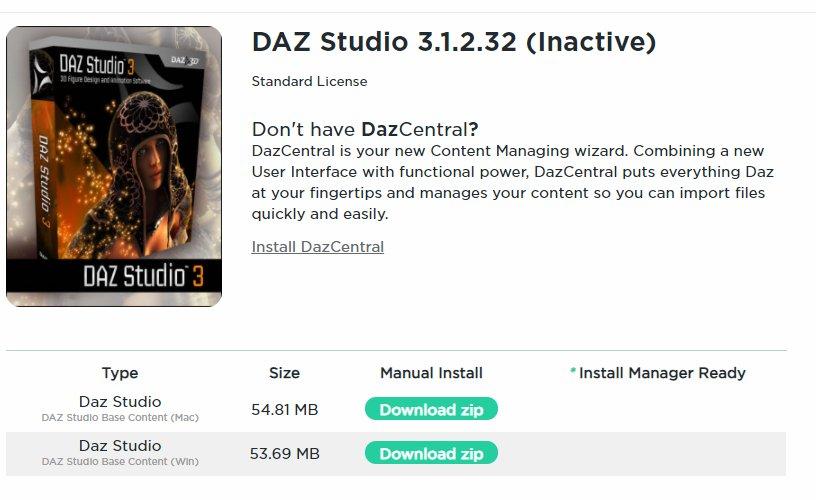
Rigging of V3 & V3 clothingThe download button has disappeared from the product page. The only thing available to download is the base content bundle in Win & Mac formats. Oh and lots of lovely advert blurb about 'Daz Central' to ignore. See for yourself:
Regards,
Richard
Daz 3D is part of

Connect
DAZ Productions, Inc.
7533 S Center View Ct #4664
West Jordan, UT 84084Licensing Agreement | Terms of Service | Privacy Policy | EULA
© 2026 Daz Productions Inc. All Rights Reserved.