-
Which Genesis do most people use?
No, Generation 4 was before Genesis 1. G1 is Generation 5.
Thank you for clearing that up. I got a little confused!
I use G8 but if I see a character or morph set from another generation that I love I convert it to G8. If I find a skin I love from V4 to G2 I convert it. I refit clothes from any generation to G8. Even poses. I have converted poses from V4 to G2 to G3 to G8 and with a few tweaks they work. Everything is possible.How do you fit Genesis and G2 clothes to G8? Is there a tutorial for this?
Which Genesis do most people use?I use G8 but if I see a character or morph set from another generation that I love I convert it to G8. If I find a skin I love from V4 to G2 I convert it. I refit clothes from any generation to G8. Even poses. I have converted poses from V4 to G2 to G3 to G8 and with a few tweaks they work. Everything is possible.Which Genesis do most people use?You know if I have a specific need, like making a character transform into a werewolf say for Genesis, I sometimes will create 3 different versions of my characters ranging from G1 - G8 even. If the morph won't work in the later figures I just pop back to the G1 or whichever base it supports for the panel before (I'm doing 3d comics mostly) then establish the earlier base looking more or less like the modern base version, then use rapterians or whatever ever older character package I need. I guess I consider them all tools in a tool box. G2 certainly creates the best likeness using FaceGen I have found.
Which Genesis do most people use?I do mostly men and monsters and use G1 mostly because of the large number of morphs and morph sets for them. Once in a while I'll use G2, because of the better detail. I'll use G2 for the Minotaur. I only rarely use G3. But my primary guys are still M4 and Freak4 despite the lack of surface detail. They just bulk up better!
virtual nickel 4 yor carrara thoughts: the next levelbump map leaves the silhouette smooth. want those vein maps to show for close ups.
trying to sleep, but fretting over those veins in my dream hubba hubba dude's forearms
thinkin, to use hd g3m version in carrara, would havd to export subdivided mesh as the 'base' mesh. but then every morph i need would need to be exported at the subd level and reimpoerted to work on the new hd base mesh. only for close-ups tho. thats a lot of polys for an animation.
would be more restful to dream about pineapples
Genesis 3 Clone for Genesis 8Butch said:
If it's Sickleyield's "Transferring Character Morphs G1G2G3G8" tutorial that you've been following, it doesn't work properly for me, either. Sickleyield says to put the model into the A pose for the transfer utility, but that stuffs up my end result. I found it works properly to stay in the T pose for Transfer Utility and only changing to the A pose, for the bone work.
I tried that and it didn't work, however the link that I posted HERE has instruction in a PDF file and the basic files to get one going. I have been able transger all the aging morphs for G3 to G8 and I am currently working on the Vascularity morphs.
Genesis 3 Clone for Genesis 8If it's Sickleyield's "Transferring Character Morphs G1G2G3G8" tutorial that you've been following, it doesn't work properly for me, either. Sickleyield says to put the model into the A pose for the transfer utility, but that stuffs up my end result. I found it works properly to stay in the T pose for Transfer Utility and only changing to the A pose, for the bone work.
L'Adair's WIPs
This is actually a variation of the original image I created for the PFDLives edition of Llola Lane's Monthly Render Challenge. In the original, the camera is to the side, showing the entire fae and she is much closer to the tree. This month's challenge is the shape of a triangle. The pose of the fae's legs create a triangle, but I also modified the transmap for the leaves so that all the leaves are triangles, too. I used Khloe for Karyssa for the fae, and in the original, she isn't wearing a stitch of clothing, which is why I created this variation. If you'd like to see the original, I've posted it here, in my Deviant Art gallery, tucked behind a mature content filter due to the full nudity.
I'm pretty sure my girl didn't want this version published; Apparently faeries do not like to wear clothing, a strictly human construct, one she quite approved of—for humans!
I have never had a pose or expression change on me after saving, but this one did. The neck bent further back, the smile became less wide and the mouth dropped open further, the eyes pointing up and the lids slightly open. Some of the issues I had I could chalk up to being tired and forgetting the local camera dimensions needed to be added to the general Render Settings for the spot renders and stuff like that. But not the expression. Thank goodness I used Expression Mixer to create the expression in the first place. (It keeps the last applied settings!) I zeroed out all the dials for her face, opened Expression Mixer and reapplied the expression. (I had to adjust the neck bend manually, though.) It took me three days, three full renders and what seemed like a hundred spot renders to finally get this image completed! Spot renders were around the eyes. Those beautiful lashes and the "wet" hair were intersecting. I finally got spots I could use to "paint" the hair over the lashes. The original image is 4000 pixels wide, and the eyes/lashes/hair is still a very small area to work on!
But forget the fae for a moment. That set is really nice. If you don't have it already, you may want to wishlist Tree of Life from Flipmode. I loaded it mainly for the HDRI, but realized the set tiself would be perfect for the Sycamore Tree I used from Daz's Sentinels of the Forest. This set has some of the nicest ground textures I've seen in a long time; specifically not so stretched as to look blurry, pixelated, or full of jpeg artifacts. And if you look closely at the water, you can see the rocks on the bottom.
I like the trees from the Sentinels product because, though it is an older product, the roots have several bones each. I used the bones to adjust the roots, along with DForms to create a morph for the center island to bulge upward and meet the base of the tree. Unfortunately, the morph caused the island to intersect with it's vegetation, so I hid those for this render. All in all, a really wonderful set.
For a complete list of products used, or to see the 2K wide image, visit the gallery page here.
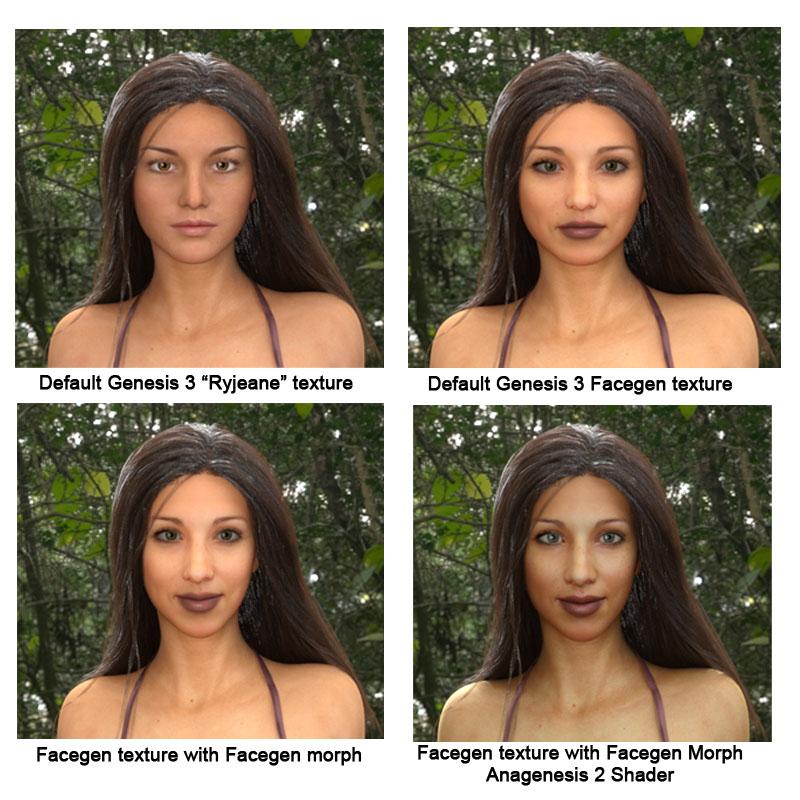
Photo-real characters. A different approach.I'm late to the discussion but I've been watching this thread with interest. I've been doing some test renders to see what influences realism most.Some might consider Facegen a cheat, but to me it's just another tool in my toolbox and I think it really helps to see the influence of texture, morphs, and shaders. The first render (top left) is the default Genesis 3 with the Daz supplied "Ryjeane" texture. Hair is the new Dforce Classic Long hair with Dimension Theory's Iradiance County Pasture for a background. I added a single plane with the Daz Uber emissive shader to throw some light on her eyes. Top right we have a Facegen generated texture on the default Genesis 3 face. No morphs. Here you can already see that the fine lines around the eyes and mouth, dimples in the cheeks and the uneven skin tone in the exported face texture help make this look far less "CG".Bottom left I've added the Facgen morph and to my eye combined with the texture adds another layer of realism. FInally bottom right I've added the Anagenesis 2 shader. Is it realistic? Not enough to fool the folks on this forum, but I think the difference between the first and last picture is like night and day. Could I achieve similar results with morphs and a good enough texture instead of using Facegen? While I'm certain there are people talented enough I don't think I could. But I have to say that in the almost 20 years since I took my first steps in Poser 4 I am constantly amazed at what is possible.
If you read this far...thanks and Happy Rendering
 Genesis 3 Clone for Genesis 8
I think fastbike1 means all the items like hair , skin and clothes for G3 work with G8 , the morphs have to be transferred from G3 to G8
That's what I'm doing now is transfering character morphs, aging, vascularity, etc. I don't want to build a whole new collection of characters and morphs. No, no one MAKES me buy new stuff but just the fact that DAZ has not offered an easy way to transfer your existing stuff, that you paid for, mean they are just trying to make move money with the G8 program. When G3 came out I spent $$$$$$$$$$$$$$$$$$$$$$$$$$$$$$ on characters, morphs, AND clothes and I can't afford to keep doing this. Yes they are not MAKING me do it, but they would like it if I did.
Of course they're trying to make money. They're a business....lol. Is that unusual?
Laurie
Genesis 3 Clone for Genesis 8I think fastbike1 means all the items like hair , skin and clothes for G3 work with G8 , the morphs have to be transferred from G3 to G8
That's what I'm doing now is transfering character morphs, aging, vascularity, etc. I don't want to build a whole new collection of characters and morphs. No, no one MAKES me buy new stuff but just the fact that DAZ has not offered an easy way to transfer your existing stuff, that you paid for, mean they are just trying to make move money with the G8 program. When G3 came out I spent $$$$$$$$$$$$$$$$$$$$$$$$$$$$$$ on characters, morphs, AND clothes and I can't afford to keep doing this. Yes they are not MAKING me do it, but they would like it if I did.
In all fairness, they are a business and that is their goal. Before Genx there wasn't really a way to do this and buying into the next generation was the norm, so we are totally spolied with what backwards compatibility we do have now.
But what if not having backwards compatibility pushes people out? Like the poster of thread. That is business , too, the business of making customers happy. Happy customers stay longer, shop longer, and spend more. And don't forget the whole pitch Daz made for G8, they have advertised G8 as the most backwards compatible figure ever. So they know how important it is. They also made Hexagon free, which allows people to make their own stuff instead of buying it. Clearly Daz does not see being able to create your own stuff as a threat to their business, and neither is transferring morphs of past generations. If anything, this only strengthens the community.The issue is pretty simple, and unfortunate. The creator of GenX passed away, so there is no way to update GenX for Genesis 8. Somebody else will have to create a whole new conversion tool from scratch, and that has been proven more difficult than expected.and that's the main problem. between DAZ going towards encripted scripts and other methods of trying to combat piracy (DAZ Connect is another case in this situation) it's making it much harder for users to make plugins and scripts for DAZ Studio. it's ruining preservation since plugins and scripts basiclly become abandoned after the user who made it passes away. no one would know how they coded it because of the level of encription that DAZ has set for DAZ Studio.
There isn't currently any encrypted Connect-only content, but when there was it didn't stop people from making add-ons. Commercial scripts have always been encrypted, and can't be read even by the original author - nothing new there, nor in the way that DS checks the version before running binary scripts (both encrypted, .dse, and compressed, .dsb).
Aiko and Hiro has lost their anime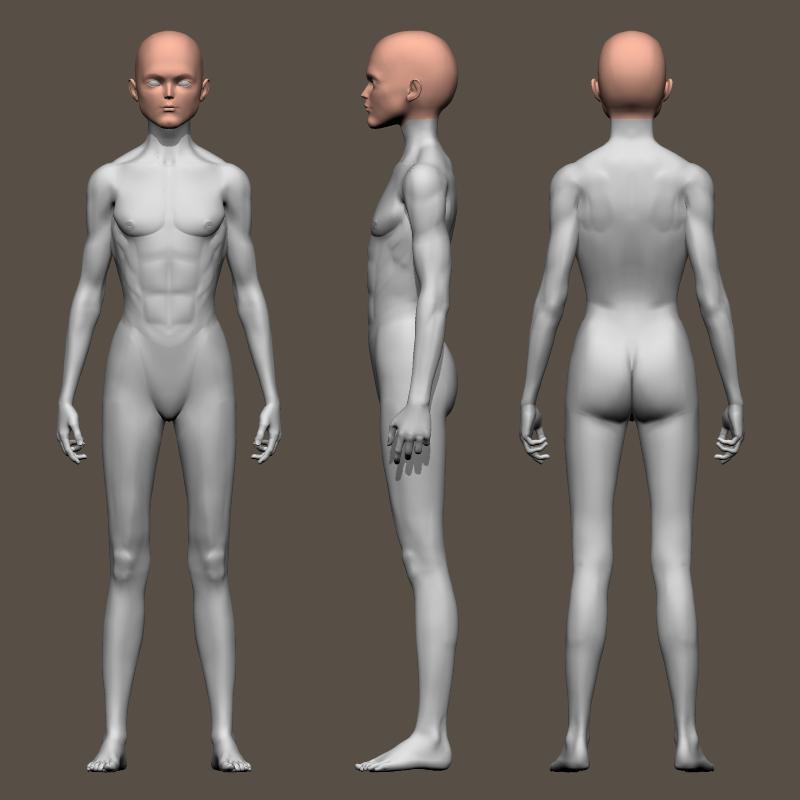
There was no official Hiro figure until H3 was released to serve as a counterpart to Aiko 3.
However, the first Aiko did have a "body male" morph that granted the base figure arguably masculine attributes as can be seen here. Basically, it flattened the breasts, broadened the shoulders and chest and slimmed the hips, well, a bit. It also introduced and almost comically square chin.
Very few clothing items were made for Aiko "1" and I can remember only a single one for the male morph and that came from PoserWorld. As such, the figure had limited appeal. Hoping to avoid repeating that mistake, D*Z released Aiko 3 (there never was an Aiko 2) with a series of different wardrobes, some on the same day, others following even days. Like all D*Z male figures, Hiro 3 (really, the first) never got as wide a selection as A3, but at least he did get some so he wouldn't be mimited to "second skin" bodysuit textures..
Sincerely,
Bill
Genesis 3 Clone for Genesis 8I think fastbike1 means all the items like hair , skin and clothes for G3 work with G8 , the morphs have to be transferred from G3 to G8
That's what I'm doing now is transfering character morphs, aging, vascularity, etc. I don't want to build a whole new collection of characters and morphs. No, no one MAKES me buy new stuff but just the fact that DAZ has not offered an easy way to transfer your existing stuff, that you paid for, mean they are just trying to make move money with the G8 program. When G3 came out I spent $$$$$$$$$$$$$$$$$$$$$$$$$$$$$$ on characters, morphs, AND clothes and I can't afford to keep doing this. Yes they are not MAKING me do it, but they would like it if I did.
In all fairness, they are a business and that is their goal. Before Genx there wasn't really a way to do this and buying into the next generation was the norm, so we are totally spolied with what backwards compatibility we do have now.
But what if not having backwards compatibility pushes people out? Like the poster of thread. That is business , too, the business of making customers happy. Happy customers stay longer, shop longer, and spend more. And don't forget the whole pitch Daz made for G8, they have advertised G8 as the most backwards compatible figure ever. So they know how important it is. They also made Hexagon free, which allows people to make their own stuff instead of buying it. Clearly Daz does not see being able to create your own stuff as a threat to their business, and neither is transferring morphs of past generations. If anything, this only strengthens the community.The issue is pretty simple, and unfortunate. The creator of GenX passed away, so there is no way to update GenX for Genesis 8. Somebody else will have to create a whole new conversion tool from scratch, and that has been proven more difficult than expected.True, even though I think you are reading more into those statements than there really is. There are always going to be unhappy customers, you can't please everyone and contrary to what customers think, they are not always right. I work in retail manangement and I am just bringing a different perspective is all. the bottom line is all the matters, no matter how many happy customers you have, if the bills can't be paid it's pointless, you close up shop and everyone is unhappy. There are many areas that make customers unhappy at DAZ and haven't been addressed and there are many areas that DAZ could implement something to make even more happy, but they haven't yet. I try not to second guess their motives or speak for all the customers and enjoy what I do have and vote with my wallet when I can.
That being said, if a vendor does come out with a plugin that works for transferring morphs, I will gladly give them my money. If not, I am still good with using what I have.
Genesis 3 Clone for Genesis 8I think fastbike1 means all the items like hair , skin and clothes for G3 work with G8 , the morphs have to be transferred from G3 to G8
That's what I'm doing now is transfering character morphs, aging, vascularity, etc. I don't want to build a whole new collection of characters and morphs. No, no one MAKES me buy new stuff but just the fact that DAZ has not offered an easy way to transfer your existing stuff, that you paid for, mean they are just trying to make move money with the G8 program. When G3 came out I spent $$$$$$$$$$$$$$$$$$$$$$$$$$$$$$ on characters, morphs, AND clothes and I can't afford to keep doing this. Yes they are not MAKING me do it, but they would like it if I did.
In all fairness, they are a business and that is their goal. Before Genx there wasn't really a way to do this and buying into the next generation was the norm, so we are totally spolied with what backwards compatibility we do have now.
But what if not having backwards compatibility pushes people out? Like the poster of thread. That is business , too, the business of making customers happy. Happy customers stay longer, shop longer, and spend more. And don't forget the whole pitch Daz made for G8, they have advertised G8 as the most backwards compatible figure ever. So they know how important it is. They also made Hexagon free, which allows people to make their own stuff instead of buying it. Clearly Daz does not see being able to create your own stuff as a threat to their business, and neither is transferring morphs of past generations. If anything, this only strengthens the community.The issue is pretty simple, and unfortunate. The creator of GenX passed away, so there is no way to update GenX for Genesis 8. Somebody else will have to create a whole new conversion tool from scratch, and that has been proven more difficult than expected.and that's the main problem. between DAZ going towards encripted scripts and other methods of trying to combat piracy (DAZ Connect is another case in this situation) it's making it much harder for users to make plugins and scripts for DAZ Studio. it's ruining preservation since plugins and scripts basiclly become abandoned after the user who made it passes away. no one would know how they coded it because of the level of encription that DAZ has set for DAZ Studio.
Genesis 3 Clone for Genesis 8
But what if not having backwards compatibility pushes people out? Like the poster of thread. That is business , too, the business of making customers happy. Happy customers stay longer, shop longer, and spend more. And don't forget the whole pitch Daz made for G8, they have advertised G8 as the most backwards compatible figure ever. So they know how important it is. They also made Hexagon free, which allows people to make their own stuff instead of buying it. Clearly Daz does not see being able to create your own stuff as a threat to their business, and neither is transferring morphs of past generations. If anything, this only strengthens the community. The issue is pretty simple, and unfortunate. The creator of GenX passed away, so there is no way to update GenX for Genesis 8. Somebody else will have to create a whole new conversion tool from scratch, and that has been proven more difficult than expected.I think fastbike1 means all the items like hair , skin and clothes for G3 work with G8 , the morphs have to be transferred from G3 to G8
That's what I'm doing now is transfering character morphs, aging, vascularity, etc. I don't want to build a whole new collection of characters and morphs. No, no one MAKES me buy new stuff but just the fact that DAZ has not offered an easy way to transfer your existing stuff, that you paid for, mean they are just trying to make move money with the G8 program. When G3 came out I spent $$$$$$$$$$$$$$$$$$$$$$$$$$$$$$ on characters, morphs, AND clothes and I can't afford to keep doing this. Yes they are not MAKING me do it, but they would like it if I did.
In all fairness, they are a business and that is their goal. Before Genx there wasn't really a way to do this and buying into the next generation was the norm, so we are totally spolied with what backwards compatibility we do have now.
Genesis 3 Clone for Genesis 8I think fastbike1 means all the items like hair , skin and clothes for G3 work with G8 , the morphs have to be transferred from G3 to G8
That's what I'm doing now is transfering character morphs, aging, vascularity, etc. I don't want to build a whole new collection of characters and morphs. No, no one MAKES me buy new stuff but just the fact that DAZ has not offered an easy way to transfer your existing stuff, that you paid for, mean they are just trying to make move money with the G8 program. When G3 came out I spent $$$$$$$$$$$$$$$$$$$$$$$$$$$$$$ on characters, morphs, AND clothes and I can't afford to keep doing this. Yes they are not MAKING me do it, but they would like it if I did.
In all fairness, they are a business and that is their goal. Before Genx there wasn't really a way to do this and buying into the next generation was the norm, so we are totally spolied with what backwards compatibility we do have now.
Genesis 3 Clone for Genesis 8I think fastbike1 means all the items like hair , skin and clothes for G3 work with G8 , the morphs have to be transferred from G3 to G8
That's what I'm doing now is transfering character morphs, aging, vascularity, etc. I don't want to build a whole new collection of characters and morphs. No, no one MAKES me buy new stuff but just the fact that DAZ has not offered an easy way to transfer your existing stuff, that you paid for, mean they are just trying to make move money with the G8 program. When G3 came out I spent $$$$$$$$$$$$$$$$$$$$$$$$$$$$$$ on characters, morphs, AND clothes and I can't afford to keep doing this. Yes they are not MAKING me do it, but they would like it if I did.
Any saved scenes exchange communities?Thank you for the answer.
To see it clearly, here is an example: if I have a scene preset that I created combining several store assets. Let's assume, I used morphs from 3 different morph asset packs, one hair asset with different hair shader, and skin created also from 3 different character asset packs from the store, plus a cloth and lights - then is it 'illegal' to share this scene file with anyone? (afaik the scene file does not include the assets, just references to the assets, so only those will be able to use it, who has all the assets have been used creating the scene)For the most part, true. You cannot share any textures, mesh or morphs only the presets that don't include any saved parts. This means that the person using the presets has to have the same assets installed in their DS to achieve the same results as you did.
Zbrush import to DazFirst i export the full figure at base mesh to Zbrush. Next i use Zmodeler to add more mesh in model. Then, i bring it back to Daz by using GoZ.
Two different approaches
1. You are trying to create a morph. You send the lowest resolution mesh to zbrush. While mesh is there you cannot add or subtract to the mesh, this changes the entire
mesh, so that when you send back to daz it sees a new object and adds it. The new object will have the default texture.
It look like, in your scrren print. the original is there but so is the new one (ear).
Look in scene and see how many figures in the scene
2 Second approach you are using the original figure to createt a new one. In this case all uv mapping in the original is now basically wothless
Thanks bicc39, Could you explain for me what i can do to fix this problem. I'm a newbie in 3D
Any saved scenes exchange communities?Thank you for the answer.
To see it clearly, here is an example: if I have a scene preset that I created combining several store assets. Let's assume, I used morphs from 3 different morph asset packs, one hair asset with different hair shader, and skin created also from 3 different character asset packs from the store, plus a cloth and lights - then is it 'illegal' to share this scene file with anyone? (afaik the scene file does not include the assets, just references to the assets, so only those will be able to use it, who has all the assets have been used creating the scene)Daz 3D is part of

Connect
DAZ Productions, Inc.
7533 S Center View Ct #4664
West Jordan, UT 84084Licensing Agreement | Terms of Service | Privacy Policy | EULA
© 2026 Daz Productions Inc. All Rights Reserved.